Debugging Broken Agentic AI Pipelines in Production: Loops, Hallucinations, and Non-Determinism
The autonomous code review agent had been running smoothly for three weeks when it suddenly went silent. No output, no errors, no alerts — just a Kubernetes pod consuming 100% CPU and an LLM bill that had accumulated $340 in two hours. What was happening: the agent had entered an infinite reasoning loop, repeatedly calling a search_codebase tool, getting back results, deciding it needed more context, calling the tool again with a slightly different query, and never concluding. There was no loop-detection mechanism, no step budget, and no observability into what the LLM was actually deciding between tool calls. The incident crystallized a fundamental challenge in production AI engineering: agentic systems fail silently, non-deterministically, and in ways that no conventional monitoring can detect. This post is the debugging field guide the team built after that incident.
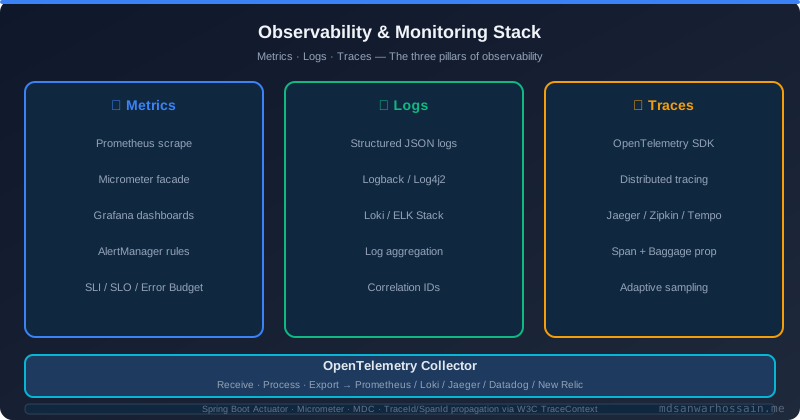
Table of Contents
- Failure Taxonomy: What Can Go Wrong in an Agent
- Diagnosing and Preventing Agent Loops
- Tracing LLM Hallucinations in Tool Calls
- Context Window Exhaustion
- Tool Call Failure Patterns
- Non-Determinism: Same Prompt, Different Failures
- Observability Stack for Agentic Pipelines
- Structured Logging for Agent Steps
- Replay Debugging: Reproducing Failures
- Production Guardrails Checklist
- Key Takeaways
1. Failure Taxonomy: What Can Go Wrong in an Agent
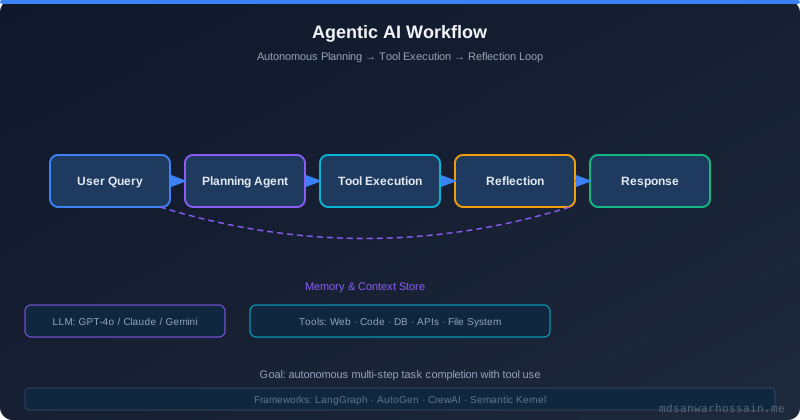
Agentic pipelines fail in qualitatively different ways from deterministic software. The failure modes cluster into six categories:
| Failure Mode | Observable Symptom | Root Cause | Detection Signal |
|---|---|---|---|
| Agent Loop | CPU spike, no output, LLM cost surge | Missing termination signal, poor prompt | Step counter, repeated tool call detection |
| Tool Hallucination | Tool called with invalid params | LLM invents tool args it has not seen | Schema validation failure logs |
| Context Overflow | Truncated results, irrelevant actions | Context window full, early tokens lost | Token count metrics per request |
| Tool Failure Cascade | Agent confused, random recovery attempts | Tool error not handled in prompt | Tool error injection in context |
| Silent Incorrect Output | Task appears complete, wrong result | LLM confident but incorrect reasoning | Output validation, human-in-loop |
| State Corruption | Inconsistent decisions over multi-step | Memory retrieval returns stale/wrong facts | Memory access trace logging |
2. Diagnosing and Preventing Agent Loops
An agent loop occurs when the LLM enters a cycle of reasoning steps and tool calls without making progress toward a terminal state. The loop is invisible to conventional monitoring because each individual LLM API call succeeds — the system is functioning normally, just not terminating.
Detection: Step Budget and Loop Fingerprinting
Implement a hard step budget (maximum number of LLM + tool call iterations) and a loop detector that fingerprints recent tool calls:
public class AgentExecutor {
    private static final int MAX_STEPS = 25;
    private static final int LOOP_WINDOW = 5;

    public AgentResult execute(AgentTask task) {
        List<AgentStep> history = new ArrayList<>();
        Deque<String> recentToolCalls = new ArrayDeque<>();

        for (int step = 0; step < MAX_STEPS; step++) {
            LLMResponse response = llm.complete(buildContext(task, history));

            if (response.isTerminal()) {
                return AgentResult.success(response.getOutput());
            }

            ToolCall toolCall = response.getToolCall();
            String callFingerprint = toolCall.getName() + ":" +
                hashArgs(toolCall.getArguments());

            // Loop detection: same tool+args fingerprint appearing 3x
            long repetitions = recentToolCalls.stream()
                .filter(callFingerprint::equals).count();
            if (repetitions >= 3) {
                log.warn("Agent loop detected at step {} - fingerprint: {}",
                    step, callFingerprint);
                return AgentResult.failed("LOOP_DETECTED",
                    "Agent repeated tool call " + repetitions + " times");
            }

            recentToolCalls.addLast(callFingerprint);
            if (recentToolCalls.size() > LOOP_WINDOW) recentToolCalls.removeFirst();

            ToolResult result = toolExecutor.execute(toolCall);
            history.add(new AgentStep(step, toolCall, result,
                response.getReasoning()));
        }

        return AgentResult.failed("STEP_BUDGET_EXCEEDED",
            "Agent did not complete within " + MAX_STEPS + " steps");
    }
}
Prompt Engineering for Termination
Loops often stem from ambiguous termination criteria in the system prompt. Be explicit:
SYSTEM: You are a code review agent. You have a budget of at most 15 tool calls.
After each tool call, assess: do I have enough information to produce a final review?
If yes, output your review and use FINISH tool.
If after 5 searches you still cannot find what you need, output what you know and
use FINISH with a note on what you could not determine. Never search for the same
information twice.
3. Tracing LLM Hallucinations in Tool Calls
Tool call hallucinations occur when the LLM generates tool arguments that do not correspond to real entities or violate the tool's schema. In production, this manifests as database queries for non-existent record IDs, API calls with invented endpoint paths, or file operations on paths that do not exist.
Validation layer: Every tool call should be validated against a JSON Schema before execution. Do not trust the LLM to always produce valid arguments — it will not.
public class ValidatingToolExecutor {
    private final Map<String, JsonSchema> toolSchemas;

    public ToolResult execute(ToolCall call) {
        JsonSchema schema = toolSchemas.get(call.getName());
        if (schema == null) {
            return ToolResult.error("Unknown tool: " + call.getName() +
                ". Available: " + toolSchemas.keySet());
        }

        ValidationResult validation = schema.validate(call.getArguments());
        if (!validation.isValid()) {
            // Return error to LLM in structured form so it can self-correct
            return ToolResult.error(
                "Invalid arguments for tool '" + call.getName() + "': " +
                validation.getErrors().stream()
                    .map(e -> e.field() + ": " + e.message())
                    .collect(Collectors.joining(", ")));
        }

        return delegate.execute(call);
    }
}
Return errors to the LLM: When a tool call fails or returns an error, include the error in the next context rather than silently retrying or throwing. The LLM can often self-correct if given explicit error feedback: "The file you requested does not exist: src/main/java/NonExistentClass.java. Please verify the file path using the list_files tool first."
4. Context Window Exhaustion
As an agent accumulates tool call results over many steps, the context window fills. When the context window is full, the LLM provider truncates from the beginning — typically dropping the system prompt and early tool call results. This causes the agent to "forget" its original objective and the results of early research steps, leading to contradictory reasoning and incorrect conclusions.
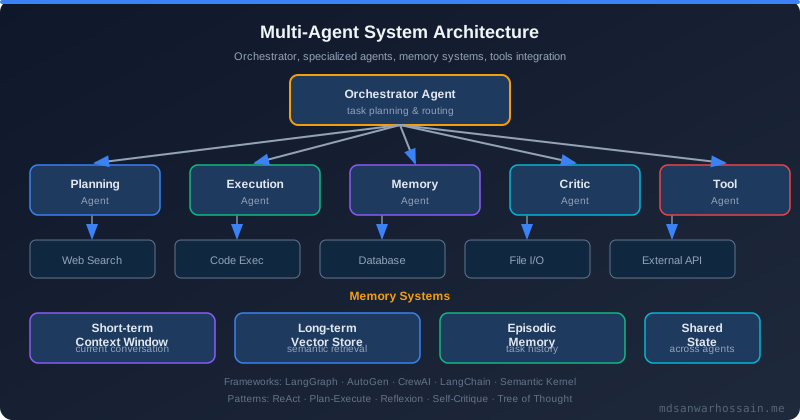
Token budget monitoring: Track cumulative token usage per agent run and trigger context compression before hitting the model's limit.
@Component
public class ContextManager {
    private static final int CONTEXT_LIMIT = 128_000;
    private static final int COMPRESSION_THRESHOLD = 100_000;

    public List<Message> buildContext(
            AgentTask task,
            List<AgentStep> history) {

        List<Message> messages = new ArrayList<>();
        messages.add(Message.system(task.getSystemPrompt()));
        messages.add(Message.user(task.getInput()));

        int tokenCount = tokenizer.count(messages);

        for (AgentStep step : history) {
            int stepTokens = tokenizer.count(step.toMessages());
            if (tokenCount + stepTokens > COMPRESSION_THRESHOLD) {
                // Compress older steps: keep tool name + outcome summary
                messages.add(Message.tool(
                    step.getToolCall().getName(),
                    summarize(step.getToolResult())));
            } else {
                messages.addAll(step.toMessages());
                tokenCount += stepTokens;
            }
        }

        // Always include system prompt and pin it to the end to prevent loss
        messages.add(Message.system(
            "Remember your objective: " + task.getObjectiveSummary()));

        return messages;
    }
}
5. Tool Call Failure Patterns
External API timeouts: When a tool makes an HTTP call that times out, the agent receives no result and — without explicit timeout handling — may interpret the silence as success. Always return a structured error on timeout: "Tool search_github timed out after 10s. The API may be slow. Try a more specific query or skip this search."
Cascading tool dependency failures: If an agent's workflow requires tool A to run before tool B (e.g., authenticate → fetch_user_data), a silent failure of tool A followed by a confusing error from tool B causes the LLM to diagnose the wrong root cause. Make dependencies explicit in tool descriptions and error messages.
Partial results: A tool that returns 0 results (e.g., a search that found nothing) is not a failure but may be misinterpreted as one. Return: "Search returned 0 results for query 'X'. This may mean the file doesn't exist or the query is too specific."
6. Non-Determinism: Same Prompt, Different Failures
The most frustrating aspect of debugging agentic pipelines is that the same input can produce different failures on different runs. Temperature > 0 introduces sampling randomness. The same bug may appear only 10% of the time, making it difficult to reproduce and fix.
Deterministic replay: Log every LLM request and response (prompts, tool call sequences, tool results) with a run ID. To reproduce a failure, replay the exact same context at temperature=0. This gives you a deterministic reproduction of the execution path that led to the failure, even if the original run was non-deterministic.
Statistical testing: For reliability-critical agents, run each change 50–100 times on a benchmark task set and measure pass rate, not just correctness on a single run. A regression that drops pass rate from 92% to 85% is a real regression even if the change "passes" on manual testing.
// Reliability benchmark runner
@Test
void agentPassRate_onCodeReviewBenchmark() {
    int runs = 50;
    long passed = IntStream.range(0, runs).parallel().filter(i -> {
        AgentResult result = agent.execute(BENCHMARK_TASK);
        return result.isSuccess() &&
               evaluator.score(result.getOutput()) >= 0.8;
    }).count();

    double passRate = (double) passed / runs;
    log.info("Pass rate: {}/{}  = {}%", passed, runs, passRate * 100);
    assertThat(passRate).isGreaterThanOrEqualTo(0.85);
}
7. Observability Stack for Agentic Pipelines
Traditional APM tools (Datadog, New Relic) are not designed for the non-linear, tree-structured execution graph of an agentic pipeline. You need specialized observability layers:
- LLM-native tracing — LangSmith / Langfuse / Arize Phoenix: These tools understand the semantic structure of LLM runs: prompt, completion, token counts, latency, tool calls, chain steps. They provide a visual trace of each agent run, showing every LLM call and tool invocation in sequence. Essential for post-mortem analysis.
- OpenTelemetry spans: Instrument each tool call and LLM call as an OTel span. Propagate trace context through tool HTTP calls so downstream API traces link back to the agent run. This connects LLM-level failures to infrastructure-level failures.
- Metrics: Track per-agent:
agent.steps.count(histogram — alert on outliers),agent.tokens.input/output(gauge — alert on >80% of context limit),agent.tool.error.rate(counter),agent.run.duration(alert on p95 > threshold),agent.loop.detected.count. - Cost tracking: Instrument every LLM call with model name, input tokens, and output tokens. Compute cost per run and alert on cost anomalies. The $340 incident above would have triggered an alert within minutes with cost monitoring in place.
8. Structured Logging for Agent Steps
Every agent step should produce a structured log event that can be queried, aggregated, and replayed:
// Log every agent step as structured JSON
log.info("agent_step",
    "run_id", runId,
    "task_id", task.getId(),
    "step", stepNumber,
    "action_type", "TOOL_CALL",
    "tool_name", toolCall.getName(),
    "tool_args_hash", hashArgs(toolCall.getArguments()),
    "tool_args", sanitize(toolCall.getArguments()), // redact secrets
    "tool_result_status", result.getStatus(),
    "tool_result_tokens", tokenizer.count(result.getContent()),
    "reasoning_summary", truncate(response.getReasoning(), 200),
    "cumulative_tokens", cumulativeTokens,
    "cumulative_cost_usd", cumulativeCost,
    "step_latency_ms", stepLatency
);
With this structure, a Kibana or Grafana Loki query can reconstruct the complete execution trace of any agent run by filtering on run_id, ordered by step. This is your primary post-mortem tool for understanding what an agent did and why it failed.
9. Replay Debugging: Reproducing Failures
Replay debugging is the most powerful technique for diagnosing agent failures. The idea: log the complete execution trace (all LLM requests, tool call inputs and outputs) and replay it from any step with modifications to test hypotheses.
Step-by-step replay: Given a logged trace of a failed run, replay it with a mock LLM that returns the recorded responses (at temperature=0) for all steps before the failure point, then let the real LLM continue from the failure step. This isolates the failing step and allows you to test prompt fixes without re-running the entire expensive pipeline from scratch.
Tool mock injection: Replace a flaky tool with a mock that returns controlled responses. This lets you test agent behaviour under specific tool failure scenarios (timeout, empty results, schema error) without needing the real external system to actually fail.
10. Production Guardrails Checklist
Every Production Agent Must Have:
- ✅ Step budget — hard maximum on LLM + tool call iterations (e.g., 25 steps)
- ✅ Wall-clock timeout — kill the entire run if it exceeds N minutes (e.g., 10 minutes)
- ✅ Cost budget — abort if cumulative LLM cost exceeds threshold per run
- ✅ Loop detection — fingerprint tool call sequences, alert on repetition
- ✅ Tool schema validation — validate every tool call before execution
- ✅ Context window monitoring — track token usage per step, compress before overflow
- ✅ Structured step logging — run_id, step, tool, args, result, tokens, cost, latency
- ✅ Output validation — validate final output against expected schema or criteria
- ✅ Human escalation path — if agent fails N times, route to human review queue
- ✅ Replay capability — log complete trace for deterministic replay during debugging
"Agentic AI fails in ways that cannot be detected by watching HTTP 200 responses. You need to observe the reasoning, not just the infrastructure. That requires a completely different observability mindset."
11. Key Takeaways
- Agent loops are silent and expensive; always implement a step budget, wall-clock timeout, and cost budget before deploying any agent to production.
- Loop fingerprinting (detecting repeated tool call patterns) is more effective than simple step counting for detecting semantic loops where the agent makes incremental progress but never terminates.
- Return structured error messages to the LLM when tools fail or return empty results — the agent can often self-correct with explicit error context.
- Context window exhaustion causes the agent to "forget" its objective; monitor cumulative token count and implement context compression before hitting the model limit.
- Non-deterministic failures require statistical pass-rate testing over 50+ runs, not just single-run validation.
- LLM-native observability tools (Langfuse, LangSmith, Arize Phoenix) are essential for post-mortem analysis; structured step logging enables deterministic replay debugging.
Architecture Diagram Idea
Flow diagram of an agent run with observability layers: User Request → Agent Executor (Step Budget: 0/25, Token Budget: 0/128K, Cost: $0.00) → LLM Call → [Response: TOOL_CALL or TERMINAL] → Tool Validator (JSON Schema) → Tool Executor → Result. Sidebar shows OTel spans flowing to Langfuse + Prometheus. Bottom shows Structured Log events flowing to Loki/Kibana. Red branches show: Loop Detected → Abort; Budget Exceeded → Abort; Cost Exceeded → Abort.
Leave a Comment
Related Posts

Software Engineer · Java · Spring Boot · Microservices