Model Context Protocol (MCP) Developer Guide: Build Custom AI Tools in 2026
MCP is Anthropic's open protocol that lets any LLM client — Claude Desktop, VS Code Copilot, Cursor, or your own app — connect to any data source or tool you build. Instead of writing custom integrations for every AI client, you write one MCP server and it works everywhere. This guide teaches you to build, deploy, and secure production MCP servers from the ground up.
TL;DR — Why MCP Matters
"MCP is the USB-C of AI integrations. Build one MCP server exposing your database, APIs, or file system, and every MCP-compatible AI client — Claude, Copilot, Cursor, your own agent — can use it immediately without custom integration code per client."
Table of Contents
- What Is MCP and Why Was It Created?
- MCP Architecture: Hosts, Clients, Servers
- MCP Core Primitives: Tools, Resources, Prompts
- Building Your First MCP Server (Python)
- Advanced Tool Design Patterns
- Integrating with Claude Desktop
- Securing MCP Servers in Production
- Transport Options: stdio vs SSE vs HTTP
- Deploying MCP Servers to Production
- MCP Ecosystem: Popular Servers & Tools
1. What Is MCP and Why Was It Created?
Before MCP, every AI application that needed to access external data had to build bespoke integrations: a custom plugin for Claude, a different integration for ChatGPT, another for GitHub Copilot. This created an N×M integration problem — N AI clients × M data sources = unsustainable complexity.
Anthropic released the Model Context Protocol (MCP) as an open standard to solve this. MCP defines a universal protocol for how AI applications connect to external tools and data sources. It's model-agnostic, transport-agnostic, and open source under the MIT license.
- For developers: Write one MCP server and it works with every MCP-compatible client — Claude Desktop, VS Code, Cursor, Zed, your custom LLM app.
- For AI systems: LLMs gain structured, safe access to external capabilities through a well-defined protocol instead of ad-hoc function calling.
- For enterprises: Centralized access control, auditing, and security at the MCP server layer rather than scattered across individual integrations.
By April 2026, MCP has been adopted by over 1,000 open-source server implementations covering databases, cloud providers, DevOps tools, productivity apps, and custom enterprise systems.
2. MCP Architecture: Hosts, Clients, Servers
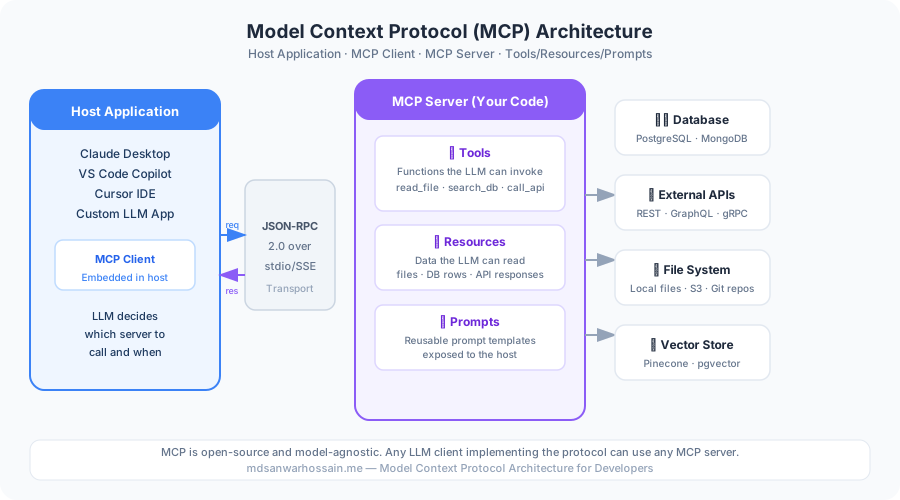
MCP has a three-layer architecture. Understanding it is essential before building.
- Host Application: The AI application the user interacts with — Claude Desktop, VS Code with Copilot, Cursor, or your custom LLM app. The host manages the LLM conversation and coordinates multiple MCP clients.
- MCP Client: Embedded in the host application. It speaks the MCP protocol, connects to one or more MCP servers, and exposes their capabilities to the LLM.
- MCP Server: A process (local or remote) that you build. It exposes tools, resources, and prompts via the MCP protocol. It has no knowledge of the LLM — it only knows the MCP protocol.
Communication uses JSON-RPC 2.0 as the message format. Transport can be stdio (local process), Server-Sent Events over HTTP (remote), or WebSockets. The protocol defines a lifecycle: initialize → capability negotiation → request/response → shutdown.
3. MCP Core Primitives: Tools, Resources, Prompts
MCP servers expose three types of capabilities:
Tools — Functions the LLM Can Call
Tools are executable functions. The LLM decides when to call them based on the user's request. Each tool has a name, description (shown to the LLM), and a JSON Schema defining its parameters.
Examples: search_database, create_github_issue, run_sql_query, send_email
Resources — Data the LLM Can Read
Resources are read-only data sources identified by URIs. They provide context to the LLM without requiring function calls. Examples: file:///project/README.md, db://customers/schema, git://repo/recent-commits
Prompts — Reusable Prompt Templates
Prompts are pre-defined, parameterized templates exposed by the server. Users or the host app can invoke them by name. Examples: summarize_document, analyze_pr, generate_test_cases
4. Building Your First MCP Server (Python)
The official MCP Python SDK makes building servers straightforward. Install it with pip install mcp.
# my_database_server.py — A complete MCP server exposing database tools
from mcp.server import Server
from mcp.server.stdio import stdio_server
from mcp import types
import psycopg2
import json

# Initialize the server with a name
app = Server("my-database-server")

# --- Register a Tool ---
@app.list_tools()
async def list_tools() -> list[types.Tool]:
    return [
        types.Tool(
            name="query_customers",
            description="Search customers by name, email, or ID. Returns matching customer records.",
            inputSchema={
                "type": "object",
                "properties": {
                    "search_term": {
                        "type": "string",
                        "description": "Name, email, or customer ID to search for"
                    },
                    "limit": {
                        "type": "integer",
                        "description": "Maximum number of results (default: 10)",
                        "default": 10
                    }
                },
                "required": ["search_term"]
            }
        ),
        types.Tool(
            name="get_order_history",
            description="Retrieve order history for a specific customer ID.",
            inputSchema={
                "type": "object",
                "properties": {
                    "customer_id": {"type": "string", "description": "The customer's unique ID"},
                    "days": {"type": "integer", "description": "Number of days of history (default: 30)", "default": 30}
                },
                "required": ["customer_id"]
            }
        )
    ]

# --- Handle Tool Calls ---
@app.call_tool()
async def call_tool(name: str, arguments: dict) -> list[types.TextContent]:
    conn = psycopg2.connect(dsn="postgresql://localhost/mydb")

    if name == "query_customers":
        term = arguments["search_term"]
        limit = arguments.get("limit", 10)
        with conn.cursor() as cur:
            cur.execute(
                "SELECT id, name, email, created_at FROM customers "
                "WHERE name ILIKE %s OR email ILIKE %s LIMIT %s",
                (f"%{term}%", f"%{term}%", limit)
            )
            rows = cur.fetchall()
        result = [{"id": r[0], "name": r[1], "email": r[2], "created": str(r[3])} for r in rows]
        return [types.TextContent(type="text", text=json.dumps(result, indent=2))]

    elif name == "get_order_history":
        customer_id = arguments["customer_id"]
        days = arguments.get("days", 30)
        with conn.cursor() as cur:
            cur.execute(
                "SELECT order_id, amount, status, created_at FROM orders "
                "WHERE customer_id=%s AND created_at > NOW() - INTERVAL '%s days' "
                "ORDER BY created_at DESC",
                (customer_id, days)
            )
            rows = cur.fetchall()
        orders = [{"order_id": r[0], "amount": float(r[1]), "status": r[2]} for r in rows]
        return [types.TextContent(type="text", text=json.dumps(orders, indent=2))]

    conn.close()
    raise ValueError(f"Unknown tool: {name}")

# --- Register a Resource ---
@app.list_resources()
async def list_resources() -> list[types.Resource]:
    return [
        types.Resource(
            uri="db://schema",
            name="Database Schema",
            description="Full database schema with table definitions",
            mimeType="text/plain"
        )
    ]

@app.read_resource()
async def read_resource(uri: str) -> str:
    if uri == "db://schema":
        return """Tables: customers(id, name, email, created_at),
orders(order_id, customer_id, amount, status, created_at),
products(id, name, price, stock)"""
    raise ValueError(f"Unknown resource: {uri}")

# --- Run the server ---
if __name__ == "__main__":
    import asyncio
    asyncio.run(stdio_server(app))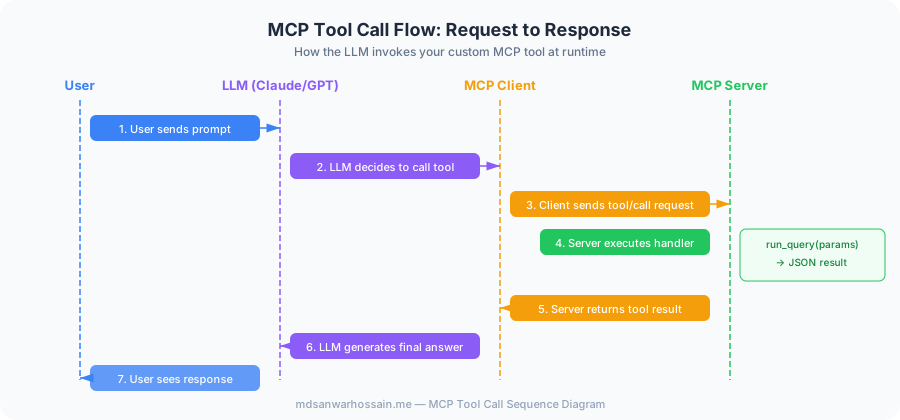
5. Advanced Tool Design Patterns
Write Tool Descriptions for LLMs, Not Humans
The description field in your tool definition is what the LLM reads to decide when to call your tool. Poor descriptions lead to wrong tool selection or missed invocations.
- ❌ Bad: "Queries the database" — too vague, LLM doesn't know when to use it
- ✅ Good: "Search customers by name, email address, or customer ID. Use this when the user asks about a specific customer, wants to look up account details, or needs to find contact information."
- Include trigger phrases: List the types of user requests that should invoke this tool
- Describe return format: Tell the LLM what it will get back so it can process it correctly
- State limitations: "Only returns data from the last 90 days" prevents the LLM from making false promises to users
Tool Granularity: One Tool Per Action
Avoid mega-tools that do everything via a action parameter. LLMs reliably call specific, narrow tools and struggle with over-parameterized ones.
- ❌ Bad:
database_operation(action: "read"|"write"|"delete", table, filters) - ✅ Good: Separate
query_customers,update_customer,delete_customertools
6. Integrating with Claude Desktop
Claude Desktop reads MCP server configurations from ~/.config/claude/claude_desktop_config.json (Linux/Mac) or the equivalent on Windows.
// ~/.config/claude/claude_desktop_config.json
{
  "mcpServers": {
    "my-database": {
      "command": "python",
      "args": ["/path/to/my_database_server.py"],
      "env": {
        "DATABASE_URL": "postgresql://user:pass@localhost/mydb"
      }
    },
    "filesystem": {
      "command": "npx",
      "args": ["-y", "@modelcontextprotocol/server-filesystem", "/home/user/projects"]
    },
    "github": {
      "command": "npx",
      "args": ["-y", "@modelcontextprotocol/server-github"],
      "env": {
        "GITHUB_PERSONAL_ACCESS_TOKEN": "ghp_your_token_here"
      }
    }
  }
}
After editing the config, restart Claude Desktop. Your tools will appear in the tool panel. You can test them directly in the Claude chat interface before integrating into your custom application.
7. Securing MCP Servers in Production
MCP servers have elevated access to your systems — they can read files, query databases, call APIs. Security is non-negotiable.
- Principle of least privilege: Create dedicated DB users with read-only access. Never give MCP servers admin credentials. Scope file system access to specific directories.
- Input validation on every tool: Never pass raw LLM-generated arguments to SQL queries or shell commands. Validate against your JSON Schema and sanitize all string inputs.
- Defend against prompt injection: Malicious content in tool results can inject instructions. Sanitize tool return values before feeding them back to the LLM context.
- Authentication for remote servers: For HTTP/SSE transport, require OAuth 2.0 or API key authentication. Never expose MCP servers on the public internet without auth.
- Audit logging: Log every tool call with timestamp, tool name, arguments, and calling user. Essential for compliance and debugging.
- Rate limiting: Prevent runaway agents from hammering your database. Apply per-client rate limits at the MCP server level.
# Security middleware for MCP tool calls
import re
import logging
from functools import wraps

logger = logging.getLogger("mcp.security")

def sanitize_sql_input(value: str) -> str:
    """Remove SQL injection patterns from LLM-generated inputs"""
    dangerous = ["--", ";", "DROP", "DELETE", "INSERT", "UPDATE", "EXEC", "UNION"]
    for pattern in dangerous:
        if pattern.upper() in value.upper():
            raise ValueError(f"Rejected input containing SQL keyword: {pattern}")
    return value.strip()[:500]  # Also enforce max length

def audit_log(tool_name: str, arguments: dict, result_length: int):
    logger.info({
        "event": "mcp_tool_call",
        "tool": tool_name,
        "args_keys": list(arguments.keys()),  # Log keys, not values (may contain PII)
        "result_tokens": result_length
    })

def secure_tool(func):
    """Decorator: validate, sanitize, audit-log every tool call"""
    @wraps(func)
    async def wrapper(name: str, arguments: dict):
        # Sanitize string arguments
        for key, value in arguments.items():
            if isinstance(value, str):
                arguments[key] = sanitize_sql_input(value)
        result = await func(name, arguments)
        audit_log(name, arguments, len(str(result)))
        return result
    return wrapper
8. Transport Options: stdio vs SSE vs HTTP
| Transport | Use Case | Auth Required | Latency |
|---|---|---|---|
| stdio | Local tools on developer machine | No (OS-level) | <1ms |
| SSE (HTTP) | Remote servers, team-shared tools | Yes (OAuth/API key) | 10–100ms |
| WebSocket | Bi-directional, streaming results | Yes | 10–50ms |
9. Deploying MCP Servers to Production
- Containerize with Docker: Package your MCP server in a Docker container. Use multi-stage builds to minimize image size. Run as non-root user.
- Health checks: Implement
GET /healthendpoint returning server status and tool list. Use it for Kubernetes readiness probes. - Graceful shutdown: Handle SIGTERM to finish in-flight tool calls before shutting down. Critical for Kubernetes rolling deploys.
- Observability: Export OpenTelemetry spans for every tool call. Track: call duration, error rate, tool usage frequency.
- Connection pooling: Share database connection pools across tool calls. Don't open a new connection per tool invocation.
10. MCP Ecosystem: Popular Servers & Tools
| MCP Server | What It Exposes | Install |
|---|---|---|
| @mcp/server-filesystem | Read/write local files and directories | npx @modelcontextprotocol/server-filesystem |
| @mcp/server-github | GitHub repos, PRs, issues, files | npx @modelcontextprotocol/server-github |
| @mcp/server-postgres | PostgreSQL query and schema exploration | npx @modelcontextprotocol/server-postgres |
| @mcp/server-brave-search | Web search via Brave Search API | npx @modelcontextprotocol/server-brave-search |
| @mcp/server-kubernetes | K8s pods, deployments, logs, events | npx @mcp-servers/kubernetes |
Frequently Asked Questions
What is TL;DR — Why MCP Matters and how does it work?
"MCP is the USB-C of AI integrations. Build one MCP server exposing your database, APIs, or file system, and every MCP-compatible AI client — Claude, Copilot, Cursor, your own agent — can use it immediately without custom integration code per client."
What Is MCP and Why Was It Created?
Before MCP, every AI application that needed to access external data had to build bespoke integrations: a custom plugin for Claude, a different integration for ChatGPT, another for GitHub Copilot. This created an N×M integration problem — N AI clients × M data sources = unsustainable complexity. Anthropic released the Model Context Protocol (MCP) as an open standard to solve this. MCP defines a universal protocol for how AI applications connect to external tools and data sources. It's model-agnostic, transport-agnostic, and open source under the MIT license. By April 2026, MCP has been adopted by over 1,000 open-source server implementations covering databases, cloud providers, DevOps tools, productivity apps, and custom enterprise systems.
What is MCP Architecture and how does it work?
MCP has a three-layer architecture. Understanding it is essential before building. Communication uses JSON-RPC 2.0 as the message format. Transport can be stdio (local process), Server-Sent Events over HTTP (remote), or WebSockets. The protocol defines a lifecycle: initialize → capability negotiation → request/response → shutdown. Host Application: The AI application the user interacts with — Claude Desktop, VS Code with Copilot, Cursor, or your custom LLM app. The host manages the LLM conversation and coordinates multiple MCP clients. MCP Client: Embedded in the host application. It speaks the MCP protocol, connects to one or more MCP servers, and exposes their capabilities to the LLM. MCP Server: A process (local or remote) that you build. It exposes tools, resources, and prompts via the MCP protocol.
What is Tools — Functions the LLM Can Call and how does it work?
Tools are executable functions. The LLM decides when to call them based on the user's request. Each tool has a name, description (shown to the LLM), and a JSON Schema defining its parameters. Examples: search_database , create_github_issue , run_sql_query , send_email
What is Resources — Data the LLM Can Read and how does it work?
Resources are read-only data sources identified by URIs. They provide context to the LLM without requiring function calls. Examples: file:///project/README.md , db://customers/schema , git://repo/recent-commits
