Mutation Testing with PITest: Beyond Code Coverage in Java & Spring Boot
100% line coverage is not a safety net — it's a false sense of security. A test that executes every line but makes no assertions is worthless. Mutation testing with PITest exposes exactly these gaps by injecting small code faults and checking whether your tests catch them. If they don't, your suite has survivors — and survivors ship bugs to production.
TL;DR
"Master mutation testing with PITest in Java and Spring Boot: understand mutation operators, interpret mutation scores, enforce quality gates in CI/CD, and go beyond code coverage metrics."
Table of Contents
- Why 100% Code Coverage Lies to You
- How Mutation Testing Works
- PITest Setup: Maven + Spring Boot Configuration
- Mutation Operators Explained with Examples
- Reading PITest Reports & Interpreting Mutation Scores
- Killing Survivors: Writing Stronger Tests
- CI/CD Mutation Quality Gates
- When to Skip Mutation Testing
Why 100% Code Coverage Lies to You
Consider this Spring Boot service method:
// OrderService.java
public boolean isEligibleForDiscount(Order order) {
    return order.getTotalAmount() > 100 && order.isLoyalCustomer();
}
And this test with 100% line coverage:
@Test
void testDiscountEligibility() {
    Order order = new Order(150.0, true);
    orderService.isEligibleForDiscount(order); // No assertion!
}
The test runs the method, achieves 100% line coverage, and passes — but it asserts nothing. A mutation that changes > to < or removes the isLoyalCustomer() check would go completely undetected. Your CI pipeline stays green while broken logic ships to production.
This is the coverage paradox: coverage measures execution, not verification. Mutation testing measures the latter. It asks: if I break the code, do your tests notice?
How Mutation Testing Works
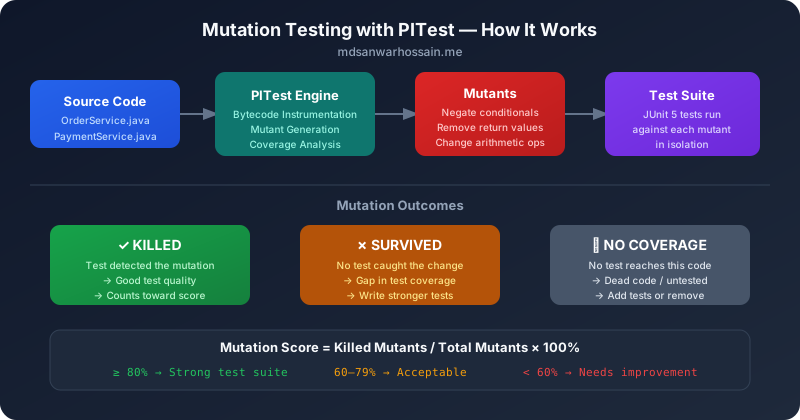
Mutation testing follows a precise algorithm:
- Generate mutants: PITest modifies your compiled bytecode using mutation operators — small, semantically meaningful changes like negating a condition, removing a return value, or changing an arithmetic operator.
- Run tests against each mutant: Each mutant is a separate version of your code. PITest runs your test suite against every mutant.
- Classify the outcome:
- Killed: At least one test failed because it detected the mutation. ✅ Good.
- Survived: All tests passed despite the mutation. ❌ Gap in tests.
- No coverage: No test even reached the mutated code. ⚠️ Dead/untested code.
- Timed out / error: The mutation caused an infinite loop or compilation error — typically counted as killed.
- Compute the mutation score:
Killed / (Total - No Coverage) × 100%
PITest operates at the bytecode level, which means it is fast, language-accurate, and does not require recompilation for each mutant. It also uses coverage data to skip mutants that are not reached by any test, making it practical for real projects.
PITest Setup: Maven + Spring Boot Configuration
Add the PITest Maven plugin to your pom.xml:
<!-- pom.xml -->
<plugin>
    <groupId>org.pitest</groupId>
    <artifactId>pitest-maven</artifactId>
    <version>1.15.3</version>
    <dependencies>
        <!-- JUnit 5 support -->
        <dependency>
            <groupId>org.pitest</groupId>
            <artifactId>pitest-junit5-plugin</artifactId>
            <version>1.2.1</version>
        </dependency>
    </dependencies>
    <configuration>
        <!-- Target only your business logic packages, not DTOs/configs -->
        <targetClasses>
            <param>com.example.service.*</param>
            <param>com.example.domain.*</param>
        </targetClasses>
        <!-- Only run unit test classes -->
        <targetTests>
            <param>com.example.*Test</param>
            <param>com.example.*Tests</param>
        </targetTests>
        <!-- Mutation operators to apply -->
        <mutators>
            <mutator>DEFAULTS</mutator>
            <mutator>STRONGER</mutator>
        </mutators>
        <!-- Fail build if score drops below threshold -->
        <mutationThreshold>80</mutationThreshold>
        <coverageThreshold>80</coverageThreshold>
        <!-- Report formats -->
        <outputFormats>
            <outputFormat>HTML</outputFormat>
            <outputFormat>XML</outputFormat>
        </outputFormats>
        <!-- Exclude generated/config code -->
        <excludedClasses>
            <param>com.example.config.*</param>
            <param>com.example.*Application</param>
            <param>com.example.dto.*</param>
        </excludedClasses>
        <!-- Parallel execution for speed -->
        <threads>4</threads>
        <!-- Timeout multiplier for slow tests -->
        <timeoutFactor>2</timeoutFactor>
    </configuration>
</plugin>
Run the analysis:
# Run mutation testing
mvn test-compile org.pitest:pitest-maven:mutationCoverage

# Or bind to verify phase
mvn verify -Dpitest.skip=false

# Skip in normal builds (recommended for speed)
mvn verify -Dpitest.skip=true
Reports are generated at target/pit-reports/<timestamp>/index.html.
<targetClasses> to focus on business logic only. Avoid running it in every build — bind it to a mutation profile or run nightly in CI.
Mutation Operators Explained with Examples
PITest ships with dozens of mutation operators. Here are the most important ones every Java engineer must understand:
| Operator | Original | Mutated | What it tests |
|---|---|---|---|
| NEGATE_CONDITIONALS | if (a > b) | if (!(a > b)) | Boundary assertions |
| CONDITIONALS_BOUNDARY | if (a > b) | if (a >= b) | Off-by-one tests |
| REMOVE_CONDITIONALS | if (x != null) | if (true) | Null safety tests |
| MATH | a + b | a - b | Calculation assertions |
| VOID_METHOD_CALLS | repository.save(entity) | (removed) | Side effect assertions |
| NULL_RETURNS | return findOrder(id) | return null | Null-safety of callers |
| EMPTY_RETURNS | return orders | return Collections.emptyList() | Empty collection handling |
| TRUE_RETURNS / FALSE_RETURNS | return isValid() | return true | Boolean logic tests |
The STRONGER mutator group adds more aggressive operators like REMOVE_INCREMENTS (removing i++) and INVERT_NEGS (negating numeric return values). Use these for critical business logic paths.
Reading PITest Reports & Interpreting Mutation Scores
The PITest HTML report shows every mutant per class with its status. Here is how to interpret scores:
| Mutation Score | Interpretation | Action |
|---|---|---|
| ≥ 85% | Excellent. Strong test suite with real assertions. | Maintain; review surviving mutants selectively. |
| 70–84% | Good. Some gaps but acceptable for most domains. | Target surviving mutants in business-critical paths. |
| 55–69% | Moderate. Meaningful gaps in test assertions. | Add assertion-heavy tests; audit weak tests. |
| < 55% | Poor. Tests execute code but don't verify behavior. | Audit all passing-but-assertionless tests immediately. |
A practical example of a PITest report entry for a survived mutant:
OrderService.java:42: SURVIVED
Mutation: replaced boolean return with false
Original: return order.getTotalAmount() > 100 && order.isLoyalCustomer();
Mutant:   return false;

→ No test asserted that isEligibleForDiscount() returns true for qualifying orders.
This tells you exactly what to fix: add a test that asserts the true return path.
Killing Survivors: Writing Stronger Tests
Here is a real workflow for converting a survivor into a killed mutant. Start with a weak test:
// Weak test — executes code but weak assertions
@Test
void orderDiscountTest() {
    Order order = new Order(150.0, true);
    boolean result = orderService.isEligibleForDiscount(order);
    // Missing: asserting boundary, both branches, and return value
}
The mutations that survive this test:
- CONDITIONALS_BOUNDARY:
> 100→>= 100— survives because we never test with amount = 100 - FALSE_RETURNS: method returns
false— survives if we don't assert the return value - REMOVE_CONDITIONALS:
&& order.isLoyalCustomer()removed — survives because we don't test non-loyal customers
The mutation-killing test suite:
// Mutation-killing test suite
@ParameterizedTest
@MethodSource("discountScenarios")
void testDiscountEligibilityCoversAllBranches(double amount, boolean isLoyal, boolean expected) {
    Order order = new Order(amount, isLoyal);
    assertThat(orderService.isEligibleForDiscount(order)).isEqualTo(expected);
}

static Stream<Arguments> discountScenarios() {
    return Stream.of(
        // Kills CONDITIONALS_BOUNDARY: test exact boundary (100.00 should NOT qualify)
        Arguments.of(100.0, true, false),
        // Kills CONDITIONALS_BOUNDARY: just above boundary (100.01 should qualify)
        Arguments.of(100.01, true, true),
        // Kills REMOVE_CONDITIONALS on isLoyalCustomer: non-loyal should not qualify
        Arguments.of(150.0, false, false),
        // Kills both conditions combined
        Arguments.of(150.0, true, true),
        // Below threshold, loyal customer
        Arguments.of(50.0, true, false)
    );
}

// Kill VOID_METHOD_CALLS: verify side effects are actually called
@Test
void placeOrderShouldPersistAndPublishEvent() {
    Order order = buildValidOrder();
    orderService.placeOrder(order);

    // Don't just assert the return; verify the side effects
    verify(orderRepository).save(order);
    verify(eventPublisher).publishEvent(any(OrderPlacedEvent.class));
    verify(notificationService).sendConfirmation(order.getCustomerId());
}verify() calls kill VOID_METHOD_CALLS mutants. Asserting on return values kills NULL_RETURNS and FALSE_RETURNS.
CI/CD Mutation Quality Gates
Running mutation testing on every commit is too slow for most projects. The recommended strategy:
# .github/workflows/mutation-testing.yml
name: Mutation Testing Gate

on:
  schedule:
    - cron: '0 2 * * *'   # nightly at 2 AM
  pull_request:
    paths:
      - 'src/main/java/com/example/service/**'
      - 'src/main/java/com/example/domain/**'

jobs:
  mutation-test:
    runs-on: ubuntu-latest
    steps:
      - uses: actions/checkout@v4

      - name: Set up JDK 21
        uses: actions/setup-java@v4
        with:
          java-version: '21'
          distribution: 'temurin'
          cache: maven

      - name: Run Mutation Tests
        run: |
          mvn test-compile \
            org.pitest:pitest-maven:mutationCoverage \
            -Dpitest.mutationThreshold=80 \
            -Dpitest.coverageThreshold=80 \
            -Dpitest.threads=4

      - name: Upload PITest Report
        uses: actions/upload-artifact@v4
        if: always()
        with:
          name: pitest-report
          path: target/pit-reports/
For pull request gates on changed files only, use the --changed-files feature (PITest 1.14+):
<!-- pom.xml: incremental mutation testing on changed classes -->
<configuration>
    <!-- Only mutate classes changed since last commit -->
    <features>
        <feature>+GITCI(from[HEAD~1])</feature>
    </features>
    <mutationThreshold>80</mutationThreshold>
</configuration>
When to Skip Mutation Testing
Mutation testing is not free. Know when to exclude code from analysis:
- Data Transfer Objects (DTOs) and value objects: Generated getters/setters have trivially predictable mutations. Exclude
com.example.dto.*. - Configuration classes: Spring
@Configuration,@Beanmethods are framework-wired and testing them with mutation adds no value. - Infrastructure adapters: Database repositories, Kafka producers/consumers — test these with integration tests (Testcontainers), not mutation testing.
- Generated code: Lombok-generated code, MapStruct mappers, OpenAPI stubs — exclude these entirely.
- Legacy untested code: If you are onboarding mutation testing on a legacy project, set a realistic initial threshold (e.g., 50%) and ratchet it up gradually — failing a 1000-mutant suite immediately kills adoption.
<!-- Exclude generated and config code -->
<excludedClasses>
    <param>com.example.dto.*</param>
    <param>com.example.config.*</param>
    <param>com.example.mapper.*</param>
    <param>com.example.*Application</param>
</excludedClasses>
<excludedMethods>
    <param>hashCode</param>
    <param>equals</param>
    <param>toString</param>
    <param>canEqual</param>
</excludedMethods>Understanding Mutation Score: What's a Good Target?
A mutation score measures the percentage of generated mutants that your test suite kills. A score of 100% means every artificial defect was detected — every mutant triggered at least one test failure. The practical question is: what score is good enough? The honest answer depends on the code layer, the consequence of defects, and the cost of achieving higher scores.
Domain logic and service layers should aim for 80–90%+ mutation scores. These are the classes that encode your business rules — eligibility calculations, pricing algorithms, state machines, validation logic. A survived mutant here corresponds to a code path your tests do not verify, which is a real gap. By contrast, infrastructure code like repository implementations, configuration classes, and framework-driven adapters typically yield scores of 40–60%, and pushing higher returns diminishing value because mutations in these classes rarely represent real application logic bugs.
| Code Layer | Recommended Mutation Score | Rationale |
|---|---|---|
| Domain model / business logic | 85–95% | Business rule mutations represent real defect risk |
| Service layer | 75–85% | Orchestration logic with important conditional paths |
| Controller / REST layer | 60–75% | Mostly delegation; cover validation and error mapping |
| Repository / infrastructure | Not applicable | Use integration tests (Testcontainers) instead |
| Generated code (Lombok, MapStruct) | Exclude entirely | Generated code mutations are not meaningful defect signals |
When introducing mutation testing to an existing project, start by measuring the current score without any targets. If the domain layer scores 45%, jumping to an 85% target immediately will fail the build on hundreds of uncovered mutants and kill adoption. Instead, set the initial threshold at current score minus 5%, commit to ratcheting it upward by 5% per sprint, and use the "surviving mutants" report to guide where new test cases add the most value. This incremental approach builds team confidence while steadily improving quality.
Be cautious about optimising for mutation score at the expense of test maintainability. Tests written solely to kill a specific mutant — with no conceptual connection to a business requirement — are fragile and add noise without value. The goal is not a perfect score, but rather a score that gives you confidence that the most important code paths are verified. Complement mutation score with code review practices that require tests to describe the intent behind each assertion.
Configuring PITest for Microservices: Multi-Module Maven Projects
Enterprise Spring Boot applications are typically structured as multi-module Maven projects: a parent POM with child modules for the domain, application, infrastructure, and API layers. Running PITest across a multi-module project requires a few configuration adjustments to avoid running mutation on every module (which would be extremely slow) and to exclude generated or framework code correctly.
<!-- Parent pom.xml: configure PITest in pluginManagement so each module inherits -->
<pluginManagement>
    <plugins>
        <plugin>
            <groupId>org.pitest</groupId>
            <artifactId>pitest-maven</artifactId>
            <version>1.15.3</version>
            <dependencies>
                <dependency>
                    <groupId>org.pitest</groupId>
                    <artifactId>pitest-junit5-plugin</artifactId>
                    <version>1.2.1</version>
                </dependency>
            </dependencies>
            <configuration>
                <!-- Only mutate main source classes, not test classes -->
                <targetClasses>
                    <param>${project.groupId}.*</param>
                </targetClasses>
                <excludedClasses>
                    <param>${project.groupId}.config.*</param>
                    <param>${project.groupId}.dto.*</param>
                    <param>${project.groupId}.mapper.*</param>
                    <param>${project.groupId}.*Application</param>
                    <param>${project.groupId}.*Config</param>
                </excludedClasses>
                <!-- Fail build if mutation score drops below threshold -->
                <mutationThreshold>80</mutationThreshold>
                <coverageThreshold>70</coverageThreshold>
                <!-- Use incremental analysis to only re-mutate changed classes -->
                <historyInputFile>${project.build.directory}/pitest-history.bin</historyInputFile>
                <historyOutputFile>${project.build.directory}/pitest-history.bin</historyOutputFile>
            </configuration>
        </plugin>
    </plugins>
</pluginManagement>
For a multi-module project, run PITest only on modules containing domain and service logic by adding the plugin execution to those modules' pom.xml files explicitly. Skip it for the infrastructure module (repositories, Kafka producers/consumers) and the API module (controller layer), which are better tested with integration tests. This targeted approach keeps mutation analysis fast and focused on code where mutation score is meaningful.
<!-- domain-module/pom.xml: activate PITest only in this module -->
<build>
    <plugins>
        <plugin>
            <groupId>org.pitest</groupId>
            <artifactId>pitest-maven</artifactId>
            <!-- inherits configuration from parent pluginManagement -->
            <executions>
                <execution>
                    <id>mutation-tests</id>
                    <goals><goal>mutationCoverage</goal></goals>
                    <phase>verify</phase>
                </execution>
            </executions>
        </plugin>
    </plugins>
</build>
PITest's incremental analysis feature (historyInputFile/historyOutputFile) is especially valuable in multi-module projects. After the first full analysis run, subsequent runs only re-test mutants in classes that have changed since the last run. For large codebases this can reduce mutation analysis time from 20 minutes to under 3 minutes on typical feature branches. The history file should be cached between CI runs using the build cache (Gradle Build Cache or Maven CI-friendly mechanisms) to make incremental analysis effective in CI as well as locally.
Integrating PITest with SonarQube and Quality Gates
SonarQube's standard quality gate measures line coverage and branch coverage, but not mutation score. By integrating PITest reports with SonarQube through the PITest SonarQube plugin, you can surface mutation score as a first-class metric in your SonarQube dashboard and enforce it as part of your quality gate — blocking PRs that reduce mutation score below the project threshold.
<!-- Add PITest SonarQube sensor plugin -->
<dependency>
    <groupId>org.pitest</groupId>
    <artifactId>pitest-sonar</artifactId>
    <version>0.0.10</version>
    <scope>test</scope>
</dependency>

<!-- In sonar-project.properties or Maven Sonar plugin configuration: -->
<!-- sonar.pitest.mode=reuseReport -->
<!-- sonar.pitest.reportsDirectory=target/pit-reports -->
The integration works by having PITest generate its XML reports, then the SonarQube PITest sensor reads those reports during the sonar:sonar execution and uploads mutation data alongside standard coverage data. In the SonarQube UI, you see mutation coverage per class alongside line coverage. Classes with high line coverage but low mutation coverage stand out visually — these are exactly the classes with test-assertion gaps that standard coverage metrics miss.
# Complete CI pipeline: test → mutate → sonar
- name: Run unit tests
  run: mvn test

- name: Run mutation testing (domain module only)
  run: mvn org.pitest:pitest-maven:mutationCoverage -pl domain-module

- name: Run SonarQube analysis
  run: mvn sonar:sonar
       -Dsonar.projectKey=my-service
       -Dsonar.host.url=${{ secrets.SONAR_URL }}
       -Dsonar.login=${{ secrets.SONAR_TOKEN }}
       -Dsonar.pitest.mode=reuseReport
To enforce mutation score via a SonarQube quality gate, add a custom condition in the SonarQube administration panel: navigate to Quality Gates → Add Condition → select "Mutation Score" (available after the PITest plugin is installed) → set the threshold (e.g., "Mutation score on new code is less than 80%" as a failure condition). Pull request analyses will then fail the quality gate when new code introduces business logic that is not verified by mutation-killing tests, providing an automatic check-in gate against logic gaps.
For teams without SonarQube, PITest generates standalone HTML and XML reports in target/pit-reports/. The HTML report is browsable and shows each survived mutant inline in the source code with a colour-coded overlay. These reports can be published as CI artifacts and shared with the team during code review. Tools like pitest-gradle's report aggregation or the Maven PITest aggregate goal can merge reports from multiple modules into a single project-wide dashboard, making it practical to see the overall mutation score at a glance.
Mutation Testing ROI: Cost vs Bug-Prevention Value
The most common objection to mutation testing adoption is execution time. PITest running 1,000 mutants against a service layer might take 10–15 minutes, which is impractical in a 2-minute CI pipeline. Understanding the ROI requires separating when mutation testing runs from whether it runs, and measuring the cost of the alternative: escaped defects.
The recommended execution model is nightly full analysis, PR partial analysis. On pull requests, run mutation testing only against changed packages using PITest's targetClasses filter derived from the git diff. On the nightly build, run the full mutation analysis and update the history file. This hybrid approach gives fast PR feedback (typically 1–3 minutes for a single feature change) while ensuring that the full mutation score is measured regularly.
# PR build: only mutate changed packages
- name: Detect changed packages
  run: |
    CHANGED=$(git diff --name-only origin/main...HEAD |
              grep "src/main/java" |
              sed 's|src/main/java/||;s|/[^/]*\.java$||;s|/|.|g' |
              sort -u | tr '\n' ',')
    echo "CHANGED_PACKAGES=$CHANGED" >> $GITHUB_ENV

- name: Run targeted mutation analysis
  run: |
    mvn org.pitest:pitest-maven:mutationCoverage \
      -DtargetClasses="${CHANGED_PACKAGES}*" \
      -DmutationThreshold=80
The bug-prevention value is measurable through defect tracking. Teams that adopt mutation testing consistently report that the category of bugs most often escaped to production before adoption — off-by-one errors, missing null checks, inverted conditions — drops by 40–70% within 6 months. These are exactly the defects that mutation operators target. An off-by-one boundary change mutation (> to >=) survived in a discount eligibility check is the same class of defect that leads to financial miscalculation in production.
From a total cost perspective, consider: a single production incident caused by a logic defect (customer data corruption, incorrect financial calculation, authorization bypass) typically costs 2–8 hours of engineer time to diagnose, fix, and deploy, plus potential business impact. A mutation testing analysis that runs nightly and prevents one such incident per quarter represents a return on the 10–15 minutes of nightly CI time many times over. The ROI argument becomes even stronger when you factor in the secondary benefit: mutation testing guides junior engineers toward writing assertions that actually verify behaviour, improving overall test suite quality without requiring a separate review process.
Leave a Comment
Related Posts

Software Engineer · Java · Spring Boot · Microservices