TL;DR
Use Apache Flink for stateful stream processing requiring exactly-once guarantees, event-time windowing, or complex CEP patterns. Flink's RocksDB state backend scales to terabytes. Use Kafka as source/sink. Deploy on Kubernetes with Flink Operator. Always configure checkpointing for fault tolerance.
Table of Contents
- When to Choose Apache Flink Over Spark Streaming & Kafka Streams
- Flink Architecture: JobManager, TaskManagers & Slots
- DataStream API: Sources, Transformations & Sinks
- Event Time vs Processing Time: Watermarks & Late Events
- Windowing Strategies: Tumbling, Sliding & Session Windows
- Stateful Processing: Keyed State & RocksDB Backend
- Exactly-Once Semantics: Checkpointing & Two-Phase Commit
- Flink-Kafka Integration: Source, Sink & Offset Management
- Flink on Kubernetes with Flink Operator
- Performance Tuning, Monitoring & Production Checklist
1. When to Choose Apache Flink Over Spark Streaming & Kafka Streams
Choosing the right stream processing framework is one of the most consequential architectural decisions for real-time systems. Apache Flink, Apache Spark Streaming, and Kafka Streams each occupy a distinct niche — understanding the trade-offs prevents costly rewrites later.
Framework Comparison
| Criterion | Apache Flink | Spark Streaming | Kafka Streams |
|---|---|---|---|
| Latency | <10 ms (true streaming) | Seconds (micro-batch) | <10 ms (true streaming) |
| State Management | RocksDB, TB-scale | In-memory, limited scale | RocksDB, moderate scale |
| Windowing | Rich event-time windows | Micro-batch windows | Basic tumbling/hopping |
| Exactly-Once | End-to-end yes | Yes (with WAL/checkpoints) | Yes (within Kafka only) |
| Deployment | Cluster / Kubernetes | Spark cluster / Databricks | Embedded library in JVM app |
| Learning Curve | High | Medium | Low |
| Complex Event Processing | Full CEP library | Limited | Not natively supported |
| Batch + Streaming | Unified (DataSet/DataStream) | Best-in-class (Spark SQL) | Stream only |
When to Choose Apache Flink
- Complex stateful processing — fraud detection, sessionization, multi-event correlations requiring terabytes of managed state.
- Complex Event Processing (CEP) — pattern detection across event sequences with the
flink-ceplibrary. - True event-time semantics — when correctness demands watermark-based late event handling rather than processing-time approximations.
- Large-scale state — when state exceeds available heap memory; RocksDB backend spills to disk seamlessly.
- Sub-100ms latency SLAs — Flink's pipelined execution model avoids micro-batch overhead.
When to Choose Kafka Streams
- Simple Kafka-to-Kafka transformations, enrichments, or aggregations.
- You want an embedded library without a separate cluster to operate.
- State is small and Kafka is already the primary data platform.
When to Choose Spark Streaming
- You need unified batch + streaming (Lambda architecture) with Spark SQL.
- Your team already runs Databricks or has deep Spark expertise.
- Near-real-time (seconds latency) is acceptable — analytics over time windows.
Rule of thumb: If you're building fraud detection, real-time feature pipelines, or any pipeline with multi-second stateful correlations across millions of keys, Flink is almost always the right choice over Kafka Streams or Spark.
2. Flink Architecture: JobManager, TaskManagers & Slots
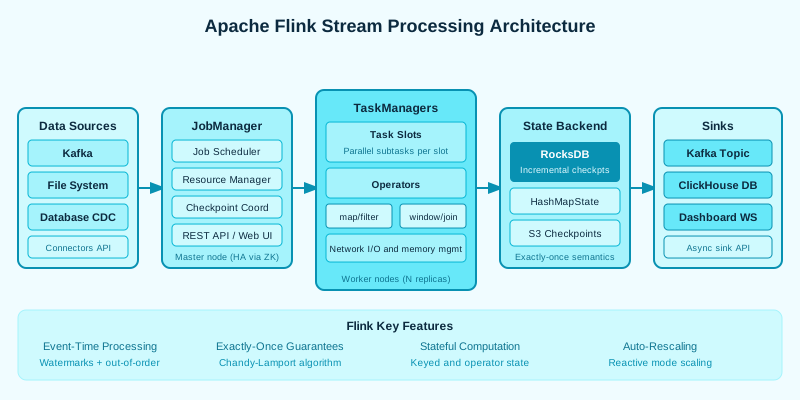
Understanding Flink's internals is essential for tuning, debugging, and operating pipelines in production. Flink follows a classic master/worker architecture, but the subtleties of how jobs are compiled, scheduled, and executed set it apart.
Job Compilation Pipeline
A Flink user program compiles through three representations before execution:
- JobGraph — the logical dataflow graph built by the user's pipeline code. Operators are vertices, data channels are edges.
- ExecutionGraph — the parallelized version of the JobGraph. Each operator vertex is split into N parallel subtasks (where N = configured parallelism).
- Physical Graph — the actual task-level mapping onto TaskManager slots after resource negotiation.
JobManager Responsibilities
- Resource management — negotiates slots from TaskManagers (or the resource manager like YARN/Kubernetes).
- Scheduling — decides which subtasks run on which slots, respecting colocation hints and slot sharing groups.
- Checkpoint coordination — triggers checkpoint barriers, collects state handles from TaskManagers, and maintains the completed checkpoint store.
- Failure recovery — detects task failures and triggers restarts according to the configured restart strategy.
TaskManagers: Slots and Parallelism
Each TaskManager is a JVM process with a configured number of task slots. A slot is the unit of resource allocation — it represents one thread of execution. Typically set to the number of CPU cores per TaskManager.
- Slot sharing — by default, subtasks from different operators can share a slot (one subtask per operator per slot group). This allows a full pipeline to run in a single slot.
- Task parallelism — total available slots across all TaskManagers = maximum achievable parallelism.
- Operator chaining — Flink chains compatible consecutive operators into a single "task" to avoid serialization overhead on the network.
Memory Model
- JVM heap — Java objects, UDF state for HashMapStateBackend.
- Off-heap / native memory — RocksDB data, network buffers (MemorySegments), and direct ByteBuffers.
- Network buffers — pre-allocated MemorySegments used for data exchange between tasks. Sized by
taskmanager.network.memory.fraction. - Managed memory — a pool managed by Flink's MemoryManager, used by RocksDB state backend and batch sorting operators. Sized by
taskmanager.memory.managed.fraction.
Deployment Modes
- Session Cluster — one long-lived JobManager shared by multiple jobs. Good for dev/test. Resource isolation between jobs is weak.
- Per-Job Cluster — one dedicated JobManager per job, started on submission. Provides isolation. Deprecated in Flink 1.15+ in favor of Application Mode.
- Application Mode — the
main()method executes on the JobManager. Reduces client-side resource usage. Preferred for Kubernetes deployments.
3. DataStream API: Sources, Transformations & Sinks
The DataStream API is Flink's core API for processing unbounded streams of data. It provides a rich set of transformation operators that compose into a dataflow DAG executed by the Flink runtime.
Maven Dependencies (Flink 1.19)
<dependencies>
    <dependency>
        <groupId>org.apache.flink</groupId>
        <artifactId>flink-streaming-java</artifactId>
        <version>1.19.0</version>
    </dependency>
    <dependency>
        <groupId>org.apache.flink</groupId>
        <artifactId>flink-connector-kafka</artifactId>
        <version>3.1.0-1.18</version>
    </dependency>
    <dependency>
        <groupId>org.apache.flink</groupId>
        <artifactId>flink-clients</artifactId>
        <version>1.19.0</version>
    </dependency>
</dependencies>
Complete Word Count Streaming Example
import org.apache.flink.api.common.eventtime.WatermarkStrategy;
import org.apache.flink.api.common.serialization.SimpleStringSchema;
import org.apache.flink.connector.kafka.sink.KafkaRecordSerializationSchema;
import org.apache.flink.connector.kafka.sink.KafkaSink;
import org.apache.flink.connector.kafka.source.KafkaSource;
import org.apache.flink.connector.kafka.source.enumerator.initializer.OffsetsInitializer;
import org.apache.flink.streaming.api.datastream.DataStream;
import org.apache.flink.streaming.api.environment.StreamExecutionEnvironment;
import org.apache.flink.streaming.api.windowing.assigners.TumblingProcessingTimeWindows;
import org.apache.flink.streaming.api.windowing.time.Time;
import org.apache.flink.api.java.tuple.Tuple2;

public class WordCountStream {

    public static void main(String[] args) throws Exception {
        // 1. Get execution environment
        StreamExecutionEnvironment env =
            StreamExecutionEnvironment.getExecutionEnvironment();
        env.setParallelism(4);

        // 2. Configure Kafka source
        KafkaSource<String> source = KafkaSource.<String>builder()
            .setBootstrapServers("kafka:9092")
            .setTopics("input-topic")
            .setGroupId("flink-wordcount-group")
            .setStartingOffsets(OffsetsInitializer.latest())
            .setValueOnlyDeserializer(new SimpleStringSchema())
            .build();

        // 3. Build the DataStream pipeline
        DataStream<String> lines = env.fromSource(
            source,
            WatermarkStrategy.noWatermarks(),
            "Kafka Source"
        );

        DataStream<Tuple2<String, Integer>> wordCounts = lines
            .flatMap((String line, Collector<Tuple2<String, Integer>> out) -> {
                for (String word : line.split("\\s+")) {
                    if (!word.isEmpty()) out.collect(Tuple2.of(word.toLowerCase(), 1));
                }
            })
            .returns(Types.TUPLE(Types.STRING, Types.INT))
            .keyBy(t -> t.f0)
            .window(TumblingProcessingTimeWindows.of(Time.minutes(1)))
            .sum(1);

        // 4. Configure Kafka sink
        KafkaSink<String> sink = KafkaSink.<String>builder()
            .setBootstrapServers("kafka:9092")
            .setRecordSerializer(KafkaRecordSerializationSchema.builder()
                .setTopic("output-topic")
                .setValueSerializationSchema(new SimpleStringSchema())
                .build())
            .build();

        wordCounts
            .map(t -> t.f0 + ":" + t.f1)
            .sinkTo(sink);

        // 5. Execute
        env.execute("Word Count Stream Job");
    }
}
Core Transformation Operators
map(MapFunction)— one-to-one transformation, same number of output records as input.flatMap(FlatMapFunction)— one-to-many; emit zero or more output records per input.filter(FilterFunction)— retain only records satisfying a predicate.keyBy(KeySelector)— partition stream by key; required before keyed windows and keyed state.process(ProcessFunction)— low-level operator with access to timers, state, and side outputs.union(DataStream...)— merge multiple streams of the same type.connect(DataStream)— connect two streams of different types for co-processing.
4. Event Time vs Processing Time: Watermarks & Late Events
One of Flink's most powerful and nuanced features is its support for three distinct notions of time. Choosing the right time characteristic is critical for correctness in streaming applications.
Three Time Notions
- Event Time — the timestamp embedded in the event data itself (e.g., when a user clicked a button). Provides correct results regardless of out-of-order arrival or network delays. The right choice for analytics and billing.
- Ingestion Time — the wall-clock time when the event enters the Flink source operator. Simpler than event time but cannot handle reprocessing correctly.
- Processing Time — the current wall-clock time on the TaskManager processing the event. Fastest and simplest, but produces non-deterministic results during replay.
Watermarks: Progress Markers for Event Time
Watermarks are special records injected into the stream to signal "we've seen all events with timestamp ≤ W". They allow Flink to advance event-time windows and emit results. The trade-off: a larger out-of-orderness tolerance improves completeness but increases latency.
// Bounded out-of-orderness watermark (handles events up to 5s late)
WatermarkStrategy<UserEvent> strategy = WatermarkStrategy
    .<UserEvent>forBoundedOutOfOrderness(Duration.ofSeconds(5))
    .withTimestampAssigner(
        (event, recordTimestamp) -> event.getEventTimestampMs()
    );

// Monotonous timestamps (no late events expected)
WatermarkStrategy<UserEvent> monoStrategy = WatermarkStrategy
    .<UserEvent>forMonotonousTimestamps()
    .withTimestampAssigner(
        (event, recordTimestamp) -> event.getEventTimestampMs()
    );

DataStream<UserEvent> events = env.fromSource(
    kafkaSource, strategy, "Kafka User Events"
);
Handling Late Events
Even with a generous watermark strategy, some events arrive after the window has been triggered and closed. Flink provides two mechanisms:
// Define late-data side output tag
OutputTag<UserEvent> lateTag = new OutputTag<UserEvent>("late-events") {};

SingleOutputStreamOperator<PageViewCount> result = events
    .keyBy(UserEvent::getPageId)
    .window(TumblingEventTimeWindows.of(Time.minutes(5)))
    .allowedLateness(Time.minutes(2))          // keep window state 2 extra minutes
    .sideOutputLateData(lateTag)               // late events beyond allowed lateness
    .aggregate(new PageViewAggregator());

// Main output: on-time results (+ late updates within allowedLateness)
result.print("on-time");

// Side output: events too late even for allowedLateness
DataStream<UserEvent> lateEvents = result.getSideOutput(lateTag);
lateEvents.sinkTo(deadLetterSink);
Idle Partitions Problem
When a Kafka partition receives no data, its watermark stalls and blocks downstream window progress. Fix with:
WatermarkStrategy.<UserEvent>forBoundedOutOfOrderness(Duration.ofSeconds(5))
    .withIdleness(Duration.ofMinutes(1)); // treat idle source as not blocking watermark
5. Windowing Strategies: Tumbling, Sliding & Session Windows
Windows are the primary mechanism for grouping infinite streams into finite, processable chunks. Flink supports three fundamental window types — each with event-time and processing-time variants — plus composable triggers and evictors for advanced use cases.
Tumbling Windows (Non-Overlapping Fixed Windows)
Each event belongs to exactly one window. The classic choice for per-minute/per-hour aggregations where you don't need overlap.
// Count page views per page per 1-minute tumbling window
DataStream<PageViewCount> tumblingResult = events
    .keyBy(UserEvent::getPageId)
    .window(TumblingEventTimeWindows.of(Time.minutes(1)))
    .aggregate(new PageViewCountAggregator(), new PageViewWindowFunction());

// AggregateFunction (incremental, memory-efficient)
public class PageViewCountAggregator
    implements AggregateFunction<UserEvent, Long, Long> {
    @Override public Long createAccumulator() { return 0L; }
    @Override public Long add(UserEvent v, Long acc) { return acc + 1; }
    @Override public Long getResult(Long acc) { return acc; }
    @Override public Long merge(Long a, Long b) { return a + b; }
}
Sliding Windows (Overlapping Windows)
Each event may belong to multiple windows. A sliding window of size 5 minutes sliding every 1 minute keeps 5 overlapping windows in memory simultaneously. Good for continuously updating moving-average metrics.
// 5-minute window sliding every 1 minute
DataStream<MetricSnapshot> slidingResult = metricsStream
    .keyBy(Metric::getServiceId)
    .window(SlidingEventTimeWindows.of(Time.minutes(5), Time.minutes(1)))
    .process(new SlidingWindowMetricProcessor());

// ProcessWindowFunction gives access to window context and state
public class SlidingWindowMetricProcessor
    extends ProcessWindowFunction<Metric, MetricSnapshot, String, TimeWindow> {
    @Override
    public void process(String key,
                        Context ctx,
                        Iterable<Metric> elements,
                        Collector<MetricSnapshot> out) {
        long count = StreamSupport.stream(elements.spliterator(), false).count();
        double avg = StreamSupport.stream(elements.spliterator(), false)
            .mapToDouble(Metric::getValue).average().orElse(0.0);
        out.collect(new MetricSnapshot(key, ctx.window().getStart(),
                                       ctx.window().getEnd(), count, avg));
    }
}
Session Windows (Activity-Based)
Session windows group events separated by a period of inactivity. No fixed size — they grow as long as events keep arriving within the gap. Perfect for user session analysis.
// Session window: gap of 30 minutes inactivity closes the session
DataStream<UserSession> sessionResult = clickStream
    .keyBy(ClickEvent::getUserId)
    .window(EventTimeSessionWindows.withGap(Time.minutes(30)))
    .aggregate(new SessionAggregator(), new SessionWindowFunction());
Custom Triggers and Evictors
- CountTrigger — fire window when N elements accumulate, regardless of time.
- PurgingTrigger — wraps another trigger and purges (clears) window state after each firing.
- Evictor — pre/post-processing hook to remove elements from a window before or after the window function is applied.
// Fire every 1000 events, then purge state
stream.keyBy(Event::getId)
    .window(GlobalWindows.create())
    .trigger(PurgingTrigger.of(CountTrigger.of(1000)))
    .aggregate(new CountAgg());
6. Stateful Processing: Keyed State & RocksDB Backend
State is what elevates Flink beyond simple ETL. Keyed state allows individual operators to maintain per-key storage that persists across events, enabling use cases like fraud detection, session management, and running aggregations.
Keyed State Types
public class FraudDetectionFunction
    extends KeyedProcessFunction<String, Transaction, Alert> {

    // ValueState: single value per key
    private ValueState<Long> lastTransactionTime;
    // MapState: key-value map per stream-key
    private MapState<String, Long> transactionsByMerchant;
    // ListState: accumulate events
    private ListState<Transaction> recentTransactions;

    @Override
    public void open(Configuration params) throws Exception {
        lastTransactionTime = getRuntimeContext().getState(
            new ValueStateDescriptor<>("last-tx-time", Long.class));

        transactionsByMerchant = getRuntimeContext().getMapState(
            new MapStateDescriptor<>("merchant-counts",
                TypeInformation.of(String.class),
                TypeInformation.of(Long.class)));

        recentTransactions = getRuntimeContext().getListState(
            new ListStateDescriptor<>("recent-txns",
                TypeInformation.of(Transaction.class)));
    }

    @Override
    public void processElement(Transaction tx, Context ctx,
                                Collector<Alert> out) throws Exception {
        Long lastTime = lastTransactionTime.value();

        if (lastTime != null) {
            long gap = tx.getTimestamp() - lastTime;
            // Rapid successive transactions — potential fraud
            if (gap < 5000 && tx.getAmount() > 1000) {
                out.collect(new Alert(tx.getUserId(),
                    "Rapid high-value transactions detected", tx));
            }
        }

        // Update state
        lastTransactionTime.update(tx.getTimestamp());

        long merchantCount = transactionsByMerchant
            .getOrDefault(tx.getMerchantId(), 0L);
        transactionsByMerchant.put(tx.getMerchantId(), merchantCount + 1);

        recentTransactions.add(tx);

        // Register event-time timer for cleanup
        ctx.timerService().registerEventTimeTimer(
            tx.getTimestamp() + Duration.ofHours(1).toMillis());
    }

    @Override
    public void onTimer(long timestamp, OnTimerContext ctx,
                        Collector<Alert> out) throws Exception {
        // Clean up old state
        recentTransactions.clear();
        transactionsByMerchant.clear();
    }
}
Choosing a State Backend
- HashMapStateBackend — state lives on the JVM heap. Fastest for small state. Use in development or when total state < a few GB per TaskManager. Checkpoint serializes to distributed storage.
- EmbeddedRocksDBStateBackend — state lives in a local RocksDB instance (off-heap, on disk). Can handle terabytes of state per TaskManager. Slightly higher read latency due to serialization. The only choice for production pipelines with large state.
// Configure RocksDB state backend
env.setStateBackend(new EmbeddedRocksDBStateBackend(true)); // true = incremental checkpoints
env.getCheckpointConfig().setCheckpointStorage("s3://my-bucket/flink-checkpoints/");

// RocksDB memory tuning in flink-conf.yaml
// state.backend.rocksdb.memory.managed: true
// state.backend.rocksdb.memory.fixed-per-slot: 512mb
// state.backend: rocksdb
// state.backend.incremental: true
State TTL Configuration
StateTtlConfig ttlConfig = StateTtlConfig
    .newBuilder(Time.hours(24))
    .setUpdateType(StateTtlConfig.UpdateType.OnCreateAndWrite)
    .setStateVisibility(StateTtlConfig.StateVisibility.NeverReturnExpired)
    .cleanupFullSnapshot()       // clean on checkpoint
    .cleanupIncrementally(1000, true) // clean 1000 entries per access
    .build();

ValueStateDescriptor<UserProfile> descriptor =
    new ValueStateDescriptor<>("user-profile", UserProfile.class);
descriptor.enableTimeToLive(ttlConfig);

ValueState<UserProfile> profileState =
    getRuntimeContext().getState(descriptor);
Large State Best Practices
- Prefer
MapState<K, V>overValueState<Map<K, V>>— Flink can serialize individual entries lazily. - Avoid putting large objects in
ListStatewithout TTL — state grows unboundedly. - Use
@TypeInfoannotations or customTypeSerializerto avoid slow Kryo serialization for complex types. - Enable RocksDB compaction statistics and monitor via Prometheus metrics.
7. Exactly-Once Semantics: Checkpointing & Two-Phase Commit
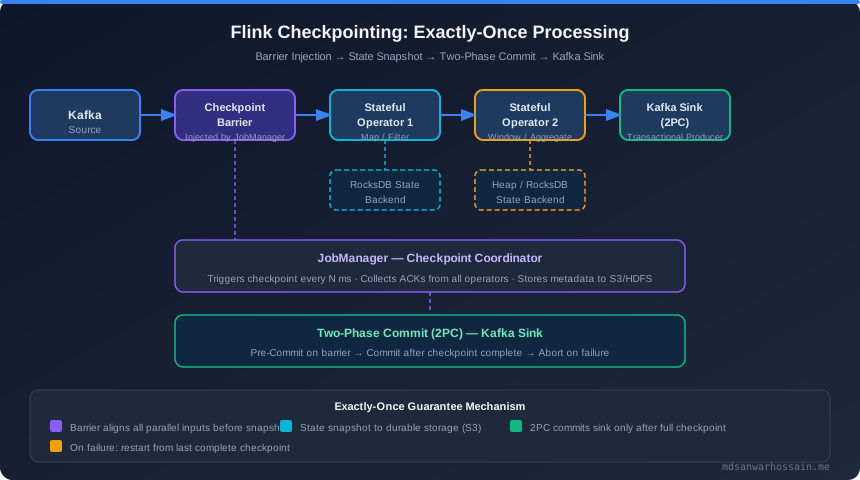
Exactly-once processing is Flink's killer feature for data-critical applications. It means each record affects the application state and outputs exactly once — even in the presence of failures, restarts, and network partitions.
Checkpointing Configuration
StreamExecutionEnvironment env =
    StreamExecutionEnvironment.getExecutionEnvironment();

// Enable checkpointing every 60 seconds
env.enableCheckpointing(60_000, CheckpointingMode.EXACTLY_ONCE);

CheckpointConfig config = env.getCheckpointConfig();
// Maximum time a checkpoint may take before being discarded
config.setCheckpointTimeout(120_000);
// Only one checkpoint at a time
config.setMaxConcurrentCheckpoints(1);
// Minimum time between end of last checkpoint and start of next
config.setMinPauseBetweenCheckpoints(30_000);
// Keep last 3 completed checkpoints for manual recovery
config.setExternalizedCheckpointCleanup(
    CheckpointConfig.ExternalizedCheckpointCleanup.RETAIN_ON_CANCELLATION);
config.setTolerableCheckpointFailureNumber(2);

// Configure checkpoint storage (S3)
config.setCheckpointStorage("s3://my-flink-bucket/checkpoints/job-name/");
How Checkpoint Barriers Work
Flink implements the Chandy-Lamport algorithm for distributed snapshots:
- The JobManager triggers a checkpoint by injecting a special barrier record into each source partition.
- Barriers flow downstream through the dataflow graph. When an operator receives barriers from all its input channels, it takes a snapshot of its state.
- Once all operators have acknowledged their state snapshot to the JobManager, the checkpoint is complete and durable.
- On failure, Flink restores all operator state from the last completed checkpoint and replays events from that point.
Savepoints vs Checkpoints
| Aspect | Checkpoint | Savepoint |
|---|---|---|
| Purpose | Automatic fault tolerance | Manual operational snapshot |
| Triggered by | Flink runtime automatically | Operator (CLI / REST API) |
| Lifecycle | Auto-deleted on job success | Retained until manually deleted |
| Use case | Crash recovery | Upgrades, A/B testing, scaling |
| Format | Optimized internal format | Portable canonical format |
Two-Phase Commit for External Sinks
To achieve end-to-end exactly-once with external systems (e.g., Kafka, databases), Flink uses a two-phase commit (2PC) protocol implemented via TwoPhaseCommitSinkFunction. The sink pre-commits during each checkpoint and commits only when the checkpoint completes.
// Kafka exactly-once sink configuration
KafkaSink<String> exactlyOnceSink = KafkaSink.<String>builder()
    .setBootstrapServers("kafka:9092")
    .setRecordSerializer(KafkaRecordSerializationSchema.builder()
        .setTopic("output-topic")
        .setValueSerializationSchema(new SimpleStringSchema())
        .build())
    .setDeliverGuarantee(DeliveryGuarantee.EXACTLY_ONCE)
    .setTransactionalIdPrefix("flink-txn-myapp")
    .setKafkaProducerConfig(producerProperties) // transaction.timeout.ms=120000
    .build();
Restart Strategy
// Fixed delay: retry 3 times with 10 second delay
env.setRestartStrategy(
    RestartStrategies.fixedDelayRestart(3, Time.seconds(10)));

// Exponential delay: more sophisticated backoff
env.setRestartStrategy(
    RestartStrategies.exponentialDelayRestart(
        Time.seconds(1),      // initial delay
        Time.minutes(5),      // max delay
        2.0,                  // multiplier
        Time.minutes(10),     // reset interval
        0.1                   // jitter factor
    ));
8. Flink-Kafka Integration: Source, Sink & Offset Management
Kafka is the most common data source and sink for production Flink pipelines. The flink-connector-kafka library provides first-class, transactionally-aware integration with full exactly-once semantics when combined with Flink checkpointing.
KafkaSource Configuration
// Full KafkaSource with custom deserializer
KafkaSource<UserEvent> kafkaSource = KafkaSource.<UserEvent>builder()
    .setBootstrapServers("kafka-broker-1:9092,kafka-broker-2:9092")
    .setTopics("user-events")
    // Or pattern-based topic discovery:
    // .setTopicPattern(Pattern.compile("user-events-.*"))
    .setGroupId("flink-consumer-group")
    .setStartingOffsets(OffsetsInitializer.committedOffsets(
        OffsetsInitializer.earliest())) // fallback to earliest if no committed offset
    .setDeserializer(KafkaRecordDeserializationSchema.valueOnly(
        new JsonDeserializationSchema<>(UserEvent.class)))
    .setProperty("partition.discovery.interval.ms", "30000") // auto-discover new partitions
    .build();
Custom Deserialization Schema
public class UserEventDeserializationSchema
    implements KafkaRecordDeserializationSchema<UserEvent> {

    private static final ObjectMapper MAPPER = new ObjectMapper();

    @Override
    public void deserialize(ConsumerRecord<byte[], byte[]> record,
                             Collector<UserEvent> out) throws IOException {
        UserEvent event = MAPPER.readValue(record.value(), UserEvent.class);
        // Enrich with Kafka metadata
        event.setKafkaOffset(record.offset());
        event.setKafkaPartition(record.partition());
        out.collect(event);
    }

    @Override
    public TypeInformation<UserEvent> getProducedType() {
        return TypeInformation.of(UserEvent.class);
    }
}
KafkaSink Configuration
Properties producerProps = new Properties();
producerProps.setProperty("transaction.timeout.ms", "120000");
producerProps.setProperty("acks", "all");
producerProps.setProperty("compression.type", "lz4");

KafkaSink<ProcessedEvent> kafkaSink = KafkaSink.<ProcessedEvent>builder()
    .setBootstrapServers("kafka-broker-1:9092,kafka-broker-2:9092")
    .setRecordSerializer(KafkaRecordSerializationSchema.builder()
        .setTopic("processed-events")
        .setKeySerializationSchema(event ->
            event.getUserId().getBytes(StandardCharsets.UTF_8))
        .setValueSerializationSchema(new JsonSerializationSchema<>())
        .build())
    .setDeliverGuarantee(DeliveryGuarantee.EXACTLY_ONCE)
    .setTransactionalIdPrefix("flink-txn-processed")
    .setKafkaProducerConfig(producerProps)
    .build();
Offset Management with Exactly-Once
When using DeliveryGuarantee.EXACTLY_ONCE, Flink manages Kafka consumer offsets as part of the checkpoint state — not via Kafka's consumer group commit protocol. This is important to understand:
- Offsets are stored in Flink's checkpoint, not in Kafka's
__consumer_offsetstopic. - The consumer group lag shown in Kafka monitoring tools may appear high because Kafka-committed offsets lag behind actual consumption.
- On restart from checkpoint, Flink seeks Kafka to the saved offsets directly, bypassing the group coordinator.
- Transactional producers are opened per checkpoint interval — set
transaction.timeout.ms> checkpoint interval.
Monitoring Kafka Source Metrics
KafkaSourceReader.currentOffset— current read offset per partition.KafkaSourceReader.committedOffset— last committed offset (lags behind by design).numRecordsInPerSecond— throughput metric to detect backpressure from slow Kafka.
9. Flink on Kubernetes with Flink Operator
The Apache Flink Kubernetes Operator (version 1.8.0) is the recommended way to deploy and manage Flink applications on Kubernetes. It provides a FlinkDeployment custom resource that manages the full lifecycle: submission, scaling, savepoints, and upgrades.
Installing the Flink Kubernetes Operator
# Add Helm repository
helm repo add flink-operator-repo \
  https://downloads.apache.org/flink/flink-kubernetes-operator-1.8.0/

# Install operator with CRDs
helm install flink-kubernetes-operator \
  flink-operator-repo/flink-kubernetes-operator \
  --namespace flink-operator \
  --create-namespace \
  --set webhook.create=true
FlinkDeployment Custom Resource
apiVersion: flink.apache.org/v1beta1
kind: FlinkDeployment
metadata:
  name: fraud-detection-job
  namespace: flink-jobs
spec:
  flinkVersion: v1_19
  image: my-registry/fraud-detection-flink:1.0.0
  flinkConfiguration:
    taskmanager.numberOfTaskSlots: "4"
    state.backend: rocksdb
    state.backend.incremental: "true"
    state.checkpoints.dir: s3://my-flink-bucket/checkpoints/
    state.savepoints.dir: s3://my-flink-bucket/savepoints/
    execution.checkpointing.interval: "60000"
    execution.checkpointing.mode: EXACTLY_ONCE
    high-availability: kubernetes
    high-availability.storageDir: s3://my-flink-bucket/ha/
    kubernetes.cluster-id: fraud-detection-job
  serviceAccount: flink
  jobManager:
    resource:
      memory: "2048m"
      cpu: 1
    replicas: 1
  taskManager:
    resource:
      memory: "4096m"
      cpu: 2
    replicas: 3
  job:
    jarURI: local:///opt/flink/usrlib/fraud-detection.jar
    entryClass: com.example.FraudDetectionJob
    args: ["--kafka.bootstrap", "kafka:9092"]
    parallelism: 12
    upgradeMode: savepoint
    savepointTriggerNonce: 0
Kubernetes Native HA Configuration
# Additional flinkConfiguration entries for HA
ha.type: kubernetes
kubernetes.cluster-id: fraud-detection-ha
high-availability.storageDir: s3://my-flink-bucket/ha/
# JobManager HA: elect leader via Kubernetes ConfigMap lease
kubernetes.leader-election.enabled: "true"
Job Upgrades with Savepoints
The Flink Operator supports three upgrade modes:
- savepoint — triggers a savepoint before stopping the old job, restarts new version from savepoint. Zero data loss, requires compatible state schema.
- last-state — restarts from the most recent successful checkpoint without triggering a new savepoint. Faster but less safe for code changes.
- stateless — discards all state and restarts fresh. Use only when state compatibility is broken.
Reactive Autoscaling
# Enable reactive mode for dynamic parallelism scaling
scheduler-mode: reactive

# Or use KEDA with Kafka lag-based scaling:
apiVersion: keda.sh/v1alpha1
kind: ScaledObject
metadata:
  name: flink-taskmanager-scaler
spec:
  scaleTargetRef:
    name: fraud-detection-job
  minReplicaCount: 2
  maxReplicaCount: 20
  triggers:
    - type: kafka
      metadata:
        bootstrapServers: kafka:9092
        consumerGroup: flink-consumer-group
        topic: user-events
        lagThreshold: "10000"
Accessing the Flink UI
# Port-forward to Flink Web UI
kubectl port-forward svc/fraud-detection-job-rest 8081:8081 -n flink-jobs
# Open http://localhost:8081 for job monitoring, checkpoints, backpressure
10. Performance Tuning, Monitoring & Production Checklist
Running Flink in production requires proactive performance tuning and comprehensive monitoring. Backpressure, checkpoint failures, and uncontrolled state growth are the three most common production issues.
Backpressure Detection & Resolution
Backpressure occurs when a downstream operator cannot keep up with its upstream source. The Flink Web UI's Backpressure tab shows backpressure ratio per operator. The busyTimeMsPerSecond metric is the most reliable indicator:
busyTimeMsPerSecond > 800— operator is a bottleneck, consuming >80% of a second being busy.backPressuredTimeMsPerSecond > 200— operator is waiting on downstream >20% of the time.
Checkpoint Optimization
# flink-conf.yaml / flinkConfiguration in operator CRD
state.backend: rocksdb
state.backend.incremental: "true"       # only upload changed SST files
state.backend.rocksdb.memory.managed: "true"
state.backend.rocksdb.memory.fixed-per-slot: "512mb"
state.backend.local-recovery: "true"    # recover from local TaskManager disk first
execution.checkpointing.interval: "60000"
execution.checkpointing.timeout: "120000"
execution.checkpointing.max-concurrent-checkpoints: "1"
execution.checkpointing.min-pause: "30000"
Parallelism and Resource Tuning
- Set job parallelism to match the number of Kafka partitions for the source topic — prevents some subtasks from idling.
- Set
taskmanager.numberOfTaskSlotsequal to the number of CPU cores per TaskManager pod. - Allocate TaskManager memory: JVM heap (~30%), managed memory for RocksDB (~40%), network buffers (~10%), remaining for overhead.
- Increase
taskmanager.network.memory.fraction(default 0.1) if you see network buffer exhaustion.
Key Prometheus Metrics to Monitor
| Metric | Warning Threshold | Critical Threshold |
|---|---|---|
numRecordsInPerSecond | — | Near 0 (source stalled) |
busyTimeMsPerSecond | >700 | >900 |
backPressuredTimeMsPerSecond | >200 | >500 |
lastCheckpointDuration | >30 s | >60 s |
lastCheckpointSize | Growing >10%/hr | Exceeds storage quota |
numberOfFailedCheckpoints | >0 | >2 |
numberOfRestarts | >0 in 1hr | >3 in 1hr |
| Kafka consumer lag | >10k records | >100k records |
Production Checklist
- ✅ Checkpointing enabled with
EXACTLY_ONCEmode and external storage (S3/GCS) - ✅
EmbeddedRocksDBStateBackendwith incremental checkpoints for production state - ✅ Kafka source/sink using
DeliveryGuarantee.EXACTLY_ONCEwith transactional prefix - ✅ Restart strategy configured (exponential or fixed delay, not fail-fast)
- ✅ Kubernetes HA mode enabled (JobManager leader election via ConfigMap)
- ✅ Resource requests and limits set on all pods (OOMKill prevention)
- ✅ Prometheus metrics exported and Grafana dashboards configured
- ✅ State TTL configured on long-lived keyed state to prevent unbounded growth
- ✅ Late event handling with
allowedLatenessand side output dead-letter sink - ✅ Idle source partitions handled with
.withIdleness()in WatermarkStrategy - ✅ Savepoint created before every production deployment (
upgradeMode: savepoint) - ✅ Throughput and latency SLAs defined and alerted on (P99 end-to-end latency)
Grafana Dashboard Sample Queries (PromQL)
# End-to-end throughput
rate(flink_taskmanager_job_task_operator_numRecordsOutPerSecond[1m])

# Average checkpoint duration
avg(flink_jobmanager_job_lastCheckpointDuration) by (job_name)

# Backpressure ratio
flink_taskmanager_job_task_backPressuredTimeMsPerSecond / 1000

# Kafka consumer lag (from Kafka Exporter)
sum(kafka_consumer_lag_sum) by (consumergroup, topic)
Last updated: April 11, 2026
Leave a Comment