📌 TL;DR
Use Kafka Streams when you're already on Kafka and need embedded, library-based stream processing with exactly-once semantics — without managing a separate cluster like Flink or Spark.
📋 Table of Contents
- Why Kafka Streams? (vs Flink, Spark Streaming)
- Core Abstractions: KStream, KTable, GlobalKTable
- Your First Stream Topology
- Stateful Operations: Aggregations, Joins & Windowing
- State Stores: RocksDB Under the Hood
- Exactly-Once Semantics: How It Works
- Real-World: Fraud Detection Pipeline
- Kafka Streams vs Flink vs Spark Streaming
- Spring Boot Integration
- Performance Tuning & Production Config
- Common Mistakes & Anti-Patterns
- Interview Questions & Insights
- Conclusion & Production Checklist
1. Why Kafka Streams? (vs Flink, Spark Streaming)
Kafka Streams is an open-source Java library (part of Apache Kafka since 0.10) that lets you build real-time applications and microservices where input and output data are stored in Kafka topics. Unlike Apache Flink or Spark Streaming, there is no separate processing cluster to provision, secure, or monitor. Your Kafka Streams application is just a regular Java process — deploy it anywhere you deploy a Spring Boot service.
Key Advantages
- Embedded library: No cluster manager (YARN, Mesos, K8s operators for Flink) required.
- Linear scalability: Add more application instances; Kafka automatically rebalances partitions.
- Fault-tolerant by default: State is backed by Kafka changelog topics and RocksDB.
- Sub-second latency: Record-at-a-time processing with configurable micro-batching.
- Exactly-once semantics: End-to-end EOS without external coordination.
Real-World Motivation
Consider a payments team at a fintech company receiving 500,000 transactions/second across 200 Kafka partitions. They need real-time fraud signals in under 200 ms. Kafka Streams handles this on commodity hardware by running as a microservice alongside their existing Spring Boot services — zero new infrastructure, full exactly-once guarantees, and state automatically restored on pod restarts.
Apache Flink requires a JobManager + TaskManager cluster, heavy YAML configuration, and dedicated ops expertise. Apache Spark Streaming (micro-batch) typically adds 500 ms–5 s of latency and requires a Spark cluster. For teams already running Kafka, Kafka Streams is the zero-ops choice.
2. Core Abstractions: KStream, KTable, GlobalKTable
Kafka Streams exposes three primary abstractions. Understanding when to use each is the most important architectural decision you will make when designing a topology.
| Abstraction | Represents | Storage | Use Case | Partition Scope |
|---|---|---|---|---|
| KStream | Unbounded sequence of key-value records; every record is an independent event | Kafka topic (append-only) | Click events, transactions, logs, sensor readings | Per assigned partition |
| KTable | Changelog stream materialised as a latest-value-per-key view; new record upserts existing key | RocksDB state store + changelog topic | User profiles, product inventory, account balances | Per assigned partition |
| GlobalKTable | Fully replicated KTable — every instance holds the complete dataset | RocksDB state store (all partitions) | Small reference data: country codes, currency rates, config flags | All partitions (replicated) |
Design rule: Use GlobalKTable only for small reference datasets (< a few hundred MB). For large tables, use a regular KTable with co-partitioning so joins stay local.
3. Your First Stream Topology
The entry point to every Kafka Streams application is StreamsBuilder. You describe your processing graph (topology) declaratively, then hand it to a KafkaStreams instance to execute.
❌ BAD: Manual Kafka consumer loop with in-memory state (loses state on restart)
// BAD: raw consumer — stateful aggregation held only in memory
Map<String, Long> countByUser = new HashMap<>();

while (true) {
    ConsumerRecords<String, String> records = consumer.poll(Duration.ofMillis(100));
    for (ConsumerRecord<String, String> record : records) {
        // No fault tolerance — restart wipes countByUser
        countByUser.merge(record.key(), 1L, Long::sum);
    }
    consumer.commitSync(); // at-least-once at best; no transactions
}
// Problems:
// 1. State lives only in heap — a pod restart loses everything
// 2. No exactly-once guarantee across read + compute + write
// 3. Manual partition assignment and rebalancing logic needed
// 4. No windowing, joins, or aggregations out of the box
✅ GOOD: Equivalent logic as a proper KStream topology
import org.apache.kafka.common.serialization.Serdes;
import org.apache.kafka.streams.*;
import org.apache.kafka.streams.kstream.*;
import java.util.Properties;

public class WordCountTopology {

    public static void main(String[] args) {
        Properties props = new Properties();
        props.put(StreamsConfig.APPLICATION_ID_CONFIG,     "word-count-app");
        props.put(StreamsConfig.BOOTSTRAP_SERVERS_CONFIG,  "kafka:9092");
        props.put(StreamsConfig.DEFAULT_KEY_SERDE_CLASS_CONFIG,
                  Serdes.String().getClass().getName());
        props.put(StreamsConfig.DEFAULT_VALUE_SERDE_CLASS_CONFIG,
                  Serdes.String().getClass().getName());
        props.put(StreamsConfig.PROCESSING_GUARANTEE_CONFIG,
                  StreamsConfig.EXACTLY_ONCE_V2);        // EOS_V2

        StreamsBuilder builder = new StreamsBuilder();

        // Read from input topic
        KStream<String, String> source = builder.stream("raw-events");

        // Stateless transformations
        KStream<String, String> filtered = source
            .filter((key, value) -> value != null && !value.isBlank())
            .mapValues(value -> value.toLowerCase().trim());

        // Stateful aggregation — backed by RocksDB, auto-restored on restart
        KTable<String, Long> counts = filtered
            .groupByKey()
            .count(Materialized.as("event-counts-store"));

        // Write results to output topic
        counts.toStream().to("event-counts-output",
            Produced.with(Serdes.String(), Serdes.Long()));

        KafkaStreams streams = new KafkaStreams(builder.build(), props);
        streams.setUncaughtExceptionHandler(ex -> {
            System.err.println("Uncaught exception: " + ex.getMessage());
            return StreamThreadExceptionResponse.REPLACE_THREAD;
        });

        Runtime.getRuntime().addShutdownHook(
            new Thread(streams::close));
        streams.start();
    }
}
4. Stateful Operations: Aggregations, Joins & Windowing
Kafka Streams shines when you need to compute running totals, detect patterns over time windows, or enrich a stream with data from another topic. All stateful results are automatically checkpointed and replicated via Kafka changelog topics.
Tumbling Window Aggregation
import org.apache.kafka.streams.kstream.*;
import java.time.Duration;

KStream<String, Transaction> transactions = builder.stream(
    "raw-transactions",
    Consumed.with(Serdes.String(), txnSerde));

// Tumbling 1-minute window: count per user per minute
KTable<Windowed<String>, Long> txnPerMinute = transactions
    .groupByKey()
    .windowedBy(TimeWindows.ofSizeWithNoGrace(Duration.ofMinutes(1)))
    .count(Materialized.as("txn-count-1min"));

// Emit window close events to downstream topic
txnPerMinute.toStream()
    .map((windowedKey, count) -> KeyValue.pair(
        windowedKey.key(), count))
    .to("txn-rate-per-user-1min",
        Produced.with(Serdes.String(), Serdes.Long()));
KStream–KTable Join (Stream Enrichment)
// Enrich each transaction with user profile from a KTable
KTable<String, UserProfile> userProfiles = builder.table(
    "user-profiles",
    Consumed.with(Serdes.String(), profileSerde));

KStream<String, EnrichedTransaction> enriched = transactions
    .join(userProfiles,
        (txn, profile) -> new EnrichedTransaction(txn, profile),
        Joined.with(Serdes.String(), txnSerde, profileSerde));

// NOTE: keys must match between KStream and KTable (co-partitioning required)
enriched.to("enriched-transactions",
    Produced.with(Serdes.String(), enrichedSerde));
5. State Stores: RocksDB Under the Hood
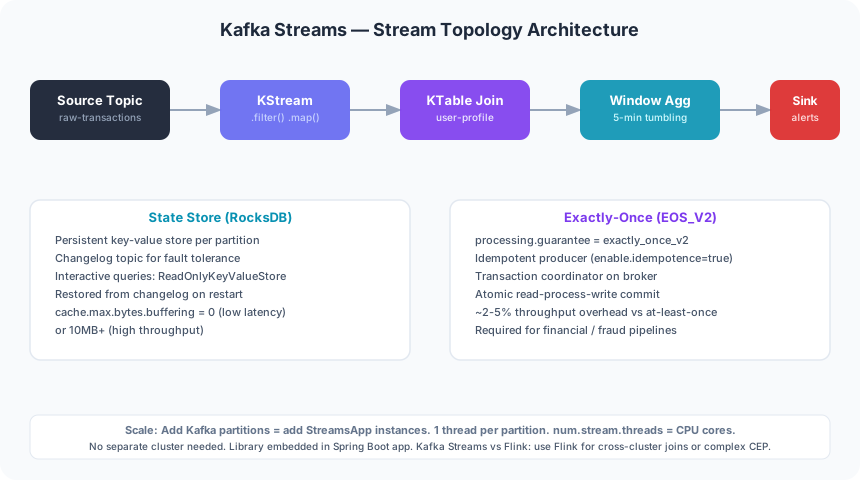
Kafka Streams persists local state in RocksDB by default — a high-performance embedded key-value store from Facebook. Each state store has a corresponding changelog topic in Kafka. On task restart or rebalance, the application replays the changelog to restore the store, then resumes from the last committed offset.
| Store Type | Persistence | Recovery | Best For |
|---|---|---|---|
| RocksDB (persistent) | Disk + changelog topic | Standby replicas or replay | Large state, production default |
| In-memory | Heap only + changelog topic | Full changelog replay | Small state, lowest latency |
Interactive Queries: Serving State via REST
// Query the local state store directly without a round-trip to Kafka
ReadOnlyKeyValueStore<String, Long> store = streams.store(
    StoreQueryParameters.fromNameAndType(
        "event-counts-store",
        QueryableStoreTypes.keyValueStore()));

Long count = store.get("userId-42");  // O(1) lookup in RocksDB

// For distributed queries (multiple app instances), use Kafka Streams
// metadata to route the request to the host owning the key:
KeyQueryMetadata metadata = streams.queryMetadataForKey(
    "event-counts-store", "userId-42", Serdes.String().serializer());
// metadata.activeHost() returns the host:port owning this key
By default Kafka Streams keeps num.standby.replicas warm shadow copies of each state store on other instances. This dramatically reduces recovery time from seconds/minutes (full replay) to near-instant warm failover.
6. Exactly-Once Semantics: How It Works
Kafka Streams supports three processing guarantees. The right choice depends on your tolerance for duplicates and your latency budget.
| Mode | Config Value | Risk | Overhead |
|---|---|---|---|
| At-most-once | at_most_once (default off) | Data loss possible | None |
| At-least-once | at_least_once (Kafka Streams default) | Duplicates possible | Minimal |
| Exactly-once v2 | exactly_once_v2 | No duplicates, no loss | ~20-30% throughput, +latency |
How EOS_V2 Works
EOS_V2 (introduced in Kafka 2.6) wraps the entire read → process → write cycle in a single Kafka transaction. The key components are:
- Idempotent producer: Each message is assigned a sequence number; the broker deduplicates retries within a producer epoch.
- Transaction coordinator: A Kafka broker role that manages atomic writes across multiple partitions and topics.
- Fenced zombie producers: Old producer epochs are fenced by the transaction coordinator, preventing zombie writers after a task rebalance.
- Atomic commit: Offsets & output records are committed together; consumers reading with
isolation.level=read_committedonly see committed data.
// Enable EOS_V2 — requires Kafka brokers >= 2.5
props.put(StreamsConfig.PROCESSING_GUARANTEE_CONFIG,
          StreamsConfig.EXACTLY_ONCE_V2);

// Recommended companion settings for EOS
props.put(StreamsConfig.COMMIT_INTERVAL_MS_CONFIG, 100);     // commit every 100ms
props.put(StreamsConfig.NUM_STREAM_THREADS_CONFIG, 4);       // parallelism
props.put(StreamsConfig.REPLICATION_FACTOR_CONFIG, 3);       // HA for internal topics
props.put("transaction.timeout.ms", "60000");                // align with broker
7. Real-World: Fraud Detection Pipeline
This complete topology implements a real-time fraud detection pipeline:
raw-transactions → filter(amount > threshold) → branch (domestic / international) → join with user-profile KTable → 5-min window aggregation → fraud-alerts topic.
✅ GOOD: Complete Fraud Detection Topology
import org.apache.kafka.common.serialization.Serdes;
import org.apache.kafka.streams.*;
import org.apache.kafka.streams.kstream.*;
import java.math.BigDecimal;
import java.time.Duration;
import java.util.Properties;

public class FraudDetectionTopology {

    private static final BigDecimal THRESHOLD = new BigDecimal("10000");

    public static Topology build(
            JsonSerde<Transaction> txnSerde,
            JsonSerde<UserProfile> profileSerde,
            JsonSerde<FraudSignal> signalSerde) {

        StreamsBuilder builder = new StreamsBuilder();

        // --- Source: raw transactions ---
        KStream<String, Transaction> raw = builder.stream(
            "raw-transactions",
            Consumed.with(Serdes.String(), txnSerde));

        // --- Step 1: Filter high-value transactions ---
        KStream<String, Transaction> highValue = raw
            .filter((userId, txn) -> txn.getAmount().compareTo(THRESHOLD) > 0);

        // --- Step 2: Branch into domestic & international ---
        Map<String, KStream<String, Transaction>> branches = highValue
            .split(Named.as("branch-"))
            .branch((k, v) -> "DOMESTIC".equals(v.getRegion()),  Named.as("domestic"))
            .branch((k, v) -> "INTL".equals(v.getRegion()),      Named.as("international"))
            .defaultBranch(Named.as("unknown"));

        KStream<String, Transaction> domestic      = branches.get("branch-domestic");
        KStream<String, Transaction> international = branches.get("branch-international");

        // --- Step 3: Enrich with user profile (KTable join) ---
        KTable<String, UserProfile> userProfiles = builder.table(
            "user-profiles",
            Consumed.with(Serdes.String(), profileSerde),
            Materialized.as("user-profile-store"));

        KStream<String, FraudSignal> enrichedDomestic = domestic
            .join(userProfiles,
                (txn, profile) -> FraudSignal.of(txn, profile, "DOMESTIC"),
                Joined.with(Serdes.String(), txnSerde, profileSerde));

        KStream<String, FraudSignal> enrichedIntl = international
            .join(userProfiles,
                (txn, profile) -> FraudSignal.of(txn, profile, "INTL"),
                Joined.with(Serdes.String(), txnSerde, profileSerde));

        // --- Step 4: Merge branches ---
        KStream<String, FraudSignal> merged = enrichedDomestic.merge(enrichedIntl);

        // --- Step 5: 5-minute tumbling window — count per user ---
        KTable<Windowed<String>, Long> windowedCounts = merged
            .groupByKey(Grouped.with(Serdes.String(), signalSerde))
            .windowedBy(TimeWindows.ofSizeWithNoGrace(Duration.ofMinutes(5)))
            .count(Materialized.as("fraud-window-count"));

        // --- Step 6: Emit when count >= 3 (velocity check) ---
        windowedCounts.toStream()
            .filter((windowedKey, count) -> count != null && count >= 3)
            .map((windowedKey, count) -> KeyValue.pair(
                windowedKey.key(),
                "ALERT: " + count + " high-value txns in 5 min"))
            .to("fraud-alerts", Produced.with(Serdes.String(), Serdes.String()));

        return builder.build();
    }

    public static void main(String[] args) {
        Properties props = new Properties();
        props.put(StreamsConfig.APPLICATION_ID_CONFIG,       "fraud-detection-v2");
        props.put(StreamsConfig.BOOTSTRAP_SERVERS_CONFIG,    "kafka:9092");
        props.put(StreamsConfig.PROCESSING_GUARANTEE_CONFIG, StreamsConfig.EXACTLY_ONCE_V2);
        props.put(StreamsConfig.NUM_STREAM_THREADS_CONFIG,   Runtime.getRuntime().availableProcessors());
        props.put(StreamsConfig.COMMIT_INTERVAL_MS_CONFIG,   100);
        props.put(StreamsConfig.NUM_STANDBY_REPLICAS_CONFIG, 1);

        JsonSerde<Transaction>  txnSerde     = new JsonSerde<>(Transaction.class);
        JsonSerde<UserProfile>  profileSerde = new JsonSerde<>(UserProfile.class);
        JsonSerde<FraudSignal>  signalSerde  = new JsonSerde<>(FraudSignal.class);

        KafkaStreams streams = new KafkaStreams(
            build(txnSerde, profileSerde, signalSerde), props);

        streams.setUncaughtExceptionHandler(ex -> {
            System.err.println("Stream error: " + ex.getMessage());
            return StreamThreadExceptionResponse.REPLACE_THREAD;
        });

        Runtime.getRuntime().addShutdownHook(new Thread(streams::close));
        streams.start();
        System.out.println("Fraud detection topology started.");
    }
}
8. Kafka Streams vs Flink vs Spark Streaming
| Dimension | Kafka Streams | Apache Flink | Spark Streaming |
|---|---|---|---|
| Deployment | Embedded in JVM app | Separate Flink cluster | Separate Spark cluster |
| Latency | Sub-second (record-at-a-time) | Sub-second (record-at-a-time) | 500 ms – 5 s (micro-batch) |
| State Backend | RocksDB + Kafka changelog | RocksDB / heap + S3/HDFS | Spark shuffle / external |
| Exactly-Once | ✅ EOS_V2 (native) | ✅ Two-phase commit | ⚠️ With idempotent sinks |
| Primary Language | Java / Kotlin / Scala | Java / Scala / Python / SQL | Scala / Java / Python / R |
| Learning Curve | Low (Java library) | High (cluster + CEP + SQL) | Medium (Spark concepts) |
| Best For | Kafka-first teams, microservices stream processing | Complex CEP, very large state, multi-source streaming | Batch + streaming unified, ML pipelines |
9. Spring Boot Integration
Spring for Apache Kafka provides first-class integration via @EnableKafkaStreams and StreamsBuilderFactoryBean. The factory bean manages the lifecycle (start, stop, health checks) and exposes the underlying KafkaStreams instance for configuration.
✅ GOOD: Spring Boot Kafka Streams Configuration
// KafkaStreamsConfig.java
import org.apache.kafka.streams.StreamsConfig;
import org.springframework.context.annotation.*;
import org.springframework.kafka.annotation.EnableKafkaStreams;
import org.springframework.kafka.annotation.KafkaStreamsDefaultConfiguration;
import org.springframework.kafka.config.*;
import java.util.HashMap;
import java.util.Map;

@Configuration
@EnableKafkaStreams                     // activates StreamsBuilderFactoryBean
public class KafkaStreamsConfig {

    @Bean(name = KafkaStreamsDefaultConfiguration.DEFAULT_STREAMS_CONFIG_BEAN_NAME)
    public KafkaStreamsConfiguration kStreamsConfig() {
        Map<String, Object> props = new HashMap<>();
        props.put(StreamsConfig.APPLICATION_ID_CONFIG,       "fraud-detection-spring");
        props.put(StreamsConfig.BOOTSTRAP_SERVERS_CONFIG,    "kafka:9092");
        props.put(StreamsConfig.PROCESSING_GUARANTEE_CONFIG, StreamsConfig.EXACTLY_ONCE_V2);
        props.put(StreamsConfig.NUM_STREAM_THREADS_CONFIG,
                  Runtime.getRuntime().availableProcessors());
        props.put(StreamsConfig.COMMIT_INTERVAL_MS_CONFIG,   100);
        props.put(StreamsConfig.CACHE_MAX_BYTES_BUFFERING_CONFIG, 10 * 1024 * 1024); // 10MB
        props.put(StreamsConfig.NUM_STANDBY_REPLICAS_CONFIG, 1);
        return new KafkaStreamsConfiguration(props);
    }

    // Register uncaught exception handler and custom state listener
    @Bean
    public StreamsBuilderFactoryBeanCustomizer kafkaStreamsCustomizer() {
        return factoryBean -> {
            factoryBean.setKafkaStreamsCustomizer(streams -> {
                streams.setUncaughtExceptionHandler(ex -> {
                    // Replace crashed thread; alert ops via PagerDuty/Slack here
                    return StreamThreadExceptionResponse.REPLACE_THREAD;
                });
                streams.setStateListener((newState, oldState) -> {
                    if (newState == KafkaStreams.State.ERROR) {
                        // Emit metric, trigger alert
                    }
                });
            });
        };
    }
}

// FraudTopologyBean.java — declare the topology as a Spring @Bean
@Configuration
public class FraudTopologyBean {

    @Bean
    public KStream<String, Transaction> fraudTopology(StreamsBuilder builder) {
        KStream<String, Transaction> transactions = builder.stream("raw-transactions");

        transactions
            .filter((k, v) -> v.getAmount().compareTo(new BigDecimal("10000")) > 0)
            .mapValues(v -> { v.setFlaggedAt(Instant.now()); return v; })
            .to("flagged-transactions");

        return transactions;
    }
}
application.yml Configuration
spring:
  kafka:
    streams:
      application-id: fraud-detection-spring
      bootstrap-servers: kafka:9092
      properties:
        processing.guarantee: exactly_once_v2
        num.stream.threads: 4
        commit.interval.ms: 100
        cache.max.bytes.buffering: 10485760   # 10 MB
        num.standby.replicas: 1
        replication.factor: 3
        default.deserialization.exception.handler: >
          org.apache.kafka.streams.errors.LogAndContinueExceptionHandler
10. Performance Tuning & Production Config
Out of the box, Kafka Streams is optimised for throughput. For latency-sensitive workloads (fraud detection, payments, real-time personalisation) you need to tune the following parameters carefully.
| Parameter | Default | Recommended (Low Latency) | Recommended (High Throughput) | Notes |
|---|---|---|---|---|
| num.stream.threads | 1 | CPU count | CPU count | One thread per partition is ideal |
| commit.interval.ms | 30,000 | 100 | 5,000 | Lower = less reprocessing on restart |
| cache.max.bytes.buffering | 10 MB | 0 (disable cache) | 10 MB+ | 0 = emit every record; higher = batch writes |
| statestore.cache.max.bytes | 10 MB | 64 MB | 256 MB | RocksDB block cache; size to available RAM |
| num.standby.replicas | 0 | 1 | 1 | Warm shadow stores reduce failover time |
| poll.ms | 100 | 5–10 | 100 | Lower poll.ms reduces consumer lag |
Scaling Strategy
Kafka Streams scales by adding instances. The rule is: max parallelism = number of input topic partitions. If your topic has 32 partitions, run up to 32 application instances (or a single instance with 32 threads). Beyond that, extra instances remain idle. Pre-provision partitions generously — you cannot reduce them later without data migration.
11. Common Mistakes & Anti-Patterns
-
❌ Processing in a single partition (no key-based routing):
All stateful operations require co-partitioning. If you join a KStream and a KTable that are not partitioned by the same key and partition count, the join will silently produce wrong results. Always
repartition()before a join if keys differ. -
❌ Ignoring state store cleanup after topology changes:
When you rename a state store or change its schema, the old RocksDB files on disk are incompatible. Run
KafkaStreams.cleanUp()before restarting, or configure a newAPPLICATION_ID_CONFIGand reset consumer offsets. - ❌ Using GlobalKTable for large datasets: A GlobalKTable replicates the full topic to every instance. For a 1 GB reference table with 20 instances, you replicate 20 GB total. Use a regular partitioned KTable joined with co-partitioned keys instead.
-
❌ Not setting an uncaught exception handler:
By default, an uncaught exception kills the stream thread silently. The application keeps running but stops processing its assigned partitions, leading to consumer lag that looks like a Kafka broker problem. Always register
setUncaughtExceptionHandler. - ❌ Starting with exactly-once before profiling latency cost: EOS_V2 adds 20–30% latency overhead due to Kafka transactions. Profile your topology with at-least-once first; enable EOS_V2 only for topologies where duplicates are genuinely unacceptable (financial transactions, billing events).
12. Interview Questions & Insights
Q1: What is the difference between KStream and KTable?
A KStream is an unbounded sequence of independent key-value records — every record is an event (append-only). A KTable is a changelog stream where each new record for a given key replaces the previous value, materialising the latest state for each key. Think of KStream as a ledger and KTable as a lookup table.
Q2: How does Kafka Streams achieve fault tolerance?
State stores are backed by Kafka changelog topics. If an instance crashes, the task is reassigned to another instance which replays the changelog to rebuild the store. With num.standby.replicas=1, a shadow copy of the store is maintained on a second instance, enabling near-instant failover without full replay.
Q3: What is a state store in Kafka Streams?
A state store is a local key-value database (RocksDB by default) that holds intermediate computation results such as aggregation counts, join buffers, and window accumulations. It is co-located with the stream task processing the same partitions, enabling O(1) local lookups without network round-trips. State is automatically backed up to Kafka changelog topics.
Q4: Explain the exactly-once guarantee in Kafka Streams.
With processing.guarantee=exactly_once_v2, Kafka Streams wraps each processing cycle in a Kafka transaction. The consumer offset commit, state store changelog writes, and output topic writes are all atomically committed together. Idempotent producers prevent duplicate writes on retry, and the transaction coordinator fences zombie producers after rebalances. Consumers reading output topics must set isolation.level=read_committed to only see committed records.
Q5: How do you scale a Kafka Streams application?
Scale by adding application instances (horizontal) or increasing num.stream.threads per instance (vertical). The maximum effective parallelism equals the number of input topic partitions. Kafka automatically rebalances tasks across instances during a group rebalance. For state-heavy topologies, enable standby replicas and use sticky assignors to minimise state migration on rebalance.
13. Conclusion & Production Checklist
Kafka Streams is the right tool for any team already running Kafka that needs low-latency, stateful stream processing without the operational complexity of a separate cluster. The library-embedded model, first-class Spring Boot integration, and battle-tested exactly-once semantics make it a compelling default choice for fraud detection, real-time analytics, event-driven microservices, and data pipeline enrichment.
✅ Production Readiness Checklist
- Set
processing.guarantee=exactly_once_v2for financial or billing topologies - Configure
num.stream.threadsto match CPU count (not default 1) - Set
num.standby.replicas=1to enable warm failover for stateful apps - Register
setUncaughtExceptionHandlerwithREPLACE_THREADstrategy - Add a
StateListenerto emit metrics and alerts on ERROR state - Tune
commit.interval.ms=100for low-latency; higher for throughput-first - Enable co-partitioning validation before deploying joins
- Configure
replication.factor=3for all internal changelog topics - Expose state stores via interactive queries REST endpoints for real-time dashboards
- Run
KafkaStreams.cleanUp()after topology structural changes before restart
Frequently Asked Questions
What is the difference between Kafka Streams and Kafka Consumer?
A Kafka Consumer is a low-level API that simply reads bytes from partitions. Kafka Streams builds on top of it to provide a full stream processing DSL with KStream, KTable, aggregations, windowing, fault-tolerant state stores, exactly-once semantics, and automatic partition management — without writing any consumer loop boilerplate.
Does Kafka Streams require a separate cluster?
No. Kafka Streams is a Java library that runs inside your application process. It uses your existing Kafka brokers for storage, changelog topics, and coordination. There is no additional infrastructure to provision, configure, or operate.
How does Kafka Streams compare to Apache Flink for real-time analytics?
Both offer sub-second latency and exactly-once semantics. Kafka Streams is simpler (no cluster, pure Java library, zero new ops tooling) and is the natural choice for Kafka-first teams. Apache Flink offers richer event-time semantics, a SQL layer, and better support for very large state and complex CEP patterns. Choose Flink when your team is dedicated to stream processing engineering and needs advanced features beyond what Kafka Streams provides.
What is a KTable and how is it different from a KStream?
A KStream is an append-only log of events — every record is independent. A KTable maintains only the latest value per key; when a new record arrives for an existing key, it replaces the old value. KTable is used to represent mutable state: user profiles, account balances, configuration. KStream is used for immutable events: payments, clicks, logs.
Can Kafka Streams guarantee exactly-once processing?
Yes. Set processing.guarantee=exactly_once_v2 (requires Kafka brokers >= 2.5). This wraps the read–process–write cycle in a Kafka transaction using idempotent producers and a transaction coordinator. The overhead is approximately 20–30% throughput reduction and slightly higher latency — justified for financial transactions, billing, and audit events but often unnecessary for analytics pipelines where duplicates can be tolerated or deduplicated downstream.
Tags
Leave a Comment
Related Posts
RabbitMQ vs Kafka for Java Microservices
Messaging comparison guide for Java teams
MicroservicesKafka Schema Registry in Production
Avro, Protobuf & schema evolution guide
MicroservicesEvent-Driven Architecture Patterns
Designing reactive systems at scale
MicroservicesAWS EventBridge, SQS & SNS for Microservices
Event-driven AWS architecture deep dive

Md Sanwar Hossain
Senior Software Engineer • Java & Spring Boot • Kafka • Kubernetes • AWS
Building distributed systems and stream-processing pipelines for high-traffic production environments. Passionate about clean architecture, event-driven design, and making complex systems approachable for every engineer.
Last updated: April 11, 2026
Back to Blog