API Rate Limiting in Spring Boot: Token Bucket, Sliding Window, and Distributed Throttling at Scale
A Spring Boot API powering a popular developer tool was scraped by a single malicious client firing 1,400 requests per second for 11 minutes. Three pods, 512 MB heap each, all in GC hell within 4 minutes. Legitimate users locked out for 23 minutes. No rate limiting. One bad actor, complete availability disaster. This post covers every algorithm, every implementation pattern, and every production pitfall — so you never face that incident.
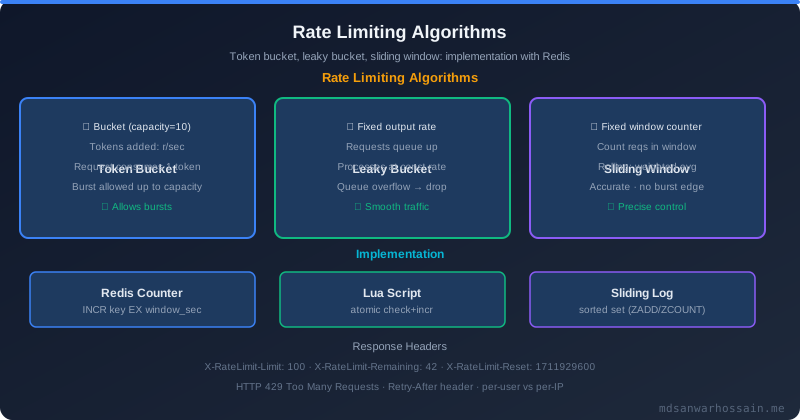
Table of Contents
- The Real Problem: Unprotected APIs Are Sitting Ducks
- Rate Limiting Algorithms: The Theory
- In-Memory Rate Limiting with Resilience4j
- Distributed Rate Limiting with Redis
- Spring Boot Filter for Rate Limiting
- Rate Limiting with Spring Cloud Gateway
- Failure Scenarios and Bypass Prevention
- Production Best Practices
- When NOT to Over-Engineer Rate Limiting
- Key Takeaways
- Conclusion
1. The Real Problem: Unprotected APIs Are Sitting Ducks
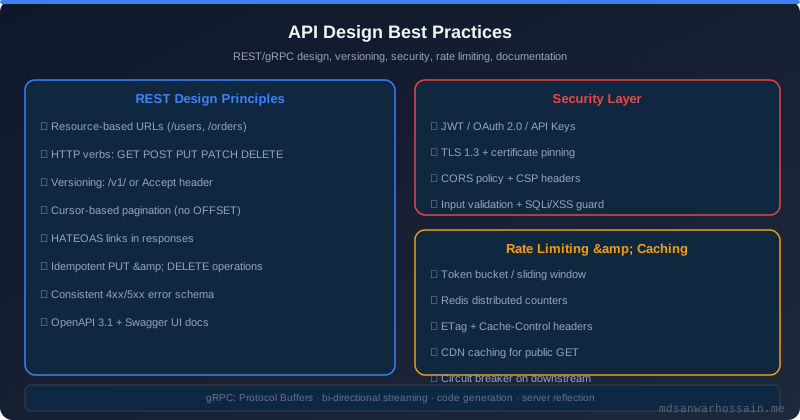
The scraping incident described above is not hypothetical. A single IP address fired 1,400 requests per second against a Spring Boot search endpoint for 11 consecutive minutes. The service had three Kubernetes pods, each with a 512 MB JVM heap. Within 4 minutes, heap utilization hit 98% on all three pods. Stop-the-world GC pauses stretched to 40 seconds. P99 latency went from 180 ms to 40 seconds. Every legitimate developer using the API experienced a complete outage for 23 minutes while the team frantically scaled out pods — which only diluted the problem rather than stopping the attacker. The fix took one engineer 45 minutes to deploy a OncePerRequestFilter backed by Redis. The incident could have been prevented from day one.
All your capacity planning, autoscaling policies, and headroom calculations become meaningless without rate limiting. API abuse takes several forms: web scraping that consumes search or content delivery budget, brute-force credential attacks against login or password-reset endpoints, DDoS amplification using your API as a reflector, and cost amplification when expensive LLM inference calls are invoked thousands of times by a single client. Each category requires a slightly different limiting strategy, but all of them share the same foundational fix: a hard per-client ceiling enforced before your business logic even runs.
You may already have AWS WAF rules or API Gateway throttling in place. That is necessary but not sufficient. AWS WAF operates on L7 but has coarse-grained controls and significant per-rule cost. API Gateway throttling is per-account, not per-client-IP or per-user. Neither tool gives you the fine-grained, business-logic-aware limiting that your application needs — for example, allowing 1,000 requests per minute to a cheap health-check endpoint while limiting an expensive vector search endpoint to 10 per minute per user. Application-level rate limiting fills this gap and adds context your infrastructure layer cannot see.
2. Rate Limiting Algorithms: The Theory
Choosing the right algorithm is the first decision. Each algorithm makes different trade-offs between burst tolerance, memory cost, and accuracy. Here is a practical comparison:
| Algorithm | How it Works | Burst Handling | Memory | Best For |
|---|---|---|---|---|
| Token Bucket | Refills N tokens/sec, reject when empty | ✓ Allows bursts | Low | Most APIs |
| Leaky Bucket | Process at fixed rate, queue overflow | ✗ Smooths bursts | Medium | Video streaming |
| Fixed Window Counter | Count in time windows, reset at boundary | Boundary spike | Very Low | Simple quotas |
| Sliding Window Log | Log each request timestamp, count last N | ✓ Accurate | High | Financial APIs |
| Sliding Window Counter | Weighted blend of current+previous window | ✓ Good balance | Low | Production default |
The Token Bucket is the right default for most REST APIs because it accommodates natural bursty traffic — a user opening a dashboard that fires five parallel requests — while still enforcing a hard ceiling over time. The Sliding Window Counter is the production default for high-traffic APIs where you need smooth enforcement without the high memory cost of the Sliding Window Log. The Fixed Window Counter is deceptively dangerous: a client can fire double the limit by sending all requests at the end of one window and the beginning of the next. Never use it for security-sensitive endpoints.
3. In-Memory Rate Limiting with Resilience4j
Resilience4j ships a RateLimiter module that implements an atomic semaphore-based limiter using an internal refresh thread. It is dead simple to configure and integrates cleanly with Spring Boot via the resilience4j-spring-boot3 starter. The limiter operates entirely in-process with no external dependencies:
@Configuration
public class RateLimiterConfig {
    @Bean
    public RateLimiterRegistry rateLimiterRegistry() {
        RateLimiterConfig config = RateLimiterConfig.custom()
            .limitForPeriod(100)                         // 100 requests
            .limitRefreshPeriod(Duration.ofSeconds(1))   // per second
            .timeoutDuration(Duration.ofMillis(0))       // fail fast
            .build();
        return RateLimiterRegistry.of(config);
    }
}

// In controller or service
@GetMapping("/api/search")
public ResponseEntity<SearchResult> search(@RequestParam String query) {
    return Decorators.ofSupplier(() -> searchService.search(query))
        .withRateLimiter(rateLimiter)
        .decorate()
        .get();  // throws RequestNotPermitted if limit exceeded
}
Catch RequestNotPermitted in a @ControllerAdvice and return HTTP 429 with a Retry-After header. The configuration above allows up to 100 requests per second with zero wait time — if the permit is not immediately available, the call fails fast rather than queuing. This avoids the latency amplification you get when a queued backlog of rejected requests suddenly processes in a burst after the window resets.
4. Distributed Rate Limiting with Redis
Redis is the production standard for distributed rate limiting for three reasons: it is single-threaded (no concurrency bugs), it supports atomic Lua script execution (increment and check in one round-trip), and its INCR and ZADD operations are O(1). A Lua script evaluated atomically on Redis guarantees that no two pods can race on the same counter:
@Component
public class RedisRateLimiter {
    private final StringRedisTemplate redis;
    private static final String RATE_LIMIT_SCRIPT = """
            local key = KEYS[1]
            local window = tonumber(ARGV[1])
            local limit = tonumber(ARGV[2])
            local now = tonumber(ARGV[3])

            -- Sliding window: remove timestamps older than window
            redis.call('ZREMRANGEBYSCORE', key, 0, now - window)
            local count = redis.call('ZCARD', key)

            if count < limit then
                redis.call('ZADD', key, now, now)
                redis.call('EXPIRE', key, window)
                return 1  -- allowed
            else
                return 0  -- rejected
            end
            """;

    public boolean isAllowed(String identifier, int limitPerSecond) {
        long now = System.currentTimeMillis();
        List<Object> result = redis.execute(
            RedisScript.of(RATE_LIMIT_SCRIPT, Long.class),
            List.of("rate:" + identifier),
            String.valueOf(1000), String.valueOf(limitPerSecond), String.valueOf(now)
        );
        return Long.valueOf(1).equals(result);
    }
}
This implementation uses the Sliding Window Log algorithm. Each request's timestamp is stored as a sorted set member with score equal to the timestamp in milliseconds. The Lua script atomically removes timestamps older than the window, checks the remaining count, and either adds the new timestamp (allowing the request) or returns 0 (rejecting it). The entire operation is atomic — no race condition between the ZCARD check and the ZADD write.
For very high-throughput scenarios where the per-request Redis round-trip is too expensive, switch to a Sliding Window Counter approach using two fixed-window counters weighted by elapsed time. This uses a simple INCR + EXPIRE pair instead of a sorted set, reducing memory usage from O(requests in window) to O(1) per client.
5. Spring Boot Filter for Rate Limiting
The cleanest integration point in a Spring Boot application is a OncePerRequestFilter. It intercepts every request before it reaches any controller, extracts the client identifier (API key, IP address, or user ID), checks the Redis rate limiter, and either allows the request through or returns a 429 response with the appropriate headers:
@Component
@Order(1)
public class RateLimitFilter extends OncePerRequestFilter {
    private final RedisRateLimiter rateLimiter;
    private static final int LIMIT_PER_SECOND = 100;

    @Override
    protected void doFilterInternal(HttpServletRequest request,
                                    HttpServletResponse response,
                                    FilterChain chain)
            throws ServletException, IOException {

        String identifier = resolveIdentifier(request);
        boolean allowed = rateLimiter.isAllowed(identifier, LIMIT_PER_SECOND);

        // Always set informational headers
        response.setHeader("X-RateLimit-Limit", String.valueOf(LIMIT_PER_SECOND));
        response.setHeader("X-RateLimit-Identifier", identifier);

        if (!allowed) {
            response.setStatus(429);
            response.setHeader("Retry-After", "1");
            response.setHeader("X-RateLimit-Remaining", "0");
            response.setContentType("application/json");
            response.getWriter().write(
                "{\"error\":\"Too Many Requests\",\"retryAfter\":1}"
            );
            return;
        }
        chain.doFilter(request, response);
    }

    private String resolveIdentifier(HttpServletRequest request) {
        // Prefer API key over IP (more reliable for NAT'd clients)
        String apiKey = request.getHeader("X-API-Key");
        if (apiKey != null && !apiKey.isBlank()) {
            return "apikey:" + apiKey;
        }
        // Extract real IP from trusted proxy (see bypass prevention)
        String forwarded = request.getHeader("X-Forwarded-For");
        if (forwarded != null) {
            return "ip:" + forwarded.split(",")[0].trim();
        }
        return "ip:" + request.getRemoteAddr();
    }
}
The filter returns a proper JSON error body, sets Retry-After: 1 so well-behaved clients know when to retry, and always populates the X-RateLimit-Limit header so clients can self-govern. For endpoints with different limits, inject a Map<String, Integer> of path-to-limit configuration and look up the limit per endpoint pattern before calling the rate limiter.
6. Rate Limiting with Spring Cloud Gateway
If your architecture uses Spring Cloud Gateway as the API gateway, you get Redis-backed rate limiting out of the box via the RequestRateLimiter GatewayFilter. It uses the Token Bucket algorithm implemented in Lua scripts against Redis — the same Redis round-trip as our custom implementation, but with zero application code. Configure it in application.yml:
spring:
  cloud:
    gateway:
      routes:
        - id: search-service
          uri: lb://search-service
          predicates:
            - Path=/api/search/**
          filters:
            - name: RequestRateLimiter
              args:
                redis-rate-limiter.replenishRate: 100   # tokens/sec refill rate
                redis-rate-limiter.burstCapacity: 200   # max burst size (bucket capacity)
                redis-rate-limiter.requestedTokens: 1   # tokens consumed per request
                key-resolver: "#{@apiKeyResolver}"      # Spring bean for key extraction

        - id: expensive-search
          uri: lb://search-service
          predicates:
            - Path=/api/vector-search/**
          filters:
            - name: RequestRateLimiter
              args:
                redis-rate-limiter.replenishRate: 10
                redis-rate-limiter.burstCapacity: 20
                redis-rate-limiter.requestedTokens: 1
                key-resolver: "#{@userIdResolver}"
@Bean
public KeyResolver apiKeyResolver() {
return exchange -> Mono.justOrEmpty(
exchange.getRequest().getHeaders().getFirst("X-API-Key")
).defaultIfEmpty("anonymous");
}
@Bean
public KeyResolver userIdResolver() {
return exchange -> exchange.getPrincipal()
.map(Principal::getName)
.defaultIfEmpty("anonymous");
}The replenishRate is the steady-state limit (tokens refilled per second). The burstCapacity is the bucket size — how many tokens a client can accumulate during a quiet period and then spend in a burst. Setting burstCapacity to 2 × replenishRate is a reasonable starting point that permits modest bursts while still bounding peak throughput.
7. Failure Scenarios and Bypass Prevention
X-Forwarded-For spoofing. The most common bypass: an attacker sets an arbitrary X-Forwarded-For header to rotate through fake IPs, making every request appear to come from a different client. The fix is to only trust headers appended by your trusted proxy hops. If you have one layer of load balancer, take the second-to-last IP in the X-Forwarded-For chain, not the first — or use RemoteAddr when the request arrives directly at your gateway without any trusted proxy in front.
// Correct IP extraction when behind one trusted proxy
private String extractRealIp(HttpServletRequest request) {
    String forwarded = request.getHeader("X-Forwarded-For");
    if (forwarded == null) {
        return request.getRemoteAddr();
    }
    String[] ips = forwarded.split(",");
    // Last IP is appended by your trusted load balancer
    // Client-supplied values are everything before that
    // For 1 trusted proxy hop: take ips[ips.length - 1] as the real client IP
    return ips[ips.length - 1].trim();
}
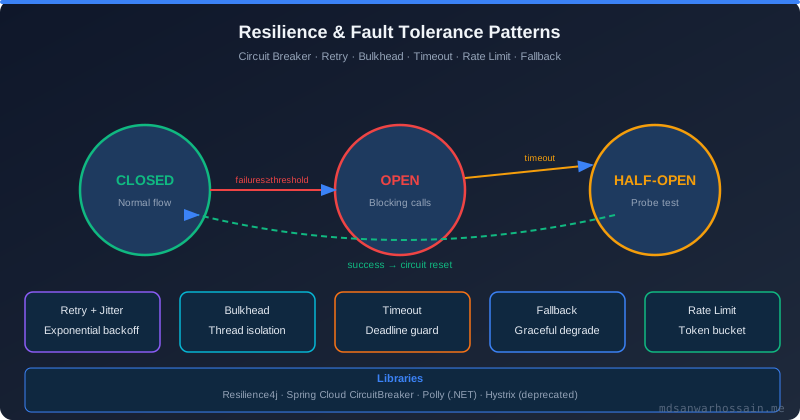
Redis failover. If Redis becomes unavailable, your rate limiter will throw exceptions. The worst response is to block all traffic until Redis recovers — you would cause a self-inflicted outage. Instead, wrap the Redis call in a try-catch and allow-by-default on Redis failure. Combine this with a Resilience4j CircuitBreaker that opens after 5 consecutive Redis timeouts, falling back to an in-memory limiter for the duration of the Redis outage:
Rate limit key design. Keying only by IP is the weakest strategy — corporate users behind NAT share one IP, legitimate traffic gets throttled while botnets rotate IPs freely. Key by API key when one is present (strongest), fall back to user ID from the JWT (good), and only use IP as a last resort for unauthenticated endpoints. For authenticated endpoints, a composite key of userId:endpoint lets you apply per-user, per-endpoint limits simultaneously.
Thundering herd at window boundaries. Fixed-window counters reset at exact second or minute boundaries. If 10,000 clients all hit their limit at second 59 and spam the endpoint from second 60 onward, you get a coordinated burst that your rate limiter technically allows. Mitigate by using a sliding window algorithm (no hard boundary), or by adding a small random jitter to window start times per client identifier when using fixed windows.
8. Production Best Practices
Tiered rate limits. Never apply a one-size-fits-all limit. Free-tier API keys get 60 requests per minute, paid-tier gets 1,000 per minute, and internal service-to-service calls bypass rate limiting entirely (use network policy or a trusted header instead). Store the tier in your API key metadata and look it up at filter time — Redis lookup adds less than 1 ms at P99.
Per-endpoint differentiation. A /health endpoint can tolerate 1,000 requests per minute per IP without any risk. A /api/vector-search endpoint that costs $0.01 per call in LLM inference should be limited to 10 per minute per user. A login endpoint should be limited to 5 per minute per IP to prevent brute-force attacks. Encode these limits in a configuration map and load them at startup — hot-reloading from a feature flag system is even better for tuning without redeploys.
Return useful headers. A rate-limited client that cannot understand why its requests are failing will retry aggressively, amplifying the problem. Always include:
X-RateLimit-Limit: the ceiling for this client/endpoint combinationX-RateLimit-Remaining: permits left in the current windowX-RateLimit-Reset: Unix timestamp when the window resets (for fixed windows)Retry-After: seconds until the client can safely retry (RFC 7231 standard)
Monitor 429 rates in Grafana. Instrument your filter to emit a rate_limit_rejected_total counter metric tagged by endpoint and identifier type (IP vs API key). Track the ratio of 429s to total requests per endpoint. A sudden spike in 429s from a single IP at 3 AM is an attack pattern; a gradual rise across all users is a sign your limits are too tight for your user base's growth. Alert on both patterns.
9. When NOT to Over-Engineer Rate Limiting
Internal service-to-service calls. Service A calling Service B over an internal Kubernetes network does not need Redis-backed rate limiting. Use Resilience4j's in-memory RateLimiter or BulkheadLimiter to prevent a single slow consumer from overwhelming a shared service. Redis round-trips add latency to every internal call for no additional benefit — both services are in the same trust domain and the scaling relationship is already bounded by your infrastructure topology.
Low-traffic APIs under 100 RPS. If your API receives fewer than 100 requests per second across all pods combined, in-memory rate limiting with Resilience4j is entirely sufficient. Redis adds an operational dependency, a round-trip latency cost, and a failure mode (Redis going down) that simply is not worth it for a service that could not be meaningfully abused at that traffic level. Size your solution to your actual threat model, not to what Netflix might need.
When API Gateway already handles it natively. AWS API Gateway, Kong, and Apigee all have production-grade rate limiting with persistent counters. If you are already operating one of these as your edge gateway and it is configured with per-user or per-key limits, adding a second Redis rate limiter inside your Spring Boot service doubles the latency cost and the operational complexity without doubling the protection. Audit what your gateway already provides before building your own layer.
"Rate limiting is not about being hostile to your users. It is about being fair to all of them. One greedy client should never be able to degrade the experience of a thousand well-behaved ones."
— Production Engineering Principle
Key Takeaways
- Rate limiting is not optional in production — a single unthrottled client can saturate your JVM heap and cause a full availability outage for all legitimate users within minutes.
- Token Bucket is the right default for most REST APIs — it allows natural bursty traffic while enforcing hard ceilings; use Sliding Window Counter for high-accuracy enforcement with low memory overhead.
- In-memory Resilience4j rate limiting does not work in multi-pod deployments — any horizontally scaled service requires Redis-backed distributed limiting with atomic Lua scripts to enforce a single shared counter.
- Rate limit bypass via X-Forwarded-For spoofing is trivial to execute and trivial to fix — always extract the real client IP from the trusted proxy hop, not the client-supplied header position.
- Fail open on Redis unavailability, monitor 429 rates per endpoint in Grafana, and use tiered limits per API key tier — these three practices separate production-grade rate limiting from a basic proof of concept.
Conclusion
API rate limiting in Spring Boot is not a single technology decision — it is a layered strategy. Start with the right algorithm for your traffic shape: Token Bucket for general APIs, Sliding Window for financial accuracy, Fixed Window only for non-critical quotas. Layer your implementation by deployment topology: Resilience4j for single-node services or internal calls, Redis-backed limiting for any multi-pod public API. Close bypass vectors by extracting real client IPs from trusted proxy hops and keying on API keys or user IDs whenever possible. And fail gracefully when Redis is unavailable — your rate limiter should protect availability, not threaten it.
Rate limiting is closely related to other resilience patterns in distributed systems. If a downstream service starts responding slowly under load, your rate limiter alone will not prevent thread-pool exhaustion — pair it with a Circuit Breaker that opens and sheds load before your connection pools saturate. And if you are protecting a shared resource like a cache or database from stampede after a TTL expiry, the complementary pattern is Cache Stampede Prevention. Together, these three patterns form the core defensive layer every production microservice should have in place before going to market.
Read Full Blog Here
Explore the complete guide including full Resilience4j configuration, production Redis Lua scripts, Spring Cloud Gateway setup, and bypass prevention strategies for API rate limiting at scale.
Explore Circuit Breaker PatternsLeave a Comment
Related Posts

Software Engineer · Java · Spring Boot · Microservices