Bulkhead Pattern in Spring Boot: Thread Pool Isolation to Prevent Cascade Failures
One slow downstream service can bring your entire microservices architecture to its knees — not through a dramatic crash, but through the silent exhaustion of a shared thread pool. The Bulkhead pattern, borrowed from naval architecture, solves this by isolating each external dependency behind its own resource boundary. In this guide we implement Thread Pool and Semaphore Bulkheads in Spring Boot using Resilience4j, walk through the math of thread pool sizing with Little's Law, and explore the real failure scenarios that make proper bulkhead configuration the difference between a degraded feature and a complete production outage.
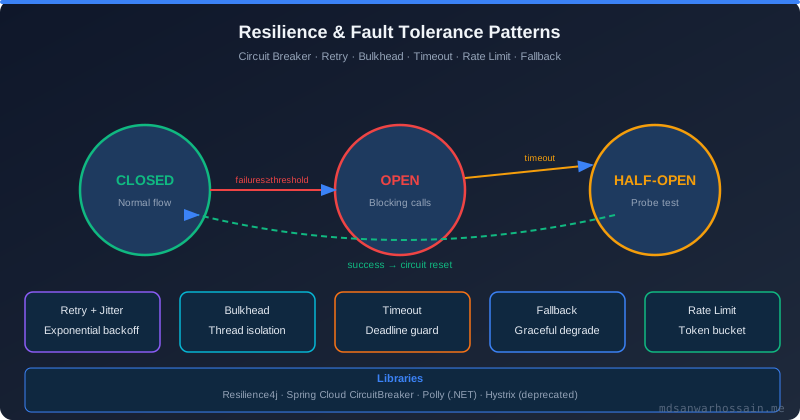
Table of Contents
1. The Cascade Failure That Took Down Production
Picture a user-service that orchestrates five downstream calls: payment-gateway for charging, inventory-service to check stock, notification-service for emails, recommendation-engine for personalised product lists, and audit-service for compliance logging. On a normal Tuesday afternoon, the payment gateway operator pushes a configuration change that introduces a 4-second response latency on their end. Nothing fails immediately — the payment calls succeed, just slowly.
Within 90 seconds, every one of your Tomcat worker threads is occupied waiting for a payment-gateway response. New requests arrive — most are simply trying to view a product page, which requires no payment call whatsoever. But there are no free threads to serve them. Tomcat's request queue fills to its limit and the server starts rejecting connections with HTTP 503. From the user's perspective, the entire site is down. The payment gateway's slowness has killed the product catalog, user authentication, recommendation API, and everything else — services that had nothing to do with payments. This is cascade failure caused by a shared thread pool, and it is one of the most common failure modes in microservices architectures.
The ship bulkhead analogy makes the solution immediately intuitive. Modern cargo vessels are divided into watertight compartments. If the hull is breached in one compartment, flooding is contained to that section — the ship remains seaworthy. The Bulkhead pattern applies the same principle to software: give each downstream dependency its own isolated resource pool so that a failure or slowdown in one service cannot starve resources from the rest of the system.
2. Understanding Thread Pool Exhaustion
Spring Boot's embedded Tomcat server defaults to a maximum of 200 worker threads (server.tomcat.threads.max=200). Each inbound HTTP request occupies one thread for its entire duration — from the moment the request is accepted until the response is fully written. If that request calls a downstream service and waits for the response synchronously, the thread is blocked for the entire wait duration.
The math is unforgiving. With 200 threads and a downstream service averaging 2 seconds per response, Little's Law tells us the maximum throughput for requests hitting that dependency is 100 concurrent operations. During normal load at 500ms average latency, those same 200 threads can handle 400 concurrent requests. When the payment gateway degrades from 500ms to 4000ms, throughput for payment calls drops from 400/s to 50/s — and now those threads are occupied 8x longer, consuming the thread pool 8x faster.
The insidious part is the starvation of unrelated services. Your recommendation-engine calls are fast (50ms), your inventory checks are fast (80ms), your product-catalog reads are fast (30ms). None of these calls are slow. But they cannot be served because the threads are all blocked waiting for the payment gateway. A single misbehaving dependency can render four perfectly healthy services completely unreachable. Bulkheads are the architectural answer: cap the maximum threads any single dependency can consume, so that misbehavior of one service can never starve all the others.
3. Bulkhead Pattern Architecture
Resilience4j implements two distinct bulkhead variants, each with different resource isolation characteristics. The Thread Pool Bulkhead creates a dedicated ExecutorService for each protected dependency. When your service calls the payment gateway through a Thread Pool Bulkhead, the call runs in a separate thread pool that has no connection to Tomcat's request threads. Even if every thread in the payment-gateway pool is exhausted, the Tomcat threads are completely unaffected — they receive a BulkheadFullException immediately rather than blocking indefinitely.
The Semaphore Bulkhead does not use separate threads. Instead, it maintains a counting semaphore that limits the number of concurrent calls to a dependency. If the limit is reached, new callers receive a rejection immediately. This is lightweight and has no overhead from context switching between thread pools, but the Tomcat threads are still the ones doing the waiting — you are just capping how many of them can be waiting on this particular service at once.
In production, it is common to combine bulkheads with circuit breakers. The bulkhead limits concurrent load to a dependency; the circuit breaker detects sustained failure and opens to prevent calls altogether. Together they provide both resource isolation (bulkhead) and failure isolation (circuit breaker), which are complementary concerns. The bulkhead fires immediately when capacity is reached; the circuit breaker fires after a failure rate threshold is exceeded over a time window.
Architecture with isolated thread pools per downstream service:

  [Tomcat Worker Threads - 200 max]
        |
        v
  [User Service Request Handler]
        |
   +----+------+--------+--------+--------+
   |           |        |        |        |
   v           v        v        v        v
[Payment    [Inventory] [Notif.] [Reco.] [Audit]
 Bulkhead]   Bulkhead]  BH]      BH]     BH]
   |           |        |        |        |
[Pool:10T]  [Pool:8T] [Pool:5T] [Pool:6T][Pool:4T]
   |           |        |        |        |
   v           v        v        v        v
[payment-gw] [inv-svc] [notif]  [reco]  [audit]

If payment-gw is slow:
  - All 10 payment-pool threads get occupied
  - New payment requests get BulkheadFullException IMMEDIATELY
  - Inventory/Notif/Reco/Audit pools are completely unaffected
  - Tomcat threads are freed to serve other requests
4. Implementation with Resilience4j
Add the Resilience4j Spring Boot starter to your pom.xml:
<dependency>
    <groupId>io.github.resilience4j</groupId>
    <artifactId>resilience4j-spring-boot3</artifactId>
    <version>2.2.0</version>
</dependency>
<dependency>
    <groupId>org.springframework.boot</groupId>
    <artifactId>spring-boot-starter-aop</artifactId>
</dependency>
<dependency>
    <groupId>org.springframework.boot</groupId>
    <artifactId>spring-boot-starter-actuator</artifactId>
</dependency>
Configure separate bulkheads for each downstream dependency in application.yml:
resilience4j:
  thread-pool-bulkhead:
    instances:
      payment-service:
        maxThreadPoolSize: 10
        coreThreadPoolSize: 5
        queueCapacity: 5
        keepAliveDuration: 20ms
        writableStackTraceEnabled: false

      inventory-service:
        maxThreadPoolSize: 8
        coreThreadPoolSize: 4
        queueCapacity: 10
        keepAliveDuration: 20ms

      notification-service:
        maxThreadPoolSize: 5
        coreThreadPoolSize: 3
        queueCapacity: 20    # notifications can queue longer
        keepAliveDuration: 20ms

  bulkhead:  # semaphore variant
    instances:
      recommendation-engine:
        maxConcurrentCalls: 15
        maxWaitDuration: 50ms

      audit-service:
        maxConcurrentCalls: 10
        maxWaitDuration: 0ms  # fail immediately if at capacity

management:
  endpoints:
    web:
      exposure:
        include: health,metrics,bulkheads
  health:
    bulkheads:
      enabled: true
Apply the bulkhead to your service methods using annotations. Note that Thread Pool Bulkhead requires the method to return CompletableFuture since it executes on a separate thread pool:
@Service
@Slf4j
public class UserOrderService {

    private final PaymentClient paymentClient;
    private final InventoryClient inventoryClient;
    private final NotificationClient notificationClient;

    // Thread Pool Bulkhead — runs in dedicated executor, returns CompletableFuture
    @Bulkhead(name = "payment-service",
              type = Bulkhead.Type.THREADPOOL,
              fallbackMethod = "paymentFallback")
    public CompletableFuture<PaymentResult> processPayment(OrderRequest order) {
        log.info("Processing payment for order {} on thread {}",
                 order.getId(), Thread.currentThread().getName());
        return CompletableFuture.completedFuture(paymentClient.charge(order));
    }

    // Fallback: return a deferred-payment result so order still proceeds
    public CompletableFuture<PaymentResult> paymentFallback(
            OrderRequest order, BulkheadFullException ex) {
        log.warn("Payment bulkhead full for order {}. Queuing for async retry.", order.getId());
        return CompletableFuture.completedFuture(
            PaymentResult.deferred(order.getId(), "QUEUED_FOR_RETRY")
        );
    }

    // Semaphore Bulkhead — synchronous, limits concurrent callers
    @Bulkhead(name = "recommendation-engine",
              type = Bulkhead.Type.SEMAPHORE,
              fallbackMethod = "recommendationFallback")
    public List<Product> getRecommendations(String userId) {
        return notificationClient.fetchRecommendations(userId);
    }

    public List<Product> recommendationFallback(String userId, BulkheadFullException ex) {
        log.warn("Recommendation engine at capacity for user {}. Returning cached.", userId);
        return productCache.getTopSellers(); // graceful degradation
    }
}
For more control — particularly when you need to react to metrics or apply bulkheads conditionally — use the BulkheadRegistry programmatically:
@Service
@RequiredArgsConstructor
public class InventoryService {

    private final InventoryClient inventoryClient;
    private final ThreadPoolBulkheadRegistry bulkheadRegistry;
    private final MeterRegistry meterRegistry;

    @PostConstruct
    public void setupMetrics() {
        ThreadPoolBulkhead bulkhead = bulkheadRegistry.bulkhead("inventory-service");

        // Expose bulkhead metrics to Micrometer / Prometheus
        TaggedThreadPoolBulkheadMetrics
            .ofThreadPoolBulkheadRegistry(bulkheadRegistry)
            .bindTo(meterRegistry);

        // Log when bulkhead rejects calls (for capacity tuning)
        bulkhead.getEventPublisher()
            .onCallRejected(event ->
                log.warn("Inventory bulkhead rejected call. " +
                         "Active threads: {}, Queue depth: {}",
                         bulkhead.getMetrics().getActiveThreadCount(),
                         bulkhead.getMetrics().getQueueDepth())
            );
    }

    public CompletableFuture<StockLevel> checkStock(String productId) {
        ThreadPoolBulkhead bulkhead = bulkheadRegistry.bulkhead("inventory-service");

        return bulkhead.executeSupplier(() -> inventoryClient.getStock(productId))
            .exceptionally(ex -> {
                if (ex.getCause() instanceof BulkheadFullException) {
                    log.error("Inventory bulkhead exhausted for product {}", productId);
                    return StockLevel.unknown(productId);
                }
                throw new RuntimeException(ex);
            });
    }
}
5. Thread Pool Bulkhead vs Semaphore Bulkhead
The choice between Thread Pool and Semaphore Bulkhead is not stylistic — it reflects fundamentally different isolation guarantees and operational costs. Understanding the trade-offs is essential for applying the right variant to each dependency.
| Aspect | Thread Pool Bulkhead | Semaphore Bulkhead |
|---|---|---|
| Isolation level | True isolation — separate OS threads | Concurrency cap only — caller thread still blocks |
| Thread model | Dedicated ExecutorService per bulkhead | Reuses caller's thread (e.g., Tomcat worker) |
| Return type | Must return CompletableFuture | Any return type, synchronous |
| Resource cost | Higher — separate thread pools per service | Low — just an atomic counter |
| Protects Tomcat threads? | Yes — Tomcat threads never block on downstream | Partially — still blocks if under the limit |
| Best for | I/O-bound downstream calls (HTTP, DB, gRPC) | CPU-bound or very fast in-process calls |
| Timeout support | Built-in via keepAliveDuration | Requires external timeout (e.g., @TimeLimiter) |
In practice, use Thread Pool Bulkheads for every external I/O call — payment gateways, third-party APIs, database read replicas, and inter-service HTTP calls. Use Semaphore Bulkheads for calls that are already asynchronous (reactive streams, non-blocking I/O) or for CPU-bound operations where spawning additional threads would actually worsen performance through context switching overhead.
6. Tuning Bulkhead Parameters
Little's Law provides the theoretical foundation for sizing thread pools: L = λ × W, where L is the average number of concurrent requests in the system, λ is the arrival rate (requests per second), and W is the average wait time (seconds). If your payment gateway handles 20 requests/second at peak and has a P95 response time of 300ms, you need L = 20 × 0.3 = 6 concurrent threads at P95. Add a 50-60% headroom buffer for latency spikes, giving a thread pool size of 10.
The key configuration parameters and their roles:
resilience4j:
  thread-pool-bulkhead:
    instances:
      payment-service:
        # Maximum threads in the pool.
        # Formula: (peak_rps * p95_latency_seconds) * 1.5 headroom
        # e.g., 20 rps * 0.3s * 1.5 = 9 -> round up to 10
        maxThreadPoolSize: 10

        # Threads kept alive even when idle.
        # Set to 50-70% of maxThreadPoolSize for warm-pool benefit.
        coreThreadPoolSize: 6

        # Queue depth for waiting requests when all threads are busy.
        # Keep small (5-10) for latency-sensitive paths.
        # Deeper queue = more latency variance under load.
        queueCapacity: 5

        # Time idle threads beyond core size are kept alive.
        # Lower values release resources faster after traffic spikes.
        keepAliveDuration: 30ms

  bulkhead:
    instances:
      recommendation-engine:
        # Max simultaneous callers allowed.
        # For semaphore: peak_concurrent_callers * 1.3 headroom
        maxConcurrentCalls: 15

        # How long to wait if at capacity before rejecting.
        # 0ms = fail-fast, which is usually better for latency SLOs.
        # Small positive value (e.g. 50ms) helps absorb microsecond bursts.
        maxWaitDuration: 50ms
Validate your sizing empirically with load testing. Use Gatling or k6 to ramp traffic to 2x expected peak while monitoring the Actuator metrics exposed by Resilience4j. The key metrics to watch are resilience4j.bulkhead.available_concurrent_calls (semaphore) and resilience4j.thread_pool_bulkhead.available_queue_capacity (thread pool). If these metrics hit zero under normal load, your pool is undersized. If they never drop below 80%, your pool may be oversized and consuming unnecessary memory.
7. Failure Scenarios and Anti-Patterns
Anti-pattern 1 — Bulkhead too large: A team configures a 150-thread bulkhead for their payment service "to be safe." This defeats the entire purpose. If 150 threads can be occupied by a slow payment gateway, those 150 threads are no longer available for anything else — effectively the same problem as the shared pool, just one layer removed. Size bulkheads based on what the downstream service can actually absorb and what your latency SLO allows, not on "the more the safer."
Anti-pattern 2 — No fallback defined: Bulkheads without fallbacks turn cascade failures into fast-fail failures — which is better, but not good enough for user-facing services. A BulkheadFullException that propagates to the HTTP layer will return HTTP 500, which is still a failure. A well-designed fallback returns a degraded response: cached data, a default value, a queued-for-later acknowledgement, or a graceful "service temporarily limited" message that the UI can handle gracefully.
Anti-pattern 3 — Shared bulkhead for multiple services: Grouping payment-gateway and fraud-detection under the same bulkhead instance because "they are both payment-related" undermines isolation. Fraud detection can be slow during a model recomputation and exhaust the shared bulkhead, causing payment calls to fail even though the payment gateway is healthy. Each dependency that can fail independently must have its own bulkhead instance.
Success scenario — Black Friday traffic spike: A well-configured system with per-service bulkheads experiences a 10x traffic spike during a flash sale. The recommendation engine — which calls an ML model with variable latency — becomes slow under load. Its semaphore bulkhead fills immediately. New requests to the recommendation engine receive a cached "top 10 products" response from the fallback method within milliseconds. The payment service, running in its own isolated thread pool, processes orders without any degradation. The inventory service continues operating normally. Users experience a slightly less personalised recommendation section, but the checkout flow works perfectly throughout the entire event. Without bulkheads, this scenario would be a complete outage.
8. Key Takeaways
- Shared thread pools are a single point of failure in microservices. One slow dependency can starve all others. Bulkheads are not optional for production-grade services — they are table stakes for fault tolerance.
- Use Thread Pool Bulkheads for I/O-bound downstream calls. They provide true isolation by removing the dependency call from the Tomcat thread entirely, protecting the main request-handling capacity unconditionally.
- Size thread pools with Little's Law (L = λW) and add 50% headroom for latency variance. Validate empirically with load tests and adjust based on
available_queue_capacitymetrics under peak load. - Every bulkhead must have a fallback. Fail-fast without degraded-mode responses is still a failure. Design fallbacks that return meaningful cached or default data to preserve the user journey.
- One bulkhead per logical dependency, never shared across unrelated services. The isolation guarantee is exactly as strong as the granularity of your bulkhead configuration.
- Combine Bulkhead with Circuit Breaker and TimeLimiter for complete resilience coverage: bulkhead caps concurrency, circuit breaker prevents calls when the service is unhealthy, and time limiter enforces response deadlines.
9. Conclusion
The Bulkhead pattern addresses a failure mode that is almost invisible until it happens: the complete collapse of a healthy system caused by one misbehaving dependency consuming a shared resource. Unlike circuit breakers, which respond to failures that have already started accumulating, bulkheads prevent the failure from spreading in the first place. That distinction is the difference between a degraded feature and a full-site outage.
Resilience4j makes the implementation accessible — a Maven dependency, a few lines of YAML, and the @Bulkhead annotation on your service methods. The harder engineering work is in the sizing and fallback design: understanding your traffic patterns well enough to apply Little's Law correctly, choosing the right bulkhead variant for each dependency's characteristics, and building fallbacks that degrade gracefully rather than just returning errors faster. Teams that invest in this design work build services that absorb dependency failures transparently — turning what would have been a pager-waking incident into a metric blip that resolves itself while users continue transacting unaware.
Leave a Comment
Related Posts

Software Engineer · Java · Spring Boot · Microservices