Creational Design Patterns in Java: The Complete Guide with Spring Boot Scenarios
Creational design patterns solve one of the most underappreciated problems in software engineering: how objects are created, composed, and represented. The Gang of Four (GoF) identified five creational patterns — Singleton, Factory Method, Abstract Factory, Builder, and Prototype — each targeting a distinct instantiation challenge. In modern Spring Boot microservices these patterns appear everywhere: Spring's BeanFactory, RestTemplate.Builder, @Scope("prototype"), and @Bean singletons. This guide walks through every pattern with production-grade Java code, real Spring Boot integration examples, and the tradeoffs that inform when to reach for each one.
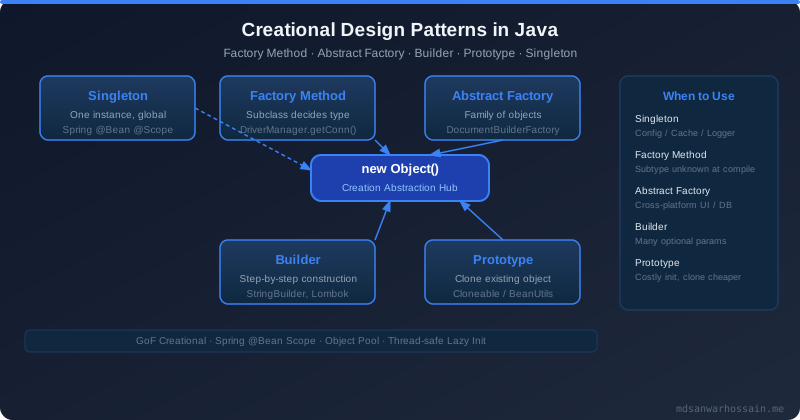
- Singleton — one instance per JVM; use enum-based or double-checked locking; Spring
@Beanis singleton by default. - Factory Method — delegate object creation to subclasses; great for pluggable notification channels.
- Abstract Factory — create families of related objects without specifying concrete classes; ideal for UI component themes.
- Builder — construct complex objects step by step; use Lombok
@Builderin Spring Boot DTOs. - Prototype — clone an existing object instead of creating from scratch; maps to
@Scope("prototype")in Spring.
Table of Contents
- What Are Creational Patterns?
- Singleton Pattern — Thread-Safe Implementation
- Factory Method Pattern — Decoupling Object Creation
- Abstract Factory Pattern — Families of Objects
- Builder Pattern — Complex Object Construction
- Prototype Pattern — Clone Instead of Create
- Spring Boot Uses of Creational Patterns
- Choosing the Right Creational Pattern
- Common Mistakes & Anti-Patterns
- Interview Questions & Answers
1. What Are Creational Patterns?
Creational patterns abstract the instantiation process. They help make a system independent of how its objects are created, composed, and represented. Rather than calling new ConcreteClass() directly throughout your codebase — coupling callers tightly to implementation details — creational patterns introduce indirection that keeps construction logic centralized, configurable, and testable.
The Gang of Four described five creational patterns in their landmark 1994 book Design Patterns: Elements of Reusable Object-Oriented Software. Each solves a different axis of the creation problem: who creates the object, when it is created, how many instances are allowed, and how complex its construction is. In Java, these patterns are especially relevant because the language's verbosity and strong static typing make unmanaged instantiation particularly painful to refactor later.
When to Use Creational Patterns
- You need to decouple clients from the concrete classes they instantiate.
- Object construction is complex, involves multiple steps, or requires configuration.
- You want to enforce constraints such as a single instance or a pool of reusable instances.
- You need to switch between families of related objects at runtime or via configuration.
3 Key Benefits
- Encapsulation of construction logic — changes to how objects are built are isolated to one place.
- Improved testability — factories and builders can be replaced with test doubles without touching business logic.
- Flexibility — concrete implementations can be swapped via configuration or dependency injection without modifying callers.
@Builder, @RequiredArgsConstructor) are used where they reduce boilerplate without obscuring the pattern.2. Singleton Pattern — Thread-Safe Implementation
The Singleton pattern ensures that a class has only one instance and provides a global access point to it. The canonical use case is a shared configuration service, a connection pool manager, or a metrics registry — resources that are expensive to create and must be shared consistently across the entire application.
Problem: Non-Thread-Safe Singleton (Bad)
The naive implementation works fine in single-threaded tests but breaks under concurrent load. Two threads can both evaluate instance == null as true simultaneously and create two separate instances — defeating the entire purpose.
// BAD: race condition — two threads can create two instances
public class ConfigService {
    private static ConfigService instance;

    private ConfigService() {
        // expensive initialization: load properties, connect to config server
    }

    public static ConfigService getInstance() {
        if (instance == null) {           // Thread A and Thread B both see null
            instance = new ConfigService(); // both create a new instance!
        }
        return instance;
    }
}
Best Practice: Enum-Based Singleton
Joshua Bloch's recommendation in Effective Java: use a single-element enum. The JVM guarantees that enum instances are created once and are immune to serialization and reflection attacks.
// BEST: Enum singleton — serialization-safe, reflection-safe
public enum ConfigService {
    INSTANCE;

    private final Map<String, String> properties = new HashMap<>();

    ConfigService() {
        // load from application.properties or AWS Parameter Store
        properties.put("app.timeout", "30");
        properties.put("app.retries", "3");
    }

    public String get(String key) {
        return properties.getOrDefault(key, "");
    }
}

// Usage:
String timeout = ConfigService.INSTANCE.get("app.timeout");
Double-Checked Locking with volatile
When you need a classic class-based singleton that is thread-safe and lazy-initialized, use double-checked locking with a volatile field. The volatile keyword prevents the JVM from reordering instructions and ensures all threads see the fully constructed object.
// GOOD: Double-checked locking — thread-safe lazy initialization
public class MetricsRegistry {
    private static volatile MetricsRegistry instance;

    private final Map<String, AtomicLong> counters = new ConcurrentHashMap<>();

    private MetricsRegistry() {}

    public static MetricsRegistry getInstance() {
        if (instance == null) {                        // first check (no lock)
            synchronized (MetricsRegistry.class) {
                if (instance == null) {                // second check (with lock)
                    instance = new MetricsRegistry();
                }
            }
        }
        return instance;
    }

    public void increment(String metricName) {
        counters.computeIfAbsent(metricName, k -> new AtomicLong(0)).incrementAndGet();
    }

    public long get(String metricName) {
        return counters.getOrDefault(metricName, new AtomicLong(0)).get();
    }
}
Singleton in Spring Boot
In Spring Boot, every @Bean is a singleton by default. You rarely need to implement the Singleton pattern manually — Spring's IoC container manages the single instance lifecycle for you. However, understanding the pattern is essential for non-Spring code, utility classes, and for recognising when Spring's singleton scope is inappropriate.
// Spring Boot: @Bean is singleton by default
@Configuration
public class AppConfig {
    @Bean // single instance shared across all injection points
    public RestTemplate restTemplate() {
        return new RestTemplate();
    }
}

// Explicit singleton scope (same as default):
@Service
@Scope("singleton") // optional — singleton is already the default
public class CacheManager {
    private final Map<String, Object> store = new ConcurrentHashMap<>();
    // ...
}readResolve() is implemented. Reflection can bypass the private constructor. The enum-based singleton handles all three pitfalls automatically.3. Factory Method Pattern — Decoupling Object Creation
The Factory Method pattern defines an interface for creating an object, but lets subclasses (or implementations) decide which class to instantiate. The factory method defers instantiation to subclasses, keeping the creator class open for extension without modification — directly complementing the Open/Closed Principle.
Problem: Notification System (Email, SMS, Push)
Your application needs to send notifications via different channels. Hard-coding new EmailNotification() or new SmsNotification() at every call site creates tight coupling and makes adding a new channel (e.g., WhatsApp) require a cascade of changes across the codebase.
// Step 1: Product interface
public interface Notification {
    void send(String recipient, String message);
    String getChannel();
}

// Step 2: Concrete products
public class EmailNotification implements Notification {
    @Override
    public void send(String recipient, String message) {
        System.out.println("EMAIL to " + recipient + ": " + message);
    }
    @Override public String getChannel() { return "EMAIL"; }
}

public class SmsNotification implements Notification {
    @Override
    public void send(String recipient, String message) {
        System.out.println("SMS to " + recipient + ": " + message);
    }
    @Override public String getChannel() { return "SMS"; }
}

public class PushNotification implements Notification {
    @Override
    public void send(String recipient, String message) {
        System.out.println("PUSH to " + recipient + ": " + message);
    }
    @Override public String getChannel() { return "PUSH"; }
}

// Step 3: Creator interface with factory method
public interface NotificationFactory {
    Notification createNotification();  // the factory method
}

// Step 4: Concrete creators
public class EmailNotificationFactory implements NotificationFactory {
    @Override public Notification createNotification() {
        return new EmailNotification();
    }
}

public class SmsNotificationFactory implements NotificationFactory {
    @Override public Notification createNotification() {
        return new SmsNotification();
    }
}

public class PushNotificationFactory implements NotificationFactory {
    @Override public Notification createNotification() {
        return new PushNotification();
    }
}
Spring Boot Integration with @Component and @Qualifier
In Spring Boot, factories become Spring-managed beans. Use a map-based dispatcher to select the right factory at runtime — no if/else required, fully extensible.
@Component("EMAIL")
public class EmailNotificationFactory implements NotificationFactory {
    @Override public Notification createNotification() {
        return new EmailNotification();
    }
}

@Component("SMS")
public class SmsNotificationFactory implements NotificationFactory {
    @Override public Notification createNotification() {
        return new SmsNotification();
    }
}

@Service
@RequiredArgsConstructor
public class NotificationService {
    // Spring injects all NotificationFactory beans into this map:
    // key = bean name (@Component value), value = bean instance
    private final Map<String, NotificationFactory> factories;

    public void notify(String channel, String recipient, String message) {
        NotificationFactory factory = factories.get(channel.toUpperCase());
        if (factory == null) {
            throw new IllegalArgumentException("Unsupported channel: " + channel);
        }
        factory.createNotification().send(recipient, message);
    }
}

// Adding WhatsApp: just add @Component("WHATSAPP") WhatsAppNotificationFactory
// Zero changes to NotificationService — Open/Closed Principle preserved.| Benefit | How Factory Method Delivers It |
|---|---|
| Open for extension | New channel = new class + @Component, no existing code touched |
| Testability | Inject a mock factory; test dispatcher logic without real I/O |
| Runtime flexibility | Channel selection from DB, config, or request parameter |
| Single creation point | Construction logic changes in one factory, not scattered across callers |
4. Abstract Factory Pattern — Families of Objects
The Abstract Factory pattern provides an interface for creating families of related or dependent objects without specifying their concrete classes. Where Factory Method creates one product, Abstract Factory creates a suite of products that belong together. The canonical example is a UI toolkit: Web and Mobile platforms each need a button, a dialog, and a text field — but the implementations differ significantly between platforms.
Problem: UI Component Families (Web vs Mobile)
// Product interfaces
public interface Button {
    void render();
    void onClick(Runnable handler);
}

public interface Dialog {
    void show(String title, String content);
}

// Abstract Factory interface
public interface UIFactory {
    Button createButton();
    Dialog createDialog();
}

// Concrete Factory 1: Web
public class WebUIFactory implements UIFactory {
    @Override
    public Button createButton() {
        return new WebButton();  // renders HTML <button>
    }
    @Override
    public Dialog createDialog() {
        return new WebDialog(); // renders CSS modal
    }
}

// Concrete Factory 2: Mobile
public class MobileUIFactory implements UIFactory {
    @Override
    public Button createButton() {
        return new MobileButton(); // renders native Android/iOS button
    }
    @Override
    public Dialog createDialog() {
        return new MobileDialog(); // renders bottom sheet
    }
}

// Client — works with any UIFactory without knowing which platform
public class UIRenderer {
    private final Button button;
    private final Dialog dialog;

    public UIRenderer(UIFactory factory) {
        this.button = factory.createButton();
        this.dialog = factory.createDialog();
    }

    public void renderUI() {
        button.render();
        dialog.show("Welcome", "Loading your dashboard...");
    }
}

// Wiring — could be driven by a runtime flag or Spring @Profile
UIFactory factory = isMobile ? new MobileUIFactory() : new WebUIFactory();
UIRenderer renderer = new UIRenderer(factory);
renderer.renderUI();
Factory Method vs Abstract Factory
| Aspect | Factory Method | Abstract Factory |
|---|---|---|
| Product count | One product type | Family of related products |
| Mechanism | Subclass overrides method | Composition — inject factory |
| Consistency | Not enforced across products | Enforced — all products match |
| Extension cost | Add one class | Add full factory + product set |
@Profile("web") and @Profile("mobile") on concrete factory beans to let Spring automatically select the right Abstract Factory based on the active profile — zero conditional logic in your application code.5. Builder Pattern — Complex Object Construction
The Builder pattern separates the construction of a complex object from its representation so that the same construction process can create different representations. It is the antidote to telescoping constructors — constructors with ever-growing parameter lists that are impossible to read and easy to misuse by swapping positional arguments.
Problem: Complex Order Object Construction
// BAD: telescoping constructor — which boolean is which?
Order order = new Order(userId, productId, 3, "STANDARD", true, false, "PROMO10", warehouse);

// GOOD: Builder with fluent API
public class Order {
    private final UUID userId;
    private final UUID productId;
    private final int quantity;
    private final String shippingTier;
    private final boolean giftWrap;
    private final boolean expressDelivery;
    private final String promoCode;
    private final String warehouseId;

    private Order(Builder builder) {
        this.userId        = Objects.requireNonNull(builder.userId, "userId required");
        this.productId     = Objects.requireNonNull(builder.productId, "productId required");
        this.quantity      = builder.quantity;
        this.shippingTier  = builder.shippingTier;
        this.giftWrap      = builder.giftWrap;
        this.expressDelivery = builder.expressDelivery;
        this.promoCode     = builder.promoCode;
        this.warehouseId   = builder.warehouseId;
    }

    // Getters only — Order is immutable after construction
    public UUID getUserId()       { return userId; }
    public UUID getProductId()    { return productId; }
    public int  getQuantity()     { return quantity; }
    public boolean isGiftWrap()   { return giftWrap; }

    public static Builder builder() { return new Builder(); }

    public static class Builder {
        private UUID userId;
        private UUID productId;
        private int quantity = 1;
        private String shippingTier = "STANDARD";
        private boolean giftWrap = false;
        private boolean expressDelivery = false;
        private String promoCode;
        private String warehouseId;

        public Builder userId(UUID userId)               { this.userId = userId; return this; }
        public Builder productId(UUID productId)         { this.productId = productId; return this; }
        public Builder quantity(int quantity)            { this.quantity = quantity; return this; }
        public Builder shippingTier(String tier)         { this.shippingTier = tier; return this; }
        public Builder giftWrap(boolean giftWrap)        { this.giftWrap = giftWrap; return this; }
        public Builder expressDelivery(boolean express)  { this.expressDelivery = express; return this; }
        public Builder promoCode(String promoCode)       { this.promoCode = promoCode; return this; }
        public Builder warehouseId(String warehouseId)   { this.warehouseId = warehouseId; return this; }

        public Order build() {
            if (quantity < 1) throw new IllegalStateException("Quantity must be positive");
            return new Order(this);
        }
    }
}

// Readable, self-documenting usage:
Order order = Order.builder()
    .userId(currentUser.getId())
    .productId(product.getId())
    .quantity(3)
    .expressDelivery(true)
    .promoCode("PROMO10")
    .build();
Lombok @Builder
Lombok's @Builder annotation generates the entire builder class at compile time. In Spring Boot DTOs and domain objects this eliminates boilerplate entirely while preserving the fluent API and immutability.
@Builder
@Value  // Lombok: all fields final, generates getters + equals/hashCode
public class CreateOrderRequest {
    UUID    userId;
    UUID    productId;
    @Builder.Default int quantity = 1;
    @Builder.Default String shippingTier = "STANDARD";
    boolean giftWrap;
    boolean expressDelivery;
    String  promoCode;
}

// Spring Boot REST controller using the builder:
@RestController
@RequestMapping("/api/orders")
@RequiredArgsConstructor
public class OrderController {
    private final OrderService orderService;

    @PostMapping
    public ResponseEntity<OrderResponse> createOrder(
            @RequestBody @Valid CreateOrderRequest request) {

        Order order = Order.builder()
            .userId(request.getUserId())
            .productId(request.getProductId())
            .quantity(request.getQuantity())
            .shippingTier(request.getShippingTier())
            .giftWrap(request.isGiftWrap())
            .expressDelivery(request.isExpressDelivery())
            .promoCode(request.getPromoCode())
            .build();

        return ResponseEntity.status(HttpStatus.CREATED)
            .body(orderService.place(order));
    }
}| Approach | Readability | Immutability | Validation |
|---|---|---|---|
| Telescoping constructor | Poor | Yes | In constructor |
| Setters (JavaBean) | Good | No | Scattered |
| Builder pattern | Excellent | Yes | In build() |
6. Prototype Pattern — Clone Instead of Create
The Prototype pattern creates new objects by copying (cloning) an existing object — the prototype. It is most valuable when object creation is expensive (database queries, network calls, heavy computation) and you need many similar instances. Instead of repeating the expensive initialization, you create one prototype and clone it as needed, customizing the clone for each use case.
Problem: Expensive Report Object
// Report with expensive initialization (fetch base template from DB/network)
public class ReportTemplate implements Cloneable {
    private String title;
    private List<String> columns;   // mutable — needs deep copy
    private Map<String, Object> metadata;

    // Simulate expensive initialization
    public ReportTemplate(String title) {
        this.title    = title;
        this.columns  = new ArrayList<>(fetchColumnsFromDatabase()); // expensive
        this.metadata = new HashMap<>(loadMetadataFromConfigServer()); // expensive
    }

    // Shallow clone from Object — columns list is shared!
    // For a deep clone, copy mutable fields manually:
    @Override
    public ReportTemplate clone() {
        try {
            ReportTemplate copy = (ReportTemplate) super.clone(); // copies primitives/references
            copy.columns  = new ArrayList<>(this.columns);        // deep copy list
            copy.metadata = new HashMap<>(this.metadata);         // deep copy map
            return copy;
        } catch (CloneNotSupportedException e) {
            throw new AssertionError("Clone not supported", e);
        }
    }

    public void setTitle(String title)   { this.title = title; }
    public void addColumn(String column) { this.columns.add(column); }
}

// Usage: one expensive init, many cheap clones
ReportTemplate salesBase = new ReportTemplate("Sales Report"); // expensive

ReportTemplate q1Report = salesBase.clone();
q1Report.setTitle("Q1 Sales Report");
q1Report.addColumn("Q1 Revenue");

ReportTemplate q2Report = salesBase.clone();
q2Report.setTitle("Q2 Sales Report");
q2Report.addColumn("Q2 Revenue");
// q1Report and q2Report each have independent column lists
Shallow vs Deep Copy
- Shallow copy — primitive fields and immutable objects are copied by value; mutable objects (lists, maps, other domain objects) are shared by reference. Modifying a list in the clone modifies the original too.
- Deep copy — all fields are recursively copied so that the clone is completely independent. Required when the prototype contains mutable objects.
Spring Boot @Scope("prototype")
// Spring prototype scope: a new bean instance per injection point
@Component
@Scope("prototype")
public class ReportGenerator {
    private String reportId;

    @PostConstruct
    public void init() {
        this.reportId = UUID.randomUUID().toString();
        System.out.println("New ReportGenerator created: " + reportId);
    }

    public String generate(String title) {
        return "Report[" + reportId + "]: " + title;
    }
}

// Injecting prototype into a singleton — use ObjectProvider or ApplicationContext
@Service
@RequiredArgsConstructor
public class ReportService {
    private final ObjectProvider<ReportGenerator> generatorProvider;

    public String buildReport(String title) {
        ReportGenerator generator = generatorProvider.getObject(); // fresh instance
        return generator.generate(title);
    }
}@Scope("prototype") bean via @Autowired into a singleton bean only creates one prototype instance — the singleton holds a reference and never requests a new one. Always use ObjectProvider<T>, ApplicationContext.getBean(), or @Lookup to get a fresh prototype from a singleton.7. Spring Boot Uses of Creational Patterns
Spring Boot's internals are a textbook illustration of all five creational patterns working in harmony. Understanding which Spring mechanism maps to which GoF pattern makes you a far more effective Spring developer — you stop fighting the framework and start leveraging its design intentionally.
| GoF Pattern | Spring Boot Mechanism | Example |
|---|---|---|
| Singleton | Default @Bean scope |
@Service, @Repository, @Component |
| Factory Method | BeanFactory, FactoryBean<T> |
LocalContainerEntityManagerFactoryBean |
| Abstract Factory | ApplicationContext, @Profile |
Swap entire datasource family per environment |
| Builder | RestTemplate.Builder, WebClient.Builder |
WebClient.builder().baseUrl(...).build() |
| Prototype | @Scope("prototype"), ObjectProvider |
Stateful request-scoped processors |
// Spring Boot Builder pattern in the wild: WebClient.Builder
@Configuration
public class WebClientConfig {
    @Bean
    public WebClient inventoryClient(WebClient.Builder builder) {
        return builder
            .baseUrl("https://inventory-service.internal")
            .defaultHeader(HttpHeaders.CONTENT_TYPE, MediaType.APPLICATION_JSON_VALUE)
            .filter(ExchangeFilterFunctions.basicAuthentication("svc", "secret"))
            .codecs(c -> c.defaultCodecs().maxInMemorySize(2 * 1024 * 1024))
            .build();
    }
}

// Spring FactoryBean: Factory Method in Spring internals
public class ConnectionPoolFactoryBean implements FactoryBean<HikariDataSource> {
    private final HikariConfig config;

    public ConnectionPoolFactoryBean(HikariConfig config) { this.config = config; }

    @Override
    public HikariDataSource getObject() {
        return new HikariDataSource(config); // factory method
    }

    @Override
    public Class<?> getObjectType() { return HikariDataSource.class; }

    @Override
    public boolean isSingleton() { return true; }
}
8. Choosing the Right Creational Pattern
The five creational patterns solve different problems. Reaching for the wrong one creates unnecessary complexity; using the right one makes code self-explanatory. Use the decision table below as a quick reference.
| Scenario | Recommended Pattern | Reason |
|---|---|---|
| Need exactly one instance shared globally | Singleton | Controlled instance count; expensive resource |
| Create one type of object, subclass decides which | Factory Method | Decouples creation; extensible via new subclass |
| Create families of related objects consistently | Abstract Factory | Enforces cross-product consistency per variant |
| Object has many optional fields / complex init | Builder | Readable construction; immutable result |
| Object creation is expensive; need many similar copies | Prototype | Clone amortizes expensive initialization |
| Multiple classes, runtime dispatch by type/key | Factory Method + Map dispatch | No switch/if; Spring @Component collection |
9. Common Mistakes & Anti-Patterns
Singleton Abuse (God Object)
The Singleton pattern is the most commonly abused GoF pattern. Developers add more and more state and behavior to a Singleton because it is globally accessible, gradually turning it into a God Object: a single class that knows too much and does too much. Every test that touches this Singleton requires careful state reset. In concurrent applications a mutable Singleton without proper synchronization causes data races that are nearly impossible to reproduce and debug.
Factory Overcomplexity
Introducing a factory for every class — even ones that will only ever have one implementation — creates a proliferation of interfaces and factories that add indirection without benefit. Follow YAGNI: introduce a factory when you have (or confidently anticipate) multiple implementations that need to be swapped at runtime or in tests.
Builder for Simple Objects
A builder for a two-field value object is over-engineering. Builders shine for objects with five or more fields, especially when many are optional or have sensible defaults. For simple objects, a constructor or Lombok @Value is cleaner and more idiomatic.
Mutable Singletons in Concurrent Environments
In Spring Boot, all @Service and @Component beans are singletons shared across every thread handling incoming HTTP requests. If such a bean holds instance-level mutable state (e.g., a simple HashMap for caching), you have a data race. Always use ConcurrentHashMap, AtomicLong, or move state to request scope. The safest singleton is a stateless one.
// BAD: mutable singleton — data race in multi-threaded Spring Boot
@Service
public class CounterService {
    private int requestCount = 0; // not thread-safe!

    public int increment() {
        return ++requestCount; // read-modify-write is not atomic
    }
}

// GOOD: thread-safe singleton with AtomicInteger
@Service
public class CounterService {
    private final AtomicInteger requestCount = new AtomicInteger(0);

    public int increment() {
        return requestCount.incrementAndGet(); // atomic, lock-free
    }
}
10. Interview Questions & Answers
Q1: What is the difference between Factory Method and Abstract Factory?
Factory Method defines a single method that subclasses override to create one type of object. Abstract Factory provides an interface with multiple factory methods, each creating a different product in a family. Use Abstract Factory when products in a family must be consistent with each other (e.g., all Web components or all Mobile components).
Q2: Why is the enum-based Singleton preferred in Java?
Java guarantees enum instances are created once by the class loader and are inherently serialization-safe (no second instance from deserialization) and reflection-safe (reflection cannot invoke a private constructor on an enum). No other Singleton implementation offers all three guarantees out of the box.
Q3: When would you use Prototype over Builder?
Use Prototype when object creation is expensive (network calls, DB queries) and you need many instances that start from the same baseline and then diverge slightly. Use Builder when construction is complex but not expensive, and you want a readable, validated, immutable result.
Q4: What is the relationship between Spring's BeanFactory and the Factory Method pattern?
Spring's BeanFactory (and its sub-interface ApplicationContext) is a concrete implementation of the Factory Method pattern. The getBean() method is the factory method — callers request beans by name or type without knowing how they are constructed. FactoryBean<T> lets you plug custom factory logic into Spring's container.
Q5: How does double-checked locking work and why is volatile necessary?
Double-checked locking checks instance == null twice — once without a lock (for performance) and once inside a synchronized block (for safety). Without volatile, the JVM's instruction reordering can allow a thread to observe a partially-constructed object: the reference is written before the constructor completes. volatile establishes a happens-before relationship, guaranteeing all writes in the constructor are visible before the reference is published.
Q6: What is a shallow copy vs a deep copy in the Prototype pattern?
A shallow copy copies primitive fields by value but copies object references — the clone and original share the same mutable objects. A deep copy recursively copies all objects so the clone is fully independent. In Java, Object.clone() performs a shallow copy; deep copy requires manual implementation or serialization-based techniques.
Q7: How do you inject a prototype-scoped bean into a singleton-scoped bean in Spring?
Use ObjectProvider<T> (preferred in Spring 5+), ApplicationContext.getBean(), or the @Lookup method injection. Direct @Autowired injection only creates one prototype instance, defeating the purpose of prototype scope. ObjectProvider.getObject() creates a fresh instance on every call.
Q8: When should you NOT use the Builder pattern?
Avoid Builder when the object has only one or two mandatory fields and no optional ones — a plain constructor is simpler and clearer. Also avoid it when the object is mutable by design (e.g., a JPA entity managed by Hibernate), where setters are necessary and a Builder's immutable result would conflict with the persistence framework's requirements.
Leave a Comment
Related Posts

Software Engineer · Java · Spring Boot · Microservices