Structural Design Patterns in Java: Complete Guide with Spring Boot Scenarios
Structural design patterns address one of the most persistent challenges in enterprise Java development: how to compose objects and classes into larger, flexible structures without creating brittle inheritance hierarchies or tight coupling. The GoF's seven structural patterns — Adapter, Decorator, Proxy, Facade, Composite, Bridge, and Flyweight — appear throughout every mature Spring Boot application, often without developers recognizing them. This guide walks through each pattern with production-grade Java code, real Spring Boot scenarios, and practical guidance on when to use each one.
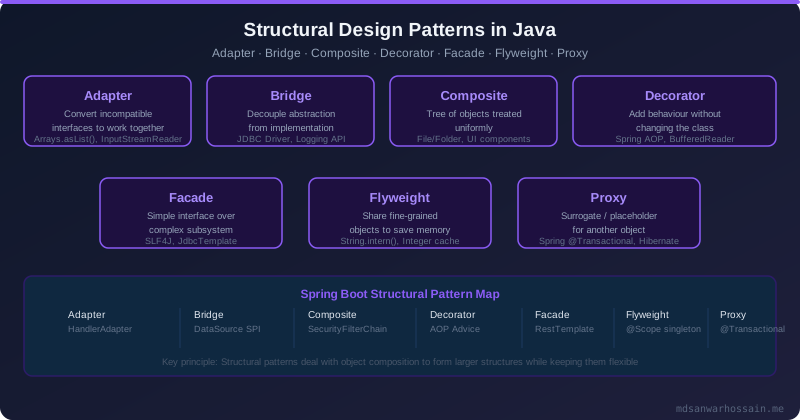
- Adapter bridges incompatible interfaces — use it for legacy integration without touching existing code.
- Decorator adds cross-cutting behavior (logging, auth) at runtime — the basis of Spring AOP.
- Proxy controls access and adds lazy-loading or caching — Spring's
@Transactionalis a proxy. - Facade hides subsystem complexity behind a single entry point — your
@Serviceorchestrators. - Composite treats trees and leaves uniformly — ideal for category hierarchies and menus.
- Bridge decouples abstraction from implementation — prevents subclass explosion in report generators.
- Flyweight shares intrinsic state to reduce memory — critical for rendering thousands of map markers.
Table of Contents
- What Are Structural Patterns?
- Adapter Pattern — Legacy Integration
- Decorator Pattern — Adding Behavior Dynamically
- Proxy Pattern — Controlled Access
- Facade Pattern — Simplifying Complex Systems
- Composite Pattern — Tree Structures
- Bridge Pattern — Abstraction vs Implementation
- Flyweight Pattern — Memory Optimization
- Spring Boot Real-World Uses
- Comparison Table & When to Use Each
1. What Are Structural Patterns?
Structural design patterns are concerned with how classes and objects are composed to form larger structures. Unlike creational patterns (which deal with object creation) or behavioral patterns (which deal with object communication), structural patterns answer the question: "How do I wire these pieces together without making the result rigid and hard to change?"
The Gang of Four catalogued seven structural patterns. In enterprise Java, you encounter all of them — sometimes without recognizing the pattern by name. Spring Boot's core infrastructure is built almost entirely from structural patterns: the @Transactional annotation wraps your service in a Proxy; Spring Security's filter chain is a Decorator pipeline; your @Service orchestrating multiple subsystems is a Facade; Spring Data's JpaRepository adapts JPA's EntityManager API through an Adapter. Recognizing these patterns in framework code helps you apply them correctly in your own application layer.
2. Adapter Pattern — Legacy Integration
Intent: Convert the interface of a class into another interface that clients expect. Adapter lets classes work together that otherwise couldn't because of incompatible interfaces.
Problem Scenario: Your platform has a modern PaymentGateway interface that all new payment processors must implement. However, you've just acquired a company whose legacy Stripe integration was written against a bespoke internal API with different method signatures, exception hierarchies, and response objects. Rewriting the legacy code is risky and expensive. The Adapter pattern lets you wrap the legacy class and expose the modern interface — zero changes to existing code, full integration.
// Modern interface all services expect
public interface PaymentGateway {
    PaymentResult charge(String customerId, Money amount, String currency);
    void refund(String transactionId, Money amount);
}

// Legacy class — cannot be modified (third-party or acquired code)
public class LegacyStripeClient {
    public StripeCharge createCharge(long amountCents, String curr, String custId) {
        // legacy Stripe v1 API call
        return new StripeCharge(UUID.randomUUID().toString(), amountCents, "succeeded");
    }
    public void issueRefund(String chargeId, long amountCents) {
        // legacy refund logic
    }
}

// Adapter: wraps legacy, exposes modern interface
@Component
public class LegacyStripeAdapter implements PaymentGateway {

    private final LegacyStripeClient legacyClient;

    public LegacyStripeAdapter(LegacyStripeClient legacyClient) {
        this.legacyClient = legacyClient;
    }

    @Override
    public PaymentResult charge(String customerId, Money amount, String currency) {
        long cents = amount.getAmount().multiply(BigDecimal.valueOf(100)).longValue();
        StripeCharge charge = legacyClient.createCharge(cents, currency, customerId);
        return new PaymentResult(charge.getId(), charge.getStatus());
    }

    @Override
    public void refund(String transactionId, Money amount) {
        long cents = amount.getAmount().multiply(BigDecimal.valueOf(100)).longValue();
        legacyClient.issueRefund(transactionId, cents);
    }
}

// Client — only knows PaymentGateway, unaware of legacy implementation
@Service
@RequiredArgsConstructor
public class CheckoutService {
    private final PaymentGateway paymentGateway; // Spring injects LegacyStripeAdapter

    public OrderConfirmation checkout(Cart cart, String customerId) {
        PaymentResult result = paymentGateway.charge(customerId, cart.total(), "USD");
        return new OrderConfirmation(result.getTransactionId());
    }
}- Zero changes to legacy code — safe for acquired or third-party libraries.
- Clients are fully decoupled from the legacy implementation detail.
- Swapping to a new native implementation later requires only removing the adapter.
- Spring's
@Componentmakes adapter registration automatic via classpath scanning.
3. Decorator Pattern — Adding Behavior Dynamically
Intent: Attach additional responsibilities to an object dynamically. Decorators provide a flexible alternative to subclassing for extending functionality.
Problem Scenario: You have an HTTP request handling pipeline. Some requests need logging, some need authentication, some need both, and future handlers may need rate limiting or tracing — but you don't want to modify the core handler class every time a new cross-cutting concern is added. The Decorator pattern wraps the handler in a composable chain, with each decorator adding exactly one behaviour and delegating everything else to the next handler in the chain.
// Component interface
public interface RequestHandler {
    ApiResponse handle(ApiRequest request);
}

// Core handler — pure business logic, no cross-cutting concerns
@Component
public class OrderRequestHandler implements RequestHandler {
    @Override
    public ApiResponse handle(ApiRequest request) {
        // process order business logic
        return ApiResponse.ok("Order placed: " + request.getOrderId());
    }
}

// Decorator 1: logging
public class LoggingDecorator implements RequestHandler {
    private final RequestHandler delegate;
    private static final Logger log = LoggerFactory.getLogger(LoggingDecorator.class);

    public LoggingDecorator(RequestHandler delegate) {
        this.delegate = delegate;
    }

    @Override
    public ApiResponse handle(ApiRequest request) {
        log.info("Handling request: orderId={}", request.getOrderId());
        long start = System.currentTimeMillis();
        ApiResponse response = delegate.handle(request);
        log.info("Request completed in {}ms, status={}", System.currentTimeMillis() - start, response.getStatus());
        return response;
    }
}

// Decorator 2: authentication
public class AuthDecorator implements RequestHandler {
    private final RequestHandler delegate;
    private final TokenValidator tokenValidator;

    public AuthDecorator(RequestHandler delegate, TokenValidator tokenValidator) {
        this.delegate = delegate;
        this.tokenValidator = tokenValidator;
    }

    @Override
    public ApiResponse handle(ApiRequest request) {
        if (!tokenValidator.isValid(request.getAuthToken())) {
            return ApiResponse.unauthorized("Invalid token");
        }
        return delegate.handle(request);
    }
}

// Composition — build the pipeline in a @Configuration class
@Configuration
public class HandlerConfig {
    @Bean
    public RequestHandler requestHandler(OrderRequestHandler core, TokenValidator tokenValidator) {
        // outer → AuthDecorator → LoggingDecorator → core handler
        return new AuthDecorator(new LoggingDecorator(core), tokenValidator);
    }
}@Aspect classes with @Around advice. Spring's proxy infrastructure (JDK dynamic proxy or CGLIB) wraps the target bean at runtime — the same structural pattern, zero boilerplate composition code. Use manual decorators when you need precise ordering control or when AOP proxy mechanics would interfere (e.g., self-invocation).- Each decorator has a single responsibility — easy to unit-test in isolation.
- Concerns can be combined and reordered without modifying existing classes (OCP).
- Avoids deep inheritance hierarchies (no
LoggingAuthOrderHandler extends ...). - Runtime composition means different clients can get different decorator stacks.
4. Proxy Pattern — Controlled Access
Intent: Provide a surrogate or placeholder for another object to control access to it. Common proxy types include virtual proxy (lazy initialization), protection proxy (access control), and remote proxy (network transparency).
Problem Scenario: Your UserService performs expensive initialization — loading roles, permissions, and preference data from the database — that is not always needed. You also need to enforce role-based access control so that non-admin callers cannot invoke sensitive admin methods. A protection + virtual proxy handles both concerns without changing the real UserServiceImpl.
// Subject interface
public interface UserService {
    UserProfile getProfile(UUID userId);
    void deleteUser(UUID userId);   // admin only
    List<UserProfile> listAllUsers(); // expensive — lazy-load
}

// Real subject
@Service
public class UserServiceImpl implements UserService {
    private final UserRepository userRepository;

    @Override
    public UserProfile getProfile(UUID userId) {
        return userRepository.findById(userId).orElseThrow();
    }

    @Override
    public void deleteUser(UUID userId) {
        userRepository.deleteById(userId);
    }

    @Override
    public List<UserProfile> listAllUsers() {
        return userRepository.findAll(); // potentially thousands of records
    }
}

// Protection + Virtual Proxy
@Component
@Primary  // Spring injects this wherever UserService is requested
public class UserServiceProxy implements UserService {

    private final UserServiceImpl realService;
    private final SecurityContext securityContext;
    private List<UserProfile> cachedUserList; // lazy cache

    public UserServiceProxy(UserServiceImpl realService, SecurityContext securityContext) {
        this.realService = realService;
        this.securityContext = securityContext;
    }

    @Override
    public UserProfile getProfile(UUID userId) {
        return realService.getProfile(userId); // no restriction
    }

    @Override
    public void deleteUser(UUID userId) {
        if (!securityContext.currentUser().hasRole("ADMIN")) {
            throw new AccessDeniedException("Admin role required to delete users");
        }
        cachedUserList = null; // invalidate cache
        realService.deleteUser(userId);
    }

    @Override
    public List<UserProfile> listAllUsers() {
        if (cachedUserList == null) {           // lazy initialization
            cachedUserList = realService.listAllUsers();
        }
        return cachedUserList;
    }
}@Transactional on a bean method, it generates a CGLIB subclass proxy at startup. The proxy begins a transaction before delegating to your real method and commits or rolls back after. This is a textbook protection + resource management proxy — and the reason why @Transactional has no effect when you call a @Transactional method from within the same class (self-invocation bypasses the proxy). Similarly, Spring's @Cacheable, @Async, and @Retryable are all realized through proxies.- Access control and lazy loading added transparently — client code unchanged.
- Use
@Primaryto make Spring inject the proxy everywhere automatically. - Proxies are independently testable — inject mock real-service and mock security context.
- Supports cache invalidation, audit logging, or circuit-breaking at the proxy layer.
5. Facade Pattern — Simplifying Complex Systems
Intent: Provide a unified interface to a set of interfaces in a subsystem. Facade defines a higher-level interface that makes the subsystem easier to use.
Problem Scenario: Placing an order involves four independent subsystems: inventory reservation, payment processing, shipping label creation, and customer notification. Each subsystem has its own service interface, exception hierarchy, and transaction boundary. A REST controller should not need to understand and orchestrate all four — that knowledge belongs in a single OrderFacade that presents one clean method to callers.
// Four independent subsystem services
@Service public class InventoryService {
    public ReservationId reserve(UUID productId, int qty) { /* ... */ return new ReservationId(); }
    public void release(ReservationId reservationId) { /* ... */ }
}

@Service public class PaymentService {
    public PaymentResult charge(String customerId, Money amount) { /* ... */ return new PaymentResult(); }
}

@Service public class ShippingService {
    public ShippingLabel createLabel(Order order) { /* ... */ return new ShippingLabel(); }
}

@Service public class NotificationService {
    public void sendOrderConfirmation(Order order, ShippingLabel label) { /* ... */ }
}

// Facade — single entry point for the entire order placement workflow
@Service
@RequiredArgsConstructor
public class OrderFacade {

    private final InventoryService inventoryService;
    private final PaymentService paymentService;
    private final ShippingService shippingService;
    private final NotificationService notificationService;
    private final OrderRepository orderRepository;

    @Transactional
    public OrderConfirmation placeOrder(PlaceOrderRequest request) {
        // 1. Reserve inventory (throws if out of stock)
        ReservationId reservation = inventoryService.reserve(
                request.getProductId(), request.getQuantity());
        try {
            // 2. Charge payment
            PaymentResult payment = paymentService.charge(
                    request.getCustomerId(), request.getTotal());

            // 3. Persist order
            Order order = orderRepository.save(Order.from(request, payment));

            // 4. Create shipping label
            ShippingLabel label = shippingService.createLabel(order);

            // 5. Notify customer (async — fire and forget)
            notificationService.sendOrderConfirmation(order, label);

            return new OrderConfirmation(order.getId(), label.getTrackingNumber());

        } catch (PaymentException ex) {
            inventoryService.release(reservation); // compensate
            throw ex;
        }
    }
}

// REST controller — knows nothing about subsystem internals
@RestController
@RequestMapping("/api/orders")
@RequiredArgsConstructor
public class OrderController {
    private final OrderFacade orderFacade;

    @PostMapping
    public ResponseEntity<OrderConfirmation> placeOrder(@RequestBody PlaceOrderRequest req) {
        return ResponseEntity.ok(orderFacade.placeOrder(req));
    }
}- Controllers stay thin — one call, one result, no subsystem awareness.
- Business workflow is captured in one place — easy to read, review, and change.
- Compensation logic (rollback of partial operations) lives in the facade, not scattered.
- Subsystems can evolve independently; only the facade needs updating when APIs change.
6. Composite Pattern — Tree Structures
Intent: Compose objects into tree structures to represent part-whole hierarchies. Composite lets clients treat individual objects and compositions of objects uniformly.
Problem Scenario: An e-commerce platform has a category tree: "Electronics" contains "Smartphones" and "Laptops"; "Smartphones" contains individual products like "iPhone 16" and "Galaxy S25". The UI needs to render a full tree with counts and prices, and the business logic needs to calculate totals recursively. The Composite pattern allows treating Category nodes and Product leaves through a single CatalogComponent interface.
// Component interface — both leaf and composite implement this
public interface CatalogComponent {
    String getName();
    BigDecimal getPrice();
    void display(String indent);
}

// Leaf — a single product
public class Product implements CatalogComponent {
    private final String name;
    private final BigDecimal price;

    public Product(String name, BigDecimal price) {
        this.name = name;
        this.price = price;
    }

    @Override public String getName() { return name; }
    @Override public BigDecimal getPrice() { return price; }

    @Override
    public void display(String indent) {
        System.out.println(indent + "📦 " + name + " ($" + price + ")");
    }
}

// Composite — a category that can contain other categories or products
public class Category implements CatalogComponent {
    private final String name;
    private final List<CatalogComponent> children = new ArrayList<>();

    public Category(String name) { this.name = name; }

    public void add(CatalogComponent component) { children.add(component); }
    public void remove(CatalogComponent component) { children.remove(component); }

    @Override public String getName() { return name; }

    @Override
    public BigDecimal getPrice() {
        return children.stream()
                .map(CatalogComponent::getPrice)
                .reduce(BigDecimal.ZERO, BigDecimal::add);
    }

    @Override
    public void display(String indent) {
        System.out.println(indent + "📁 " + name + " (total: $" + getPrice() + ")");
        children.forEach(child -> child.display(indent + "   "));
    }
}

// Usage — client treats leaves and composites identically
Category electronics = new Category("Electronics");
Category smartphones = new Category("Smartphones");
smartphones.add(new Product("iPhone 16", new BigDecimal("999.00")));
smartphones.add(new Product("Galaxy S25", new BigDecimal("849.00")));
Category laptops = new Category("Laptops");
laptops.add(new Product("MacBook Pro M4", new BigDecimal("2499.00")));
electronics.add(smartphones);
electronics.add(laptops);

electronics.display(""); // recursively prints entire tree- Client code is simple — always calls the same interface whether operating on a leaf or a whole tree.
- Adding new leaf types (e.g.,
Bundle,DigitalProduct) requires no changes to traversal code. - Recursive operations (price calculation, permission checks) are naturally expressed.
- Maps directly to JPA parent-child relationships with
@OneToMany(mappedBy="parent").
7. Bridge Pattern — Abstraction vs Implementation
Intent: Decouple an abstraction from its implementation so that the two can vary independently. Bridge prevents the combinatorial explosion of subclasses when two orthogonal dimensions of variation are present.
Problem Scenario: A reporting service needs to generate reports in multiple formats (PDF, Excel, CSV) for multiple environments (Web UI, REST API, Email). Without Bridge, this produces 3 × 3 = 9 subclasses: PdfWebReport, PdfApiReport, ExcelWebReport, and so on. Every new format adds three new classes; every new environment adds three more. Bridge separates "how to render" (the abstraction) from "what format to produce" (the implementation), reducing this to 3 + 3 = 6 classes regardless of how many combinations you need.
// Implementor interface — "what format to produce"
public interface ReportFormat {
    byte[] render(ReportData data);
    String getContentType();
}

// Concrete implementors
@Component("pdfFormat")
public class PdfReportFormat implements ReportFormat {
    @Override
    public byte[] render(ReportData data) {
        // iText / Apache PDFBox PDF generation
        return PdfBuilder.build(data);
    }
    @Override public String getContentType() { return "application/pdf"; }
}

@Component("excelFormat")
public class ExcelReportFormat implements ReportFormat {
    @Override
    public byte[] render(ReportData data) {
        // Apache POI Excel generation
        return ExcelBuilder.build(data);
    }
    @Override public String getContentType() { return "application/vnd.ms-excel"; }
}

// Abstraction — "how to deliver"
public abstract class ReportGenerator {
    protected final ReportFormat format; // bridge to implementor

    protected ReportGenerator(ReportFormat format) {
        this.format = format;
    }

    public abstract ReportResult generate(ReportRequest request);
}

// Refined abstraction 1 — web download
public class WebReportGenerator extends ReportGenerator {
    public WebReportGenerator(ReportFormat format) { super(format); }

    @Override
    public ReportResult generate(ReportRequest request) {
        ReportData data = fetchData(request);
        byte[] content = format.render(data);
        return ReportResult.forDownload(content, format.getContentType(),
                "report-" + request.getId() + ".download");
    }
}

// Refined abstraction 2 — API response
public class ApiReportGenerator extends ReportGenerator {
    public ApiReportGenerator(ReportFormat format) { super(format); }

    @Override
    public ReportResult generate(ReportRequest request) {
        ReportData data = fetchData(request);
        byte[] content = format.render(data);
        return ReportResult.forApi(Base64.getEncoder().encodeToString(content),
                format.getContentType());
    }
}

// Spring wiring — compose any combination without new subclasses
@Configuration
public class ReportConfig {
    @Bean public ReportGenerator webPdfReport(@Qualifier("pdfFormat") ReportFormat fmt) {
        return new WebReportGenerator(fmt);
    }
    @Bean public ReportGenerator apiExcelReport(@Qualifier("excelFormat") ReportFormat fmt) {
        return new ApiReportGenerator(fmt);
    }
    // Add CSV format tomorrow: zero changes to existing classes
}- N formats + M environments = N + M classes, not N × M subclasses.
- Formats and delivery channels can be tested, swapped, and deployed independently.
- Spring's
@Qualifierenables precise injection of any format into any generator.
8. Flyweight Pattern — Memory Optimization
Intent: Use sharing to efficiently support a large number of fine-grained objects. The Flyweight separates intrinsic state (shared, immutable, context-free) from extrinsic state (unique per instance, supplied by the caller).
Problem Scenario: A map rendering service needs to display 10,000 markers on a city map. Each marker has a type (restaurant, hotel, hospital), an icon, and a colour — all of which are the same for every marker of the same type. Without Flyweight, each of the 10,000 markers stores its own copy of the icon bytes and rendering metadata. With Flyweight, the type-specific data is shared via a factory cache — only the (latitude, longitude) coordinates are stored per marker instance.
// Flyweight — shared intrinsic state (immutable, thread-safe)
public final class MarkerType {
    private final String type;       // "RESTAURANT", "HOTEL", "HOSPITAL"
    private final String iconUrl;    // shared icon resource
    private final String color;      // shared color code
    private final byte[] iconBytes;  // pre-loaded icon — expensive to load

    public MarkerType(String type, String iconUrl, String color) {
        this.type = type;
        this.iconUrl = iconUrl;
        this.color = color;
        this.iconBytes = IconLoader.load(iconUrl); // loaded once, shared
    }

    // Render using extrinsic state (coordinates) passed by caller
    public void render(double lat, double lng) {
        System.out.printf("Rendering %s marker at (%.4f, %.4f) with color %s%n",
                type, lat, lng, color);
    }

    public String getType() { return type; }
}

// Flyweight Factory — ensures one MarkerType instance per type
@Component
public class MarkerFactory {
    private final Map<String, MarkerType> cache = new ConcurrentHashMap<>();

    public MarkerType getMarkerType(String type) {
        return cache.computeIfAbsent(type, t -> switch (t) {
            case "RESTAURANT" -> new MarkerType(t, "/icons/restaurant.png", "#FF5722");
            case "HOTEL"      -> new MarkerType(t, "/icons/hotel.png",      "#2196F3");
            case "HOSPITAL"   -> new MarkerType(t, "/icons/hospital.png",   "#F44336");
            default           -> throw new IllegalArgumentException("Unknown type: " + t);
        });
    }

    public int getCacheSize() { return cache.size(); }
}

// Marker — only stores extrinsic state (coordinates + reference to flyweight)
public class MapMarker {
    private final double latitude;
    private final double longitude;
    private final MarkerType markerType; // shared flyweight reference

    public MapMarker(double lat, double lng, MarkerType markerType) {
        this.latitude = lat;
        this.longitude = lng;
        this.markerType = markerType;
    }

    public void render() {
        markerType.render(latitude, longitude);
    }
}

// Service — creates 10,000 markers but only 3 MarkerType instances
@Service
@RequiredArgsConstructor
public class MapRenderService {
    private final MarkerFactory markerFactory;

    public List<MapMarker> buildMarkers(List<PoiData> pois) {
        return pois.stream()
                .map(poi -> new MapMarker(
                        poi.getLat(), poi.getLng(),
                        markerFactory.getMarkerType(poi.getType())))
                .toList();
    }
}
Memory Comparison:
| Approach | Objects Created | Icon Bytes Loaded | Approx. Heap |
|---|---|---|---|
| Without Flyweight | 10,000 full objects | 10,000 × icon size | ~500 MB |
| With Flyweight | 10,000 + 3 shared | 3 × icon size | ~5 MB |
- Dramatic memory reduction when many objects share common state (icons, fonts, styles).
ConcurrentHashMap.computeIfAbsentprovides thread-safe factory caching with no locking overhead.- Java's
String.intern()andInteger.valueOf()are built-in JVM flyweight implementations. - Use when profiling shows high memory pressure from many similarly-structured objects.
9. Spring Boot Real-World Uses
Every structural pattern appears in Spring Boot's own framework code. Recognizing these mappings helps you understand Spring's internal mechanics and make better design decisions in your application layer.
| Pattern | Spring Boot Feature | Where You'll See It |
|---|---|---|
| Adapter | HandlerAdapter, JpaRepository |
Spring MVC adapts any controller type; Spring Data adapts JPA EntityManager |
| Decorator | Spring AOP, Security filter chain | @Around advice wraps beans; OncePerRequestFilter chains |
| Proxy | @Transactional, @Cacheable, @Async |
CGLIB/JDK proxies generated at startup for annotated beans |
| Facade | @Service orchestrators, SLF4J |
SLF4J is a facade over Log4j2/Logback; your service layer over JPA/external APIs |
| Composite | CompositePropertySource, FilterChainProxy |
Spring Environment composes multiple property sources uniformly |
| Bridge | ResourceLoader, MessageSource |
ResourceLoader abstraction over classpath/filesystem/URL implementations |
| Flyweight | @Singleton beans, BeanDefinition cache |
Spring's default singleton scope shares one bean instance across all injection points |
10. Comparison Table & When to Use Each
Choosing the right structural pattern requires understanding both the problem shape and the dimension of variation. The following table summarises each pattern's intent, canonical trigger, and Spring Boot example to guide your decision.
| Pattern | Intent | Use When… | Spring Example |
|---|---|---|---|
| Adapter | Convert incompatible interface | Integrating legacy or third-party code with a new interface | HandlerAdapter, custom gateway adapters |
| Decorator | Add behaviour without subclassing | Adding cross-cutting concerns (logging, auth, metrics) composably | Spring AOP @Around, Security filters |
| Proxy | Control access to real object | Lazy init, access control, caching, transaction management | @Transactional, @Cacheable, CGLIB proxies |
| Facade | Simplify complex subsystem | Orchestrating multiple services behind a clean API for callers | @Service orchestrators, SLF4J over logging backends |
| Composite | Uniform tree/leaf handling | Recursive structures: categories, org charts, menus, permissions | CompositePropertySource, nested security configs |
| Bridge | Decouple two variation axes | Two orthogonal dimensions (format × delivery) risk subclass explosion | ResourceLoader, report format + channel separation |
| Flyweight | Share intrinsic state | High-volume fine-grained objects with shared immutable properties | Singleton beans, icon/font caches in rendering services |
Understanding structural patterns at this level transforms how you read framework source code, design APIs, and review pull requests. When you see a colleague's @Service growing into a 500-line orchestrator, you know the Facade pattern is already emerging — it just needs to be made explicit. When you see nine report subclasses, you can propose Bridge. When you see a legacy client being re-wrapped again and again, you introduce a single Adapter. The patterns give you a precise vocabulary to articulate design improvements and make codebases that are genuinely easier to change.
Leave a Comment
Related Posts

Software Engineer · Java · Spring Boot · Microservices