Designing a Gmail-Scale Email System: SMTP, Storage, Search & Delivery Architecture
Email is one of the most critical and deceptively complex distributed systems ever built. Gmail processes over 10 billion emails per day across 1.8 billion active users. This guide walks through every engineering layer — from SMTP ingestion and Bigtable-style message storage to full-text search indexing, ML-based spam filtering, IMAP/IDLE push delivery, and globally-replicated active-active architecture — giving you a production-grade blueprint for system design interviews and real-world platform builds.
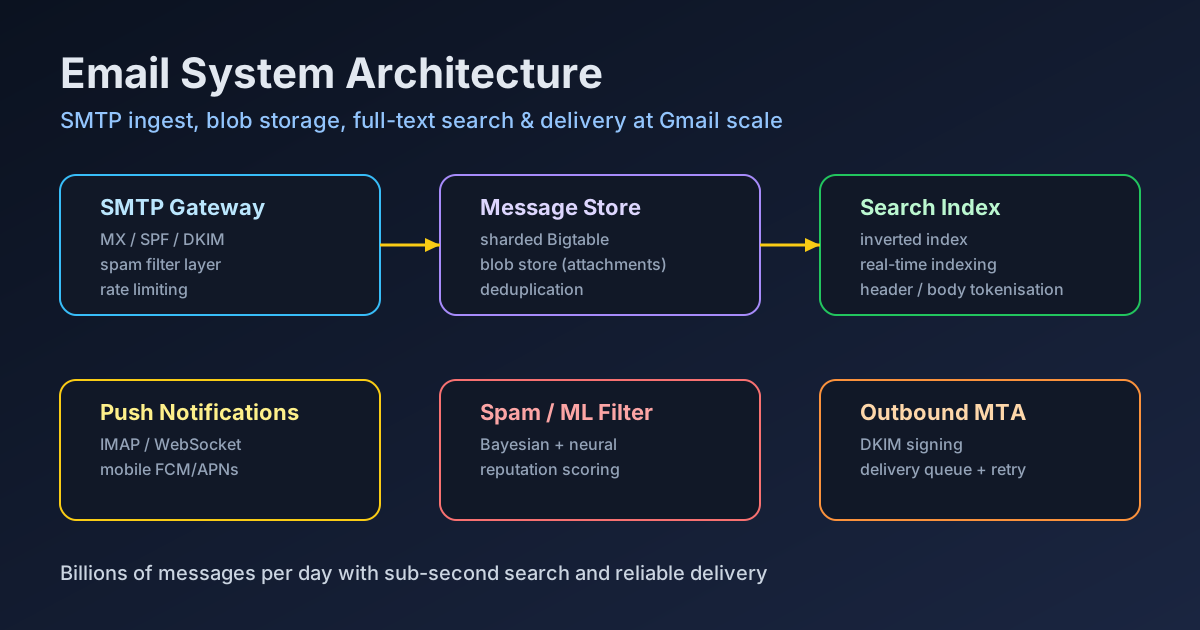
TL;DR — The Architecture in One Paragraph
"A Gmail-scale email system routes inbound SMTP through MX gateways that enforce SPF/DKIM/DMARC, stores messages in a sharded Bigtable-style store with separate blob storage for attachments, indexes content in a real-time inverted index for sub-second search, applies ML-based spam scoring at ingestion time, delivers to clients via IMAP/IDLE + WebSocket push, and replicates across regions in an active-active topology with eventual consistency for mailbox state."
Table of Contents
- Functional & Non-Functional Requirements
- High-Level Architecture Overview
- SMTP Gateway & MX Routing
- Message Storage Design
- Full-Text Search & Indexing
- Spam & Phishing Filtering
- Outbound Delivery & MTA
- Push Notifications & IMAP
- Global Replication & Availability
- Capacity Estimation & Back-of-Envelope Math
- Security & Compliance
- System Design Interview Checklist
1. Functional & Non-Functional Requirements
Before diving into architecture, nail down the requirements. Email systems are one of the most feature-dense platforms in existence — scope carefully to avoid analysis paralysis in interviews and misaligned delivery in production.
Functional Requirements
- Send email: Compose and send messages to internal and external recipients with attachment support (up to 25 MB per message).
- Receive email: Accept inbound SMTP from external mail servers via MX records; route to recipient mailboxes.
- Inbox management: Read, delete, archive, label, star, mark-as-read, move-to-folder operations on messages.
- Threaded conversations: Group related messages into conversations using References and In-Reply-To headers.
- Full-text search: Search across all mailbox content (subject, body, sender, attachment filename) with sub-second response time.
- Spam and phishing filtering: Automatically classify and quarantine unsolicited or malicious messages.
- Push notifications: Notify clients in real time (mobile push, web socket) when new mail arrives.
- Labels and folders: User-defined and system labels (Inbox, Sent, Drafts, Spam, Trash) with multi-label support per message.
- Draft saving: Autosave drafts during composition with conflict-free merge on concurrent edits.
- Vacation / auto-reply: Configurable automatic response during defined time windows.
- Filters and rules: User-defined routing rules triggered by sender, subject, keywords, size, or attachment type.
- Contact autocomplete: Suggest recipients from address book and frequent contacts as the user types.
Non-Functional Requirements
| Dimension | Target | Notes |
|---|---|---|
| Scale | 1.8B users, 10B emails/day | ~115,000 emails/sec peak |
| Availability | 99.99% (52 min/year downtime) | Multi-region active-active |
| Durability | 11 nines (99.999999999%) | Triple replication minimum |
| Latency (send) | < 2 seconds end-to-end | From compose-click to inbox |
| Search latency | < 300 ms p99 | Over billions of messages |
| Storage | 15 GB free per user | ~27 exabytes total corpus |
| Spam accuracy | > 99.9% precision | < 0.1% false positive rate |
2. High-Level Architecture Overview
A Gmail-scale email system decomposes into seven distinct planes. Each plane is independently scalable and deployed as its own service cluster. Understanding the data flow through these planes is the foundation of any system design answer.
Data Flow: Inbound Email
- DNS / MX lookup → sender's MTA resolves recipient's MX records → connects to our SMTP Gateway
- SMTP Gateway → validates connection (IP reputation, rate limiting), runs SPF/DKIM/DMARC checks, accepts or rejects at SMTP level
- Spam & AV Scanner → scores the message for spam probability, scans attachments for malware, extracts phishing signals
- Routing Service → applies user-defined filters and rules, determines destination mailbox and labels
- Storage Writer → writes message metadata to the mailbox index shard, stores raw message body in blob store
- Search Indexer → asynchronously tokenizes subject/body/headers, writes to the per-user inverted index
- Notification Dispatcher → pushes new-mail events to IMAP/IDLE connections, WebSocket sessions, and FCM/APNs for mobile
Core Service Boundaries
Each service is isolated behind an internal RPC interface (gRPC) and communicates asynchronously via a distributed message queue (Apache Kafka) for non-latency-critical paths. Synchronous paths include spam scoring (inline, pre-delivery) and storage writes (must complete before SMTP 250 OK is returned to the sender). Asynchronous paths include search indexing, notification dispatch, and delivery status webhook callbacks.
- SMTP Gateway cluster: Stateless, horizontally scalable. Each instance handles thousands of concurrent SMTP connections via async I/O (Netty or equivalent). Geographic anycast routing directs senders to the nearest gateway datacenter.
- Mailbox Store: Sharded, strongly consistent for writes within a user's shard, eventually consistent across replicas. The single source of truth for message metadata (read/unread, labels, thread membership).
- Blob Store: Immutable object store for raw MIME messages and attachments. Content-addressed by SHA-256 hash enabling global deduplication.
- Search Index: Per-user inverted index sharded by user ID. Real-time index updates within 10 seconds of message delivery.
- Spam & ML Service: GPU-accelerated inference cluster. Shared across all users; stateless per request.
- Delivery & MTA: Outbound message transfer agent handling retry, bounce, and DKIM signing for messages sent to external domains.
- Push Gateway: Fanout service that maintains long-lived IMAP/IDLE and WebSocket connections per authenticated client session.
3. SMTP Gateway & MX Routing
The SMTP gateway is the first line of defense and the entry point for all inbound email. It must handle enormous connection concurrency (millions of simultaneous SMTP sessions from external mail servers worldwide), enforce authentication standards, and make accept/reject decisions in milliseconds — because rejected spam at SMTP level is cheaper than accepting it and filtering downstream.
MX Record Architecture
Multiple MX records with different priority values provide load distribution and failover. A typical production setup publishes MX records at priority 5 and 10 pointing to anycast IP ranges backed by multiple physical SMTP gateway pools. Senders use the lowest-priority MX first (5), failing over to priority 10 only when the primary is unreachable. Within each priority group, DNS-level load balancing via round-robin or GeoDNS routes to the nearest gateway cluster.
Sender Authentication: SPF, DKIM, DMARC
The gateway validates three sender authentication mechanisms during the SMTP transaction. Failure modes must be handled carefully — misclassifying legitimate email as fraudulent creates false positives that erode user trust.
- SPF (Sender Policy Framework): After receiving the
MAIL FROMcommand, the gateway performs a DNS TXT lookup on the sending domain's SPF record. It compares the connecting server's IP against the list of authorized sending IPs in the SPF record. SPF pass/fail is one input signal to the spam score; a hard SPF fail from a domain with strict policies (-all) can trigger immediate rejection at SMTP level. - DKIM (DomainKeys Identified Mail): After receiving the full message headers and body, the gateway extracts the
DKIM-Signatureheader, fetches the signer's public key from DNS (_domainkey.example.com TXT), and cryptographically verifies the signature against the canonicalized message body. DKIM verification proves the message was signed by the stated domain and has not been tampered in transit. - DMARC (Domain-based Message Authentication, Reporting & Conformance): DMARC ties SPF and DKIM together and specifies a policy for how to handle failures. A sender's DMARC record can specify
none(monitor only),quarantine(move to spam), orreject(bounce). The gateway fetches the DMARC policy, evaluates SPF and DKIM alignment, and applies the policy accordingly. Gmail's outgoing email is fully DMARC-aligned; incoming email is subject to the sender's published DMARC policy.
Connection-Level Rate Limiting & IP Reputation
Before accepting even the SMTP banner exchange, the gateway applies connection-level throttling:
# SMTP Gateway rate-limit policy (pseudoconfig)
connection_limits:
  per_ip_max_concurrent: 20          # max simultaneous connections per IP
  per_ip_rate_limit: 100/minute      # new connections per minute per IP
  unknown_ip_greylisting: true       # defer unknown IPs with 451 for 5 min
  ip_reputation_threshold: 0.4      # block IPs with reputation score < 0.4

spamhaus_dnsbl_lookup: true          # check sending IP against Spamhaus ZEN
surbl_url_check: true                # check embedded URLs against SURBL
tarpitting:
  enabled: true
  delay_ms_per_rcpt_unknown: 5000   # slow down dictionary attacks

greylisting:
  first_seen_defer_seconds: 300
  allowlist_after_first_success: true
IP reputation is maintained in a globally replicated distributed cache (Redis Cluster with cross-region replication). Each successfully delivered message from an IP increases its reputation score; each spam complaint, bounce, or authentication failure decreases it. Reputation scores decay over 30 days without updates, allowing reformed senders to rebuild trust gradually.
4. Message Storage Design
Email storage is a classic write-heavy, read-mostly workload with complex access patterns. Users read recent emails frequently, search across all historical email occasionally, and almost never access emails older than 6 months. This access pattern demands a tiered storage architecture that separates hot metadata from cold raw content.
Mailbox Metadata Store — Bigtable-Style Sharding
Message metadata (subject, sender, timestamp, size, labels, thread ID, read/unread status, blob reference) is stored in a wide-column store modeled after Google Bigtable. The row key is constructed as user_id + reverse_timestamp, which sorts messages chronologically in reverse order within each user's key range — this means mailbox listing queries (most common operation) read a contiguous sequence of rows from the user's shard without scatter-gather across multiple nodes.
// Row key design: user_id (8 bytes) + inverted_epoch_ms (8 bytes)
// Row key for user abc123, message at 2026-04-07T10:00:00Z:
// "abc123" + (Long.MAX_VALUE - 1712484000000) → "abc1239223372036854775807"

// Column families:
// meta: {from, to, subject, size_bytes, mime_type}
// flags: {read, starred, archived, deleted}
// labels: {label_id_1: true, label_id_2: true, ...}
// refs:   {blob_key: "sha256:abc...", thread_id: "t_xyz..."}
// spam:   {score: 0.03, classifier_version: "v47"}

// Sharding: users are range-partitioned across tablet servers
// Each tablet covers ~10GB of data before splitting
// Hot users (high-volume inboxes) get dedicated tablet servers
The metadata store uses Paxos-based replication (similar to Spanner) within each region for strong consistency within a user's shard. All write operations for a given user are routed to their primary shard leader, which replicates synchronously to two followers before acknowledging the write. Cross-region replication is asynchronous, enabling reads from nearby replicas without cross-region latency.
Blob Store for Message Bodies & Attachments
Raw MIME message bodies and attachments are stored separately in an immutable, content-addressed blob store — analogous to Google's Colossus distributed file system or Amazon S3. Content addressing means the blob key is the SHA-256 hash of the raw bytes, providing automatic deduplication: if two users receive the same mass-mailing, only one copy of the attachment blob is stored on disk.
- Write path: SMTP gateway passes raw MIME bytes to the blob writer service, which hashes the content, checks if the hash already exists in the blob index (cache hit = dedup), and writes the blob to the distributed file system only if absent.
- Read path: Client requests message body → metadata store returns blob key → blob reader fetches from local cache (hot path) or blob store (cold path) → MIME parser extracts requested parts (headers, text/plain, text/html, attachment list).
- Tiered storage: Blobs accessed within the last 30 days remain on SSD-backed hot storage. Blobs not accessed in 30–365 days migrate to HDD-backed warm storage. Blobs older than 365 days compress and archive to tape or cold-object-store (Glacier-equivalent). Access costs increase but storage costs drop by ~10× per tier.
- Deduplication rate: In production, mass mailings (newsletters, marketing campaigns) achieve 40–60% deduplication, reducing effective storage by ~25% globally across the entire corpus.
Thread Grouping
Grouping messages into conversation threads requires matching on the RFC 2822 Message-ID, In-Reply-To, and References headers. The threading service maintains a per-user thread graph stored as a separate column family in the metadata store. When a new message arrives, the service checks its In-Reply-To header against the thread index; if matched, the message is added to the existing thread. If no match is found and the subject line (normalized by stripping Re:/Fwd: prefixes) matches a recent thread, a heuristic grouping is applied. Thread IDs are stable 64-bit identifiers that clients use to fetch all messages in a conversation with a single query.
5. Full-Text Search & Indexing
Full-text search over a personal mailbox of potentially millions of messages must return results in under 300ms at p99. This is a hard engineering problem: the corpus is enormous, updates are real-time (new mail must be searchable within seconds of delivery), and queries are unpredictable (wildcard, phrase, field-scoped, date-ranged). Gmail's search system is one of the most complex parts of the platform.
Inverted Index Architecture
The search subsystem maintains a per-user inverted index — a mapping from each term (word) to the list of message IDs containing that term. The index is sharded by user ID, with each user's index living on a dedicated index shard that can be up to a few gigabytes for heavy users with decades of email history.
// Inverted index structure (Lucene-style segment format)
// Term dictionary (sorted, prefix-compressed):
//   "amazon"       → [msg_001, msg_047, msg_293, msg_1102, ...]
//   "invoice"      → [msg_001, msg_112, msg_293, ...]
//   "order"        → [msg_001, msg_039, msg_112, ...]

// Posting list entry:
// {
//   msg_id: uint64,
//   field_mask: uint8,   // bitmask: 0x01=subject, 0x02=body, 0x04=from
//   term_freq: uint16,   // how many times term appears in message
//   positions: []uint16  // byte offsets for snippet highlighting
// }

// Per-field boosting at query time:
// subject_match_weight: 5.0
// from_match_weight:    3.0
// body_match_weight:    1.0
// attachment_name:      2.0
Tokenization & Analysis Pipeline
Raw message content passes through a multi-stage analysis pipeline before indexing:
- MIME extraction: Parse the multi-part MIME structure; extract text/plain and text/html parts. Strip HTML tags from the HTML part. Decode base64 and quoted-printable encodings.
- Language detection: Detect the primary language of the message body (CLD3 or FastText). Apply language-appropriate tokenizer.
- Tokenization: Split text into tokens on Unicode word boundaries. For CJK (Chinese, Japanese, Korean) languages, use n-gram tokenization (bigrams) since word boundaries are not space-delimited.
- Normalization: Lowercase all tokens. Apply Unicode NFKC normalization to handle full-width characters, ligatures, and accented characters. Strip diacritics for fuzzy matching.
- Stop word removal: Remove high-frequency words (the, a, is, and) from the index to reduce index size. Note: stop word removal is language-specific.
- Stemming / Lemmatization: Reduce inflected forms to their base form (running → run, invoices → invoice) using language-specific stemmers (Snowball for European languages).
- Shingle generation: Index adjacent word pairs (bigrams) to support phrase queries without expensive positional lookup in common cases.
- Special entity extraction: Detect and index email addresses, phone numbers, URLs, and dates as structured tokens with separate field types, enabling queries like
from:amazon.com after:2025-01-01.
Real-Time Index Updates
Search indexing must be real-time: users expect new mail to be searchable immediately. The system uses a two-tier index architecture inspired by Elasticsearch's translog and Lucene's segment merging:
- Real-time segment (in-memory): Newly indexed messages are written to a small in-memory index segment that is immediately searchable. This segment is flushed to disk every 5 seconds, making new messages searchable with under 10-second latency.
- Background merge: A background merge process continuously merges small segments into larger ones (Lucene's classic segment merging strategy). Larger segments have better compression and faster query performance due to reduced I/O seeks.
- Transactional safety: Index updates are idempotent. If the indexer crashes after writing to the blob store but before updating the index, the indexing pipeline replays from Kafka, applying each message exactly once using message-level deduplication via the message's unique ID.
6. Spam & Phishing Filtering
Email spam and phishing represent an adversarial arms race. Gmail's spam system reportedly blocks over 100 million spam and phishing emails every day. The classifier must maintain above 99.9% precision (very few false positives — legitimate email going to spam) while maximizing recall (catching all spam). These competing objectives require a multi-layer defense in depth.
Layer 1: Connection & Authentication Signals
The cheapest signals to compute are those available at connection time, before even reading the message body. These include IP reputation score, Spamhaus DNSBL lookup result, SPF/DKIM/DMARC authentication outcome, sending domain age (recently registered domains are high-risk), and the ratio of this IP's historically accepted versus rejected messages. Approximately 70–80% of inbound spam connections can be rejected at this layer alone with zero content analysis required.
Layer 2: Bayesian & Rule-Based Classification
For messages that pass connection-level checks, a Naive Bayes classifier scores the message based on token frequency statistics. Bayesian spam filtering works by computing, for each token in the message, the conditional probability that the token appears in spam versus legitimate (ham) email. The individual token probabilities are combined using Bayes' theorem to produce a final message-level spam probability score.
Alongside the Bayesian model, a rule engine (SpamAssassin-style) evaluates hundreds of hand-crafted rules. These rules detect patterns such as: excessive use of HTML formatting tricks (invisible text, tiny fonts used to fool word-frequency-based classifiers), URL shortener abuse, mismatches between the display name and email address in the From header, and known spam phrases. Each rule contributes a positive or negative score; the total rule score is combined with the Bayesian probability to produce an aggregate signal.
Layer 3: Neural Network Classifier
A deep neural network model — typically a transformer-based text classifier fine-tuned on billions of labeled spam/ham examples — provides the final classification for messages that score in the ambiguous range from the rule-based system. The model is retrained continuously on a stream of user feedback signals (user marks as spam, user marks as not spam, user moves out of spam folder). This adversarial retraining loop allows the classifier to adapt to new spam campaigns within hours of their first appearance.
- Feature engineering: Beyond raw text, the model consumes structural features: HTML-to-text ratio, number of external image tags (tracking pixels), number of URLs, URL domain reputation scores, attachment file type entropy, and header anomalies (non-standard X-headers, spoofed Message-ID formats).
- Phishing detection: A separate model specializes in phishing classification — detecting brand impersonation (pixel-perfect login page replicas), homograph attacks (using Unicode lookalike characters in domain names), and OAuth permission-harvesting emails. This model runs only for messages that contain links or HTML.
- Reputation scoring for senders: Each sending domain and IP accumulates a long-term reputation score based on historical spam rates, complaint rates, and authentication compliance. New domains start with a neutral (not trusted) score and must build reputation through consistent, authenticated, low-complaint sending.
Quarantine & User Feedback Loop
Messages classified as spam above a configurable threshold are routed to the Spam folder rather than hard-bounced. Hard bouncing spam backscatter (sending NDRs to spoofed senders) is itself a spam amplification vector. Spam folder retention is 30 days before automatic permanent deletion. User actions — marking a message as spam or moving it out of spam — generate training signals that flow back into the classifier's online learning pipeline with a few hours of lag. Users who routinely receive high volumes of a particular sender pattern (newsletters, mailing lists) can create personal spam-override rules that prevent future messages from that sender from being marked as spam regardless of classifier output.
7. Outbound Delivery & MTA
Outbound email delivery — sending messages composed by users to external email servers — is a complex, stateful process that involves queue management, retry logic, DKIM signing, bounce handling, and reputation management across thousands of destination mail servers, each with their own acceptance policies and rate limits.
MTA Architecture & Delivery Queues
The outbound MTA (Mail Transfer Agent) maintains per-destination delivery queues. Rather than a single global queue, messages are partitioned by destination domain. This design prevents a single slow or unavailable destination domain from blocking delivery to other domains — a critical isolation property at scale.
// Per-destination delivery queue state machine
enum DeliveryStatus {
    QUEUED,          // awaiting delivery worker pickup
    IN_FLIGHT,       // active SMTP connection to destination
    DELIVERED,       // 250 OK received → move to Sent folder
    TEMP_FAILED,     // 4xx response → retry with backoff
    PERM_FAILED,     // 5xx response → generate bounce NDR
    DEFERRED         // destination rate-limited us → hold and retry
}

// Exponential backoff schedule for temporary failures:
// Attempt 1: immediate
// Attempt 2: +5 minutes
// Attempt 3: +30 minutes
// Attempt 4: +2 hours
// Attempt 5: +6 hours
// Attempt 6: +24 hours
// Max retry window: 5 days (per RFC 5321 minimum 5 days)
// After 5 days: generate bounce NDR to sender
DKIM Signing
Every outbound message is DKIM-signed before delivery. The signing service maintains a pool of RSA-2048 or Ed25519 private keys, rotating them every 90 days. The public key is published in DNS as a TXT record at selector._domainkey.gmail.com. Key rotation is non-breaking: the old selector remains published in DNS for 30 days after rotation so that messages signed with the old key (which may still be in transit or cached) can still be verified by recipients. The DKIM signature covers the message body (SHA-256 hash) and a defined set of headers (From, To, Subject, Date, Message-ID), making it tamper-evident.
Bounce Handling & Feedback Loops
Bounces (NDRs — Non-Delivery Reports) returned by destination servers must be processed to protect outbound reputation. A high bounce rate signals to destination servers that the sender is sending to invalid addresses (a common spam pattern), triggering throttling or blocking. The bounce processor parses NDR messages, classifies them as hard (permanent: unknown user, domain does not exist) or soft (transient: mailbox full, destination server temporarily unavailable), and updates the sending user's account state. Hard bounces to a specific address suppress future delivery attempts to that address from all users. Abuse feedback loops (FBL) from major ISPs (Yahoo, AOL, Outlook.com) report spam complaints back to Gmail; these complaints influence the sender's outbound reputation score and can trigger account-level sending throttling.
8. Push Notifications & IMAP
Clients — web browsers, mobile apps, desktop email clients — need to receive new email notifications in real time without polling. Polling at scale (1.8B users each polling every 30 seconds) would be catastrophically expensive. The system must support multiple push delivery protocols to serve the full ecosystem of client types.
IMAP with IDLE Extension
IMAP (Internet Message Access Protocol) is the standard protocol for email client access. The IDLE extension (RFC 2177) allows a client to place an IMAP connection into a "listening" state where the server pushes EXISTS and FETCH notifications to the client whenever the mailbox changes, without the client needing to poll. Each IDLE connection is a persistent TCP connection maintained per authenticated user session.
At Gmail scale, maintaining billions of long-lived IMAP connections requires a dedicated IMAP proxy tier. The proxy uses multiplexed, event-driven I/O (similar to Nginx's event loop model) to serve thousands of IMAP connections per process, each forwarding to a user's mailbox shard. IDLE connections are load-balanced across proxy instances; when a new message arrives for a user, the storage write path publishes a notification event to Kafka, which is consumed by the IMAP proxy that holds the user's active IDLE connection. The proxy immediately sends the EXISTS notification to the connected client.
WebSocket Push for Web Clients
The Gmail web application uses a WebSocket connection (or HTTP/2 server push, or long-polling as fallback) to receive real-time new-mail events. The web push gateway maintains a mapping of authenticated user sessions to WebSocket connections. When the notification Kafka topic receives a new-mail event for a user, the gateway fans out the notification to all open WebSocket sessions for that user (supporting multi-tab and multi-device scenarios). The notification payload contains minimal data: message ID, subject preview, sender, timestamp, and unread count — enough to update the inbox UI without a full page reload. The client then lazily fetches the full message only when the user clicks on it.
Mobile Push via FCM & APNs
For mobile clients (Android and iOS), battery life constraints mean maintaining a persistent background connection from the app is not viable. Instead, the system integrates with platform-specific push notification services: Firebase Cloud Messaging (FCM) for Android and Apple Push Notification service (APNs) for iOS.
- Token registration: The mobile app registers a device-specific push token with the email server on first launch and on each token refresh. Tokens are stored in a user-device mapping table, supporting up to 10 devices per user.
- Notification payload: When a new message arrives, the push dispatcher calls FCM/APNs APIs with a data payload containing message metadata. This wakes the mobile app in the background, which fetches the full message details and displays a system notification.
- Delivery priority: High-priority pushes for new emails, low-priority (silent background sync) for label changes and bulk operations. High-priority pushes bypass Android's Doze mode battery optimization.
- Token staleness handling: FCM and APNs return error codes when tokens become invalid (user uninstalled the app). The push dispatcher immediately removes stale tokens from the mapping table to avoid wasted API calls and prevent ghost-delivery errors.
9. Global Replication & Availability
Email is mission-critical infrastructure. A 1-hour Gmail outage makes international news. Achieving 99.99% availability requires an architecture that can survive the complete failure of an entire datacenter region without user-visible disruption. This mandates multi-region, active-active deployment with careful consistency trade-offs.
Multi-Region Active-Active Topology
User mailboxes are assigned a home region based on user location and capacity planning. Writes (new message delivery, read/unread status changes, label mutations) are directed to the home region's shard leader and synchronously replicated to a second replica within the same region before acknowledging. Cross-region replication to at least two additional geographic regions happens asynchronously, with a typical replication lag of 1–5 seconds under normal conditions.
Reads are served from the nearest region. Because cross-region replication is asynchronous, reads from non-home regions may reflect a slightly stale view (eventual consistency). In practice, for email — which is not a financial transaction system — users tolerate a few seconds of stale inbox state when reading from a geographically distant replica. Operations that require strict freshness (explicit inbox refresh, sending a reply that must reflect the latest draft state) are pinned to the home region with a read-your-writes consistency guarantee.
Regional Failover
When a home region becomes unavailable (network partition, power failure, major hardware incident), the system promotes the most up-to-date secondary replica to become the new primary using a distributed leader election protocol (Paxos or Raft). The promotion process includes a brief write-hold window (typically 10–30 seconds) during which writes are buffered in a durable WAL (write-ahead log) at the SMTP gateway layer. Once the new primary is established, the buffered writes are replayed. This brief hold is invisible to external senders (the SMTP gateway has not yet returned 250 OK) and results in slightly delayed email delivery — acceptable given the alternative of data loss.
Consistency Choices by Operation Type
| Operation | Consistency Model | Rationale |
|---|---|---|
| Message delivery write | Strong (within region) | No message loss after SMTP 250 OK |
| Read/unread status | Eventual (cross-region) | Tolerable 2–5s lag across devices |
| Label mutation | Eventual (cross-region) | Low-conflict; last-write-wins acceptable |
| Send draft | Read-your-writes (home region) | Must read latest draft before sending |
| Search index update | Eventual (< 10 seconds) | Async; brief delay is acceptable |
10. Capacity Estimation & Back-of-Envelope Math
Capacity estimation grounds the architecture in physical reality. In a system design interview, precise calculations demonstrate engineering maturity. Here is the complete back-of-envelope analysis for a Gmail-scale email platform.
Traffic & Throughput
- Users: 1.8 billion active users; assume 500 million daily active users (DAU)
- Emails per day: 10 billion total (inbound + outbound). Roughly 6 per DAU per day
- Average rate: 10B / 86,400 seconds ≈ 115,700 emails/second on average
- Peak rate: 3–5× average during business hours → 350,000–580,000 emails/second at peak
- SMTP gateway: Must handle ~500K concurrent SMTP sessions at peak. At 20 concurrent sessions per gateway instance, requires 25,000 gateway instances. Horizontally auto-scaled.
- Read traffic: Inbox load (list view, read message) is ~50× write traffic → ~5.8 million read operations/second at peak
Storage Calculations
- Average message size: 75 KB (including attachments, amortized across text-only and attachment emails)
- Raw storage per day: 10B × 75 KB = 750 TB/day of new raw message data
- After deduplication (30% saving): ~525 TB/day net new unique data
- Total corpus (10 years history, tiered compression): 525 TB × 365 × 10 × 0.4 (compression ratio) ≈ 766 PB (~0.77 exabytes)
- Metadata index: Message metadata row ≈ 500 bytes. 10B messages/day × 500 bytes × 365 × 10 years = 18.25 PB of metadata
- Search index: Inverted index ≈ 50% of raw text content. Text-only content ≈ 15 KB/message. Index = 10B × 15 KB × 0.5 × 10 years = 750 PB
- Total storage estimate: ~1.5 exabytes (consistent with public Google infrastructure scale reports)
Network Bandwidth
- Inbound SMTP bandwidth: 115,700 emails/sec × 75 KB = 8.68 GB/sec ≈ 69 Gbps inbound raw data at average rate
- Peak inbound: ~200 Gbps inbound SMTP across all gateway clusters
- Internal replication bandwidth: 3× replication factor × 8.68 GB/sec = ~26 GB/sec internal replication traffic
- Cross-region replication: Each message replicated to 3 additional regions → 4× data volume crossing inter-region links
11. Security & Compliance
An email platform stores some of the most sensitive personal and business information that exists. Security must be built into every layer, from transport encryption to at-rest data protection, access control, and regulatory compliance frameworks spanning dozens of jurisdictions.
Transport Security
All SMTP connections — both inbound from external servers and outbound to external destinations — enforce STARTTLS opportunistic encryption. Connections from major email providers (Microsoft 365, Yahoo, iCloud) that support SMTP MTA-STS (RFC 8461) require TLS with certificate validation, preventing downgrade attacks. Between internal services (SMTP gateway → spam scanner → storage writer), mutual TLS (mTLS) is enforced using internally managed PKI certificates rotated every 90 days. No plaintext internal traffic is permitted.
At-Rest Encryption
All data at rest — message blobs, metadata index rows, search index segments — is encrypted using AES-256-GCM. Encryption keys are managed by an internal Key Management Service (KMS) that wraps data encryption keys (DEKs) with key encryption keys (KEKs). KEKs are stored in hardware security modules (HSMs) and rotated annually. This envelope encryption model ensures that even if raw disk images are stolen, they cannot be decrypted without access to the KMS. For enterprise Google Workspace customers, customer-managed encryption keys (CMEK) allow businesses to hold their own KEKs outside of Google's infrastructure, enabling them to revoke Google's ability to decrypt their data by revoking the KEK.
Access Control & Audit Logging
Access to mailbox data is governed by strict authorization policies. The storage service enforces that only authenticated, authorized services (spam scanner, search indexer, client API) can access message data, and only for the specific user they are authorized to serve. All data access — including internal service-to-service accesses — is logged to an immutable audit log. These audit logs are retained for 7 years for compliance with financial sector regulations and are regularly reviewed by automated anomaly detection systems to flag unusual data access patterns (e.g., bulk export of messages from millions of accounts, which could indicate an insider threat or compromised service account).
GDPR, CCPA & Data Retention
- Right to Erasure (GDPR Article 17): When a user deletes their account, all message data must be permanently purged within 30 days. This requires a distributed deletion pipeline that locates all replicas (including cross-region copies and cold-tier archives) and removes them. Content-addressed blobs require reference counting — a blob is only deleted when the last user's metadata record referencing it is purged.
- Data portability (GDPR Article 20): Users can export all their email data via Google Takeout (MBOX format). The export pipeline scans all mailbox shards, decrypts and reassembles messages, and packages them into downloadable archives.
- Data residency: Enterprise customers in regulated industries (EU healthcare, German banking) can configure data residency policies that restrict their data to EU-region storage clusters only, preventing cross-border data transfers.
- Law enforcement requests: Legal process requests (court orders, national security letters) are handled by a dedicated legal response team using authorized tooling that extracts only the specifically requested data, maintaining a complete audit trail of all such accesses.
- Retention policies: Spam folder: 30-day auto-delete. Trash folder: 30-day auto-delete. User-configurable auto-delete policies (e.g., delete emails older than 1 year from specific senders). Sent items: retained indefinitely unless user deletes them.
12. System Design Interview Checklist
Use this checklist as a structured interview framework. Covering all dimensions within a 45–60 minute session requires preparation and practice. Map each checklist item to the architecture sections above for confident, detailed answers.
Phase 1: Requirements Clarification (5 min)
- ☑ Clarify scale: number of users, daily email volume, expected read vs write ratio
- ☑ Confirm feature scope: send, receive, search, spam filtering, push notifications
- ☑ Clarify availability target (99.9% vs 99.99%) and durability SLA
- ☑ Ask about global vs single-region requirement
- ☑ Clarify attachment size limits and storage quota per user
Phase 2: Back-of-Envelope Estimation (5 min)
- ☑ Calculate peak email throughput (emails/sec)
- ☑ Estimate storage per day and total corpus size
- ☑ Estimate inbound network bandwidth at SMTP gateway
- ☑ Size the metadata store vs blob store separately
- ☑ Estimate search index size as percentage of raw content
Phase 3: High-Level Design (15 min)
- ☑ Draw inbound flow: external MTA → SMTP Gateway → Spam Filter → Storage → Search Index → Push
- ☑ Draw outbound flow: Client → API → MTA Queue → DKIM Signing → External Delivery
- ☑ Separate metadata store (structured, sharded) from blob store (immutable, content-addressed)
- ☑ Explain the inverted index structure and real-time update path
- ☑ Name the push delivery mechanisms: IMAP/IDLE, WebSocket, FCM/APNs
Phase 4: Deep Dives (15 min)
- ☑ Storage sharding strategy: row key design (user_id + inverted_timestamp), range partitioning
- ☑ Blob deduplication via content-addressed SHA-256 keys
- ☑ Spam filtering layers: IP reputation → Bayesian → rules → neural model
- ☑ SPF/DKIM/DMARC validation at SMTP gateway
- ☑ Outbound delivery retry backoff and bounce handling
- ☑ Full-text search: tokenization pipeline, inverted index, real-time segment merge
- ☑ Multi-region replication: strong within-region, eventual cross-region
- ☑ Failover: replica promotion, write-hold window, WAL replay
Phase 5: Edge Cases & Failure Modes (5 min)
- ☑ What happens if spam classifier is unavailable? → Accept email, mark for async reclassification
- ☑ What if blob store write fails mid-delivery? → SMTP gateway returns 4xx (temp failure), sender retries
- ☑ What if a destination domain is down during outbound delivery? → 5-day retry queue with exponential backoff
- ☑ What if search indexer falls behind? → Queue-based catch-up; messages still delivered, temporarily unsearchable
- ☑ Large attachment (25 MB): stream directly to blob store during SMTP DATA phase, never buffer in memory
- ☑ Mail loop detection: check Received headers for recursive loops; reject after configurable hop limit (RFC 5321 recommends max 25 hops)
Leave a Comment
Related Posts

Software Engineer · Java · Spring Boot · Microservices · Distributed Systems