JVM GC Tuning, JVM Flags & Java Profiling: Production Performance Guide (2026)
Garbage collection pauses, OutOfMemoryError, and mysterious CPU spikes are among the most punishing issues in production Java systems. This guide consolidates everything you need: choosing the right GC, tuning the critical JVM flags, reading GC logs, capturing and analyzing thread dumps and heap dumps, profiling with async-profiler and JFR, and exporting JVM metrics to Grafana via Micrometer.
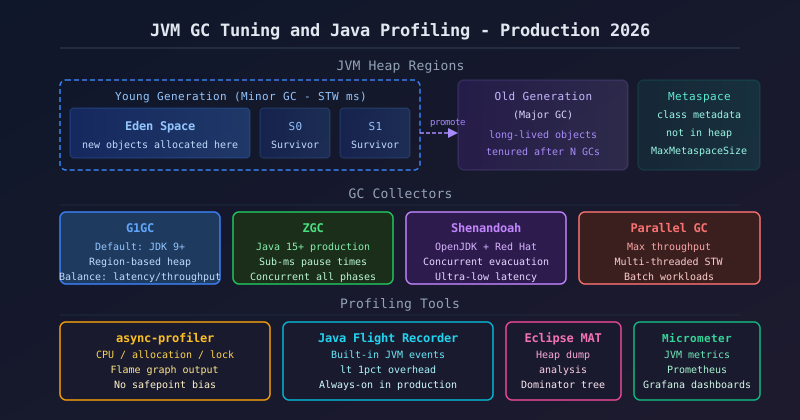
For latency: use ZGC or Shenandoah; for throughput: use G1GC with pause targets. Always set -Xms = -Xmx in containers. Enable GC logging (-Xlog:gc*). Take thread dumps with jstack for BLOCKED threads. Analyze heap dumps with Eclipse MAT. Use async-profiler for CPU hotspots. Use JFR for continuous low-overhead event recording. Export JVM metrics via Micrometer to Grafana.
1. JVM Memory Model
The JVM memory model partitions memory into several regions, each with a distinct lifecycle and GC responsibility. Understanding these regions is the foundation for any tuning work.
+-------------------------------------------+  +------------+
|               JVM HEAP                    |  |  Off-Heap  |
|  +--Young Generation--+  +-Old Gen------+ |  +------------+
|  | Eden | S0 | S1     |  | Tenured      | |  | Metaspace  |
|  +--------------------+  +--------------+ |  | Code Cache |
+-------------------------------------------+  +------------+
  <--- Minor GC (fast) --->  <-- Major GC -->
| Heap Area | Description | GC Type | Tuning Flag |
|---|---|---|---|
| Eden Space | New object allocation; most objects die here | Minor GC | -XX:NewRatio |
| Survivor S0/S1 | Objects surviving 1+ Minor GCs; age counter incremented each cycle | Minor GC | -XX:SurvivorRatio |
| Old Generation | Long-lived objects promoted from young gen; most GC pause time here | Major/Full GC | -Xmx |
| Metaspace | Class metadata, method descriptors; unbounded by default — always cap it | Full GC | -XX:MaxMetaspaceSize |
| Code Cache | JIT-compiled native code; exhaustion causes deoptimization, severe slowdown | n/a | -XX:ReservedCodeCacheSize |
Key insight: the tenuring threshold (-XX:MaxTenuringThreshold, default 15) controls how many Minor GCs an object survives before being promoted to old gen. Premature promotion fills old gen faster and increases Major GC frequency.
2. GC Algorithms Overview
Choosing the right GC for your workload is the highest-leverage decision in JVM tuning. There is no universally best GC — each makes different trade-offs.
| GC | Java Version | Pauses | Throughput | Latency | Use Case |
|---|---|---|---|---|---|
| Serial GC | All | STW, long | Low | Poor | Single-CPU, tiny heaps (<256MB) |
| Parallel GC | All | STW, medium | Highest | Poor | Batch jobs, throughput-first |
| G1GC | Default JDK 9+ | STW, short | Good | Good | General-purpose, <16GB heaps |
| ZGC | Java 15+ prod | Sub-ms | Good | Excellent | Latency-critical, large heaps |
| Shenandoah | OpenJDK 12+ | Sub-ms | Good | Excellent | Low-latency, all heap sizes |
| Epsilon | Java 11+ | None | Max | n/a | Performance benchmarking only |
3. G1GC Deep Dive and Tuning Flags
G1GC divides the heap into equal-sized regions (1–32 MB). Instead of fixed young/old boundaries, it dynamically assigns regions as Eden, Survivor, or Old based on demand. The GC targets a pause-time goal (-XX:MaxGCPauseMillis) and selects which regions to collect to meet that goal — hence "Garbage-First".
# G1GC Production Flags
-XX:+UseG1GC                          # G1GC (default JDK 9+)
-Xms4g -Xmx4g                         # Fix heap size in containers
-XX:MaxGCPauseMillis=200               # Target pause time (best effort)
-XX:G1HeapRegionSize=16m               # Region size 1-32MB, power of 2
-XX:G1NewSizePercent=20                # Min young gen % of heap
-XX:G1MaxNewSizePercent=40             # Max young gen % of heap
-XX:G1MixedGCCountTarget=8            # Mixed GC cycles to clear old regions
-XX:G1HeapWastePercent=5              # Allowed heap waste before mixed GC
-XX:InitiatingHeapOccupancyPercent=45 # Start concurrent marking at 45% heap
-XX:ConcGCThreads=4                   # Concurrent GC thread count
-XX:ParallelGCThreads=8               # STW parallel threads
G1GC phases: Minor (Young) GC → Concurrent Marking → Remark (STW) → Cleanup (STW) → Mixed GC. The remark and cleanup pauses are usually very short (<50ms). If you see long Remark pauses, lower -XX:InitiatingHeapOccupancyPercent so marking starts earlier.
4. ZGC and Shenandoah for Low Latency
Both ZGC and Shenandoah achieve low pause times by performing most GC work concurrently while the application is running. The key difference: ZGC uses load barriers and colored pointers to handle object relocation concurrently; Shenandoah uses Brooks forwarding pointers. Java 21 introduced Generational ZGC which dramatically improves throughput by applying generational hypothesis to ZGC's concurrent model.
# ZGC — Java 15+ production ready (Java 11+ experimental)
-XX:+UseZGC
-Xms8g -Xmx8g
-XX:ConcGCThreads=4
-XX:ZAllocationSpikeTolerance=5        # allocation burst tolerance
-XX:ZCollectionInterval=120            # force GC every 120 seconds
-XX:+ZGenerational                     # Generational ZGC (Java 21+, much better!)

# Shenandoah
-XX:+UseShenandoahGC
-XX:ShenandoahGCHeuristics=adaptive    # auto-tunes based on heap pressure
-XX:ShenandoahInitFreeThreshold=70     # start GC when 30% of heap used
-XX:ShenandoahMinFreeThreshold=10      # emergency GC threshold

# Verify which GC is active
java -XX:+PrintCommandLineFlags -version 2>&1 | grep -E "UseG1GC|UseZGC|Shenandoah"-XX:+UseZGC -XX:+ZGenerational. For existing services on Java 11–17 needing low latency, use -XX:+UseShenandoahGC. Both add roughly 5–10% CPU overhead compared to G1GC — a worthwhile trade for latency-sensitive APIs.
5. Essential JVM Flags
These flags form the baseline configuration for production JVM deployments. Split them into categories for clarity in your startup scripts or Kubernetes pod specs.
# Memory sizing
-Xms512m                              # initial heap size
-Xmx2g                               # max heap size
-XX:MetaspaceSize=256m               # initial metaspace (triggers GC)
-XX:MaxMetaspaceSize=512m            # max metaspace
-XX:ReservedCodeCacheSize=256m       # JIT code cache
-XX:+UseContainerSupport             # Docker CPU/memory awareness (JDK 10+)
-XX:MaxRAMPercentage=75.0            # use 75% of container RAM as heap

# GC logging (JDK 9+ unified logging)
-Xlog:gc*:file=/var/log/gc.log:time,uptime,level,tags:filecount=5,filesize=20m
-Xlog:gc+heap=debug                  # heap usage per GC
-Xlog:safepoint                      # safepoint pauses

# Diagnostics
-XX:+HeapDumpOnOutOfMemoryError
-XX:HeapDumpPath=/dumps/heap.hprof
-XX:+ExitOnOutOfMemoryError          # restart instead of running degraded
-XX:+PrintCommandLineFlags
-XX:NativeMemoryTracking=summary     # track off-heap memory

# Performance
-XX:+UseStringDeduplication          # G1GC: dedup duplicate String objects
-XX:+OptimizeStringConcat            # JIT optimize StringBuilder chains
-server                              # server JVM mode (usually default)
Container critical: Without -XX:+UseContainerSupport (default on since JDK 10), the JVM reads host memory instead of the container limit and over-allocates heap, causing OOM kills. Use -XX:MaxRAMPercentage=75 instead of hard-coding -Xmx in container environments for better portability.
6. Reading GC Logs
GC logs are the primary diagnostic source for memory pressure and pause time issues. The JDK 9+ unified logging format is consistent across all collectors.
[2026-04-11T10:15:23.456+0000] GC(42) Pause Young (Normal) (G1 Evacuation Pause)
[2026-04-11T10:15:23.456+0000] GC(42)   Heap: 2048M(4096M)->1024M(4096M)
[2026-04-11T10:15:23.472+0000] GC(42) Pause Young (Normal) 2048M->1024M(4096M) 16.432ms
[2026-04-11T10:15:45.100+0000] GC(43) Concurrent Mark Cycle
[2026-04-11T10:15:48.200+0000] GC(43) Pause Remark 3072M->3072M(4096M) 45.231ms
[2026-04-11T10:15:50.500+0000] GC(44) Pause Young (Mixed) (G1 Evacuation Pause)
[2026-04-11T10:15:50.520+0000] GC(44) Pause Young (Mixed) 3072M->2048M(4096M) 18.764ms- GC(42) Pause Young 16.432ms — Minor GC taking 16ms. Normal. Concern if >200ms.
- Heap: 2048M(4096M)->1024M(4096M) — used before → used after (max). 1GB freed.
- Concurrent Mark Cycle — background marking, no pause. Expected at 45%+ old gen.
- Pause Remark 45.231ms — STW remark phase. Over 200ms indicates GC pressure.
- Pause Young (Mixed) — collecting both young and old regions. Old gen is being reclaimed.
Warning signs: heap usage not dropping after GC (memory leak), Remark pauses growing over time, frequent Mixed GCs, or any Full GC entries (Full GC means all concurrent mechanisms failed). Use GCEasy.io to visualize logs automatically.
7. Thread Dumps: Taking, Reading, Deadlock Detection
Thread dumps capture the state of every JVM thread at a point in time. They are essential for diagnosing deadlocks, thread pool starvation, and high-CPU threads.
# Take a thread dump
jstack $(pgrep -f 'spring-boot') > thread-dump.txt

# In Kubernetes
kubectl exec -it my-pod -- jstack 1

# jcmd (more features)
jcmd <PID> Thread.print

# Find high-CPU threads
top -H -p <PID>   # note thread PID in hex, correlate with thread dump
printf '%x\n' <TID_DECIMAL>  # convert decimal TID to hex for grep
grep "nid=0x<HEX>" thread-dump.txt

# Deadlock detection — jstack reports automatically:
# Found 1 deadlock.
# Thread-A waiting for Thread-B's lock
# Thread-B waiting for Thread-A's lock
Sample deadlock in a thread dump:
"Thread-A" #25 prio=5 os_prio=0 tid=0x00007f nid=0x1a2 BLOCKED
  waiting to lock <0xd4c5e1b8> (a java.lang.Object)
  held locks: [0xc3a2f890] (a java.lang.Object)

"Thread-B" #26 prio=5 os_prio=0 tid=0x00007e nid=0x1a3 BLOCKED
  waiting to lock <0xc3a2f890> (a java.lang.Object)
  held locks: [0xd4c5e1b8] (a java.lang.Object)

Found one Java-level deadlock:
=============================
Thread-A: waiting to lock monitor 0xd4c5e1b8,  held by Thread-B
Thread-B: waiting to lock monitor 0xc3a2f890,  held by Thread-A
Collect 3 thread dumps at 10-second intervals to distinguish transient spikes from persistent BLOCKED states. Use FastThread.io for visual thread dump analysis.
8. Heap Dumps: OOME and Eclipse MAT Analysis
A heap dump is a snapshot of all live objects in the JVM heap. It is the definitive artifact for diagnosing memory leaks and OutOfMemoryError.
# Trigger heap dump on OOME (JVM flag — always enable in production)
-XX:+HeapDumpOnOutOfMemoryError -XX:HeapDumpPath=/dumps/

# Manual heap dump
jmap -dump:live,format=b,file=heap.hprof <PID>

# jcmd (preferred over jmap — less impact on running JVM)
jcmd <PID> GC.heap_dump /dumps/heap.hprof

# In Kubernetes
kubectl exec <pod> -- jcmd 1 GC.heap_dump /tmp/heap.hprof
kubectl cp <pod>:/tmp/heap.hprof ./heap.hprof

# Eclipse MAT analysis workflow:
# 1. File > Open Heap Dump > heap.hprof
# 2. Reports > Leak Suspects (auto-identifies likely leaks)
# 3. Window > Heap Dump Details > Dominator Tree (top memory consumers)
# 4. OQL queries: SELECT * FROM java.util.ArrayList WHERE size > 10000| OOME Type | Cause | Fix |
|---|---|---|
| Java heap space | Heap full — leak or undersized | Fix leak; increase -Xmx; scale out |
| GC overhead limit exceeded | GC uses >98% CPU, recovers <2% | Find and fix memory leak |
| Metaspace | Class loader leak, dynamic proxies | -XX:MaxMetaspaceSize; fix class loader |
| unable to create native thread | Too many threads; OS limit hit | Reduce thread pool sizes; use virtual threads |
9. Java Flight Recorder and JDK Mission Control
JFR is built into OpenJDK 11+ and records hundreds of JVM events with under 1% overhead. It is safe for always-on use in production and is the recommended first tool when investigating a performance regression.
# Enable JFR at startup (low overhead, always-on profiling)
-XX:+FlightRecorder
-XX:StartFlightRecording=name=startup,settings=default,duration=60s,filename=/dumps/startup.jfr

# Start/stop JFR at runtime (no restart needed)
jcmd <PID> JFR.start name=production settings=profile maxsize=100m
jcmd <PID> JFR.dump filename=/dumps/production.jfr
jcmd <PID> JFR.stop

# JFR configuration settings:
# default (< 1% overhead): covers GC, compilation, class loading, I/O
# profile (2-3% overhead): adds CPU sampling, allocation profiling, lock profiling| JFR Event Category | What It Captures | Available In |
|---|---|---|
| GC Events | Pause duration, heap before/after, GC cause | default + profile |
| JIT Compilation | Methods compiled/deoptimized, code cache | default + profile |
| Thread Events | Thread start/stop, park/unpark, sleep | default + profile |
| I/O Events | Socket reads/writes, file I/O duration | default + profile |
| CPU Sampling | Method-level CPU hotspots (sampled) | profile only |
| Allocation Profiling | Top allocation sites, object sizes | profile only |
Open JFR recordings in JDK Mission Control (JMC) — a GUI available at adoptium.net/jmc. The Automated Analysis view flags the most impactful issues automatically.
10. Async-Profiler for CPU and Allocation Profiling
async-profiler uses AsyncGetCallTrace (avoids safepoint bias) combined with Linux perf_events to capture accurate CPU usage, memory allocations, and lock contention. It generates flame graphs — the most effective tool for quickly identifying performance bottlenecks.
# Download and run async-profiler
curl -L https://github.com/async-profiler/async-profiler/releases/latest/download/async-profiler-linux-x64.tar.gz | tar xz
cd async-profiler

# CPU profiling — 30 seconds, flame graph output
./profiler.sh -e cpu -d 30 -f cpu-profile.html <PID>

# Allocation profiling — find top memory allocators
./profiler.sh -e alloc -d 30 -f alloc-profile.html <PID>

# Lock contention profiling
./profiler.sh -e lock -d 30 -f lock-profile.html <PID>

# Combined (CPU + allocation)
./profiler.sh -e cpu,alloc -d 60 -f combined.html <PID>

# In Docker/Kubernetes (needs --privileged or cap SYS_PTRACE)
kubectl exec <pod> -- /profiler.sh -e cpu -d 30 -f /tmp/profile.html 1
kubectl cp <pod>:/tmp/profile.html ./profile.html- X-axis = time on CPU (not chronological — alphabetical). Wider = more CPU time.
- Y-axis = call stack depth. Bottom = root frame, top = most specific frame.
- Wide plateaus at the top = hot methods — your optimization targets.
- Tall narrow towers = deep but fast — usually not a problem.
- Click any frame to zoom in. Look for unexpected framework overhead in hot paths.
11. Micrometer JVM Metrics in Spring Boot
Spring Boot Actuator with Micrometer auto-exports dozens of JVM metrics to Prometheus with zero configuration. Add the dependency and expose the endpoint.
# application.yml
management:
  endpoints:
    web:
      exposure:
        include: health, metrics, prometheus
  metrics:
    enable:
      jvm: true

# Add to pom.xml:
# <dependency>micrometer-registry-prometheus</dependency>
# <dependency>spring-boot-starter-actuator</dependency>
// Custom JVM gauge example
@Component
public class JvmMetricsExporter {
public JvmMetricsExporter(MeterRegistry registry) {
// JVM metrics auto-registered by Spring Boot Actuator:
// jvm.memory.used{area="heap"} — heap usage
// jvm.memory.max{area="heap"} — max heap
// jvm.gc.pause — GC pause duration
// jvm.gc.memory.promoted — bytes promoted to old gen
// jvm.threads.live — live thread count
// jvm.threads.daemon — daemon thread count
// jvm.classes.loaded — loaded class count
// system.cpu.usage — system CPU
// process.cpu.usage — JVM process CPU
// Add custom Gauge for code cache usage
Gauge.builder("jvm.code.cache.used", Runtime.getRuntime(), rt ->
ManagementFactory.getMemoryPoolMXBeans().stream()
.filter(p -> p.getName().contains("Code Cache"))
.mapToLong(p -> p.getUsage().getUsed())
.sum())
.description("JVM code cache used bytes")
.register(registry);
}
}# Heap usage %
jvm_memory_used_bytes{area="heap"} / jvm_memory_max_bytes{area="heap"} * 100
# GC pause rate (pauses per second)
rate(jvm_gc_pause_seconds_count[1m])
# GC time ratio (% of time in GC)
rate(jvm_gc_pause_seconds_sum[5m]) / 5 * 100
# Thread count
jvm_threads_live_threads12. Production Checklist
Use this checklist before releasing a Java service to production or when investigating a performance issue.
- ✅ Set
-Xms = -Xmxin containers (avoid resize pauses) - ✅ Use
-XX:MaxRAMPercentage=75instead of hard-coded -Xmx in K8s - ✅ Cap Metaspace with
-XX:MaxMetaspaceSize=512m - ✅ Choose GC based on latency vs throughput requirement
- ✅ Use Generational ZGC for latency on Java 21+
- ✅ Set
-XX:InitiatingHeapOccupancyPercent=45for G1GC
- ✅ Enable GC logging with rotation (
-Xlog:gc*:file=...) - ✅ Enable
-XX:+HeapDumpOnOutOfMemoryError - ✅ Set
-XX:+ExitOnOutOfMemoryError(fail fast) - ✅ Run JFR in default mode always-on
- ✅ Export JVM metrics to Prometheus via Micrometer
- ✅ Alert on heap >85%, GC time >10%, thread count spikes
- ✅ Profile with async-profiler before any optimization
- ✅ Use JFR profile settings for detailed analysis
- ✅ Analyze heap dumps with Eclipse MAT Leak Suspects
- ✅ Take 3 thread dumps at 10s intervals for BLOCKED analysis
- ✅ Baseline GC overhead <5% of CPU under normal load
- ✅ Load test after each tuning change; tune one variable at a time