Distributed Tracing with OpenTelemetry & Spring Boot: Complete Production Guide (2026)
A complete guide to implementing distributed tracing across Spring Boot microservices: OpenTelemetry Java agent vs SDK, Micrometer Tracing auto-instrumentation, custom spans, trace context propagation via W3C traceparent, Jaeger and Zipkin backends, sampling strategies, and Grafana Tempo integration.
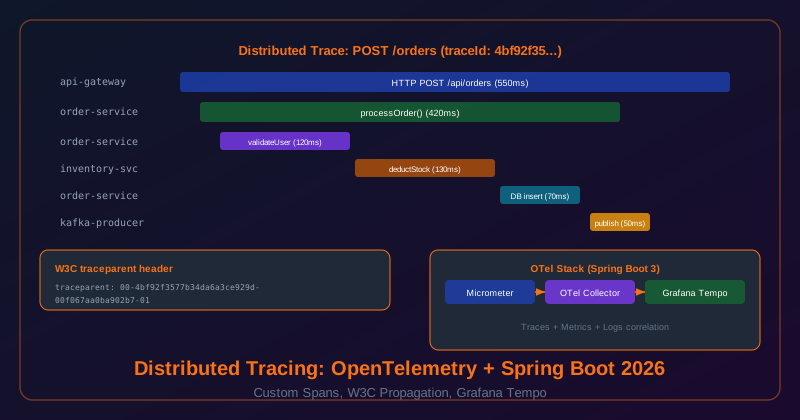
1. Core Concepts: Traces, Spans, Propagation
- Trace: A complete record of one request as it flows through your entire system. Every trace has a globally unique
traceId(128-bit hex string). - Span: A single unit of work within a trace (e.g., HTTP request, DB query, Kafka publish). Each span has a
spanId, start/end time, parent span ID, status, and key-value attributes. - Parent-child relationship: When Service A calls Service B, Service B creates a child span with Service A's span as the parent. This forms the trace tree (waterfall view).
- Trace context propagation: The traceId and parent spanId are forwarded to all downstream services via HTTP headers (W3C
traceparent) or message headers (Kafka). Automatic in Spring Boot 3. - Attributes vs Events: Attributes are metadata on the span (userId, orderId, HTTP status). Events are time-stamped annotations within a span (e.g., "cache miss", "retry attempt 2").
2. Tooling: OTel Java Agent vs Micrometer Tracing
| Approach | How | Instrumentation | Best For |
|---|---|---|---|
| OTel Java Agent | JVM -javaagent flag | Auto (bytecode) | Legacy apps, zero code change |
| Micrometer Tracing (Spring Boot 3) | Spring Boot starter | Auto + @Observed API | Spring Boot microservices (recommended) |
| OTel SDK direct | SDK dependency | Manual Span API | Full control, non-Spring apps |
Recommendation: Use Micrometer Tracing for Spring Boot 3+ apps — it bridges to the OTel SDK under the hood, auto-instruments RestTemplate, WebClient, Feign, Spring Data, Kafka, and Redis, and integrates with Spring's observation API.
3. Spring Boot 3 Setup: Zero-Code Auto-Instrumentation
<!-- Micrometer Tracing core -->
<dependency>
    <groupId>io.micrometer</groupId>
    <artifactId>micrometer-tracing-bridge-otel</artifactId>
</dependency>
<!-- OTel OTLP exporter (sends to Jaeger/Tempo/any OTLP-compatible backend) -->
<dependency>
    <groupId>io.opentelemetry</groupId>
    <artifactId>opentelemetry-exporter-otlp</artifactId>
</dependency>
management:
  tracing:
    sampling:
      probability: 1.0   # 100% for dev; 0.1 for prod (10%)
    propagation:
      type: w3c           # W3C traceparent (recommended)
  otlp:
    tracing:
      endpoint: http://jaeger:4318/v1/traces
  zipkin:
    tracing:
      endpoint: http://zipkin:9411/api/v2/spans  # if using Zipkin

spring:
  application:
    name: order-service   # appears as service name in trace backend
With this config, Spring Boot 3 automatically instruments: all HTTP incoming requests, RestTemplate/WebClient/Feign outbound calls, Spring Data (JPA/MongoDB/Redis), Spring Kafka, and @Scheduled tasks. No code changes needed.
4. Custom Spans: @Observed & Tracer API
// You see: "POST /api/orders" taking 3s — but WHY? Which sub-operation is slow?
// Option 1: @Observed annotation (declarative, AOP-based)
@Observed(name = "order.payment", contextualName = "processPayment",
          lowCardinalityKeyValues = {"payment.provider", "stripe"})
public PaymentResult processPayment(Order order) {
    return stripeService.charge(order);
}

// Option 2: Tracer API for fine-grained control
@Service
public class InventoryService {
    @Autowired private Tracer tracer;

    public void deductInventory(String productId, int qty) {
        Span span = tracer.nextSpan()
            .name("inventory.deduct")
            .tag("product.id", productId)
            .tag("quantity", String.valueOf(qty))
            .start();
        try (Tracer.SpanInScope ws = tracer.withSpan(span.start())) {
            // Business logic
            Product p = productRepository.findById(productId).orElseThrow();
            if (p.getStock() < qty) {
                span.tag("error", "insufficient_stock");
                span.event("insufficient_stock_detected");
                throw new InsufficientStockException(productId);
            }
            p.setStock(p.getStock() - qty);
            productRepository.save(p);
            span.tag("new.stock", String.valueOf(p.getStock()));
        } catch (Exception ex) {
            span.error(ex);
            throw ex;
        } finally {
            span.end();  // always end the span
        }
    }
}
5. Trace Context Propagation
Spring Boot 3 with Micrometer Tracing propagates the W3C traceparent header automatically for:
- RestTemplate / WebClient / Feign: Auto-injects traceparent on all outgoing HTTP calls
- Spring Kafka: Injects/extracts trace context in Kafka message headers
- Incoming requests: Extracts traceparent from incoming HTTP headers to continue the trace
W3C traceparent format: 00-{traceId}-{parentSpanId}-{flags}. Example: 00-4bf92f3577b34da6a3ce929d0e0e4736-00f067aa0ba902b7-01
// In order-service: set business baggage that all downstream services see
@PostMapping("/orders")
public ResponseEntity<Order> createOrder(@RequestBody OrderRequest request) {
    // Baggage is auto-propagated via traceparent to all downstream services
    BaggageField.create("tenant.id").updateValue(request.getTenantId());
    BaggageField.create("user.id").updateValue(request.getUserId());
    return ResponseEntity.ok(orderService.create(request));
}

// In inventory-service: read baggage without any code coupling
@Service
public class InventoryService {
    public void deductStock(String productId, int qty) {
        String tenantId = BaggageField.getByName("tenant.id").getValue();
        // tenantId is automatically available here — propagated via HTTP header!
        log.info("Deducting stock for tenant={} product={}", tenantId, productId);
    }
}
6. Tracing Through Kafka Messages
// Producer: trace headers injected AUTOMATICALLY by Spring Kafka + Micrometer Tracing
@Service
public class OrderEventPublisher {
    @Autowired private KafkaTemplate<String, OrderCreatedEvent> kafkaTemplate;

    public void publish(OrderCreatedEvent event) {
        // traceparent header is auto-added to Kafka message headers — no manual code!
        kafkaTemplate.send("order-created", event.getOrderId(), event);
    }
}

// Consumer: trace automatically continued from message headers
@KafkaListener(topics = "order-created", groupId = "inventory-group")
@Observed(name = "kafka.order.inventory.process")
public void handleOrderCreated(OrderCreatedEvent event) {
    // This span is automatically a child of the producer's span — full trace!
    inventoryService.deductInventory(event.getProductId(), event.getQuantity());
}
7. Backends: Jaeger, Zipkin & Grafana Tempo
| Backend | Protocol | Storage | Best For |
|---|---|---|---|
| Jaeger | OTLP / Thrift UDP | Cassandra, Elasticsearch, Badger | Self-hosted, mature UI, Kubernetes-native |
| Zipkin | HTTP JSON / OTLP | In-memory, MySQL, Elasticsearch | Lightweight, simple setup, dev environments |
| Grafana Tempo | OTLP | Object storage (S3, GCS) | Production scale, correlate with Loki logs & Prometheus |
8. Sampling Strategies
| Strategy | Decision Point | Pros | Cons |
|---|---|---|---|
| Head-based (probabilistic) | At trace start | Low overhead | Discards interesting error traces at low rates |
| Tail-based (in OTel Collector) | After trace complete | ✅ Sample ALL errors, slow traces | Higher memory in collector |
| Always-on for errors | Status code check | Never miss error traces | Requires custom sampler |
9. Correlating Logs with Traces: MDC Integration
logging:
  pattern:
    console: "%d{HH:mm:ss.SSS} [%thread] %-5level %logger{36} [%X{traceId},%X{spanId}] - %msg%n"
  level:
    io.micrometer.tracing: DEBUG   # see trace propagation in logs during debugging

# Result: every log line contains the traceId
# 09:15:42.001 [nio-8080-exec-1] INFO  OrderService [4bf92f3577b34da6a...] - Processing order 123
# Click traceId in Grafana/Jaeger to see the full request waterfall!
10. Production Observability Stack
The modern production observability stack for Spring Boot microservices in 2026:
- Metrics: Micrometer + Prometheus + Grafana (JVM, business metrics)
- Logs: Logback/Log4j2 → Loki (Grafana) or Elasticsearch (ELK)
- Traces: Micrometer Tracing → OTel Collector → Grafana Tempo (all services)
- Correlation: traceId in all three systems — click a log line to see the trace, click a slow trace to see related logs
- Alerting: Prometheus AlertManager for metric-based alerts; Grafana for cross-signal alerts
11. Interview Questions & Observability Checklist
A: Open the trace for that specific request in Jaeger/Tempo. The waterfall view shows which span takes 5 seconds — whether it's a database query, an external API call, or a specific microservice. Drill into that span's attributes (SQL query, endpoint URL). Cross-reference with logs for that traceId to get application-level context. Without distributed tracing, this investigation takes hours; with it, minutes.
- Micrometer Tracing + OTel bridge in all services
- Service name set per service (spring.application.name)
- W3C traceparent propagation enabled
- Custom spans for critical business operations
- Business attributes on spans (orderId, userId)
- traceId in log pattern (MDC)
- Sampling 10% in prod; 100% for errors
- Trace IDs in error API responses
- Grafana Tempo linked to Loki logs
- OTel Collector as sidecar (buffer + retry)
12. At BRAC IT: How Distributed Tracing Transformed Incident Response
Before we implemented distributed tracing, debugging cross-service failures at BRAC IT was a multi-hour archaeology project. We would identify the failing endpoint, find its logs in Kibana, look for errors, find a downstream service mentioned in the error, switch to that service's logs, filter by the approximate timestamp, find a new downstream reference, and repeat. With 20+ services, a 20-hop request chain could require opening 8 different Kibana queries in sequence. Average time to identify root cause: 2–4 hours.
After deploying OpenTelemetry with Grafana Tempo as the backend, every distributed request has a single trace ID that flows through all services. When an incident fires, the investigation starts with one query in Tempo: search for the trace ID from the failing request (included in our error API responses as X-Trace-ID). The complete waterfall diagram appears instantly, showing every service call, database query, and Kafka message publication in the correct sequence with timing. Root cause identification time dropped from 3 hours to 25 minutes on average.
Our most impactful incident: in October 2025, our loan officer portal was returning HTTP 504 timeouts on approximately 5% of loan application submissions. The trace showed a 20-hop request chain where hop 14 — a call to our credit bureau integration service — was taking 8 seconds instead of the expected 300 milliseconds. Hop 14 was waiting on a database query. The query plan showed a full table scan on a 40-million-row table because a recent migration had accidentally dropped a composite index. The fix: restore the index. Total investigation time: 18 minutes. Without distributed tracing: estimated 4+ hours.
13. Correlating Traces with Logs and Metrics
Distributed tracing's full value is realised when you can jump between the three pillars of observability — traces, logs, and metrics — without losing context. The key is injecting trace context into logs automatically, so every log line contains the trace ID of the active request:
# logback-spring.xml: inject traceId, spanId into every log line
<pattern>
  %d{ISO8601} [%thread] %-5level %logger{36}
  traceId=%mdc{traceId:-NONE}
  spanId=%mdc{spanId:-NONE}
  - %message%n
</pattern>

# Output example:
# 2026-04-28T10:32:01.234 [http-nio-8080-exec-1] INFO LoanService
# traceId=4bf92f3577b34da6a3ce929d0e0e4736
# spanId=00f067aa0ba902b7
# - Processing loan application for borrower b-uuid-123
With trace IDs in logs, Grafana provides three-way navigation in the Grafana Explore view:
- Trace → Logs: Click a span in Tempo, see the logs generated during that span in Loki
- Logs → Trace: Click a traceId in Kibana/Loki, jump directly to the trace in Tempo
- Metrics → Trace: From a Grafana alert (high latency metric), drill down to example traces showing slow requests
This three-way correlation collapses the "find the log, find the trace, find the metric" workflow into a single click. Configure Grafana Tempo as a datasource in Grafana, then add a "Derived Fields" configuration in your Loki datasource that creates a clickable link from any log line containing a traceId.
14. OpenTelemetry Semantic Conventions: Why Consistency Matters
OpenTelemetry semantic conventions define standard attribute names for common operations: db.system, db.statement, http.method, http.status_code, messaging.system, messaging.destination. When every service uses these standard names, your dashboards, alerts, and queries work across services without customisation.
Always use the SemanticAttributes constants instead of string literals in your custom spans. This prevents typos and keeps your spans consistent with auto-instrumented spans:
// Wrong: string literals are error-prone
span.setAttribute("db.system", "postgresql");
span.setAttribute("http.method", "POST");

// Correct: use SemanticAttributes constants
span.setAttribute(SemanticAttributes.DB_SYSTEM, DbSystemValues.POSTGRESQL);
span.setAttribute(SemanticAttributes.HTTP_REQUEST_METHOD, "POST");
span.setAttribute(SemanticAttributes.HTTP_ROUTE, "/api/v1/loans");

// For Kafka producers:
span.setAttribute(SemanticAttributes.MESSAGING_SYSTEM, "kafka");
span.setAttribute(SemanticAttributes.MESSAGING_DESTINATION_NAME, "loan-events");
span.setAttribute(SemanticAttributes.MESSAGING_MESSAGE_ID, messageId);
Auto-instrumentation covers the most common scenarios: HTTP calls via RestTemplate/WebClient, JDBC queries, gRPC calls, Kafka producers and consumers, and Redis operations. Manual spans are needed for: business logic that deserves its own span for performance monitoring, external API calls via custom clients, and complex computations whose duration you want to track separately. The rule: if you want to set an alert on a specific operation's duration, it needs its own span.
Frequently Asked Questions
What is Core Concepts and how does it work?
Trace: A complete record of one request as it flows through your entire system. Every trace has a globally unique traceId (128-bit hex string). Span: A single unit of work within a trace (e.g., HTTP request, DB query, Kafka publish). Each span has a spanId , start/end time, parent span ID, status, and key-value attributes. Parent-child relationship: When Service A calls Service B, Service B creates a child span with Service A's span as the parent. This forms the trace tree (waterfall view). Trace context propagation: The traceId and parent spanId are forwarded to all downstream services via HTTP headers (W3C traceparent ) or message headers (Kafka). Automatic in Spring Boot 3.
What is Tooling and how does it work?
Recommendation: Use Micrometer Tracing for Spring Boot 3+ apps — it bridges to the OTel SDK under the hood, auto-instruments RestTemplate, WebClient, Feign, Spring Data, Kafka, and Redis, and integrates with Spring's observation API.
How do you configure Spring Boot 3 Setup?
<!-- Micrometer Tracing core --> <dependency> <groupId>io.micrometer</groupId> <artifactId>micrometer-tracing-bridge-otel</artifactId> </dependency> <!-- OTel OTLP exporter (sends to Jaeger/Tempo/any OTLP-compatible backend) --> <dependency> <groupId>io.opentelemetry</groupId> <artifactId>opentelemetry-exporter-otlp</artifactId> </dependency> # application.yml — tracing config management: tracing: sampling: probability: 1.0 # 100% for dev; 0.1 for prod (10%) propagation: type: w3c # W3C traceparent (recommended) otlp: tracing: endpoint: http://jaeger:4318/v1/traces zipkin: tracing: endpoint: http://zipkin:9411/api/v2/spans # if using Zipkin spring: application: name: order-service # appears as service name in trace backend With this config, Spring Boot 3 automatically instruments: all HTTP incoming requests, RestTemplate/WebClient/Feign outbound calls, Spring Data (JPA/MongoDB/Redis), Spring Kafka, and @Scheduled tasks. No code changes needed.
What is Trace Context Propagation and how does it work?
Spring Boot 3 with Micrometer Tracing propagates the W3C traceparent header automatically for: W3C traceparent format: 00-{traceId}-{parentSpanId}-{flags} . Example: 00-4bf92f3577b34da6a3ce929d0e0e4736-00f067aa0ba902b7-01 RestTemplate / WebClient / Feign: Auto-injects traceparent on all outgoing HTTP calls Spring Kafka: Injects/extracts trace context in Kafka message headers Incoming requests: Extracts traceparent from incoming HTTP headers to continue the trace
What are the production considerations for Production Observability Stack?
The modern production observability stack for Spring Boot microservices in 2026: Metrics: Micrometer + Prometheus + Grafana (JVM, business metrics) Logs: Logback/Log4j2 → Loki (Grafana) or Elasticsearch (ELK) Traces: Micrometer Tracing → OTel Collector → Grafana Tempo (all services) Correlation: traceId in all three systems — click a log line to see the trace, click a slow trace to see related logs
Leave a Comment
Frequently Asked Questions
What is Core Concepts and how does it work?
Trace: A complete record of one request as it flows through your entire system. Every trace has a globally unique traceId (128-bit hex string). Span: A single unit of work within a trace (e.g., HTTP request, DB query, Kafka publish). Each span has a spanId , start/end time, parent span ID, status, and key-value attributes. Parent-child relationship: When Service A calls Service B, Service B creates a child span with Service A's span as the parent. This forms the trace tree (waterfall view). Trace context propagation: The traceId and parent spanId are forwarded to all downstream services via HTTP headers (W3C traceparent ) or message headers (Kafka). Automatic in Spring Boot 3.
What is Tooling and how does it work?
Recommendation: Use Micrometer Tracing for Spring Boot 3+ apps — it bridges to the OTel SDK under the hood, auto-instruments RestTemplate, WebClient, Feign, Spring Data, Kafka, and Redis, and integrates with Spring's observation API.
How do you configure Spring Boot 3 Setup?
<!-- Micrometer Tracing core --> <dependency> <groupId>io.micrometer</groupId> <artifactId>micrometer-tracing-bridge-otel</artifactId> </dependency> <!-- OTel OTLP exporter (sends to Jaeger/Tempo/any OTLP-compatible backend) --> <dependency> <groupId>io.opentelemetry</groupId> <artifactId>opentelemetry-exporter-otlp</artifactId> </dependency> # application.yml — tracing config management: tracing: sampling: probability: 1.0 # 100% for dev; 0.1 for prod (10%) propagation: type: w3c # W3C traceparent (recommended) otlp: tracing: endpoint: http://jaeger:4318/v1/traces zipkin: tracing: endpoint: http://zipkin:9411/api/v2/spans # if using Zipkin spring: application: name: order-service # appears as service name in trace backend With this config, Spring Boot 3 automatically instruments: all HTTP incoming requests, RestTemplate/WebClient/Feign outbound calls, Spring Data (JPA/MongoDB/Redis), Spring Kafka, and @Scheduled tasks. No code changes needed.
What is Trace Context Propagation and how does it work?
Spring Boot 3 with Micrometer Tracing propagates the W3C traceparent header automatically for: W3C traceparent format: 00-{traceId}-{parentSpanId}-{flags} . Example: 00-4bf92f3577b34da6a3ce929d0e0e4736-00f067aa0ba902b7-01 RestTemplate / WebClient / Feign: Auto-injects traceparent on all outgoing HTTP calls Spring Kafka: Injects/extracts trace context in Kafka message headers Incoming requests: Extracts traceparent from incoming HTTP headers to continue the trace
What are the production considerations for Production Observability Stack?
The modern production observability stack for Spring Boot microservices in 2026: Metrics: Micrometer + Prometheus + Grafana (JVM, business metrics) Logs: Logback/Log4j2 → Loki (Grafana) or Elasticsearch (ELK) Traces: Micrometer Tracing → OTel Collector → Grafana Tempo (all services) Correlation: traceId in all three systems — click a log line to see the trace, click a slow trace to see related logs