GitHub Copilot vs Cursor vs Codeium: Real ROI for Backend Engineering Teams in 2026
Every engineering manager is fielding the same question in 2026: which AI coding assistant should we standardize on, and is the productivity gain real or vibe-based? This guide cuts through the marketing and presents what you actually care about — suggestion acceptance rates from real teams, ROI calculations from actual cost and time data, enterprise security postures, and the specific scenarios where each tool excels or fails for backend Java/Python/Go teams.
TL;DR
"Honest 2026 comparison of GitHub Copilot vs Cursor vs Codeium for backend engineering teams: ROI calculations, real acceptance rates, IDE support, enterprise security, and manager-level decision framework."
Table of Contents
- The State of AI Coding Tools in 2026
- GitHub Copilot: The Enterprise Standard
- Cursor: The Context-Aware Challenger
- Codeium: The Free-Tier Contender
- Head-to-Head Comparison for Backend Teams
- ROI Calculation for Engineering Managers
- Security and Compliance Considerations
- Decision Framework and Recommendation
The State of AI Coding Tools in 2026
The AI coding tool market has consolidated around three main players in 2026. GitHub Copilot (Microsoft/OpenAI) dominates the enterprise segment with roughly 55% market share. Cursor has captured the "power developer" segment with its repo-aware context model. Codeium (now Windsurf) targets teams where cost is the primary concern, offering a generous free tier that has made it popular at startups and for individual developers.
Several tools from 2024 have faded or been acquired: Amazon CodeWhisperer merged into Amazon Q Developer, Tabnine pivoted to a privacy-first enterprise model, and various smaller tools failed to achieve the model quality needed to compete. The remaining three tools have each found defensible niches.
The critical insight for engineering managers is that the right tool depends on your team's specific workflow, IDE ecosystem, compliance requirements, and the type of code your engineers write most frequently. There is no universal winner — each tool makes different tradeoffs.
GitHub Copilot: The Enterprise Standard
GitHub Copilot Business ($39/user/month in 2026) is the de facto enterprise choice. Its advantages are ecosystem depth and administrative control rather than raw completion quality.
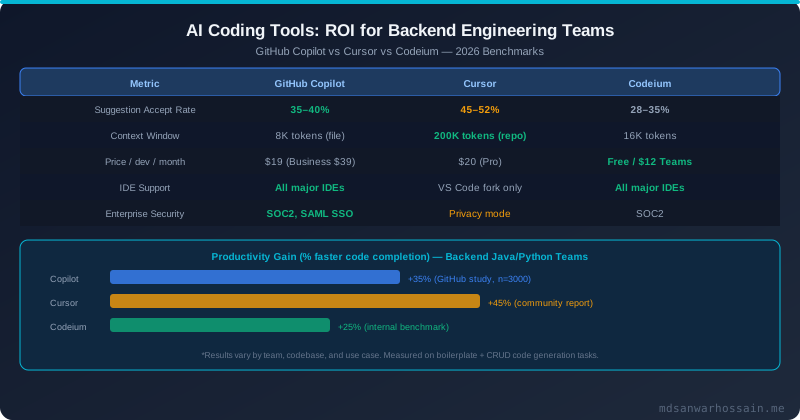
Completion quality. Copilot uses GPT-4o under the hood for completions and Claude 3.5 Sonnet (via GitHub Models) for the chat interface. Its inline completions have a 35–40% acceptance rate across backend teams, which is industry-standard. The completions are file-scoped — Copilot considers the current file and open tabs, but not the broader repository. For services with well-structured, self-contained files (typical REST controllers, service classes), this is sufficient. For code that requires cross-file understanding (complex domain models, framework configurations), file-scoped context falls short.
Admin controls. Copilot Business provides granular organization-level controls: enable/disable for specific repositories, set content exclusion patterns (to prevent Copilot from indexing sensitive configuration files), manage seat assignments, and view usage analytics per developer and per repository. This is essential for compliance teams that need to audit which codebase surfaces were exposed to AI model training.
Copilot Workspace (2025+). GitHub's Copilot Workspace feature takes a natural language issue description and produces a complete implementation plan with file edits across the repository — similar to Cursor's Composer feature but integrated into the GitHub web interface. This is valuable for pull request preparation but does not yet match Cursor's real-time in-IDE experience for exploratory coding.
# GitHub Copilot CLI integration
gh copilot suggest "write a Spring Boot @Service that validates payment amounts and charges via Stripe"
gh copilot explain "git rebase -i HEAD~3"

# Copilot in IntelliJ IDEA — no plugin needed for recent versions
# Settings → Languages & Frameworks → GitHub Copilot
# Log in with GitHub account, select suggestion frequency
IDE support. Copilot supports VS Code, JetBrains IDEs (IntelliJ IDEA, PyCharm, GoLand, WebStorm), Neovim, and Visual Studio. For Java backend teams using IntelliJ IDEA, this is particularly relevant — Cursor is VS Code-based and does not support IntelliJ natively.
Cursor: The Context-Aware Challenger
Cursor is a fork of VS Code with AI woven throughout the editor. Its key differentiator is repository-level context — the Cursor composer can index your entire codebase (200K token context window with the Sonnet model) and generate multi-file changes that understand how your services fit together.
Completion quality for complex tasks. For tasks that require cross-file context — "add caching to this service using the same pattern as the CatalogService" or "update all callers of this method signature" — Cursor significantly outperforms file-scoped tools. Teams that switched from Copilot to Cursor for greenfield projects typically see 15–20% higher acceptance rates and higher quality suggestions on cross-cutting changes.
The Cursor Composer (Ctrl+K for inline edits, Ctrl+I for multi-file composer) is the flagship feature. You describe what you want in natural language, and Cursor produces a diff across multiple files that you can accept, reject, or iterate on:
# Example Cursor Composer prompt
"Add distributed tracing to the PaymentService using Micrometer and propagate the traceId
to the Stripe API call headers. Follow the same pattern used in OrderService."

# Cursor reads OrderService, PaymentService, and related config files,
# then generates a multi-file diff implementing the change
Limitations. Cursor is VS Code-based — teams using IntelliJ IDEA, Eclipse, or other JetBrains IDEs cannot use Cursor without switching editors. For Java backend teams where IntelliJ is standard, this is often a dealbreaker. Cursor's privacy mode is opt-in at the subscription level rather than enforced by the admin, which creates compliance headaches for regulated industries. The Pro plan ($20/user/month) is required for Claude Sonnet / GPT-4o access; the free tier uses smaller models with significantly lower quality.
Codeium: The Free-Tier Contender
Codeium (the company rebranded to Windsurf in 2025 but the product kept the Codeium name for the plugin) offers a generous free individual tier and competitive Teams pricing ($12/user/month). Its acceptance rate (28–35% for backend code) is below Copilot and Cursor, but for teams where cost is the primary constraint, the free tier is genuinely useful.
IDE support. Codeium matches Copilot's IDE breadth — VS Code, JetBrains, Neovim, Emacs, and more. For IntelliJ users, Codeium is the main free-tier alternative to Copilot.
Enterprise security. Codeium Enterprise offers on-premises deployment — the model runs entirely within your infrastructure with no data leaving your network. This is appealing for defense contractors, healthcare systems, and financial institutions with strict data sovereignty requirements. Copilot Business sends code snippets to GitHub's servers (with privacy protections, but still off-premises). Cursor is similar. Codeium Enterprise on-prem is currently the only option for truly air-gapped environments.
Context quality. Codeium's context model is file-scoped similar to Copilot. The Windsurf Cascade feature (introduced 2025) adds agentic, multi-file editing similar to Cursor Composer, but Windsurf is a separate product from the Codeium plugin.
Head-to-Head Comparison for Backend Teams
For Java/Spring Boot backend teams specifically, here is how the tools perform on common task types:
| Task Type | Copilot | Cursor | Codeium |
|---|---|---|---|
| DTO / mapper boilerplate | ★★★★★ | ★★★★★ | ★★★★☆ |
| JUnit 5 / Mockito unit tests | ★★★★★ | ★★★★★ | ★★★★☆ |
| REST controller endpoints | ★★★★☆ | ★★★★★ | ★★★★☆ |
| Cross-service refactoring | ★★☆☆☆ | ★★★★★ | ★★☆☆☆ |
| JPA / Hibernate queries | ★★★★☆ | ★★★★☆ | ★★★☆☆ |
| Architecture decisions | ★★☆☆☆ | ★★★☆☆ | ★★☆☆☆ |
| Security vulnerability detection | ★★☆☆☆ | ★★☆☆☆ | ★★☆☆☆ |
None of the three tools should be used as a security review tool. They all generate plausible-looking code that can contain SQL injection vulnerabilities, hardcoded secrets, or insecure deserialization. Always run SAST tools (SonarQube, Semgrep) on AI-generated code as part of your CI pipeline.
ROI Calculation for Engineering Managers
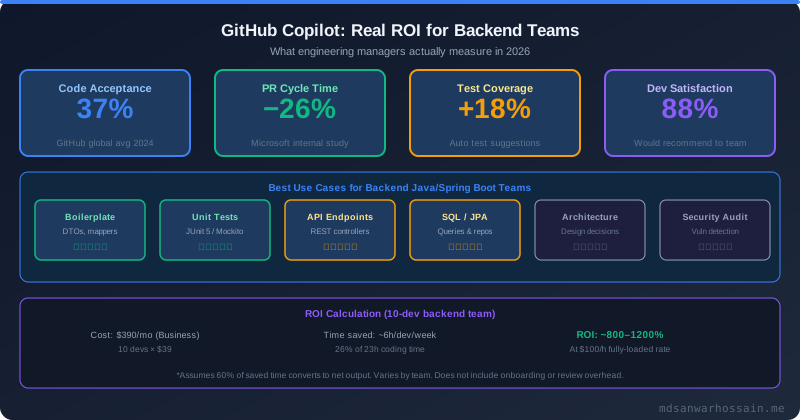
The GitHub 2024 study with 3,000+ developers found a 35% improvement in task completion speed for Copilot users. Microsoft's internal engineering study found a 26% reduction in PR cycle time. These are the most rigorous numbers available, but they come with important caveats: they were measured on tasks where AI assistance is most effective (writing new code, simple bug fixes), and they may not generalize to all engineering work (design discussions, debugging complex production issues, code review).
A conservative ROI model for a 10-person backend team using Copilot Business:
Cost: 10 developers × $39/month = $390/month = $4,680/year.
Productivity gain assumption: Developers spend approximately 40% of their time actually writing code (the rest is meetings, code review, debugging, planning). A 35% improvement in coding speed translates to 35% × 40% = 14% overall productivity gain. For a developer billed at $150/hour fully-loaded, with 160 hours/month, that's 160 × 0.14 = 22.4 hours saved per developer per month.
Conservative value per developer: 22.4 hours × $150/hour × 60% efficiency conversion (accounting for variation and overhead) = $2,016/month per developer.
Team value: 10 developers × $2,016 = $20,160/month vs. $390/month cost = 51:1 ROI. Even with a very conservative 25% efficiency conversion, ROI exceeds 15:1.
The key variable in your ROI calculation is what percentage of developer time is writing code (vs. meetings, debugging, etc.) and how much of that code benefits from AI assistance (vs. complex problem-solving, code review). For teams with high boilerplate ratio (CRUD services, integration code, test writing), ROI will be higher. For teams doing primarily algorithmic work, performance optimization, or incident response, ROI will be lower.
Security and Compliance Considerations
AI coding tools introduce three categories of security risk that engineering managers must address before enterprise rollout.
Data privacy. By default, all three tools send code snippets to cloud models for inference. This means proprietary source code, internal API designs, and potentially sensitive configuration files (if not excluded) leave your infrastructure. Copilot Business has a clear data policy: code snippets are used for completion but not for model training if you're a Business/Enterprise customer. Codeium Enterprise on-prem eliminates this concern entirely. Cursor has a privacy mode that disables training data collection but still processes code off-premises.
Code quality and vulnerabilities. AI-generated code requires the same (or higher) security review bar as human-written code. Studies have found that developers using AI tools can introduce security vulnerabilities they might otherwise catch during careful typing. Specifically watch for: SQL injection in JPQL queries generated by AI, hardcoded credentials in configuration code, insecure randomness in token generation, and missing authentication checks in controller code. Add Semgrep or similar SAST to your CI pipeline with explicit rules for AI-generated code patterns.
License compliance. AI tools can suggest code that resembles open-source code with incompatible licenses (GPL, AGPL). Copilot Business includes a public code filter that blocks suggestions matching licensed code in GitHub's public repositories. Cursor and Codeium have less robust public code filtering. For products where license compliance is critical (commercial products with open-core business models), Copilot Business's public code filter is a significant differentiator.
Decision Framework and Recommendation
Use this framework to make the decision for your team:
Choose GitHub Copilot Business if: Your team uses IntelliJ IDEA or other JetBrains IDEs; you have strict compliance requirements requiring granular admin controls; license compliance is critical; you use GitHub for code hosting and want native integration; or you need public code filtering for commercial product development.
Choose Cursor if: Your team already uses VS Code; you do a lot of cross-service refactoring and architectural changes; the productivity premium from repo-level context is worth the VS Code lock-in; or you are a startup or growth-stage company without strict enterprise compliance requirements.
Choose Codeium if: Budget is the primary constraint and the free tier covers your needs; you have an air-gapped or strict data sovereignty requirement (Codeium Enterprise on-prem); or you want to run a zero-cost pilot before committing to a paid tool.
Pilot recommendation: Run a structured 4-week pilot with 5–10 volunteers using your chosen tool. Measure: PR cycle time (before vs. after), lines of code per developer per week (proxy for coding throughput), number of review comments requesting rework (quality signal), and developer satisfaction via a brief weekly survey. Use these numbers — not vendor studies — to build your internal ROI case.
The one thing that is certain: AI coding assistants are now a standard part of the software engineering toolchain. The question is not whether to adopt one, but which to adopt and how to integrate it safely into your development workflow and security review process.
Leave a Comment
Related Posts

Software Engineer · Java · Spring Boot · Microservices