Java Collections Framework Internals: HashMap, ArrayList & ConcurrentHashMap Deep Dive
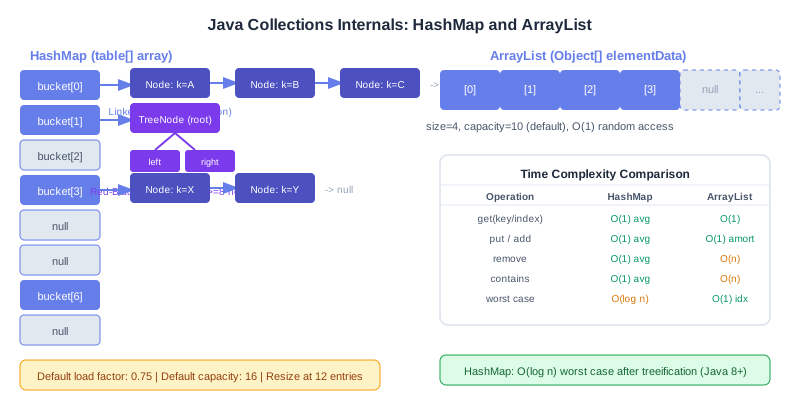
HashMap gives O(1) average lookups but degrades to O(log n) with collisions via treeification. Use ArrayList for random access, LinkedList for frequent head inserts. For concurrency, choose ConcurrentHashMap over Hashtable — striped locking gives 16x throughput.
Table of Contents
- The Java Collections Hierarchy: A Map Before the Deep Dive
- HashMap Internals: Buckets, Load Factor & Treeification
- ArrayList vs LinkedList: The Performance Truth
- ConcurrentHashMap: Striped Locking and Compute Operations
- TreeMap & LinkedHashMap: Ordered Access Patterns
- HashSet, TreeSet & EnumSet: When Sets Beat Lists
- Collections Comparison Table: Choosing the Right One
- Common Collections Pitfalls in Production
- Collections & Memory: GC Impact and Object Overhead
- Conclusion & Decision Checklist
1. The Java Collections Hierarchy: A Map Before the Deep Dive
The Java Collections Framework is organized around two separate root hierarchies. The first starts with java.lang.Iterable, which flows into java.util.Collection and then branches into four major sub-interfaces: List, Set, Queue, and Deque. The second hierarchy is java.util.Map, which stands completely apart — Map does not extend Collection because it stores key-value pairs rather than individual elements.
The most commonly used concrete implementations are:
- List:
ArrayList,LinkedList,CopyOnWriteArrayList - Set:
HashSet,LinkedHashSet,TreeSet,EnumSet - Queue/Deque:
ArrayDeque,PriorityQueue,LinkedList - Map:
HashMap,LinkedHashMap,TreeMap,ConcurrentHashMap,EnumMap
The java.util.Collections utility class (note the plural) provides static helper methods like sort(), binarySearch(), shuffle(), unmodifiableList(), and synchronizedMap(). While synchronizedMap() wraps every method in a single mutex (making it safe but slow), Java 8+ streams and List.of() / Map.of() factory methods make the utility class less central than it once was — though it remains indispensable for legacy code and operations like frequency(), disjoint(), and nCopies().
A critical subtlety: List.of() and Map.of() (Java 9+) produce structurally immutable collections — any mutation throws UnsupportedOperationException. Arrays.asList() produces a fixed-size list that allows set() but not add()/remove(). Knowing which wrapper you're working with saves hours of debugging.
2. HashMap Internals: Buckets, Load Factor & Treeification
HashMap is the workhorse of Java applications, yet its internals are misunderstood even by experienced developers. Understanding how it actually stores data lets you avoid nasty surprises at 2 AM on-call.
The Backing Array and Node Structure
HashMap is backed by an array of Node<K,V>[] (called table). Each Node holds four fields: int hash, K key, V value, and Node<K,V> next. The default initial capacity is 16 and the default load factor is 0.75. This means a resize is triggered when the map holds more than 16 × 0.75 = 12 entries.
Hash Spreading and Bucket Index Calculation
A naive implementation would use key.hashCode() % capacity, but Java goes further. It applies a supplemental hash function to spread high bits into the lower bits, reducing clustering when the table size is a power of two:
// From OpenJDK HashMap source
static final int hash(Object key) {
    int h;
    return (key == null) ? 0 : (h = key.hashCode()) ^ (h >>> 16);
}

// Bucket index (n = table.length, always a power of two)
int index = (n - 1) & hash(key);
// Equivalent to hash(key) % n but avoids expensive modulo operation
The XOR with h >>> 16 ensures that the upper 16 bits of the original hashCode influence the lower 16 bits used for bucket selection. Without this, poor hashCode implementations (like those returning values that differ only in high bits) would cluster all entries in the same bucket.
Collision Handling: Linked List → Tree
When two keys hash to the same bucket, they form a linked list of Node entries hanging off that bucket slot. As lists grow, lookup degrades from O(1) to O(n). Java 8 introduced treeification: when a single bucket's linked list reaches 8 or more entries AND the table has at least 64 total slots, that list is converted into a red-black TreeNode tree, giving O(log n) worst-case lookup. When entries are removed and the bin shrinks back to 6 or fewer, it untreeifies back to a linked list.
Resize and Rehash
When size > capacity * loadFactor, HashMap creates a new array of twice the capacity and rehashes every existing entry. Since the new capacity is always a power of two, rehashing is elegant: each entry either stays in its current bucket or moves to currentIndex + oldCapacity. No full re-hashing formula is required — just the one additional high bit check.
// Simulated HashMap.put() workflow
// 1. Compute spread hash
int h = hash(key);
// 2. If table is null or empty, resize first
// 3. Compute bucket index
int i = (n - 1) & h;
// 4. If bucket is empty, place node directly
// 5. If bucket is non-empty:
//    a. If first node matches key → update value
//    b. If first node is TreeNode → delegate to tree insert
//    c. Otherwise walk linked list, append or update
// 6. If bin length >= TREEIFY_THRESHOLD (8) → treeify
// 7. If ++size > threshold → resize()

// Pre-sizing for known capacity (avoids rehashing)
// For 1000 expected entries:
Map<String, Integer> map = new HashMap<>(1000 * 4 / 3 + 1);
// Or more precisely:
int initialCapacity = (int) (expectedSize / 0.75f) + 1;
Map<String, Object> preSeized = new HashMap<>(initialCapacity);
HashMap Time Complexity
| Operation | Average | Worst (all collide) | Worst (treeified) |
|---|---|---|---|
| get(key) | O(1) | O(n) | O(log n) |
| put(key, value) | O(1) | O(n) | O(log n) |
| remove(key) | O(1) | O(n) | O(log n) |
| containsKey(key) | O(1) | O(n) | O(log n) |
| resize() | O(n) amortized | O(n) | O(n) |
3. ArrayList vs LinkedList: The Performance Truth
The ArrayList vs LinkedList debate is one of the most common Java interview topics — and one of the most consistently misunderstood in practice. The short answer: use ArrayList almost always.
ArrayList Internals
ArrayList is backed by an Object[] array. Random access is O(1) because array indexing is a single pointer arithmetic operation. When the array fills up, it grows to 1.5× its current size (specifically newCapacity = oldCapacity + (oldCapacity >> 1)) using Arrays.copyOf(), which delegates to a native System.arraycopy() — a highly optimized bulk memory copy. Adding at the end is amortized O(1); inserting or removing in the middle is O(n) because all subsequent elements must shift.
LinkedList Internals
LinkedList is a doubly linked list where each node wraps the element plus two object references (prev and next). Head and tail insertions are O(1). But get(index) is O(n) — it walks from the head or tail toward the middle. Memory overhead is severe: each node costs approximately 40 bytes on a 64-bit JVM (16-byte object header + 8 bytes prev + 8 bytes next + 8 bytes item reference), versus 8 bytes per slot in an ArrayList's backing array. For a list of 10,000 Strings, LinkedList uses ~400 KB of extra overhead just for node objects.
The CPU cache locality argument is even more damning: ArrayList elements sit contiguously in memory, so iterating them is cache-friendly. LinkedList nodes are scattered across the heap — each next pointer dereference is potentially a cache miss. Benchmarks consistently show ArrayList iterating 3–5× faster than LinkedList on modern hardware.
// ArrayList: O(1) random access, amortized O(1) append, O(n) insert at middle
List<String> arrayList = new ArrayList<>(100); // pre-size to avoid resizing
arrayList.add("end");          // amortized O(1)
arrayList.add(0, "front");     // O(n) - shifts all elements right
String s = arrayList.get(42);  // O(1) - direct array index

// LinkedList: O(1) head/tail ops, O(n) everything else
Deque<String> deque = new ArrayDeque<>(); // prefer over LinkedList for queue use
deque.addFirst("front");       // O(1)
deque.addLast("back");         // O(1)
deque.pollFirst();             // O(1)

// LinkedList IS appropriate as a Deque when you need:
// - Queue/stack semantics
// - Frequent insertion at both ends
// But ArrayDeque outperforms LinkedList even there (no node allocation overhead)Use ArrayList for random access and iteration. Use ArrayDeque for queue/deque patterns. Only reach for LinkedList when you genuinely need a ListIterator with O(1) remove during traversal.
4. ConcurrentHashMap: Striped Locking and Compute Operations
Never use Hashtable or Collections.synchronizedMap() in concurrent code. Both synchronize on a single object monitor, serializing every read and write. ConcurrentHashMap (CHM) is the correct choice.
Java 8+ Architecture: CAS + Bin-Level Locking
In Java 8+, CHM abandoned the old "segment" approach (pre-Java 8 used 16 ReentrantLock segments) in favor of a more granular design. The backing array is the same Node[] table as HashMap, but with two key differences:
- Read operations are lock-free — table entries are declared
volatile, soget()never acquires a lock. It reads the volatile array slot and traverses nodes (also volatile) without blocking. - Write operations lock only the bin head — inserting into an empty bucket uses a CAS (Compare-And-Swap) operation. If the slot is occupied, only
synchronized(binHead)is acquired, not the entire map. This means up to n concurrent writes can proceed (where n is the number of non-colliding buckets).
This design allows theoretical throughput proportional to the number of available buckets — vastly better than the single-lock approaches.
Atomic Compute Operations
ConcurrentHashMap<String, Integer> freq = new ConcurrentHashMap<>();

// Atomic frequency counting (thread-safe, no external synchronization needed)
String word = "java";
freq.compute(word, (k, v) -> v == null ? 1 : v + 1);

// computeIfAbsent: lazy initialization (safe for complex objects)
ConcurrentHashMap<String, List<String>> groups = new ConcurrentHashMap<>();
groups.computeIfAbsent("category", k -> new CopyOnWriteArrayList<>()).add("item");

// merge: combine existing value with new value atomically
freq.merge(word, 1, Integer::sum);

// getOrDefault: read without locking
int count = freq.getOrDefault("java", 0);

// forEach with parallelism threshold (uses ForkJoinPool)
freq.forEach(2, (k, v) -> System.out.println(k + "=" + v));

// CAUTION: CHM does NOT allow null keys or null values
// map.put(null, "value"); // throws NullPointerExceptionsize() in CHM returns an approximate count — it sums per-segment counters and may not reflect the exact current state in a concurrent environment. Use mappingCount() for a long-returning accurate estimate. Neither is guaranteed to be a point-in-time snapshot.
5. TreeMap & LinkedHashMap: Ordered Access Patterns
TreeMap: Red-Black Tree Under the Hood
TreeMap implements NavigableMap using a red-black tree — a self-balancing BST that guarantees O(log n) for all operations: get(), put(), remove(), and range queries. Keys are sorted by natural ordering (Comparable) or a provided Comparator.
The NavigableMap API makes TreeMap uniquely powerful for range-based queries:
TreeMap<Integer, String> scores = new TreeMap<>();
scores.put(85, "Alice");
scores.put(92, "Bob");
scores.put(78, "Carol");
scores.put(99, "Dave");
scores.put(65, "Eve");

// NavigableMap range operations
System.out.println(scores.floorKey(90));    // 85 (largest key ≤ 90)
System.out.println(scores.ceilingKey(90));  // 92 (smallest key ≥ 90)
System.out.println(scores.lowerKey(85));    // 78 (strictly less)
System.out.println(scores.higherKey(85));   // 92 (strictly greater)

// Submap views (range queries)
SortedMap<Integer, String> topScorers = scores.tailMap(90);     // {92=Bob, 99=Dave}
SortedMap<Integer, String> midRange   = scores.subMap(78, 93);  // {78=Carol, 85=Alice, 92=Bob}
System.out.println(scores.firstKey()); // 65
System.out.println(scores.lastKey());  // 99

// Custom Comparator: reverse order
TreeMap<String, Integer> reverseMap = new TreeMap<>(Comparator.reverseOrder());
LinkedHashMap: Insertion Order + LRU Cache
LinkedHashMap extends HashMap and adds a doubly linked list that threads through all entries, maintaining either insertion order (default) or access order (when the constructor's third argument is true). Iteration always follows this order, making it deterministic unlike HashMap.
With access order enabled, every get() or put() moves the accessed entry to the tail of the linked list. Override removeEldestEntry() to evict the head (least-recently-used) entry automatically:
// LRU Cache using LinkedHashMap (single-threaded)
public class LRUCache<K, V> extends LinkedHashMap<K, V> {
    private final int maxSize;

    public LRUCache(int maxSize) {
        // accessOrder=true: get() moves entry to tail
        super(maxSize, 0.75f, true);
        this.maxSize = maxSize;
    }

    @Override
    protected boolean removeEldestEntry(Map.Entry<K, V> eldest) {
        return size() > maxSize; // evict head when over capacity
    }
}

LRUCache<Integer, String> cache = new LRUCache<>(3);
cache.put(1, "one");
cache.put(2, "two");
cache.put(3, "three");
cache.get(1);            // access key 1 → moves to tail
cache.put(4, "four");    // evicts key 2 (least recently used)
// Cache now: {3=three, 1=one, 4=four}

// For concurrent LRU: wrap with Collections.synchronizedMap()
// or use Caffeine/Guava Cache for production use
6. HashSet, TreeSet & EnumSet: When Sets Beat Lists
HashSet
HashSet is implemented as a HashMap<E, PRESENT> where PRESENT is a static dummy Object value shared by all entries. This means every Set operation delegates to the corresponding HashMap operation. contains(), add(), remove() are all O(1) average. Use HashSet when you need fast membership testing with no ordering requirements.
TreeSet
TreeSet is backed by a TreeMap<E, PRESENT>. Like TreeMap, all operations are O(log n). It implements NavigableSet, providing floor(), ceiling(), headSet(), tailSet(), and subSet(). Choose TreeSet over HashSet when you need elements sorted or need range queries.
EnumSet: The Bit-Vector Secret Weapon
EnumSet is the most overlooked performance gem in the Collections API. For enum types with up to 64 constants, it uses a single long as a bit vector (RegularEnumSet). For larger enums, it uses a long[] (JumboEnumSet). All operations — add(), contains(), remove() — reduce to bit manipulation, making them blazingly fast and extremely memory-efficient.
enum Permission { READ, WRITE, EXECUTE, ADMIN }

// EnumSet: bit operations internally, O(1) everything
EnumSet<Permission> userPerms = EnumSet.of(Permission.READ, Permission.WRITE);
userPerms.contains(Permission.EXECUTE); // false — single bit check

// Factory methods
EnumSet<Permission> allPerms  = EnumSet.allOf(Permission.class);
EnumSet<Permission> noPerms   = EnumSet.noneOf(Permission.class);
EnumSet<Permission> readRange = EnumSet.range(Permission.READ, Permission.EXECUTE);
// {READ, WRITE, EXECUTE} — contiguous range

// Also use EnumMap instead of HashMap for enum keys
EnumMap<Permission, String> descriptions = new EnumMap<>(Permission.class);
descriptions.put(Permission.READ, "Can read data");
// EnumMap uses a plain array indexed by ordinal — O(1), zero hashing overhead
7. Collections Comparison Table: Choosing the Right One
| Class | Ordering | Null Keys/Values | Thread-Safe | get / put | Backed By |
|---|---|---|---|---|---|
| HashMap | None | 1 null key, many null values | No | O(1) avg | Array of Node lists/trees |
| LinkedHashMap | Insertion or Access | Same as HashMap | No | O(1) avg | HashMap + doubly linked list |
| TreeMap | Sorted (natural/Comparator) | No null keys; null values ok | No | O(log n) | Red-Black Tree |
| ConcurrentHashMap | None | No nulls (keys or values) | Yes | O(1) avg | Array + CAS + bin locks |
| HashSet | None | One null element | No | O(1) avg | HashMap<E,PRESENT> |
| TreeSet | Sorted | No null elements | No | O(log n) | TreeMap<E,PRESENT> |
| EnumSet | Enum declaration order | No null elements | No | O(1) | Bit vector (long / long[]) |
| ArrayList | Insertion order | Yes | No | O(1) get; O(n) insert | Object[] |
| LinkedList | Insertion order | Yes | No | O(n) get; O(1) head/tail | Doubly linked nodes |
| ArrayDeque | FIFO/LIFO | No null elements | No | O(1) ends; O(n) random | Circular Object[] |
| PriorityQueue | Min-heap (natural/Comparator) | No null elements | No | O(log n) offer/poll | Binary heap in Object[] |
8. Common Collections Pitfalls in Production
Pitfall 1: Mutable Keys in HashMap
If you use a mutable object as a HashMap key and mutate it after insertion, its hashCode() changes. The entry is stored in the wrong bucket. Subsequent lookups will miss it — the key is effectively lost in the map. Always use immutable objects (String, Integer, UUID, records) as map keys.
// DANGER: mutable key
List<String> key = new ArrayList<>(List.of("a", "b"));
Map<List<String>, Integer> map = new HashMap<>();
map.put(key, 42);
key.add("c"); // mutates key — hashCode changes!
System.out.println(map.get(key)); // null — entry is lost!

// SAFE: immutable key
record Point(int x, int y) {}
Map<Point, String> grid = new HashMap<>();
grid.put(new Point(1, 2), "treasure"); // safe — records are immutable
Pitfall 2: ConcurrentModificationException
Modifying a collection while iterating over it throws ConcurrentModificationException (even in single-threaded code). Use Iterator.remove(), collect-then-remove, or stream filtering instead:
Map<String, Integer> map = new HashMap<>(Map.of("a", 1, "b", 2, "c", 3));

// WRONG: throws ConcurrentModificationException
for (String key : map.keySet()) {
    if (map.get(key) > 1) map.remove(key); // BAD
}

// CORRECT option 1: Iterator.remove()
Iterator<Map.Entry<String, Integer>> it = map.entrySet().iterator();
while (it.hasNext()) {
    if (it.next().getValue() > 1) it.remove(); // safe
}

// CORRECT option 2: removeIf (Java 8+)
map.entrySet().removeIf(e -> e.getValue() > 1);
Pitfall 3: toMap() Duplicate Key Exception
// WRONG: throws IllegalStateException on duplicate keys
Map<String, User> byName = users.stream()
    .collect(Collectors.toMap(User::getName, u -> u)); // fails if names not unique

// CORRECT: provide merge function
Map<String, User> byName = users.stream()
    .collect(Collectors.toMap(
        User::getName,
        u -> u,
        (existing, replacement) -> existing // keep first on conflict
    ));
Pitfall 4: Not Pre-Sizing Collections
Each resize of HashMap or ArrayList is an O(n) operation. If you know the approximate size upfront, pre-size to avoid repeated rehashing/copying:
// For HashMap: avoid resizing at expectedSize entries
// Formula: initialCapacity = expectedSize / loadFactor + 1
int expected = 1000;
Map<String, Object> map = new HashMap<>((int)(expected / 0.75f) + 1);

// Guava shortcut
Map<String, Object> map2 = Maps.newHashMapWithExpectedSize(1000);

// For ArrayList
List<String> list = new ArrayList<>(1000); // no resizing needed
Pitfall 5: EnumMap vs HashMap for Enum Keys
When your keys are enum constants, always prefer EnumMap over HashMap. EnumMap stores values in an array indexed by the enum's ordinal — zero hashing, zero boxing, and O(1) with better cache locality than HashMap.
9. Collections & Memory: GC Impact and Object Overhead
Collections are often the dominant source of heap pressure in Java applications. Understanding their memory footprint enables smarter choices at scale.
Per-Collection Memory Costs (64-bit JVM, compressed oops)
| Collection | Overhead per element | Notes |
|---|---|---|
| ArrayList | ~8 bytes (object reference) | Plus backing array header ~16 bytes |
| LinkedList | ~40 bytes per Node | 16 header + 8 prev + 8 next + 8 item |
| HashMap entry | ~48 bytes per entry | Node: 16 header + 4 hash + 8 key + 8 value + 8 next + alignment |
| ConcurrentHashMap | ~48–56 bytes per entry | Plus CounterCell array overhead for size tracking |
| HashSet | ~48 bytes per entry | Backed by HashMap; PRESENT dummy value shared |
| EnumSet (≤64 constants) | ~1 bit per constant | Entire set = one long (8 bytes) |
For a HashMap with 1 million entries, you're looking at approximately 48 MB of overhead just for the Node objects — before accounting for the key and value objects themselves. This matters at scale: microservices caching tens of millions of entries in-process can trigger frequent GC pauses.
GC Pressure Mitigation
- Use primitive collections for numeric data: Eclipse Collections (
IntList,LongObjectHashMap) and Trove eliminate boxing entirely, reducing memory by 3–5×. - Avoid
HashMap<Integer, ...>for large maps — each Integer boxes an int into a 16-byte heap object. Use an int-keyed map from Eclipse Collections or a primitive int[] array with direct indexing. - Consider off-heap storage for very large collections: Chronicle Map and MapDB store data off-heap to avoid GC entirely.
- Use
ArrayList.trimToSize()after bulk loads to release unused array capacity. - LinkedHashMap LRU caches hold strong references — entries are never GC'd. Use Caffeine with soft references or time-based expiration for production caches.
// Eclipse Collections: primitive int-to-object map (no boxing!)
// MutableIntObjectMap<String> map = IntObjectMaps.mutable.empty();
// map.put(42, "answer"); // 42 stored as primitive int — no Integer allocation

// Java 21 sequenced collections (awareness, no memory impact)
// List, Set, Map now expose SequencedCollection interface
// with getFirst(), getLast(), reversed() for O(1) first/last access on LinkedHashMap
10. Conclusion & Decision Checklist
The Java Collections Framework is mature, battle-tested, and deeply optimized — but only if you pick the right tool for the job. The internals matter: a poor choice can silently degrade throughput by orders of magnitude or inflate heap usage by 5×.
✅ Quick Decision Checklist
- Need fast lookup by key? → HashMap
- Need fast lookup by key + concurrent? → ConcurrentHashMap
- Need sorted key iteration or range queries? → TreeMap
- Need insertion order preserved? → LinkedHashMap
- Need LRU cache? → LinkedHashMap(accessOrder=true) or Caffeine
- Need an indexed list? → ArrayList
- Need a queue / deque? → ArrayDeque
- Need a priority queue / min-heap? → PriorityQueue
- Need fast membership testing? → HashSet
- Need sorted set with range queries? → TreeSet
- Keys are enum values? → EnumMap / EnumSet
- Memory-sensitive with primitives? → Eclipse Collections
- Truly immutable collection? → List.of() / Map.of()
Master these internals and you'll not only write faster code — you'll be the engineer who spots the O(n²) HashMap resize during code review, catches the mutable-key bug before it hits production, and correctly recommends ConcurrentHashMap over synchronized blocks during architecture discussions.
Related Posts
Complete guide to Java concurrency: synchronized, ReentrantLock, Semaphore, CountDownLatch, and thread-safe patterns in production.
Common algorithm patterns: sliding window, two pointers, BFS/DFS, dynamic programming for Java backend interview prep.
Diagnosing and resolving thread contention hotspots: lock profiling, false sharing, and lock-free alternatives.
Java Memory Model: happens-before, volatile semantics, and safe publication patterns for concurrent Java programs.