Java LangChain4j: Building AI Agents in Pure Java Without Python
LangChain4j is Java's answer to Python's LangChain — a comprehensive framework for building LLM-powered applications and autonomous AI agents using idiomatic Java. While Python dominated early AI tooling, LangChain4j brings the full agent stack to the JVM: tool execution via annotated methods, persistent conversation memory, RAG with embedded vector stores, and structured output parsing into Java records. This post covers the full framework from first steps through production-grade agent deployment in Spring Boot.
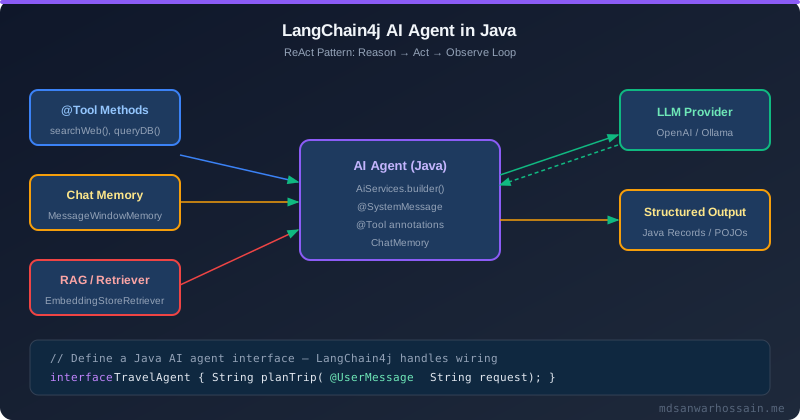
Table of Contents
- Why LangChain4j? Java vs Python for AI Agents
- AiServices: The Zero-Boilerplate Agent Interface
- @Tool Annotation: Giving Agents Java Superpowers
- Chat Memory: Per-User Conversation State
- RAG in LangChain4j: Document Ingestion to Query Answering
- Structured Output: LLM Responses as Java Records
- Streaming and Async Responses
- Spring Boot Integration: @Bean + @Service Wiring
- Key Takeaways
1. Why LangChain4j? Java vs Python for AI Agents
The "just use Python for AI" argument has a real cost in enterprise environments: a Python microservice adds a second runtime, a second CI pipeline, a second set of deployment artifacts, and a language mismatch between the AI tier and the core business logic tier. LangChain4j eliminates this cost by running the full agent stack inside the JVM, next to your existing Spring Boot services.
LangChain4j's key differentiators over raw API clients are: the AiServices interface declaration pattern (define what you want, LangChain4j wires the how), annotation-driven tool registration with automatic JSON schema generation, built-in chat memory with multiple backend options (in-memory, Redis, custom), and a unified embedding store abstraction covering pgvector, Chroma, Weaviate, and Pinecone.
2. AiServices: The Zero-Boilerplate Agent Interface
The AiServices builder is LangChain4j's flagship feature. You declare an interface with @SystemMessage, @UserMessage, and @MemoryId annotations, and LangChain4j generates a fully functional implementation at runtime — no implementation code required:
<!-- pom.xml -->
<dependency>
    <groupId>dev.langchain4j</groupId>
    <artifactId>langchain4j-spring-boot-starter</artifactId>
    <version>0.36.2</version>
</dependency>
<dependency>
    <groupId>dev.langchain4j</groupId>
    <artifactId>langchain4j-open-ai-spring-boot-starter</artifactId>
    <version>0.36.2</version>
</dependency>
// Declare the agent interface — no implementation needed
@AiService
public interface CustomerSupportAgent {
@SystemMessage("""
You are a helpful customer support agent for an e-commerce platform.
Be concise, professional, and always check order status before responding.
Today's date: {{current_date}}
""")
String chat(@MemoryId String userId, @UserMessage String userMessage);
}
// Spring Boot auto-wires this — use it anywhere
@RestController
@RequiredArgsConstructor
public class SupportController {
private final CustomerSupportAgent agent;
@PostMapping("/support/chat")
public ResponseEntity<String> chat(
@RequestHeader("X-User-Id") String userId,
@RequestBody String message) {
return ResponseEntity.ok(agent.chat(userId, message));
}
}# application.properties
langchain4j.open-ai.chat-model.api-key=${OPENAI_API_KEY}
langchain4j.open-ai.chat-model.model-name=gpt-4o
langchain4j.open-ai.chat-model.temperature=0.33. @Tool Annotation: Giving Agents Java Superpowers
The @Tool annotation transforms any Java method into a callable LLM tool. LangChain4j introspects the method signature, generates a JSON schema from parameter types and @P descriptions, and handles the complete request/response cycle — including multi-step tool calls:
@Component
@RequiredArgsConstructor
public class OrderTools {

    private final OrderService orderService;
    private final ShippingService shippingService;

    @Tool("Get the current status and details of an order by order ID")
    public OrderStatus getOrderStatus(@P("The order ID, e.g. ORD-12345") String orderId) {
        return orderService.getStatus(orderId);
    }

    @Tool("Cancel an order if it has not yet shipped")
    public String cancelOrder(
            @P("The order ID to cancel") String orderId,
            @P("Reason for cancellation") String reason) {
        return orderService.cancel(orderId, reason)
            ? "Order " + orderId + " has been successfully cancelled."
            : "Order " + orderId + " cannot be cancelled — it has already shipped.";
    }

    @Tool("Get estimated delivery date for a shipped order")
    public String getDeliveryEstimate(@P("The order ID") String orderId) {
        return shippingService.getEstimatedDelivery(orderId)
            .map(date -> "Expected delivery: " + date)
            .orElse("No delivery estimate available yet.");
    }
}

// Register tools with the agent
@Configuration
public class AgentConfig {

    @Bean
    public CustomerSupportAgent customerSupportAgent(
            ChatLanguageModel chatModel,
            ChatMemory chatMemory,
            OrderTools orderTools) {
        return AiServices.builder(CustomerSupportAgent.class)
            .chatLanguageModel(chatModel)
            .chatMemoryProvider(memoryId -> MessageWindowChatMemory.withMaxMessages(20))
            .tools(orderTools)
            .build();
    }
}@Tool methods before executing business logic. The LLM may pass unexpected parameter values. Use Bean Validation annotations (@NotNull, @Pattern) on tool parameters and handle validation exceptions gracefully.
4. Chat Memory: Per-User Conversation State
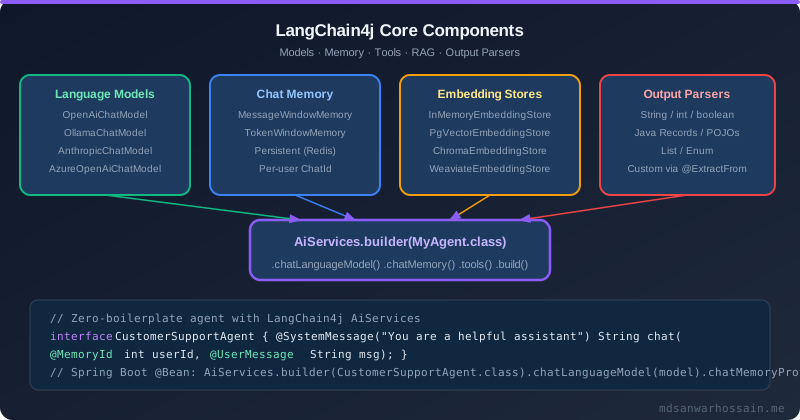
Stateful conversations require per-user memory. LangChain4j separates the memory interface from its implementation, making it easy to switch from in-memory (development) to Redis (production) without changing agent code:
@Configuration
public class MemoryConfig {

    // Production: Redis-backed per-user memory with TTL
    @Bean
    @Profile("prod")
    public ChatMemoryProvider redisChatMemoryProvider(RedisTemplate<String, Object> redis) {
        return memoryId -> new RedisChatMemory(redis, memoryId.toString(),
            MessageWindowChatMemory.builder()
                .maxMessages(30)
                .build());
    }

    // Development: in-memory (no persistence between restarts)
    @Bean
    @Profile("dev")
    public ChatMemoryProvider inMemoryChatMemoryProvider() {
        Map<Object, ChatMemory> memories = new ConcurrentHashMap<>();
        return memoryId -> memories.computeIfAbsent(memoryId,
            id -> MessageWindowChatMemory.withMaxMessages(20));
    }
}

// Agent with per-user memory — userId is the @MemoryId key
@AiService
public interface PersonalAssistant {

    @SystemMessage("You are a personal assistant. Remember user preferences across conversations.")
    String chat(@MemoryId long userId, @UserMessage String message);
}
MessageWindowChatMemory keeps the last N messages. TokenWindowChatMemory keeps messages within a token budget — better for cost control since it won't accidentally exceed context window limits on long conversations.
5. RAG in LangChain4j: Document Ingestion to Query Answering
LangChain4j's RAG stack covers the full pipeline from document loading through query-time retrieval. The EasyRag module provides a one-call setup; advanced use cases compose individual components:
// Document ingestion — run once, store in pgvector
@Component
@RequiredArgsConstructor
public class KnowledgeBaseIngester {

    private final EmbeddingModel embeddingModel;
    private final EmbeddingStore<TextSegment> embeddingStore;

    public void ingest(Path documentPath) {
        List<Document> documents = FileSystemDocumentLoader.loadDocuments(documentPath);

        DocumentSplitter splitter = DocumentSplitters.recursive(500, 50); // chunk size, overlap
        List<TextSegment> segments = splitter.splitAll(documents);

        List<Embedding> embeddings = embeddingModel.embedAll(segments).content();
        embeddingStore.addAll(embeddings, segments);
    }
}

// Retrieval-augmented agent — answers grounded in documents
@Configuration
@RequiredArgsConstructor
public class RagAgentConfig {

    @Bean
    public CustomerSupportAgent ragAgent(
            ChatLanguageModel chatModel,
            EmbeddingModel embeddingModel,
            EmbeddingStore<TextSegment> embeddingStore) {

        EmbeddingStoreContentRetriever retriever = EmbeddingStoreContentRetriever.builder()
            .embeddingStore(embeddingStore)
            .embeddingModel(embeddingModel)
            .maxResults(5)
            .minScore(0.75)
            .build();

        return AiServices.builder(CustomerSupportAgent.class)
            .chatLanguageModel(chatModel)
            .contentRetriever(retriever)
            .chatMemoryProvider(id -> MessageWindowChatMemory.withMaxMessages(10))
            .build();
    }
}
# pgvector EmbeddingStore configuration
langchain4j.pgvector.host=localhost
langchain4j.pgvector.port=5432
langchain4j.pgvector.database=mydb
langchain4j.pgvector.table=embeddings
langchain4j.pgvector.dimension=1536 # text-embedding-3-small output dimension6. Structured Output: LLM Responses as Java Records
LangChain4j can return structured Java types directly from agent interfaces — no JSON parsing required. It generates a JSON schema instruction, appends it to the system prompt, and deserializes the response:
// Java records for structured output
record SentimentAnalysis(Sentiment sentiment, double confidence, List<String> reasons) {}
enum Sentiment { POSITIVE, NEGATIVE, NEUTRAL }

record ExtractedEntities(
    List<String> productNames,
    List<String> orderIds,
    String urgencyLevel  // HIGH, MEDIUM, LOW
) {}

@AiService
public interface TextAnalysisAgent {

    // Returns structured Java record — LangChain4j handles JSON schema + parsing
    @UserMessage("Analyze the sentiment of the following customer message: {{message}}")
    SentimentAnalysis analyzeSentiment(@V("message") String message);

    @SystemMessage("Extract all mentioned entities from customer support messages.")
    @UserMessage("{{message}}")
    ExtractedEntities extractEntities(@V("message") String message);
}

// Usage in a Spring service:
@Service
@RequiredArgsConstructor
public class TicketTriageService {

    private final TextAnalysisAgent analysisAgent;

    public TicketPriority triage(String ticketBody) {
        ExtractedEntities entities = analysisAgent.extractEntities(ticketBody);
        SentimentAnalysis sentiment = analysisAgent.analyzeSentiment(ticketBody);
        return TicketPriority.from(entities.urgencyLevel(), sentiment.sentiment());
    }
}
7. Streaming and Async Responses
LangChain4j supports streaming via TokenStream — a reactive-style API for receiving token chunks as they arrive, enabling real-time display without waiting for the full response:
@AiService
public interface StreamingAssistant {

    // Return TokenStream for streaming support
    TokenStream chat(@MemoryId String userId, @UserMessage String message);
}

@RestController
@RequiredArgsConstructor
public class StreamingController {

    private final StreamingAssistant assistant;

    @GetMapping(value = "/assistant/stream", produces = MediaType.TEXT_EVENT_STREAM_VALUE)
    public SseEmitter stream(
            @RequestHeader("X-User-Id") String userId,
            @RequestParam String message) {

        SseEmitter emitter = new SseEmitter(60_000L); // 60s timeout

        assistant.chat(userId, message)
            .onNext(token -> {
                try { emitter.send(token); }
                catch (IOException e) { emitter.completeWithError(e); }
            })
            .onComplete(response -> emitter.complete())
            .onError(emitter::completeWithError)
            .start();

        return emitter;
    }
}
8. Spring Boot Integration: @Bean + @Service Wiring
LangChain4j's Spring Boot starter auto-configures ChatLanguageModel and EmbeddingModel beans. The @AiService annotation on agent interfaces triggers automatic registration as Spring beans, making agents injectable anywhere in the application context:
// Complete Spring Boot setup for a production LangChain4j agent
@SpringBootApplication
public class Application {

    public static void main(String[] args) {
        SpringApplication.run(Application.class, args);
    }
}

// Everything auto-wired via langchain4j.open-ai.* properties:
// - ChatLanguageModel bean (OpenAI GPT-4o)
// - EmbeddingModel bean (text-embedding-3-small)
// - @AiService interfaces registered as Spring beans
// - @Tool components discovered and registered automatically

// Observability: LangChain4j integrates with Micrometer for latency + token metrics
@Configuration
public class ObservabilityConfig {

    @Bean
    public ChatModelListener tokenMetricsListener(MeterRegistry registry) {
        return event -> {
            if (event instanceof LlmResponseEvent resp) {
                registry.counter("llm.tokens.input").increment(resp.inputTokenCount());
                registry.counter("llm.tokens.output").increment(resp.outputTokenCount());
            }
        };
    }
}
9. Key Takeaways
- LangChain4j's
AiServices.builder()+@AiServiceannotation eliminates agent boilerplate — declare an interface, LangChain4j wires the implementation. @Toolannotations on Spring beans transform existing service methods into LLM-callable tools with automatic JSON schema generation.- Per-user
ChatMemoryvia@MemoryIdenables stateful multi-turn conversations — useMessageWindowChatMemoryfor development, Redis-backed for production. - LangChain4j's RAG stack (document loaders, splitters, embedding stores) covers the full ingestion-to-retrieval pipeline with minimal code.
- Structured output returns strongly-typed Java records from LLM responses — no JSON parsing, no DTOs, just annotated interfaces.
- The Spring Boot starter auto-configures all model and embedding beans;
@AiServiceinterfaces become injectable Spring beans with zero configuration.
10. Production Observability: Token Costs, Latency & Micrometer
Every LLM call has real financial cost. In production, unmonitored token consumption can result in unexpected cloud bills — GPT-4o at $15 per million output tokens adds up fast across thousands of daily users. LangChain4j integrates with Micrometer to expose per-request metrics automatically when the langchain4j-micrometer dependency is on the classpath.
// pom.xml
<dependency>
    <groupId>dev.langchain4j</groupId>
    <artifactId>langchain4j-micrometer</artifactId>
    <version>0.32.0</version>
</dependency>

// Spring Boot config — auto-wires MicrometerChatModelListener
@Configuration
public class AiObservabilityConfig {

    @Bean
    public ChatLanguageModel openAiChatModel(MeterRegistry registry) {
        var listener = MicrometerChatModelListener.builder()
            .meterRegistry(registry)
            .build();

        return OpenAiChatModel.builder()
            .apiKey(System.getenv("OPENAI_API_KEY"))
            .modelName("gpt-4o-mini")
            .listeners(List.of(listener))
            .build();
    }
}
Micrometer emits these counters and timers automatically: langchain4j.chat.model.request (latency histogram), langchain4j.chat.model.response.input.tokens, langchain4j.chat.model.response.output.tokens, and langchain4j.chat.model.error. Wire them into Grafana for real-time cost dashboards:
# Prometheus: total tokens consumed per hour
sum(increase(langchain4j_chat_model_response_output_tokens_total[1h]))
  by (model_name)

# Estimated cost (GPT-4o-mini: $0.60 per 1M output tokens)
sum(increase(langchain4j_chat_model_response_output_tokens_total[1h]))
  by (model_name) * 0.00000060

# 95th percentile response latency
histogram_quantile(0.95, rate(langchain4j_chat_model_request_duration_seconds_bucket[5m]))
Beyond Micrometer, configure structured logging at the model level to capture request/response pairs for debugging. LangChain4j supports a LoggingModelListener that redacts PII before writing to your log aggregator:
@Bean
public ChatLanguageModel monitoredModel() {
    return OpenAiChatModel.builder()
        .apiKey(apiKey)
        .modelName("gpt-4o-mini")
        .listeners(List.of(
            new MicrometerChatModelListener(registry),
            new LoggingChatModelListener()   // logs at DEBUG level
        ))
        .build();
}
11. Multi-Agent Orchestration: Chaining AI Services
Real-world AI workflows rarely fit in a single agent. A support ticket triage system might need a classification agent to determine priority, a knowledge agent to retrieve relevant documentation, and a resolution agent to draft the response. LangChain4j makes multi-agent wiring natural because each @AiService is a plain Spring bean that can inject other agents.
// Step 1: Classification agent
@AiService
public interface TicketClassifier {

    @SystemMessage("Classify the support ticket as: BILLING, TECHNICAL, ACCOUNT, or GENERAL")
    TicketCategory classify(@UserMessage String ticketText);
}

// Step 2: Knowledge retrieval agent with RAG
@AiService
public interface KnowledgeAgent {

    @SystemMessage("You are a knowledge base assistant. Use only the provided context to answer.")
    String findSolution(@UserMessage String problem);
}

// Step 3: Orchestrator wires them together
@Service
public class TicketOrchestrator {

    private final TicketClassifier classifier;
    private final KnowledgeAgent knowledge;
    private final ResolutionAgent resolution;

    public TicketResolution handleTicket(String ticketText) {
        // parallel classification + knowledge fetch
        CompletableFuture<TicketCategory> catFuture =
            CompletableFuture.supplyAsync(() -> classifier.classify(ticketText));
        CompletableFuture<String> kbFuture =
            CompletableFuture.supplyAsync(() -> knowledge.findSolution(ticketText));

        TicketCategory category = catFuture.join();
        String context = kbFuture.join();

        return resolution.draft(ticketText, category, context);
    }
}
For sequential chains where the output of one agent feeds the next, use LangChain4j's AiServices.builder() with a shared ChatMemory to maintain context across hops. This is particularly powerful for multi-step reasoning chains where intermediate results need to be visible to subsequent agents:
// Shared memory across a 3-hop reasoning chain
ChatMemory sharedMemory = MessageWindowChatMemory.withMaxMessages(20);

ReviewAnalysisAgent analyser = AiServices.builder(ReviewAnalysisAgent.class)
    .chatLanguageModel(model)
    .chatMemory(sharedMemory)
    .build();

SentimentAgent sentiment = AiServices.builder(SentimentAgent.class)
    .chatLanguageModel(model)
    .chatMemory(sharedMemory)   // same memory window
    .build();

// Agent 1 populates memory; Agent 2 can reference it
String analysis = analyser.analyzeReviews(reviews);
Sentiment result = sentiment.summarize();   // has full prior context
12. Error Handling, Retries, and Fallback Strategies
LLM APIs fail — rate limits (HTTP 429), transient network errors, model overload (HTTP 503), and malformed JSON in structured output responses are common production pain points. Wrap your AI service calls with Resilience4j for retry and circuit breaker patterns, and implement a local fallback when the primary provider is unavailable:
// application.yml — Resilience4j config for AI calls
resilience4j:
  retry:
    instances:
      ai-service:
        max-attempts: 3
        wait-duration: 2s
        retry-exceptions:
          - dev.langchain4j.exception.HttpException
        ignore-exceptions:
          - dev.langchain4j.exception.AuthenticationException
  circuitbreaker:
    instances:
      ai-service:
        sliding-window-size: 10
        failure-rate-threshold: 50
        wait-duration-in-open-state: 30s
@Service
public class ResilientSupportAgent {
private final SupportAgent primaryAgent; // OpenAI GPT-4o-mini
private final SupportAgent fallbackAgent; // local Ollama llama3
@CircuitBreaker(name = "ai-service", fallbackMethod = "localFallback")
@Retry(name = "ai-service")
public String answer(String question) {
return primaryAgent.answer(question);
}
public String localFallback(String question, Throwable ex) {
log.warn("Primary AI unavailable ({}), switching to local model", ex.getMessage());
return fallbackAgent.answer(question);
}
}For structured output failures — where the LLM returns malformed JSON that can't deserialize into your record type — catch OutputParsingException and retry with an explicit repair prompt that includes the invalid output and asks the model to fix it:
public ProductInfo extractWithRepair(String text) {
    try {
        return extractor.extract(text);
    } catch (OutputParsingException e) {
        // ask model to fix its own malformed output
        String repairPrompt = String.format(
            "Fix this JSON to match ProductInfo schema:\n%s\nError: %s",
            e.getOutput(), e.getMessage()
        );
        return extractor.repair(repairPrompt);
    }
}
13. Deploying LangChain4j Agents on Kubernetes: Scaling and Configuration
LangChain4j agents are stateless HTTP services — deploy them like any Spring Boot microservice on Kubernetes. The key operational challenges are secret management (API keys), horizontal scaling with stateful chat memory, and graceful shutdown during active LLM calls which can take 10–30 seconds.
# k8s/deployment.yaml
apiVersion: apps/v1
kind: Deployment
metadata:
  name: ai-agent-service
spec:
  replicas: 3
  selector:
    matchLabels:
      app: ai-agent-service
  template:
    spec:
      terminationGracePeriodSeconds: 60   # Allow long LLM calls to complete
      containers:
        - name: ai-agent
          image: myrepo/ai-agent:1.0.0
          env:
            - name: OPENAI_API_KEY
              valueFrom:
                secretKeyRef:
                  name: openai-secrets
                  key: api-key
          resources:
            requests:
              cpu: "500m"
              memory: "512Mi"
            limits:
              cpu: "2000m"
              memory: "1Gi"
          readinessProbe:
            httpGet:
              path: /actuator/health/readiness
              port: 8080
            initialDelaySeconds: 10
            periodSeconds: 5
When scaling horizontally, per-user ChatMemory stored in-process breaks — each pod has its own memory map and requests route to different pods. The solution is to back ChatMemory with a shared store. LangChain4j provides a Redis-backed persistent memory implementation that works transparently across replicas:
@Bean
public ChatMemoryStore redisChatMemoryStore(RedisTemplate<String, String> redis) {
    return new RedisChatMemoryStore(redis, Duration.ofHours(24));
}

@AiService
public interface SupportAgent {

    @SystemMessage("You are a helpful support agent. Recall previous conversation context.")
    String chat(@MemoryId String userId, @UserMessage String message);
}

// Wiring: memory backed by Redis — works across all pods
SupportAgent agent = AiServices.builder(SupportAgent.class)
    .chatLanguageModel(chatModel)
    .chatMemoryProviderFor(SupportAgent.class,
        memoryId -> MessageWindowChatMemory.builder()
            .id(memoryId)
            .maxMessages(20)
            .chatMemoryStore(redisChatMemoryStore)   // shared across pods
            .build())
    .build();
For autoscaling, configure HPA (Horizontal Pod Autoscaler) on CPU and a custom metric for LLM queue depth. Since LLM calls are CPU-light but I/O-bound (waiting for API responses), standard CPU-based HPA underestimates load. Expose a custom Prometheus metric for inflight LLM requests and scale on that:
# HPA with custom metric: inflight LLM requests per pod
apiVersion: autoscaling/v2
kind: HorizontalPodAutoscaler
metadata:
  name: ai-agent-hpa
spec:
  scaleTargetRef:
    apiVersion: apps/v1
    kind: Deployment
    name: ai-agent-service
  minReplicas: 2
  maxReplicas: 10
  metrics:
    - type: Pods
      pods:
        metric:
          name: langchain4j_inflight_requests
        target:
          type: AverageValue
          averageValue: "5"    # Scale up when avg >5 inflight per pod
Graceful shutdown is critical for LLM agents because a pod termination signal during an active LLM call leaves the user with an incomplete response. Configure Spring Boot's graceful shutdown with a 60-second wait so in-flight requests complete before the pod exits. Combine this with Kubernetes preStop lifecycle hook to drain load balancer connections before SIGTERM:
# application.yml — graceful shutdown
server:
  shutdown: graceful

spring:
  lifecycle:
    timeout-per-shutdown-phase: 60s   # Wait 60s for active LLM calls

# k8s deployment — preStop hook delays SIGTERM by 10s
lifecycle:
  preStop:
    exec:
      command: ["sleep", "10"]        # Drain load balancer before SIGTERM
When running LangChain4j agents on GKE or EKS with GPU nodes (for locally-hosted models via vLLM), node auto-provisioning and spot instance interruptions require your agent to handle SIGTERM mid-stream. Implement a response continuation mechanism using Redis to store partial streaming responses, so a new pod can resume delivery to the user after a spot interruption — a pattern borrowed from Netflix's video resumption logic applied to LLM streaming.
The architecture choices you make for LangChain4j agents in Kubernetes compound over time. Start with stateless agents backed by Redis memory, instrument everything from day one with Micrometer, and build the Resilience4j circuit breaker layer before you hit your first rate limit incident rather than after. The Kubernetes-native patterns described here — HPA on custom metrics, graceful shutdown, preStop hooks — apply equally to any I/O-bound Java microservice and set the foundation for LLM agents that can scale to millions of daily requests with the reliability your users expect. LangChain4j's opinionated, Java-first API makes it uniquely well-suited for enterprises already running Spring Boot microservices — you get the full power of LLM agents without abandoning the Java ecosystem, tooling, or operational practices your team has built over years of production experience.
Leave a Comment
Using LangChain4j in production? Share your agent architecture, tool design patterns, or questions below.
Leave a Comment
Related Posts

Software Engineer · Java · Spring Boot · Microservices