Java OpenAI API Integration: Building AI Features in Spring Boot Microservices
"Java OpenAI" is a 30,000+ searches/month query for a reason: Java is the dominant enterprise backend language, and every team is now tasked with adding AI features to existing Spring Boot microservices. This guide covers the full production stack — from the official OpenAI Java SDK and Spring AI abstraction layer, through function calling, streaming with SSE, semantic search via embeddings, to rate limiting, token cost management, and observability. Everything runs in the Spring Boot ecosystem you already know.
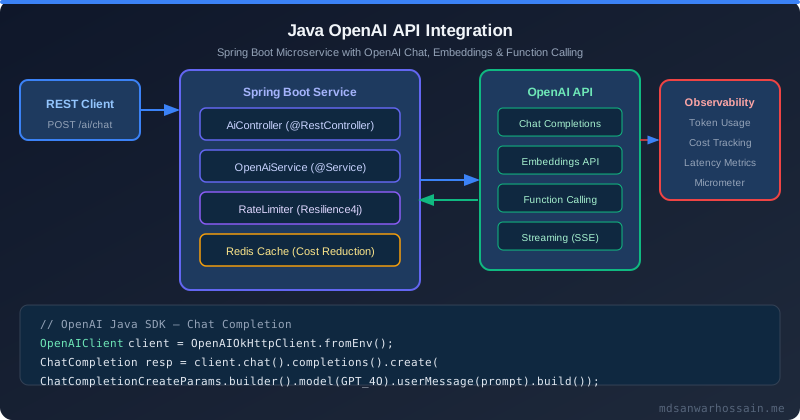
Table of Contents
- OpenAI Java SDK Options: Official SDK vs Spring AI
- Chat Completions: From Hello World to Production Patterns
- Function Calling: LLM-Driven Microservice Orchestration
- Embeddings API: Semantic Search in Your Java Backend
- Streaming with Spring WebFlux and SSE
- Rate Limiting, Retry & Circuit Breaker for OpenAI Calls
- Token Cost Management & Prompt Optimization
- Testing AI Features: Mocking OpenAI in Unit Tests
- Key Takeaways
1. OpenAI Java SDK Options: Official SDK vs Spring AI
OpenAI released the official Java SDK (com.openai:openai-java) in 2024, replacing the popular community library com.theokanning.openai-gpt3-java. For new projects, you have a clear choice hierarchy: use Spring AI if you want provider portability and Spring Boot integration, or the OpenAI Java SDK directly if you need full control over raw API parameters or are working outside Spring.
<!-- Option A: Official OpenAI Java SDK (direct, full control) -->
<dependency>
    <groupId>com.openai</groupId>
    <artifactId>openai-java</artifactId>
    <version>2.3.0</version>
</dependency>

<!-- Option B: Spring AI (recommended for Spring Boot — portable abstraction) -->
<dependency>
    <groupId>org.springframework.ai</groupId>
    <artifactId>spring-ai-openai-spring-boot-starter</artifactId>
    <version>1.0.0</version>
</dependency>
The official SDK uses a builder pattern and returns strongly-typed response objects. It handles authentication, HTTP retries, and JSON serialization automatically. For teams with existing Spring Boot infrastructure, Spring AI builds on top of the SDK and adds auto-configuration, prompt templates, and vector store integration.
2. Chat Completions: From Hello World to Production Patterns
The chat completions API is the workhorse for most AI features. A production Spring Boot service wraps it in a service bean with configuration externalized to application.properties:
@Configuration
public class OpenAiConfig {

    @Value("${openai.api-key}")
    private String apiKey;

    @Bean
    public OpenAIClient openAiClient() {
        return OpenAIOkHttpClient.builder()
            .apiKey(apiKey)
            .build();
    }
}

@Service
@RequiredArgsConstructor
public class ChatCompletionService {

    private final OpenAIClient client;

    public String complete(String systemPrompt, String userMessage) {
        ChatCompletion completion = client.chat().completions().create(
            ChatCompletionCreateParams.builder()
                .model(ChatModel.GPT_4O)
                .maxCompletionTokens(1024)
                .addSystemMessage(systemPrompt)
                .addUserMessage(userMessage)
                .build()
        );
        return completion.choices().get(0).message().content().orElse("");
    }

    // Multi-turn conversation with message history
    public String continueConversation(List<ChatCompletionMessageParam> history, String newMessage) {
        List<ChatCompletionMessageParam> messages = new ArrayList<>(history);
        messages.add(ChatCompletionUserMessageParam.builder()
            .content(newMessage).build());

        ChatCompletion completion = client.chat().completions().create(
            ChatCompletionCreateParams.builder()
                .model(ChatModel.GPT_4O)
                .messages(messages)
                .build()
        );
        return completion.choices().get(0).message().content().orElse("");
    }
}
Always configure a system prompt for production chat features — it sets the model's persona, scope, and output format constraints, reducing the risk of hallucinations and off-topic responses. For multi-turn conversations, maintain message history in a server-side session or a Redis-backed store rather than sending the entire history with every client request; cap the history to the last 10–20 exchanges to avoid context window overflow and runaway token usage. Structure responses by asking the model to output JSON when you need machine-parseable results — pair this with Spring's @ResponseBody and the SDK's responseFormat parameter to enforce structured generation reliably.
3. Function Calling: LLM-Driven Microservice Orchestration
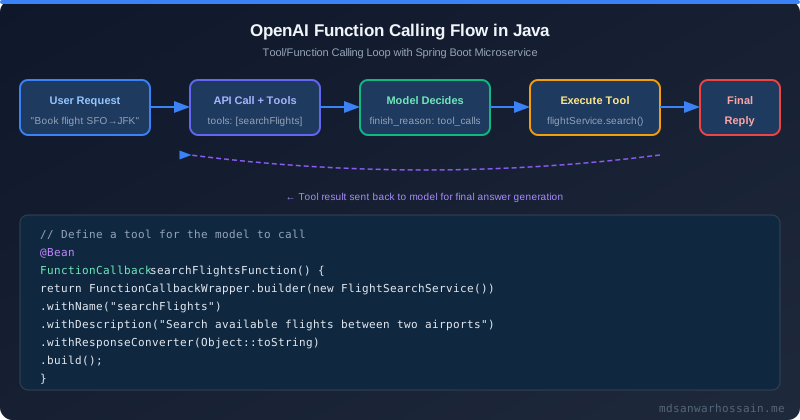
Function calling (tool use) is the most powerful pattern for integrating LLMs into microservices. The model decides when a tool is needed, generates a structured JSON call, and your Java service executes it. This enables natural language interfaces to any existing service method:
@Service
@RequiredArgsConstructor
public class OrderAssistantService {

    private final OpenAIClient client;
    private final OrderService orderService;
    private final ObjectMapper objectMapper;

    // Tool definition with JSON schema
    private static final ChatCompletionToolParam GET_ORDER_TOOL =
        ChatCompletionToolParam.builder()
            .type(ChatCompletionToolParam.Type.FUNCTION)
            .function(FunctionDefinition.builder()
                .name("getOrder")
                .description("Get details of a customer order by order ID")
                .parameters(FunctionParameters.builder()
                    .putAdditionalProperty("type", JsonValue.from("object"))
                    .putAdditionalProperty("properties", JsonValue.from(Map.of(
                        "orderId", Map.of("type", "string", "description", "The order ID")
                    )))
                    .putAdditionalProperty("required", JsonValue.from(List.of("orderId")))
                    .build())
                .build())
            .build();

    public String handleCustomerQuery(String userQuery) throws Exception {
        List<ChatCompletionMessageParam> messages = new ArrayList<>();
        messages.add(ChatCompletionUserMessageParam.builder().content(userQuery).build());

        // First API call: model decides to use a tool
        ChatCompletion response = client.chat().completions().create(
            ChatCompletionCreateParams.builder()
                .model(ChatModel.GPT_4O)
                .messages(messages)
                .tools(List.of(GET_ORDER_TOOL))
                .build()
        );

        ChatCompletionMessage assistantMessage = response.choices().get(0).message();

        // If model called a tool, execute it and send result back
        if (!assistantMessage.toolCalls().isEmpty()) {
            messages.add(assistantMessage.toParam());
            for (ChatCompletionMessageToolCall toolCall : assistantMessage.toolCalls()) {
                String result = executeToolCall(toolCall);
                messages.add(ChatCompletionToolMessageParam.builder()
                    .toolCallId(toolCall.id())
                    .content(result)
                    .build());
            }
            // Second API call: model generates natural language response with tool result
            ChatCompletion finalResponse = client.chat().completions().create(
                ChatCompletionCreateParams.builder()
                    .model(ChatModel.GPT_4O)
                    .messages(messages)
                    .build()
            );
            return finalResponse.choices().get(0).message().content().orElse("");
        }
        return assistantMessage.content().orElse("");
    }

    private String executeToolCall(ChatCompletionMessageToolCall toolCall) throws Exception {
        if ("getOrder".equals(toolCall.function().name())) {
            Map<String, String> args = objectMapper.readValue(
                toolCall.function().arguments(), new TypeReference<>() {});
            Order order = orderService.findById(args.get("orderId"));
            return objectMapper.writeValueAsString(order);
        }
        return "{\"error\": \"Unknown tool\"}";
    }
}
Function calling is a powerful paradigm for building natural language interfaces to existing microservices. The model decides which tool to call based on user intent, so you do not need to parse intent manually or maintain complex if-else routing logic. Each tool definition is just a JSON schema — keep schemas precise and descriptive so the model can choose the right function consistently. In production, validate tool call arguments server-side before execution regardless of what the model returns; never trust LLM-generated arguments as sanitized input to a database or external service. For multi-step orchestration where the model chains several tool calls, set tool_choice to auto and loop until the model returns a final message without a tool call.
4. Embeddings API: Semantic Search in Your Java Backend
Embeddings convert text into high-dimensional vectors where semantically similar texts are close in vector space. This enables semantic search (find documents by meaning, not keywords), recommendation systems, and duplicate detection — all without fine-tuning a model:
@Service
@RequiredArgsConstructor
public class SemanticSearchService {

    private final OpenAIClient client;
    private final ProductRepository productRepository; // stores embeddings in PostgreSQL

    // Generate embedding for a single text
    public List<Double> embed(String text) {
        CreateEmbeddingResponse response = client.embeddings().create(
            EmbeddingCreateParams.builder()
                .model(EmbeddingModel.TEXT_EMBEDDING_3_SMALL)
                .input(EmbeddingCreateParams.Input.ofString(text))
                .build()
        );
        return response.data().get(0).embedding();
    }

    // Index products: called once during ingestion
    public void indexProduct(Product product) {
        List<Double> embedding = embed(product.getName() + " " + product.getDescription());
        productRepository.saveWithEmbedding(product, embedding); // pgvector column
    }

    // Semantic search: find products similar to the query
    public List<Product> search(String query, int topK) {
        List<Double> queryEmbedding = embed(query);
        // Uses pgvector cosine similarity: SELECT * FROM products ORDER BY embedding <=> $1 LIMIT $2
        return productRepository.findBySemanticSimilarity(queryEmbedding, topK);
    }
}text-embedding-3-small costs $0.02 per million tokens (20x cheaper than ada-002) and matches or exceeds ada-002's quality on most tasks. Cache embeddings aggressively — identical product descriptions should never be re-embedded.
5. Streaming with Spring WebFlux and SSE
Streaming is essential for long-form generation (documents, code, summaries). The first token appears in <200ms instead of waiting 10+ seconds for the full response. The OpenAI SDK provides a streaming variant; Spring WebFlux wraps it in a reactive Flux:
@RestController
@RequiredArgsConstructor
public class StreamingChatController {

    private final OpenAIClient client;

    @GetMapping(value = "/chat/stream", produces = MediaType.TEXT_EVENT_STREAM_VALUE)
    public Flux<String> streamChat(@RequestParam String message) {
        return Flux.create(sink -> {
            try (StreamResponse<ChatCompletionChunk> stream =
                    client.chat().completions().createStreaming(
                        ChatCompletionCreateParams.builder()
                            .model(ChatModel.GPT_4O)
                            .addUserMessage(message)
                            .build())) {

                stream.forEach(chunk -> {
                    String content = chunk.choices().get(0).delta().content().orElse("");
                    if (!content.isEmpty()) {
                        sink.next(content);
                    }
                });
                sink.complete();
            } catch (Exception e) {
                sink.error(e);
            }
        });
    }
}
The Angular or React frontend connects to this SSE endpoint using the browser's EventSource API — no WebSocket upgrade is needed, and the connection works through HTTP/2 multiplexing and standard proxies without special configuration. On the backend, annotate the streaming endpoint with produces = MediaType.TEXT_EVENT_STREAM_VALUE and ensure your Nginx or AWS ALB is configured with increased timeout values for SSE connections (typically 60–300 seconds) so long-running generations are not terminated by the load balancer. Also handle the sink.error() path carefully — expose a fallback message in the SSE stream rather than closing the connection abruptly, so the client can display a user-friendly error state.
6. Rate Limiting, Retry & Circuit Breaker for OpenAI Calls
OpenAI enforces rate limits by tokens per minute (TPM) and requests per minute (RPM). Production services must handle 429 Too Many Requests with exponential backoff, and protect the application from cascading failures when OpenAI is degraded. Resilience4j integrates cleanly with Spring Boot:
# application.properties
resilience4j.retry.instances.openai.max-attempts=3
resilience4j.retry.instances.openai.wait-duration=2s
resilience4j.retry.instances.openai.exponential-backoff-multiplier=2
resilience4j.retry.instances.openai.retry-exceptions=com.openai.errors.RateLimitError

resilience4j.circuitbreaker.instances.openai.failure-rate-threshold=50
resilience4j.circuitbreaker.instances.openai.wait-duration-in-open-state=30s
resilience4j.circuitbreaker.instances.openai.sliding-window-size=10
@Service
@RequiredArgsConstructor
public class ResilientAiService {
private final ChatCompletionService delegate;
@Retry(name = "openai", fallbackMethod = "fallbackResponse")
@CircuitBreaker(name = "openai", fallbackMethod = "fallbackResponse")
@RateLimiter(name = "openai")
public String complete(String systemPrompt, String userMessage) {
return delegate.complete(systemPrompt, userMessage);
}
public String fallbackResponse(String systemPrompt, String userMessage, Exception ex) {
log.warn("OpenAI unavailable, using fallback. Error: {}", ex.getMessage());
return "I'm temporarily unable to process your request. Please try again in a moment.";
}
}The exponential backoff configuration tells Resilience4j to wait 2 seconds before the first retry, then 4 seconds, then 8 seconds — this matches OpenAI's guidance for handling 429 responses. The circuit breaker opens when 50% of the last 10 requests fail, preventing the application from flooding OpenAI with retries during an outage and giving the API time to recover. Always implement a meaningful fallback method — returning a cached response, a degraded static answer, or a human-readable error is far better than propagating an exception to the frontend. Monitor circuit breaker state via Micrometer metrics in Prometheus/Grafana to detect when your OpenAI integration is unhealthy before users start complaining.
7. Token Cost Management & Prompt Optimization
Uncontrolled OpenAI usage can generate surprising bills. Token cost management requires tracking usage per request, caching repeated queries, and optimizing prompt length:
@Service
@RequiredArgsConstructor
public class TokenTrackingService {

    private final MeterRegistry meterRegistry;
    private final OpenAIClient client;
    private final RedisTemplate<String, String> redisTemplate;

    public String completeWithTracking(String prompt, String userId) {
        // Check cache first — identical prompts return cached response
        String cacheKey = "openai:" + DigestUtils.md5Hex(prompt);
        String cached = redisTemplate.opsForValue().get(cacheKey);
        if (cached != null) {
            meterRegistry.counter("ai.cache.hit").increment();
            return cached;
        }

        ChatCompletion response = client.chat().completions().create(
            ChatCompletionCreateParams.builder()
                .model(ChatModel.GPT_4O_MINI) // 15x cheaper than GPT-4o for simple tasks
                .addUserMessage(prompt)
                .maxCompletionTokens(500)     // Hard limit to prevent runaway costs
                .build()
        );

        // Track token usage per user for cost attribution
        long inputTokens = response.usage().map(u -> u.promptTokens()).orElse(0L);
        long outputTokens = response.usage().map(u -> u.completionTokens()).orElse(0L);
        meterRegistry.counter("ai.tokens.input", "user", userId).increment(inputTokens);
        meterRegistry.counter("ai.tokens.output", "user", userId).increment(outputTokens);

        String result = response.choices().get(0).message().content().orElse("");
        redisTemplate.opsForValue().set(cacheKey, result, Duration.ofHours(1));
        return result;
    }
}8. Testing AI Features: Mocking OpenAI in Unit Tests
AI features need deterministic tests — you cannot make real API calls in CI (cost, latency, flakiness). Mock the OpenAIClient or the Spring AI ChatModel interface:
@ExtendWith(MockitoExtension.class)
class OrderAssistantServiceTest {

    @Mock
    private OpenAIClient mockClient;

    @Mock
    private OrderService orderService;

    @InjectMocks
    private OrderAssistantService service;

    @Test
    void handleCustomerQuery_withValidOrderId_returnsOrderDetails() {
        // Arrange: mock a response with a tool call
        ChatCompletionMessageToolCall toolCall = mock(ChatCompletionMessageToolCall.class);
        when(toolCall.id()).thenReturn("call_abc123");
        when(toolCall.function().name()).thenReturn("getOrder");
        when(toolCall.function().arguments()).thenReturn("{\"orderId\":\"ORD-001\"}");

        // ... (full mock setup for ChatCompletion response)
        // ... (mock final response after tool call)

        Order mockOrder = new Order("ORD-001", "Laptop", OrderStatus.SHIPPED);
        when(orderService.findById("ORD-001")).thenReturn(mockOrder);

        // Act
        String result = service.handleCustomerQuery("What is the status of my order ORD-001?");

        // Assert
        assertThat(result).isNotBlank();
        verify(orderService).findById("ORD-001");
    }
}

// Integration test: use Spring AI's MockChatModel for full context
@SpringBootTest
class AiControllerIntegrationTest {

    @TestConfiguration
    static class MockAiConfig {
        @Bean
        @Primary
        ChatModel mockChatModel() {
            // Returns deterministic responses for testing
            return new MockChatModel(new ChatResponse(List.of(
                new Generation(new AssistantMessage("Mock response")))));
        }
    }
}
Mocking is critical for keeping test suites fast and cost-free — a full end-to-end test against the real OpenAI API costs money on every CI run and introduces flakiness depending on network conditions and API availability. Use Mockito to mock the OpenAIClient in unit tests and Spring AI's MockChatModel for integration tests where you need the Spring application context. Record real API responses in a fixture file and replay them in tests using WireMock for contract-level testing — this catches API schema changes without adding real API dependency. Always test error paths explicitly: simulate 429 rate-limit errors, 500 server errors, and timeout scenarios to verify that your Resilience4j configuration and fallback methods work correctly under failure conditions.
9. Key Takeaways
- Use Spring AI for Spring Boot projects (portability, auto-config, advisors). Use the official OpenAI Java SDK for fine-grained control or non-Spring contexts.
- Function calling enables natural language interfaces to any existing Java service method — no code changes to the service, just a tool definition wrapper.
- Always wrap OpenAI calls with Resilience4j retry + circuit breaker to handle rate limits and outages without cascading failures.
- Route intelligently: GPT-4o-mini for most tasks (15x cheaper), GPT-4o for complex reasoning. Set
maxCompletionTokensto prevent runaway cost. - Cache embedding results in Redis — the same product description generates the same vector every time, so re-computing is pure waste.
- Test with Spring AI's
MockChatModeland Mockito mocks ofOpenAIClientto keep CI fast and deterministic.
Leave a Comment
Building OpenAI features in Java? Share your experience, architecture questions, or cost optimization tips below.
Leave a Comment
Related Posts

Software Engineer · Java · Spring Boot · Microservices