Java Streams API: Advanced Collectors, flatMap & Parallel Streams in Production
The Java Streams API introduced in Java 8 transformed how Java developers write data processing code. But most tutorials stop at filter and map. This guide goes deep: advanced Collector compositions, flatMap for nested structures, mutable vs immutable reduction, parallel stream gotchas, and the performance tradeoffs you need to understand before hitting production at scale.
TL;DR — Key Takeaway
"Java Streams are lazy pipeline processors. Use groupingBy + counting for aggregations, flatMap to flatten nested structures. Parallel streams help only for CPU-bound work on large data — always benchmark before switching. Avoid streams for simple loops with side effects."
Table of Contents
- Stream Pipeline Mechanics: Lazy Evaluation & Terminal Operations
- Essential Collectors Deep Dive: groupingBy, toMap, partitioningBy
- Advanced Collectors: joining, teeing, and Custom Collectors
- flatMap: Transforming Nested Structures
- reduce and collect: Mutable vs Immutable Reduction
- Parallel Streams: When They Help and When They Hurt
- Stream Performance: Avoiding Common Anti-patterns
- Infinite Streams and Stream.generate / Stream.iterate
- Streams vs Loops vs Collectors: Decision Guide
- Conclusion & Production Checklist
1. Stream Pipeline Mechanics: Lazy Evaluation & Terminal Operations
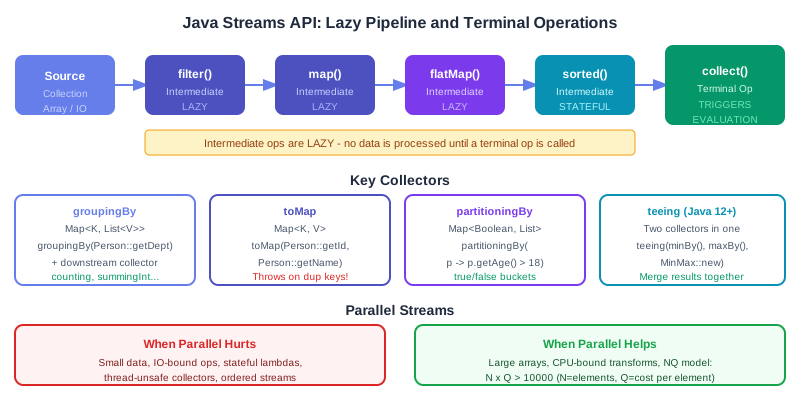
A Stream pipeline has three parts: a source, zero or more intermediate operations, and exactly one terminal operation. Intermediate operations are lazy — they build a description of what to do, but no data is processed until a terminal operation is invoked.
// Lazy evaluation: nothing executes until terminal op
List<String> names = List.of("Alice", "Bob", "Charlie", "David", "Eve");

// Building the pipeline (no work done yet):
Stream<String> pipeline = names.stream()
    .filter(s -> { System.out.println("filter: " + s); return s.length() > 3; })
    .map(s -> { System.out.println("map: " + s); return s.toUpperCase(); });

// Work only begins when terminal op is called:
Optional<String> first = pipeline.findFirst();
// Output: filter: Alice, map: Alice (stops at first match!)
Operation Categories
| Category | Operations | Notes |
|---|---|---|
| Stateless intermediate | filter, map, flatMap, peek | No state, process element independently |
| Stateful intermediate | sorted, distinct, limit, skip | Must see all/multiple elements before producing results |
| Short-circuit terminal | findFirst, findAny, anyMatch, allMatch, noneMatch | May not process all elements |
| Terminal | collect, forEach, reduce, count, min, max, toArray | Triggers pipeline execution |
2. Essential Collectors Deep Dive: groupingBy, toMap, partitioningBy
groupingBy: The Most Powerful Collector
record Employee(String name, String dept, int salary) {}

List<Employee> employees = fetchEmployees();

// Basic: group by department
Map<String, List<Employee>> byDept =
    employees.stream().collect(Collectors.groupingBy(Employee::dept));

// With downstream collector: count per department
Map<String, Long> countPerDept =
    employees.stream().collect(Collectors.groupingBy(Employee::dept, Collectors.counting()));

// With downstream: average salary per department
Map<String, Double> avgSalaryByDept = employees.stream().collect(
    Collectors.groupingBy(Employee::dept, Collectors.averagingInt(Employee::salary)));

// Nested groupingBy: by dept, then by salary range
Map<String, Map<String, List<Employee>>> nested = employees.stream().collect(
    Collectors.groupingBy(Employee::dept,
        Collectors.groupingBy(e -> e.salary() > 100000 ? "senior" : "junior")));

// With TreeMap for sorted keys:
TreeMap<String, List<Employee>> sorted = employees.stream().collect(
    Collectors.groupingBy(Employee::dept, TreeMap::new, Collectors.toList()));
toMap: Building Maps from Streams
// Basic toMap — throws IllegalStateException on duplicate keys!
Map<Integer, String> idToName = employees.stream()
    .collect(Collectors.toMap(e -> e.id(), Employee::name));  // danger: duplicate id?

// With merge function for duplicates (keep the higher salary):
Map<String, Integer> deptMaxSalary = employees.stream()
    .collect(Collectors.toMap(
        Employee::dept,
        Employee::salary,
        Integer::max));  // merge function: called on duplicate key

// Unmodifiable map (Java 10+):
Map<String, Employee> byName = employees.stream()
    .collect(Collectors.toUnmodifiableMap(Employee::name, e -> e));

// toMap with LinkedHashMap for insertion order:
Map<String, Integer> ordered = employees.stream()
    .collect(Collectors.toMap(Employee::name, Employee::salary,
        (a, b) -> a, LinkedHashMap::new));
partitioningBy: Two-Way Split
// Split into two groups: always returns Map<Boolean, List<T>>
Map<Boolean, List<Employee>> seniorJunior = employees.stream()
    .collect(Collectors.partitioningBy(e -> e.salary() > 100_000));

List<Employee> senior = seniorJunior.get(true);
List<Employee> junior = seniorJunior.get(false);

// With downstream:
Map<Boolean, Long> counts = employees.stream()
    .collect(Collectors.partitioningBy(e -> e.salary() > 100_000, Collectors.counting()));
groupingBy is the stream equivalent of SQL's GROUP BY and is the workhorse for any aggregation scenario. Its power comes from downstream collectors: by composing groupingBy with counting(), averagingInt(), mapping(), or even another groupingBy, you can express complex multi-level aggregations in a single stream pass rather than iterating the collection multiple times. The toMap collector requires explicit handling of duplicate keys via a merge function — omitting it causes an unchecked IllegalStateException at runtime, a common production bug that only surfaces when real-world data contains duplicates that test data did not. Use partitioningBy instead of groupingBy when the grouping predicate is boolean — it always returns exactly two keys (true and false), making access to both partitions safer and more readable than checking map.get("senior") with a possible null.
3. Advanced Collectors: joining, teeing, and Custom Collectors
joining: String Concatenation the Right Way
// joining is more efficient than manual string concat via reduce
List<String> names = List.of("Alice", "Bob", "Charlie");

String csv = names.stream().collect(Collectors.joining(", "));
// "Alice, Bob, Charlie"

String wrapped = names.stream().collect(Collectors.joining(", ", "[", "]"));
// "[Alice, Bob, Charlie]"

// For SQL IN clause generation:
String inClause = ids.stream()
    .map(String::valueOf)
    .collect(Collectors.joining(",", "(", ")"));
// "(1,2,3,4)"
teeing: Two Collectors in One Pass (Java 12+)
record MinMax(int min, int max) {}

// Without teeing: two passes needed
int min = employees.stream().mapToInt(Employee::salary).min().orElse(0);
int max = employees.stream().mapToInt(Employee::salary).max().orElse(0);

// With teeing: single pass!
MinMax minMax = employees.stream().collect(
    Collectors.teeing(
        Collectors.minBy(Comparator.comparingInt(Employee::salary)),
        Collectors.maxBy(Comparator.comparingInt(Employee::salary)),
        (minEmp, maxEmp) -> new MinMax(
            minEmp.map(Employee::salary).orElse(0),
            maxEmp.map(Employee::salary).orElse(0))
    ));
Custom Collector with Collector.of()
// Custom collector: collect to immutable list with capacity pre-sizing hint
Collector<String, List<String>, List<String>> toImmutableList =
    Collector.of(
        ArrayList::new,                    // supplier: create mutable container
        List::add,                         // accumulator: add element
        (a, b) -> { a.addAll(b); return a; }, // combiner: merge two containers (parallel)
        Collections::unmodifiableList,     // finisher: transform to final result
        Collector.Characteristics.UNORDERED // characteristics
    );

List<String> result = Stream.of("a", "b", "c").collect(toImmutableList);
The Collectors.joining() collector uses a single StringJoiner internally, making it significantly more efficient than manual concatenation inside reduce(), which allocates a new String at every element. The teeing collector (Java 12+) is invaluable whenever you need two independent aggregations over the same data — without it you either stream the collection twice (doubling iteration cost) or manually combine two accumulators in a mutable reduction, both of which are error-prone. Custom collectors built with Collector.of() are the right choice when no built-in collector matches your accumulation strategy; the four-argument form (supplier, accumulator, combiner, finisher) maps directly to the four phases of a parallel collect, so marking the collector UNORDERED or CONCURRENT where safe unlocks additional parallel-stream optimisations without changing the collector's logic.
4. flatMap: Transforming Nested Structures
flatMap maps each element to a stream and then flattens all those streams into one. It is the key operation for working with nested collections, optional values, and multi-valued transformations.
// map vs flatMap:
List<List<Integer>> nested = List.of(List.of(1,2,3), List.of(4,5), List.of(6));

// map produces Stream<List<Integer>> — NOT what we want:
Stream<List<Integer>> wrong = nested.stream().map(List::stream);

// flatMap produces Stream<Integer> — correct:
List<Integer> flat = nested.stream()
    .flatMap(Collection::stream)
    .collect(Collectors.toList());
// [1, 2, 3, 4, 5, 6]

// Real-world: find all unique skills across employees
record Employee(String name, List<String> skills) {}
Set<String> allSkills = employees.stream()
    .flatMap(e -> e.skills().stream())
    .collect(Collectors.toSet());

// Optional with flatMap — chain operations that return Optional:
Optional<String> result = Optional.of(userId)
    .flatMap(id -> userRepository.findById(id))    // returns Optional<User>
    .flatMap(user -> user.getEmail())               // returns Optional<String>
    .filter(email -> email.endsWith("@company.com"));

// flatMap on arrays:
String[] words = {"Hello World", "Java Streams"};
long uniqueLetters = Arrays.stream(words)
    .flatMap(word -> Arrays.stream(word.split("")))
    .distinct()
    .count();
5. reduce and collect: Mutable vs Immutable Reduction
reduce performs immutable reduction — it combines elements into a single immutable result by applying a binary operator repeatedly. collect performs mutable reduction — it accumulates elements into a mutable container like a List or Map.
// reduce: immutable, creates new object at each step
int totalSalary = employees.stream()
    .mapToInt(Employee::salary)
    .reduce(0, Integer::sum);

// Three-arg reduce for parallel: identity, accumulator, combiner
int total = employees.parallelStream()
    .reduce(
        0,
        (acc, e) -> acc + e.salary(),    // accumulator
        Integer::sum                       // combiner (merges partial results from threads)
    );

// collect: mutable reduction — more efficient for building collections
// reduce to List is WRONG and inefficient:
// BAD: creates a new list at each step — O(n^2) copies!
List<String> wrongWay = names.stream()
    .reduce(new ArrayList<>(),
        (list, e) -> { List<String> newList = new ArrayList<>(list); newList.add(e); return newList; },
        (a, b) -> { List<String> merged = new ArrayList<>(a); merged.addAll(b); return merged; });

// GOOD: mutable container, single allocation
List<String> goodWay = names.stream().collect(Collectors.toList());
Rule: use reduce for numeric aggregation (sum, max, product) and simple value folding. Use collect for building collections, maps, or any mutable result structure.
6. Parallel Streams: When They Help and When They Hurt
Parallel streams split the data across multiple threads from the common ForkJoinPool. The promise is automatic parallelism, but the reality is more nuanced. Most parallel stream usage in production codebases is premature and actually hurts performance.
The NQ Model: When Parallel Actually Helps
// NQ model: N = number of elements, Q = cost per element
// Parallel only wins if N * Q > ~10,000 (approximate threshold)

// Good candidates for parallel:
// - Large arrays of primitives with CPU-intensive transforms
long count = IntStream.rangeClosed(1, 10_000_000)
    .parallel()
    .filter(n -> isPrime(n))  // CPU-heavy operation
    .count();

// Custom pool to avoid starvation of main ForkJoinPool:
ForkJoinPool pool = new ForkJoinPool(4);
long result = pool.submit(() ->
    largeList.parallelStream()
        .mapToLong(ExpensiveComputation::compute)
        .sum()
).get();
When Parallel Streams HURT Performance
- Small data (<1000 elements): thread management overhead exceeds processing gains
- I/O-bound operations: parallel doesn't help when threads wait on I/O; use CompletableFuture instead
- Stateful lambdas: using external mutable state causes races and incorrect results
- LinkedList as source: cannot be split efficiently; use ArrayList or arrays
- Thread-unsafe collectors: always use thread-safe collectors or Collectors.toConcurrentMap()
- Ordered operations on unordered data: maintaining encounter order in parallel is expensive
7. Stream Performance: Avoiding Common Anti-patterns
Anti-pattern 1: Streams for Simple Indexed Loops
// BAD: stream with side effect — use a loop instead
list.stream().forEach(System.out::println);
// GOOD: direct loop, clearer intent and avoids stream overhead
for (String s : list) System.out.println(s);

// BAD: unnecessary boxing
List<Integer> nums = List.of(1, 2, 3, 4, 5);
int sum = nums.stream().reduce(0, Integer::sum);  // autoboxing overhead

// GOOD: primitive stream avoids boxing
int sum = nums.stream().mapToInt(Integer::intValue).sum();
Anti-pattern 2: Multiple Stream Operations When One Would Do
// BAD: two stream passes when one suffices
long count = list.stream().filter(s -> s.startsWith("A")).count();
Optional<String> first = list.stream().filter(s -> s.startsWith("A")).findFirst();

// GOOD: single pass with limit for count use case
// Or use Collectors.teeing for two results in one pass

// BAD: sorted before filter (sorts entire list before reducing)
list.stream().sorted().filter(pred).findFirst();
// GOOD: filter before sorted (sorts only matching elements)
list.stream().filter(pred).sorted().findFirst();
8. Infinite Streams and Stream.generate / Stream.iterate
// Stream.generate: infinite stream from Supplier
Stream<UUID> ids = Stream.generate(UUID::randomUUID);
List<UUID> fiveIds = ids.limit(5).collect(Collectors.toList());

// Stream.iterate (Java 8): seed + unary operator (infinite)
Stream<Integer> powers = Stream.iterate(1, n -> n * 2);  // 1, 2, 4, 8, 16...
List<Integer> first10 = powers.limit(10).collect(Collectors.toList());

// Stream.iterate (Java 9): with hasNext predicate (finite)
List<Integer> upTo100 = Stream.iterate(1, n -> n <= 100, n -> n * 2)
    .collect(Collectors.toList());  // 1, 2, 4, 8, ..., 64

// Fibonacci with iterate:
Stream.iterate(new int[]{0, 1}, f -> new int[]{f[1], f[0]+f[1]})
    .limit(10)
    .map(f -> f[0])
    .forEach(System.out::println);  // 0, 1, 1, 2, 3, 5, 8, 13, 21, 34

// IntStream.range / IntStream.rangeClosed for index-based streams:
IntStream.range(0, list.size())
    .filter(i -> i % 2 == 0)
    .mapToObj(list::get)
    .collect(Collectors.toList());  // elements at even indices
9. Streams vs Loops vs Collectors: Decision Guide
| Use Case | Prefer | Reason |
|---|---|---|
| Transform + filter collection | Stream | Declarative, composable, readable |
| Group/aggregate data | Collectors | groupingBy, toMap are purpose-built |
| Side effects only (logging, saving) | Loop (for-each) | Streams designed for functional operations |
| Index-aware iteration | Loop or IntStream.range() | Streams lack direct index access |
| Exception handling inside logic | Loop | Checked exceptions in lambdas require wrapping |
| Large CPU-bound data | Parallel Stream (benchmark first) | Only when N*Q > threshold |
10. Conclusion & Production Checklist
Java Streams are a powerful abstraction, but like all abstractions they can be misused. Master the Collector API for aggregations, use flatMap liberally for nested structures, and treat parallel streams as an optimization requiring measurement rather than a free performance boost.
Production Checklist
- ✅ Filter before map, filter before sort to reduce element count early
- ✅ Use mapToInt/mapToLong/mapToDouble for numeric ops to avoid boxing
- ✅ Use Collectors.toUnmodifiableList() (Java 10+) for immutable results
- ✅ Always provide merge function in toMap() to handle potential duplicates
- ✅ Prefer groupingBy downstream collectors over post-processing the result map
- ✅ Use teeing (Java 12+) when you need two aggregations in a single pass
- ✅ Benchmark parallel streams with JMH before committing to them in production
- ✅ Never use parallel streams for I/O operations — use CompletableFuture or reactive instead
- ✅ Close streams from I/O sources (Files.lines()) in try-with-resources
