JVM Architecture Deep Dive: ClassLoader Subsystem, Runtime Data Areas & Execution Engine
Every Java engineer writes code that runs on the JVM, yet surprisingly few understand what the JVM actually does with that code. Understanding the JVM's internal architecture — from how the ClassLoader subsystem loads and verifies bytecode, through the precise memory regions of the runtime data areas, to how the execution engine interprets and JIT-compiles your hot methods — transforms you from a Java user into a Java engineer who can tune, debug, and reason about production systems at a fundamentally deeper level.
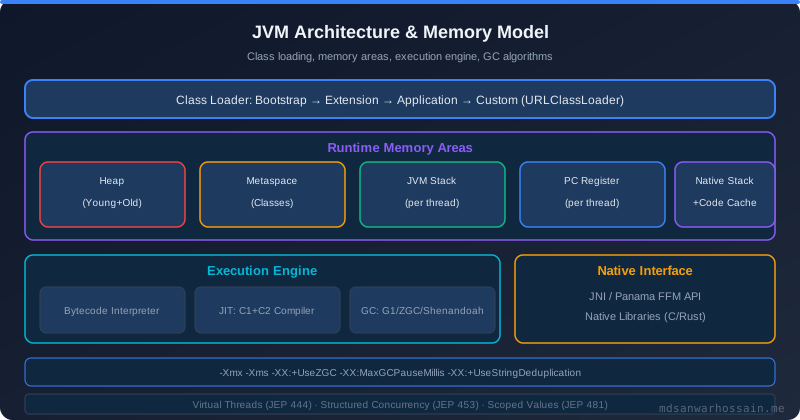
Table of Contents
- What is the JVM and Why Every Java Engineer Must Know Its Architecture
- ClassLoader Subsystem: Bootstrap, Extension, and Application Loaders
- Runtime Data Areas: Where Java Lives at Runtime
- Execution Engine: Interpreter, JIT Compiler, and Garbage Collector
- Native Method Interface (JNI) and Native Method Libraries
- The Bytecode Execution Cycle: From .java to Running Code
- JVM Startup Sequence Step-by-Step
- Key Takeaways
- Conclusion
1. What is the JVM and Why Every Java Engineer Must Know Its Architecture
The Java Virtual Machine is an abstract computing machine — a software implementation of a CPU-like processor that understands a specific instruction set called Java bytecode. When you compile a .java file with javac, the compiler doesn't emit native machine code for x86 or ARM. Instead it emits platform-neutral .class files containing bytecode instructions. The JVM then translates that bytecode into native instructions at runtime, enabling Java's famous "write once, run anywhere" guarantee.
It is critical to distinguish between the JVM Specification (a document published by Oracle that defines the abstract machine's behavior) and a concrete JVM implementation. The specification dictates what the JVM must do; an implementation decides how. The pipeline from source to execution looks like this:
.java source → javac → .class bytecode → Class Loader Subsystem → Runtime Data Areas → Execution Engine → Native Interface (JNI) → Native Method Libraries (OS/Hardware)
2. ClassLoader Subsystem: Bootstrap, Extension, and Application Loaders
The ClassLoader subsystem is responsible for three activities: loading (finding and reading the .class binary), linking (verification, preparation, and resolution), and initialization (executing static initializers). Java uses a parent delegation model: before a ClassLoader tries to load a class itself, it always delegates the request to its parent first. Only if the parent cannot find the class does the child attempt to load it. This hierarchy has three built-in levels:
- Bootstrap ClassLoader — implemented in native C++ inside the JVM. Loads the core Java runtime classes from
$JAVA_HOME/lib/(e.g.,java.lang.*,java.util.*). Has no parent. Returnsnullwhen queried via Java's API. - Extension (Platform) ClassLoader — loads JDK extension classes from
$JAVA_HOME/lib/ext/or thejava.ext.dirssystem property. In Java 9+ (JPMS), this became the Platform ClassLoader loading named modules. - Application (System) ClassLoader — loads classes from the application classpath (
-classpath/-cpargument orCLASSPATHenv). This is the loader that loads your application code and third-party JARs.
You can inspect the ClassLoader hierarchy at runtime:
// Inspecting the ClassLoader hierarchy at runtime
public class ClassLoaderHierarchy {
    public static void main(String[] args) {
        // Application class — loaded by AppClassLoader
        ClassLoader appLoader = ClassLoaderHierarchy.class.getClassLoader();
        System.out.println("App ClassLoader:      " + appLoader);
        // jdk.internal.loader.ClassLoaders$AppClassLoader@...

        ClassLoader platformLoader = appLoader.getParent();
        System.out.println("Platform ClassLoader: " + platformLoader);
        // jdk.internal.loader.ClassLoaders$PlatformClassLoader@...

        ClassLoader bootstrapLoader = platformLoader.getParent();
        System.out.println("Bootstrap ClassLoader:" + bootstrapLoader);
        // null  <-- Bootstrap is native, not representable as a Java object

        // Core class — loaded by Bootstrap
        ClassLoader stringLoader = String.class.getClassLoader();
        System.out.println("String ClassLoader:   " + stringLoader);
        // null  <-- confirms Bootstrap loaded it
    }
}
When a class is requested, the delegation chain executes: Application ClassLoader asks Platform ClassLoader, which asks Bootstrap ClassLoader. Bootstrap searches the JDK runtime modules first. If found, it returns the class immediately. If not found, Platform ClassLoader tries its module path. If still not found, Application ClassLoader searches the classpath. This prevents application code from accidentally shadowing core JDK classes — your custom java.lang.String will never replace the real one, because Bootstrap always wins the race.
For advanced use cases — OSGi bundles, application servers deploying multiple WARs, and plugin systems — you implement a custom ClassLoader. The classic use case is hot-reloading: drop a new JAR into a watched directory and reload the classes without restarting the JVM.
// Minimal custom ClassLoader for plugin hot-reloading
public class PluginClassLoader extends ClassLoader {

    private final Path pluginJar;

    public PluginClassLoader(Path pluginJar, ClassLoader parent) {
        super(parent); // parent delegation preserved
        this.pluginJar = pluginJar;
    }

    @Override
    protected Class<?> findClass(String name) throws ClassNotFoundException {
        String classPath = name.replace('.', '/') + ".class";
        try (var jar = new java.util.jar.JarFile(pluginJar.toFile())) {
            var entry = jar.getJarEntry(classPath);
            if (entry == null) throw new ClassNotFoundException(name);
            byte[] bytes = jar.getInputStream(entry).readAllBytes();
            return defineClass(name, bytes, 0, bytes.length);
        } catch (IOException e) {
            throw new ClassNotFoundException(name, e);
        }
    }
}

// Usage: load a plugin class, invoke its interface
PluginClassLoader loader = new PluginClassLoader(
        Path.of("/plugins/my-plugin-v2.jar"),
        Thread.currentThread().getContextClassLoader()
);
Class<?> pluginClass = loader.loadClass("com.example.MyPlugin");
Plugin plugin = (Plugin) pluginClass.getDeclaredConstructor().newInstance();
plugin.execute();Thread.currentThread().setContextClassLoader(null) in teardown hooks and deregister drivers via DriverManager.deregisterDriver(). Monitor Metaspace with -XX:+PrintGCDetails and alert on jvm.memory.metaspace.used growing unboundedly across redeployments.
3. Runtime Data Areas: Where Java Lives at Runtime
Once classes are loaded, the JVM needs memory to store bytecode, objects, thread execution state, and native pointers. The JVM specification defines five runtime data areas. Understanding which data goes where is the foundation of every memory tuning, GC debugging, and OOM troubleshooting exercise.
Method Area (Metaspace in Java 8+)
The Method Area stores per-class metadata: the runtime constant pool, field and method descriptors, method bytecode, and static variable values. In Java 7 and earlier, this was called the PermGen — a fixed-size region inside the JVM heap bounded by -XX:MaxPermSize. Java 8 replaced it with Metaspace, which lives in native memory (off-heap) and grows dynamically. This eliminated the notorious java.lang.OutOfMemoryError: PermGen space errors, but introduced the possibility of native memory exhaustion if Metaspace is left unbounded (-XX:MaxMetaspaceSize is not set). Every class loaded by a ClassLoader occupies Metaspace; unloading requires GC-ing the ClassLoader itself.
Heap
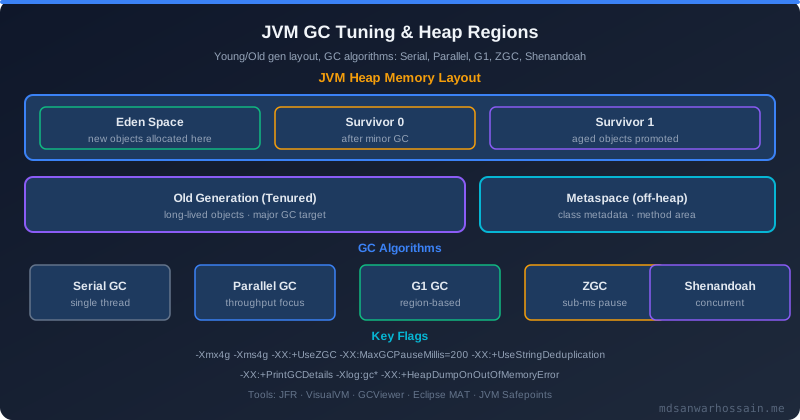
The heap is where all object instances and arrays live. It is shared across all threads and is managed by the garbage collector. HotSpot's generational heap (with G1, ZGC, or Shenandoah) divides the heap into regions. The classic generational layout consists of:
- Young Generation: Eden space (where new objects are allocated) + Survivor spaces S0 and S1 (objects surviving minor GC are moved here before promotion). Most objects die young — the generational hypothesis.
- Old Generation (Tenured): Long-lived objects promoted from Young Gen after surviving a configurable number of GC cycles (
-XX:MaxTenuringThreshold). - TLAB (Thread-Local Allocation Buffer): Each thread has a private chunk carved from Eden. Object allocation is a simple pointer bump inside the TLAB — lock-free and extremely fast.
JVM Stack (Per-Thread)
Each thread has its own JVM stack. When a method is invoked, a stack frame is pushed. Each frame contains: a local variable array (stores this, method parameters, and local variables — primitive values and object references), an operand stack (a LIFO working area where bytecode instructions push/pop intermediate values), and frame data (reference to the runtime constant pool and return address). When the method returns, its frame is popped. StackOverflowError occurs when the stack depth exceeds the limit set by -Xss (default is typically 512KB–1MB for platform threads, ~few KB for virtual threads).
// Bytecode-level view of a simple addition method
// Java source:
public int add(int a, int b) {
    return a + b;
}

// Compiled bytecode (javap -c):
// public int add(int, int);
//   Code:
//      0: iload_1        // push local var[1] (a) onto operand stack
//      1: iload_2        // push local var[2] (b) onto operand stack
//      2: iadd           // pop two ints, push their sum
//      3: ireturn        // return int on top of operand stack
Program Counter (PC) Register
Each thread has its own Program Counter register. For a Java method, the PC holds the address of the currently executing bytecode instruction. For a native method, the PC is undefined (the native frame is managed by the operating system). When the OS context-switches between threads, the JVM saves and restores each thread's PC, enabling interleaved execution. This is why thread dumps show exactly which bytecode offset a thread was executing when the dump was captured.
Native Method Stack
Analogous to the JVM stack but used for native (C/C++) method invocations via JNI. When a Java method calls a native method, execution transfers to the native method stack. A StackOverflowError can originate here too if native code recurses deeply.
Here is a side-by-side comparison of all five runtime data areas:
4. Execution Engine: Interpreter, JIT Compiler, and Garbage Collector
The Execution Engine is the heart of the JVM — it reads bytecode from the Method Area and executes it. HotSpot's execution engine has three tightly integrated components: the interpreter, the JIT compiler, and the garbage collector.
Interpreter
The interpreter is a simple fetch-decode-execute loop: it reads one bytecode instruction at a time, decodes it, and dispatches it to the corresponding handler. Interpretation is safe and flexible — every method starts life in the interpreter — but slow. A single Java bytecode instruction may involve many native instructions. JVM startup is interpreter-dominated; this is why JVM warmup time matters for latency-sensitive applications.
JIT Compiler: C1 and C2, Tiered Compilation
HotSpot ships two JIT compilers that work together in tiered compilation mode (enabled by default since Java 8 via -XX:+TieredCompilation). The system defines five compilation tiers:
- Level 0 — Pure interpreter execution. No compilation. Profiling counters begin accumulating.
- Level 1 — C1 compiled, no profiling. Fast native code, no instrumentation overhead. Used for trivially simple methods.
- Level 2 — C1 compiled with lightweight profiling (invocation + back-edge counters only).
- Level 3 — C1 compiled with full profiling (branch probabilities, type profiles, call targets). Rich data feeds the C2 compiler.
- Level 4 — C2 (server) compiled. Aggressively optimized native code using all profiling data. Performs inlining, escape analysis, loop unrolling, lock elision, and SIMD vectorization. This is peak JVM performance.
HotSpot decides which methods to JIT-compile based on an invocation counter (incremented every time the method is called) and a back-edge counter (incremented for every loop iteration). When the combined count exceeds the compilation threshold (-XX:CompileThreshold, default 10,000 for C2), the method is queued for compilation. This is the famous "hot method detection" — the feature that gives HotSpot its name.
# JVM flags for observing and tuning JIT compilation
# Print all JIT compilation events (method name, tier, time)
java -XX:+PrintCompilation -jar myapp.jar

# Disable tiered compilation (force interpreter or C2 only)
java -XX:-TieredCompilation -jar myapp.jar

# Force C1-only (client compiler, fast startup)
java -client -jar myapp.jar

# Force C2-only (server compiler, max throughput)
java -server -XX:-TieredCompilation -jar myapp.jar

# Print inlining decisions made by C2
java -XX:+UnlockDiagnosticVMOptions -XX:+PrintInlining -jar myapp.jar

# Control compilation threshold (lower = compile sooner)
java -XX:CompileThreshold=1000 -jar myapp.jar

# OSR (On-Stack Replacement) threshold for loops
java -XX:OnStackReplacePercentage=140 -jar myapp.jar
Garbage Collector as Part of the Execution Engine: The GC is logically part of the execution engine because it works continuously alongside bytecode execution to reclaim unreachable heap objects. HotSpot offers multiple GC implementations — G1GC (default since Java 9), ZGC (low-latency, pauseless since Java 15), Shenandoah (RedHat's concurrent GC), and the legacy Parallel GC. Each manages the heap differently but all interact with the execution engine through safepoints — moments when the JVM pauses threads to perform GC work safely.
5. Native Method Interface (JNI) and Native Method Libraries
The Java Native Interface (JNI) is the bridge between Java bytecode executing in the JVM and native code (C, C++, or assembly) running in the OS process. JNI is used when Java needs capabilities unavailable in pure Java: accessing hardware devices, calling legacy C libraries, performing OS-level operations, or implementing performance-critical algorithms that benefit from hand-tuned native code. The JDK itself is full of JNI calls — System.gc(), Object.hashCode(), and sun.misc.Unsafe all delegate to native implementations.
// Java side: declaring and calling a native method
public class NativeDemo {
    // Declare the native method (implemented in C/C++)
    public native long nativeAdd(long a, long b);

    static {
        // Load the shared library at class initialization
        System.loadLibrary("nativedemo"); // looks for libnativedemo.so on Linux
    }

    public static void main(String[] args) {
        NativeDemo demo = new NativeDemo();
        long result = demo.nativeAdd(1_000_000L, 2_000_000L);
        System.out.println("Native result: " + result);
    }
}

// C side: implementing the native method (nativedemo.c)
// #include <jni.h>
// JNIEXPORT jlong JNICALL
// Java_NativeDemo_nativeAdd(JNIEnv *env, jobject obj, jlong a, jlong b) {
//     return a + b;
// }
JNI comes with significant security implications. Native code runs outside the JVM's memory safety guarantees — a bug in native code can corrupt the JVM heap, cause segmentation faults, or bypass Java's access control. JNI also requires manual memory management for JNI objects; forgetting to call DeleteLocalRef in long-running native code leaks JNI references, eventually triggering OutOfMemoryError. For most use cases, Java Native Access (JNA) is a safer alternative — it uses reflection to call native libraries without writing C glue code, and Project Panama's Foreign Function & Memory API (finalized in Java 22) provides a modern, type-safe replacement for JNI entirely.
6. The Bytecode Execution Cycle: From .java to Running Code
When a class is first referenced by your code, the ClassLoader subsystem performs three phases — Loading, Linking, and Initialization — before the execution engine can run any of that class's methods.
Loading: The ClassLoader reads the .class file bytes and creates a java.lang.Class object in the Method Area (Metaspace), representing the class's structure.
Linking — Verification: The bytecode verifier runs a static analysis pass over the bytecode to enforce JVM type safety rules: no uninitialized variable reads, no invalid casts, no stack underflows, no access to private members of other classes. This is the JVM's primary defense against malformed or malicious bytecode. Verification can be disabled with -Xverify:none but this is strongly discouraged in production.
Linking — Preparation: Static fields are allocated in Metaspace and set to their default values (0, false, null). Note: explicit initializers haven't run yet — that happens during Initialization.
Linking — Resolution: Symbolic references in the constant pool (e.g., com.example.Foo.bar as a string) are replaced with direct references (actual memory pointers or method table offsets). Resolution may trigger loading of referenced classes.
Initialization: The JVM executes the class's <clinit> method (the compiled form of all static { ... } blocks and static field initializers), in top-to-bottom, declaration order. Initialization is guaranteed to happen exactly once per ClassLoader, and the JVM uses a per-class lock to handle concurrent initialization safely.
# Disassemble bytecode with javap to see what the JVM actually executes
$ javac Calculator.java
$ javap -c -verbose Calculator

// Example output excerpt for a multiply method:
public int multiply(int, int);
  descriptor: (II)I
  flags: (0x0001) ACC_PUBLIC
  Code:
    stack=2, locals=3, args_size=3     // operand stack depth=2, 3 local vars
       0: iload_1                       // load param 'a' (local var slot 1)
       1: iload_2                       // load param 'b' (local var slot 2)
       2: imul                          // multiply top two ints on operand stack
       3: ireturn                       // return the int result
    LineNumberTable:
      line 5: 0
    LocalVariableTable:
      Start  Length  Slot  Name   Signature
          0       4     0  this   LCalculator;
          0       4     1     a   I
          0       4     2     b   I
Reading javap -c output is one of the most valuable debugging skills a Java engineer can develop. It reveals exactly how the compiler translated your source code, exposes unintended boxing/unboxing, identifies when autoboxing creates unnecessary object allocations, and shows how string concatenation is compiled (hint: Java 9+ uses invokedynamic with StringConcatFactory, not StringBuilder chains).
7. JVM Startup Sequence Step-by-Step
When you run java -jar myapp.jar, a carefully ordered sequence of events occurs before your first line of application code executes:
- OS process creation: The OS creates a new process and loads the JVM shared library (
libjvm.soon Linux,jvm.dllon Windows) into the process address space. - JVM initialization: The JVM allocates and configures all runtime data areas — heap (sized by
-Xms/-Xmx), Metaspace, per-thread stacks. GC threads and JIT compiler threads are started. - Bootstrap ClassLoader activation: The Bootstrap ClassLoader loads foundational JDK classes:
java.lang.Object,java.lang.Class,java.lang.String, primitive type wrappers, and the runtime module graph. This happens in native code, before any Java code runs. - System initialization: The JVM initializes the
java.lang.Systemclass, setting up standard I/O streams (System.in,System.out,System.err) and system properties. - Main class loading: The Application ClassLoader loads the main class (the one with the
main(String[])method). Its static initializers (<clinit>) are executed. Any classes referenced by the main class are loaded on demand as they are first referenced. - Main thread creation: The JVM creates the main thread as a platform thread, pushes an initial stack frame, and sets the PC register to the first bytecode instruction of
main(String[]). main()invocation: The interpreter begins executing your application's entry point. From this moment, the execution engine, JIT compiler, and GC operate concurrently to run your code as efficiently as possible.- Warmup phase: The JIT's tiered compilation kicks in as method invocation counters accumulate. Methods first run in the interpreter (Level 0), then are progressively compiled by C1 (Levels 1–3) and finally C2 (Level 4) as they prove to be hot.
- Shutdown: When the last non-daemon thread completes (or
System.exit()is called), the JVM runs shutdown hooks (Runtime.getRuntime().addShutdownHook()), finalizes any objects with pending finalization, and tears down the process.
"The JVM is not magic — it is an extremely well-engineered piece of software that executes bytecode, manages memory, and compiles hot paths to native code. Engineers who understand what happens inside that process write better code, tune more effectively, and debug production incidents faster."
— Cliff Click, co-author of HotSpot's C2 compiler
Key Takeaways
- The JVM is an abstract machine — the specification defines behavior; HotSpot, OpenJ9, and GraalVM are competing implementations with different performance trade-offs.
- Parent delegation is the ClassLoader's safety guarantee — it prevents application code from overriding JDK core classes; always respect this model in custom loaders.
- ClassLoader leaks fill Metaspace — monitor
jvm.memory.metaspace.usedacross redeployments; static caches and thread-locals are the most common leak sources. - The heap is generational — most objects die young (Eden → minor GC); long-lived objects promote to Old Gen. TLAB makes allocation lock-free and extremely fast.
- Tiered compilation (Levels 0–4) balances startup speed (C1) with peak throughput (C2). The JVM profiles methods continuously and recompiles as code gets hotter.
- JNI escapes JVM memory safety — prefer Panama's Foreign Function API (Java 22+) or JNA for native interop in new code; audit JNI code carefully for reference leaks.
javap -cis your X-ray vision — use it to understand what the compiler actually emits, detect accidental boxing, and verify string concatenation strategy.- JVM startup is multi-phase — Bootstrap ClassLoader runs in native code before any Java runs; JIT warmup begins only after the main method starts executing, making the first few thousand requests slower.
Conclusion
The JVM is one of the most sophisticated pieces of software infrastructure ever built. Its three-subsystem architecture — ClassLoader, Runtime Data Areas, and Execution Engine — works together seamlessly to deliver platform independence, memory safety, and near-native performance. Understanding how the parent delegation model protects class namespace integrity, how the generational heap enables efficient GC, how tiered compilation evolves methods from interpreted bytecode to aggressively optimized native code, and how JNI bridges the managed and native worlds gives you a mental model that directly improves how you write, tune, and debug Java applications.
This foundational knowledge is the prerequisite for every advanced JVM topic: GC tuning, JIT profiling with Java Flight Recorder, diagnosing ClassLoader leaks in application servers, understanding virtual thread scheduling in Project Loom, and evaluating GraalVM native image trade-offs for startup-sensitive microservices. Start here, build the mental model, and the more specialized topics become vastly more accessible.
Leave a Comment
Related Posts

Software Engineer · Java · Spring Boot · Microservices