Java JIT Compiler Deep Dive: Tiered Compilation, Code Cache Exhaustion, and Deoptimization in Production
The JIT compiler is the engine that turns interpreted Java bytecode into native machine code fast enough to compete with C++. But it also introduces subtle performance traps — warm-up latency, code cache exhaustion, and sudden deoptimization events — that can blindside engineering teams in production. This guide maps every layer of the JIT pipeline and shows you how to tune, observe, and reason about it.
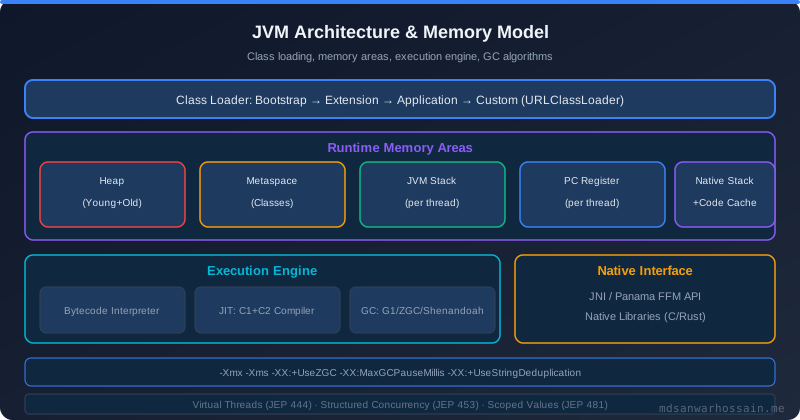
Table of Contents
- The Production Incident
- How the JIT Compiler Works: Tiered Compilation Levels 0–4
- Code Cache Exhaustion: The Silent Performance Cliff
- Deoptimization Traps: When C2 Bails Out
- JIT-Friendly Code Patterns
- JVM Flags for JIT Tuning
- Diagnosing JIT Issues with JFR and jcmd
- When NOT to Over-Optimize for JIT
- Key Takeaways
The Production Incident
A Spring Boot REST API service powering a user-profile microservice worked perfectly in staging — P99 latency sat at 45ms under load, CPU was comfortable, and no errors appeared in the dashboards. But every single time the service restarted in production — during rolling deploys, pod evictions, or scaling events — P99 latency spiked to 180ms for the first 60 seconds. The on-call team received PagerDuty alerts for SLA breaches on every restart. Engineers assumed it was a database connection pool warming up. It was not.
The actual root cause was JIT compilation warm-up. The hottest code paths — the Spring MVC dispatcher, Jackson serialization, and the custom UserService::findById method — were running in interpreted mode for the first 30–60 seconds after startup. Interpreted Java is roughly 10–50× slower than JIT-compiled native code for CPU-bound hot paths. The P99 latency of 4× higher than steady-state was a direct consequence of method bytecode being executed by the interpreter, not C2-compiled machine code.
Two weeks into investigating the repeated incidents, the team discovered a second, more severe problem in the logs:
[2026-03-22T08:15:33.241+0000] Java HotSpot(TM) 64-Bit Server VM warning: CodeCache is full. Compiler has been disabled.
When the code cache fills, the JVM disables the JIT compiler entirely. Every method that would have been compiled from that point forward runs in interpreter mode indefinitely. In this service's case, disabling JIT caused an 8× latency increase — not just the initial warm-up delay, but a permanent regression lasting until the next restart. The code cache was set to its default of 240MB (JDK 8), which was insufficient for a large Spring Boot application with 400+ @Service beans, Hibernate entity mappings, and Jackson reflective serialization paths.
The fix was a combination of three changes: enabling JFR to monitor compilation events for the first time, increasing ReservedCodeCacheSize from 240MB to 512MB, and explicitly enabling -XX:+TieredCompilation (which was accidentally disabled by a legacy JVM flag in the startup script). After the fix, the JFR before/after metrics told the story clearly:
# Before fix — JFR compilation events at T+60s after restart
CompilationActivity:
  compiledMethods: 1,840
  failedCompilations: 312   # 312 methods failed to compile due to full code cache
  codeCache.usedSize: 240MB (100% full)
  p99LatencyMs: 182ms

# After fix — JFR compilation events at T+60s after restart
CompilationActivity:
  compiledMethods: 2,947
  failedCompilations: 0
  codeCache.usedSize: 187MB (36% of 512MB)
  p99LatencyMs: 47ms
The warm-up period shrank from 60 seconds to under 15 seconds. The failed-compilation count dropped to zero. P99 latency at steady state improved slightly because previously suppressed C2 optimizations were now active. This incident is the best illustration of why understanding the JIT pipeline — not just GC tuning — is essential for production Java performance engineering.
How the JIT Compiler Works: Tiered Compilation Levels 0–4
HotSpot JVM uses a tiered compilation model with five distinct execution levels. A method does not jump directly from interpreter to fully optimized native code — it moves through intermediate compilation tiers as HotSpot's profiling data accumulates evidence that the method is "hot" enough to warrant increasingly expensive optimization work.
The five tiers are:
| Level | Name | Compiler | Profiling | Speed vs Interpreter |
|---|---|---|---|---|
| 0 | Interpreter | — | Full (invocation & back-edge counters) | 1× |
| 1 | C1 — Simple | C1 | None | ~5× |
| 2 | C1 — Limited Profiling | C1 | Invocation & back-edge counters only | ~5× |
| 3 | C1 — Full Profiling | C1 | Full: type profiles, branch profiles | ~5× |
| 4 | C2 — Optimized | C2 (Opto) | None (uses Level 3 profile data) | 10–50× |
HotSpot tracks two counters per method: an invocation counter (incremented each time the method is called) and a back-edge counter (incremented each time a loop iteration completes inside the method). When these counters cross thresholds, HotSpot queues the method for compilation at the next tier. A method is typically compiled at Level 3 after approximately 2,000 invocations, and promoted to Level 4 (C2) after approximately 15,000 invocations. At Level 4, C2 applies its full optimization arsenal: aggressive method inlining, escape analysis, scalar replacement, loop unrolling, and speculative type optimizations backed by the profiling data gathered during Level 3 execution.
You can observe the JIT compilation activity in real time with the -XX:+PrintCompilation flag:
-XX:+PrintCompilation
Sample output during application warm-up:
   523  147    3       java.lang.String::hashCode (55 bytes)
   891  312    4       com.example.UserService::findById (87 bytes)
   892  308    3       com.example.UserService::findById (87 bytes)   made not entrant
The columns are: timestamp (ms since JVM start), compilation ID, tier level, method name and bytecode size, and optional annotation. The third line shows the Level 3 version of UserService::findById being marked "made not entrant" — it is no longer eligible for new invocations because the superior Level 4 C2 version (line 2, compiled one millisecond earlier) has taken over. Understanding this output helps you confirm that your hottest methods are reaching Level 4 during warm-up.
Code Cache Exhaustion: The Silent Performance Cliff
The code cache is a fixed-size, off-heap memory region where HotSpot stores all compiled native code. Every method that the JIT compiler promotes to Level 1–4 occupies space in the code cache. When the code cache fills, HotSpot logs the warning from the production incident above and disables the JIT compiler — new methods can no longer be compiled, and existing compiled code that gets evicted (via UseCodeCacheFlushing) cannot be replaced. The application degrades to interpreter-mode execution for all subsequently loaded methods.
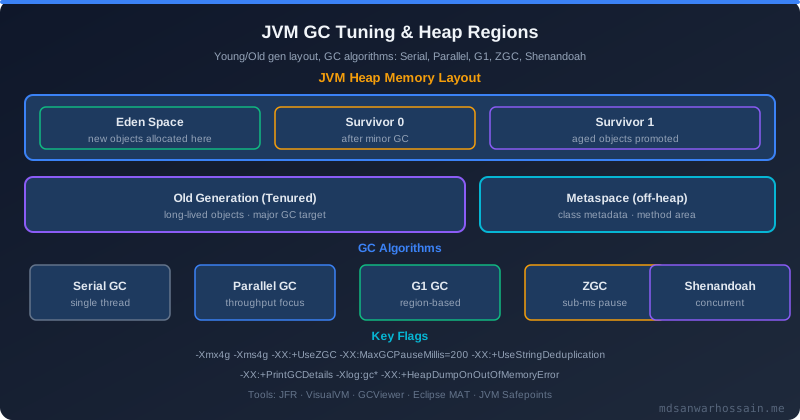
Code cache defaults vary by JVM version: 240MB in JDK 8, 256MB in JDK 11+. In JDK 9+, the code cache is divided into three segments: non-method (JVM internal stubs, ~5MB), profiled (Level 2/3 C1 compiled code), and non-profiled (Level 1 and Level 4 C2 compiled code). This segmentation prevents one category from monopolizing the entire cache, but the total size cap still applies.
Large Spring Boot applications are particularly susceptible. A service with 400+ @Service beans has thousands of proxy methods generated by Spring AOP (each occupying code cache space), plus Hibernate generates accessor methods for every entity field, plus Jackson generates dynamic serializers — in aggregate, these can easily exhaust 240MB of code cache in production under sustained load. The same risk applies to services using heavy reflection or dynamic class loading patterns.
To inspect code cache usage live on a running JVM:
jcmd <pid> VM.native_memory summary | grep -A5 "Code"
The recommended fix flags for production Spring Boot services:
-XX:ReservedCodeCacheSize=512m
-XX:InitialCodeCacheSize=64m
-XX:+UseCodeCacheFlushing
ReservedCodeCacheSize=512m doubles the ceiling for large applications. InitialCodeCacheSize=64m pre-allocates 64MB at startup to avoid repeated OS memory mapping calls during warm-up. UseCodeCacheFlushing enables the JVM to evict old compiled code when the cache approaches its limit rather than simply disabling the compiler — a much more graceful degradation strategy. Note that code cache memory is allocated from native memory (not JVM heap), so increasing it does not affect -Xmx settings.
Deoptimization Traps: When C2 Bails Out
C2 achieves its dramatic speed improvements by making optimistic assumptions about the running program. The most impactful is speculative monomorphic inlining: if profiling data shows that a virtual method call has always dispatched to a single concrete implementation (monomorphic call site), C2 inlines that implementation directly into the call site — eliminating the virtual dispatch overhead entirely and enabling further optimizations like dead code elimination across the inlined body.
The trap is what happens when the assumption is violated. If a second implementation of the interface is loaded into the JVM after C2 has compiled the method, the compiled native code is invalidated. HotSpot deoptimizes the method — discards the compiled code and falls back to the interpreter. Any thread currently executing inside that compiled method is rolled back to the last safe deoptimization point. From the application's perspective, this manifests as a sudden 5–10× latency spike when a new subclass of a heavily-used interface is class-loaded for the first time (often triggered by a first request that exercises a code path using the new type).
To detect deoptimization events in production:
# JDK 8
-XX:+PrintDeoptimizationEvents

# JDK 11+
-Xlog:deoptimization
Sample deoptimization log output:
[2026-03-22T09:44:12.033+0000][deoptimization] Uncommon trap: reason=class_check action=maybe_recompile pc=0x00007f3a2c04d8a0 method=com.example.PaymentProcessor::process(Lcom/example/Payment;)V @ 42
The reason=class_check field confirms this is a type-check deoptimization — C2's monomorphic inlining assumption was violated. The action=maybe_recompile means HotSpot will re-profile the method and attempt to recompile it with updated type information, this time producing a bimorphic or polymorphic dispatch. The method's performance after recompilation is lower than the monomorphic version but better than the interpreter.
The practical fixes are: use final classes for leaf implementations that should never be subclassed, use sealed interfaces (Java 17+) to bound the set of permitted implementations so C2 can reason about the complete type hierarchy, and avoid loading large numbers of polymorphic types (e.g., hundreds of @Component-annotated subtypes of a common interface) into the JVM simultaneously unless your profiler confirms the call sites are not megamorphic.
JIT-Friendly Code Patterns
Method size and inlining. C2 will automatically inline methods with fewer than 35 bytecodes (MaxInlineSize) at any call frequency. Methods called very frequently (above FreqInlineSize=325 bytecodes) are also inlined. Large methods that exceed both thresholds will not be inlined — each call incurs virtual dispatch overhead, and the calling method cannot benefit from cross-boundary optimizations like constant folding across the inlined body. Prefer splitting large service methods into smaller sub-methods; JIT inlining eliminates the call overhead at runtime while keeping code readable.
// Bad: 180-bytecode method — too large to inline automatically
public OrderResult processOrder(Order order) {
    validateOrder(order);            // could be inlined separately
    applyDiscounts(order);           // could be inlined separately
    persistOrder(order);             // could be inlined separately
    notifyFulfillment(order);        // could be inlined separately
    // ... 100+ more bytecodes
}

// Better: each delegated method is small enough to inline independently
// C2 can inline validateOrder() into processOrder() and eliminate virtual dispatch
public void validateOrder(Order o) { /* <35 bytecodes */ }
Escape analysis and scalar replacement. If C2's escape analysis can prove that an object allocated in a method never escapes that method's scope (is not stored in a field, not passed to another thread, not returned), it can allocate the object on the stack rather than the heap — completely eliminating GC pressure for that allocation. It can go further with scalar replacement: decomposing the object into its primitive fields and holding them as local variables, avoiding even the stack allocation overhead.
// Escape analysis eliminates heap allocation for Point2D here
// C2 replaces new Point2D(x, y) with two local double variables
public double distanceTo(double x1, double y1, double x2, double y2) {
    Point2D delta = new Point2D(x2 - x1, y2 - y1);  // does not escape
    return Math.sqrt(delta.x * delta.x + delta.y * delta.y);
}
Escape analysis fails when the object is passed to a method that C2 cannot inline (too large, native method, reflective call). Keep methods that work with short-lived value objects small and co-located so C2 can see the full object lifetime within a single compilation unit.
Avoiding megamorphic call sites. A call site is monomorphic (1 type), bimorphic (2 types), or megamorphic (3+ types). C2 can inline monomorphic and bimorphic sites. Megamorphic sites result in a full vtable dispatch that C2 cannot optimize away. In practice, this means that if you have a hot loop iterating over a List<Handler> with many different Handler implementations, each call to handler.handle(event) in the loop is megamorphic and immune to inlining optimization.
// Megamorphic — C2 cannot inline, vtable dispatch on every call
List<EventHandler> handlers = registry.getAll(); // 10+ implementations
for (EventHandler h : handlers) { h.handle(event); }

// Prefer: route to a specific implementation early, keep hot loops monomorphic
SpecificHandler handler = registry.getForType(event.type());
handler.handle(event); // monomorphic — C2 inlines this
JVM Flags for JIT Tuning
The following flags provide fine-grained control over JIT compilation behavior. Most production services need only the code cache and logging flags; the threshold and inlining flags should only be adjusted after profiler evidence confirms a specific bottleneck.
# Tune compilation thresholds
-XX:CompileThreshold=1500        # invocations before C2 compilation (non-tiered)
-XX:Tier4CompileThreshold=15000  # C2 compile threshold in tiered mode
-XX:MaxInlineSize=35             # max bytecodes for automatic inlining
-XX:FreqInlineSize=325           # max bytecodes for frequent call inlining

# Code cache sizing
-XX:ReservedCodeCacheSize=512m   # increase code cache ceiling
-XX:InitialCodeCacheSize=64m     # pre-allocate at startup

# Compilation mode
-XX:+TieredCompilation           # enable tiered (default in Java 8+)
-XX:+UseCodeCacheFlushing        # evict stale code instead of disabling JIT

# Compiler threading
-XX:CICompilerCount=4            # number of JIT compiler threads

# Logging
-Xlog:jit+compilation=info       # log JIT compilation events (JDK 11+)
For services experiencing unusually long warm-up periods, lowering Tier4CompileThreshold from 15,000 to 5,000–10,000 forces C2 to kick in earlier at the cost of slightly more compilation overhead during warm-up. This is often worthwhile for services in containerized environments where instances restart frequently (rolling deploys, Kubernetes HPA scale-out events). Conversely, in long-running services that take hours before a restart, the default thresholds are appropriate — they give HotSpot sufficient data to make correct optimization decisions.
CICompilerCount=4 sets the number of background JIT compiler threads. On pods with limited CPU (1–2 vCPU), default JIT thread counts can contend with application threads during the compilation burst at startup. On multi-core pods (8+ vCPU), increasing this to 6–8 can shorten the warm-up window. Use jcmd <pid> Compiler.queue to check compilation queue depth — a persistently deep queue indicates insufficient compiler threads relative to the rate of new hot methods being discovered.
Diagnosing JIT Issues with JFR and jcmd
Java Flight Recorder (JFR) is the definitive tool for JIT analysis in production. It captures compilation events, code cache statistics, deoptimization events, and method timing with sub-microsecond precision and typically less than 1% overhead. Unlike -XX:+PrintCompilation, JFR data is structured and queryable in JDK Mission Control (JMC).
# Record 120 seconds of JFR including JIT events
jcmd <pid> JFR.start duration=120s filename=/tmp/jit-analysis.jfr settings=profile

# After the recording completes (or to stop it early):
jcmd <pid> JFR.stop

# Check code cache stats live
jcmd <pid> Compiler.codecache

# Print current compilation queue size
jcmd <pid> Compiler.queue
In JDK Mission Control, open the JFR recording and navigate to the Code tab. The Code Cache panel shows a timeline of code cache utilization — you can see exactly when the cache approached its limit and whether UseCodeCacheFlushing triggered evictions. The Compilations panel shows a histogram of compilation counts per method and the time spent in each compilation tier. Methods with unusually high recompilation counts (promoted to C2, deoptimized, re-profiled, recompiled repeatedly) indicate unstable type profiles — candidates for the megamorphic or polymorphic call site investigation described in Section 4.
High Compilation event counts combined with many Deoptimization events in the same method are the canonical signature of a megamorphic call site causing repeated speculative compilation and bailout. The JFR Deoptimizations event stream shows each deoptimization with its reason, the affected method, and the bytecode index where the trap fired — giving you the exact line of application code responsible.
For continuous JIT monitoring in production, add -Xlog:jit+compilation=info:file=/var/log/app/jit.log:time,uptime:filecount=3,filesize=10m to your JVM startup flags. This produces a rolling log of all compilation events without the overhead of a full JFR recording, and is particularly useful for capturing the warm-up profile during the first minutes after a restart.
When NOT to Over-Optimize for JIT
JIT optimization is largely automatic and self-managing. The scenarios above represent specific failure modes — code cache exhaustion, deoptimization storms, megamorphic hot loops — that require intervention. They are not the norm. For most production Java services, the JVM's tiered compilation defaults deliver near-optimal performance without any manual tuning.
Do not pre-split methods to stay under the inlining threshold unless async-profiler flamegraphs show that a specific call site is the bottleneck. Artificially splitting business logic into tiny fragments to trick the JIT makes code harder to read and maintain, and modern C2 with its FreqInlineSize=325 threshold handles moderate-sized frequently-called methods well. Similarly, do not avoid interfaces just to prevent megamorphic call sites — use interfaces freely for correct abstractions. Only restructure when a profiler proves a specific call site is a bottleneck and it is actually megamorphic.
JIT warm-up is primarily a concern for services that restart frequently: serverless functions (AWS Lambda, Azure Functions running on JVM runtimes), Kubernetes pods in environments with aggressive eviction policies, or services with very short average uptime due to crash-looping. For long-running services — database-heavy APIs, background workers, streaming processors — warm-up completes within the first 1–5 minutes and is not meaningfully impacting the service's overall latency profile over its lifetime.
GraalVM Native Image (AOT compilation) is the architectural alternative to JIT when cold-start latency is the primary concern. Native Image performs all compilation at build time and produces a self-contained native binary with instant startup (milliseconds vs. JVM's seconds). The trade-off is the absence of adaptive optimization — Native Image produces fixed machine code that cannot re-optimize based on runtime behavior, so peak throughput is typically 20–40% lower than a warmed-up HotSpot JVM. AOT compilation is the right choice when fast cold start matters more than peak throughput; HotSpot JIT is the right choice when long-running peak performance is the priority.
Key Takeaways
- Tiered compilation is a 5-level pipeline: Methods move from interpreter (Level 0) through C1 profiling tiers (1–3) to C2 fully optimized native code (Level 4) as invocation counts cross thresholds (~2,000 for Level 3, ~15,000 for Level 4). Warm-up latency is the period before hot paths reach Level 4.
- Code cache exhaustion silently disables JIT: The warning
CodeCache is full. Compiler has been disabled.is a critical production event. Always set-XX:ReservedCodeCacheSize=512mand-XX:+UseCodeCacheFlushingfor large Spring Boot services with many classes, proxies, or Hibernate entity types. - Deoptimization causes sudden latency spikes: When C2's speculative type assumptions are violated by a newly loaded class, the compiled method is discarded and falls back to the interpreter. Use
-Xlog:deoptimization(JDK 11+) to detect deoptimization events. Final classes and sealed interfaces reduce deoptimization risk. - Small methods and escape analysis are your best JIT allies: Methods under 35 bytecodes inline automatically. Short-lived local objects that don't escape can be stack-allocated (or scalar-replaced), eliminating GC pressure entirely. Write small, focused methods and let C2 inline them.
- Use JFR and jcmd for production JIT diagnostics:
jcmd <pid> Compiler.codecacheand a 120-second JFR recording withsettings=profilegive you code cache utilization, compilation counts, and deoptimization events without intrusive instrumentation. Analyze JFR recordings in JDK Mission Control. - JIT warm-up matters for restart-heavy deployments: In Kubernetes environments with frequent rolling deploys, lowering
-XX:Tier4CompileThresholdto 5,000–10,000 shortens the warm-up window at acceptable compilation overhead. For long-running services, the default thresholds are optimal.
Leave a Comment
Related Posts

Software Engineer · Java · Spring Boot · Microservices