Kafka Schema Registry in Production: Handling Schema Evolution Without Breaking Consumers
In distributed event-driven systems, schema evolution is the silent contract between producers and consumers. Break it carelessly and you will have consumers crashing in production at 2am, with events piling up in Kafka that nobody can read. Schema Registry is not optional tooling — it is the enforcement mechanism that makes event streaming safe to evolve.
Table of Contents
- Why Schema Evolution Breaks Distributed Systems
- Schema Registry Architecture
- Avro vs Protobuf vs JSON Schema in Kafka
- Compatibility Levels: Choosing the Right Strategy
- The Production Incident: Non-Nullable Field Addition
- Zero-Downtime Schema Migration: The Correct Process
- Spring Boot + spring-kafka + Confluent Schema Registry
- Subject Naming Strategies
- Dead Letter Queues for Schema Deserialization Failures
- When NOT to Use Schema Registry
- Conclusion
Why Schema Evolution Breaks Distributed Systems
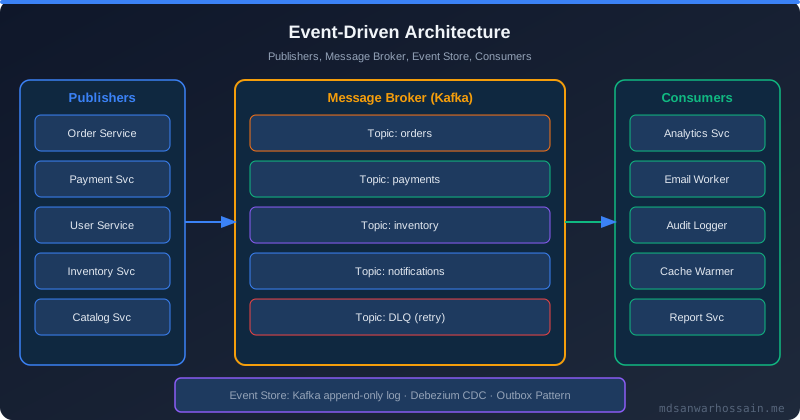
Kafka topics are durable logs. Unlike REST APIs where you version the endpoint and deprecate the old one, Kafka messages stay on the topic for days, weeks, or indefinitely based on retention policy. A consumer that was offline during a deployment might restart and encounter messages written under three different schema versions. Without a registry, the consumer has no idea which version produced any given message.
The classic incident: a team adds a new field discountPercentage of type float (not nullable) to an OrderPlaced Avro schema. They deploy the producer. Old consumers that were compiled against the schema without this field start crashing on deserialization with:
org.apache.avro.AvroTypeException: Found OrderPlaced, expecting OrderPlaced,
missing required field discountPercentage

  at org.apache.avro.io.ResolvingDecoder.action(ResolvingDecoder.java:292)
  at org.apache.avro.io.ResolvingDecoder.readInt(ResolvingDecoder.java:197)
  at org.apache.avro.generic.GenericDatumReader.readWithoutConversion(...)

Consumer group order-fulfillment-service: partition lag: 847,203 (and climbing)
Consumer lag climbs to a million events. The fix requires rolling back the producer, deploying consumers with the new schema, then re-deploying the producer. The root cause: zero schema compatibility enforcement at publish time.
Schema Registry Architecture
Confluent Schema Registry is a REST service that acts as a versioned store for Avro, Protobuf, and JSON Schema schemas. It integrates directly into the Kafka serializer/deserializer (SerDes) layer:
Producer Side:
  1. Serialize Java object → Avro bytes
  2. Call Schema Registry: "register this schema under subject 'orders-value'"
  3. Registry validates compatibility, assigns schema ID (e.g., 42)
  4. Message format: [Magic Byte (0x0)] [Schema ID (4 bytes)] [Avro payload]
  5. Publish to Kafka topic

Consumer Side:
  1. Read message from Kafka
  2. Extract schema ID from first 5 bytes
  3. Call Schema Registry: "give me schema 42" (cached after first fetch)
  4. Deserialize Avro bytes using schema 42 → Java object
The schema ID embedded in every message is the key. Consumers always know exactly which schema produced any message, regardless of when it was published.
Avro vs Protobuf vs JSON Schema in Kafka
The choice of serialization format has significant implications for schema evolution:
- Avro: compact binary, excellent schema evolution support, requires schema to deserialize (no self-describing). Best for high-throughput internal topics. The default and most widely used in Confluent ecosystems.
- Protobuf: also compact binary, field numbers rather than field names (more evolution-friendly), self-describing with
Anytype support, better for polyglot environments (Java, Go, Python all consuming same topic). Better default for new multi-language systems. - JSON Schema: human-readable, larger payload size (2–5x Avro), slower serialization, but excellent for debugging and external-facing topics where consumers cannot use binary formats.
Compatibility Levels: Choosing the Right Strategy
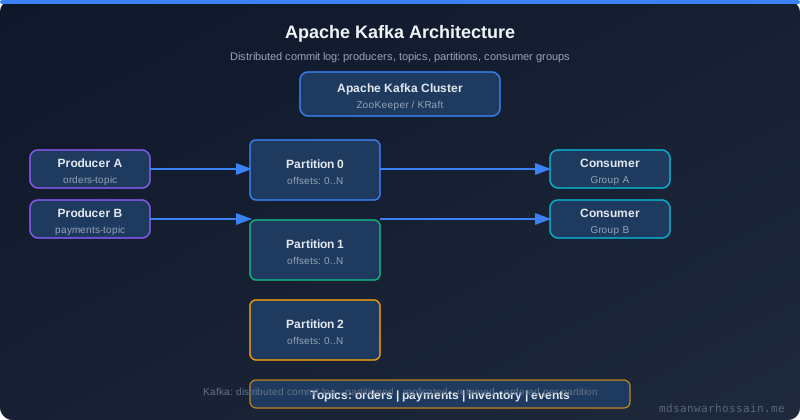
Schema Registry enforces compatibility when a new schema version is registered. The compatibility level determines what changes are allowed:
- BACKWARD (default): new schema can read data written with the previous schema. Old consumers can read new messages if you add fields with defaults. Use when you deploy consumers before producers.
- FORWARD: old schema can read data written with the new schema. New consumers can read old messages. Use when you deploy producers before consumers.
- FULL: both BACKWARD and FORWARD simultaneously. Most restrictive, highest safety. Fields can only be added with defaults or removed with defaults. Use for critical business events.
- BACKWARD_TRANSITIVE / FORWARD_TRANSITIVE / FULL_TRANSITIVE: extends compatibility checking to all previous schema versions, not just the latest. Expensive but eliminates all consumer lag risk from consumers on old versions.
- NONE: no compatibility checking. Never use in production topics.
# Set compatibility level per subject via REST API
curl -X PUT http://schema-registry:8081/config/orders-value \
  -H "Content-Type: application/vnd.schemaregistry.v1+json" \
  -d '{"compatibility": "FULL_TRANSITIVE"}'

# Verify current compatibility
curl http://schema-registry:8081/config/orders-value
The Production Incident: Non-Nullable Field Addition
The ordering team's schema before the incident:
{
  "type": "record",
  "name": "OrderPlaced",
  "namespace": "com.example.orders",
  "fields": [
    {"name": "orderId",   "type": "string"},
    {"name": "userId",    "type": "string"},
    {"name": "totalAmount", "type": "double"}
  ]
}
The attempted change (breaking under BACKWARD compatibility):
{
  "type": "record",
  "name": "OrderPlaced",
  "namespace": "com.example.orders",
  "fields": [
    {"name": "orderId",   "type": "string"},
    {"name": "userId",    "type": "string"},
    {"name": "totalAmount", "type": "double"},
    {"name": "discountPercentage", "type": "float"}  // NO DEFAULT = BREAKING under BACKWARD compatibility
  ]
}
The Schema Registry would have rejected this if BACKWARD compatibility was set. The safe version:
{"name": "discountPercentage", "type": ["null", "float"], "default": null}Zero-Downtime Schema Migration: The Correct Process
Never add a required field in a single step. The safe migration playbook for adding a required business field:
- Step 1: Add field as optional with default null. Register new schema version. Deploy — no consumer changes needed.
- Step 2: Deploy all consumers to understand and handle the new optional field. Verify all consumer groups are processing new messages.
- Step 3: Deploy producers to populate the new field. Both old and new consumers can read messages.
- Step 4: Once all consumers are confirmed on the new version and no old consumers remain in any consumer group, make the field required in documentation/code — but in Avro, keep the union type as the registry is immutable per ID.
Cardinal rule: Never add a non-nullable field without a default. Never remove a field that is still used by any consumer. Always deploy consumers before producers when adding fields. Always deploy producers before consumers when removing fields.
Spring Boot + spring-kafka + Confluent Schema Registry
# pom.xml dependencies
<dependency>
    <groupId>io.confluent</groupId>
    <artifactId>kafka-avro-serializer</artifactId>
    <version>7.6.0</version>
</dependency>
<dependency>
    <groupId>io.confluent</groupId>
    <artifactId>kafka-schema-registry-client</artifactId>
    <version>7.6.0</version>
</dependency>
# application.yaml
spring:
kafka:
bootstrap-servers: kafka:9092
producer:
key-serializer: org.apache.kafka.common.serialization.StringSerializer
value-serializer: io.confluent.kafka.serializers.KafkaAvroSerializer
properties:
schema.registry.url: http://schema-registry:8081
auto.register.schemas: false # CRITICAL: never auto-register in prod
use.latest.version: false
avro.use.logical.type.converters: true
consumer:
key-deserializer: org.apache.kafka.common.serialization.StringDeserializer
value-deserializer: io.confluent.kafka.serializers.KafkaAvroDeserializer
properties:
schema.registry.url: http://schema-registry:8081
specific.avro.reader: true # Use generated specific classes
schema.registry.ssl.truststore.location: /etc/ssl/kafka/truststore.jks@Service
public class OrderEventProducer {
private final KafkaTemplate<String, OrderPlaced> kafkaTemplate;
public void publishOrderPlaced(Order order) {
OrderPlaced event = OrderPlaced.newBuilder()
.setOrderId(order.getId().toString())
.setUserId(order.getUserId().toString())
.setTotalAmount(order.getTotalAmount().doubleValue())
.setDiscountPercentage(order.getDiscountPercentage()) // nullable float
.build();
kafkaTemplate.send("orders", order.getId().toString(), event)
.whenComplete((result, ex) -> {
if (ex != null) {
log.error("Failed to publish order event for orderId={}", order.getId(), ex);
// Dead letter queue or retry logic here
}
});
}
}Subject Naming Strategies
Schema Registry uses "subjects" to group schema versions. The naming strategy determines how subjects map to topics:
- TopicNameStrategy (default): subject =
{topic}-valueor{topic}-key. Simple but limits each topic to one schema type. Best for most use cases. - RecordNameStrategy: subject = fully qualified record name (e.g.,
com.example.orders.OrderPlaced). Allows multiple event types on the same topic. Required for event bus patterns. - TopicRecordNameStrategy: subject =
{topic}-{recordName}. Hybrid approach, good for topic-scoped multi-event patterns.
# RecordNameStrategy for multi-event topics
spring.kafka.producer.properties.value.subject.name.strategy=\
  io.confluent.kafka.serializers.subject.RecordNameStrategy
Dead Letter Queues for Schema Deserialization Failures
Even with Schema Registry, consumers can encounter deserialization failures — corrupted messages, manually published raw bytes, or Registry unavailability. Always configure a DLQ:
@Bean
public DefaultErrorHandler kafkaErrorHandler(KafkaTemplate<?, ?> template) {
    DeadLetterPublishingRecoverer recoverer = new DeadLetterPublishingRecoverer(
        template,
        (record, ex) -> {
            // Route to {topic}.DLT (dead letter topic)
            if (ex.getCause() instanceof SerializationException) {
                return new TopicPartition(record.topic() + ".DLT", record.partition());
            }
            return new TopicPartition("generic.DLT", 0);
        }
    );
    // Retry 3 times before sending to DLT
    return new DefaultErrorHandler(recoverer, new FixedBackOff(1000L, 3));
}
When NOT to Use Schema Registry
- Small teams in rapid prototyping: Schema Registry adds operational overhead (another service to run, monitor, and back up). JSON without schema is acceptable for pre-MVP stages.
- Single producer, single consumer, same team: if both sides of the topic are owned and deployed by the same team simultaneously, the operational risk of schema mismatch is minimal.
- Low-volume event streams where human-readable JSON debugging value outweighs the binary format efficiency. Consider JSON Schema with the Registry in this case rather than skipping it entirely.
Key Takeaways
- Always set
auto.register.schemas: falsein production — schema registration should be a deliberate CI/CD step, not an automatic publisher side-effect FULL_TRANSITIVEcompatibility is the safest mode for business-critical topics; it catches breaking changes against all historical versions- The zero-downtime migration sequence is always: add optional → deploy consumers → deploy producers → document as required. Never collapse these steps.
- DLQs for deserialization failures are non-negotiable — Schema Registry availability issues should not stop your consumer
- Embed schema compatibility checking into your CI pipeline using the Confluent CLI:
schema-registry-cli schema-check - Protobuf is the better default for new multi-language systems; Avro is the better default for Java-centric high-throughput pipelines
Conclusion
Schema evolution is the most underestimated risk in Kafka-based architectures. Teams that treat it as an afterthought consistently create outages at the worst possible time — during deployments, when consumers are at different versions across rolling restart windows. Schema Registry, combined with strict compatibility modes and the correct deployment ordering discipline, transforms schema evolution from a source of 2am incidents into a routine, safe, zero-downtime operation. The tooling is mature; the discipline requires only engineering commitment.
Frequently Asked Questions
Why Schema Evolution Breaks Distributed Systems?
Kafka topics are durable logs. Unlike REST APIs where you version the endpoint and deprecate the old one, Kafka messages stay on the topic for days, weeks, or indefinitely based on retention policy. A consumer that was offline during a deployment might restart and encounter messages written under three different schema versions. Without a registry, the consumer has no idea which version produced any given message. The classic incident: a team adds a new field discountPercentage of type float (not nullable) to an OrderPlaced Avro schema. They deploy the producer. Old consumers that were compiled against the schema without this field start crashing on deserialization with: org.apache.avro.AvroTypeException: Found OrderPlaced, expecting OrderPlaced, missing required field discountPercentage at org.apache.avro.io.ResolvingDecoder.action(ResolvingDecoder.java:292) at org.apache.avro.io.ResolvingDecoder.readInt(ResolvingDecoder.java:197) at org.apache.avro.generic.GenericDatumReader.readWithoutConversion(...) Consumer group order-fulfillment-service: partition lag: 847,203 (and climbing) Consumer.
What is Schema Registry Architecture and how does it work?
Confluent Schema Registry is a REST service that acts as a versioned store for Avro, Protobuf, and JSON Schema schemas. It integrates directly into the Kafka serializer/deserializer (SerDes) layer: Producer Side: 1. Serialize Java object → Avro bytes 2. Call Schema Registry: "register this schema under subject 'orders-value'" 3. Registry validates compatibility, assigns schema ID (e.g., 42) 4. Message format: [Magic Byte (0x0)] [Schema ID (4 bytes)] [Avro payload] 5. Publish to Kafka topic Consumer Side: 1. Read message from Kafka 2. Extract schema ID from first 5 bytes 3. Call Schema Registry: "give me schema 42" (cached after first fetch) 4. Deserialize Avro bytes using schema 42 → Java object The schema ID embedded in every message is the key.
What is the difference between Avro vs Protobuf vs JSON Schema in Kafka?
The choice of serialization format has significant implications for schema evolution: Avro : compact binary, excellent schema evolution support, requires schema to deserialize (no self-describing). Best for high-throughput internal topics. The default and most widely used in Confluent ecosystems. Protobuf : also compact binary, field numbers rather than field names (more evolution-friendly), self-describing with Any type support, better for polyglot environments (Java, Go, Python all consuming same topic). Better default for new multi-language systems. JSON Schema : human-readable, larger payload size (2–5x Avro), slower serialization, but excellent for debugging and external-facing topics where consumers cannot use binary formats.
What is Compatibility Levels and how does it work?
Schema Registry enforces compatibility when a new schema version is registered. The compatibility level determines what changes are allowed: BACKWARD (default): new schema can read data written with the previous schema. Old consumers can read new messages if you add fields with defaults. Use when you deploy consumers before producers. FORWARD : old schema can read data written with the new schema. New consumers can read old messages. Use when you deploy producers before consumers. FULL : both BACKWARD and FORWARD simultaneously. Most restrictive, highest safety. Fields can only be added with defaults or removed with defaults. Use for critical business events. BACKWARD_TRANSITIVE / FORWARD_TRANSITIVE / FULL_TRANSITIVE : extends compatibility checking to all previous schema versions, not just the latest.
What are the production considerations for The Production Incident?
The ordering team's schema before the incident: { "type": "record", "name": "OrderPlaced", "namespace": "com.example.orders", "fields": [ {"name": "orderId", "type": "string"}, {"name": "userId", "type": "string"}, {"name": "totalAmount", "type": "double"} ] } The attempted change (breaking under BACKWARD compatibility): { "type": "record", "name": "OrderPlaced", "namespace": "com.example.orders", "fields": [ {"name": "orderId", "type": "string"}, {"name": "userId", "type": "string"}, {"name": "totalAmount", "type": "double"}, {"name": "discountPercentage", "type": "float"} // NO DEFAULT = BREAKING under BACKWARD compatibility ] } The Schema Registry would have rejected this if BACKWARD compatibility was set. The safe version:
Leave a Comment
Related Posts

Software Engineer · Java · Spring Boot · Microservices