Externalized Configuration in Microservices: Spring Cloud Config, HashiCorp Vault & Dynamic Properties
Configuration management is one of the most underestimated challenges in microservices architectures. With dozens or hundreds of services each requiring environment-specific settings, database credentials, feature flags, and third-party API keys, a disciplined externalized configuration strategy is not optional — it is a production prerequisite. This guide covers the full spectrum: from the twelve-factor principle through Spring Cloud Config Server, HashiCorp Vault for dynamic secrets, Kubernetes-native ConfigMaps, and real-time config refresh without restarts. Every pattern comes with the hard-won production lessons that distinguish a working system from one that pages you at 3 AM.
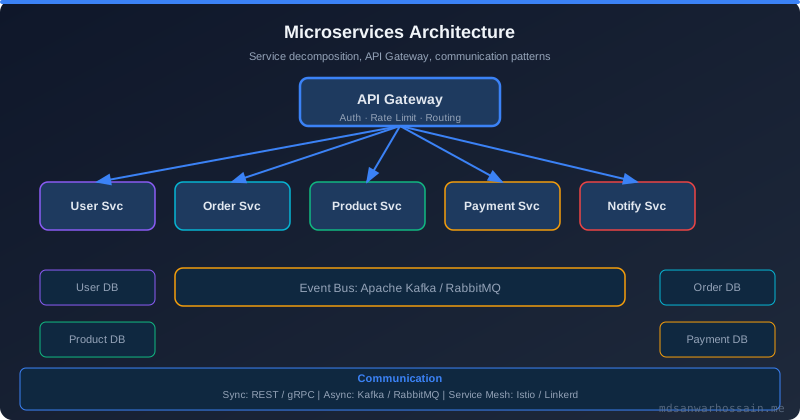
Table of Contents
- The Config Anti-Pattern: Hardcoded Values and Config Sprawl
- Twelve-Factor App Config Principle
- Spring Cloud Config Server: Centralized Config Management
- HashiCorp Vault: Secrets Management Done Right
- Kubernetes ConfigMaps and Secrets
- Dynamic Config Refresh with @RefreshScope
- Config Versioning and Audit Trails
- Production Failure Patterns
- Key Takeaways
- Conclusion
1. The Config Anti-Pattern: Hardcoded Values and Config Sprawl
Every microservices journey begins with good intentions and ends — far too often — with config chaos. The pattern is always the same: a developer under deadline pressure embeds a database URL directly into an @Value annotation "just for now." A few sprints later, that shortcut has been copy-pasted across fifteen services, each with slightly different hardcoded defaults pointing to different hosts. Congratulations, you have config sprawl.
The most dangerous form of hardcoded config is the one that looks configurable but has a toxic default. Consider this pattern that appears in real production codebases:
// ANTI-PATTERN: toxic default pointing to prod DB
@Value("${db.url:jdbc:mysql://prod-db-01:3306/orders}")
private String databaseUrl;

@Value("${db.password:s3cr3t-pr0d-passw0rd}")
private String databasePassword;

@Value("${payment.api.key:pk_live_abcdefgh12345678}")
private String paymentApiKey;

@Value("${feature.new-checkout:true}")
private boolean newCheckoutEnabled;
This code is a production incident waiting to happen. If a developer spins up the service locally without setting environment variables, the application silently connects to the production database with live credentials. If the code is ever published to a public repository — a common mishap when spinning up a demo or open-sourcing a related project — those credentials are now permanently exposed in Git history even after deletion.
Config sprawl compounds this problem in a 50-service architecture. Database URLs live in Helm values files. API keys are pasted into Slack channels and forgotten. Feature flags are documented in Confluence wikis that go stale. Service X in dev points to the staging message broker because someone never updated the environment variable after a migration six months ago — and nobody noticed because the dev environment "works fine" with either broker. This is environment drift, and it is the root cause of the classic "it works in staging but breaks in prod" failure mode.
The operational consequences are severe. Credential rotation becomes a multi-day coordinated deployment across all services, increasing the blast radius of every security incident. Auditors cannot answer "which version of the database password was service Y using on March 15th?" because there is no audit trail. A single misconfigured environment variable in a production Helm chart can cause a cascade of failures that takes hours to diagnose because the misconfiguration is invisible at the application layer — everything starts fine, it just connects to the wrong thing.
@Value annotation with a colon-separated default.
2. Twelve-Factor App Config Principle
Factor III of the Twelve-Factor App methodology states: "Store config in the environment." The core principle is a strict separation between code (which does not change across environments) and configuration (which varies by deploy). The same Docker image that runs in development must be deployable to production with zero code changes — only configuration differs.
The twelve-factor definition of config is precise: everything that is likely to vary between environments — development, staging, production. This includes resource handles to databases, caches, and external services; credentials to external services such as payment gateways and OAuth providers; per-deploy values such as canonical hostnames and feature toggle states. Crucially, it does not include internal application config such as Spring Bean wiring, which does not vary by environment and legitimately lives in code.
The twelve-factor approach also provides a litmus test that is worth running against your codebase regularly: Could you open-source the application code right now, without compromising any credentials? If the answer is no, your config is not properly externalized. This test immediately reveals hardcoded production endpoints, embedded API keys, and environment-specific logic baked into the build.
The baseline implementation of twelve-factor config is environment variables. They are language-agnostic, OS-standard, and never accidentally committed to source control. However, raw environment variables have limits at scale: they cannot be versioned, they have no encryption, they cannot be shared across pods without duplication, and managing 200 environment variables per service across 50 services is operationally untenable. This is where dedicated configuration management systems enter.
3. Spring Cloud Config Server: Centralized Config Management
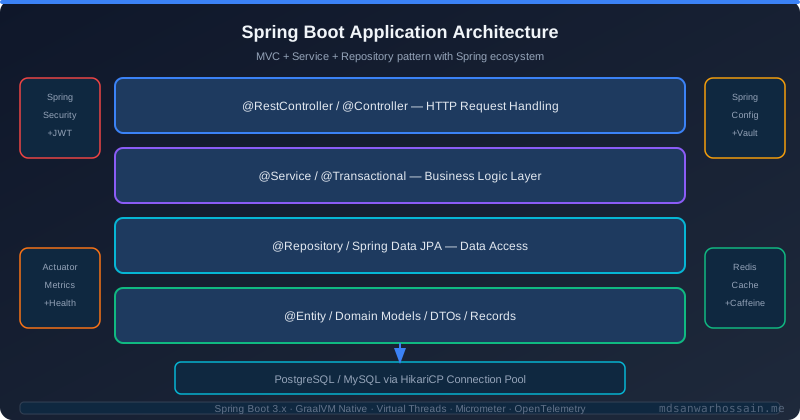
Spring Cloud Config Server provides centralized, version-controlled configuration for distributed systems. It serves configuration from a backend store — typically a Git repository — over an HTTP API. Every microservice fetches its configuration at startup and, with refresh support, on demand. The Git backend means every config change is a commit with an author, timestamp, and message, giving you a free audit trail.
Setting up the Config Server is a matter of adding the dependency and one annotation:
// Config Server application
@SpringBootApplication
@EnableConfigServer
public class ConfigServerApplication {
    public static void main(String[] args) {
        SpringApplication.run(ConfigServerApplication.class, args);
    }
}

// application.yml for Config Server
server:
  port: 8888

spring:
  cloud:
    config:
      server:
        git:
          uri: https://github.com/your-org/microservices-config
          default-label: main
          search-paths: '{application}'
          clone-on-start: true
          force-pull: true
  security:
    user:
      name: config-server
      password: ${CONFIG_SERVER_PASSWORD}

encrypt:
  key: ${CONFIG_ENCRYPT_KEY}  # symmetric key for property encryption
The Config Server resolves configuration files using the pattern {application}-{profile}.yml. For example, order-service-dev.yml contains development-specific overrides, while order-service-prod.yml contains production values. A base order-service.yml holds shared config across all profiles. The server merges these files intelligently, with profile-specific values taking precedence.
Client services consume the Config Server by declaring a config import in their Spring Boot configuration:
# Client service: application.yml
spring:
  application:
    name: order-service
  profiles:
    active: ${SPRING_PROFILES_ACTIVE:dev}
  config:
    import: "optional:configserver:http://config-server:8888"
  cloud:
    config:
      username: config-server
      password: ${CONFIG_SERVER_PASSWORD}
      fail-fast: true          # fail startup if config server unreachable
      retry:
        max-attempts: 6
        initial-interval: 1000
        multiplier: 1.5
For sensitive values that must live in the config Git repository (not ideal, but sometimes required for teams not yet running Vault), Spring Cloud Config Server provides symmetric and asymmetric encryption. Encrypt a value using the Config Server's /encrypt endpoint and store the result with the {cipher} prefix in the config file — for example, db.password: '{cipher}AQBq8X...'. The server decrypts the value before serving it to clients. Always prefer asymmetric (RSA) encryption for production: the Config Server holds only the public key used to verify, while decryption requires the private key held separately.
The recommended config repository structure for a fleet of services is hierarchical: a shared application.yml at the root for global defaults (logging levels, management endpoints), service-specific directories with base and profile overrides, and a dedicated secrets/ path that is encrypted at rest. Pull requests to the config repository go through the same peer review process as application code — a critical discipline that prevents unauthorized config changes in production.
4. HashiCorp Vault: Secrets Management Done Right
HashiCorp Vault is the gold standard for secrets management in production microservices. Its fundamental advantage over any static secrets approach is dynamic secrets: rather than storing a fixed database password that all services share, Vault generates unique short-lived credentials for each service instance on demand. The database never stores a long-lived shared password — only Vault has the root credential, and it creates time-limited role credentials that expire automatically.
# Enable the database secrets engine and configure MySQL
vault secrets enable database

vault write database/config/orders-db \
    plugin_name=mysql-database-plugin \
    connection_url="{{username}}:{{password}}@tcp(mysql-prod:3306)/" \
    allowed_roles="order-service-role" \
    username="vault-root" \
    password="${VAULT_DB_ROOT_PASSWORD}"

# Create a role: Vault will generate credentials valid for 1 hour
vault write database/roles/order-service-role \
    db_name=orders-db \
    creation_statements="CREATE USER '{{name}}'@'%' IDENTIFIED BY '{{password}}';
        GRANT SELECT, INSERT, UPDATE ON orders.* TO '{{name}}'@'%';" \
    default_ttl="1h" \
    max_ttl="24h"

# A service fetches credentials: each call returns a unique username/password
vault read database/creds/order-service-role
# Key                Value
# lease_duration     1h
# username           v-order-svc-3Kx9aB
# password           A1b2C3d4E5f6G7h8
Spring Boot integrates with Vault via Spring Vault. Services authenticate using AppRole — a machine-friendly authentication method where each service has a role_id (baked into the image or ConfigMap) and a secret_id (injected at runtime via the Vault agent or a CI/CD pipeline). The combination proves the service's identity to Vault without embedding long-lived tokens.
# Spring Boot application.yml with Vault integration
spring:
  cloud:
    vault:
      uri: https://vault.internal:8200
      authentication: APPROLE
      app-role:
        role-id: ${VAULT_ROLE_ID}
        secret-id: ${VAULT_SECRET_ID}
        app-role-path: approle
      kv:
        enabled: true
        backend: secret
        default-context: order-service
      database:
        enabled: true
        role: order-service-role
        backend: database
      config:
        lifecycle:
          enabled: true      # auto-renew leases before expiry
          min-renewal: 10s
          expiry-threshold: 1m
With Spring Vault's lifecycle management enabled, the framework automatically renews leases for dynamic credentials before they expire, and gracefully handles Vault seal/unseal events. When a lease cannot be renewed (e.g., Vault is temporarily unreachable), the service logs a warning and retries — database connections remain valid until the credential TTL expires, giving a one-hour grace window to restore Vault connectivity.
The contrast between static and dynamic secrets matters enormously in a security incident. With static secrets: if credentials are compromised, you must rotate them across all services simultaneously — a coordinated production deployment under pressure. With dynamic Vault secrets: compromised credentials expire within the TTL (one hour), you revoke the specific lease, and the affected service instance fetches new credentials automatically on the next renewal cycle. The blast radius is contained to one lease, not the entire fleet.
5. Kubernetes ConfigMaps and Secrets
Kubernetes provides two native primitives for configuration: ConfigMaps for non-sensitive data and Secrets for sensitive data. Both can be consumed by pods as environment variables or as volume-mounted files. The volume-mounted approach is strongly preferred for dynamic config because Kubernetes can update a mounted ConfigMap in a running pod without restart — a feature that environment variable injection does not support.
# ConfigMap for order-service non-sensitive config
apiVersion: v1
kind: ConfigMap
metadata:
  name: order-service-config
  namespace: production
data:
  application.yml: |
    server:
      port: 8080
    spring:
      datasource:
        url: jdbc:mysql://mysql-service:3306/orders
        hikari:
          maximum-pool-size: 20
          connection-timeout: 30000
    features:
      new-checkout: true
      loyalty-points: false
    logging:
      level:
        com.company.orders: INFO
---
# Kubernetes Secret (base64-encoded values)
apiVersion: v1
kind: Secret
metadata:
  name: order-service-secrets
  namespace: production
type: Opaque
data:
  db-password: cHJvZC1zZWN1cmUtcGFzcw==   # base64 of "prod-secure-pass"
  payment-api-key: cGtfbGl2ZV9hYmMxMjM=   # base64 of "pk_live_abc123"
---
# Pod spec mounting both ConfigMap and Secret as volumes
spec:
  containers:
  - name: order-service
    image: order-service:2.1.0
    volumeMounts:
    - name: config-volume
      mountPath: /config
      readOnly: true
    - name: secrets-volume
      mountPath: /secrets
      readOnly: true
    env:
    - name: SPRING_CONFIG_LOCATION
      value: /config/application.yml
    - name: DB_PASSWORD
      valueFrom:
        secretKeyRef:
          name: order-service-secrets
          key: db-password
  volumes:
  - name: config-volume
    configMap:
      name: order-service-config
  - name: secrets-volume
    secret:
      secretName: order-service-secrets
Kubernetes Secrets have a significant weakness: they are only base64-encoded, not encrypted, when stored in etcd by default. Anyone with etcd access or kubectl get secret permission can read them in plaintext. The production solutions are: (1) enable etcd encryption at rest in your cluster configuration, (2) use Sealed Secrets (Bitnami) which encrypts secrets with a cluster-specific asymmetric key so only the Sealed Secrets controller can decrypt them — you can safely commit SealedSecret resources to Git, or (3) use the External Secrets Operator to pull secrets from Vault, AWS Secrets Manager, or Azure Key Vault at pod creation time.
For Spring Boot services, the spring-cloud-kubernetes library enables automatic discovery of ConfigMaps and Secrets. By adding the dependency, a Spring Boot application can load its configuration directly from a ConfigMap matching its application name, with no explicit configuration of config server URLs. This is the most Kubernetes-native approach and works well in clusters where Vault is not yet deployed.
6. Dynamic Config Refresh with @RefreshScope
One of the most powerful capabilities of Spring Cloud Config is updating configuration in running services without restarting pods. The @RefreshScope annotation marks a bean as refreshable — when a refresh event is triggered, Spring creates a new instance of the bean with the updated configuration values, replacing the old one transparently.
@RestController
@RefreshScope  // bean is destroyed and recreated on /actuator/refresh
public class FeatureFlagController {

    @Value("${features.new-checkout:false}")
    private boolean newCheckoutEnabled;

    @Value("${features.loyalty-points:false}")
    private boolean loyaltyPointsEnabled;

    @Value("${pricing.discount-percentage:0}")
    private int discountPercentage;

    @GetMapping("/api/checkout")
    public ResponseEntity<CheckoutResponse> checkout(@RequestBody CheckoutRequest req) {
        if (newCheckoutEnabled) {
            return ResponseEntity.ok(newCheckoutService.process(req, discountPercentage));
        }
        return ResponseEntity.ok(legacyCheckoutService.process(req));
    }
}

// Trigger refresh for a single instance:
// POST /actuator/refresh
// Returns: ["features.new-checkout", "pricing.discount-percentage"]

// For cluster-wide refresh via Spring Cloud Bus (Kafka):
// POST /actuator/busrefresh  → broadcasts RefreshRemoteApplicationEvent to all instances
Spring Cloud Bus extends the refresh mechanism to an entire cluster. When a config change is pushed to Git, a webhook triggers the Config Server, which publishes a RefreshRemoteApplicationEvent to a Kafka or RabbitMQ topic. Every running instance of every service subscribes to this topic and performs a refresh. This enables config changes to propagate to all 200 pods of your order service within seconds of a Git push — no coordinated deployment required.
@RefreshScope has important limitations that bite teams in production. It works by creating a proxy in front of the actual bean; when refresh fires, the proxy initializes a new underlying bean with fresh config. However, beans that hold stateful resources — database connection pools (HikariCP), Kafka consumers, scheduled thread pools — cannot be safely refreshed this way because destroying the bean mid-operation can leave connections open or tasks orphaned. For these resources, a rolling restart is still the safest approach. Feature flags and threshold values are ideal candidates for @RefreshScope; datasource configuration is not.
@RefreshScope to beans that manage database connection pools, Kafka consumers, or thread pools. Refreshing these beans mid-operation can cause connection leaks, duplicate message processing, or task loss. Use rolling restarts for infrastructure-level config changes.
7. Config Versioning and Audit Trails
Git-backed configuration management provides versioning essentially for free: every change is a commit with an author, timestamp, and message. This git history is a compliance artifact — auditors can determine exactly what configuration a service was running at any point in time by combining deployment records (which Git SHA was deployed) with config repository history (what that SHA contained).
The environment promotion workflow through Git branches enforces discipline around config changes. The recommended pattern is: developers raise a PR to merge config changes from dev branch to staging after testing. A separate PR promotes from staging to main (production). Automated diff checks on PRs highlight exactly which properties changed, making it impossible for a reviewer to miss a sensitive change buried in a large diff. Tag the config repository at each production release with the application version — order-service-v2.1.0 — so you can check out the exact config that was live during an incident.
Beyond Git history, production-grade config management requires real-time change event logging. Integrate Config Server webhooks with your observability stack: when a config refresh event fires, log the old value, new value, triggering commit SHA, and service instance ID to your audit log sink (Splunk, Elasticsearch, CloudWatch Logs). This satisfies SOC 2 and PCI-DSS requirements for configuration change management without any manual record-keeping.
Config drift — when a service's running configuration diverges from what Git says it should be — is a subtle but real problem. A service that missed a refresh event, or a pod that was created before a ConfigMap update propagated, runs with stale config. Implement a periodic config integrity check: each service exposes a /actuator/env endpoint, and an external monitor compares the live values against the expected values from the Config Server. Alert on any divergence immediately, before a silent misconfiguration escalates to an incident.
8. Production Failure Patterns
After operating Spring Cloud Config and Vault in production, three failure patterns emerge repeatedly. Understanding them before they hit you is the difference between a five-minute recovery and a two-hour postmortem.
Pattern 1: Bootstrap failure when Config Server is unreachable. If your service is configured with fail-fast: true and the Config Server is down during deployment, your service refuses to start. In a rolling deployment, this can leave zero healthy pods if Config Server is unavailable. The mitigation is layered: configure retry with exponential backoff (as shown in the client config above), deploy Config Server with high availability (multiple replicas behind a load balancer), and configure a local fallback config that allows the service to start with last-known-good values from a volume-mounted file.
# Fallback config strategy: mount last-known-good config as a file
# If Config Server is unreachable after all retries, use local file
spring:
  config:
    import:
      - "optional:configserver:http://config-server:8888"
      - "optional:file:/config/fallback-application.yml"  # volume-mounted last-known-good
  cloud:
    config:
      fail-fast: true
      retry:
        max-attempts: 6
        initial-interval: 2000
        multiplier: 1.5
        max-interval: 10000

# Kubernetes CronJob: backup current config to PVC every 5 minutes
# Used as fallback mount if Config Server is down during cold start
Pattern 2: Config drift from missed refresh. A service running for weeks can accumulate missed refresh events due to network partitions, RabbitMQ/Kafka consumer lag, or simply pods being created before a refresh propagated. The service runs with config that is many versions behind current. Mitigate with scheduled forced refresh: a sidecar container or a Kubernetes CronJob that calls /actuator/refresh on each pod every 15 minutes, regardless of whether a bus event was received. This is a safety net, not the primary mechanism.
Pattern 3: Vault credential expiry mid-service. When the Vault agent or Spring Vault lifecycle manager fails to renew a dynamic credential lease — due to a network partition between the service and Vault — the database credentials expire. The service's HikariCP connection pool holds open connections that are still valid (the MySQL session is alive), but when the pool evicts a connection and tries to create a new one, authentication fails because the Vault-issued username no longer exists. New requests begin failing while in-flight requests on cached connections succeed. This creates a mysterious partial failure that is difficult to diagnose. The fix: configure HikariCP's keepaliveTime shorter than the Vault TTL, enabling early detection, and set up alerting on Vault lease renewal failures with a threshold well below the credential TTL.
Key Takeaways
- Eliminate toxic defaults — Never use production endpoints or credentials as fallback defaults in
@Valueannotations; they are silent production disasters waiting to happen. - Twelve-factor is the principle — Run the open-source litmus test on every service; any failed service needs immediate config externalization.
- Spring Cloud Config for non-secrets — Git-backed Config Server provides versioning, encryption, and profile-based overrides for the bulk of application configuration.
- Vault for dynamic secrets — Dynamic credentials with short TTLs fundamentally change the security model; a leaked credential that expires in 60 minutes is a non-event compared to a leaked static password.
- Sealed Secrets or External Secrets for Kubernetes — Never commit raw Kubernetes Secrets to Git; use Sealed Secrets or External Secrets Operator to encrypt them before they touch version control.
- @RefreshScope has limits — Apply it only to beans holding simple values (feature flags, thresholds); never apply it to beans managing connection pools or consumers.
- Plan for Config Server unavailability — A volume-mounted fallback config and aggressive retry logic prevents Config Server downtime from cascading into service startup failures.
- Automate drift detection — Periodic integrity checks comparing live config against expected config catch missed refreshes before they become incidents.
Conclusion
Externalized configuration management is not glamorous infrastructure work, but its absence is the cause of an outsized share of production incidents: credential leaks, environment drift, failed rotations, and silent misconfiguration. The patterns in this guide — Spring Cloud Config for version-controlled application settings, HashiCorp Vault for dynamic secrets, Kubernetes ConfigMaps and Secrets for cluster-native config, and @RefreshScope for zero-downtime updates — form a complete, production-tested configuration management strategy.
The investment in proper configuration management compounds over time. Every hour spent building these systems now saves multiple hours of incident response when a production credential is compromised or when a configuration change brings down a service at 2 AM. Start with the twelve-factor litmus test on your existing services, identify the worst offenders, and migrate them to centralized config first. The Config Server and Vault deployments that support ten services will support a hundred services with no additional operational overhead — that is the leverage that makes the investment worthwhile.
| Approach | Centralization | Secret Support | Dynamic Refresh | Kubernetes Native | Complexity |
|---|---|---|---|---|---|
| Environment Variables | Per-pod | Limited | No | Yes | Low |
| Spring Cloud Config | High | Via Vault | Yes | Via adapter | Medium |
| HashiCorp Vault | High | Excellent | Yes | Via agent | High |
| Kubernetes ConfigMap/Secret | Per-cluster | Basic | Via reload | Yes | Low |
| AWS Parameter Store / Secrets Mgr | High | Excellent | Via SDK | Via IAM | Medium |
"The best time to externalize your configuration was when you wrote your first microservice. The second best time is now — before that hardcoded production password ends up in a public repository."
— Production microservices engineering wisdom
Leave a Comment
Related Posts

Software Engineer · Java · Spring Boot · Microservices