Model Context Protocol (MCP): Building Interoperable AI Agent Integrations in Production
MCP is rapidly becoming the USB-C of AI agent tooling—a universal interface that lets any LLM-powered agent connect to any tool, database, or service without bespoke integration code. In this deep dive we cover architecture, failure modes, security hardening, and production deployment patterns.
Table of Contents
- What Is MCP and Why Does It Matter?
- The Real-World Problem: Integration Hell in Agentic Systems
- MCP Architecture: Hosts, Clients, and Servers
- Deep Dive: Protocol Primitives — Resources, Tools, Prompts
- Building an MCP Server in Practice
- Failure Scenarios and How to Handle Them
- Security: Preventing Tool Misuse and Prompt Injection via MCP
- Trade-offs and When NOT to Use MCP
- Performance Optimization for High-Throughput Agent Workloads
- Key Takeaways
1. What Is MCP and Why Does It Matter?
Model Context Protocol (MCP) is an open standard introduced by Anthropic in late 2024 that defines how LLM-powered agents communicate with external tools and data sources. Before MCP, every AI product team built their own bespoke "tool use" layer—a brittle, non-reusable integration that coupled the agent runtime tightly to specific APIs.
MCP solves this by providing a JSON-RPC 2.0-based protocol with three core constructs: Resources (data endpoints the agent can read), Tools (functions the agent can call), and Prompts (reusable prompt templates). Any conforming MCP Server exposes these constructs; any conforming MCP Client (the agent runtime) knows how to invoke them—without either side needing to know implementation details of the other.
In 2025–2026 we've seen rapid ecosystem adoption: Claude Desktop, Cursor, VS Code Copilot Chat, and dozens of open-source agent frameworks now support MCP natively. Enterprise teams are using MCP to expose internal databases, CI/CD pipelines, ticketing systems, and observability platforms to their AI agents.
2. The Real-World Problem: Integration Hell in Agentic Systems
Consider a platform team at a mid-size SaaS company building an AI-powered developer assistant. The assistant needs to query Jira for ticket context, read from a PostgreSQL analytics database, call the internal deployment API, and fetch recent alert data from Datadog.
Without MCP, the team writes four separate adapters, each with its own auth flow, error handling, schema definition, and serialization logic. When the agent framework is upgraded or replaced, all four adapters must be rewritten. When a new tool (e.g., PagerDuty) needs adding, another adapter is built from scratch.
MCP shifts the integration burden to the tool owner (who publishes an MCP Server) rather than the agent builder (who just discovers and calls it). This is the same paradigm shift that REST brought to web APIs in the 2000s.
3. MCP Architecture: Hosts, Clients, and Servers
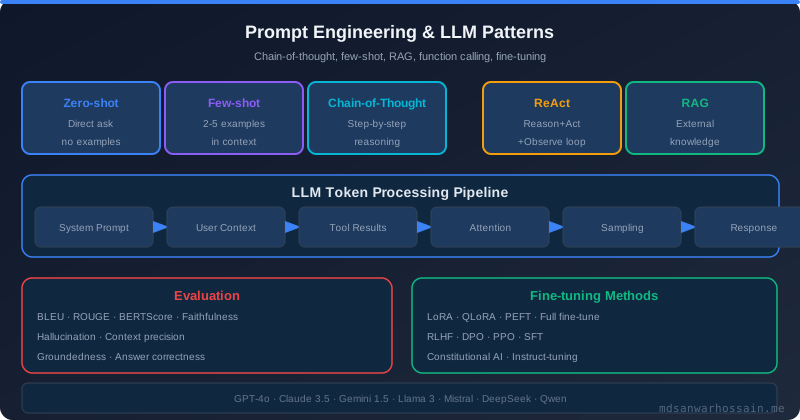
MCP defines three roles in the integration topology:
- MCP Host: The application that contains one or more MCP Clients. Examples: Claude Desktop, an IDE plugin, a custom agent orchestrator. The Host manages the lifecycle of Client connections.
- MCP Client: A component within the Host that opens a 1:1 connection to a single MCP Server. It speaks the MCP protocol—sending initialization handshakes, capability negotiation, and RPC calls.
- MCP Server: A lightweight process (local or remote) that exposes Resources, Tools, and Prompts. It runs alongside or separately from the agent, connected via stdio (local) or HTTP with SSE/WebSocket (remote).
┌────────────────────────────────────────────────────────┐
│ MCP Host (Agent App) │
│ ┌──────────────┐ ┌──────────────┐ ┌──────────┐ │
│ │ LLM Runtime │ │ MCP Client A│ │MCP Client│ │
│ │ (Claude/GPT)│──▶│ (Jira) │ │B(Postgres│ │
│ └──────────────┘ └──────┬───────┘ └────┬─────┘ │
└─────────────────────────────┼────────────────┼────────┘
│ stdio/HTTP+SSE │
▼ ▼
┌─────────────────┐ ┌──────────────────┐
│ MCP Server:Jira │ │MCP Server:Postgres│
└─────────────────┘ └──────────────────┘
The protocol operates over a bi-directional transport. Locally, stdio pipes are used for zero-latency IPC. For remote MCP Servers (e.g., a company-wide Datadog MCP Server), HTTP with Server-Sent Events (SSE) provides streaming notifications back to the Client.
4. Deep Dive: Protocol Primitives — Resources, Tools, Prompts
4.1 Resources
Resources are addressable data endpoints. Each resource has a URI (e.g., jira://ticket/ENG-1234), a MIME type, and optionally a subscription mechanism for change notifications. The agent reads Resources to inject context into the LLM's prompt window.
Key design consideration: Resources are read-only by protocol definition. Any mutation must go through a Tool call. This separation keeps the data-access pattern safe and auditable.
4.2 Tools
Tools are callable functions with a JSON Schema input definition. When the LLM decides to call a tool, it emits a structured tool-call message; the MCP Client routes it to the correct Server; the Server executes and returns a structured result. Tools can have side effects (creating tickets, triggering deployments, sending messages).
{
  "name": "create_jira_ticket",
  "description": "Creates a Jira ticket in the ENG project",
  "inputSchema": {
    "type": "object",
    "properties": {
      "summary": { "type": "string" },
      "priority": { "type": "string", "enum": ["P0","P1","P2","P3"] },
      "description": { "type": "string" }
    },
    "required": ["summary", "priority"]
  }
}
4.3 Prompts
Prompts are server-defined, parameterized prompt templates. They allow domain experts (e.g., the Jira team) to define canonical "how to interpret a sprint report" prompts that any connected agent can use consistently—avoiding prompt drift across different agent implementations.
5. Building an MCP Server in Practice
The MCP SDK is available for TypeScript, Python, and (experimentally) Java/Kotlin. Here's a minimal Python MCP Server exposing a database query tool:
from mcp.server import Server
from mcp.server.stdio import stdio_server
from mcp import types
import asyncpg, asyncio

app = Server("postgres-mcp-server")

@app.list_tools()
async def list_tools():
    return [types.Tool(
        name="query_analytics",
        description="Run a read-only SQL query on the analytics DB",
        inputSchema={
            "type": "object",
            "properties": {"sql": {"type": "string"}},
            "required": ["sql"]
        }
    )]

@app.call_tool()
async def call_tool(name: str, arguments: dict):
    if name == "query_analytics":
        conn = await asyncpg.connect(DATABASE_URL)
        rows = await conn.fetch(arguments["sql"])
        await conn.close()
        return [types.TextContent(type="text", text=str(rows))]

async def main():
    async with stdio_server() as (r, w):
        await app.run(r, w, app.create_initialization_options())

asyncio.run(main())
Production tip: Never expose unrestricted SQL. Use an allowlist of parameterized queries or a read-only DB user. The tool schema is your first line of validation; implement a second layer inside the handler.
6. Failure Scenarios and How to Handle Them
6.1 Server Crash During a Tool Call
If an MCP Server process crashes mid-call, the Client receives an EOF on the stdio pipe or a connection reset on HTTP. The agent runtime should treat this as a retriable error with exponential backoff. However, tool calls that have side effects must not be blindly retried—use idempotency keys in the tool's input schema.
6.2 Schema Version Mismatch
MCP Server upgrades that remove required fields break existing Client tool calls. Always version your tool schemas. Implement backward-compatible changes (add optional fields) and bump the Server version in server_info.version. Clients should log schema drift as a warning—not silently fail.
6.3 Resource Staleness
Resources are read at the moment the agent calls resources/read. In high-velocity systems, data can change between reads and subsequent tool calls, causing the agent to act on stale context. Use resource subscriptions (resources/subscribe) and implement an agent-side cache with TTL-based invalidation.
6.4 Transport Timeouts
Long-running tool calls (e.g., a deployment pipeline that takes 5 minutes) will exceed default HTTP timeouts. Use Server-Sent Events for streaming progress updates, or break long operations into async tasks with a polling tool (get_task_status(taskId)). Never leave the agent blocked on an unbounded operation.
7. Security: Preventing Tool Misuse and Prompt Injection via MCP
MCP's open tool-calling surface is a significant attack vector in production. An adversarial document read via a Resource could contain a prompt injection payload that instructs the agent to call a destructive Tool.
Defense-in-Depth Strategy:
- Input sanitization on Server: Strip HTML/markdown from user-controlled data before returning it as Resource content.
- Tool call confirmation: For high-risk tools (delete, deploy, send), require a Human-in-the-Loop approval step before execution. MCP's sampling capability supports this natively.
- Least-privilege tool exposure: Expose only the tools a specific agent role needs. Don't give a read-only reporting agent access to mutation tools.
- Audit logging on the Server: Every tool invocation should be logged with the originating agent session ID, arguments, result, and timestamp. This is your incident forensics data.
- mTLS for remote MCP Servers: In production deployments, use mutual TLS between the MCP Client and Server to prevent impersonation attacks.
8. Trade-offs and When NOT to Use MCP
- Overhead for simple single-tool integrations: If your agent calls exactly one API, the MCP Server abstraction adds unnecessary process management complexity. Direct API calls with JSON Schema validation suffice.
- Latency on stdio transport: Local stdio MCP Servers add ~1–5ms per call. For latency-critical agents making 100+ tool calls per request, this accumulates. Profile before committing.
- Protocol immaturity: As of early 2026, MCP specification is at 2024-11-05 and evolving. Breaking changes are still possible. Pin your SDK version and test upgrades thoroughly.
- No built-in auth standard: MCP delegates authentication to the transport layer. For HTTP-based Servers, you must implement OAuth 2.0 or API key auth yourself. There is no out-of-box auth in the protocol.
Use MCP when: You have multiple agents (or multiple LLM runtimes) that need to share the same tool ecosystem. The cross-agent reusability dividend pays off after two or more consumers.
9. Performance Optimization for High-Throughput Agent Workloads
- Connection pooling: MCP Clients maintain persistent connections to Servers. Avoid creating a new connection per agent request—pool connections and reuse them across concurrent agent sessions.
- Tool result caching: Implement LRU caching on idempotent tool calls (e.g., "get user profile"). Cache at the Client layer with TTL-based expiry to avoid hammering backend systems during burst traffic.
- Parallel tool calls: Modern LLM runtimes (Claude 3.5+, GPT-4o) support parallel tool calling in a single response turn. Design your MCP Servers to be stateless so parallel calls don't create race conditions.
- Pagination on Resources: For large datasets (e.g., fetching 10k log lines), implement cursor-based pagination in your Resource endpoints. Send the first page immediately; the agent requests subsequent pages as needed.
- SSE keepalives: For long-running remote MCP connections, configure SSE keepalive intervals to prevent load balancer timeouts. 30-second keepalive comments are the standard.
Common Mistakes Engineers Make with MCP
- Exposing too many tools: The LLM context window has limited tool description space. More than 20–30 tools degraded tool selection accuracy in benchmarks. Group tools into domain-specific Servers and connect only relevant ones per agent session.
- Poor tool descriptions: Tool names and descriptions are the LLM's only guide for selection. Invest in clear, unambiguous descriptions with examples. Bad descriptions cause the LLM to call the wrong tool or hallucinate arguments.
- Ignoring capability negotiation: MCP's initialization handshake includes capability exchange. Don't assume a Server supports sampling or logging—check
serverCapabilitiesbefore using advanced features. - Missing error propagation: When a Tool call fails, return a structured error in the MCP response (not just an empty result). The LLM needs to see the error to decide whether to retry, use an alternative tool, or escalate to the user.
10. Key Takeaways
- MCP standardizes the tool/data integration layer for AI agents, eliminating bespoke adapter maintenance.
- Three primitives — Resources (read), Tools (call), Prompts (template) — cover the vast majority of agentic integration needs.
- Use stdio transport for local Servers; HTTP+SSE for remote/multi-host deployments with mTLS.
- Implement idempotency keys on side-effecting Tools; never blindly retry mutations.
- Sanitize Resource content and enforce least-privilege Tool exposure to defeat prompt injection attacks.
- Connection pooling + parallel tool calls + result caching form the performance optimization triad for high-throughput agents.
- Pin SDK version; MCP is still evolving rapidly as of early 2026.
Conclusion
MCP represents the maturation of the agentic AI ecosystem from ad-hoc integrations to a standardized protocol layer. For engineering teams building production multi-agent systems, early adoption now means you'll be building on an increasingly stable foundation as the ecosystem converges—rather than scrambling to retrofit compatibility later.
Start by wrapping your most-used internal tools as MCP Servers. Measure the reduction in integration maintenance burden. Then extend to cross-team shared Servers. The network effects of a standardized tool protocol compound quickly.
Leave a Comment
Related Posts

Software Engineer · Java · Spring Boot · Microservices