Multi-Cluster Kubernetes: Fleet Management with ArgoCD, Cluster API, and Karmada
Single-cluster Kubernetes is tractable. Multi-cluster Kubernetes — spanning production regions, staging environments, edge nodes, and tenant clusters — is an entirely different operational challenge. Without a coherent fleet management strategy, teams end up with dozens of clusters each configured slightly differently, with configuration drift, inconsistent security policies, and no automated way to roll out changes across the fleet. This guide covers the three-tool stack that solves this: ArgoCD for GitOps delivery, Cluster API for declarative cluster lifecycle, and Karmada for policy-based workload propagation.
TL;DR
"Complete guide to multi-cluster Kubernetes fleet management using ArgoCD ApplicationSet, Cluster API for provisioning, and Karmada for workload propagation — production patterns for 2026."
Table of Contents
- Why You End Up with Multiple Clusters
- Hub-and-Spoke Architecture
- Cluster API: Declarative Cluster Lifecycle
- ArgoCD ApplicationSet: Fleet-Scale GitOps
- Karmada: Workload Propagation and Cluster Failover
- Federated Observability with Thanos and Grafana
- Multi-Cluster Networking and Service Discovery
- Fleet Management Operational Runbook
Why You End Up with Multiple Clusters
Organizations accumulate multiple Kubernetes clusters for several distinct reasons, and each reason drives different operational requirements.
Geographic distribution is the most common. Regulatory requirements (GDPR mandates EU data residency), latency requirements (serving users in APAC from us-east-1 adds 200ms+), and availability requirements (active-active across regions) all push toward multi-cluster. Each region runs its own cluster to ensure data sovereignty and local failover.
Environment isolation separates production from staging from development at the cluster level rather than the namespace level. Namespace isolation provides soft boundaries — a misconfigured RBAC policy or resource quota can still impact other namespaces. Cluster-level isolation provides hard boundaries: a developer cannot accidentally affect production by running experiments in a separate cluster.
Blast radius reduction is the security argument for cluster-per-tenant in SaaS platforms. A vulnerability in one customer's workload cannot affect other customers if they run in separate clusters with no shared Kubernetes API server.
Specialized workloads often require different node types, instance families, or operating systems. GPU clusters for ML inference, ARM64 clusters for cost optimization, edge clusters running k3s on constrained hardware — these typically run in separate clusters from the main service fleet.
The result is that most organizations with production Kubernetes end up operating between 5 and 500 clusters. The operational question is not whether to have multiple clusters, but how to manage them without a proportional increase in operational overhead.
Hub-and-Spoke Architecture
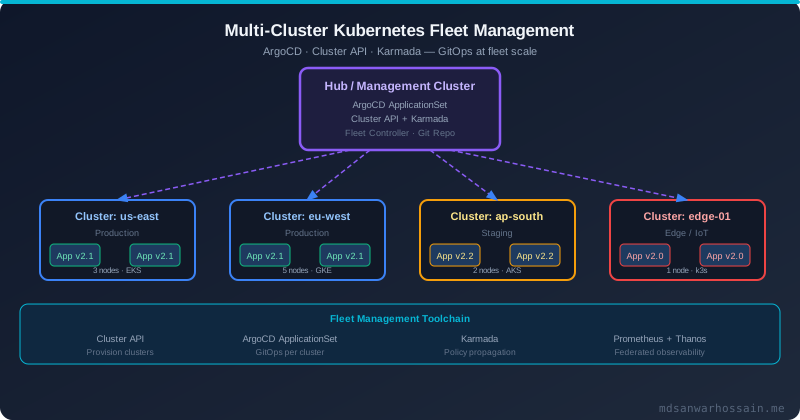
The standard pattern for multi-cluster management is hub-and-spoke: a dedicated management cluster (the hub) that runs your fleet management tooling and has API access to all workload clusters (the spokes). The hub never runs production workloads — it exists solely to manage the fleet.
The hub cluster runs: ArgoCD (with cluster secrets for all spoke clusters), Cluster API controllers, Karmada control plane, Prometheus with Thanos Sidecar (for federated metrics), and any CI/CD tooling that needs cluster access. Spoke clusters run ArgoCD agents (in the pull-based mode for edge clusters without inbound connectivity), Thanos Sidecar, and the actual application workloads.
Security for hub-to-spoke communication uses dedicated service accounts with minimal permissions on each spoke cluster — enough for ArgoCD to apply Kubernetes manifests and for the health check controllers to read resource status. These service accounts are separate from any human user accounts and are rotated regularly.
Cluster API: Declarative Cluster Lifecycle
Cluster API (CAPI) brings the Kubernetes declarative model to cluster lifecycle management itself. Instead of running cloud CLI commands or Terraform scripts to provision a cluster, you apply a Kubernetes YAML to the hub cluster that declares the desired cluster configuration, and CAPI controllers reconcile the actual state to match.
apiVersion: cluster.x-k8s.io/v1beta1
kind: Cluster
metadata:
  name: prod-eu-west-1
  namespace: clusters
spec:
  clusterNetwork:
    pods:
      cidrBlocks: ["192.168.0.0/16"]
    services:
      cidrBlocks: ["10.96.0.0/12"]
  infrastructureRef:
    apiVersion: infrastructure.cluster.x-k8s.io/v1beta2
    kind: AWSManagedCluster
    name: prod-eu-west-1
  controlPlaneRef:
    apiVersion: controlplane.cluster.x-k8s.io/v1beta2
    kind: AWSManagedControlPlane
    name: prod-eu-west-1
---
apiVersion: infrastructure.cluster.x-k8s.io/v1beta2
kind: AWSManagedControlPlane
metadata:
  name: prod-eu-west-1
  namespace: clusters
spec:
  region: eu-west-1
  version: "1.30"
  eksClusterName: prod-eu-west-1
  iamAuthenticatorConfig:
    mapRoles:
    - rolearn: arn:aws:iam::123456789:role/ArgoCD-ClusterRole
      username: argocd
      groups: ["system:masters"]
CAPI supports all major cloud providers (AWS, GCP, Azure) through provider-specific infrastructure controllers, as well as bare-metal provisioning with Tinkerbell and vSphere with CAPV. This means your entire fleet — regardless of cloud provider — is described in a unified Kubernetes YAML format stored in Git, giving you a single source of truth for cluster infrastructure configuration.
Cluster upgrades are also declarative. Changing the Kubernetes version in the AWSManagedControlPlane spec triggers a rolling control plane upgrade. CAPI handles the upgrade sequence (control plane first, then node groups), with automatic rollback if health checks fail:
# Upgrade cluster to Kubernetes 1.31
kubectl patch awsmanagedcontrolplane prod-eu-west-1 -n clusters \
  --type merge --patch '{"spec":{"version":"1.31"}}'

# Monitor upgrade progress
clusterctl describe cluster prod-eu-west-1 -n clusters
ArgoCD ApplicationSet: Fleet-Scale GitOps
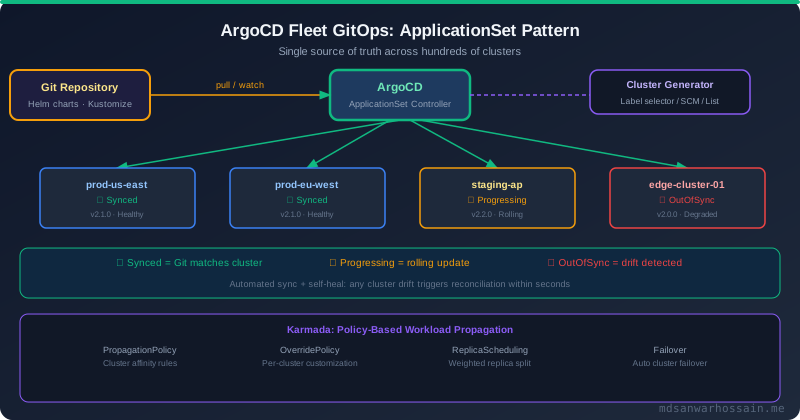
ArgoCD ApplicationSet is the multi-cluster scaling layer on top of ArgoCD. Where a standard ArgoCD Application deploys one application to one cluster, an ApplicationSet uses generators to dynamically create Application resources — one per cluster, environment, or combination thereof.
The Cluster generator creates one Application per registered ArgoCD cluster, automatically including any newly registered cluster:
apiVersion: argoproj.io/v1alpha1
kind: ApplicationSet
metadata:
  name: production-services
  namespace: argocd
spec:
  generators:
  - clusters:
      selector:
        matchLabels:
          environment: production
          tier: standard
  template:
    metadata:
      name: "{{name}}-production-services"
    spec:
      project: production
      source:
        repoURL: https://github.com/example/platform-config
        targetRevision: main
        path: "clusters/{{name}}/production-services"
      destination:
        server: "{{server}}"
        namespace: production
      syncPolicy:
        automated:
          prune: true
          selfHeal: true
        syncOptions:
        - CreateNamespace=true
        - PrunePropagationPolicy=foreground
When a new cluster is provisioned by Cluster API and registered with ArgoCD (using the argocd cluster add command or the cluster secret pattern), the ApplicationSet controller automatically creates a new ArgoCD Application for it and begins syncing the cluster-specific configuration. This eliminates the manual step of configuring each new cluster individually.
The Matrix generator combines two generators, creating the cartesian product — useful for deploying multiple applications to multiple clusters:
generators:
- matrix:
    generators:
    - clusters:
        selector:
          matchLabels:
            environment: production
    - list:
        elements:
        - app: api-gateway
          path: charts/api-gateway
        - app: order-service
          path: charts/order-service
        - app: payment-service
          path: charts/payment-service
For edge clusters that don't have inbound connectivity from the hub (common in IoT, retail, and manufacturing deployments), ArgoCD supports pull-based mode with the argocd-agent. The agent runs on the spoke cluster and polls ArgoCD on the hub for Application manifests, then applies them locally. This works through outbound-only firewall rules, which is often required in enterprise network environments.
Karmada: Workload Propagation and Cluster Failover
While ArgoCD handles GitOps delivery (deploying the right application version to the right clusters), Karmada handles workload propagation policy — which clusters should run which workloads, with how many replicas, and what happens when a cluster becomes unavailable.
Karmada runs on the hub cluster and has its own Kubernetes-compatible API. You define resources in Karmada, and Karmada's controllers propagate them to member clusters according to PropagationPolicy rules:
apiVersion: policy.karmada.io/v1alpha1
kind: PropagationPolicy
metadata:
  name: order-service-global
  namespace: production
spec:
  resourceSelectors:
  - apiVersion: apps/v1
    kind: Deployment
    name: order-service
  - apiVersion: v1
    kind: Service
    name: order-service
  placement:
    clusterAffinity:
      matchLabels:
        region: production
    replicaScheduling:
      replicaSchedulingType: Divided
      weightPreference:
        staticClusterWeight:
        - targetCluster:
            matchLabels:
              name: prod-us-east-1
          weight: 3
        - targetCluster:
            matchLabels:
              name: prod-eu-west-1
          weight: 2
        - targetCluster:
            matchLabels:
              name: prod-ap-south-1
          weight: 1
This policy deploys the order-service to three production clusters with a 3:2:1 weighted replica split across regions. Karmada calculates the actual replica count per cluster based on the total replicas and the weights. If the total is 60 replicas, us-east gets 30, eu-west gets 20, and ap-south gets 10.
Cluster failover is configured via PropagationPolicy.spec.placement.clusterTolerations and triggered automatically when Karmada's cluster health controller detects that a member cluster's API server is unreachable:
placement:
  clusterTolerations:
  - key: cluster.karmada.io/unreachable
    operator: Exists
    effect: NoSchedule
    tolerationSeconds: 60  # After 60s unreachable, reschedule replicas
  - key: cluster.karmada.io/not-ready
    operator: Exists
    effect: NoSchedule
    tolerationSeconds: 300
After 60 seconds of unreachability, Karmada automatically redistributes the replicas that were running in the failed cluster to the remaining healthy clusters — providing automatic disaster recovery without manual intervention.
OverridePolicy enables cluster-specific customizations on top of the base template — different resource limits for edge clusters, different image registry mirrors for air-gapped environments, or region-specific environment variables:
apiVersion: policy.karmada.io/v1alpha1
kind: OverridePolicy
metadata:
  name: edge-resource-override
  namespace: production
spec:
  resourceSelectors:
  - apiVersion: apps/v1
    kind: Deployment
    name: order-service
  targetCluster:
    matchLabels:
      tier: edge
  overrideRules:
  - overriders:
      jsonpatch:
      - path: /spec/template/spec/containers/0/resources/limits/memory
        op: replace
        value: "256Mi"  # Reduced for edge nodes
Federated Observability with Thanos and Grafana
Observability in a multi-cluster fleet requires a federated approach — you need both per-cluster dashboards and cross-cluster aggregated views. Thanos provides this by extending Prometheus with a global query layer.
Each spoke cluster runs a Prometheus instance with a Thanos Sidecar. The sidecar uploads Prometheus blocks to object storage (S3/GCS/Azure Blob) and exposes the StoreAPI. The hub cluster runs Thanos Querier, which connects to all Thanos Sidecar endpoints and object storage, allowing queries across all clusters simultaneously:
# Thanos Querier on hub cluster
apiVersion: apps/v1
kind: Deployment
metadata:
  name: thanos-querier
  namespace: monitoring
spec:
  template:
    spec:
      containers:
      - name: thanos
        image: quay.io/thanos/thanos:v0.36
        args:
        - query
        - --http-address=0.0.0.0:9090
        - --store=thanos-sidecar.prod-us-east.svc:10901
        - --store=thanos-sidecar.prod-eu-west.svc:10901
        - --store=thanos-sidecar.prod-ap-south.svc:10901
        - --store=dnssrv+_grpc._tcp.thanos-store.monitoring.svc
        - --query.replica-label=cluster
Grafana on the hub cluster connects to Thanos Querier as a Prometheus datasource. You can write PromQL queries that aggregate across all clusters using the cluster label that each Prometheus instance adds to its metrics. This enables cross-cluster SLO dashboards, fleet-wide error rate views, and per-cluster drill-downs from a single Grafana interface.
Multi-Cluster Networking and Service Discovery
Services in different clusters cannot communicate using Kubernetes Service DNS by default — a pod in prod-us-east cannot reach payment-service.production.svc.cluster.local in prod-eu-west. Multi-cluster networking tools solve this.
Submariner creates an encrypted IPsec tunnel between clusters, allowing pods to use each other's Pod CIDRs directly. This requires non-overlapping Pod and Service CIDRs across clusters — plan this when provisioning clusters with Cluster API.
Cilium ClusterMesh is the more production-proven approach for Cilium-based clusters. It establishes etcd-based cluster membership and allows services to be exposed as Global Services — accessible from any cluster in the mesh using the standard Kubernetes DNS name:
# Mark a service as global across the ClusterMesh
apiVersion: v1
kind: Service
metadata:
  name: payment-service
  namespace: production
  annotations:
    service.cilium.io/global: "true"
    service.cilium.io/shared: "true"  # Other clusters can use this service
With ClusterMesh, payment-service.production.svc.cluster.local resolves to healthy endpoints in any cluster where the service is running — automatically load balancing across regional instances and failing over to other clusters if local endpoints become unavailable.
Fleet Management Operational Runbook
Day-two operations for a multi-cluster fleet require clear runbooks for the most common scenarios.
Adding a new cluster. Provision with Cluster API (apply CAPI manifests to hub cluster). Wait for cluster Ready condition. Register with ArgoCD (argocd cluster add <context-name> --name prod-new-region). Add cluster labels for ApplicationSet selectors. Register with Karmada (kubectl --kubeconfig karmada-config join prod-new-region --cluster-kubeconfig=new-cluster.kubeconfig). Verify ApplicationSet generates Application resources for the new cluster and syncs successfully.
Rolling a Kubernetes version upgrade across the fleet. Update the version in the staging cluster CAPI manifest first. Monitor for pod failures and API deprecation errors using kubectl get events and Prometheus. After 24 hours with no incidents, update production clusters one region at a time using the same CAPI manifest patch.
Responding to a cluster failure. Karmada automatically reschedules workloads after the configurable tolerance period. Verify rescheduling with kubectl --kubeconfig karmada-config get rb -n production (ResourceBinding shows which clusters hold which replicas). Investigate the failing cluster using kubectl get nodes and cluster event logs. After recovery, manually trigger Karmada rebalancing to restore the original replica distribution.
Leave a Comment
Related Posts

Software Engineer · Java · Spring Boot · Microservices