Node.js Production Best Practices: Scalability, Security & Performance in 2026
Node.js powers a significant slice of the internet's backend — from Netflix and LinkedIn to Shopify and NASA. Yet the gap between a working Node.js app and a production-grade Node.js system is enormous. This comprehensive guide covers everything you need to run Node.js at scale in 2026: event loop internals, security hardening, performance tuning, clustering, memory management, and Kubernetes deployment.
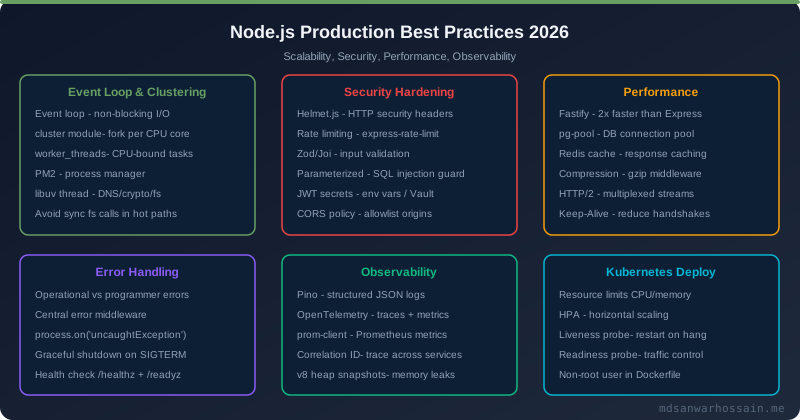
TL;DR — The Node.js Production Survival Kit
"Use Fastify over Express for new APIs (3× throughput). Enable clustering to saturate all CPU cores. Set --max-old-space-size explicitly and monitor heap with v8.getHeapStatistics(). Handle every unhandledRejection and uncaughtException. Add Helmet + rate limiting + Zod validation as non-negotiable middleware. Always implement graceful shutdown with a 30-second drain window before Kubernetes sends SIGTERM."
Table of Contents
- Node.js Architecture: Event Loop, Libuv & Worker Threads
- Project Structure: Layered Architecture for Node.js
- Error Handling Best Practices
- Express vs Fastify in 2026: Benchmarks & Migration
- Security Hardening: Helmet, Rate Limiting & Input Validation
- Clustering & Worker Threads for CPU-Bound Tasks
- Memory Management & Leak Detection
- Logging Best Practices: Pino, Winston & Correlation IDs
- Database Connection Pooling
- Health Checks, Graceful Shutdown & Zero-Downtime Deploys
- Kubernetes Deployment: Resource Limits, HPA & Probes
- Monitoring & Observability: OpenTelemetry & Prometheus
- Production Checklist
1. Node.js Architecture: Event Loop, Libuv & Worker Threads
Understanding Node.js internals is not academic trivia — it directly dictates how you architect services and diagnose production latency spikes. Node.js is single-threaded by design, but it is not single-process. The event loop runs on a single thread; I/O operations are delegated to libuv's thread pool and OS-level async APIs.
The Event Loop Phases
The event loop cycles through six phases on every tick. Understanding each phase prevents subtle ordering bugs in production:
- Timers: Executes callbacks scheduled by
setTimeoutandsetInterval. Minimum delay, not guaranteed exact timing. - Pending callbacks: Executes I/O error callbacks deferred from the previous loop iteration.
- Idle/Prepare: Internal use only — libuv housekeeping.
- Poll: The heart of the event loop. Retrieves new I/O events and executes their callbacks. Blocks here if there are no timers pending.
- Check: Executes
setImmediatecallbacks. Runs immediately after the poll phase, before the next timer fires. - Close callbacks: Handles
socket.on('close')and similar cleanup callbacks.
Microtask queues (Promise.resolve(), queueMicrotask()) are drained after every phase, before moving to the next. process.nextTick() runs before any I/O event, even before resolved Promises — overuse causes starvation.
Libuv Thread Pool
Libuv maintains a thread pool (default size: 4) for operations that cannot be made non-blocking at the OS level: DNS lookups, fs.* calls, crypto operations, and zlib compression. In production, set UV_THREADPOOL_SIZE to match your I/O concurrency — typically 8–16 for API servers:
# In your Kubernetes Deployment or .env
UV_THREADPOOL_SIZE=16
NODE_OPTIONS="--max-old-space-size=2048"
Worker Threads for CPU-Bound Work
Node.js 12+ ships worker_threads as stable. Use them for CPU-intensive operations that would otherwise block the event loop — image resizing, PDF generation, JSON parsing of large payloads, and cryptographic operations:
// worker-pool.js — reusable worker thread pool
const { Worker, isMainThread, parentPort, workerData } = require('worker_threads');
const os = require('os');

// Main thread: create a pool of workers
if (isMainThread) {
  const POOL_SIZE = os.cpus().length - 1; // Leave one core for the event loop
  const pool = [];

  function createWorker() {
    const worker = new Worker(__filename);
    worker.on('error', console.error);
    worker.on('exit', () => { /* restart if needed */ });
    return worker;
  }

  for (let i = 0; i < POOL_SIZE; i++) pool.push(createWorker());

  module.exports.runTask = (data) => new Promise((resolve, reject) => {
    const worker = pool.shift();
    worker.once('message', result => { pool.push(worker); resolve(result); });
    worker.once('error', err => { pool.push(worker); reject(err); });
    worker.postMessage(data);
  });
} else {
  // Worker thread: process CPU-intensive work
  parentPort.on('message', (data) => {
    const result = heavyCpuWork(data);
    parentPort.postMessage(result);
  });
}2. Project Structure: Layered Architecture for Node.js
The biggest architectural mistake in Node.js projects is placing all business logic inside route handlers. A layered architecture (routes → controllers → services → repositories) is testable, maintainable, and scales to large teams.
Recommended Directory Structure
src/
├── app.js              # Express/Fastify app setup (no listen())
├── server.js           # Entry point: listen(), clustering, graceful shutdown
├── config/
│   ├── index.js        # Validated env config (dotenv + Joi/Zod)
│   └── database.js     # DB connection pool setup
├── routes/
│   └── user.routes.js  # Route definitions only — no logic
├── controllers/
│   └── user.controller.js  # HTTP layer: parse req, call service, send res
├── services/
│   └── user.service.js     # Business logic — framework-agnostic
├── repositories/
│   └── user.repository.js  # DB queries — swap pg/prisma/mongoose here
├── middleware/
│   ├── auth.middleware.js
│   ├── error.middleware.js  # Central error handler
│   └── validate.middleware.js
├── utils/
│   ├── logger.js
│   └── AppError.js         # Custom error class
└── __tests__/
Config Validation at Startup
Never let a Node.js process start with missing environment variables. Validate all config at startup using Zod or Joi so failures are immediate and explicit:
// config/index.js
const { z } = require('zod');

const envSchema = z.object({
  NODE_ENV:       z.enum(['development', 'test', 'production']),
  PORT:           z.string().transform(Number).default('3000'),
  DATABASE_URL:   z.string().url(),
  JWT_SECRET:     z.string().min(32),
  REDIS_URL:      z.string().url().optional(),
  LOG_LEVEL:      z.enum(['trace','debug','info','warn','error']).default('info'),
});

const parsed = envSchema.safeParse(process.env);
if (!parsed.success) {
  console.error('❌ Invalid environment configuration:', parsed.error.format());
  process.exit(1);
}

module.exports = parsed.data;
3. Error Handling Best Practices
Poor error handling is the #1 cause of unexpected Node.js process crashes in production. The Node.js error handling model distinguishes between two fundamentally different error categories:
Operational vs Programmer Errors
- Operational errors: Expected runtime failures — network timeouts, DB connection refused, invalid user input, file not found. Handle these gracefully: return a structured error response, log at WARN level, and continue serving traffic.
- Programmer errors: Bugs in your code — accessing a property on
undefined, passing wrong argument types, assertion failures. These indicate logic bugs. The correct response is to crash the process and let your process manager (PM2, Kubernetes) restart it.
Custom AppError Class
// utils/AppError.js
class AppError extends Error {
  constructor(message, statusCode, code) {
    super(message);
    this.statusCode = statusCode;
    this.code = code;
    this.isOperational = true; // Mark as safe to expose
    Error.captureStackTrace(this, this.constructor);
  }
}

module.exports = AppError;

// Usage in service layer:
if (!user) throw new AppError('User not found', 404, 'USER_NOT_FOUND');
Central Error Handler Middleware
// middleware/error.middleware.js
const AppError = require('../utils/AppError');
const logger = require('../utils/logger');

module.exports = (err, req, res, next) => {
  const statusCode = err.statusCode || 500;
  const isOperational = err.isOperational === true;

  logger[isOperational ? 'warn' : 'error']({
    err,
    requestId: req.id,
    method: req.method,
    url: req.url,
  });

  if (!isOperational && process.env.NODE_ENV === 'production') {
    // Programmer error in production — do not expose internals
    return res.status(500).json({ error: 'Internal server error', requestId: req.id });
  }

  res.status(statusCode).json({
    error: err.message,
    code:  err.code || 'INTERNAL_ERROR',
    requestId: req.id,
    ...(process.env.NODE_ENV !== 'production' && { stack: err.stack }),
  });
};
Global Safety Nets
// server.js — attach before starting the server
process.on('unhandledRejection', (reason, promise) => {
  logger.error({ reason }, 'Unhandled Promise Rejection');
  // Give logger time to flush, then exit so K8s restarts the pod
  setTimeout(() => process.exit(1), 500);
});

process.on('uncaughtException', (err) => {
  logger.fatal({ err }, 'Uncaught Exception — shutting down');
  setTimeout(() => process.exit(1), 500);
});
4. Express vs Fastify in 2026: Performance Benchmarks & Migration
Express has been the default Node.js framework since 2010. In 2026, Fastify is the clear performance winner for new projects. The decision is nuanced for existing codebases.
Performance Comparison
| Metric | Express 4.x | Fastify 4.x | Hono 4.x |
|---|---|---|---|
| Req/sec (simple JSON) | ~18,000 | ~54,000 | ~62,000 |
| JSON serialization | JSON.stringify | fast-json-stringify (schema) | native / custom |
| Schema validation | Manual / middleware | Built-in (JSON Schema) | Zod / Valibot |
| TypeScript support | @types/express | First-class | First-class |
| Ecosystem / plugins | Massive (15+ years) | Growing rapidly | Edge-first, smaller |
Fastify Hello World with Schema Validation
// app.js — Fastify with JSON schema validation & serialization
const fastify = require('fastify')({ logger: true });

const createUserSchema = {
  body: {
    type: 'object',
    required: ['name', 'email'],
    properties: {
      name:  { type: 'string', minLength: 2, maxLength: 100 },
      email: { type: 'string', format: 'email' },
    },
    additionalProperties: false,
  },
  response: {
    201: {
      type: 'object',
      properties: {
        id:    { type: 'string' },
        name:  { type: 'string' },
        email: { type: 'string' },
      },
    },
  },
};

fastify.post('/users', { schema: createUserSchema }, async (req, reply) => {
  const user = await userService.create(req.body);
  return reply.code(201).send(user);
});

// fast-json-stringify serializes the response 2-4× faster than JSON.stringify
When to Stick With Express
- Existing large codebase with heavy Express middleware chain — migration cost exceeds performance gain
- Team has deep Express expertise and performance is not the primary constraint
- Heavy dependency on Express-only middleware (Passport.js strategies, some third-party SDKs)
- You're at <5,000 req/sec — Express overhead is negligible at this scale
5. Security Hardening: Helmet, Rate Limiting & Input Validation
Node.js security in production requires defense-in-depth: HTTP security headers, rate limiting, input validation, and SQL injection prevention. None of these are optional for internet-facing services.
Helmet — HTTP Security Headers
const helmet = require('helmet');

app.use(helmet({
  contentSecurityPolicy: {
    directives: {
      defaultSrc: ["'self'"],
      scriptSrc:  ["'self'", "'strict-dynamic'"],
      styleSrc:   ["'self'", "'unsafe-inline'"],
      imgSrc:     ["'self'", "data:", "https:"],
    },
  },
  hsts: {
    maxAge: 31536000,     // 1 year
    includeSubDomains: true,
    preload: true,
  },
  referrerPolicy: { policy: 'same-origin' },
  crossOriginEmbedderPolicy: false, // Adjust for CDN assets
}));
Rate Limiting with express-rate-limit & Redis
const rateLimit = require('express-rate-limit');
const RedisStore = require('rate-limit-redis');
const redis = require('./config/redis');

// General API rate limit
const apiLimiter = rateLimit({
  windowMs: 15 * 60 * 1000, // 15 minutes
  max: 200,
  standardHeaders: 'draft-7',
  legacyHeaders: false,
  store: new RedisStore({ sendCommand: (...args) => redis.sendCommand(args) }),
  keyGenerator: (req) => req.ip + ':' + (req.user?.id || 'anon'),
  handler: (req, res) => res.status(429).json({ error: 'Too many requests', retryAfter: req.rateLimit.resetTime }),
});

// Stricter limit on auth endpoints
const authLimiter = rateLimit({ windowMs: 15 * 60 * 1000, max: 10, store: ... });

app.use('/api/', apiLimiter);
app.use('/auth/', authLimiter);
Input Validation with Zod
const { z } = require('zod');

const CreateUserSchema = z.object({
  name:     z.string().min(2).max(100).trim(),
  email:    z.string().email().toLowerCase(),
  age:      z.number().int().min(13).max(120).optional(),
  role:     z.enum(['admin', 'user', 'moderator']).default('user'),
  website:  z.string().url().optional(),
});

// Reusable validation middleware
const validate = (schema) => (req, res, next) => {
  const result = schema.safeParse(req.body);
  if (!result.success) {
    return res.status(400).json({
      error: 'Validation failed',
      details: result.error.flatten().fieldErrors,
    });
  }
  req.body = result.data; // Replace with sanitized/coerced data
  next();
};

router.post('/users', validate(CreateUserSchema), userController.create);
SQL Injection Prevention
- Always use parameterized queries. Never concatenate user input into SQL strings.
- With
pg:pool.query('SELECT * FROM users WHERE id = $1', [userId]) - With Prisma: all queries are parameterized by default — but raw queries (
$queryRaw) must use tagged template literals, not string interpolation. - Enable
pg'sssl: { rejectUnauthorized: true }for encrypted connections to your database. - Limit database user permissions: your app user should only have SELECT/INSERT/UPDATE/DELETE on its own tables — never DDL privileges in production.
6. Clustering & Worker Threads for CPU-Bound Tasks
A single Node.js process runs on a single CPU core. On a modern 8-core server, a single-process app wastes 87.5% of available compute. Clustering creates one process per core, multiplying throughput by up to 8× for I/O-bound workloads.
Production Cluster Setup
// server.js — production cluster setup
const cluster = require('cluster');
const os = require('os');
const logger = require('./utils/logger');

const NUM_WORKERS = process.env.WEB_CONCURRENCY
  ? parseInt(process.env.WEB_CONCURRENCY, 10)
  : Math.max(1, os.cpus().length - 1); // Leave 1 core for OS

if (cluster.isPrimary) {
  logger.info({ workers: NUM_WORKERS }, 'Master process started');

  for (let i = 0; i < NUM_WORKERS; i++) cluster.fork();

  cluster.on('exit', (worker, code, signal) => {
    logger.warn({ pid: worker.process.pid, code, signal }, 'Worker died — restarting');
    cluster.fork(); // Auto-restart crashed workers
  });

  // Zero-downtime restart: send SIGUSR2 to master
  process.on('SIGUSR2', () => {
    const workers = Object.values(cluster.workers);
    const restartNext = (i) => {
      if (i >= workers.length) return;
      workers[i].once('exit', () => { cluster.fork(); restartNext(i + 1); });
      workers[i].kill('SIGTERM');
    };
    restartNext(0);
  });

} else {
  require('./app').listen(process.env.PORT || 3000, () => {
    logger.info({ pid: process.pid }, 'Worker started');
  });
}
Cluster vs Worker Threads — When to Use Which
| Approach | Best For | Memory | Communication |
|---|---|---|---|
| Cluster | Serving HTTP I/O-bound requests | Separate heap per worker | IPC (JSON messages) |
| Worker Threads | CPU-bound tasks (image processing, crypto) | Shared ArrayBuffer possible | postMessage + SharedArrayBuffer |
| Both together | High-traffic + CPU-heavy features | Higher total | Both channels |
7. Memory Management & Leak Detection
Memory leaks in Node.js are insidious — they manifest as gradual OOMKilled pods in Kubernetes, not as immediate crashes. Proactive monitoring and correct heap configuration are essential.
Setting the Heap Size Correctly
By default, V8 limits the heap to ~1.5 GB on 64-bit systems. Always set --max-old-space-size to ~75% of your container memory limit to give the OS and other processes room:
# Dockerfile — set before node command
ENV NODE_OPTIONS="--max-old-space-size=1536"
# Container limit: 2Gi → heap limit: 1536 MB (75%)

# Or in Kubernetes Deployment:
env:
  - name: NODE_OPTIONS
    value: "--max-old-space-size=1536"
Exposing Heap Metrics with prom-client
const v8 = require('v8');
const client = require('prom-client');

const heapGauge = new client.Gauge({
  name: 'nodejs_heap_used_bytes',
  help: 'V8 heap used in bytes',
  collect() { this.set(v8.getHeapStatistics().used_heap_size); },
});

const externalGauge = new client.Gauge({
  name: 'nodejs_external_memory_bytes',
  help: 'Node.js external memory (Buffers, native addons)',
  collect() { this.set(process.memoryUsage().external); },
});
Common Memory Leak Patterns & Fixes
- Global state accumulation: Storing per-request data in module-level objects. Fix: use
Mapwith explicit cleanup, orAsyncLocalStoragefor request-scoped context. - Unbounded event listener growth: Adding listeners without removing them. Always call
emitter.removeListener()or use{ once: true }. Monitor withEventEmitter.defaultMaxListeners. - Closure capturing large buffers: Long-lived closures that reference large objects in scope. Move heavy data to WeakRef or clear references explicitly.
- Timer leaks:
setIntervalwithoutclearInterval. Always store the timer ID and clear it on shutdown. - Cache without eviction: In-memory caches that grow forever. Use
lru-cachewith a size limit or TTL.
Heap Snapshot Analysis
// Trigger a heap snapshot on demand via a protected endpoint
const v8 = require('v8');
const fs = require('fs');
const path = require('path');

app.get('/debug/heap-snapshot', requireInternalAuth, (req, res) => {
  const filename = `heap-${Date.now()}.heapsnapshot`;
  const snapshotPath = path.join('/tmp', filename);
  const stream = v8.writeHeapSnapshot(snapshotPath);
  res.json({ message: 'Heap snapshot written', path: stream });
});

// Load the .heapsnapshot file in Chrome DevTools → Memory tab
// Look for objects with high retained size that shouldn't be growing
8. Logging Best Practices: Pino, Winston & Correlation IDs
In production, logs are your primary debugging tool. Structured JSON logs with correlation IDs enable log aggregation and distributed tracing across microservices.
Pino — The Fastest Node.js Logger
Pino is 5–10× faster than Winston and 2–3× faster than Bunyan because it uses a worker thread for serialization. Use Pino for any performance-sensitive service:
// utils/logger.js
const pino = require('pino');

const logger = pino({
  level: process.env.LOG_LEVEL || 'info',
  formatters: {
    level: (label) => ({ level: label }),
    bindings: (bindings) => ({ pid: bindings.pid, host: bindings.hostname }),
  },
  timestamp: pino.stdTimeFunctions.isoTime,
  redact: {
    paths: ['req.headers.authorization', 'req.body.password', 'req.body.token'],
    censor: '[REDACTED]',
  },
}, pino.destination({ sync: false })); // async destination for performance

module.exports = logger;
Request Correlation IDs with AsyncLocalStorage
const { AsyncLocalStorage } = require('async_hooks');
const { v4: uuidv4 } = require('uuid');

const requestContext = new AsyncLocalStorage();

// Middleware: attach requestId to every log in this request's async chain
app.use((req, res, next) => {
  const requestId = req.headers['x-request-id'] || uuidv4();
  res.setHeader('X-Request-ID', requestId);
  requestContext.run({ requestId }, next);
});

// Child logger that automatically includes requestId
function getLogger() {
  const ctx = requestContext.getStore();
  return ctx ? logger.child({ requestId: ctx.requestId }) : logger;
}

// Usage in any service/repository — no need to pass logger down:
getLogger().info({ userId }, 'User created successfully');
Log Levels in Production
- trace/debug: Disable in production (too verbose, performance overhead). Enable dynamically via a feature flag or health endpoint for troubleshooting.
- info: Key business events — user created, order processed, job completed. Aim for <5 log lines per request.
- warn: Operational errors — retries, rate limit hits, deprecated API usage, slow DB queries (>500ms).
- error: Unexpected failures that require attention. Always include
errobject for stack trace. - fatal: System-level failures requiring immediate shutdown (uncaughtException, out-of-memory signals).
9. Database Connection Pooling
Each database connection consumes memory on both the server and the database. In a clustered Node.js app, connection count scales as workers × pool_size. Getting pooling wrong causes connection exhaustion under load.
pg-pool (PostgreSQL) Configuration
// config/database.js — pg-pool production setup
const { Pool } = require('pg');

const pool = new Pool({
  connectionString: process.env.DATABASE_URL,
  ssl: process.env.NODE_ENV === 'production' ? { rejectUnauthorized: true } : false,
  max: parseInt(process.env.DB_POOL_MAX || '10', 10),   // Per worker process
  min: parseInt(process.env.DB_POOL_MIN || '2',  10),
  idleTimeoutMillis:    30_000, // Close idle connections after 30s
  connectionTimeoutMillis: 3_000, // Fail fast if pool is exhausted
  statement_timeout:   10_000, // Kill long-running queries after 10s
  application_name:    `myapp-worker-${process.pid}`,
});

pool.on('error', (err, client) => {
  logger.error({ err }, 'Unexpected error on idle client');
});

// Formula: max_connections_per_db = workers × DB_POOL_MAX
// 4 workers × 10 pool = 40 connections. Keep well below PostgreSQL max_connections.

module.exports = pool;
Prisma Best Practices
// Use a singleton PrismaClient to prevent connection pool exhaustion
// config/prisma.js
const { PrismaClient } = require('@prisma/client');

const globalForPrisma = global;
const prisma = globalForPrisma.prisma ?? new PrismaClient({
  log: process.env.NODE_ENV === 'development'
    ? ['query', 'warn', 'error']
    : ['warn', 'error'],
  datasources: {
    db: { url: process.env.DATABASE_URL + '?connection_limit=10&pool_timeout=10' },
  },
});

if (process.env.NODE_ENV !== 'production') globalForPrisma.prisma = prisma;

module.exports = prisma;

// Always disconnect in graceful shutdown:
process.on('beforeExit', async () => { await prisma.$disconnect(); });
Mongoose (MongoDB) Best Practices
- Set
maxPoolSize(default 5) based on expected concurrency:mongoose.connect(url, { maxPoolSize: 10 }) - Enable
serverSelectionTimeoutMS: 5000to fail fast if MongoDB is unreachable - Use
.lean()on read queries to return plain JS objects (up to 3× faster, 2× less memory than Mongoose Documents) - Index all query fields. Use
explain()to verify IXSCAN vs COLLSCAN in production - Set
autoIndex: falsein production — build indexes separately during deployment, not on app startup
10. Health Checks, Graceful Shutdown & Zero-Downtime Deploys
Kubernetes routes traffic based on probe responses and sends SIGTERM before killing a pod. Failing to implement these correctly leads to dropped requests during deployments — a silent killer of user experience.
Health Check Endpoints
// routes/health.routes.js
let isShuttingDown = false;

// Liveness: is the process alive? Never check external dependencies here.
app.get('/health/live', (req, res) => {
  res.status(200).json({ status: 'ok', pid: process.pid, uptime: process.uptime() });
});

// Readiness: is the process ready to serve traffic?
// Return 503 during startup AND during graceful shutdown.
app.get('/health/ready', async (req, res) => {
  if (isShuttingDown) return res.status(503).json({ status: 'shutting_down' });

  try {
    await pool.query('SELECT 1');              // DB check
    await redis.ping();                        // Cache check
    res.status(200).json({ status: 'ready', db: 'ok', cache: 'ok' });
  } catch (err) {
    res.status(503).json({ status: 'not_ready', error: err.message });
  }
});

// Startup probe: takes longer, used once during init
app.get('/health/startup', async (req, res) => {
  try {
    await pool.query('SELECT 1');
    res.status(200).json({ status: 'started' });
  } catch {
    res.status(503).json({ status: 'starting' });
  }
});
Graceful Shutdown
// server.js — graceful shutdown handler
const SHUTDOWN_TIMEOUT_MS = 30_000; // Must be < terminationGracePeriodSeconds in K8s

async function gracefulShutdown(signal) {
  logger.info({ signal }, 'Received shutdown signal');
  isShuttingDown = true; // Fail /health/ready immediately

  // Stop accepting new connections
  server.close(async () => {
    logger.info('HTTP server closed');
    try {
      await pool.end();          // Drain DB pool
      await redis.quit();        // Close Redis connection
      await prisma.$disconnect(); // If using Prisma
      logger.info('All connections drained — exiting cleanly');
      process.exit(0);
    } catch (err) {
      logger.error({ err }, 'Error during shutdown');
      process.exit(1);
    }
  });

  // Hard kill if graceful shutdown takes too long
  setTimeout(() => {
    logger.error('Graceful shutdown timed out — force exiting');
    process.exit(1);
  }, SHUTDOWN_TIMEOUT_MS);
}

process.on('SIGTERM', () => gracefulShutdown('SIGTERM'));
process.on('SIGINT',  () => gracefulShutdown('SIGINT'));
11. Kubernetes Deployment: Resource Limits, HPA & Probes
A production Kubernetes Deployment for Node.js requires careful resource sizing, horizontal pod autoscaling, and correctly configured liveness/readiness probes to achieve zero-downtime deploys.
Complete Deployment Manifest
apiVersion: apps/v1
kind: Deployment
metadata:
  name: my-nodejs-app
  labels:
    app: my-nodejs-app
spec:
  replicas: 3
  strategy:
    type: RollingUpdate
    rollingUpdate:
      maxSurge: 1
      maxUnavailable: 0      # Zero-downtime rolling update
  selector:
    matchLabels:
      app: my-nodejs-app
  template:
    metadata:
      labels:
        app: my-nodejs-app
    spec:
      terminationGracePeriodSeconds: 60  # Must exceed SHUTDOWN_TIMEOUT_MS
      containers:
      - name: api
        image: myregistry/my-nodejs-app:latest
        ports:
        - containerPort: 3000
        env:
        - name: NODE_ENV
          value: production
        - name: NODE_OPTIONS
          value: "--max-old-space-size=1536"
        - name: UV_THREADPOOL_SIZE
          value: "16"
        resources:
          requests:
            cpu:    "250m"
            memory: "512Mi"
          limits:
            cpu:    "1000m"
            memory: "2Gi"
        livenessProbe:
          httpGet:
            path: /health/live
            port: 3000
          initialDelaySeconds: 10
          periodSeconds: 15
          failureThreshold: 3
          timeoutSeconds: 5
        readinessProbe:
          httpGet:
            path: /health/ready
            port: 3000
          initialDelaySeconds: 5
          periodSeconds: 10
          failureThreshold: 3
          timeoutSeconds: 5
        startupProbe:
          httpGet:
            path: /health/startup
            port: 3000
          failureThreshold: 30
          periodSeconds: 5   # 30 × 5s = 150s max startup time
Horizontal Pod Autoscaler
apiVersion: autoscaling/v2
kind: HorizontalPodAutoscaler
metadata:
  name: my-nodejs-app-hpa
spec:
  scaleTargetRef:
    apiVersion: apps/v1
    kind: Deployment
    name: my-nodejs-app
  minReplicas: 3
  maxReplicas: 20
  metrics:
  - type: Resource
    resource:
      name: cpu
      target:
        type: Utilization
        averageUtilization: 60  # Scale up at 60% CPU (not 80% — gives headroom)
  - type: Resource
    resource:
      name: memory
      target:
        type: Utilization
        averageUtilization: 70
  behavior:
    scaleUp:
      stabilizationWindowSeconds: 30
      policies:
      - type: Pods
        value: 4
        periodSeconds: 60
    scaleDown:
      stabilizationWindowSeconds: 300  # Wait 5 minutes before scaling down
Node.js Resource Sizing Guidelines
| Service Type | CPU Request | Memory Request | Memory Limit | --max-old-space-size |
|---|---|---|---|---|
| Lightweight API | 100m | 256Mi | 512Mi | 384 |
| Standard API | 250m | 512Mi | 2Gi | 1536 |
| CPU-intensive service | 1000m | 1Gi | 4Gi | 3072 |
12. Monitoring & Observability: OpenTelemetry & Prometheus
Production observability requires three pillars: metrics (Prometheus + Grafana), traces (OpenTelemetry + Jaeger/Tempo), and logs (Pino + Loki). All three are needed to diagnose latency regressions, error spikes, and capacity issues.
Prometheus Metrics with prom-client
const client = require('prom-client');

// Collect default Node.js metrics (heap, GC, event loop lag, etc.)
client.collectDefaultMetrics({ prefix: 'myapp_' });

// Custom business metrics
const httpRequestDuration = new client.Histogram({
  name: 'myapp_http_request_duration_seconds',
  help: 'Duration of HTTP requests in seconds',
  labelNames: ['method', 'route', 'status_code'],
  buckets: [0.005, 0.01, 0.025, 0.05, 0.1, 0.25, 0.5, 1, 2.5, 5],
});

const activeConnections = new client.Gauge({
  name: 'myapp_active_http_connections',
  help: 'Number of active HTTP connections',
});

// Middleware to record request duration
app.use((req, res, next) => {
  const end = httpRequestDuration.startTimer();
  res.on('finish', () => {
    end({
      method:      req.method,
      route:       req.route?.path || req.path,
      status_code: res.statusCode,
    });
  });
  next();
});

// Prometheus scrape endpoint — protect in production!
app.get('/metrics', requireInternalAuth, async (req, res) => {
  res.set('Content-Type', client.register.contentType);
  res.send(await client.register.metrics());
});
OpenTelemetry Auto-Instrumentation
// tracing.js — load BEFORE any other require()
const { NodeSDK } = require('@opentelemetry/sdk-node');
const { OTLPTraceExporter } = require('@opentelemetry/exporter-trace-otlp-http');
const { getNodeAutoInstrumentations } = require('@opentelemetry/auto-instrumentations-node');

const sdk = new NodeSDK({
  serviceName: process.env.SERVICE_NAME || 'my-nodejs-app',
  traceExporter: new OTLPTraceExporter({
    url: process.env.OTEL_EXPORTER_OTLP_ENDPOINT + '/v1/traces',
  }),
  instrumentations: [
    getNodeAutoInstrumentations({
      '@opentelemetry/instrumentation-http': { enabled: true },
      '@opentelemetry/instrumentation-express': { enabled: true },
      '@opentelemetry/instrumentation-pg': { enabled: true },
      '@opentelemetry/instrumentation-redis-4': { enabled: true },
    }),
  ],
});

sdk.start();
process.on('SIGTERM', () => sdk.shutdown());

# Start with: node -r ./tracing.js server.js
Key Grafana Dashboards to Build
- Request rate, error rate, duration (RED): HTTP requests per second, 5xx error rate, p50/p95/p99 latency by route.
- Event loop lag:
nodejs_eventloop_lag_seconds— values above 100ms indicate blocking operations. - Heap usage vs limit: Alert when
nodejs_heap_used_bytes / nodejs_heap_size_limitexceeds 80%. - GC duration:
nodejs_gc_duration_secondshistogram — frequent full GC pauses indicate a memory leak. - Active DB connections vs pool max: Alert at 85% saturation to scale before exhaustion.
13. Production Checklist
Use this checklist before shipping any Node.js service to production. Missing items in this list have caused real production incidents.
Security
- ☐ Helmet middleware configured with strict CSP
- ☐ Rate limiting on all public endpoints (Redis-backed for multi-instance)
- ☐ Input validated & sanitized with Zod/Joi on every route
- ☐ All DB queries parameterized — no string interpolation
- ☐ JWT secrets are 256-bit random, rotated, stored in Vault/K8s Secrets
- ☐
npm auditpasses with zero critical/high vulnerabilities - ☐
.envfiles never committed — use Kubernetes Secrets or AWS Secrets Manager - ☐ CORS configured with explicit allowed origins (not
*) - ☐ Dependencies pinned to exact versions in
package-lock.json
Performance & Scalability
- ☐ Clustering enabled — one worker per CPU core (or via
WEB_CONCURRENCY) - ☐
--max-old-space-sizeset to 75% of container memory limit - ☐
UV_THREADPOOL_SIZEset appropriately (8–16 for I/O-heavy services) - ☐ Database connection pool sized correctly (workers × pool_max < DB max_connections)
- ☐ CPU-bound tasks offloaded to Worker Threads
- ☐ Response compression enabled (Brotli preferred over gzip)
- ☐ Caching layer in place for expensive queries (Redis, in-process LRU)
- ☐ Fastify considered for new services (3× throughput over Express)
Error Handling & Reliability
- ☐
process.on('unhandledRejection')anduncaughtExceptionhandlers crash with exit code 1 - ☐ Central Express error handler (4-argument middleware) registered as last middleware
- ☐ All async route handlers wrapped in try/catch or use express-async-errors
- ☐ Custom AppError class with
isOperationalflag - ☐ Circuit breakers on external service calls (opossum)
- ☐ Retry with exponential backoff for transient failures
Kubernetes & Deployment
- ☐ Liveness, readiness, and startup probes configured
- ☐ Readiness probe returns 503 while shutting down
- ☐
terminationGracePeriodSeconds> your shutdown timeout - ☐ HPA configured with CPU target of 60% (not 80%)
- ☐
maxUnavailable: 0in rolling update strategy - ☐ PodDisruptionBudget set to
minAvailable: 2 - ☐ Resource requests AND limits set on all containers
- ☐ Non-root container user (
USER nodein Dockerfile)
Observability
- ☐ Structured JSON logging (Pino) with correlation IDs via AsyncLocalStorage
- ☐ Sensitive fields redacted (
authorization,password, PII) - ☐ Prometheus metrics endpoint with RED metrics + heap + event loop lag
- ☐ OpenTelemetry auto-instrumentation for distributed tracing
- ☐ Alerts on: error rate >1%, p99 latency >1s, heap >80%, event loop lag >100ms
- ☐ Log aggregation to centralized store (Loki, CloudWatch, Datadog)
Every item in this checklist has been hardened by real production incidents. The teams that skip "optional" items like PodDisruptionBudgets and startup probes are the ones paging at 3am. Production Node.js is not just about writing JavaScript — it's about understanding the entire stack from V8 internals to Kubernetes scheduling.
