Spring AI Framework: Building LLM-Powered Java Applications with Spring Boot
Spring AI is the fastest-growing addition to the Spring ecosystem in 2025–2026. It brings the familiar Spring programming model — auto-configuration, dependency injection, and portable abstractions — to the world of Large Language Models. Instead of writing brittle HTTP clients against OpenAI's API and manually wiring vector stores, prompt templates, and streaming responses, Spring AI gives you a coherent, testable framework. This deep dive covers everything from ChatClient basics and Retrieval-Augmented Generation (RAG) to structured output, function calling, and production observability.
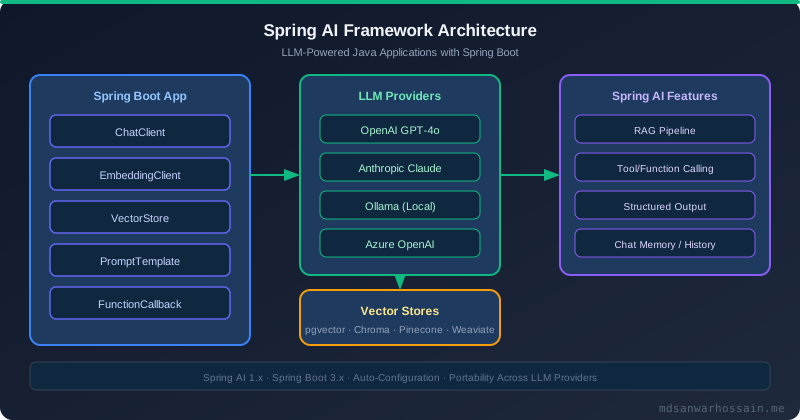
Table of Contents
- Why Spring AI? The Java LLM Landscape in 2026
- Getting Started: Auto-Configuration & ChatClient
- PromptTemplate, SystemMessage & Structured Output
- Retrieval-Augmented Generation (RAG) with pgvector
- Function Calling: Giving LLMs Tools in Java
- Streaming Responses with Server-Sent Events
- Switching LLM Providers Without Changing Code
- Observability: Token Costs, Latency & Tracing
- Key Takeaways
1. Why Spring AI? The Java LLM Landscape in 2026
Before Spring AI reached 1.0, Java developers integrating LLMs faced a fragmented landscape: raw OpenAI HTTP clients, community wrappers with inconsistent APIs, and no standard way to handle embeddings, vector search, or conversation memory. Python's LangChain dominated the space, creating a skill gap for Java shops unwilling to introduce a Python microservice just to call a chat API.
Spring AI solves this by defining portable abstractions — ChatModel, EmbeddingModel, VectorStore — backed by multiple implementations. Switching from OpenAI to Anthropic Claude or a local Ollama model is a single line in application.properties, not a code rewrite. The ChatClient fluent API handles prompt construction, advisor chains (middleware for prompts), streaming, and structured output parsing out of the box.
2. Getting Started: Auto-Configuration & ChatClient
Add the Spring AI BOM and the OpenAI starter to your pom.xml. Spring Boot auto-configuration picks up your OPENAI_API_KEY environment variable and provides a ready-to-inject ChatModel and ChatClient.Builder:
<!-- pom.xml -->
<dependencyManagement>
    <dependencies>
        <dependency>
            <groupId>org.springframework.ai</groupId>
            <artifactId>spring-ai-bom</artifactId>
            <version>1.0.0</version>
            <type>pom</type>
            <scope>import</scope>
        </dependency>
    </dependencies>
</dependencyManagement>
<dependencies>
    <dependency>
        <groupId>org.springframework.ai</groupId>
        <artifactId>spring-ai-openai-spring-boot-starter</artifactId>
    </dependency>
</dependencies>
# application.properties
spring.ai.openai.api-key=${OPENAI_API_KEY}
spring.ai.openai.chat.options.model=gpt-4o
spring.ai.openai.chat.options.temperature=0.7@RestController
@RequiredArgsConstructor
public class AiController {
private final ChatClient chatClient;
// ChatClient.Builder is auto-configured by Spring AI
public AiController(ChatClient.Builder builder) {
this.chatClient = builder.build();
}
@PostMapping("/chat")
public String chat(@RequestBody String userMessage) {
return chatClient
.prompt()
.system("You are a senior Java architect. Answer concisely.")
.user(userMessage)
.call()
.content();
}
}
The ChatClient fluent API separates system prompt, user message, advisor registration, and output extraction. Unlike raw HTTP clients, it handles retries, token limits, and model-specific serialization automatically.
3. PromptTemplate, SystemMessage & Structured Output
Hard-coded prompt strings are brittle and hard to test. Spring AI's PromptTemplate class separates prompt structure from runtime values using the {placeholder} syntax, and templates can be loaded from classpath resources for easy versioning:
// resources/prompts/code-review.st
You are a senior Java developer performing a code review.
Analyze the following code for: bugs, performance issues, and security vulnerabilities.
Code language: {language}
Code snippet:
{code}
Return a JSON object with fields: issues (list), severity (HIGH/MED/LOW), suggestions (list).
@Service
public class CodeReviewService {
private final ChatClient chatClient;
private final PromptTemplate reviewTemplate;
public CodeReviewService(ChatClient.Builder builder) {
this.chatClient = builder.build();
// Load from classpath:/prompts/code-review.st
this.reviewTemplate = new PromptTemplate(
new ClassPathResource("prompts/code-review.st"));
}
// Structured output: Spring AI maps LLM JSON output to a Java record
public record ReviewResult(List<String> issues, String severity, List<String> suggestions) {}
public ReviewResult review(String language, String code) {
return chatClient
.prompt(reviewTemplate.create(Map.of("language", language, "code", code)))
.call()
.entity(ReviewResult.class); // Automatic JSON → Record mapping
}
}
The .entity(ReviewResult.class) call uses Spring AI's BeanOutputConverter, which auto-generates a JSON schema instruction appended to the prompt and then deserializes the LLM's response into the Java record. This eliminates the boilerplate of manual Jackson parsing and prompt engineering for output format.
4. Retrieval-Augmented Generation (RAG) with pgvector
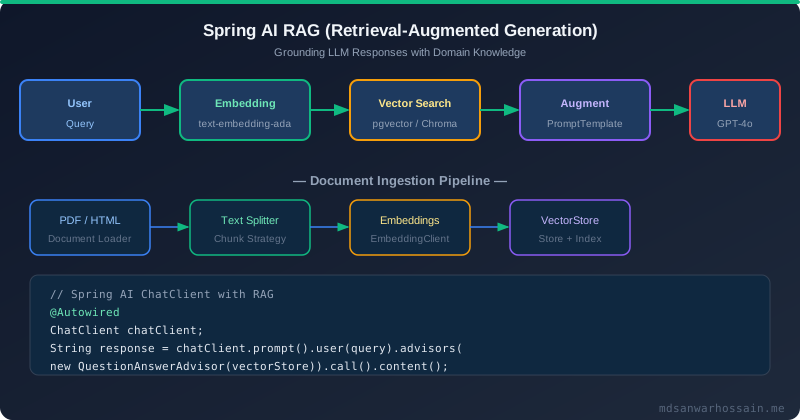
RAG prevents hallucination by grounding LLM responses in your actual data. The pattern has two phases: ingestion (load documents, split into chunks, embed, store in a vector database) and retrieval (embed the user query, find nearest chunks, inject them into the prompt). Spring AI handles both phases with built-in components:
# application.properties — pgvector configuration
spring.datasource.url=jdbc:postgresql://localhost:5432/mydb
spring.ai.vectorstore.pgvector.index-type=HNSW
spring.ai.vectorstore.pgvector.distance-type=COSINE_DISTANCE
spring.ai.vectorstore.pgvector.dimensions=1536
@Service
@RequiredArgsConstructor
public class DocumentIngestionService {
private final VectorStore vectorStore;
private final TokenTextSplitter textSplitter;
public void ingestPdf(Resource pdfResource) {
// 1. Load PDF
var reader = new PagePdfDocumentReader(pdfResource,
PdfDocumentReaderConfig.builder().withPagesPerDocument(1).build());
List<Document> pages = reader.get();
// 2. Split into overlapping chunks
List<Document> chunks = textSplitter.apply(pages);
// 3. Embed and store (EmbeddingModel called automatically by VectorStore)
vectorStore.add(chunks);
}
}
@Service
@RequiredArgsConstructor
public class KnowledgeBaseQaService {
private final ChatClient chatClient;
private final VectorStore vectorStore;
public String answer(String question) {
return chatClient
.prompt()
.user(question)
// QuestionAnswerAdvisor: embeds query, retrieves top-k chunks, injects as context
.advisors(new QuestionAnswerAdvisor(vectorStore, SearchRequest.defaults()))
.call()
.content();
}
}SearchRequest.defaults().withTopK(5).withSimilarityThreshold(0.75) to control retrieval quality. Too many chunks bloat the context window and increase cost; too few miss relevant information.
5. Function Calling: Giving LLMs Tools in Java
Function calling (also called tool use) lets the LLM decide when to invoke a real API and what arguments to pass. Spring AI maps this to Spring @Bean definitions — no JSON schema hand-coding required. The framework introspects your Function<Input, Output> bean and generates the tool description automatically:
// Define the input/output records
record WeatherRequest(String city, String unit) {}
record WeatherResponse(double temperature, String condition, String humidity) {}

@Configuration
public class WeatherToolConfig {

    // Spring AI detects this bean and registers it as a callable tool
    @Bean
    @Description("Get current weather for a given city")
    public Function<WeatherRequest, WeatherResponse> currentWeather(WeatherApiClient client) {
        return request -> client.fetchWeather(request.city(), request.unit());
    }
}

@RestController
@RequiredArgsConstructor
public class WeatherChatController {

    private final ChatClient chatClient;

    @PostMapping("/weather-chat")
    public String chat(@RequestBody String question) {
        return chatClient
            .prompt()
            .user(question) // "What is the weather in Dhaka right now?"
            .functions("currentWeather") // Registered by bean name
            .call()
            .content();
        // LLM calls currentWeather("Dhaka", "celsius"), gets result,
        // then generates a natural language answer — all automatically
    }
}
6. Streaming Responses with Server-Sent Events
For long-form responses (code generation, document summarization), streaming dramatically improves perceived performance. Spring AI uses Project Reactor's Flux for reactive streaming, which integrates naturally with Spring WebFlux or Spring MVC's SseEmitter:
@RestController
@RequiredArgsConstructor
public class StreamingController {

    private final ChatClient chatClient;

    // Spring MVC + Reactor: returns a streaming text/event-stream response
    @GetMapping(value = "/chat/stream", produces = MediaType.TEXT_EVENT_STREAM_VALUE)
    public Flux<String> streamChat(@RequestParam String message) {
        return chatClient
            .prompt()
            .user(message)
            .stream()          // Returns ChatResponse Flux instead of blocking call
            .content();        // Maps each token chunk to String
    }
}

// Frontend consumption (JavaScript)
// const es = new EventSource(`/chat/stream?message=${encodeURIComponent(input)}`);
// es.onmessage = e => appendToUI(e.data);
// es.onerror = () => es.close();
7. Switching LLM Providers Without Changing Code
Spring AI's biggest production benefit is provider portability. The ChatModel and EmbeddingModel interfaces abstract all provider differences. Switching to Anthropic Claude for better reasoning or Ollama for privacy-sensitive on-premise deployment requires only configuration changes:
# Switch to Anthropic Claude — same Java code, different starter + config
spring.ai.anthropic.api-key=${ANTHROPIC_API_KEY}
spring.ai.anthropic.chat.options.model=claude-3-5-sonnet-20241022

# OR: local Ollama (zero cost, full privacy)
spring.ai.ollama.base-url=http://localhost:11434
spring.ai.ollama.chat.options.model=llama3.2
// Use Spring profiles to switch providers per environment
@Configuration
@Profile("prod")
public class ProdAiConfig {
@Bean
ChatModel chatModel(OpenAiChatModel model) { return model; }
}
@Configuration
@Profile("dev")
public class DevAiConfig {
@Bean
ChatModel chatModel(OllamaChatModel model) { return model; }
}8. Observability: Token Costs, Latency & Tracing
AI features have unique observability requirements: token usage drives cost, model latency affects UX, and prompt/response logging is essential for debugging. Spring AI integrates with Micrometer out of the box, exposing metrics for Prometheus and supporting OpenTelemetry distributed tracing:
# Enable Spring AI observability
management.observations.ai.enabled=true
spring.ai.openai.chat.options.metadata-mode=ALL

# Micrometer metrics exposed (scrape with Prometheus):
# gen_ai.client.token.usage{gen_ai.token.type="input"}
# gen_ai.client.token.usage{gen_ai.token.type="output"}
# gen_ai.client.operation.duration{gen_ai.operation.name="chat"}
// Custom advisor for request/response logging (avoid logging PII in prod)
public class TokenLoggingAdvisor implements CallAroundAdvisor {
private static final Logger log = LoggerFactory.getLogger(TokenLoggingAdvisor.class);
@Override
public AdvisedResponse aroundCall(AdvisedRequest req, CallAroundAdvisorChain chain) {
AdvisedResponse response = chain.nextAroundCall(req);
Usage usage = response.response().getMetadata().getUsage();
log.info("Tokens — prompt: {}, completion: {}, total: {}",
usage.getPromptTokens(), usage.getGenerationTokens(), usage.getTotalTokens());
return response;
}
@Override
public String getName() { return "TokenLoggingAdvisor"; }
@Override
public int getOrder() { return Ordered.LOWEST_PRECEDENCE; }
}CachingEmbeddingModel wrapper — identical text chunks produce identical embeddings, and skipping redundant API calls is the single highest-impact cost optimization for RAG-heavy applications.
9. Key Takeaways
- Spring AI provides portable
ChatModel,EmbeddingModel, andVectorStoreabstractions — swap providers via configuration, not code rewrites. - The
ChatClientfluent API handles prompt construction, advisor chains, streaming, and structured output parsing with minimal boilerplate. - RAG with
QuestionAnswerAdvisor+PgVectorStoreis the production-ready pattern for grounding LLM answers in your domain data. - Function calling via Spring
@Bean+@Descriptionlets LLMs invoke real services with automatic JSON schema generation. - Use Micrometer metrics for token cost tracking and OpenTelemetry for end-to-end trace correlation of AI requests through your microservice stack.
- Cache embeddings in Redis and set similarity thresholds carefully to balance retrieval quality against API cost.
10. Testing Spring AI Applications with MockChatModel
Testing LLM-based features is notoriously difficult — real API calls are slow, expensive, and non-deterministic. Spring AI's test module provides MockChatModel and MockEmbeddingModel that let you unit-test your AI logic with full control over responses and token counts.
// pom.xml
<dependency>
    <groupId>org.springframework.ai</groupId>
    <artifactId>spring-ai-test</artifactId>
    <scope>test</scope>
</dependency>

@ExtendWith(MockitoExtension.class)
class ProductSummaryServiceTest {

    // Predetermined response — completely deterministic
    private final MockChatModel mockModel = MockChatModel.builder()
        .defaultResponses("This product has excellent battery life and build quality.")
        .build();

    private ProductSummaryService service;

    @BeforeEach
    void setUp() {
        ChatClient client = ChatClient.create(mockModel);
        service = new ProductSummaryService(client);
    }

    @Test
    void summarize_returnsExpectedText() {
        String result = service.summarize("Model XYZ", List.of("great battery", "solid build"));
        assertThat(result).contains("battery life");
    }

    @Test
    void summarize_sendsCorrectPrompt() {
        // Verify prompt construction without touching real OpenAI
        service.summarize("Widget Pro", List.of("fast", "lightweight"));

        List<ChatModel.Exchange> exchanges = mockModel.getExchanges();
        assertThat(exchanges).hasSize(1);
        assertThat(exchanges.get(0).userText()).contains("Widget Pro");
    }
}
For integration tests that verify the full Spring context — including advisor chains, bean wiring, and auto-configuration — use @SpringBootTest with a custom TestConfiguration that replaces the real ChatModel bean:
@SpringBootTest
class RagPipelineIntegrationTest {

    @TestConfiguration
    static class MockConfig {
        @Bean
        @Primary
        ChatModel mockChatModel() {
            return MockChatModel.builder()
                .defaultResponses("Based on the context: Spring AI uses advisors.")
                .build();
        }
    }

    @Autowired
    private RagService ragService;

    @Test
    void ragPipeline_retrievesAndResponds() {
        String answer = ragService.ask("What are Spring AI advisors?");
        assertThat(answer).startsWith("Based on the context");
    }
}
11. Production Resilience: Circuit Breakers, Retries, and Cost Controls
OpenAI and other LLM APIs apply aggressive rate limits. GPT-4o has a token-per-minute (TPM) limit that, in high-traffic scenarios, triggers HTTP 429 responses. Spring AI's retry support combined with Resilience4j circuit breakers protects your application from cascading failures:
# application.yml — Spring AI retry config
spring:
  ai:
    retry:
      max-attempts: 3
      on-http-codes: 429, 503
      backoff:
        initial-interval: 2s
        multiplier: 2.0
        max-interval: 30s

# Resilience4j circuit breaker wrapping AI calls
resilience4j:
  circuitbreaker:
    instances:
      llm-gateway:
        sliding-window-size: 20
        failure-rate-threshold: 40
        wait-duration-in-open-state: 60s
        permitted-number-of-calls-in-half-open-state: 5
@Service
public class ResilientChatService {
private final ChatClient chatClient;
private final ChatClient localFallback; // Ollama llama3 — zero API cost
@CircuitBreaker(name = "llm-gateway", fallbackMethod = "localAnswer")
public String ask(String question) {
return chatClient.prompt()
.user(question)
.call()
.content();
}
public String localAnswer(String question, Throwable ex) {
log.warn("OpenAI circuit open: {}, routing to local model", ex.getMessage());
return localFallback.prompt()
.user(question)
.call()
.content();
}
}To control costs at the application level, set a token budget per request using Spring AI's ChatOptions. Combine this with request-level caching using SimpleVectorStore to deduplicate semantically identical queries — a single Prometheus metric for cache hit rate often reveals that 30–40% of LLM calls can be served from cache:
// Hard token cap per request
ChatResponse response = chatClient.prompt()
    .user(userMessage)
    .options(OpenAiChatOptions.builder()
        .withMaxTokens(512)          // never exceed 512 output tokens
        .withTemperature(0.3f)       // lower temp = more deterministic, fewer retries
        .build())
    .call()
    .chatResponse();

// Log actual usage for cost attribution
Usage usage = response.getMetadata().getUsage();
log.info("tokens: input={} output={} total={}",
    usage.getPromptTokens(), usage.getGenerationTokens(), usage.getTotalTokens());
12. Vector Store Comparison: pgvector vs Redis vs Qdrant
Choosing the right vector store for your RAG pipeline depends on your latency requirements, query patterns, and operational constraints. Spring AI's VectorStore abstraction lets you switch between providers by swapping a Spring Bean — zero code change in your RAG service. Here's how the most common choices compare:
| Store | Spring AI Bean | Best For | Latency (p99) | Production Maturity |
|---|---|---|---|---|
| pgvector | PgVectorStore |
Existing PostgreSQL, transactional consistency | 10–50 ms | ★★★★★ |
| Redis | RedisVectorStore |
Sub-5ms lookups, caching embeddings | < 5 ms | ★★★★☆ |
| Qdrant | QdrantVectorStore |
Large-scale similarity search (>10M vectors) | 5–20 ms | ★★★★☆ |
| Chroma | ChromaVectorStore |
Local development and prototyping | 20–100 ms | ★★★☆☆ |
For most Spring Boot deployments already running PostgreSQL, pgvector is the zero-ops choice. Enable the extension with a single migration (CREATE EXTENSION IF NOT EXISTS vector), configure Spring AI, and your existing DBA runbooks handle backup, replication, and monitoring. Only move to a dedicated vector database when you exceed 5 million document chunks or need sub-5ms approximate nearest-neighbor queries at scale.
13. Prompt Engineering Best Practices for Production Spring AI
Effective prompt engineering is not about clever tricks — it's about writing clear, testable, and versioned system prompts that produce consistent output across different LLM provider versions. Spring AI's PromptTemplate combined with a template registry pattern gives you the same lifecycle management for prompts that you apply to code.
// src/main/resources/prompts/summarize-product.st
You are a product description writer. Summarize the following product reviews
in exactly 3 sentences. Focus on: 1) Key benefits, 2) Common issues, 3) Ideal buyer.

Product: {productName}
Reviews:
{reviews}

Output format: Plain text. No bullet points. No markdown.

// Java: load template from classpath, bind variables
@Service
public class ProductSummaryService {

    @Value("classpath:prompts/summarize-product.st")
    private Resource promptResource;

    private final ChatClient chatClient;

    public String summarize(String productName, List<String> reviews) {
        PromptTemplate template = new PromptTemplate(promptResource);
        Prompt prompt = template.create(Map.of(
            "productName", productName,
            "reviews", String.join("\n- ", reviews)
        ));

        return chatClient.prompt(prompt).call().content();
    }
}
Store prompts in version control as .st (StringTemplate) files alongside your code. This enables prompt diffs in code reviews, CI-based prompt regression testing, and A/B testing of prompt variants without code deployments. Annotate each prompt file with the model version it was tuned for and the expected output format — treating prompts as first-class engineering artifacts rather than magic strings hardcoded in services.
For multi-step reasoning, use few-shot examples in your system prompt to anchor the model's output style. Spring AI supports message lists with UserMessage, AssistantMessage, and SystemMessage for building multi-turn prompt chains with example demonstrations:
// Few-shot prompting with Spring AI message API
List<Message> messages = List.of(
    new SystemMessage("Classify customer sentiment. Reply with only: POSITIVE, NEGATIVE, or NEUTRAL."),
    // Few-shot example 1
    new UserMessage("The product arrived on time and works perfectly."),
    new AssistantMessage("POSITIVE"),
    // Few-shot example 2
    new UserMessage("Stopped working after 2 days. Very disappointed."),
    new AssistantMessage("NEGATIVE"),
    // Actual input
    new UserMessage(customerReview)
);

String sentiment = chatClient.prompt(new Prompt(messages)).call().content();
Monitor prompt performance with a regression test suite that runs your top 50 most critical prompts against a golden dataset on every PR. Assert on key properties of the output (contains expected entities, follows format, stays within length bounds) rather than exact string equality — LLMs are non-deterministic, but their outputs should satisfy invariant constraints.
14. Advisor Chains: Cross-Cutting Concerns for LLM Calls
Spring AI's advisor abstraction is equivalent to Spring MVC's HandlerInterceptor for LLM calls. Advisors wrap the ChatClient pipeline and can intercept, modify, or augment requests and responses at the framework level — without changing your service code. This is the right place for cross-cutting concerns like PII redaction, content moderation, audit logging, and semantic caching:
// Custom advisor: redact PII before sending to LLM
@Component
public class PiiRedactionAdvisor implements CallAroundAdvisor {

    @Override
    public AdvisedResponse aroundCall(AdvisedRequest request,
            CallAroundAdvisorChain chain) {

        // Redact emails and phone numbers before the LLM sees them
        String sanitized = piiRedactor.redact(request.userText());
        AdvisedRequest sanitizedRequest = request.mutate()
            .userText(sanitized)
            .build();

        AdvisedResponse response = chain.nextAroundCall(sanitizedRequest);

        // Log sanitized prompt + response for audit
        auditLog.record(sanitized, response.response().getResult().getOutput().getContent());
        return response;
    }

    @Override
    public String getName() { return "PiiRedactionAdvisor"; }

    @Override
    public int getOrder() { return Ordered.HIGHEST_PRECEDENCE; }
}

// Wire advisors in ChatClient — applied to every call
ChatClient client = ChatClient.builder(chatModel)
    .defaultAdvisors(
        new PiiRedactionAdvisor(piiRedactor, auditLog),
        new QuestionAnswerAdvisor(vectorStore),    // RAG
        new SimpleLoggerAdvisor()                  // debug logging
    )
    .build();
Spring AI's built-in QuestionAnswerAdvisor implements the RAG pattern as an advisor — it intercepts the user message, searches the vector store, and injects retrieved context into the prompt automatically. Using advisors for RAG keeps your service code clean: the ChatClient call looks identical whether RAG is active or not, and you can disable or swap the RAG advisor for testing without touching business logic.
Spring AI's advisor architecture is one of its most underappreciated features. By composing cross-cutting concerns — PII redaction, content moderation, semantic caching, RAG retrieval, audit logging — as independent, testable advisor beans, you achieve the same separation of concerns that AOP brings to database transactions and security. Each advisor is independently testable, independently configurable, and independently replaceable. This makes Spring AI applications significantly more maintainable than frameworks where these concerns are mixed into service business logic. Build your advisor chain deliberately: start with the must-haves (audit logging, rate limiting), add RAG when needed, and reach for content moderation only when your use case requires it. Spring AI 1.0 GA, released in 2024, brings the framework to production readiness with stable APIs across ChatModel, EmbeddingModel, VectorStore, and ImageModel abstractions — making it the recommended choice for Java teams building LLM-powered features on the Spring Boot platform in 2026.
Leave a Comment
Have questions about Spring AI or LLM integration patterns in Java? Share your experience below.
Leave a Comment
Related Posts

Software Engineer · Java · Spring Boot · Microservices