Spring Boot GraphQL: Schema Design, DataLoader N+1 Prevention, Subscriptions & Production Best Practices 2026
GraphQL has moved from hype to production reality for Java backend teams. With Spring for GraphQL now GA, teams can build type-safe, performant, and observable GraphQL APIs on the JVM. This guide covers everything you need: schema-first design, solving the N+1 problem with DataLoader, real-time subscriptions, security, and production hardening for 2026.
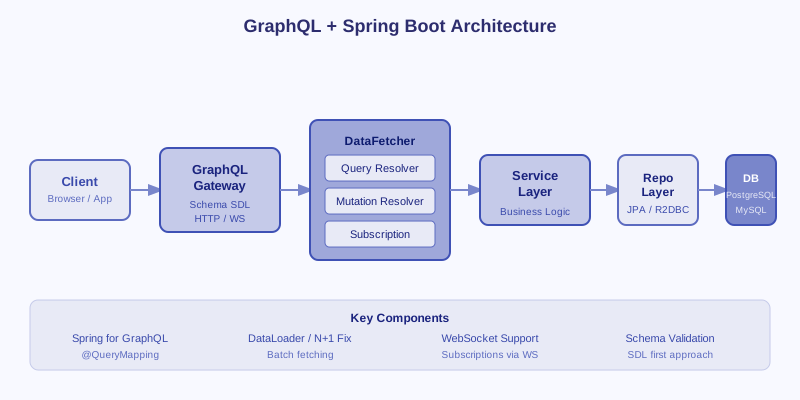
TL;DR — Production Rule in One Sentence
"Use Spring for GraphQL (spring-graphql) with schema-first design. Solve N+1 with DataLoader. Secure with @PreAuthorize + field-level masking. Use WebSocket subscriptions for real-time. Deploy with persisted queries to block introspection in production."
Table of Contents
- Why GraphQL Over REST for Java Backends
- Schema-First Design with Spring for GraphQL
- Resolvers, QueryDSL & Type System Deep Dive
- Solving the N+1 Problem with DataLoader
- GraphQL Subscriptions with WebSocket
- Security: Auth, Authorization & Field Masking
- Error Handling and Custom Scalar Types
- Performance Optimization & Persisted Queries
- Testing GraphQL APIs: @GraphQlTest & Integration Tests
- Production Checklist & 2026 Trends
1. Why GraphQL Over REST for Java Backends
REST APIs have served backend engineers well for over a decade, but they come with structural limitations that become painful at scale. The most common complaints: over-fetching (the endpoint returns 40 fields when the client only needs 5) and under-fetching (one page requires 6 separate API calls to assemble its data). GraphQL solves both by letting the client declare exactly what it needs in a single request.
The BFF Pattern & Mobile Clients
The Backend for Frontend (BFF) pattern — where a dedicated API layer aggregates data for a specific client — becomes significantly simpler with GraphQL. A mobile app, a web dashboard, and an admin panel can all query the same GraphQL endpoint yet retrieve only the fields relevant to each. This eliminates the maintenance overhead of multiple REST BFFs or the performance cost of generic REST responses that include excess data on constrained mobile connections.
| Aspect | REST | GraphQL |
|---|---|---|
| Data fetching | Fixed endpoints, over/under-fetch | Client-specified fields |
| Multiple resources | Multiple round trips | Single query |
| API versioning | /v1/, /v2/ endpoints | Schema evolution with deprecation |
| Real-time | Server-Sent Events/WebSocket | Native Subscriptions |
| Tooling | OpenAPI/Swagger | GraphQL Playground, Introspection |
| Learning curve | Low | Moderate |
When NOT to Use GraphQL
GraphQL is not the right tool for every situation. Avoid it for simple CRUD microservices where REST with OpenAPI is easier to document and maintain. Public, caching-critical APIs (like CDN-served content) are better served by REST because HTTP-level caching is trivial with GET endpoints but awkward with GraphQL POST queries. File upload APIs, webhooks, and streaming binary data are also poor fits. If your API has fewer than 5 entity types and no complex relationship queries, the added complexity of a GraphQL schema is not justified.
2. Schema-First Design with Spring for GraphQL
Spring for GraphQL (spring-boot-starter-graphql) is the official Spring project for GraphQL support. It embraces a schema-first approach: you define the GraphQL schema in .graphqls files, and Spring wires up your annotated Java controllers to the schema automatically. This is the recommended approach over code-first generation because it treats the schema as the API contract — visible to all clients, tooling, and teams.
Maven Dependency
<dependency>
    <groupId>org.springframework.boot</groupId>
    <artifactId>spring-boot-starter-graphql</artifactId>
</dependency>
<dependency>
    <groupId>org.springframework.boot</groupId>
    <artifactId>spring-boot-starter-web</artifactId>
</dependency>
<!-- For subscriptions -->
<dependency>
    <groupId>org.springframework.boot</groupId>
    <artifactId>spring-boot-starter-websocket</artifactId>
</dependency>
Complete Schema Example (schema.graphqls)
type Query {
    book(id: ID!): Book
    books(page: Int, size: Int): BookPage
    booksByAuthor(authorId: ID!): [Book!]!
}
type Mutation {
    createBook(input: CreateBookInput!): Book!
    updateBook(id: ID!, input: UpdateBookInput!): Book!
    deleteBook(id: ID!): Boolean!
}
type Subscription {
    bookAdded: Book!
    orderStatusChanged(orderId: ID!): OrderStatus!
}
type Book {
    id: ID!
    title: String!
    isbn: String!
    publishedYear: Int
    author: Author
    tags: [String!]!
}
type Author {
    id: ID!
    name: String!
    bio: String
    books: [Book!]!
}
type BookPage {
    content: [Book!]!
    totalElements: Int!
    totalPages: Int!
    pageNumber: Int!
}
input CreateBookInput {
    title: String!
    isbn: String!
    authorId: ID!
    publishedYear: Int
    tags: [String!]
}
input UpdateBookInput {
    title: String
    isbn: String
    publishedYear: Int
    tags: [String!]
}
BookController with @QueryMapping and @MutationMapping
@Controller
public class BookController {

    private final BookService bookService;

    public BookController(BookService bookService) {
        this.bookService = bookService;
    }

    @QueryMapping
    public Book book(@Argument Long id) {
        return bookService.findById(id);
    }

    @QueryMapping
    public BookPage books(@Argument int page, @Argument int size) {
        return bookService.findAll(PageRequest.of(page, size));
    }

    @QueryMapping
    public List<Book> booksByAuthor(@Argument Long authorId) {
        return bookService.findByAuthorId(authorId);
    }

    @MutationMapping
    @PreAuthorize("hasRole('EDITOR')")
    public Book createBook(@Argument CreateBookInput input) {
        return bookService.create(input);
    }

    @MutationMapping
    @PreAuthorize("hasRole('EDITOR')")
    public Book updateBook(@Argument Long id, @Argument UpdateBookInput input) {
        return bookService.update(id, input);
    }

    @MutationMapping
    @PreAuthorize("hasRole('ADMIN')")
    public boolean deleteBook(@Argument Long id) {
        bookService.delete(id);
        return true;
    }
}
Enable the GraphiQL IDE for local development in application.properties:
spring.graphql.graphiql.enabled=true
spring.graphql.path=/graphql
spring.graphql.websocket.path=/graphql-ws
3. Resolvers, QueryDSL & Type System Deep Dive
GraphQL's type system includes interfaces, unions, enums, and input types. Understanding how to map these to Spring controllers is essential for real-world schemas.
Nested Resolvers with @SchemaMapping
The @SchemaMapping annotation wires a Java method to a specific field on a parent type. This is how you implement nested resolvers — for example, resolving the author field on each Book:
@Controller
public class BookResolver {

    private final AuthorService authorService;

    // Resolves Book.author field — called once per Book in the result
    @SchemaMapping(typeName = "Book", field = "author")
    public Author author(Book book) {
        return authorService.findById(book.getAuthorId());
        // WARNING: This causes N+1! See Section 4 for DataLoader solution.
    }
}

// Enum mapping in schema:
// enum BookStatus { DRAFT, PUBLISHED, ARCHIVED }
// Maps directly to Java enum with same name — Spring handles conversion automatically
public enum BookStatus {
    DRAFT, PUBLISHED, ARCHIVED
}
QueryDSL Integration for Dynamic Filtering
QueryDSL lets you build type-safe predicates from GraphQL filter arguments instead of writing fragile dynamic JPQL. Add querydsl-jpa and extend QuerydslPredicateExecutor in your repository:
public interface BookRepository extends JpaRepository<Book, Long>,
        QuerydslPredicateExecutor<Book> {}

// In the controller, build predicates from filter arguments:
@QueryMapping
public Page<Book> books(@Argument BookFilter filter, @Argument int page, @Argument int size) {
    QBook qBook = QBook.book;
    BooleanBuilder predicate = new BooleanBuilder();

    if (filter != null) {
        if (filter.getTitle() != null) {
            predicate.and(qBook.title.containsIgnoreCase(filter.getTitle()));
        }
        if (filter.getStatus() != null) {
            predicate.and(qBook.status.eq(filter.getStatus()));
        }
        if (filter.getPublishedAfter() != null) {
            predicate.and(qBook.publishedYear.goe(filter.getPublishedAfter()));
        }
    }
    return bookRepository.findAll(predicate, PageRequest.of(page, size));
}
Input Validation with Spring Validation
Annotate input record/DTO fields with Jakarta Validation constraints and add @Valid to the controller argument. Spring for GraphQL will translate constraint violations into GraphQL errors automatically when combined with a DataFetcherExceptionResolverAdapter.
4. Solving the N+1 Problem with DataLoader
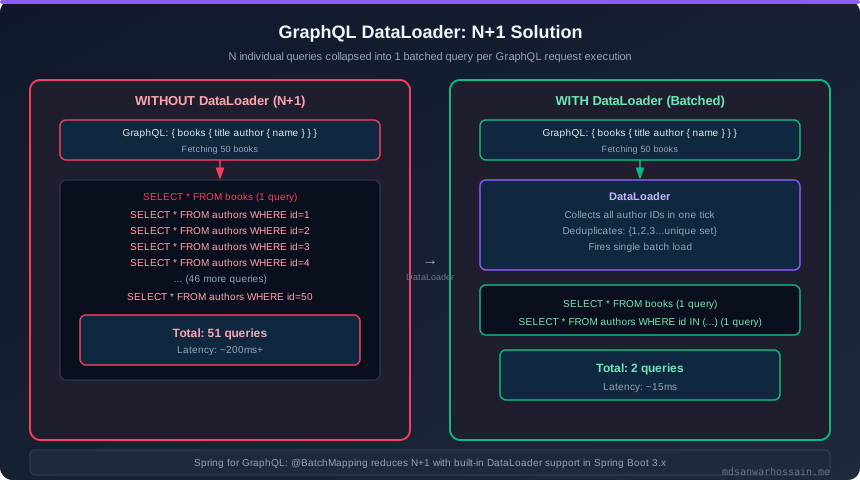
The N+1 problem is the most common performance mistake in GraphQL APIs. When you fetch a list of 50 books and each book resolves its author field, your naive resolver fires 50 individual SQL queries — one per book. At 100 concurrent users doing the same query, you get 5,000 SQL queries per second for what should be 100.
How DataLoader Fixes N+1
DataLoader batches all author ID lookups that occur within a single GraphQL request execution. Instead of 50 individual queries, it collects all 50 author IDs and fires a single SELECT * FROM authors WHERE id IN (...). It also deduplicates — if 30 out of 50 books share the same author, only 1 query is made for that author within the request scope.
BatchLoaderRegistry Configuration
@Configuration
public class DataLoaderConfig {

    @Bean
    public BatchLoaderRegistry batchLoaderRegistry(AuthorRepository authorRepository) {
        BatchLoaderRegistry registry = new DefaultBatchLoaderRegistry();

        registry.forTypePair(Long.class, Author.class)
            .withName("authorLoader")
            .registerMappedBatchLoader((authorIds, env) -> {
                // Single query for all author IDs in the batch
                List<Author> authors = authorRepository.findAllById(authorIds);
                return Mono.just(
                    authors.stream().collect(Collectors.toMap(Author::getId, a -> a))
                );
            });

        return registry;
    }
}
Using DataLoader in the Resolver
@Controller
public class BookResolver {

    // Spring for GraphQL injects the DataLoader by matching the type parameters
    @SchemaMapping(typeName = "Book", field = "author")
    public CompletableFuture<Author> author(Book book,
            DataLoader<Long, Author> authorLoader) {
        // load() defers execution — all loads in a request are batched together
        return authorLoader.load(book.getAuthorId());
    }
}- Caching: DataLoader caches results within a single request. If the same author ID is requested twice in one query, only one DB call is made and the second gets the cached value.
- Deduplication: All
load(id)calls within one GraphQL execution are collected, deduplicated, and dispatched as a single batch at the end of the current execution phase. - Per-request scope: DataLoader instances are created fresh per GraphQL request, so there is no cross-request contamination. Spring for GraphQL handles this lifecycle automatically.
- Nested batching: You can chain DataLoaders — for example, loading books per author can itself batch further nested resolver calls, eliminating deep N+1 chains.
5. GraphQL Subscriptions with WebSocket
GraphQL Subscriptions enable real-time push updates from the server to connected clients. Spring for GraphQL uses Project Reactor's Flux as the streaming primitive over a WebSocket transport. This is significantly cleaner than managing SSE or raw WebSocket frames manually.
Subscription Resolver
@Controller
public class BookSubscriptionController {

    private final Sinks.Many<Book> bookSink = Sinks.many().multicast().onBackpressureBuffer();

    @SubscriptionMapping
    public Flux<Book> bookAdded() {
        return bookSink.asFlux();
    }

    // Called from BookService when a new book is created:
    public void publishNewBook(Book book) {
        bookSink.tryEmitNext(book);
    }
}

// application.properties:
// spring.graphql.websocket.path=/graphql-ws
Filtered Subscription by Order ID
@SubscriptionMapping
public Flux<OrderStatus> orderStatusChanged(@Argument String orderId) {
    return orderStatusSink.asFlux()
        .filter(status -> status.getOrderId().equals(orderId))
        .doOnError(e -> log.error("Subscription error for order {}", orderId, e))
        .onErrorResume(e -> Flux.empty());
}
JavaScript Client Subscription
// Using graphql-ws client library
import { createClient } from 'graphql-ws';

const client = createClient({
  url: 'ws://localhost:8080/graphql-ws',
  connectionParams: {
    Authorization: `Bearer ${token}`
  }
});

const subscription = client.subscribe(
  {
    query: `subscription { bookAdded { id title author { name } } }`
  },
  {
    next: (data) => console.log('New book:', data.data.bookAdded),
    error: (err) => console.error('Subscription error:', err),
    complete: () => console.log('Subscription completed')
  }
);
Spring Security for WebSocket Subscriptions
Secure subscriptions by extracting the JWT from the WebSocket connection parameters using a WebGraphQlInterceptor. The authentication context is propagated through the reactive chain automatically when you use Spring Security's reactive support with ReactiveSecurityContextHolder.
6. Security: Auth, Authorization & Field Masking
GraphQL security has multiple layers: transport security (HTTPS), authentication (JWT/OAuth2), operation-level authorization, and field-level masking for sensitive data. Spring for GraphQL integrates seamlessly with Spring Security for all of these.
Operation-Level Authorization with @PreAuthorize
@MutationMapping
@PreAuthorize("hasRole('ADMIN')")
public boolean deleteBook(@Argument Long id) {
    bookService.delete(id);
    return true;
}

@QueryMapping
@PreAuthorize("hasAnyRole('EDITOR', 'ADMIN')")
public List<Book> drafts() {
    return bookService.findDrafts();
}
WebGraphQlInterceptor for JWT Extraction
@Component
public class AuthInterceptor implements WebGraphQlInterceptor {

    private final JwtDecoder jwtDecoder;

    @Override
    public Mono<WebGraphQlResponse> intercept(WebGraphQlRequest request,
                                               Chain chain) {
        String authHeader = request.getHeaders()
            .getFirst(HttpHeaders.AUTHORIZATION);

        if (authHeader != null && authHeader.startsWith("Bearer ")) {
            String token = authHeader.substring(7);
            try {
                Jwt jwt = jwtDecoder.decode(token);
                Authentication auth = buildAuthentication(jwt);
                return chain.next(request)
                    .contextWrite(ReactiveSecurityContextHolder
                        .withAuthentication(auth));
            } catch (JwtException e) {
                return Mono.error(new GraphQlException("Invalid token"));
            }
        }
        return chain.next(request);
    }
}
Field-Level Security & Masking
For sensitive fields (credit card numbers, PII, internal system IDs), use a @SchemaMapping resolver that masks the value based on the current user's roles. This is more reliable than client-side filtering because it prevents data leakage at the API boundary.
@SchemaMapping(typeName = "User", field = "email")
public String email(User user, Authentication authentication) {
    // Only ADMIN or the user themselves can see the full email
    if (hasAdminRole(authentication) || isCurrentUser(authentication, user)) {
        return user.getEmail();
    }
    // Mask: j***@example.com
    return maskEmail(user.getEmail());
}

private String maskEmail(String email) {
    int atIndex = email.indexOf('@');
    return email.charAt(0) + "***" + email.substring(atIndex);
}
CSRF Protection
GraphQL over HTTP uses POST requests, so CSRF protection applies. For browser-based clients, configure Spring Security's CSRF protection to check the X-Requested-With header. For mobile or server-to-server clients using JWT, CSRF can be disabled for the /graphql endpoint as the Bearer token approach is inherently CSRF-safe.
7. Error Handling and Custom Scalar Types
GraphQL errors should be structured, machine-readable, and include enough context for clients to handle them gracefully. Spring for GraphQL provides DataFetcherExceptionResolverAdapter for centralized error handling.
Custom Exception Resolver
@Component
public class GlobalGraphQlExceptionHandler extends DataFetcherExceptionResolverAdapter {

    @Override
    protected GraphQLError resolveToSingleError(Throwable ex,
                                                DataFetchingEnvironment env) {
        if (ex instanceof BookNotFoundException e) {
            return GraphqlErrorBuilder.newError(env)
                .errorType(ErrorType.NOT_FOUND)
                .message(e.getMessage())
                .extensions(Map.of(
                    "errorCode", "BOOK_NOT_FOUND",
                    "timestamp", Instant.now().toString(),
                    "path", env.getExecutionStepInfo().getPath().toString()
                ))
                .build();
        }
        if (ex instanceof ValidationException e) {
            return GraphqlErrorBuilder.newError(env)
                .errorType(ErrorType.BAD_REQUEST)
                .message("Validation failed: " + e.getMessage())
                .extensions(Map.of("errorCode", "VALIDATION_ERROR"))
                .build();
        }
        return null; // Let Spring handle unknown exceptions
    }
}
Custom Scalar Types
The built-in GraphQL scalar types (String, Int, Float, Boolean, ID) are insufficient for real applications. Use the graphql-java-extended-scalars library for DateTime, UUID, and BigDecimal:
@Component
public class CustomScalarConfiguration implements RuntimeWiringConfigurer {

    @Override
    public void configure(RuntimeWiring.Builder builder) {
        builder.scalar(ExtendedScalars.DateTime);
        builder.scalar(ExtendedScalars.UUID);
        builder.scalar(ExtendedScalars.PositiveBigDecimal);
        builder.scalar(ExtendedScalars.NonNegativeInt);
    }
}

// In schema.graphqls, declare the scalar:
// scalar DateTime
// scalar UUID
// scalar PositiveBigDecimal
//
// Use in types:
// type Book {
//     id: ID!
//     createdAt: DateTime!
//     price: PositiveBigDecimal
// }
Error Response Format
GraphQL always returns HTTP 200 (even for errors) with an errors array in the response body. The extensions map is where you add structured error metadata for client-side error handling:
{
  "data": { "book": null },
  "errors": [
    {
      "message": "Book with ID 42 not found",
      "locations": [{ "line": 2, "column": 3 }],
      "path": ["book"],
      "extensions": {
        "errorCode": "BOOK_NOT_FOUND",
        "timestamp": "2026-04-11T10:30:00Z",
        "classification": "NOT_FOUND"
      }
    }
  ]
}
8. Performance Optimization & Persisted Queries
Without query controls, a GraphQL API is vulnerable to expensive deeply-nested queries, complex queries that time out the database, and schema introspection abuse. These instrumentation techniques harden your API for production.
Query Depth & Complexity Limiting
@Configuration
public class GraphQlInstrumentationConfig {

    @Bean
    public Instrumentation maxDepthInstrumentation() {
        return new MaxQueryDepthInstrumentation(10);
    }

    @Bean
    public Instrumentation maxComplexityInstrumentation() {
        return new MaxQueryComplexityInstrumentation(100);
    }

    // Chain multiple instrumentations
    @Bean
    public GraphQL graphQL(GraphQLSchema schema,
                           List<Instrumentation> instrumentations) {
        ChainedInstrumentation chained = new ChainedInstrumentation(instrumentations);
        return GraphQL.newGraphQL(schema)
            .instrumentation(chained)
            .build();
    }
}
Disabling Introspection in Production
GraphQL introspection exposes your entire schema to any client. Disable it in production to prevent reconnaissance by attackers:
# application-prod.properties
spring.graphql.schema.introspection.enabled=false
spring.graphql.graphiql.enabled=false
Persisted Queries (APQ)
Automatic Persisted Queries (APQ) let clients send a hash of the query instead of the full query string. On first request, the server receives the full query and stores it; subsequent requests send only the hash. This reduces payload size by 70–90% and, critically, allows you to reject any non-persisted queries — blocking arbitrary query injection from malicious clients.
@Bean
public GraphQlSource graphQlSource(GraphQlSourceBuilderCustomizer customizer) {
    // Spring for GraphQL supports APQ via PersistedQuerySupport
    return GraphQlSource.schemaResourceBuilder()
        .schemaResources(new ClassPathResource("graphql/schema.graphqls"))
        .build();
}

// Reject unknown queries in production using a WebGraphQlInterceptor:
@Component
@Profile("prod")
public class PersistedQueryEnforcer implements WebGraphQlInterceptor {

    private final PersistedQueryStore queryStore;

    @Override
    public Mono<WebGraphQlResponse> intercept(WebGraphQlRequest request,
                                               Chain chain) {
        // Only allow queries registered in the persisted query store
        if (!queryStore.contains(request.getDocument())) {
            return Mono.error(new PersistedQueryNotFound());
        }
        return chain.next(request);
    }
}
Response Caching with Spring Cache
Cache the results of expensive, frequently-read queries using Spring's @Cacheable at the service layer. Because GraphQL responses are computed per-query, caching at the resolver level is most effective for queries with stable, frequently-requested arguments. Use a TTL-based Redis cache to avoid serving stale data on mutation-heavy schemas.
9. Testing GraphQL APIs: @GraphQlTest & Integration Tests
Spring for GraphQL provides a dedicated @GraphQlTest slice annotation (similar to @WebMvcTest) that loads only the GraphQL layer without starting the full application context. Combined with GraphQlTester, tests read clearly and cover schema validation, resolver logic, and error handling.
@GraphQlTest Slice Test
@GraphQlTest(BookController.class)
class BookControllerTest {

    @Autowired
    private GraphQlTester graphQlTester;

    @MockBean
    private BookService bookService;

    @Test
    void shouldFetchBookById() {
        Book mockBook = new Book(1L, "Effective Java", "978-0134685991", null);
        Author mockAuthor = new Author(1L, "Joshua Bloch", null);
        mockBook.setAuthor(mockAuthor);

        when(bookService.findById(1L)).thenReturn(mockBook);

        graphQlTester.document("""
            query {
                book(id: "1") {
                    title
                    author { name }
                }
            }
            """)
            .execute()
            .path("book.title").entity(String.class).isEqualTo("Effective Java")
            .path("book.author.name").entity(String.class).isEqualTo("Joshua Bloch");
    }

    @Test
    void shouldReturnErrorForUnknownBook() {
        when(bookService.findById(999L)).thenThrow(new BookNotFoundException(999L));

        graphQlTester.document("""
            query { book(id: "999") { title } }
            """)
            .execute()
            .errors()
            .satisfy(errors -> {
                assertThat(errors).hasSize(1);
                assertThat(errors.get(0).getExtensions())
                    .containsEntry("errorCode", "BOOK_NOT_FOUND");
            });
    }

    @Test
    @WithMockUser(roles = "ADMIN")
    void adminShouldDeleteBook() {
        when(bookService.findById(1L)).thenReturn(mockBook());

        graphQlTester.document("""
            mutation { deleteBook(id: "1") }
            """)
            .execute()
            .path("deleteBook").entity(Boolean.class).isEqualTo(true);
    }
}
Integration Tests with Testcontainers
@SpringBootTest(webEnvironment = SpringBootTest.WebEnvironment.RANDOM_PORT)
@Testcontainers
class BookGraphQlIntegrationTest {

    @Container
    static PostgreSQLContainer<?> postgres =
        new PostgreSQLContainer<>("postgres:16-alpine");

    @DynamicPropertySource
    static void configureProperties(DynamicPropertyRegistry registry) {
        registry.add("spring.datasource.url", postgres::getJdbcUrl);
        registry.add("spring.datasource.username", postgres::getUsername);
        registry.add("spring.datasource.password", postgres::getPassword);
    }

    @Autowired
    private HttpGraphQlTester httpGraphQlTester;

    @Test
    void fullBookLifecycle() {
        // Create
        String bookId = httpGraphQlTester
            .mutate()
            .headers(h -> h.setBearerAuth(editorToken()))
            .build()
            .document("""
                mutation {
                    createBook(input: {
                        title: "Clean Code",
                        isbn: "978-0132350884",
                        authorId: "1"
                    }) { id title }
                }
                """)
            .execute()
            .path("createBook.id").entity(String.class).get();

        // Query
        httpGraphQlTester.document("""
            query { book(id: "%s") { title isbn } }
            """.formatted(bookId))
            .execute()
            .path("book.title").entity(String.class).isEqualTo("Clean Code");
    }
}
Subscription Testing
Test subscriptions using GraphQlTester.Subscription which returns a Flux-backed verifier. Use StepVerifier from Project Reactor to assert the sequence of events emitted over the subscription lifetime.
10. Production Checklist & 2026 Trends
Before deploying a GraphQL API to production, work through this checklist. Each item addresses a real category of production incident observed across Spring GraphQL deployments.
Spring Boot GraphQL Production Checklist
- ✅ Disable introspection in production (
spring.graphql.schema.introspection.enabled=false) - ✅ Enable persisted queries to block arbitrary queries
- ✅ Set max query depth (recommend: 10) with
MaxQueryDepthInstrumentation - ✅ Set max query complexity (recommend: 100) with
MaxQueryComplexityInstrumentation - ✅ Implement DataLoader for all N+1 prone relationships
- ✅ Add
@PreAuthorizeto all mutations and sensitive queries - ✅ Log all GraphQL errors with request context (operation name, variables hash)
- ✅ Enable response compression (gzip) via
server.compression.enabled=true - ✅ Use GraphQL subscriptions over polling for real-time features
- ✅ Add circuit breakers around external data sources used in resolvers
- ✅ Implement field-level masking for PII and sensitive data
- ✅ Set
spring.graphql.graphiql.enabled=falsein production - ✅ Add request timeout instrumentation to prevent long-running queries
- ✅ Monitor DataLoader batch sizes and cache hit rates via Micrometer metrics
2026 Trends in GraphQL for Java
GraphQL Federation with Spring
Apollo Federation v2 support is being integrated into Spring for GraphQL, enabling distributed supergraphs where each microservice owns its subgraph. Teams can compose a unified schema from independent Spring Boot services without a monolithic schema file.
@defer and @stream Directives
The @defer directive allows clients to receive the primary response immediately and stream lower-priority fields incrementally. This dramatically improves perceived performance for dashboards with mixed latency data sources. Spring for GraphQL is tracking this specification for inclusion in 2026.
Subscriptions over Server-Sent Events
The GraphQL over HTTP spec now standardizes subscriptions via Server-Sent Events (SSE) as an alternative to WebSocket. SSE has simpler infrastructure requirements (works through standard HTTP/2 load balancers), making it attractive for Kubernetes environments where WebSocket routing is complex.
GraalVM Native & Virtual Threads
Spring for GraphQL now fully supports GraalVM native image compilation, dramatically reducing startup time for serverless GraphQL deployments. Combined with Java 21 virtual threads, DataLoader's CompletableFuture-based batching achieves higher throughput with lower thread overhead on I/O-bound resolver chains.
The Java GraphQL ecosystem in 2026 is mature, production-ready, and well-integrated into the Spring Boot ecosystem. Teams adopting Spring for GraphQL benefit from first-class Spring Security integration, a clean annotation model, and the full reactive programming model via Project Reactor — making it the most complete GraphQL solution for JVM backends.
