Temporal Workflow Engine for Microservice Orchestration: Durable Execution at Production Scale
The order had been placed. Payment was charged. But three days later the customer received two shipments and one refund for an order that had never been cancelled. The culprit was a fintech platform's homegrown saga choreography that failed to handle a transient network partition between the inventory service and the shipping service — leaving the workflow state permanently inconsistent with no compensation logic triggered. The engineering team had spent months building retry queues, dead letter handlers, and reconciliation jobs around Kafka to approximate reliability. They needed something fundamentally different: a system where long-running distributed transactions are durable by design. That system is Temporal.
Table of Contents
- What Is Temporal? The Durable Execution Model
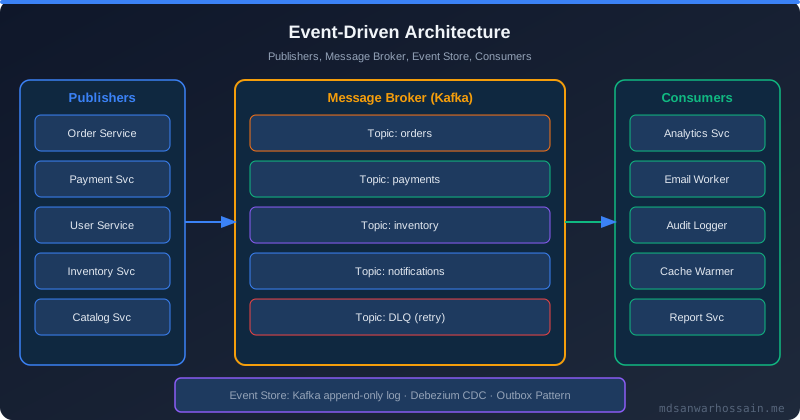
- Temporal vs Saga vs Message Queues vs Step Functions
- Core Concepts: Workflows, Activities, Workers, Signals
- Java SDK Deep Dive
- Real-World: E-Commerce Order Fulfillment Workflow
- Workflow Versioning for Zero-Downtime Deployments
- Worker Scaling on Kubernetes
- Failure Scenarios and Limits
- When NOT to Use Temporal
- Observability: Web UI, Metrics & Tracing
- Key Takeaways
1. What Is Temporal? The Durable Execution Model
Temporal is an open-source durable execution platform originally developed at Uber (as Cadence) and subsequently rewritten and released as Temporal. Its central promise is that your workflow code — written as ordinary sequential Java (or Go, Python, TypeScript) — executes durably across failures. If a worker crashes mid-workflow, Temporal automatically replays the workflow history on another worker to reconstruct the exact execution state and continue from where it left off. From the programmer's perspective, the code never crashed: the await or blocking call simply resumes.
Internally, Temporal persists every event that occurs in a workflow to a durable event history stored in a database (Cassandra or PostgreSQL). The server has four main services: Frontend (gRPC API gateway for SDK clients and Web UI), History (owns workflow state, applies events, schedules tasks), Matching (routes tasks to available workers via task queues), and Worker service — your application code, running as Temporal Workers that poll task queues.
The key insight is deterministic replay: workflow code must be deterministic (no random numbers, no direct time calls, no external I/O) so that Temporal can replay the history to reconstruct state. All non-deterministic operations — HTTP calls, database queries, time — are wrapped in Activities that are scheduled as separate tasks, executed at most once per schedule, and their results recorded in the history. On replay, the recorded result is returned instead of re-executing the activity.
2. Temporal vs Saga vs Message Queues vs Step Functions
Understanding where Temporal fits requires comparing it to existing patterns:
| Dimension | Saga (Choreography) | Message Queue (Kafka) | AWS Step Functions | Temporal |
|---|---|---|---|---|
| State ownership | Each service | Each service | Step Functions | Temporal History |
| Failure recovery | Manual compensation | DLQ + manual | Retry + catch | Automatic replay |
| Long-running | Complex | Complex | Yes (1 year max) | Yes (unlimited) |
| Debugging | Distributed logs | Distributed logs | Visual console | Full event history + Web UI |
| Versioning | Event schema | Schema registry | State machine versions | Workflow.getVersion() |
| Vendor lock-in | None | Kafka ecosystem | AWS only | Open source / Temporal Cloud |
3. Core Concepts: Workflows, Activities, Workers, Signals
Workflows are durable functions that orchestrate activities. They must be deterministic — no direct I/O — and execute inside a Worker process. Their execution history is stored in Temporal's database. A workflow can run for seconds or years.
Activities are the non-deterministic units of work: HTTP calls, database writes, email sends. Each activity execution is scheduled, executed by a worker, and its result is recorded. Activities support automatic retries with exponential backoff and a maximum attempt count. They can be called synchronously (workflow awaits the result) or asynchronously.
Workers are your application processes. They poll a named task queue for workflow tasks and activity tasks and execute them. You can have separate worker pools for workflow execution and activity execution to scale independently.
Signals allow external processes to send events into a running workflow. A workflow can wait for a signal (Workflow.await()) without consuming any server resources while blocked. Queries allow external processes to read workflow state synchronously. Timers (Workflow.sleep()) are durable — a workflow sleeping for 7 days survives worker restarts without cost.
Task Queues are named logical queues that decouple workflow scheduling from worker execution. Each worker polls one or more task queues. You can have separate task queues per environment, per service, or per priority tier.
4. Java SDK Deep Dive
The Temporal Java SDK uses interface-based workflow and activity definitions. The framework generates the workflow stub — a proxy that dispatches calls to Temporal rather than running locally.
// Activity interface
@ActivityInterface
public interface OrderActivities {
    @ActivityMethod
    String chargePayment(String orderId, BigDecimal amount);

    @ActivityMethod
    void reserveInventory(String orderId, List<String> skus);

    @ActivityMethod
    String createShipment(String orderId, Address address);

    @ActivityMethod
    void sendConfirmationEmail(String orderId, String email);

    @ActivityMethod
    void refundPayment(String orderId);

    @ActivityMethod
    void releaseInventory(String orderId);
}

// Workflow interface
@WorkflowInterface
public interface OrderFulfillmentWorkflow {
    @WorkflowMethod
    OrderResult fulfillOrder(OrderRequest request);

    @SignalMethod
    void cancelOrder(String reason);

    @QueryMethod
    String getStatus();
}
// Workflow implementation
public class OrderFulfillmentWorkflowImpl implements OrderFulfillmentWorkflow {
private final OrderActivities activities = Workflow.newActivityStub(
OrderActivities.class,
ActivityOptions.newBuilder()
.setStartToCloseTimeout(Duration.ofSeconds(30))
.setRetryOptions(RetryOptions.newBuilder()
.setMaximumAttempts(3)
.setInitialInterval(Duration.ofSeconds(2))
.setBackoffCoefficient(2.0)
.setDoNotRetry(PaymentDeclinedException.class.getName())
.build())
.build()
);
private boolean cancelRequested = false;
private String currentStatus = "STARTED";
@Override
public OrderResult fulfillOrder(OrderRequest request) {
currentStatus = "CHARGING_PAYMENT";
String paymentId = activities.chargePayment(
request.getOrderId(), request.getAmount());
if (cancelRequested) {
activities.refundPayment(request.getOrderId());
return OrderResult.cancelled("Cancelled before inventory");
}
currentStatus = "RESERVING_INVENTORY";
try {
activities.reserveInventory(
request.getOrderId(), request.getSkus());
} catch (InventoryUnavailableException e) {
activities.refundPayment(request.getOrderId());
return OrderResult.failed("Inventory unavailable");
}
currentStatus = "CREATING_SHIPMENT";
String trackingId = activities.createShipment(
request.getOrderId(), request.getShippingAddress());
currentStatus = "NOTIFYING";
activities.sendConfirmationEmail(
request.getOrderId(), request.getCustomerEmail());
currentStatus = "COMPLETED";
return OrderResult.success(paymentId, trackingId);
}
@Override
public void cancelOrder(String reason) {
this.cancelRequested = true;
}
@Override
public String getStatus() {
return currentStatus;
}
}// Worker setup (Spring Boot)
@Configuration
public class TemporalWorkerConfig {
@Bean
public WorkflowClient workflowClient() {
WorkflowServiceStubs service = WorkflowServiceStubs.newLocalServiceStubs();
return WorkflowClient.newInstance(service,
WorkflowClientOptions.newBuilder()
.setNamespace("orders")
.build());
}
@Bean(initMethod = "start", destroyMethod = "shutdown")
public Worker orderWorker(WorkflowClient client,
OrderActivitiesImpl activitiesImpl) {
WorkerFactory factory = WorkerFactory.newInstance(client);
Worker worker = factory.newWorker("order-fulfillment-queue",
WorkerOptions.newBuilder()
.setMaxConcurrentWorkflowTaskExecutionSize(50)
.setMaxConcurrentActivityExecutionSize(100)
.build());
worker.registerWorkflowImplementationTypes(
OrderFulfillmentWorkflowImpl.class);
worker.registerActivitiesImplementations(activitiesImpl);
return worker;
}
}5. Real-World: E-Commerce Order Fulfillment Workflow
The order fulfillment workflow above models the complete happy path and two failure compensation paths. Consider what happens in each failure scenario:
- Payment service times out at 30s: Temporal retries the
chargePaymentactivity up to 3 times with exponential backoff (2s, 4s, 8s). If all attempts fail, the activity throws and the workflow catches it and returns a failure result. - Worker crashes after payment but before inventory: The workflow history recorded that payment succeeded. On replay by a new worker, Temporal returns the recorded paymentId without re-charging. Execution resumes at the inventory reservation step.
- Cancel signal arrives during inventory reservation: The
cancelRequestedflag is checked after payment. If set, the refund activity fires and the workflow returns a cancelled result. The compensation is explicit in the workflow code — no separate saga coordinator needed. - Inventory service returns InventoryUnavailableException: The workflow catches the exception, fires refund as compensation, and completes with a failure result. No message bus event needed to trigger the refund.
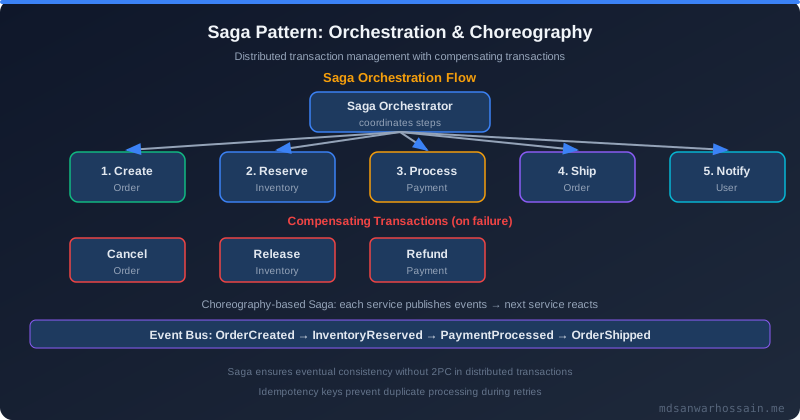
This is the core value proposition: business logic and compensation logic coexist in readable sequential code. Distributed saga choreography requires spreading this logic across multiple services and event handlers, making it nearly impossible to reason about all failure paths.
6. Workflow Versioning for Zero-Downtime Deployments
Workflow versioning is Temporal's most operationally critical feature. Because Temporal replays workflow history, any change to workflow code that alters the sequence of commands will break existing running workflows. If you add a new activity call between chargePayment and reserveInventory, the replay of a workflow that started before the deployment will diverge from its history — a non-determinism error.
The solution is Workflow.getVersion(), a marker that records a version integer into the history at a named change point:
public OrderResult fulfillOrder(OrderRequest request) {
    // Versioned change: v1 = original, v2 = added fraud check
    int version = Workflow.getVersion("add-fraud-check",
        Workflow.DEFAULT_VERSION, 2);

    currentStatus = "CHARGING_PAYMENT";
    String paymentId = activities.chargePayment(
        request.getOrderId(), request.getAmount());

    if (version >= 2) {
        // New activity only executed for workflows started after this deployment
        activities.runFraudCheck(request.getOrderId());
    }

    // ... rest of workflow
}
Old workflows replaying their history will get DEFAULT_VERSION (-1) back from getVersion — they skip the fraud check. New workflows started after deployment get version 2 and run the fraud check. Once all old workflows complete, the version guard can be removed in a subsequent deployment. This enables safe rolling workflow code upgrades without stopping running workflows.
7. Worker Scaling on Kubernetes
Temporal workers are stateless — they hold no workflow state — making them horizontally scalable on Kubernetes. Key scaling considerations:
- Sticky execution: Temporal routes workflow tasks to the same worker that last executed them (sticky execution cache). This minimizes replay overhead — the worker has the workflow execution in memory and can continue without replaying history. Set
setStickyScheduleToStartTimeoutappropriately; if the worker disappears, the task is routed to any worker which performs a full replay. - Separate workflow and activity workers: Activity workers can be scaled independently. CPU-intensive activities (e.g., PDF generation) can run on a dedicated high-CPU worker pool while lightweight workflow orchestration workers run on small instances.
- Task queue partitioning: Use separate task queues per service tier (e.g.,
orders-high-priority,orders-bulk) to prevent bulk processing from starving real-time workflows. Each task queue gets its own worker deployment in Kubernetes. - KEDA autoscaling: Use KEDA's Temporal scaler to autoscale worker deployments based on task queue backlog depth. When the queue depth exceeds threshold, KEDA scales up workers; when empty, scales down to minimum replicas.
8. Failure Scenarios and Limits
Workflow History Size Limit
Temporal enforces a default limit of 50,000 events per workflow history. A workflow with thousands of activity calls or signal receives can hit this limit — resulting in a WORKFLOW_EXECUTION_TIMED_OUT or forced workflow termination. The solution is Continue-As-New: the workflow completes itself and starts a fresh execution with the current state passed as the new input, resetting the history counter.
// Handle history size limit with Continue-As-New
if (processedCount % 1000 == 0 && processedCount > 0) {
    // Carry state forward into new execution
    Workflow.continueAsNew(new BatchState(processedCount, lastProcessedId));
}
Activity Timeout Misconfiguration
A common production issue: setting setScheduleToCloseTimeout (total budget including all retries) too low. If an activity has 3 retries with 30s each, the schedule-to-close timeout must be at least 90s + backoff time. A timeout shorter than this causes the workflow to fail before all retries are exhausted.
Temporal Server Downtime
Workers cannot poll during server downtime. In-progress activities that were dispatched before downtime will complete normally (activities run in workers, not the server). Workflows awaiting activity results will resume when the server comes back. This is a critical difference from message brokers: Temporal server downtime does not lose data — all state is in the persistent database.
9. When NOT to Use Temporal
- High-throughput, low-latency pipelines: Temporal adds coordination overhead (gRPC round-trips to the server per activity). For sub-10ms latency requirements or millions of events per second, Kafka is more appropriate.
- Simple fire-and-forget tasks: If a task has no compensation logic and can be retried independently, a message queue with a dead letter queue is simpler and cheaper.
- Short-lived ephemeral tasks: Temporal's value shines for multi-step, stateful, long-running workflows. Single-step operations gain no benefit from the durable execution model.
- Extremely cost-sensitive environments: Running a Temporal cluster (Frontend, History, Matching services + Cassandra/PostgreSQL) has real operational and infrastructure cost. Temporal Cloud removes this but adds per-action pricing.
10. Observability: Web UI, Metrics & Tracing
Temporal Web UI provides full visibility into every running and completed workflow: the complete event history, current state, input/output of each activity, pending timers, and signal history. This makes debugging a production incident dramatically simpler than piecing together distributed logs — you see the full execution timeline in one place.
Prometheus metrics are exposed by Temporal server and workers: temporal_workflow_task_execution_latency, temporal_activity_execution_latency, temporal_task_queue_backlog. Alert on temporal_request_failure_total for server-side errors and temporal_worker_task_slots_available approaching zero (worker saturation).
OpenTelemetry tracing is supported via the Temporal SDK interceptors. Each workflow execution and activity invocation can emit spans, propagating trace context to downstream HTTP calls made within activities. This provides end-to-end trace correlation from the initial API call through the entire multi-step workflow.
"The best distributed transaction is the one you don't have to coordinate. Temporal doesn't eliminate distributed systems complexity — it relocates it from your business logic into the infrastructure, where it belongs."
11. Key Takeaways
- Temporal's durable execution model eliminates the need for manual retry queues, state reconciliation jobs, and complex saga choreography in long-running distributed workflows.
- Workflow code must be deterministic; all I/O is encapsulated in Activities which have retry policies, timeouts, and their results stored in history.
- Use
Workflow.getVersion()for every breaking change to workflow logic — it is the only safe way to deploy changes to running workflows. - Workflows hitting history limits should use Continue-As-New to carry forward state into a fresh execution.
- Temporal is not appropriate for high-throughput low-latency pipelines or simple stateless tasks — these are better served by Kafka or basic message queues.
- The Temporal Web UI provides unparalleled debugging capability: full event history, step-by-step execution timeline, and input/output of every activity.
Architecture Diagram Idea
Swimlane diagram: Client → Temporal Frontend → Task Queue → Workflow Worker (Workflow Execution) → Activity Worker (chargePayment → HTTP → Payment Service | reserveInventory → HTTP → Inventory Service | createShipment → HTTP → Shipping Service) → Temporal History Service → Cassandra DB. Show signal injection from Cancel API. Show replay path on worker failure.
Leave a Comment
Related Posts

Software Engineer · Java · Spring Boot · Microservices