Zero Trust Security for Microservices: mTLS, SPIFFE/SPIRE, and Service Mesh Policies
In a microservices architecture, the network perimeter dissolves. Services spread across Kubernetes nodes, cloud regions, and third-party APIs — traditional VPN-plus-firewall security leaves enormous lateral movement opportunities for attackers. Zero Trust flips the model: every service must prove its identity before every call, every connection is encrypted, and authorization is evaluated continuously at runtime, not assumed from network location.
TL;DR
"Complete guide to Zero Trust security for microservices: mTLS mutual authentication, SPIFFE/SPIRE workload identity, service mesh policies with Istio/Linkerd, and OPA authorization for Kubernetes."
Table of Contents
- Why Perimeter Security Fails for Microservices
- Zero Trust Pillars for Distributed Systems
- mTLS: Mutual TLS Service-to-Service Authentication
- SPIFFE and SPIRE: Workload Identity for Kubernetes
- Service Mesh Policies: Istio AuthorizationPolicy
- OPA: Open Policy Agent for Fine-Grained Authorization
- Zero Trust Observability: Audit and Telemetry
- Migration Path from Perimeter to Zero Trust
Why Perimeter Security Fails for Microservices
The traditional perimeter security model assumes that everything inside the corporate network is trusted and everything outside is hostile. This model worked reasonably well when applications ran on dedicated servers in a single data center behind a hardware firewall. It completely breaks down for microservices.
A typical production microservices platform has hundreds of services communicating with each other across multiple Kubernetes clusters, managed cloud services, and third-party APIs. The "inside the perimeter" concept is meaningless when your order service runs in us-east-1, your payment processor is a SaaS in us-west-2, and your data warehouse is in eu-central-1. More critically, perimeter security provides zero protection against lateral movement — if an attacker compromises any single service through a vulnerability, they can call every other service freely because service-to-service calls on the internal network are implicitly trusted.
Real incidents confirm this. The Capital One breach in 2019 began with an SSRF vulnerability in a single misconfigured WAF. Once inside, the attacker called AWS metadata endpoints freely because internal service calls were trusted. The SolarWinds attack demonstrated how supply chain compromises can introduce trusted but malicious code that communicates freely on internal networks. In each case, the breach of the perimeter was sufficient to access everything.
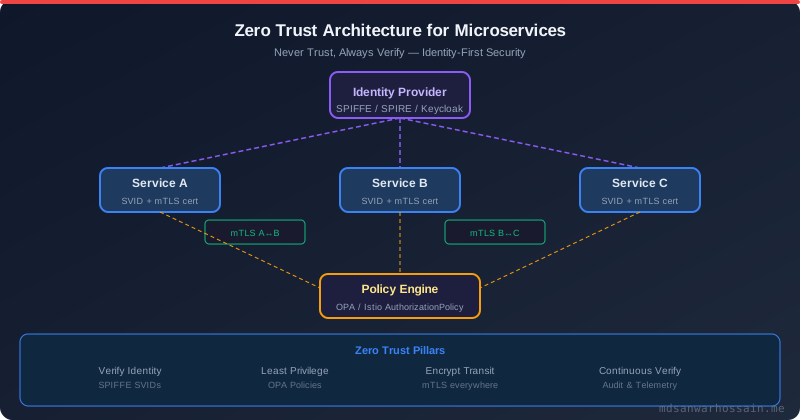
Zero Trust addresses this by enforcing authentication, authorization, and encryption on every service-to-service call, regardless of network location. The three core principles are: never trust, always verify (every call requires proof of identity); least privilege access (services can only call the specific endpoints they need, not all endpoints on all services); and assume breach (design your authorization model as if the network is already compromised, because statistically it may be).
Zero Trust Pillars for Distributed Systems
Zero Trust for microservices has five concrete technical pillars, each addressing a different attack vector.
Service Identity replaces IP-address-based trust with cryptographic workload identity. Each microservice gets a short-lived X.509 certificate that proves "I am the payment service running in the production Kubernetes namespace on node X" — not just "I am a server at 10.0.1.15". This identity is issued by a trusted certificate authority and automatically rotated every hour, limiting the blast radius of a compromised certificate.
Mutual TLS (mTLS) uses those identities to encrypt and authenticate every service-to-service connection. Unlike standard TLS (where only the server presents a certificate), mTLS requires both sides to present certificates. The calling service proves it is the order service; the called service proves it is the payment service. Man-in-the-middle attacks are cryptographically impossible even on internal networks.
Authorization Policies define which service identities are permitted to call which other services and which specific endpoints. The recommendation service can call the product catalog service's GET /products endpoint — but it cannot call POST /products (which modifies catalog data) and it cannot call the payment service at all. These policies are enforced at the network layer by the service mesh, not as application code.
Continuous Verification means authorization is evaluated on every request, not just at connection time. Token expiry, policy changes, and revocations take effect immediately rather than waiting for the next connection to be established.
Observability and Audit provide the full cryptographically-verified audit trail of which service identity called which other service identity, when, and with what result — essential for incident response and compliance.
mTLS: Mutual TLS Service-to-Service Authentication
Implementing mTLS manually — generating certificates, distributing them to every service, rotating them before expiry, handling revocation — is operationally complex enough that most teams gave up and used network-level controls instead. Service meshes exist precisely to automate this.
With Istio, enabling mTLS across an entire namespace requires a single YAML resource:
apiVersion: security.istio.io/v1beta1
kind: PeerAuthentication
metadata:
  name: default
  namespace: production
spec:
  mtls:
    mode: STRICT
STRICT mode means all inbound connections to any pod in the production namespace must use mTLS. Plain-text connections are rejected. If you set mode: PERMISSIVE, both mTLS and plain-text are accepted — this is useful during migration to Zero Trust when some services haven't been onboarded to the mesh yet.
Istio's Envoy sidecar proxies handle certificate issuance, rotation, and presentation transparently. Your application code never needs to know about TLS — it makes a plain HTTP call to a localhost port, and the sidecar handles the mTLS handshake with the destination service's sidecar. This means your Spring Boot application code is unchanged; only the Kubernetes deployment spec gains an Istio injection annotation.
For verifying mTLS is working, you can inspect the Envoy sidecar's configuration:
# Check that connections between services are using mTLS
istioctl x authz check <pod-name> -n production

# View the certificate details for a pod's sidecar
istioctl proxy-config secret <pod-name>.production

# See all mTLS connections and their cipher suites
kubectl exec -n production <pod-name> -c istio-proxy -- \
  pilot-agent request GET /certs | jq .
One common misconfiguration is having STRICT mTLS on the destination namespace but not on the source namespace, which means the source pod has no sidecar and its connections are rejected. Always verify that both source and destination pods have Istio sidecar injection enabled before enforcing STRICT mode.
SPIFFE and SPIRE: Workload Identity for Kubernetes
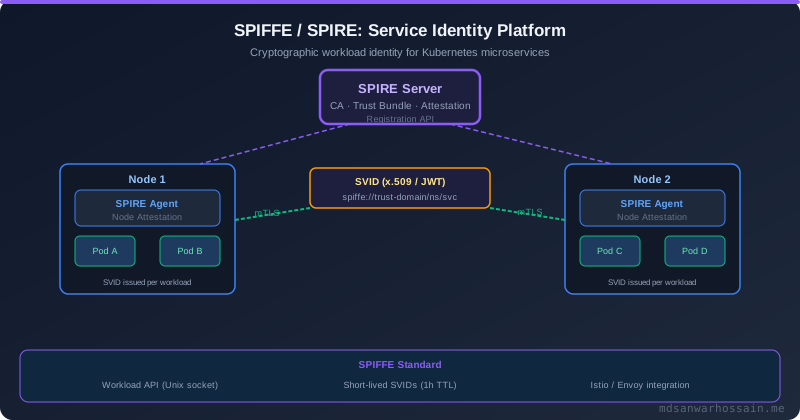
SPIFFE (Secure Production Identity Framework For Everyone) is a CNCF standard that defines a universal identity format for workloads, independent of platform, cloud provider, or technology stack. SPIRE (SPIFFE Runtime Environment) is the reference implementation that issues SPIFFE Verifiable Identity Documents (SVIDs) to workloads running on Kubernetes, VMs, or bare metal.
A SPIFFE ID is a URI of the form spiffe://<trust-domain>/<workload-path>. For example: spiffe://production.example.com/ns/payment/sa/payment-service. This identity encodes the trust domain (your organization), the Kubernetes namespace, and the service account — giving you a cryptographically verifiable, human-readable identity that works across cloud boundaries.
SPIRE consists of two components. The SPIRE Server acts as a certificate authority for your trust domain. It maintains a registration database mapping workload selectors (Kubernetes pod labels, service account names, node identities) to SPIFFE IDs. The SPIRE Agent runs as a DaemonSet on each Kubernetes node and is responsible for attesting the node's identity to the server (using the Kubernetes node attestor, which verifies the node's service account token with the Kubernetes API), then issuing SVIDs to workloads on that node via a Unix domain socket Workload API.
# Install SPIRE with Helm
helm repo add spire https://spiffe.github.io/helm-charts/
helm install spire spire/spire \
  --namespace spire-system --create-namespace \
  --set global.trustDomain=production.example.com \
  --set spire-server.replicaCount=3 \
  --set spire-agent.enabled=true

# Register a workload entry for the payment service
kubectl exec -n spire-system deploy/spire-server -- \
  /opt/spire/bin/spire-server entry create \
    -spiffeID spiffe://production.example.com/ns/payment/sa/payment-service \
    -parentID spiffe://production.example.com/spire/agent/k8s_psat/production/node1 \
    -selector k8s:ns:payment \
    -selector k8s:sa:payment-service \
    -ttl 3600
The workload entry declares: "any pod in namespace payment running under service account payment-service should receive the SPIFFE ID spiffe://production.example.com/ns/payment/sa/payment-service with a certificate valid for 1 hour." The SPIRE Agent validates the pod's Kubernetes service account token, verifies it matches the selectors, and issues an X.509 SVID to the pod via the Workload API socket at /run/spire/sockets/agent.sock.
Integrating SPIRE with Istio is straightforward with the SPIRE CSI driver or the Istio SPIFFE integration. Instead of using Istio's built-in CA (istiod), you configure Istio to use SPIRE as its external CA. This gives you a single workload identity platform that works across your service mesh, your HashiCorp Vault integration, and any non-mesh gRPC services that implement the Workload API directly.
# Configure Istio to use SPIRE as the external CA
apiVersion: install.istio.io/v1alpha1
kind: IstioOperator
spec:
  values:
    pilot:
      env:
        EXTERNAL_CA: "true"
        USE_EXTERNAL_ISTIOCA: "true"
  meshConfig:
    caAddress: "unix:///run/spire/sockets/agent.sock"
Service Mesh Policies: Istio AuthorizationPolicy
Once every service has a verified SPIFFE identity and mTLS is enforced, you can write authorization policies that specify exactly which service identities are permitted to call which other services. Istio's AuthorizationPolicy resource lets you express these rules at the namespace, service, or individual endpoint level.
# Allow only the order service to call the payment service's charge endpoint
apiVersion: security.istio.io/v1beta1
kind: AuthorizationPolicy
metadata:
  name: payment-service-authz
  namespace: payment
spec:
  selector:
    matchLabels:
      app: payment-service
  action: ALLOW
  rules:
  - from:
    - source:
        principals:
          - "cluster.local/ns/order/sa/order-service"
    to:
    - operation:
        methods: ["POST"]
        paths: ["/v1/charges", "/v1/refunds"]
  - from:
    - source:
        principals:
          - "cluster.local/ns/finance/sa/reconciliation-service"
    to:
    - operation:
        methods: ["GET"]
        paths: ["/v1/transactions/*"]
This policy says: the payment service accepts POST requests to /v1/charges and /v1/refunds only from the order service's service account identity, and GET requests to /v1/transactions/* only from the reconciliation service. Any other caller — including other services in the same namespace — receives a 403 RBAC: access denied response from the Envoy proxy before the request even reaches your Spring Boot application.
Istio also supports DENY policies for explicit blocklists and AUDIT policies that log without blocking — useful during the rollout phase when you want to verify policy coverage before enforcing it. The combination of a default-deny namespace policy with explicit allow rules implements the principle of least privilege at the network layer:
# Default deny-all for the payment namespace
apiVersion: security.istio.io/v1beta1
kind: AuthorizationPolicy
metadata:
  name: deny-all
  namespace: payment
spec:
  {}
  # Empty spec = deny all inbound traffic by default
  # Explicit ALLOW policies above override this
OPA: Open Policy Agent for Fine-Grained Authorization
Istio AuthorizationPolicy handles network-level authorization — which service identity can call which endpoint. For application-level authorization — can this specific user (from the JWT claim) perform this specific action on this specific resource — you need OPA (Open Policy Agent).
OPA is a general-purpose policy engine that evaluates Rego policies against JSON input. In a microservices context, it is typically deployed as a sidecar (using Gatekeeper or OPA Envoy Plugin) that intercepts requests and evaluates authorization before they reach your application:
# OPA Rego policy for payment service authorization
package payment.authz

import future.keywords.if
import future.keywords.in

default allow := false

# Allow if the caller's JWT role is "finance-admin" OR
# the JWT sub matches the resource owner
allow if {
    claims := jwt_claims
    "finance-admin" in claims.roles
}

allow if {
    claims := jwt_claims
    claims.sub == input.resource.owner_id
    input.method == "GET"
}

jwt_claims := payload if {
    [_, payload, _] := io.jwt.decode(input.token)
}

# Deny any attempt to access another tenant's data
deny if {
    claims := jwt_claims
    claims.tenant_id != input.resource.tenant_id
}
OPA is integrated into the Envoy sidecar via the OPA Envoy Plugin, which implements the Envoy External Authorization API. Each request is evaluated against the policy before reaching your service. The evaluation is sub-millisecond because OPA caches compiled policies and uses partial evaluation to optimize repeated checks.
For Kubernetes admission control, OPA Gatekeeper enforces policies on Kubernetes resource creation — ensuring that pods cannot be deployed without required security contexts, that images must come from approved registries, and that services cannot expose privileged ports. This prevents Zero Trust misconfigurations at the infrastructure level before they reach production.
Zero Trust Observability: Audit and Telemetry
Zero Trust security without observability is incomplete. You need to be able to answer: which service called which other service, with which identity, at what time, and was it authorized or denied? This audit trail is essential for incident response, compliance (PCI DSS, SOC 2, HIPAA), and forensic analysis.
Istio generates access logs for every mTLS connection that include the source principal (SPIFFE identity), destination principal, request path, response code, and authorization result. Configure structured JSON logging to ship these to your SIEM:
apiVersion: networking.istio.io/v1alpha3
kind: EnvoyFilter
metadata:
  name: access-log-format
  namespace: istio-system
spec:
  configPatches:
  - applyTo: NETWORK_FILTER
    match:
      context: ANY
      listener:
        filterChain:
          filter:
            name: "envoy.filters.network.http_connection_manager"
    patch:
      operation: MERGE
      value:
        typed_config:
          "@type": "type.googleapis.com/envoy.extensions.filters.network.http_connection_manager.v3.HttpConnectionManager"
          access_log:
          - name: envoy.access_loggers.file
            typed_config:
              "@type": "type.googleapis.com/envoy.extensions.access_loggers.file.v3.FileAccessLog"
              path: /dev/stdout
              log_format:
                json_format:
                  timestamp: "%START_TIME%"
                  src_principal: "%DOWNSTREAM_PEER_SUBJECT%"
                  dst_principal: "%UPSTREAM_PEER_SUBJECT%"
                  method: "%REQ(:METHOD)%"
                  path: "%REQ(X-ENVOY-ORIGINAL-PATH?:PATH)%"
                  response_code: "%RESPONSE_CODE%"
                  duration_ms: "%DURATION%"
                  authz_result: "%DYNAMIC_METADATA(envoy.filters.http.rbac:shadow_denied)%"
Beyond access logs, Istio's telemetry integration with Prometheus exposes metrics on mTLS handshake failures, authorization policy denials, and certificate expiry. Set up Prometheus alerts for:
• High rate of mTLS handshake failures (potential certificate misconfiguration or attack)
• Unexpected authorization denials (policy misconfiguration or lateral movement attempt)
• Certificate TTL below 10 minutes (rotation may be failing)
Migration Path from Perimeter to Zero Trust
Migrating a live production platform from perimeter security to Zero Trust requires a phased approach. Attempting to enable STRICT mTLS across all namespaces simultaneously will break services that haven't been onboarded to the mesh, causing a production outage.
Phase 1: Inventory and Observability (Week 1–2). Install Istio in PERMISSIVE mode, where mTLS is accepted but not required. Deploy Kiali to visualize the service graph and identify all service-to-service communication. This gives you the complete call graph before you start enforcing policies.
Phase 2: SPIRE Deployment and Identity Registration (Week 2–4). Deploy SPIRE Server and Agent. Register workload entries for each service. Verify that SVIDs are being issued correctly using spire-server bundle show and by inspecting the Workload API socket output on each pod.
Phase 3: STRICT mTLS by Namespace (Week 4–8). Enable STRICT mTLS one namespace at a time, starting with the least-connected namespaces. For each namespace, switch from PERMISSIVE to STRICT, monitor for mTLS handshake failures in Prometheus/Kiali, and only proceed to the next namespace when the current one is clean.
Phase 4: Authorization Policies (Week 8–12). Start with AUDIT mode AuthorizationPolicies that log which service identities are actually making calls without blocking them. Use these logs to verify the correct set of allowed callers before switching policies to ALLOW mode with default-deny. This prevents service disruption from overly restrictive policies.
Phase 5: OPA Integration and Compliance Reporting (Week 12–16). Deploy OPA for application-level authorization. Integrate access logs with your SIEM for compliance reporting. Configure certificate expiry alerts and automated rotation monitoring.
A Zero Trust migration is a multi-month initiative, not a weekend project. The key is starting with observability, moving incrementally, and verifying at each phase before proceeding. The payoff — elimination of lateral movement, cryptographic audit trails, and automatic compliance evidence — is worth the investment for any platform handling sensitive data.
Leave a Comment
Related Posts

Software Engineer · Java · Spring Boot · Microservices