Agentic AI Planning and Replanning: How to Build Agents That Adapt When the World Changes
Design adaptive AI agents that notice when reality diverges from their plan. This guide shows how to wire planning, evaluation, and replanning loops with explicit triggers so production agents recover safely instead of thrashing.
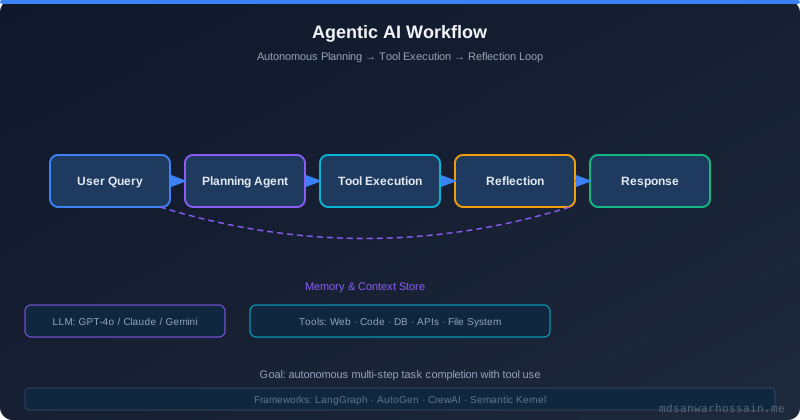
Table of Contents
- The Agent That Got Stuck
- The Plan-Act-Observe Loop
- Static vs Dynamic Planning Approaches
- When to Replan: The Three Triggers
- Implementing a Replanning Trigger System
- Plan Validation Before Execution
- Architecture: Planner, Executor, Observer, Replanner
- Production Failure Scenarios
- Trade-offs: When NOT to Replan
- Observability for Planning Systems
- Key Takeaways
- Read More
Focus keywords: agentic AI planning replanning, LLM agent task planning failure recovery, AI agent dynamic replanning, multi-step agent planning, AI agent state machine.
The Agent That Got Stuck
The team had spent three months building a code-deployment agent. The goal was ambitious: give it a feature branch name and a target environment, and it would run tests, build Docker images, push them to the registry, update the Kubernetes manifests in the GitOps repo, and confirm the rollout. In staging, it worked beautifully.
On launch day—a Thursday afternoon—the CI pipeline was mid-refactor. The pipeline now emitted JSON status output instead of the plain-text format the agent had been parsing. The agent called the "check_ci_status" tool, received a JSON blob it didn't recognize, concluded the pipeline had failed, and issued a rollback. Except no deployment had happened yet. The rollback tool found nothing to roll back and returned an error. The agent called rollback again. And again. It was stuck in a loop, consuming API credits and never completing the task, because its plan was fixed: "if CI fails, rollback"—and it had no mechanism to diagnose whether "CI failed" or "my tool output changed."
This failure taught the team a fundamental lesson: a plan is a hypothesis about the future state of the world. When the world doesn't match the hypothesis, the agent needs to detect the discrepancy and replan—not retry the same failing action indefinitely.
The Plan-Act-Observe Loop
Every agentic system—whether it uses ReAct, LangGraph, AutoGen, or a custom framework—operates on a core loop:
- Plan: Given the goal and current context, determine the next action (or a sequence of actions).
- Act: Execute the chosen action (call a tool, write to a file, make an API call).
- Observe: Receive the result of the action and update the agent's world model.
- Evaluate: Is the goal achieved? Is the plan still valid? If not, go back to Plan.
The failure mode in the story above was a broken Evaluate step: the agent detected an "unexpected" tool output but had no logic to distinguish between "the world is broken" and "my understanding of the world was wrong." A robust Evaluate step is the foundation of adaptive planning.
class AgentLoop:
    def run(self, goal: str, context: AgentContext) -> AgentResult:
        plan = self.planner.create_plan(goal, context)

        while not plan.is_complete():
            step = plan.next_step()
            observation = self.executor.execute(step)
            context.update(observation)

            evaluation = self.evaluator.evaluate(step, observation, context)

            if evaluation.requires_replan:
                replan_reason = evaluation.reason
                plan = self.replanner.replan(goal, context, plan, replan_reason)
            elif evaluation.is_failed_unrecoverable:
                return AgentResult.failure(evaluation.reason)

        return AgentResult.success(context.final_state)
Static vs Dynamic Planning Approaches
Static planning (upfront)
The planner generates the complete task decomposition before execution begins. This is like writing a complete program before running it. Fast and predictable for well-defined tasks, but brittle when the environment changes mid-execution.
# Static plan (generated once at start)
plan = [
    Step("run_tests", args={"branch": "feature/payments"}),
    Step("build_image", args={"tag": "v1.2.3"}),
    Step("push_image", args={"registry": "ecr.amazonaws.com/..."}),
    Step("update_manifests", args={"env": "staging"}),
    Step("verify_rollout", args={"timeout": 300}),
]
Use static planning when: the task is deterministic, tool outputs are well-structured and stable, and you want full auditability of the plan before execution starts.
Dynamic planning (step-by-step)
The planner decides the next step only after observing the result of the previous one. This is the ReAct pattern. More resilient to unexpected outputs, but uses more LLM calls and is harder to audit or interrupt.
# Dynamic plan: each step determined after observing the last
while not goal_achieved(context):
    next_action = llm.decide_next_action(
        goal=goal,
        history=context.action_history,
        available_tools=tool_registry.list(),
        current_observations=context.latest_observations
    )
    result = execute(next_action)
    context.append(next_action, result)
Use dynamic planning when: tool outputs are unpredictable, the task graph is not known in advance, or the agent needs to adapt to highly variable environments like web browsing or code exploration.
When to Replan: The Three Triggers
Trigger 1: Tool failure or unexpected output schema
The most common trigger. The tool returned a non-null response, but parsing it failed, or the semantic content doesn't match expectations. Distinguish between:
- Transient failure: Network timeout, rate limit. Strategy: retry with exponential backoff, no replan needed.
- Structural change: Output schema changed (as in our story). Strategy: replan with updated understanding of tool output format.
- Semantic failure: Tool ran successfully but returned unexpected semantics (e.g., "no records found" when records were expected). Strategy: replan to investigate why records are absent.
Trigger 2: Stale context / precondition violation
A plan step assumes a precondition that is no longer true. For example, step 3 assumes "image exists in registry" but step 2 (which was supposed to push it) was skipped due to a cache hit. Before executing step 3, validate preconditions:
class PreconditionValidator:
    def validate(self, step: Step, context: AgentContext) -> ValidationResult:
        for precondition in step.preconditions:
            if not precondition.is_met(context):
                return ValidationResult.failed(
                    reason=f"Precondition '{precondition.name}' not met",
                    suggested_recovery=precondition.recovery_plan
                )
        return ValidationResult.ok()
Trigger 3: Goal drift or scope change
In multi-agent or long-running tasks, the goal itself may be refined mid-execution. An orchestrating agent may inject new requirements. The agent must recognize when the current plan no longer achieves the (updated) goal and generate a new one from the current state rather than the initial state.
Implementing a Replanning Trigger System
from dataclasses import dataclass
from enum import Enum

class ReplanReason(Enum):
    TOOL_SCHEMA_CHANGED = "tool_schema_changed"
    PRECONDITION_VIOLATED = "precondition_violated"
    MAX_RETRIES_EXCEEDED = "max_retries_exceeded"
    GOAL_DRIFT = "goal_drift"
    ENVIRONMENT_STATE_CHANGED = "environment_state_changed"

@dataclass
class ReplanRequest:
    reason: ReplanReason
    failed_step: Step
    observation: Observation
    retry_count: int
    context_snapshot: AgentContext

class ReplanningOrchestrator:
    MAX_REPLAN_ATTEMPTS = 3

    def should_replan(self, request: ReplanRequest) -> bool:
        if request.retry_count >= self.MAX_REPLAN_ATTEMPTS:
            raise AgentFailureException(
                f"Maximum replan attempts exceeded for goal: {request.context_snapshot.goal}"
            )
        # Don't replan for transient failures — retry instead
        if request.reason == ReplanReason.TOOL_SCHEMA_CHANGED:
            return True
        if request.reason == ReplanReason.PRECONDITION_VIOLATED:
            return True
        return False

    def replan(self, request: ReplanRequest, current_plan: Plan) -> Plan:
        new_plan = self.planner.create_plan(
            goal=request.context_snapshot.goal,
            context=request.context_snapshot,
            failed_step=request.failed_step,
            failure_reason=request.reason.value,
            completed_steps=current_plan.completed_steps  # don't redo what worked
        )
        audit_log.info("REPLAN reason=%s new_steps=%d", request.reason, len(new_plan.steps))
        return new_plan
Plan Validation Before Execution
Before executing any plan (initial or replanned), run it through a static validator. This catches obvious errors before consuming tool budgets:
class PlanValidator:
    def validate(self, plan: Plan, context: AgentContext) -> ValidationReport:
        issues = []

        # 1. Check all referenced tools exist
        for step in plan.steps:
            if step.tool not in self.tool_registry:
                issues.append(f"Unknown tool: {step.tool}")

        # 2. Check for circular dependencies
        if self._has_cycles(plan.dependency_graph()):
            issues.append("Plan contains circular step dependencies")

        # 3. Validate that step outputs satisfy next-step inputs
        for step, next_step in plan.consecutive_pairs():
            if not self._outputs_satisfy_inputs(step.outputs, next_step.required_inputs):
                issues.append(f"Step '{step.id}' output incompatible with '{next_step.id}' input")

        # 4. Estimate token budget
        estimated_tokens = sum(s.estimated_token_cost for s in plan.steps)
        if estimated_tokens > context.remaining_token_budget * 0.8:
            issues.append(f"Plan may exceed token budget: ~{estimated_tokens} tokens")

        return ValidationReport(issues=issues, is_valid=len(issues) == 0)
Architecture: Planner, Executor, Observer, Replanner
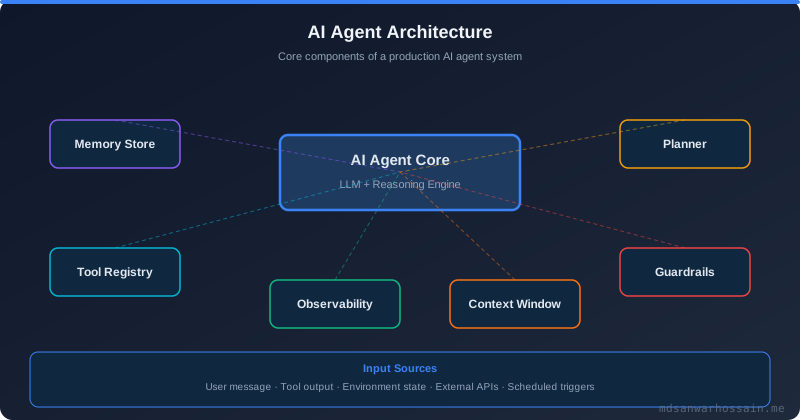
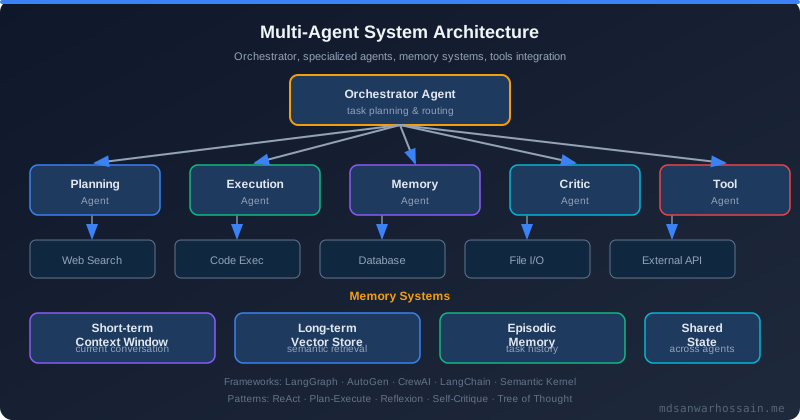
A mature agentic system separates concerns into four distinct components. This mirrors how the lifecycle management approach in Java Structured Concurrency separates task submission from lifecycle tracking—each component has a single responsibility and a clean interface.
- Planner: Given goal + context, produces a Plan (ordered list of Steps with dependencies, preconditions, and expected outputs). Backed by an LLM call.
- Executor: Given a Step, calls the appropriate tool and returns a raw Observation. Handles retries, timeouts, and circuit breaking for tool calls.
- Observer: Parses raw Observations into structured facts, updates the AgentContext world model, detects anomalies.
- Replanner: Triggered by the Observer when anomalies are detected. Receives the current context and incomplete plan; generates a new plan from the current state forward.
Production Failure Scenarios
Scenario: Infinite replanning loop
An agent was tasked with "fix the failing unit test." It kept generating code changes, running tests, getting failures (due to a test environment configuration bug, not the code), replanning, and generating new code. After 47 replan cycles it had modified 12 unrelated files. The root cause: the replanner was not tracking replan history, so it kept generating novel approaches to a problem that was not solvable at the code level.
Fix: Track attempted approaches in context. After N failed replan cycles on the same step, escalate to human or return failure. Never replan more than 3 times for the same step without a fundamentally different strategy.
Scenario: Replanning erases successful progress
An agent deployed a database migration, then a tool failure caused a replan. The new plan started from scratch and tried to run the migration again—causing a duplicate migration error and corrupting the schema.
Fix: Pass completed_steps to the replanner. The replanner must only plan for the remaining work, not re-execute completed steps. Mark idempotency requirements explicitly.
Trade-offs: When NOT to Replan
- Do not replan on transient errors. Network blips, rate limits, and temporary unavailability should trigger retries, not replanning. Use exponential backoff with jitter first.
- Do not replan when the human should decide. If the agent has exhausted its replanning budget or the failure is ambiguous (e.g., "test is failing but I don't know why"), escalate to human review rather than continuing autonomously.
- Do not replan if the plan was user-specified. If the user gave an explicit sequence of steps and a tool failed, ask the user what to do—don't silently alter their intent.
- Cap total replan attempts. A hard cap (e.g., 3 replan attempts per task) prevents infinite loops. Log every replan with reason, context snapshot, and new plan for auditability.
Observability for Planning Systems
Production planning agents need structured observability. Emit an event for every plan, step execution, replan, and failure:
{
  "event": "agent_step_completed",
  "trace_id": "abc-123",
  "agent_id": "deploy-agent-7",
  "step_id": "check_ci_status",
  "tool": "ci_tool",
  "duration_ms": 342,
  "success": true,
  "replan_triggered": false,
  "plan_version": 1,
  "remaining_steps": 4,
  "token_usage": {"prompt": 1200, "completion": 340}
}
Ship these events to your observability platform (Datadog, Grafana, OpenTelemetry). Build dashboards tracking: replan rate per agent/task type, average plan versions per task completion, step failure distribution by tool, and token cost per replan cycle.
Key Takeaways
- A plan is a hypothesis. When observations contradict the hypothesis, the agent must replan—not retry indefinitely.
- Separate the Planner, Executor, Observer, and Replanner into distinct components. Clean separation enables independent testing and improvement.
- Distinguish transient failures (retry) from structural failures (replan) from unrecoverable failures (escalate to human).
- Always pass completed steps to the replanner to avoid re-executing successful (possibly non-idempotent) actions.
- Validate plans before execution: check tool availability, dependency graphs, and token budgets.
- Cap replan attempts. Emit structured telemetry for every plan and replan event.
- When in doubt, escalate to human review rather than continuing to modify the world autonomously.
Read More
Explore related posts on agentic AI and backend engineering:
- Java Structured Concurrency — lifecycle management patterns applicable to multi-step agent task orchestration
- Browse all Agentic AI and backend engineering articles →

Software Engineer · Java · Spring Boot · Microservices
Leave a Comment
Related Posts
Software Engineer · Java · Spring Boot · Microservices