API Security Beyond JWT: API Keys, mTLS, HMAC Signing & Rate Limiting in Spring Boot
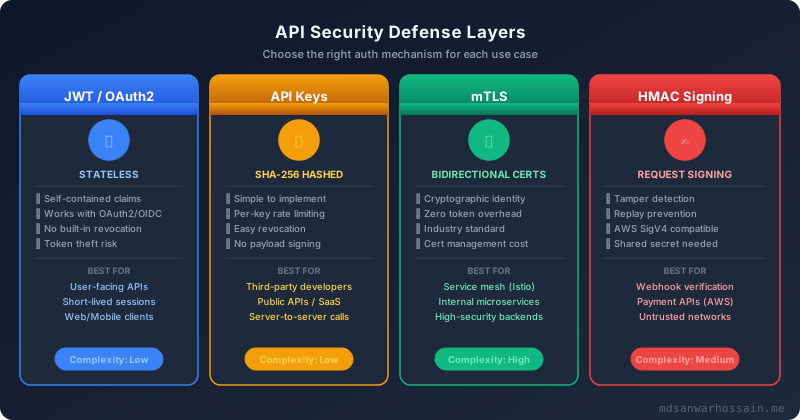
JWT is ubiquitous, but it is not the answer to every API security problem. Machine-to-machine services need certificates, not bearer tokens. Third-party integrations need hashed API keys with per-key rate limits. Financial and webhook endpoints need HMAC request signing to prevent payload tampering and replay attacks. This guide covers the full API security toolkit — beyond JWT — with real Spring Boot implementations you can take to production today.
TL;DR
"Go beyond JWT with production-grade API security in Spring Boot: cryptographically secure API keys, mutual TLS (mTLS) service authentication, HMAC request."
Table of Contents
- Why JWT Alone Is Not Enough: The API Security Landscape in 2026
- API Key Authentication: Generation, Hashing & Rotation in Spring Boot
- Mutual TLS (mTLS) for Service-to-Service Authentication
- HMAC Request Signing: Preventing Replay Attacks
- Rate Limiting at Multiple Levels in Spring Boot
- API Gateway Security: Kong & Spring Cloud Gateway
- Security Testing Your APIs: Tools & Automation
Why JWT Alone Is Not Enough: The API Security Landscape in 2026
JWT (JSON Web Token) became the default authentication mechanism for REST APIs largely because it is stateless, self-contained, and works elegantly with browser-based single-page applications. But stateless is not the same as secure, and a mechanism designed for user sessions carries significant drawbacks when applied universally across all API communication patterns.
The first fundamental limitation is token theft without revocation. A stolen JWT remains valid until its expiration timestamp — and if you issue long-lived tokens to avoid constant re-authentication, that window can be hours or days. You can implement a token blacklist in Redis, but now you have introduced state into what was meant to be a stateless system, and every validation call must hit that blacklist. At 50,000 requests per second, that is 50,000 Redis lookups per second just for authentication.
The second limitation is that JWTs are designed for human-to-machine flows. They carry user identity claims (sub, email, roles) and are issued via OAuth2 authorization flows — implicit, authorization code, or client credentials. For machine-to-machine (M2M) communication where services authenticate to each other inside a Kubernetes cluster, the client credentials flow produces JWTs that still carry unnecessary overhead and require a token server to be available on every authentication path.
The third limitation is that JWTs provide no payload integrity. The signature verifies that the token was issued by the expected issuer, but it says nothing about the HTTP request body. A man-in-the-middle attacker who intercepts a request can replay it, modify query parameters, or change the request body. For sensitive operations — financial transactions, webhook deliveries, administrative commands — you need request-level signing that covers the entire HTTP payload, not just the bearer token in the Authorization header.
The Security Decision Matrix
Here is a practical decision matrix for choosing the right authentication mechanism:
| Scenario | Recommended Mechanism | Why |
|---|---|---|
| User-facing REST API (SPA/mobile) | JWT + OAuth2 (short TTL) | Human identity, federated login |
| Third-party developer API | Hashed API Keys + rate limits | Simple, revocable, per-consumer limits |
| Internal microservice-to-microservice | mTLS (Istio/cert-manager) | Cryptographic identity, no token server |
| Financial/payment API | HMAC-SHA256 request signing | Payload integrity + replay prevention |
| Webhook delivery (inbound) | HMAC signature header verification | Verify sender without TLS client cert |
| Public API with abuse prevention | API Key + distributed rate limiting | Per-consumer quotas, graceful 429s |
In most production platforms, you will use all of these mechanisms simultaneously — JWT for your user-facing APIs, mTLS for east-west (service-to-service) traffic inside the cluster, API keys for your external developer program, and HMAC signing for your financial and webhook endpoints. The mistake is assuming JWT covers everything and leaving the rest unaddressed.
API Key Authentication: Generation, Hashing & Rotation in Spring Boot
API keys are the simplest authentication mechanism for server-to-server and third-party developer scenarios. The critical implementation mistake teams make is storing raw API keys in the database — if your database is breached, every API key is immediately compromised. The correct approach is to store only a SHA-256 hash of the key, identical to how passwords should be stored.
Generating Cryptographically Secure API Keys
Java's SecureRandom provides cryptographically strong random bytes. The key should be at least 32 bytes (256 bits) to make brute-force infeasible:
import java.security.SecureRandom;
import java.util.Base64;
import java.security.MessageDigest;
import java.nio.charset.StandardCharsets;

@Service
public class ApiKeyService {

    private static final SecureRandom SECURE_RANDOM = new SecureRandom();
    private static final int KEY_BYTES = 32; // 256-bit key

    /**
     * Generates a new API key and returns both the raw key (shown once to the user)
     * and the SHA-256 hash stored in the database.
     */
    public ApiKeyPair generateApiKey(String clientId, String[] scopes) {
        byte[] keyBytes = new byte[KEY_BYTES];
        SECURE_RANDOM.nextBytes(keyBytes);

        // Prefix with "sk_" to make keys identifiable in logs/leaked credential scans
        String rawKey = "sk_" + Base64.getUrlEncoder().withoutPadding().encodeToString(keyBytes);
        String hashedKey = hashKey(rawKey);

        ApiKeyEntity entity = ApiKeyEntity.builder()
            .clientId(clientId)
            .keyHash(hashedKey)
            .keyPrefix(rawKey.substring(0, 8)) // Store prefix for identification
            .scopes(Arrays.asList(scopes))
            .createdAt(Instant.now())
            .active(true)
            .build();

        apiKeyRepository.save(entity);

        // Return raw key ONCE — never stored, never logged
        return new ApiKeyPair(rawKey, entity.getId());
    }

    public String hashKey(String rawKey) {
        try {
            MessageDigest digest = MessageDigest.getInstance("SHA-256");
            byte[] hash = digest.digest(rawKey.getBytes(StandardCharsets.UTF_8));
            return Base64.getEncoder().encodeToString(hash);
        } catch (NoSuchAlgorithmException e) {
            throw new IllegalStateException("SHA-256 not available", e);
        }
    }

    public Optional<ApiKeyEntity> validateApiKey(String rawKey) {
        String hash = hashKey(rawKey);
        return apiKeyRepository.findByKeyHashAndActiveTrue(hash);
    }
}
Spring Security Filter for API Key Validation
Register a OncePerRequestFilter that intercepts requests, extracts the API key from the X-API-Key header, validates the hash against the database, and injects the authentication into Spring Security's context:
@Component
@RequiredArgsConstructor
public class ApiKeyAuthFilter extends OncePerRequestFilter {

    private final ApiKeyService apiKeyService;
    private final ApiKeyRateLimiter rateLimiter;

    @Override
    protected void doFilterInternal(HttpServletRequest request,
                                    HttpServletResponse response,
                                    FilterChain chain)
            throws ServletException, IOException {

        String apiKey = request.getHeader("X-API-Key");

        if (apiKey == null || apiKey.isBlank()) {
            chain.doFilter(request, response);
            return;
        }

        Optional<ApiKeyEntity> keyEntity = apiKeyService.validateApiKey(apiKey);

        if (keyEntity.isEmpty()) {
            response.setStatus(HttpServletResponse.SC_UNAUTHORIZED);
            response.getWriter().write("{\"error\":\"Invalid API key\"}");
            return;
        }

        ApiKeyEntity entity = keyEntity.get();

        // Check per-key rate limit before proceeding
        if (!rateLimiter.tryConsume(entity.getClientId())) {
            response.setStatus(429);
            response.setHeader("X-RateLimit-Limit", String.valueOf(rateLimiter.getLimit(entity.getClientId())));
            response.setHeader("X-RateLimit-Remaining", "0");
            response.setHeader("Retry-After", "60");
            response.getWriter().write("{\"error\":\"Rate limit exceeded\",\"retryAfter\":60}");
            return;
        }

        // Build authentication with granted authorities from key scopes
        List<GrantedAuthority> authorities = entity.getScopes().stream()
            .map(scope -> new SimpleGrantedAuthority("SCOPE_" + scope))
            .collect(Collectors.toList());

        ApiKeyAuthToken auth = new ApiKeyAuthToken(entity.getClientId(), authorities);
        auth.setDetails(new WebAuthenticationDetailsSource().buildDetails(request));

        SecurityContextHolder.getContext().setAuthentication(auth);
        chain.doFilter(request, response);
    }
}

// Register the filter before UsernamePasswordAuthenticationFilter
@Configuration
@EnableWebSecurity
public class SecurityConfig {

    @Bean
    public SecurityFilterChain filterChain(HttpSecurity http,
                                           ApiKeyAuthFilter apiKeyFilter) throws Exception {
        http
            .csrf(AbstractHttpConfigurer::disable)
            .sessionManagement(sm -> sm.sessionCreationPolicy(SessionCreationPolicy.STATELESS))
            .addFilterBefore(apiKeyFilter, UsernamePasswordAuthenticationFilter.class)
            .authorizeHttpRequests(auth -> auth
                .requestMatchers("/api/v1/public/**").permitAll()
                .requestMatchers("/api/v1/admin/**").hasAuthority("SCOPE_admin")
                .anyRequest().authenticated()
            );
        return http.build();
    }
}
Zero-Downtime Key Rotation
Key rotation without downtime requires supporting two concurrent active keys per client during a transition window. Clients rotate by generating a new key, updating their systems to use the new key, then revoking the old key — the overlap window (typically 24–48 hours) ensures no requests are rejected during the transition:
@Transactional
public ApiKeyPair rotateApiKey(String clientId, UUID oldKeyId) {
    ApiKeyEntity oldKey = apiKeyRepository.findById(oldKeyId)
        .orElseThrow(() -> new KeyNotFoundException(oldKeyId));

    // Generate new key before deactivating old one
    ApiKeyPair newPair = generateApiKey(clientId, oldKey.getScopes().toArray(new String[0]));

    // Mark old key as rotating — still valid for 48 hours
    oldKey.setStatus(KeyStatus.ROTATING);
    oldKey.setExpiresAt(Instant.now().plus(48, ChronoUnit.HOURS));
    apiKeyRepository.save(oldKey);

    log.info("API key rotation initiated for client={}, oldKeyPrefix={}, newKeyId={}",
        clientId, oldKey.getKeyPrefix(), newPair.getKeyId());

    return newPair;
}

// Scheduled job to deactivate expired rotating keys
@Scheduled(fixedDelay = 3600000) // every hour
public void deactivateExpiredRotatingKeys() {
    int count = apiKeyRepository.deactivateExpiredRotatingKeys(Instant.now());
    if (count > 0) {
        log.info("Deactivated {} expired rotating API keys", count);
    }
}
Mutual TLS (mTLS) for Service-to-Service Authentication
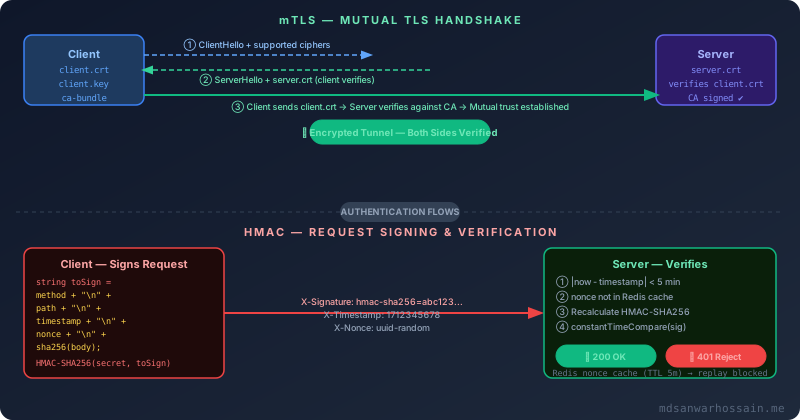
In standard TLS, only the server presents a certificate. The client verifies the server's identity, but the server has no cryptographic proof of who the client is. Mutual TLS (mTLS) extends this handshake: both the client and server present X.509 certificates, and both sides verify the other's certificate against a trusted Certificate Authority (CA). The result is bidirectional cryptographic identity — the server knows exactly which service is calling it, and the client knows exactly which server it is talking to, without any tokens or passwords in the application layer.
Spring Boot Server-Side mTLS Configuration
Configure Spring Boot to require client certificates by setting client-auth: need in the SSL properties:
# application.yml — Server requiring client certificates
server:
  ssl:
    enabled: true
    key-store: classpath:certs/server-keystore.p12
    key-store-password: ${SERVER_KEYSTORE_PASSWORD}
    key-store-type: PKCS12
    trust-store: classpath:certs/ca-truststore.p12
    trust-store-password: ${CA_TRUSTSTORE_PASSWORD}
    trust-store-type: PKCS12
    client-auth: need  # NEED = require cert; WANT = optional; NONE = no cert check
    protocol: TLS
    enabled-protocols: TLSv1.3
On the calling service side, configure the RestTemplate or WebClient to present a client certificate on every outbound request:
@Configuration
public class MtlsClientConfig {

    @Value("${client.ssl.key-store}")
    private Resource keyStore;

    @Value("${client.ssl.key-store-password}")
    private String keyStorePassword;

    @Value("${client.ssl.trust-store}")
    private Resource trustStore;

    @Value("${client.ssl.trust-store-password}")
    private String trustStorePassword;

    @Bean
    public WebClient mtlsWebClient() throws Exception {
        KeyStore ks = KeyStore.getInstance("PKCS12");
        ks.load(keyStore.getInputStream(), keyStorePassword.toCharArray());

        KeyManagerFactory kmf = KeyManagerFactory.getInstance(KeyManagerFactory.getDefaultAlgorithm());
        kmf.init(ks, keyStorePassword.toCharArray());

        KeyStore ts = KeyStore.getInstance("PKCS12");
        ts.load(trustStore.getInputStream(), trustStorePassword.toCharArray());

        TrustManagerFactory tmf = TrustManagerFactory.getInstance(TrustManagerFactory.getDefaultAlgorithm());
        tmf.init(ts);

        SSLContext sslContext = SSLContext.getInstance("TLS");
        sslContext.init(kmf.getKeyManagers(), tmf.getTrustManagers(), null);

        SslContext nettySSL = SslContextBuilder.forClient()
            .keyManager(kmf)
            .trustManager(tmf)
            .protocols("TLSv1.3")
            .build();

        HttpClient httpClient = HttpClient.create()
            .secure(spec -> spec.sslContext(nettySSL));

        return WebClient.builder()
            .clientConnector(new ReactorClientHttpConnector(httpClient))
            .build();
    }
}
Extracting Client Identity from the Certificate
After the TLS handshake completes, the client's certificate is available in the X-Client-Cert-DN header (if behind a proxy) or directly in the HttpServletRequest. Extract the Common Name (CN) to identify the calling service:
@Component
public class MtlsAuthenticationFilter extends OncePerRequestFilter {

    @Override
    protected void doFilterInternal(HttpServletRequest request,
                                    HttpServletResponse response,
                                    FilterChain chain)
            throws ServletException, IOException {

        X509Certificate[] certs = (X509Certificate[])
            request.getAttribute("jakarta.servlet.request.X509Certificate");

        if (certs == null || certs.length == 0) {
            response.setStatus(HttpServletResponse.SC_UNAUTHORIZED);
            response.getWriter().write("{\"error\":\"Client certificate required\"}");
            return;
        }

        X509Certificate clientCert = certs[0];
        String dn = clientCert.getSubjectX500Principal().getName();
        String cn = extractCN(dn); // e.g., "payment-service"

        // Verify CN against allowlist of known services
        if (!allowedServiceCNs.contains(cn)) {
            response.setStatus(HttpServletResponse.SC_FORBIDDEN);
            response.getWriter().write("{\"error\":\"Service not authorized: " + cn + "\"}");
            return;
        }

        // Check cert expiration explicitly (TLS handles this, but belt-and-suspenders)
        try {
            clientCert.checkValidity();
        } catch (CertificateExpiredException | CertificateNotYetValidException e) {
            response.setStatus(HttpServletResponse.SC_UNAUTHORIZED);
            response.getWriter().write("{\"error\":\"Client certificate expired\"}");
            return;
        }

        List<GrantedAuthority> authorities = List.of(
            new SimpleGrantedAuthority("ROLE_SERVICE"),
            new SimpleGrantedAuthority("SERVICE_" + cn.toUpperCase())
        );

        UsernamePasswordAuthenticationToken auth =
            new UsernamePasswordAuthenticationToken(cn, null, authorities);
        SecurityContextHolder.getContext().setAuthentication(auth);
        chain.doFilter(request, response);
    }

    private String extractCN(String dn) {
        for (String part : dn.split(",")) {
            part = part.trim();
            if (part.startsWith("CN=")) {
                return part.substring(3);
            }
        }
        return "";
    }
}
Generating Test Certificates with keytool
# Create a CA key and self-signed certificate
keytool -genkeypair -alias ca -keyalg RSA -keysize 4096 \
  -dname "CN=Internal CA,O=MyCompany,C=US" \
  -validity 3650 -keystore ca-keystore.p12 -storetype PKCS12 \
  -storepass changeit -ext bc:c

# Create server certificate signed by the CA
keytool -genkeypair -alias server -keyalg RSA -keysize 2048 \
  -dname "CN=api-service,O=MyCompany,C=US" \
  -validity 365 -keystore server-keystore.p12 -storetype PKCS12 \
  -storepass changeit

# Generate CSR for server cert
keytool -certreq -alias server -keystore server-keystore.p12 \
  -storepass changeit -file server.csr

# Sign CSR with CA
keytool -gencert -alias ca -keystore ca-keystore.p12 \
  -storepass changeit -infile server.csr -outfile server.crt \
  -validity 365 -ext SAN=dns:api-service,dns:api-service.default.svc.cluster.local

# Repeat for client certificate (payment-service)
keytool -genkeypair -alias payment-service -keyalg RSA -keysize 2048 \
  -dname "CN=payment-service,O=MyCompany,C=US" \
  -validity 365 -keystore client-keystore.p12 -storetype PKCS12 \
  -storepass changeit
In Kubernetes, use cert-manager to automate certificate issuance and rotation. Define a Certificate resource and cert-manager handles the CA signing and secret injection, rotating certificates automatically before expiry:
apiVersion: cert-manager.io/v1
kind: Certificate
metadata:
  name: payment-service-mtls
  namespace: payments
spec:
  secretName: payment-service-tls
  duration: 24h       # Short-lived certs
  renewBefore: 8h     # Renew 8h before expiry
  dnsNames:
    - payment-service
    - payment-service.payments.svc.cluster.local
  issuerRef:
    name: internal-ca-issuer
    kind: ClusterIssuer
HMAC Request Signing: Preventing Replay Attacks
HMAC (Hash-based Message Authentication Code) signing addresses a threat model that neither JWT nor mTLS covers: payload tampering and replay attacks at the application layer. An attacker who can intercept a legitimate signed request can replay it minutes or hours later unless the signature includes a timestamp and a unique nonce.
The signing scheme popularized by AWS Signature Version 4 is the gold standard. The canonical string covers: HTTP method, URL path, query string, selected headers, timestamp, and a hash of the request body. Any modification to any of these fields invalidates the signature.
HMAC-SHA256 Signing Implementation
import javax.crypto.Mac;
import javax.crypto.spec.SecretKeySpec;
import java.security.MessageDigest;
import java.util.HexFormat;

public class HmacSigner {

    private static final String HMAC_ALGORITHM = "HmacSHA256";

    /**
     * Builds the canonical string to sign.
     * Format: METHOD\nPATH\nQUERY\nTIMESTAMP\nNONCE\nBODY_HASH
     */
    public static String buildStringToSign(String method, String path,
                                           String query, String timestamp,
                                           String nonce, byte[] body) {
        String bodyHash = sha256Hex(body);
        return String.join("\n",
            method.toUpperCase(),
            path,
            query != null ? query : "",
            timestamp,
            nonce,
            bodyHash
        );
    }

    /**
     * Computes HMAC-SHA256 of the canonical string with the shared secret.
     */
    public static String sign(String secret, String stringToSign) {
        try {
            Mac mac = Mac.getInstance(HMAC_ALGORITHM);
            SecretKeySpec keySpec = new SecretKeySpec(
                secret.getBytes(StandardCharsets.UTF_8), HMAC_ALGORITHM);
            mac.init(keySpec);
            byte[] hmacBytes = mac.doFinal(
                stringToSign.getBytes(StandardCharsets.UTF_8));
            return "hmac-sha256=" + HexFormat.of().formatHex(hmacBytes);
        } catch (Exception e) {
            throw new IllegalStateException("HMAC signing failed", e);
        }
    }

    private static String sha256Hex(byte[] data) {
        try {
            MessageDigest digest = MessageDigest.getInstance("SHA-256");
            return HexFormat.of().formatHex(digest.digest(
                data != null ? data : new byte[0]));
        } catch (NoSuchAlgorithmException e) {
            throw new IllegalStateException("SHA-256 not available", e);
        }
    }
}

// Client usage — add headers to outgoing request
@Component
@RequiredArgsConstructor
public class HmacRequestInterceptor implements ClientHttpRequestInterceptor {

    private final String sharedSecret; // loaded from Vault/K8s Secret

    @Override
    public ClientHttpResponse intercept(HttpRequest request, byte[] body,
                                        ClientHttpRequestExecution execution)
            throws IOException {
        String timestamp = String.valueOf(Instant.now().getEpochSecond());
        String nonce = UUID.randomUUID().toString();
        String path = request.getURI().getPath();
        String query = request.getURI().getQuery();

        String stringToSign = HmacSigner.buildStringToSign(
            request.getMethod().name(), path, query, timestamp, nonce, body);
        String signature = HmacSigner.sign(sharedSecret, stringToSign);

        request.getHeaders().set("X-Timestamp", timestamp);
        request.getHeaders().set("X-Nonce", nonce);
        request.getHeaders().set("X-Signature", signature);

        return execution.execute(request, body);
    }
}
Server-Side HMAC Validation Filter
The validation filter must check the timestamp window, verify the nonce has not been used before (stored in Redis with TTL matching the window), recalculate the HMAC, and use constant-time comparison to prevent timing attacks:
@Component
@RequiredArgsConstructor
public class HmacValidationFilter extends OncePerRequestFilter {

    private static final long TIMESTAMP_WINDOW_SECONDS = 300; // 5 minutes
    private final StringRedisTemplate redisTemplate;
    private final HmacKeyResolver keyResolver; // resolves shared secret per client

    @Override
    protected void doFilterInternal(HttpServletRequest request,
                                    HttpServletResponse response,
                                    FilterChain chain)
            throws ServletException, IOException {

        String timestamp = request.getHeader("X-Timestamp");
        String nonce = request.getHeader("X-Nonce");
        String receivedSig = request.getHeader("X-Signature");

        if (timestamp == null || nonce == null || receivedSig == null) {
            chain.doFilter(request, response); // let other filters handle
            return;
        }

        // 1. Validate timestamp window — reject stale requests
        long requestTime = Long.parseLong(timestamp);
        long now = Instant.now().getEpochSecond();
        if (Math.abs(now - requestTime) > TIMESTAMP_WINDOW_SECONDS) {
            sendError(response, 401, "Request timestamp outside acceptable window");
            return;
        }

        // 2. Check nonce uniqueness — prevent replay attacks
        String nonceKey = "hmac:nonce:" + nonce;
        Boolean isNew = redisTemplate.opsForValue()
            .setIfAbsent(nonceKey, "1", Duration.ofSeconds(TIMESTAMP_WINDOW_SECONDS * 2));
        if (Boolean.FALSE.equals(isNew)) {
            sendError(response, 401, "Duplicate nonce — possible replay attack");
            return;
        }

        // 3. Read and cache body (HttpServletRequest body can only be read once)
        CachedBodyHttpServletRequest cachedRequest =
            new CachedBodyHttpServletRequest(request);
        byte[] body = cachedRequest.getContentAsByteArray();

        // 4. Recalculate signature
        String clientId = request.getHeader("X-Client-ID");
        String secret = keyResolver.resolveSecret(clientId);

        String stringToSign = HmacSigner.buildStringToSign(
            request.getMethod(),
            request.getRequestURI(),
            request.getQueryString(),
            timestamp,
            nonce,
            body
        );
        String expectedSig = HmacSigner.sign(secret, stringToSign);

        // 5. Constant-time comparison — CRITICAL to prevent timing attacks
        if (!MessageDigest.isEqual(
                expectedSig.getBytes(StandardCharsets.UTF_8),
                receivedSig.getBytes(StandardCharsets.UTF_8))) {
            sendError(response, 401, "Invalid signature");
            return;
        }

        chain.doFilter(cachedRequest, response);
    }

    private void sendError(HttpServletResponse response, int status, String message)
            throws IOException {
        response.setStatus(status);
        response.setContentType("application/json");
        response.getWriter().write("{\"error\":\"" + message + "\"}");
    }
}
Rate Limiting at Multiple Levels in Spring Boot
Rate limiting is not a single control — it operates at multiple dimensions simultaneously. At the API gateway level, you rate limit by IP address to stop basic scraping and DDoS. At the application level, you rate limit by user identity or API key to enforce fair use and prevent account abuse. For specific endpoints (login, password reset, OTP), you apply tighter limits to stop credential stuffing and brute force attacks.
Distributed Rate Limiting with Bucket4j and Redis
Resilience4j's RateLimiter is an in-memory, per-instance rate limiter — meaning each pod enforces its own limit. In a horizontally scaled deployment, a client can exceed your intended limit by hitting multiple pods. Bucket4j with Redis provides distributed rate limiting with shared state across all instances:
<!-- pom.xml -->
<dependency>
    <groupId>com.giffing.bucket4j.spring.boot.starter</groupId>
    <artifactId>bucket4j-spring-boot-starter</artifactId>
    <version>0.10.0</version>
</dependency>
<dependency>
    <groupId>io.github.bucket4j</groupId>
    <artifactId>bucket4j-redis</artifactId>
    <version>8.7.0</version>
</dependency>
@Service
@RequiredArgsConstructor
public class DistributedRateLimiter {
private final RedissonClient redisson;
// Token bucket: 1000 tokens, refill 1000 per minute
private static final Bandwidth STANDARD_LIMIT = Bandwidth.builder()
.capacity(1000)
.refillGreedy(1000, Duration.ofMinutes(1))
.build();
// Tighter limit for sensitive endpoints: 10 attempts per 15 minutes
private static final Bandwidth STRICT_LIMIT = Bandwidth.builder()
.capacity(10)
.refillGreedy(10, Duration.ofMinutes(15))
.build();
public ConsumptionProbe tryConsume(String bucketKey, Bandwidth bandwidth,
long numTokens) {
ProxyManager<String> proxyManager = Bucket4jRedisson.casBasedProxyManager(redisson);
Bucket bucket = proxyManager.builder()
.addLimit(bandwidth)
.build(bucketKey, BucketConfiguration.builder()
.addLimit(bandwidth)
.build());
return bucket.tryConsumeAndReturnRemaining(numTokens);
}
public boolean isAllowed(String clientId, String endpoint) {
Bandwidth limit = endpoint.contains("auth") ? STRICT_LIMIT : STANDARD_LIMIT;
String key = "ratelimit:" + endpoint + ":" + clientId;
ConsumptionProbe probe = tryConsume(key, limit, 1);
return probe.isConsumed();
}
public long getRemainingTokens(String clientId, String endpoint) {
Bandwidth limit = endpoint.contains("auth") ? STRICT_LIMIT : STANDARD_LIMIT;
String key = "ratelimit:" + endpoint + ":" + clientId;
ConsumptionProbe probe = tryConsume(key, limit, 0); // Peek without consuming
return probe.getRemainingTokens();
}
}Rate Limit Response Headers and 429 Handling
RFC 6585 defines the 429 Too Many Requests status code. Your API should always include rate limit context headers so clients can implement backoff logic rather than blindly retrying:
@Component
@RequiredArgsConstructor
public class RateLimitFilter extends OncePerRequestFilter {

    private final DistributedRateLimiter rateLimiter;

    @Override
    protected void doFilterInternal(HttpServletRequest request,
                                    HttpServletResponse response,
                                    FilterChain chain)
            throws ServletException, IOException {

        String clientId = extractClientId(request);
        String endpoint = request.getRequestURI();

        ConsumptionProbe probe = rateLimiter.tryConsumeAndGetProbe(clientId, endpoint);

        // Always set rate limit headers on every response
        response.setHeader("X-RateLimit-Limit", "1000");
        response.setHeader("X-RateLimit-Remaining",
            String.valueOf(probe.getRemainingTokens()));
        response.setHeader("X-RateLimit-Reset",
            String.valueOf(Instant.now().plusSeconds(
                probe.getNanosToWaitForRefill() / 1_000_000_000).getEpochSecond()));

        if (!probe.isConsumed()) {
            long retryAfterSeconds = probe.getNanosToWaitForRefill() / 1_000_000_000;
            response.setStatus(429);
            response.setHeader("Retry-After", String.valueOf(retryAfterSeconds));
            response.setContentType("application/json");
            response.getWriter().write(String.format(
                "{\"error\":\"Rate limit exceeded\",\"retryAfter\":%d,\"limit\":1000}",
                retryAfterSeconds));
            return;
        }

        chain.doFilter(request, response);
    }

    private String extractClientId(HttpServletRequest request) {
        // Priority: API Key client ID > Authenticated user > IP address
        Authentication auth = SecurityContextHolder.getContext().getAuthentication();
        if (auth != null && auth.isAuthenticated()) {
            return "user:" + auth.getName();
        }
        String apiKey = request.getHeader("X-API-Key");
        if (apiKey != null) {
            return "key:" + apiKey.substring(0, Math.min(8, apiKey.length()));
        }
        return "ip:" + request.getRemoteAddr();
    }
}
API Gateway Security: Kong & Spring Cloud Gateway
Centralizing authentication and rate limiting at the API gateway layer has two major advantages: it offloads work from each microservice, and it provides a single enforcement point that cannot be bypassed by hitting services directly (assuming services are only accessible from inside the cluster).
Spring Cloud Gateway with API Key Validation
@Configuration
public class GatewaySecurityConfig {

    @Bean
    public RouteLocator routes(RouteLocatorBuilder builder,
                               ApiKeyGatewayFilter apiKeyFilter,
                               RateLimitGatewayFilter rateLimitFilter) {
        return builder.routes()
            .route("payment-api", r -> r
                .path("/api/v1/payments/**")
                .filters(f -> f
                    .filter(apiKeyFilter)        // Validate API key
                    .filter(rateLimitFilter)     // Enforce rate limits
                    .addResponseHeader("X-Content-Type-Options", "nosniff")
                    .addResponseHeader("X-Frame-Options", "DENY")
                    .addResponseHeader("X-XSS-Protection", "0")
                    .addResponseHeader("Strict-Transport-Security",
                        "max-age=31536000; includeSubDomains; preload")
                    .addResponseHeader("Content-Security-Policy",
                        "default-src 'none'; frame-ancestors 'none'")
                    .addResponseHeader("Cache-Control",
                        "no-store, no-cache, must-revalidate")
                    .removeRequestHeader("X-Forwarded-For") // Prevent spoofing
                    .requestSize(new DataSize(1, DataUnit.MEGABYTES)) // Limit request size
                )
                .uri("lb://payment-service")
            )
            .build();
    }
}

@Component
@RequiredArgsConstructor
public class ApiKeyGatewayFilter implements GatewayFilter {

    private final ApiKeyService apiKeyService;

    @Override
    public Mono<Void> filter(ServerWebExchange exchange, GatewayFilterChain chain) {
        String apiKey = exchange.getRequest().getHeaders().getFirst("X-API-Key");

        if (apiKey == null) {
            exchange.getResponse().setStatusCode(HttpStatus.UNAUTHORIZED);
            return exchange.getResponse().setComplete();
        }

        return apiKeyService.validateApiKeyReactive(apiKey)
            .flatMap(entity -> {
                // Inject client identity for downstream services
                ServerHttpRequest mutatedRequest = exchange.getRequest().mutate()
                    .header("X-Client-ID", entity.getClientId())
                    .header("X-Client-Scopes", String.join(",", entity.getScopes()))
                    .build();
                return chain.filter(exchange.mutate().request(mutatedRequest).build());
            })
            .switchIfEmpty(Mono.defer(() -> {
                exchange.getResponse().setStatusCode(HttpStatus.UNAUTHORIZED);
                return exchange.getResponse().setComplete();
            }));
    }
}
OWASP Recommended Security Headers
Beyond authentication, the API gateway is the ideal place to inject security response headers. These headers are recommended by OWASP for all API responses:
| Header | Recommended Value | Threat Mitigated |
|---|---|---|
| Strict-Transport-Security | max-age=31536000; includeSubDomains | SSL stripping |
| X-Content-Type-Options | nosniff | MIME sniffing attacks |
| X-Frame-Options | DENY | Clickjacking |
| Content-Security-Policy | default-src 'none' | XSS, injection |
| Cache-Control | no-store | Sensitive data caching |
| Referrer-Policy | no-referrer | Info leakage in referer header |
Security Testing Your APIs: Tools & Automation
Security controls that are not tested are security controls that will fail silently. API security testing should be part of your CI/CD pipeline — not an annual penetration test that produces a PDF no one reads. Modern DevSecOps pipelines run automated security scans on every pull request and block merges when high-severity issues are found.
OWASP ZAP for Automated Scanning
OWASP ZAP (Zed Attack Proxy) can run in headless mode as part of your CI/CD pipeline. Configure it as a GitHub Actions step that runs a baseline scan against your API, checking for the OWASP API Security Top 10:
# .github/workflows/security-scan.yml
name: API Security Scan

on:
  pull_request:
    branches: [main, develop]

jobs:
  zap-scan:
    runs-on: ubuntu-latest
    steps:
      - uses: actions/checkout@v4

      - name: Start application (test environment)
        run: docker-compose -f docker-compose.test.yml up -d
        timeout-minutes: 5

      - name: Wait for application health
        run: |
          timeout 60 bash -c 'until curl -sf http://localhost:8080/actuator/health; do sleep 2; done'

      - name: OWASP ZAP API Baseline Scan
        uses: zaproxy/action-api-scan@v0.7.0
        with:
          token: ${{ secrets.GITHUB_TOKEN }}
          docker_name: 'ghcr.io/zaproxy/zaproxy:stable'
          target: 'http://localhost:8080/v3/api-docs'
          format: openapi
          rules_file_name: '.zap/rules.tsv'
          cmd_options: '-I -l WARN -z "-config api.addrs.addr.name=.* -config api.addrs.addr.regex=true"'
          fail_action: true  # Fail the build on high-risk findings

      - name: Upload ZAP report
        uses: actions/upload-artifact@v4
        if: always()
        with:
          name: zap-security-report
          path: report_html.html
Postman Security Test Scripts
Add security assertions to your Postman collection tests to verify that your API correctly rejects unauthorized requests, enforces rate limits, and returns appropriate error codes:
// Postman Test Script — Security assertions
pm.test("Response should not expose stack traces", () => {
    const body = pm.response.text();
    pm.expect(body).to.not.include("at com.example");
    pm.expect(body).to.not.include("Exception");
    pm.expect(body).to.not.include("Caused by");
});

pm.test("Security headers are present", () => {
    pm.expect(pm.response.headers.get("X-Content-Type-Options")).to.equal("nosniff");
    pm.expect(pm.response.headers.get("X-Frame-Options")).to.equal("DENY");
    pm.expect(pm.response.headers.get("Strict-Transport-Security")).to.include("max-age=");
});

pm.test("401 for missing API key", () => {
    // This test runs against a duplicate request with no X-API-Key header
    pm.expect(pm.response.code).to.be.oneOf([401, 403]);
});

pm.test("Rate limit headers are present", () => {
    pm.expect(pm.response.headers.has("X-RateLimit-Limit")).to.be.true;
    pm.expect(pm.response.headers.has("X-RateLimit-Remaining")).to.be.true;
});
Spring Boot Integration Tests for Security
Use Spring's @WebMvcTest combined with MockMvc to write fast, in-process security tests that verify your filter chain behaves correctly:
@WebMvcTest(PaymentController.class)
@Import({SecurityConfig.class, ApiKeyAuthFilter.class, HmacValidationFilter.class})
class PaymentApiSecurityTest {

    @Autowired
    private MockMvc mockMvc;

    @MockBean
    private ApiKeyService apiKeyService;

    @MockBean
    private HmacKeyResolver hmacKeyResolver;

    @Test
    void shouldReturn401WhenApiKeyIsMissing() throws Exception {
        mockMvc.perform(post("/api/v1/payments")
                .contentType(MediaType.APPLICATION_JSON)
                .content("{\"amount\":100}"))
            .andExpect(status().isUnauthorized());
    }

    @Test
    void shouldReturn401WhenHmacSignatureIsInvalid() throws Exception {
        when(apiKeyService.validateApiKey(anyString())).thenReturn(Optional.of(validKey()));
        when(hmacKeyResolver.resolveSecret(anyString())).thenReturn("test-secret");

        mockMvc.perform(post("/api/v1/payments")
                .header("X-API-Key", "sk_validkey123")
                .header("X-Timestamp", String.valueOf(Instant.now().getEpochSecond()))
                .header("X-Nonce", UUID.randomUUID().toString())
                .header("X-Signature", "hmac-sha256=invalidsignature")
                .contentType(MediaType.APPLICATION_JSON)
                .content("{\"amount\":100}"))
            .andExpect(status().isUnauthorized())
            .andExpect(jsonPath("$.error").value("Invalid signature"));
    }

    @Test
    void shouldReturn401WhenTimestampIsTooOld() throws Exception {
        when(apiKeyService.validateApiKey(anyString())).thenReturn(Optional.of(validKey()));

        long sixMinutesAgo = Instant.now().minusSeconds(360).getEpochSecond();

        mockMvc.perform(post("/api/v1/payments")
                .header("X-API-Key", "sk_validkey123")
                .header("X-Timestamp", String.valueOf(sixMinutesAgo))
                .header("X-Nonce", UUID.randomUUID().toString())
                .header("X-Signature", "hmac-sha256=any")
                .contentType(MediaType.APPLICATION_JSON)
                .content("{\"amount\":100}"))
            .andExpect(status().isUnauthorized())
            .andExpect(jsonPath("$.error")
                .value("Request timestamp outside acceptable window"));
    }

    @Test
    void shouldReturn429WhenRateLimitExceeded() throws Exception {
        when(apiKeyService.validateApiKey(anyString())).thenReturn(Optional.of(validKey()));
        when(rateLimiter.isAllowed(anyString(), anyString())).thenReturn(false);

        mockMvc.perform(get("/api/v1/data")
                .header("X-API-Key", "sk_validkey123"))
            .andExpect(status().isTooManyRequests())
            .andExpect(header().exists("Retry-After"))
            .andExpect(header().exists("X-RateLimit-Remaining"));
    }

    @Test
    void shouldNotExposeStackTracesInErrorResponses() throws Exception {
        mockMvc.perform(post("/api/v1/payments")
                .contentType(MediaType.APPLICATION_JSON)
                .content("{invalid json}"))
            .andExpect(jsonPath("$.stackTrace").doesNotExist())
            .andExpect(jsonPath("$.trace").doesNotExist());
    }
}
The key principle across all security testing is fail-open detection: your tests should verify that security controls are active by asserting that unauthorized requests fail, not just that authorized requests succeed. A filter that is misconfigured to be disabled will make all your positive tests pass while leaving your API completely unprotected.

Software Engineer · Java · Spring Boot · Microservices