Spring Boot Security with JWT: Token Lifecycle, Refresh Strategies & Production Hardening
If you are building production APIs with Spring Boot, JWT is not enough by itself. You need a complete token lifecycle design covering short-lived access tokens, rotating refresh tokens, revocation, replay resistance, and key rotation. This guide walks through practical Spring Security patterns that balance strong security with smooth UX.
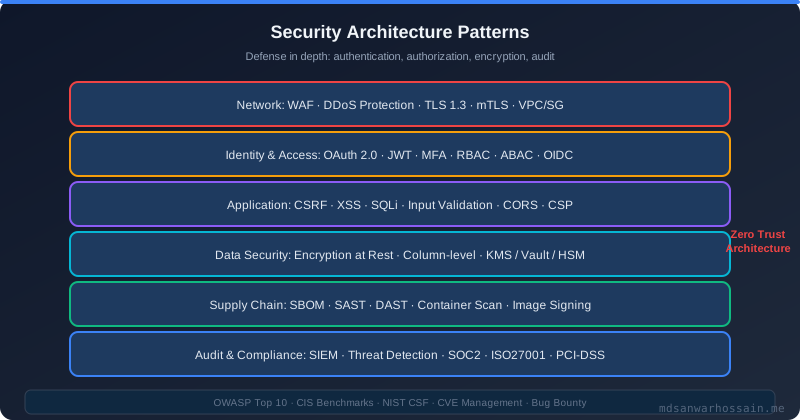
Table of Contents
- Two Incidents, One Root Cause
- JWT Anatomy: What You Are Actually Signing
- Spring Security Filter Chain for JWT
- Token Lifecycle Design: Access + Refresh Tokens
- Token Refresh Rotation Strategy
- Blacklisting and Revocation Patterns
- Replay Attack Prevention
- Storing Refresh Tokens Safely
- Common Mistakes and Fixes
- Production Hardening Checklist
- JWKS Endpoint for Key Rotation
- Key Takeaways
- Read More
Two Incidents, One Root Cause
In the same quarter, a fintech platform faced two security incidents that sat at opposite ends of the same spectrum. In April, the security team received a bug report: users were being logged out every 15 minutes. Investigation revealed that the access token TTL had been set to 15 minutes during a security hardening sprint—but the mobile app had no silent token refresh logic. Users in the middle of filling a form would suddenly get a 401 and lose their work. The UX team was furious.
In June, a different incident: a stolen laptop gave an attacker access to a user's refresh token stored in localStorage. The refresh token had a 90-day TTL and no revocation mechanism. The attacker used it to silently obtain fresh access tokens for three weeks before the breach was discovered.
Both incidents share the same root cause: the team had not designed a coherent token lifecycle. They had JWT, but not a JWT strategy. This article builds that strategy from first principles.
JWT Anatomy: What You Are Actually Signing
A JWT is three Base64URL-encoded segments joined by dots: header.payload.signature.
// Header
{
  "alg": "RS256",   // asymmetric: private key signs, public key verifies
  "typ": "JWT"
}

// Payload (claims)
{
  "sub": "user-uuid-42",
  "iat": 1711065600,        // issued at
  "exp": 1711069200,        // expiry (1 hour from now)
  "jti": "a1b2c3d4",       // JWT ID — unique per token, enables revocation
  "roles": ["ROLE_USER"],
  "tid": "tenant-acme"      // custom claim: tenant isolation
}

// Signature
RSASHA256(base64(header) + "." + base64(payload), privateKey)
Three design decisions embedded here matter enormously for production security:
- Use RS256 or ES256, not HS256. HS256 uses a shared secret—every service that validates tokens also holds a key that can forge tokens. RS256 lets you publish the public key; only the auth server holds the private key.
- Always include
jti. Without a unique token ID, you cannot selectively revoke individual tokens. - Keep payloads lean. JWTs are sent on every request. Putting roles, permissions, and tenant info in them is fine. Putting user profile data is not—it bloats every HTTP request and goes stale.
Spring Security Filter Chain for JWT
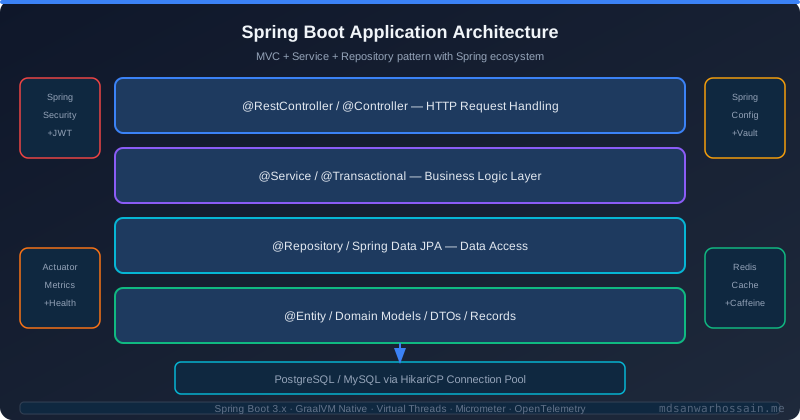
Spring Security processes every request through a chain of filters. For JWT-based APIs, you insert a custom filter early in the chain:
@Component
public class JwtAuthenticationFilter extends OncePerRequestFilter {

    private final JwtTokenService tokenService;
    private final UserDetailsService userDetailsService;

    @Override
    protected void doFilterInternal(HttpServletRequest request,
                                    HttpServletResponse response,
                                    FilterChain chain)
            throws ServletException, IOException {

        String authHeader = request.getHeader(HttpHeaders.AUTHORIZATION);
        if (authHeader == null || !authHeader.startsWith("Bearer ")) {
            chain.doFilter(request, response);
            return;
        }

        String token = authHeader.substring(7);
        try {
            Claims claims = tokenService.validateAndParse(token);
            String userId = claims.getSubject();
            UserDetails user = userDetailsService.loadUserByUsername(userId);
            UsernamePasswordAuthenticationToken auth =
                new UsernamePasswordAuthenticationToken(user, null, user.getAuthorities());
            auth.setDetails(new WebAuthenticationDetailsSource().buildDetails(request));
            SecurityContextHolder.getContext().setAuthentication(auth);
        } catch (JwtException e) {
            // Log at DEBUG; do not leak exception details in response
            response.sendError(HttpServletResponse.SC_UNAUTHORIZED, "Invalid token");
            return;
        }
        chain.doFilter(request, response);
    }
}
@Configuration
@EnableWebSecurity
public class SecurityConfig {
@Bean
public SecurityFilterChain filterChain(HttpSecurity http,
JwtAuthenticationFilter jwtFilter) throws Exception {
http
.csrf(AbstractHttpConfigurer::disable) // stateless API — CSRF not applicable
.sessionManagement(s -> s.sessionCreationPolicy(STATELESS))
.authorizeHttpRequests(auth -> auth
.requestMatchers("/api/v1/auth/**").permitAll()
.anyRequest().authenticated())
.addFilterBefore(jwtFilter, UsernamePasswordAuthenticationFilter.class);
return http.build();
}
}Token Lifecycle Design: Access + Refresh Tokens
The canonical pattern is a dual-token model:
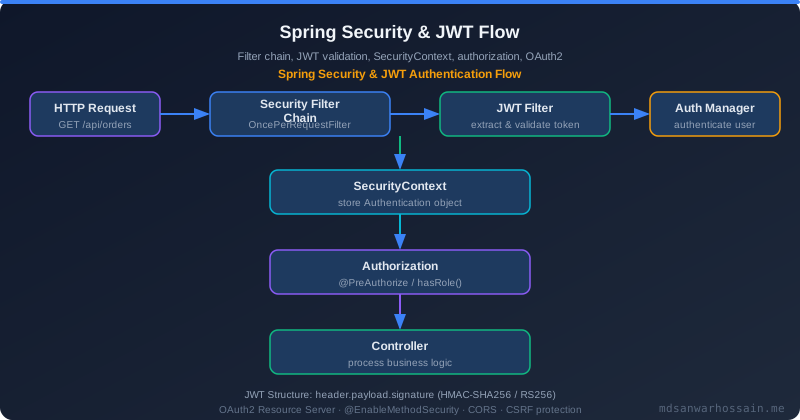
- Access token: Short-lived (5–15 minutes). Sent on every API request. Stateless—validated by signature alone, no DB lookup needed.
- Refresh token: Long-lived (7–30 days). Sent only to the
/auth/refreshendpoint. Stored server-side for revocation checks.
@Service
public class AuthService {

    private final JwtTokenService jwtService;
    private final RefreshTokenRepository refreshRepo;

    public TokenPair login(String username, String password) {
        authenticate(username, password); // throws on failure

        String accessToken = jwtService.generateAccessToken(username);  // 15 min
        String refreshToken = UUID.randomUUID().toString();              // opaque token

        // Persist refresh token with metadata
        refreshRepo.save(RefreshToken.builder()
            .token(refreshToken)
            .username(username)
            .expiresAt(Instant.now().plus(30, DAYS))
            .deviceFingerprint(getCurrentDeviceFingerprint())
            .build());

        return new TokenPair(accessToken, refreshToken);
    }
}
Token Refresh Rotation Strategy
Refresh token rotation is the cornerstone of a secure refresh strategy. Every time a refresh token is used, it is invalidated and replaced with a new one. If an attacker steals a refresh token and uses it after the legitimate client already used it, the server detects the reuse and can revoke the entire family of tokens.
@Transactional
public TokenPair refresh(String oldRefreshToken) {
    RefreshToken stored = refreshRepo.findByToken(oldRefreshToken)
        .orElseThrow(() -> new InvalidTokenException("Refresh token not found"));

    if (stored.isRevoked()) {
        // CRITICAL: token reuse detected — possible token theft
        // Revoke the entire token family for this user
        refreshRepo.revokeAllByUsername(stored.getUsername());
        auditLog.warn("REUSE_DETECTED user={}", stored.getUsername());
        throw new SecurityException("Token reuse detected — all sessions revoked");
    }

    if (stored.getExpiresAt().isBefore(Instant.now())) {
        throw new InvalidTokenException("Refresh token expired");
    }

    // Rotate: revoke old, issue new
    stored.setRevoked(true);
    refreshRepo.save(stored);

    String newAccess = jwtService.generateAccessToken(stored.getUsername());
    String newRefresh = UUID.randomUUID().toString();
    refreshRepo.save(RefreshToken.builder()
        .token(newRefresh)
        .username(stored.getUsername())
        .familyId(stored.getFamilyId()) // track lineage for reuse detection
        .expiresAt(Instant.now().plus(30, DAYS))
        .build());

    return new TokenPair(newAccess, newRefresh);
}
The familyId field chains refresh tokens together. When reuse is detected on any token in a family, the entire family is revoked—all sessions for that user are terminated. This is the Auth0 model of refresh token rotation and is considered the gold standard for high-security APIs. For concurrent workloads managing many session tokens at scale, the lifecycle management techniques in Java Structured Concurrency can complement your token refresh flows.
Blacklisting and Revocation Patterns
Access tokens are stateless by design, but sometimes you need to invalidate them immediately (user logout, password change, account suspension). Three patterns:
Pattern 1: Short TTL + token blacklist
Maintain a Redis set of revoked JTIs. Check it in your filter. The set can be auto-expired using Redis TTL matching the token's own expiry, so it never grows unboundedly.
@Service
public class TokenBlacklistService {
    private final StringRedisTemplate redis;

    public void revoke(String jti, Duration ttlRemaining) {
        redis.opsForValue().set("blacklist:" + jti, "1", ttlRemaining);
    }

    public boolean isRevoked(String jti) {
        return Boolean.TRUE.equals(redis.hasKey("blacklist:" + jti));
    }
}
Pattern 2: Token version in user profile
Store a tokenVersion integer in your user record. Embed it in the JWT payload. On each request, compare the token's version against the DB record. If the user changes their password, increment tokenVersion—all existing tokens with older versions are immediately invalid. This requires one DB/cache lookup per request but avoids maintaining a separate blacklist.
Pattern 3: Short access TTL (2–5 minutes)
Accept that revoking stateless tokens is inherently a trade-off. With a 5-minute TTL, the blast radius of a compromised access token is bounded. This is the simplest approach and is often sufficient for non-high-security APIs.
Replay Attack Prevention
Replay attacks occur when an attacker captures a valid token and replays it to gain access. In addition to HTTPS (mandatory!), consider these countermeasures:
jtinonce tracking: For truly sensitive operations (wire transfers, MFA events), store used JTIs for their TTL window and reject reuse.- Binding tokens to client context: Include a hash of the client's TLS certificate fingerprint (mTLS) or device ID in the JWT. Reject tokens presented from a different context.
- DPoP (Demonstrating Proof of Possession): The OAuth 2.0 DPoP spec binds access tokens to a public key. Each request includes a signed proof that only the holder of the private key could produce.
Storing Refresh Tokens Safely
The storage location of refresh tokens determines your attack surface:
Browser clients
- HttpOnly + Secure cookie: Cannot be read by JavaScript (XSS protection). CSRF protection required (use SameSite=Strict or a CSRF token). This is the recommended approach for web apps.
- localStorage / sessionStorage: Accessible to JavaScript—vulnerable to XSS. Avoid for refresh tokens.
Mobile clients
- iOS Keychain / Android Keystore: Hardware-backed secure storage. Use these exclusively for long-lived credentials on mobile.
Backend services (service-to-service)
Prefer OAuth2 client credentials flow (no user context, no refresh tokens needed) with short-lived access tokens. Store client secrets in Vault or Kubernetes Secrets, not in application config files.
Common Mistakes and Fixes
Mistake 1: Not validating the alg header
The infamous "alg:none" attack: an attacker creates a JWT with {"alg":"none"} and an empty signature. Naïve validators accept it. Always explicitly specify the expected algorithm in your validator:
Jwts.parserBuilder()
    .setSigningKey(publicKey)
    .requireAlgorithm("RS256")  // explicit — reject anything else
    .build()
    .parseClaimsJws(token);
Mistake 2: Putting sensitive data in claims
JWT payloads are Base64-encoded, not encrypted (unless you use JWE). Anyone can decode the payload without the signing key. Never put passwords, PII beyond user ID, or internal system paths in JWT claims.
Mistake 3: Symmetric secret in environment variables
If you use HS256, the secret must be treated like a password: stored in a secrets manager (AWS Secrets Manager, HashiCorp Vault), rotated regularly, and never committed to source control.
Mistake 4: Missing iss and aud validation
Validate the iss (issuer) and aud (audience) claims. A token issued by your auth service for Service A should be rejected if presented to Service B. Spring Security OAuth2 Resource Server validates these automatically when properly configured.
Production Hardening Checklist
- ☑ Use RS256 or ES256 (asymmetric) over HS256
- ☑ Access token TTL: 5–15 minutes maximum
- ☑ Refresh token TTL: 7–30 days, stored server-side
- ☑ Implement refresh token rotation with reuse detection
- ☑ Store refresh tokens in HttpOnly Secure cookies for web clients
- ☑ Maintain a Redis-backed JTI blacklist for immediate revocation
- ☑ Validate
alg,iss,aud,expon every token - ☑ Log all auth events: login, refresh, logout, reuse detection
- ☑ Rate-limit
/auth/loginand/auth/refreshendpoints - ☑ Enable HTTPS everywhere; set HSTS headers
- ☑ Rotate signing keys annually (or on suspected compromise) with JWKS endpoint
- ☑ Run OWASP ZAP or Burp Suite scans as part of CI/CD
JWKS Endpoint for Key Rotation
Expose a JWKS (JSON Web Key Set) endpoint so downstream services can automatically fetch the current public key without a deployment:
@RestController
@RequestMapping("/.well-known")
public class JwksController {

    private final JwtKeyProvider keyProvider;

    @GetMapping("/jwks.json")
    public Map<String, Object> jwks() {
        return Map.of("keys", List.of(keyProvider.getPublicKeyAsJwk()));
    }
}

// In resource servers (Spring Security OAuth2):
spring.security.oauth2.resourceserver.jwt.jwk-set-uri=https://auth.example.com/.well-known/jwks.json
When you rotate keys, publish the new public key to the JWKS endpoint before starting to sign with the new private key. Keep the old public key in the JWKS for the duration of the old tokens' max TTL, then remove it.
Key Takeaways
- Design token TTLs with both security and UX in mind. Short access tokens + rotating refresh tokens is the gold standard.
- Refresh token rotation with reuse detection (family revocation) eliminates the most common refresh token attack vector.
- Never use HS256 in multi-service architectures. RS256/ES256 with a JWKS endpoint enables secure, scalable key distribution.
- Always validate
alg,iss,aud,exp, andjti. Never trust claims without signature verification. - Store refresh tokens in HttpOnly Secure cookies for browser clients; use platform keystores for mobile.
- Rate-limit all authentication endpoints and emit structured audit logs for every auth event.
Tags:
Read More
Explore related deep-dives on Java concurrency, Spring Security, and backend engineering:
- Java Structured Concurrency: Virtual Threads and Scoped Lifetimes — handle concurrent token refresh at scale
- Browse all Spring Boot and backend security articles →
Leave a Comment
Related Posts

Software Engineer · Java · Spring Boot · Microservices