OWASP Top 10 for Java Developers: Fixing Real Vulnerabilities in Spring Boot APIs
The OWASP Top 10 is not a theoretical checklist — it is a ranked list of the vulnerabilities that attackers exploit most successfully in the real world. Every entry in the 2021 list has caused production breaches at companies with large engineering teams. This guide maps each category directly to Spring Boot code, showing the vulnerable pattern, explaining why it fails, and providing the production-hardened fix.
TL;DR
"Complete guide to OWASP Top 10 for Java developers: fix broken access control, SQL injection, cryptographic failures, SSRF, and security misconfiguration."
Table of Contents
- OWASP Top 10 2021: Why Java Developers Must Know This List
- A01: Broken Access Control in Spring Boot
- A02 & A03: Cryptographic Failures & Injection
- A05: Security Misconfiguration in Spring Boot
- A07: Authentication & Session Failures
- A09: Security Logging & Monitoring Failures
- A10: Server-Side Request Forgery (SSRF) in Spring Boot
- Dependency Vulnerability Scanning: A06
OWASP Top 10 2021: Why Java Developers Must Know This List
The Open Web Application Security Project (OWASP) publishes the Top 10 every three to four years based on data from hundreds of thousands of real-world applications. The 2021 edition introduced three new categories that reflect the modern software supply chain: Insecure Design (A04), Software & Data Integrity Failures (A08), and Server-Side Request Forgery (A10). For Java developers building Spring Boot APIs, nearly every category maps directly to something you write in your daily work.
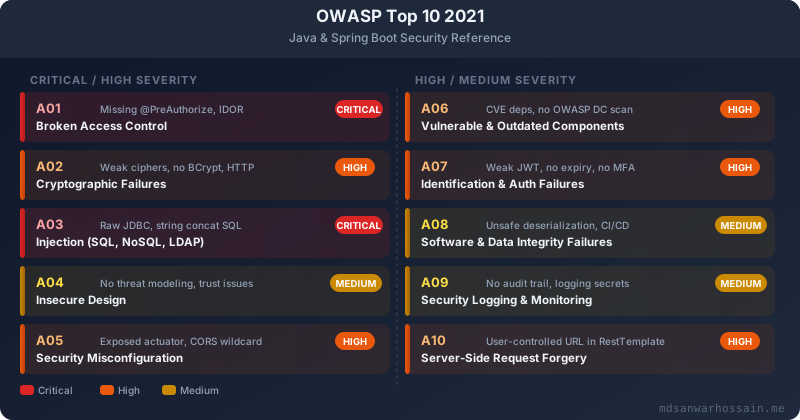
The table below gives you a quick orientation before we dive into each fix:
| ID | Category | Spring Boot Risk Area | Severity |
|---|---|---|---|
| A01 | Broken Access Control | Missing @PreAuthorize, IDOR via path variables | Critical |
| A02 | Cryptographic Failures | Weak hashing, HTTP transport, secrets in logs | High |
| A03 | Injection | Raw JDBC string concat, JPQL injection | Critical |
| A04 | Insecure Design | No threat modeling, insecure defaults in design | Medium |
| A05 | Security Misconfiguration | Exposed actuator, default creds, CORS wildcard | High |
| A06 | Vulnerable Components | Outdated Spring Boot, Log4Shell, CVE deps | High |
| A07 | Auth & Session Failures | Weak JWT secrets, no token expiry, no rotation | High |
| A08 | Software Integrity Failures | Unsafe deserialization, unverified CI/CD artifacts | Medium |
| A09 | Logging & Monitoring Failures | No auth failure logging, secrets in stack traces | Medium |
| A10 | SSRF | User-controlled URL in RestTemplate / WebClient | High |
The ordering matters: A01 (Broken Access Control) moved from fifth place in 2017 to first place in 2021 because 94% of tested applications had at least one access control failure. It is the single most prevalent vulnerability class and the easiest to introduce accidentally in a REST API when developers focus on functionality and leave authorization as an afterthought.
A01: Broken Access Control in Spring Boot
Broken access control occurs when an authenticated user can perform actions or access data that they should not be able to. The most common manifestation in REST APIs is the Insecure Direct Object Reference (IDOR) — using a predictable identifier in a URL path to access another user's data. Consider this vulnerable endpoint:
// ❌ VULNERABLE — No authorization check, any authenticated user
// can read any other user's profile by changing the ID in the URL
@RestController
@RequestMapping("/api/users")
public class UserController {

    @GetMapping("/{userId}")
    public ResponseEntity<UserProfile> getUser(@PathVariable Long userId) {
        // Fetches ANY user's data — the caller's identity is never checked
        return ResponseEntity.ok(userService.findById(userId));
    }

    @PutMapping("/{userId}/orders/{orderId}")
    public ResponseEntity<Order> updateOrder(
            @PathVariable Long userId,
            @PathVariable Long orderId,
            @RequestBody OrderUpdateRequest request) {
        // An attacker can update anyone's order by guessing orderId
        return ResponseEntity.ok(orderService.update(orderId, request));
    }
}
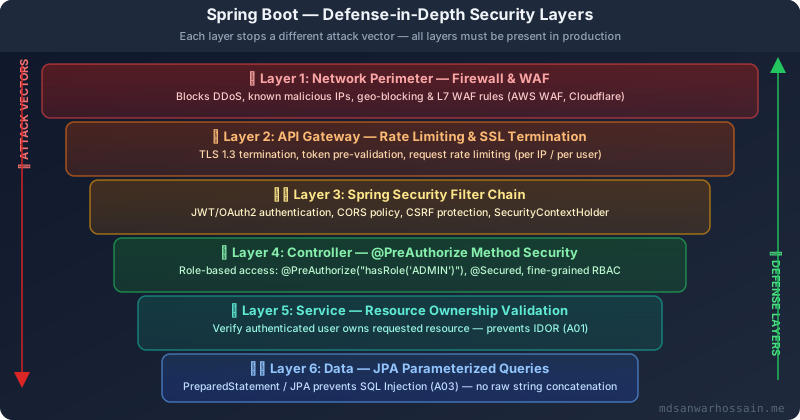
This is a genuine critical vulnerability. An authenticated user can enumerate sequential IDs and read every other user's profile, order history, payment details, or address. The fix requires two complementary controls: method-level security with @PreAuthorize for role checks, and ownership validation in the service layer for resource-level access.
First, enable method security in your Spring Security configuration:
// Enable @PreAuthorize on all @Service and @Controller methods
@Configuration
@EnableWebSecurity
@EnableMethodSecurity(prePostEnabled = true, securedEnabled = true)
public class SecurityConfig {

    @Bean
    public SecurityFilterChain filterChain(HttpSecurity http) throws Exception {
        return http
            .csrf(csrf -> csrf.disable()) // disabled for stateless JWT APIs
            .sessionManagement(session ->
                session.sessionCreationPolicy(SessionCreationPolicy.STATELESS))
            .authorizeHttpRequests(auth -> auth
                .requestMatchers("/api/auth/**").permitAll()
                .requestMatchers("/api/admin/**").hasRole("ADMIN")
                .anyRequest().authenticated()
            )
            .addFilterBefore(jwtAuthFilter, UsernamePasswordAuthenticationFilter.class)
            .build();
    }
}
With method security enabled, add @PreAuthorize at the controller level and ownership checks in the service layer:
// ✅ FIXED — Role-based access control at the controller layer
@RestController
@RequestMapping("/api/users")
public class UserController {

    // Any authenticated user can only access their own profile
    // Admins can access any profile
    @GetMapping("/{userId}")
    @PreAuthorize("hasRole('ADMIN') or #userId == authentication.principal.id")
    public ResponseEntity<UserProfile> getUser(@PathVariable Long userId) {
        return ResponseEntity.ok(userService.findById(userId));
    }

    // Order updates require ownership verification in service layer
    @PutMapping("/{userId}/orders/{orderId}")
    @PreAuthorize("isAuthenticated()")
    public ResponseEntity<Order> updateOrder(
            @PathVariable Long userId,
            @PathVariable Long orderId,
            @RequestBody OrderUpdateRequest request,
            Authentication authentication) {
        // Pass the caller's identity into the service — never trust the path variable alone
        return ResponseEntity.ok(
            orderService.updateWithOwnerCheck(orderId, request, authentication.getName())
        );
    }
}
// ✅ Service layer: ownership check prevents IDOR
@Service
public class OrderService {
public Order updateWithOwnerCheck(Long orderId, OrderUpdateRequest request,
String callerUsername) {
Order order = orderRepository.findById(orderId)
.orElseThrow(() -> new ResourceNotFoundException("Order not found"));
// Verify the caller owns this order — prevents cross-user IDOR
if (!order.getOwnerUsername().equals(callerUsername)) {
// Log the attempted unauthorized access for security monitoring
log.warn("Unauthorized order access attempt: user={}, orderId={}",
callerUsername, orderId);
throw new AccessDeniedException("You do not own this order");
}
order.applyUpdate(request);
return orderRepository.save(order);
}
}The key principle: never trust input from the client to determine authorization. Path variables, query parameters, and request body fields that contain resource IDs are attacker-controlled. The server must always derive authorization from the authenticated security context and verify it against the resource being accessed.
For admin endpoints that need to list all resources, use pagination with strict role enforcement, and never expose internal IDs in responses — use UUIDs or opaque tokens that cannot be enumerated sequentially:
// ✅ Use UUID-based identifiers to prevent enumeration attacks
@Entity
public class UserProfile {

    @Id
    @GeneratedValue(strategy = GenerationType.IDENTITY)
    private Long id; // internal auto-increment — never expose in API responses

    @Column(unique = true, nullable = false)
    private UUID publicId = UUID.randomUUID(); // expose this in API responses

    // ... other fields
}
A02 & A03: Cryptographic Failures & Injection
SQL Injection: The Classic That Never Goes Away
SQL injection is the most well-known vulnerability in the OWASP list and still appears regularly in Java codebases — particularly when developers use JdbcTemplate with raw string concatenation, thinking it is safe because they are not using an ORM. It is not safe:
// ❌ VULNERABLE — SQL injection via string concatenation with JdbcTemplate
@Repository
public class UserRepository {

    @Autowired
    private JdbcTemplate jdbcTemplate;

    public List<User> searchByUsername(String username) {
        // An attacker sends: username = "' OR '1'='1" and dumps the entire table
        // Or: username = "'; DROP TABLE users; --"
        String sql = "SELECT * FROM users WHERE username = '" + username + "'";
        return jdbcTemplate.query(sql, userRowMapper);
    }

    public User findByEmailAndStatus(String email, String status) {
        // Both parameters are injectable
        String sql = "SELECT * FROM users WHERE email = '" + email
                   + "' AND status = '" + status + "'";
        return jdbcTemplate.queryForObject(sql, userRowMapper);
    }
}
The attacker input ' OR '1'='1' -- turns the WHERE clause into a tautology that returns every row. More dangerous payloads can exfiltrate schema information or, on some databases, execute OS commands. The fix is always parameterized queries — they separate the SQL structure from the data, making injection structurally impossible:
// ✅ FIXED — Parameterized queries prevent SQL injection
@Repository
public class UserRepository {

    @Autowired
    private JdbcTemplate jdbcTemplate;

    public List<User> searchByUsername(String username) {
        // The ? placeholder is a bind variable — the driver sends it separately
        // from the SQL, so the database never interprets it as SQL syntax
        String sql = "SELECT * FROM users WHERE username = ?";
        return jdbcTemplate.query(sql, userRowMapper, username);
    }

    public Optional<User> findByEmailAndStatus(String email, String status) {
        String sql = "SELECT * FROM users WHERE email = ? AND status = ?";
        try {
            return Optional.of(jdbcTemplate.queryForObject(sql, userRowMapper, email, status));
        } catch (EmptyResultDataAccessException e) {
            return Optional.empty();
        }
    }
}
When using Spring Data JPA, JPQL with named parameters is safe. Raw @Query with string concatenation is not:
// ✅ SAFE — JPA named parameters, never interpolate into JPQL strings
public interface UserJpaRepository extends JpaRepository<User, Long> {

    // Spring Data derives a safe parameterized query automatically
    Optional<User> findByEmailAndStatus(String email, String status);

    // Named parameter in JPQL — safe
    @Query("SELECT u FROM User u WHERE u.department = :dept AND u.role = :role")
    List<User> findByDepartmentAndRole(
        @Param("dept") String department,
        @Param("role") String role
    );

    // ❌ NEVER do this — JPQL injection is possible just like SQL injection
    // @Query("SELECT u FROM User u WHERE u.username = '" + username + "'")
}
Password Hashing: BCrypt is Non-Negotiable
Storing passwords with MD5, SHA-1, or even SHA-256 is a cryptographic failure (A02). These are fast hashing algorithms designed for data integrity verification — an attacker with the hash table can crack billions of passwords per second using a GPU. BCrypt is a purpose-built password hashing function with a configurable cost factor that makes brute-forcing computationally infeasible:
// ❌ VULNERABLE — MD5 is completely broken for password storage
@Service
public class AuthService {
    public void registerUser(String username, String plainPassword) {
        // SHA-256 is also insufficient — GPU rigs can crack 10 billion/second
        String hashedPassword = DigestUtils.md5DigestAsHex(plainPassword.getBytes());
        userRepository.save(new User(username, hashedPassword));
    }

    public boolean authenticate(String username, String password) {
        User user = userRepository.findByUsername(username);
        // Comparing unsalted hashes — susceptible to rainbow table attacks
        return user.getPassword().equals(
            DigestUtils.md5DigestAsHex(password.getBytes())
        );
    }
}
// ✅ FIXED — BCrypt with cost factor 12 (adjust based on your server's capability)
@Configuration
public class PasswordEncoderConfig {
@Bean
public PasswordEncoder passwordEncoder() {
// Cost factor 12 takes ~250ms per hash on modern hardware
// This makes brute-forcing computationally prohibitive
return new BCryptPasswordEncoder(12);
}
}
@Service
public class AuthService {
@Autowired
private PasswordEncoder passwordEncoder;
public void registerUser(String username, String plainPassword) {
// BCrypt generates a unique salt for each hash automatically
String hashedPassword = passwordEncoder.encode(plainPassword);
userRepository.save(new User(username, hashedPassword));
// Never log plainPassword — even at DEBUG level
}
public boolean authenticate(String username, String password) {
User user = userRepository.findByUsername(username)
.orElseThrow(() -> new BadCredentialsException("Invalid credentials"));
// BCrypt.matches() handles the salt internally — constant-time comparison
return passwordEncoder.matches(password, user.getPassword());
}
}Enforce HTTPS and Prevent Sensitive Data in Logs
// ✅ Force HTTPS redirect in Spring Security configuration
@Bean
public SecurityFilterChain filterChain(HttpSecurity http) throws Exception {
    return http
        // Redirect all HTTP to HTTPS with HSTS
        .requiresChannel(channel ->
            channel.anyRequest().requiresSecure()
        )
        // HSTS: tell browsers to always use HTTPS for 1 year
        .headers(headers -> headers
            .httpStrictTransportSecurity(hsts -> hsts
                .includeSubDomains(true)
                .maxAgeInSeconds(31536000)
            )
        )
        // ...other config
        .build();
}

// ✅ Mask sensitive fields in log output using @JsonIgnore and custom toString
public class LoginRequest {
    private String username;

    @JsonProperty(access = JsonProperty.Access.WRITE_ONLY)
    private String password;

    @Override
    public String toString() {
        // Never include the password field in any toString() used for logging
        return "LoginRequest{username='" + username + "', password='[REDACTED]'}";
    }
}
A05: Security Misconfiguration in Spring Boot
Spring Boot's autoconfiguration is excellent for developer productivity but can create security misconfigurations in production if left at their defaults. The three most dangerous default misconfigurations in Spring Boot are exposed Actuator endpoints, CORS wildcard origins, and verbose error messages that leak stack traces to clients.
Actuator Endpoints: Information Disclosure & RCE Risk
Spring Boot Actuator's /actuator/env endpoint exposes all environment variables including database passwords, API keys, and JWT secrets. The /actuator/heapdump endpoint lets anyone download a full heap dump containing decrypted credentials. The /actuator/loggers endpoint can be used to change log levels. Never expose Actuator without authentication:
# ❌ VULNERABLE application.yml — all actuator endpoints exposed without auth
management:
  endpoints:
    web:
      exposure:
        include: "*"   # Exposes env, heapdump, threaddump, loggers, beans, etc.
  endpoint:
    health:
      show-details: always  # Leaks database connection status to unauthenticated clients
# ✅ FIXED — Expose only what monitoring systems need, secure the rest
management:
endpoints:
web:
exposure:
# Only expose health and metrics for Prometheus scraping
include: health,metrics,prometheus
base-path: /internal/actuator # Obscure the default path
endpoint:
health:
# Only show details to authenticated users with ACTUATOR role
show-details: when-authorized
roles: ACTUATOR
env:
# Never expose environment variables
enabled: false
heapdump:
enabled: false
threaddump:
enabled: false// ✅ Secure actuator endpoints with Spring Security
@Bean
public SecurityFilterChain filterChain(HttpSecurity http) throws Exception {
return http
.authorizeHttpRequests(auth -> auth
// Monitoring systems access health/metrics without authentication
.requestMatchers("/internal/actuator/health").permitAll()
.requestMatchers("/internal/actuator/prometheus").hasIpAddress("10.0.0.0/8")
// All other actuator endpoints require the ACTUATOR role
.requestMatchers("/internal/actuator/**").hasRole("ACTUATOR")
.anyRequest().authenticated()
)
.build();
}CORS: Never Use Wildcard in Production
// ❌ VULNERABLE — Wildcard CORS allows any website to make authenticated requests
@Configuration
public class CorsConfig implements WebMvcConfigurer {

    @Override
    public void addCorsMappings(CorsRegistry registry) {
        registry.addMapping("/api/**")
            .allowedOrigins("*")           // Any origin — allows cross-site attacks
            .allowedMethods("*")           // Including DELETE, PUT from any site
            .allowCredentials(true);       // With credentials — this is actually an error
            // Note: allowedOrigins("*") with allowCredentials(true) throws at runtime
            // but developers often switch to allowedOriginPatterns("*") which is dangerous
    }
}
// ✅ FIXED — Explicit allowlist of trusted origins
@Configuration
public class CorsConfig implements WebMvcConfigurer {
@Value("${app.cors.allowed-origins}")
private List<String> allowedOrigins;
@Override
public void addCorsMappings(CorsRegistry registry) {
registry.addMapping("/api/**")
.allowedOrigins(allowedOrigins.toArray(new String[0]))
.allowedMethods("GET", "POST", "PUT", "DELETE", "PATCH")
.allowedHeaders("Authorization", "Content-Type", "X-Requested-With")
.allowCredentials(true)
.maxAge(3600); // Cache preflight response for 1 hour
}
}
// In application.yml:
// app:
// cors:
// allowed-origins:
// - https://app.yourdomain.com
// - https://admin.yourdomain.comSuppress Verbose Error Responses
# ✅ Disable Spring Boot's default error page that leaks stack traces
server:
  error:
    include-stacktrace: never       # Never send stack traces to clients
    include-message: never          # Never expose exception messages
    include-binding-errors: never   # Never expose validation binding errors
    include-exception: false        # Never include exception class names

# ✅ Global exception handler to return safe, structured error responses
@RestControllerAdvice
public class GlobalExceptionHandler {

    private static final Logger log = LoggerFactory.getLogger(GlobalExceptionHandler.class);

    @ExceptionHandler(Exception.class)
    public ResponseEntity<ErrorResponse> handleGenericException(
            Exception ex, HttpServletRequest request) {
        // Log the full details server-side for debugging
        log.error("Unhandled exception for request {}: {}", request.getRequestURI(), ex.getMessage(), ex);
        // Return only a safe, generic message to the client
        return ResponseEntity.status(HttpStatus.INTERNAL_SERVER_ERROR)
            .body(new ErrorResponse("An internal error occurred. Please try again later."));
    }

    @ExceptionHandler(AccessDeniedException.class)
    public ResponseEntity<ErrorResponse> handleAccessDenied(AccessDeniedException ex) {
        // Do NOT include the reason in the response — it could help attackers probe access controls
        return ResponseEntity.status(HttpStatus.FORBIDDEN)
            .body(new ErrorResponse("Access denied."));
    }
}
A07: Authentication & Session Failures
Authentication failures in Java APIs most commonly involve JWT implementation mistakes: weak signing secrets, tokens with no expiry, missing token revocation, and using JWTs for session management without refresh token rotation. Here is a production-hardened JWT configuration:
Vulnerable JWT: No Expiry, Weak Secret
// ❌ VULNERABLE — Multiple JWT security failures
@Component
public class JwtService {

    // Weak secret — easily brute-forced offline against captured tokens
    private static final String SECRET = "secret";

    public String generateToken(String username) {
        return Jwts.builder()
            .setSubject(username)
            // ❌ No expiry — once issued, token is valid forever
            // ❌ No issued-at claim — cannot detect token reuse after logout
            .signWith(Keys.hmacShaKeyFor(SECRET.getBytes()))
            .compact();
    }

    public boolean validateToken(String token) {
        try {
            Jwts.parserBuilder()
                .setSigningKey(Keys.hmacShaKeyFor(SECRET.getBytes()))
                .build()
                .parseClaimsJws(token);
            return true;
        } catch (JwtException e) {
            return false;
        }
        // ❌ No check against a revocation list — stolen tokens remain valid
    }
}
Hardened JWT: Short Expiry, Strong Keys, Refresh Rotation
// ✅ FIXED — Production-grade JWT configuration
@Component
public class JwtService {

    // ✅ 256-bit secret from environment variable — never hardcoded
    @Value("${jwt.secret}")
    private String jwtSecret;

    @Value("${jwt.access-token-expiry-minutes:15}")
    private int accessTokenExpiryMinutes; // Short-lived: 15 minutes

    @Value("${jwt.refresh-token-expiry-days:7}")
    private int refreshTokenExpiryDays;

    private SecretKey getSigningKey() {
        byte[] keyBytes = Decoders.BASE64.decode(jwtSecret);
        return Keys.hmacShaKeyFor(keyBytes);
    }

    public String generateAccessToken(UserDetails userDetails) {
        return Jwts.builder()
            .setSubject(userDetails.getUsername())
            .setIssuedAt(new Date())
            .setExpiration(Date.from(Instant.now().plusSeconds(accessTokenExpiryMinutes * 60L)))
            .claim("roles", userDetails.getAuthorities().stream()
                .map(GrantedAuthority::getAuthority).collect(Collectors.toList()))
            .claim("jti", UUID.randomUUID().toString()) // JWT ID for revocation tracking
            .signWith(getSigningKey(), SignatureAlgorithm.HS256)
            .compact();
    }

    public String generateRefreshToken(String username) {
        String tokenId = UUID.randomUUID().toString();
        String token = Jwts.builder()
            .setSubject(username)
            .setIssuedAt(new Date())
            .setExpiration(Date.from(Instant.now().plusSeconds(refreshTokenExpiryDays * 86400L)))
            .claim("jti", tokenId)
            .claim("type", "refresh")
            .signWith(getSigningKey(), SignatureAlgorithm.HS256)
            .compact();
        // Store the refresh token hash in Redis for revocation capability
        refreshTokenStore.store(tokenId, username, Duration.ofDays(refreshTokenExpiryDays));
        return token;
    }

    public Claims validateAndExtractClaims(String token) {
        Claims claims = Jwts.parserBuilder()
            .setSigningKey(getSigningKey())
            .build()
            .parseClaimsJws(token) // Throws ExpiredJwtException if expired
            .getBody();

        // Check the JTI against the revocation list (Redis set of revoked token IDs)
        String jti = claims.get("jti", String.class);
        if (tokenRevocationStore.isRevoked(jti)) {
            throw new JwtException("Token has been revoked");
        }
        return claims;
    }
}
// ✅ Refresh token rotation — old refresh token is invalidated on each use
@RestController
@RequestMapping("/api/auth")
public class AuthController {
@PostMapping("/refresh")
public ResponseEntity<TokenResponse> refreshTokens(
@CookieValue("refresh_token") String refreshToken) {
try {
Claims claims = jwtService.validateAndExtractClaims(refreshToken);
// Validate this is actually a refresh token
if (!"refresh".equals(claims.get("type", String.class))) {
return ResponseEntity.status(HttpStatus.UNAUTHORIZED).build();
}
String username = claims.getSubject();
String oldJti = claims.get("jti", String.class);
// Invalidate the old refresh token — prevents replay attacks
tokenRevocationStore.revoke(oldJti);
// Issue fresh access + refresh tokens
UserDetails userDetails = userDetailsService.loadUserByUsername(username);
String newAccessToken = jwtService.generateAccessToken(userDetails);
String newRefreshToken = jwtService.generateRefreshToken(username);
// Deliver refresh token via HttpOnly cookie — not accessible to JavaScript
ResponseCookie refreshCookie = ResponseCookie.from("refresh_token", newRefreshToken)
.httpOnly(true)
.secure(true)
.sameSite("Strict")
.path("/api/auth/refresh")
.maxAge(Duration.ofDays(7))
.build();
return ResponseEntity.ok()
.header(HttpHeaders.SET_COOKIE, refreshCookie.toString())
.body(new TokenResponse(newAccessToken));
} catch (JwtException e) {
return ResponseEntity.status(HttpStatus.UNAUTHORIZED).build();
}
}
}Key security properties of this design: access tokens expire after 15 minutes, limiting the window for misuse after a token is stolen. Refresh tokens are single-use — every refresh invalidates the old token and issues a new one, so stolen refresh tokens are quickly detected (the legitimate user's next refresh will fail). Refresh tokens are stored in HttpOnly cookies, making them inaccessible to XSS attacks targeting JavaScript.
A09: Security Logging & Monitoring Failures
The OWASP Top 10 ranks logging and monitoring failures in the top 10 because without logs, breaches go undetected for months. The 2020 IBM Cost of a Data Breach report found the average time to identify a breach was 207 days. Adequate security logging cuts detection time dramatically. However, logging done wrong — capturing passwords, tokens, or PII — creates a secondary vulnerability where the attacker who accesses your logs harvests production credentials.
Spring Security Authentication Event Listener
// ✅ Capture authentication events for security audit trail
@Component
public class SecurityEventListener {

    private static final Logger securityLog = LoggerFactory.getLogger("SECURITY_AUDIT");

    @EventListener
    public void onAuthenticationSuccess(AuthenticationSuccessEvent event) {
        String username = event.getAuthentication().getName();
        // Do NOT log tokens, passwords, or credentials — only the outcome
        securityLog.info("AUTH_SUCCESS user={} ip={}", username, getCurrentIp());
    }

    @EventListener
    public void onAuthenticationFailure(AbstractAuthenticationFailureEvent event) {
        // Log failures without logging the attempted password
        String username = (String) event.getAuthentication().getPrincipal();
        String failureReason = event.getException().getClass().getSimpleName();
        // Sanitize username to prevent log injection — strip newlines
        String safeUsername = username.replaceAll("[\r\n]", "_");
        securityLog.warn("AUTH_FAILURE user={} reason={} ip={}",
            safeUsername, failureReason, getCurrentIp());
    }

    @EventListener
    public void onAuthorizationFailure(AuthorizationDeniedEvent event) {
        Authentication auth = (Authentication) event.getAuthentication().get();
        securityLog.warn("ACCESS_DENIED user={} resource={} ip={}",
            auth.getName(),
            event.getAuthorizationDecision(),
            getCurrentIp());
    }

    private String getCurrentIp() {
        // Use RequestContextHolder to get the current request IP
        try {
            HttpServletRequest request = ((ServletRequestAttributes)
                RequestContextHolder.getRequestAttributes()).getRequest();
            String xff = request.getHeader("X-Forwarded-For");
            return (xff != null) ? xff.split(",")[0].trim() : request.getRemoteAddr();
        } catch (Exception e) {
            return "unknown";
        }
    }
}
Preventing Sensitive Data in Exception Logs
// ❌ VULNERABLE — Exception message leaks the password in logs
public class PaymentService {
    public void processPayment(String cardNumber, String cvv, BigDecimal amount) {
        try {
            paymentGateway.charge(cardNumber, cvv, amount);
        } catch (Exception e) {
            // The exception message may contain the CVV or card number!
            log.error("Payment failed for card {} cvv {} amount {}: {}",
                cardNumber, cvv, amount, e.getMessage());
        }
    }
}
// ✅ FIXED — Mask sensitive fields before logging
public class PaymentService {
public void processPayment(PaymentRequest request) {
try {
paymentGateway.charge(request);
} catch (PaymentGatewayException e) {
// Mask card number — show only last 4 digits
String maskedCard = maskCardNumber(request.getCardNumber());
// Never log CVV under any circumstances
log.error("Payment failed: maskedCard={} amount={} error={}",
maskedCard, request.getAmount(), e.getErrorCode());
// Re-throw a sanitized exception that does not propagate raw gateway messages
throw new PaymentProcessingException("Payment could not be processed");
}
}
private String maskCardNumber(String cardNumber) {
if (cardNumber == null || cardNumber.length() < 4) return "****";
return "*".repeat(cardNumber.length() - 4) + cardNumber.substring(cardNumber.length() - 4);
}
}Logback Configuration: Security Audit Log to ELK
<!-- logback-spring.xml: Separate security audit log for SIEM integration -->
<configuration>
    <!-- Application log -->
    <appender name="APP_JSON" class="ch.qos.logback.core.rolling.RollingFileAppender">
        <file>logs/application.log</file>
        <encoder class="net.logstash.logback.encoder.LogstashEncoder"/>
        <rollingPolicy class="ch.qos.logback.core.rolling.TimeBasedRollingPolicy">
            <fileNamePattern>logs/application.%d{yyyy-MM-dd}.log</fileNamePattern>
            <maxHistory>30</maxHistory>
        </rollingPolicy>
    </appender>

    <!-- Security audit log — separate file, longer retention, forwarded to SIEM -->
    <appender name="SECURITY_AUDIT" class="ch.qos.logback.core.rolling.RollingFileAppender">
        <file>logs/security-audit.log</file>
        <encoder class="net.logstash.logback.encoder.LogstashEncoder">
            <customFields>{"log_type":"security_audit","service":"user-api"}</customFields>
        </encoder>
        <rollingPolicy class="ch.qos.logback.core.rolling.TimeBasedRollingPolicy">
            <fileNamePattern>logs/security-audit.%d{yyyy-MM-dd}.log</fileNamePattern>
            <maxHistory>365</maxHistory> <!-- 1-year retention for compliance -->
        </rollingPolicy>
    </appender>

    <logger name="SECURITY_AUDIT" level="INFO" additivity="false">
        <appender-ref ref="SECURITY_AUDIT"/>
    </logger>
</configuration>
A10: Server-Side Request Forgery (SSRF) in Spring Boot
SSRF is a new addition to the 2021 OWASP Top 10 and reflects the reality of cloud-hosted infrastructure. When an application makes HTTP requests to a URL provided by the user, an attacker can direct those requests to internal resources that should not be accessible — including cloud metadata services (AWS IMDSv1 at 169.254.169.254), internal databases, Kubernetes API servers, or other microservices on the private network.
// ❌ VULNERABLE — User-controlled URL passed directly to RestTemplate
@RestController
@RequestMapping("/api/previews")
public class UrlPreviewController {

    @Autowired
    private RestTemplate restTemplate;

    @GetMapping
    public ResponseEntity<String> fetchPreview(@RequestParam String url) {
        // Attacker sends: url=http://169.254.169.254/latest/meta-data/iam/security-credentials/
        // This fetches AWS instance credentials from the metadata service!
        // Or: url=http://internal-redis:6379  to probe internal services
        ResponseEntity<String> response = restTemplate.getForEntity(url, String.class);
        return ResponseEntity.ok(response.getBody());
    }
}
// ✅ FIXED — Strict URL allowlist validation before making any outbound request
@Service
public class SsrfSafeHttpClient {
// Allowlist of trusted domains — loaded from configuration
@Value("${app.ssrf.allowed-hosts}")
private Set<String> allowedHosts;
// Blocked IP ranges: loopback, private networks, link-local (cloud metadata)
private static final List<String> BLOCKED_PREFIXES = List.of(
"127.", "10.", "172.16.", "172.17.", "172.18.", "172.19.",
"172.20.", "172.21.", "172.22.", "172.23.", "172.24.", "172.25.",
"172.26.", "172.27.", "172.28.", "172.29.", "172.30.", "172.31.",
"192.168.", "169.254.", // AWS metadata service
"::1", "fc", "fd" // IPv6 loopback and ULA
);
public String safeFetch(String rawUrl) {
URI uri = validateAndParseUrl(rawUrl);
// Resolve the hostname to its IP to prevent DNS rebinding attacks
InetAddress resolved = resolveHostSafely(uri.getHost());
checkIpNotBlocked(resolved);
// Make the request using the resolved IP, not the hostname, to prevent TOCTOU
return restTemplate.getForObject(uri.toString(), String.class);
}
private URI validateAndParseUrl(String rawUrl) {
URI uri;
try {
uri = new URI(rawUrl);
} catch (URISyntaxException e) {
throw new InvalidUrlException("Malformed URL");
}
// Only allow HTTPS — never HTTP, file://, or other schemes
if (!"https".equalsIgnoreCase(uri.getScheme())) {
throw new InvalidUrlException("Only HTTPS URLs are permitted");
}
// Verify the host is on the explicit allowlist
String host = uri.getHost();
if (host == null || !allowedHosts.contains(host.toLowerCase())) {
throw new InvalidUrlException("Host not in allowed list: " + host);
}
return uri;
}
private InetAddress resolveHostSafely(String hostname) {
try {
return InetAddress.getByName(hostname);
} catch (UnknownHostException e) {
throw new InvalidUrlException("Cannot resolve host: " + hostname);
}
}
private void checkIpNotBlocked(InetAddress address) {
String ipString = address.getHostAddress();
// Check against blocked IP ranges
boolean blocked = BLOCKED_PREFIXES.stream().anyMatch(ipString::startsWith)
|| address.isLoopbackAddress()
|| address.isSiteLocalAddress()
|| address.isLinkLocalAddress();
if (blocked) {
log.warn("SSRF_BLOCKED target_ip={}", ipString);
throw new InvalidUrlException("Target IP address is not permitted");
}
}
}Additionally, configure RestTemplate or WebClient to use a dedicated HTTP proxy for all outbound traffic, so even if validation is bypassed, internal traffic is routed through a controlled egress point. On Kubernetes, use NetworkPolicy to restrict which pods can make outbound requests.
Dependency Vulnerability Scanning: A06
The Log4Shell vulnerability (CVE-2021-44228) in December 2021 demonstrated that a single dependency with a remote code execution vulnerability can be catastrophic for every application using it. Broken or outdated components (A06) is now the second most common failure vector after access control. The solution is automated dependency vulnerability scanning integrated into your CI/CD pipeline.
OWASP Dependency-Check Maven Plugin
<!-- pom.xml: OWASP Dependency-Check configuration -->
<build>
    <plugins>
        <plugin>
            <groupId>org.owasp</groupId>
            <artifactId>dependency-check-maven</artifactId>
            <version>9.2.0</version>
            <configuration>
                <!-- Fail the build if any dependency has a CVSS score >= 7.0 (High) -->
                <failBuildOnCVSS>7</failBuildOnCVSS>
                <!-- Generate reports in multiple formats -->
                <formats>
                    <format>HTML</format>
                    <format>JSON</format>
                    <format>SARIF</format>
                </formats>
                <!-- Suppress known false positives with a suppression file -->
                <suppressionFile>owasp-suppressions.xml</suppressionFile>
                <!-- Update CVE database from NVD API -->
                <nvdApiKey>${env.NVD_API_KEY}</nvdApiKey>
                <!-- Skip test-scope dependencies -->
                <skipTestScope>false</skipTestScope>
            </configuration>
            <executions>
                <execution>
                    <goals>
                        <goal>check</goal>
                    </goals>
                </execution>
            </executions>
        </plugin>
    </plugins>
</build>
# .github/workflows/security.yml — Dependency scanning in CI/CD
name: Security Scan
on:
push:
branches: [main, develop]
pull_request:
branches: [main]
schedule:
# Run nightly to catch newly published CVEs against existing code
- cron: '0 2 * * *'
jobs:
dependency-check:
runs-on: ubuntu-latest
steps:
- uses: actions/checkout@v4
- name: Set up Java 21
uses: actions/setup-java@v4
with:
java-version: '21'
distribution: 'temurin'
- name: OWASP Dependency Check
run: mvn dependency-check:check -DnvdApiKey=${{ secrets.NVD_API_KEY }}
continue-on-error: false # Hard fail — do not deploy with known High CVEs
- name: Upload SARIF to GitHub Security tab
uses: github/codeql-action/upload-sarif@v3
if: always()
with:
sarif_file: target/dependency-check-report.sarifKeeping Spring Boot Dependencies Current
<!-- Use Maven Versions Plugin to check for outdated dependencies -->
<plugin>
    <groupId>org.codehaus.mojo</groupId>
    <artifactId>versions-maven-plugin</artifactId>
    <version>2.16.2</version>
    <configuration>
        <generateBackupPoms>false</generateBackupPoms>
    </configuration>
</plugin>

<!-- Run: mvn versions:display-dependency-updates -->
<!-- Run: mvn versions:display-plugin-updates -->
# Renovate or Dependabot for automated PR creation on dependency updates
# .github/dependabot.yml
version: 2
updates:
- package-ecosystem: maven
directory: "/"
schedule:
interval: weekly
open-pull-requests-limit: 10
groups:
# Group Spring Boot updates together
spring-boot:
patterns:
- "org.springframework.boot:*"
- "org.springframework.security:*"
- "org.springframework:*"Security Hardening Checklist
- ✅ A01: Enable
@EnableMethodSecurity, add@PreAuthorizeon all endpoints, validate resource ownership in service layer - ✅ A02: Use BCrypt (cost ≥ 12) for passwords, enforce HTTPS with HSTS, never log sensitive fields
- ✅ A03: Always use parameterized queries — zero tolerance for string concatenation in SQL/JPQL
- ✅ A05: Disable or authenticate all Actuator endpoints, configure explicit CORS allowlist, suppress stack traces in error responses
- ✅ A06: Run OWASP Dependency-Check in CI/CD, fail build on CVSS ≥ 7, use Dependabot for automated updates
- ✅ A07: Short-lived JWTs (15 min), rotating refresh tokens in HttpOnly cookies, strong HS256 secrets from environment
- ✅ A09: Log auth success/failure/denial events without sensitive data, separate security audit log, 1-year retention
- ✅ A10: Validate & allowlist outbound URLs, resolve DNS and check IPs, block RFC-1918 and link-local addresses
Security is not a feature you add at the end — it is an architectural property woven through every layer of a Spring Boot application. The OWASP Top 10 gives you a prioritized, evidence-based map of where to focus your effort. By treating each category as a concrete engineering requirement with measurable controls (parameterized queries, BCrypt, short-lived tokens, SSRF allowlists), you convert a generic security checklist into production-safe code.
Leave a Comment
Related Posts

Software Engineer · Java · Spring Boot · Microservices