Apache Cassandra with Spring Boot: Data Modeling, Partitioning & Production Patterns (2026)
A complete production guide to Apache Cassandra with Spring Boot: understanding Cassandra's ring architecture and gossip protocol, mastering query-first data modeling, partition key and clustering key design, tunable consistency levels, Spring Data Cassandra repositories, batch operations, TTL-based time-series patterns, and production operations including compaction, repair, and monitoring.
1. Cassandra vs RDBMS: When to Choose Cassandra
Cassandra is not a drop-in replacement for PostgreSQL. It's a specialized tool designed for specific problems — choose it when those problems are yours.
| Dimension | PostgreSQL | Apache Cassandra |
|---|---|---|
| Write throughput | ~10K writes/sec per node | 100K+ writes/sec per node |
| Scaling model | Vertical (bigger server) | Horizontal (add nodes linearly) |
| JOINs | Yes — full relational algebra | No JOINs — denormalize instead |
| ACID transactions | Full ACID | Row-level only (LWT for CAS ops) |
| Multi-region replication | Complex (Patroni + logical rep.) | Native active-active multi-DC |
| CAP theorem | CP (consistency + partition tolerance) | AP (availability + partition tolerance) |
| Best for | Financial, e-commerce, complex queries | Time-series, IoT, messaging, activity feeds |
Use Cassandra for: real-time IoT data ingestion (millions of sensor events/sec), social media activity feeds (user timelines), messaging platform message storage, recommendation engine click streams, fraud detection event logs, and any system that must remain writable during regional outages.
2. Architecture: Ring, Vnodes, Gossip & Consistent Hashing
Cassandra is a leaderless (masterless) distributed database. Every node is equal — no single point of failure and no special primary node to bottleneck writes.
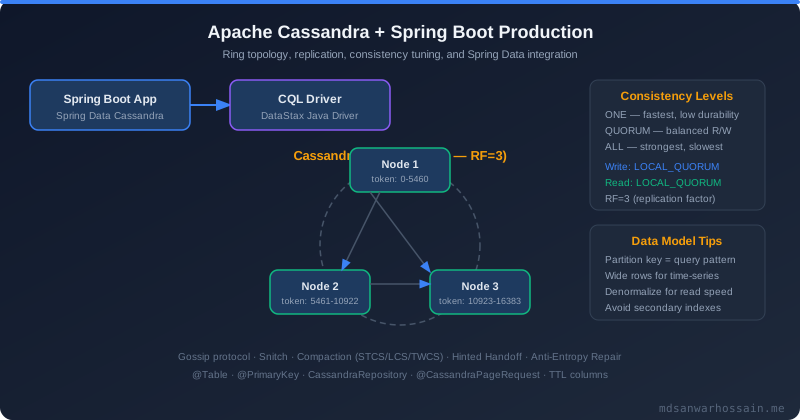
- Ring topology: All Cassandra nodes form a logical ring. Data is distributed using consistent hashing of the partition key to a token (integer 0 to 2^64). Each node owns a range of tokens.
- Virtual nodes (vnodes): Each physical node owns multiple small, non-contiguous token ranges (256 by default). This allows faster rebalancing when nodes are added/removed and naturally handles heterogeneous hardware by assigning more ranges to more powerful nodes.
- Gossip protocol: Nodes exchange state information peer-to-peer every second. Each node maintains a heartbeat and state snapshot for every other node — no central coordination needed. Failure detection is probabilistic (phi accrual detector).
- Replication factor (RF): Determines how many nodes store each partition. With RF=3, data is written to 3 consecutive nodes on the ring. Any node can serve reads or writes for any partition (coordinator role).
- Write path: Write to commit log (WAL) for durability + memtable (in-memory) for fast reads. Memtable flush to SSTable (disk) periodically. Compaction merges SSTables and removes tombstones (deletes).
3. Data Modeling Rules: Query-First Design
Cassandra data modeling is fundamentally different from relational modeling. Design your tables around your queries, not your entities. Denormalization is expected and encouraged.
-- users table
CREATE TABLE users (id UUID, name TEXT, email TEXT, PRIMARY KEY (id));
-- posts table (requires JOIN to get user's posts)
CREATE TABLE posts (id UUID, user_id UUID, title TEXT, created_at TIMESTAMP, PRIMARY KEY (id));
-- Query 1: "Get a user's recent posts" → posts_by_user
CREATE TABLE posts_by_user (
    user_id     UUID,
    created_at  TIMESTAMP,
    post_id     UUID,
    title       TEXT,
    content     TEXT,
    author_name TEXT,    -- denormalized from users table!
    PRIMARY KEY (user_id, created_at, post_id)
) WITH CLUSTERING ORDER BY (created_at DESC, post_id ASC);

-- Query 2: "Get posts by tag" → posts_by_tag
CREATE TABLE posts_by_tag (
    tag         TEXT,
    created_at  TIMESTAMP,
    post_id     UUID,
    title       TEXT,
    author_name TEXT,    -- denormalized again — that's correct!
    PRIMARY KEY (tag, created_at, post_id)
) WITH CLUSTERING ORDER BY (created_at DESC);

-- Accept the duplication — it's the price of linear scalability.
-- Rule: 1 query pattern = 1 table.
Cassandra data modeling rules: (1) Identify all queries first before designing any table; (2) Each table must be queryable by its partition key; (3) Partition key = equality filter in WHERE clause; (4) Clustering key = range filter or ORDER BY; (5) Avoid allowing filtering (ALLOW FILTERING = full table scan, never in production); (6) Duplicate data freely — storage is cheap, cross-partition queries are expensive.
4. Partition Key Design: Hot Spots & Compound Keys
The partition key is the most important design decision in Cassandra. A bad partition key creates hot spots — one node receives all traffic while others idle.
-- ❌ HOT PARTITION: All IoT events for a device go to one partition
-- If device_id is a celebrity device with millions of events, one node explodes
CREATE TABLE device_events (
    device_id  TEXT,
    event_time TIMESTAMP,
    metric     TEXT,
    value      DOUBLE,
    PRIMARY KEY (device_id, event_time)  -- BAD for high-volume devices
);

-- ✅ FIX 1: Bucket the partition key by time window
-- Distributes high-volume devices across many partitions
CREATE TABLE device_events_bucketed (
    device_id  TEXT,
    bucket     TEXT,        -- e.g., '2026-04-11-14' (hour bucket)
    event_time TIMESTAMP,
    metric     TEXT,
    value      DOUBLE,
    PRIMARY KEY ((device_id, bucket), event_time)  -- compound partition key
) WITH CLUSTERING ORDER BY (event_time DESC);

-- bucket = device_id + current_hour → partition rotates every hour
-- Queries need to know the bucket (app-level logic)

-- ✅ FIX 2: Add shard suffix for very hot partitions
-- Randomly route writes to 1 of 10 shards; fan-out reads across shards
CREATE TABLE activity_feed_sharded (
    user_id    UUID,
    shard      TINYINT,     -- 0-9, chosen randomly at write time
    created_at TIMESTAMP,
    event_type TEXT,
    payload    TEXT,
    PRIMARY KEY ((user_id, shard), created_at)
);
-- nodetool tablehistograms to see partition size distribution
nodetool tablehistograms keyspace_name.table_name

-- Or via system table in Cassandra 4+
SELECT * FROM system.size_estimates
WHERE keyspace_name = 'myapp' AND table_name = 'device_events';
5. Clustering Keys & Sort Ordering
Clustering keys define the physical sort order of rows within a partition. Efficient range queries (WHERE event_time > X) are only possible when the range column is a clustering key.
-- Time-series: most recent first (DESC ordering)
CREATE TABLE user_activity (
    user_id    UUID,
    activity_time TIMEUUID,   -- TIMEUUID = UUID v1 with embedded timestamp
    action     TEXT,
    resource   TEXT,
    PRIMARY KEY (user_id, activity_time)
) WITH CLUSTERING ORDER BY (activity_time DESC);

-- Query most recent 20 activities:
SELECT * FROM user_activity WHERE user_id = ? LIMIT 20;
-- Cassandra reads from disk in sorted order — no sort needed, very fast!

-- Multi-level clustering key: sort by status, then recency
CREATE TABLE orders_by_customer (
    customer_id UUID,
    status      TEXT,
    order_time  TIMESTAMP,
    order_id    UUID,
    total       DECIMAL,
    PRIMARY KEY (customer_id, status, order_time, order_id)
) WITH CLUSTERING ORDER BY (status ASC, order_time DESC, order_id ASC);

-- Query: all PENDING orders for a customer, newest first
SELECT * FROM orders_by_customer
WHERE customer_id = ? AND status = 'PENDING';

-- RULE: Clustering key columns must be queried in PREFIX order
-- Can query: WHERE status = ?  ✅
-- Can query: WHERE status = ? AND order_time > ?  ✅
-- CANNOT:    WHERE order_time > ? (skipping status)  ❌
6. CQL Data Types and Collections
CQL supports rich data types including frozen collections and user-defined types (UDTs), enabling denormalization within a single row.
-- Primitive types
UUID, TIMEUUID, TEXT, VARCHAR, INT, BIGINT, FLOAT, DOUBLE, DECIMAL,
BOOLEAN, TIMESTAMP, DATE, TIME, BLOB, INET

-- Collections (store multiple values in one column)
LIST<TEXT>    -- ordered, duplicates allowed; append with list + [item]
SET<TEXT>     -- unordered, no duplicates; efficient for tag-style data
MAP<TEXT, INT> -- key-value pairs; use for attributes/metadata

-- Example: product with tags (set) and attributes (map)
CREATE TABLE products (
    product_id  UUID,
    name        TEXT,
    tags        SET<TEXT>,           -- {'electronics', 'wireless', 'sale'}
    attributes  MAP<TEXT, TEXT>,     -- {'color': 'black', 'size': 'M'}
    image_urls  LIST<TEXT>,          -- ['url1', 'url2']
    PRIMARY KEY (product_id)
);

-- User-Defined Type (UDT) — embed structured data in a column
CREATE TYPE address (
    street  TEXT,
    city    TEXT,
    country TEXT,
    zipcode TEXT
);

CREATE TABLE users (
    user_id     UUID PRIMARY KEY,
    name        TEXT,
    home_addr   FROZEN<address>,     -- FROZEN = whole UDT updated atomically
    work_addr   FROZEN<address>
);

-- Counter columns — atomic increment/decrement
CREATE TABLE page_views (
    page_id TEXT PRIMARY KEY,
    views   COUNTER
);
UPDATE page_views SET views = views + 1 WHERE page_id = ?;
7. Consistency Levels: ONE, QUORUM, ALL — Tunable Consistency
Cassandra's greatest power is tunable consistency — you choose the consistency/availability trade-off per operation, not per database.
| Level | Acknowledgments (RF=3) | Consistency | Availability | Use Case |
|---|---|---|---|---|
| ONE | 1 replica | Eventual | Highest | Logging, analytics, activity feeds |
| QUORUM | 2 replicas (majority) | Strong | High | User data, orders (recommended) |
| LOCAL_QUORUM | Majority in local DC | Strong (local) | High | Multi-DC: avoid cross-DC latency |
| ALL | All 3 replicas | Linearizable | Low | Critical financial (rare) |
| TWO | 2 replicas | Strong | Medium | RF=2 deployments |
// RF=3, QUORUM reads + QUORUM writes:
// R=2, W=2  →  2+2=4 > 3  ✅ STRONG CONSISTENCY guaranteed
// Any write seen by 2 nodes; any read queries 2 nodes
// At least 1 node overlap → always read the latest write

// RF=3, ONE reads + QUORUM writes:
// R=1, W=2  →  1+2=3 = 3  ❌ NOT guaranteed (need STRICTLY greater than)

// In Spring Boot — set consistency per statement
@Bean
public CqlSession cqlSession() {
    return CqlSession.builder()
        .addContactPoint(new InetSocketAddress("cassandra-host", 9042))
        .withLocalDatacenter("datacenter1")
        .build();
}

// Override consistency level at repository layer via custom query
@Query("SELECT * FROM orders WHERE customer_id = :customerId")
@Consistency(ConsistencyLevel.QUORUM)
List<Order> findByCustomerIdWithQuorum(@Param("customerId") UUID customerId);
8. Spring Data Cassandra Setup & Configuration
<!-- pom.xml -->
<dependency>
    <groupId>org.springframework.boot</groupId>
    <artifactId>spring-boot-starter-data-cassandra</artifactId>
</dependency>

# application.yml
spring:
  cassandra:
    contact-points: cassandra-node-1,cassandra-node-2,cassandra-node-3
    port: 9042
    local-datacenter: datacenter1
    keyspace-name: myapp_keyspace
    schema-action: create-if-not-exists   # dev only; use 'none' in production
    request:
      timeout: 10s
      consistency: local_quorum           # default consistency for all requests
      serial-consistency: local_serial    # for LWT operations
    connection:
      connect-timeout: 10s
      init-query-timeout: 10s
    ssl:
      enabled: true                       # always in production
@Table("user_activity")
public class UserActivity {

    @PrimaryKeyClass
    public static class Key implements Serializable {
        @PrimaryKeyColumn(name = "user_id", ordinal = 0, type = PrimaryKeyType.PARTITIONED)
        private UUID userId;

        @PrimaryKeyColumn(name = "activity_time", ordinal = 1, type = PrimaryKeyType.CLUSTERED,
                          ordering = Ordering.DESCENDING)
        private Instant activityTime;
    }

    @PrimaryKey
    private Key key;

    @Column("action")
    private String action;

    @Column("resource")
    private String resource;

    @Column("metadata")
    private Map<String, String> metadata;    // MAP type in Cassandra
}
9. CassandraTemplate and Repository Operations
public interface UserActivityRepository
        extends CassandraRepository<UserActivity, UserActivity.Key> {

    // Derived query — Spring Data generates CQL automatically
    List<UserActivity> findByKeyUserId(UUID userId);

    // Paged results — essential for large partitions (avoid SELECT *)
    Slice<UserActivity> findByKeyUserId(UUID userId, Pageable pageable);

    // Custom CQL query — explicit control
    @Query("SELECT * FROM user_activity WHERE user_id = ?0 AND activity_time > ?1 LIMIT 50")
    List<UserActivity> findRecentActivity(UUID userId, Instant since);

    // Count within a partition
    @Query("SELECT COUNT(*) FROM user_activity WHERE user_id = ?0")
    long countByUserId(UUID userId);

    // Delete by partition key
    @Query("DELETE FROM user_activity WHERE user_id = ?0")
    void deleteAllByUserId(UUID userId);
}
@Service
public class ActivityService {

    @Autowired private CassandraTemplate cassandraTemplate;

    public void recordActivity(UUID userId, String action, String resource) {
        // Insert with explicit TTL (90 days)
        WriteOptions opts = WriteOptions.builder().ttl(Duration.ofDays(90)).build();
        UserActivity activity = new UserActivity(userId, Instant.now(), action, resource);
        cassandraTemplate.insert(activity, opts);
    }

    public List<UserActivity> getRecentActivity(UUID userId, int limit) {
        // Build SELECT query with paging state for cursor-based pagination
        Select select = QueryBuilder.selectFrom("user_activity")
            .all()
            .whereColumn("user_id").isEqualTo(literal(userId))
            .limit(limit);
        return cassandraTemplate.select(select.build(), UserActivity.class);
    }

    public void updateMetadata(UUID userId, Instant time, Map<String, String> meta) {
        // Lightweight update — only specified columns changed
        Update update = QueryBuilder.update("user_activity")
            .setColumn("metadata", literal(meta))
            .whereColumn("user_id").isEqualTo(literal(userId))
            .whereColumn("activity_time").isEqualTo(literal(time));
        cassandraTemplate.execute(update.build());
    }
}
10. Batch Operations & Lightweight Transactions
Cassandra BATCH ensures atomicity (all or nothing) but only across partitions within the same keyspace, not full ACID transactions. Use unlogged batches only for performance (avoid network round trips), not for atomicity across different partitions.
// ✅ Logged BATCH — atomic multi-row write to same partition
public void recordUserActionAndUpdateIndex(UserActivity activity, ActivityIndex index) {
    BatchStatement batch = BatchStatement.newInstance(BatchType.LOGGED)
        .add(cassandraTemplate.getConverter().convertToInsertStatement("user_activity", activity))
        .add(cassandraTemplate.getConverter().convertToInsertStatement("activity_by_type", index));
    cassandraTemplate.execute(batch);
}

// ⚠️ CAUTION: BATCH across different partition keys is an anti-pattern
// Coordinator must contact multiple nodes — increases latency
// Only use BATCH for updating multiple denormalized tables with same partition key

// Lightweight Transactions (LWT) — Compare-And-Swap (CAS) operations
// Uses Paxos consensus — expensive! ~4x slower than regular writes
// Only use when you need "check-then-act" atomicity

// Create a user account — only if username not taken
public boolean createUser(String username, String email) {
    // INSERT ... IF NOT EXISTS
    WriteOptions opts = WriteOptions.builder()
        .consistencyLevel(DefaultConsistencyLevel.LOCAL_SERIAL)
        .build();
    UserAccount user = new UserAccount(username, email, Instant.now());
    EntityWriteResult<UserAccount> result = cassandraTemplate.insert(user,
        InsertOptions.builder().withIfNotExists().build());
    return result.wasApplied();  // true = inserted; false = username taken
}

// Conditional UPDATE — optimistic locking pattern
public boolean updateEmailIfUnchanged(String username, String expectedEmail, String newEmail) {
    Update update = QueryBuilder.update("users")
        .setColumn("email", literal(newEmail))
        .whereColumn("username").isEqualTo(literal(username))
        .ifColumn("email").isEqualTo(literal(expectedEmail)); // LWT condition
    ResultSet rs = cassandraTemplate.execute(update.build());
    return rs.wasApplied();
}
11. TTL and Time-Series Patterns
Cassandra has native TTL support at the row or column level — data automatically expires without application-side cleanup jobs. This makes it ideal for time-series data, session storage, and event logs.
-- Insert with TTL
INSERT INTO sensor_readings (device_id, reading_time, temp, humidity)
VALUES (?, ?, ?, ?) USING TTL 2592000;   -- 30 days in seconds

-- Update TTL on existing row
UPDATE sensor_readings USING TTL 86400
SET temp = ?, humidity = ?
WHERE device_id = ? AND reading_time = ?;

-- Check remaining TTL on a column
SELECT TTL(temp) FROM sensor_readings WHERE device_id = ? LIMIT 1;

-- Default TTL on the table level (applies to all inserts unless overridden)
CREATE TABLE sensor_readings (
    device_id    TEXT,
    reading_time TIMESTAMP,
    temp         FLOAT,
    humidity     FLOAT,
    PRIMARY KEY (device_id, reading_time)
) WITH default_time_to_live = 2592000       -- 30-day default TTL
  AND CLUSTERING ORDER BY (reading_time DESC)
  AND compaction = {'class': 'TimeWindowCompactionStrategy',
                    'compaction_window_unit': 'DAYS',
                    'compaction_window_size': 1}; -- compact 1 day at a time
@Service
public class SensorDataService {

    @Autowired private CassandraTemplate cassandraTemplate;

    public void ingestReading(SensorReading reading) {
        WriteOptions opts = WriteOptions.builder()
            .ttl(Duration.ofDays(30))
            .consistencyLevel(DefaultConsistencyLevel.ONE)  // writes can use ONE
            .build();
        cassandraTemplate.insert(reading, opts);
    }

    // Time-series query — paginate through large partitions with token paging
    public List<SensorReading> getReadings(String deviceId, Instant from, Instant to) {
        SimpleStatement stmt = SimpleStatement.newInstance(
            "SELECT * FROM sensor_readings WHERE device_id = ? " +
            "AND reading_time >= ? AND reading_time <= ?",
            deviceId, from, to)
            .setPageSize(500)  // fetch 500 rows per page
            .setConsistencyLevel(DefaultConsistencyLevel.LOCAL_QUORUM);
        return cassandraTemplate.select(stmt, SensorReading.class);
    }
}
12. Production Checklist: Compaction, Repair & Monitoring
- Query-first data modeling (no JOINs)
- Partition key distributes data evenly
- Partition size under 100MB target
- Clustering key matches range query needs
- ALLOW FILTERING never used in production
- Replication factor RF=3 minimum
- LOCAL_QUORUM for multi-DC consistency
- TTL set on all time-series data
- TWCS compaction for time-series tables
- LCS compaction for user profile tables
- nodetool repair run weekly on all nodes
- nodetool cleanup after node addition
- Schema migrations via CQL scripts in CI/CD
- Connection pool sized appropriately
- Speculative execution enabled for tail latency
- nodetool status monitored (UN = Up/Normal)
- Heap size 8GB max (Cassandra JVM)
- Tombstone warnings monitored (max 100K)
# Check cluster health — all nodes should show UN (Up/Normal)
nodetool status

# Check compaction progress
nodetool compactionstats

# Manually trigger repair (run weekly — anti-entropy repair)
nodetool repair -pr keyspace_name  # -pr = primary range only (less load)

# Check tombstone counts (too many = GC pressure, slow reads)
nodetool cfstats keyspace_name.table_name | grep "Tombstone"

# Flush memtable to SSTables (before maintenance)
nodetool flush keyspace_name

# Check per-table statistics
nodetool tablehistograms keyspace_name table_name

# Add node — after adding, run cleanup to remove data it no longer owns
nodetool cleanup keyspace_name
With RF=3, if one node is slow (GC pause, disk issue), your read latency spikes. Enable speculative execution: if a response is not received within a threshold (p99 of your normal latency), Cassandra sends the same request to a second replica in parallel and uses whichever responds first. This dramatically reduces tail latency at the cost of a small increase in average load. Configure via driver.advanced.speculative-execution-policy in the DataStax Java driver.
Partitions can hold unlimited rows in theory, but partitions larger than 100MB cause GC pressure, slow compaction, and eventual read timeouts. For time-series tables, always bucket by time window in the partition key (e.g., day or week) to limit partition growth. Use nodetool getendpoints to identify which nodes own your hot partitions and verify their size with nodetool cfstats.