Redis Caching in Spring Boot: Patterns, TTL, Eviction & Cluster Production Guide (2026)
A complete guide to Redis caching in Spring Boot: Spring Cache abstraction with @Cacheable/@CacheEvict/@CachePut, RedisTemplate for fine-grained control, cache-aside and write-through patterns, TTL strategies, LRU/LFU eviction policies, Redis Cluster configuration, cache stampede prevention, and production monitoring.
1. Why Cache? Latency Math & Use Cases
Caching is one of the most powerful performance levers available to a backend engineer. The numbers tell the story:
| Data Source | Typical Latency | Throughput |
|---|---|---|
| L1 CPU Cache | 0.5 ns | Billions/sec |
| Redis (in-process network) | 0.1–1 ms | ~100K ops/sec/node |
| PostgreSQL (simple query) | 1–10 ms | ~10K queries/sec |
| PostgreSQL (complex join) | 10–500 ms | ~1K queries/sec |
| External HTTP API | 50–500 ms | Limited by rate limits |
Key insight: A Redis cache hit is 10–1000x faster than a database query. If your product catalog endpoint serves 1,000 req/s and each request runs 5 DB queries, you're doing 5,000 queries/sec. Cache the results at a 90% hit rate and those queries drop to 500/sec — a 10x database load reduction.
Best candidates for caching: read-heavy data (product catalog, user profiles), expensive computations (aggregations, reporting), external API responses (rate-limited), session data, and access tokens (OAuth2).
Poor cache candidates: unique per-request data, rapidly mutating data (live price ticks), data requiring strong consistency (financial balances), very large objects that exceed memory budget.
2. Spring Cache Abstraction: @Cacheable, @CacheEvict, @CachePut
Spring Cache abstraction provides a consistent, annotation-driven API that decouples your business logic from the underlying cache store. Swap Redis for Caffeine or EHCache with zero code changes.
<dependency>
    <groupId>org.springframework.boot</groupId>
    <artifactId>spring-boot-starter-data-redis</artifactId>
</dependency>
<dependency>
    <groupId>org.springframework.boot</groupId>
    <artifactId>spring-boot-starter-cache</artifactId>
</dependency>
@Configuration
@EnableCaching
public class CacheConfig {

    @Bean
    public RedisCacheManager cacheManager(RedisConnectionFactory cf) {
        RedisCacheConfiguration defaults = RedisCacheConfiguration.defaultCacheConfig()
            .entryTtl(Duration.ofMinutes(10))
            .serializeValuesWith(
                RedisSerializationContext.SerializationPair.fromSerializer(
                    new GenericJackson2JsonRedisSerializer()));

        Map<String, RedisCacheConfiguration> cacheConfigs = new HashMap<>();
        // Products cached for 30 minutes
        cacheConfigs.put("products", defaults.entryTtl(Duration.ofMinutes(30)));
        // User profiles cached for 5 minutes
        cacheConfigs.put("userProfiles", defaults.entryTtl(Duration.ofMinutes(5)));
        // Reference data cached for 24 hours
        cacheConfigs.put("countries", defaults.entryTtl(Duration.ofHours(24)));

        return RedisCacheManager.builder(cf)
            .cacheDefaults(defaults)
            .withInitialCacheConfigurations(cacheConfigs)
            .build();
    }
}
@Service
public class ProductService {

    // Cache miss: load from DB and populate cache
    // Cache hit: return cached value without calling method body
    @Cacheable(value = "products", key = "#productId",
               condition = "#productId != null",
               unless = "#result == null")
    public Product getProduct(Long productId) {
        log.info("Cache miss — loading from DB for product {}", productId);
        return productRepository.findById(productId).orElse(null);
    }

    // Always execute method and UPDATE the cache entry (no miss/hit logic)
    @CachePut(value = "products", key = "#product.id")
    public Product updateProduct(Product product) {
        Product saved = productRepository.save(product);
        return saved;  // return value goes into cache
    }

    // Remove entry from cache on delete
    @CacheEvict(value = "products", key = "#productId")
    public void deleteProduct(Long productId) {
        productRepository.deleteById(productId);
    }

    // Evict ALL entries in the cache region (use carefully — large cache flush)
    @CacheEvict(value = "products", allEntries = true)
    public void refreshAllProducts() {
        // triggers full cache rebuild on next access
    }

    // Multiple cache annotations on one method
    @Caching(evict = {
        @CacheEvict(value = "products", key = "#product.id"),
        @CacheEvict(value = "productsByCategory", key = "#product.categoryId")
    })
    public void invalidateProduct(Product product) {
        // evicts from both cache regions
    }
}
3. RedisTemplate vs Spring Cache: When to Use Each
Spring Cache abstraction handles 80% of use cases, but RedisTemplate gives you full access to Redis data structures and atomic operations when you need them.
@Service
public class RateLimitService {

    @Autowired
    private StringRedisTemplate redisTemplate;

    // Atomic increment with EXPIRE for sliding window rate limiting
    public boolean allowRequest(String userId) {
        String key = "rate_limit:" + userId;
        Long count = redisTemplate.opsForValue().increment(key);
        if (count == 1) {
            // Set expiry only on first increment (sliding 1-minute window)
            redisTemplate.expire(key, Duration.ofMinutes(1));
        }
        return count <= 100; // 100 requests per minute
    }

    // SETNX (SET if Not eXists) — distributed lock primitive
    public boolean acquireLock(String resource, String token, long ttlMs) {
        Boolean acquired = redisTemplate.opsForValue()
            .setIfAbsent("lock:" + resource, token, Duration.ofMillis(ttlMs));
        return Boolean.TRUE.equals(acquired);
    }

    // Sorted set for real-time leaderboard
    public void recordScore(String gameId, String userId, double score) {
        redisTemplate.opsForZSet()
            .add("leaderboard:" + gameId, userId, score);
    }

    // Get top-N players
    public Set<String> getTopPlayers(String gameId, int n) {
        return redisTemplate.opsForZSet()
            .reverseRange("leaderboard:" + gameId, 0, n - 1);
    }
}
| Feature | @Cacheable | RedisTemplate |
|---|---|---|
| Code verbosity | Minimal (annotations) | Explicit code |
| Per-entry TTL | No (per cache region only) | Yes (per key) |
| Redis data structures | No (only String/Object) | Yes (Hash, List, Set, ZSet) |
| Atomic ops (INCR, SETNX) | No | Yes |
| Backend portability | High (swap Redis for Caffeine) | Low (Redis-specific) |
4. Cache-Aside Pattern with Full Code Example
Cache-aside (lazy loading) is the most common pattern: the application checks the cache first, and on a miss, loads from the database and populates the cache. The cache only holds data that has actually been requested.
@Service
public class UserProfileService {

    @Autowired private RedisTemplate<String, UserProfile> redisTemplate;
    @Autowired private UserRepository userRepository;

    private static final String CACHE_PREFIX = "user:profile:";
    private static final Duration TTL = Duration.ofMinutes(15);

    public UserProfile getUserProfile(Long userId) {
        String cacheKey = CACHE_PREFIX + userId;

        // Step 1: Check cache
        UserProfile cached = (UserProfile) redisTemplate.opsForValue().get(cacheKey);
        if (cached != null) {
            return cached;  // Cache HIT
        }

        // Step 2: Cache MISS — load from database
        UserProfile profile = userRepository.findById(userId)
            .orElseThrow(() -> new UserNotFoundException(userId));

        // Step 3: Populate cache with TTL jitter to avoid stampede
        long jitterSeconds = ThreadLocalRandom.current().nextLong(-60, 60);
        redisTemplate.opsForValue().set(
            cacheKey, profile,
            TTL.plusSeconds(jitterSeconds)
        );

        return profile;
    }

    public void updateUserProfile(UserProfile profile) {
        // Write to DB first, then update cache (write-through variant)
        userRepository.save(profile);
        String cacheKey = CACHE_PREFIX + profile.getId();
        redisTemplate.opsForValue().set(cacheKey, profile, TTL);
    }

    public void invalidateUserProfile(Long userId) {
        redisTemplate.delete(CACHE_PREFIX + userId);
    }
}
Cache-aside trade-offs: Cold start — empty cache on first deploy means all requests go to DB. Mitigate with cache warming. Stale data — cache may be out of sync if DB is updated outside your app. Mitigate with short TTLs and explicit eviction on writes.
5. Write-Through & Write-Behind Patterns
Write-through: Every write updates the cache and database synchronously. Cache is always consistent, but writes are slower (two writes). Best for read-heavy data where consistency matters.
Write-behind (write-back): Write to cache immediately (fast response), then asynchronously flush to DB. Risky — you can lose data if the cache crashes before flush. Use only for non-critical data (user activity events, view counts).
@CachePut(value = "products", key = "#result.id")
@Transactional
public Product saveProduct(Product product) {
    // 1. Write to database (authoritative source)
    Product saved = productRepository.save(product);
    // 2. @CachePut ensures cache is updated with return value
    //    Next read will hit cache — no stale data
    return saved;
}

// Write-behind — async flush with @Async
@CachePut(value = "viewCounts", key = "#productId")
public long incrementViewCount(Long productId) {
    long newCount = getViewCount(productId) + 1;
    // Store in cache immediately
    asyncFlushService.scheduleDbFlush(productId, newCount);
    return newCount;
}

@Service
public class AsyncFlushService {
    @Async
    @Scheduled(fixedDelay = 30_000)
    public void flushViewCountsToDb() {
        // Batch flush accumulated view counts to DB
        Set<String> keys = redisTemplate.keys("viewCounts:*");
        // ... batch update to avoid N individual DB writes
    }
}
6. TTL Strategies: Fixed, Sliding & Tiered
TTL strategy is one of the most critical cache tuning decisions. Wrong TTLs lead to stale data or cache thrashing.
// 1. FIXED TTL — simple, predictable. Risk: thundering herd on mass expiry.
redisTemplate.opsForValue().set(key, value, Duration.ofMinutes(30));

// 2. FIXED TTL + JITTER — prevents synchronized stampede
long jitter = ThreadLocalRandom.current().nextLong(0, 300); // 0-5 min jitter
redisTemplate.opsForValue().set(key, value, Duration.ofMinutes(30).plusSeconds(jitter));

// 3. SLIDING TTL — resets on each access (session-like behavior)
//    Use EXPIRE command to reset TTL on cache hit
public Product getProductWithSlidingTtl(Long productId) {
    String key = "product:" + productId;
    Product product = (Product) redisTemplate.opsForValue().get(key);
    if (product != null) {
        redisTemplate.expire(key, Duration.ofMinutes(30)); // reset TTL
        return product;
    }
    product = productRepository.findById(productId).orElseThrow();
    redisTemplate.opsForValue().set(key, product, Duration.ofMinutes(30));
    return product;
}

// 4. TIERED TTL — hot data shorter TTL (freshness), cold data longer (efficiency)
public void cacheTiered(String key, Object value, AccessFrequency freq) {
    Duration ttl = switch (freq) {
        case HIGH   -> Duration.ofMinutes(5);   // updated often, tolerate short stale
        case MEDIUM -> Duration.ofMinutes(30);
        case LOW    -> Duration.ofHours(12);    // reference data, rarely changes
    };
    redisTemplate.opsForValue().set(key, value, ttl);
}
- 5–60 seconds: Inventory counts, live prices, session tokens
- 5–30 minutes: User profiles, product details, search results
- 1–12 hours: Category trees, configuration data, OAuth tokens
- 24+ hours: Country/currency lists, static reference data
7. Eviction Policies: LRU, LFU & maxmemory Config
When Redis reaches its maxmemory limit, it must evict keys to accept new writes. Choosing the wrong policy causes OOM errors or poor hit ratios.
# Always set maxmemory — never let Redis use all available RAM
maxmemory 2gb

# Eviction policy — allkeys-lru is the safe default for a pure cache
# Options:
#   noeviction       — reject writes when full (NEVER for cache use case)
#   allkeys-lru      — evict least-recently-used from all keys (RECOMMENDED default)
#   volatile-lru     — evict LRU from keys with TTL set (DB+cache hybrid)
#   allkeys-lfu      — evict least-frequently-used (better hit ratio for skewed access)
#   volatile-lfu     — evict LFU from keys with TTL set
#   allkeys-random   — evict random key (poor, avoid)
#   volatile-ttl     — evict key with nearest expiry (useful for rate limiting)
maxmemory-policy allkeys-lru

# LRU sample size — Redis approximates LRU, higher = more accurate but slower
maxmemory-samples 10  # default 5; 10 is a good balance for production
| Policy | Evicts | Best For | Avoid When |
|---|---|---|---|
| allkeys-lru | Least recently used (any key) | General-purpose cache | Hot keys must never expire |
| allkeys-lfu | Least frequently used | Skewed access (80/20 rule) | Uniform access patterns |
| volatile-lru | LRU among keys with TTL | Redis used as both DB + cache | Pure cache (use allkeys-lru) |
| noeviction | Nothing — returns error | Message queues, durability needed | Cache role (OOM errors) |
8. Redis Cluster with Spring Boot
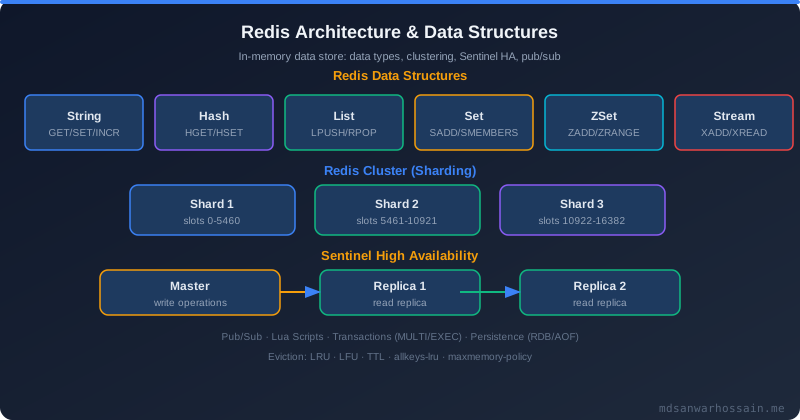
Redis Cluster provides horizontal scaling and HA by distributing data across 16,384 hash slots on multiple master nodes. Each master has one or more replicas for failover.
spring:
  data:
    redis:
      cluster:
        nodes:
          - redis-node-1:6379
          - redis-node-2:6379
          - redis-node-3:6379
          - redis-node-4:6379
          - redis-node-5:6379
          - redis-node-6:6379
        max-redirects: 3   # max MOVED/ASK redirects
      lettuce:
        cluster:
          refresh:
            adaptive: true         # auto-refresh topology on redirects
            period: 30s            # background topology refresh interval
        pool:
          max-active: 20
          max-idle: 10
          min-idle: 2
// ❌ BAD: These keys may land on different slots — MGET will fail
redisTemplate.opsForValue().multiGet(List.of("user:1", "user:2", "cart:1"));

// ✅ GOOD: Use hash tags {} to force co-location on the same hash slot
// Redis only hashes the part inside {} — both keys land on same node
String userKey  = "{user:1}:profile";   // slot of "user:1"
String cartKey  = "{user:1}:cart";      // same slot as above
redisTemplate.opsForValue().multiGet(List.of(userKey, cartKey)); // OK!

// Read from replicas to scale read throughput (Lettuce supports this)
@Bean
public LettuceClientConfigurationBuilderCustomizer readFromReplicaCustomizer() {
    return builder -> builder.readFrom(ReadFrom.REPLICA_PREFERRED);
}
Cluster operations gotchas: KEYS command is per-node (avoid in production — use SCAN per node). Lua scripts must run on a single slot. Transactions (MULTI/EXEC) only work within one slot. Pipeline commands must target one node.
9. Cache Stampede & Dog-Pile Effect Prevention
Cache stampede (dog-pile) occurs when a popular cached item expires and hundreds of concurrent threads simultaneously find a miss and hammer the database. This can bring down your DB.
public Product getProductWithLock(Long productId) {
    String dataKey = "product:" + productId;
    String lockKey = "lock:product:" + productId;

    // Try cache first
    Product cached = (Product) redisTemplate.opsForValue().get(dataKey);
    if (cached != null) return cached;

    // Cache miss — try to acquire lock (SETNX with 10s TTL)
    Boolean locked = redisTemplate.opsForValue()
        .setIfAbsent(lockKey, "1", Duration.ofSeconds(10));

    if (Boolean.TRUE.equals(locked)) {
        try {
            // Double-check after acquiring lock
            cached = (Product) redisTemplate.opsForValue().get(dataKey);
            if (cached != null) return cached;

            Product product = productRepository.findById(productId).orElseThrow();
            redisTemplate.opsForValue().set(dataKey, product, Duration.ofMinutes(30));
            return product;
        } finally {
            redisTemplate.delete(lockKey); // always release lock
        }
    } else {
        // Another thread is rebuilding — wait briefly and retry
        try { Thread.sleep(50); } catch (InterruptedException e) { Thread.currentThread().interrupt(); }
        return getProductWithLock(productId); // retry
    }
}

// Pattern 2: Stale-while-revalidate — serve stale data, refresh async
public Product getProductStaleWhileRevalidate(Long productId) {
    String dataKey = "product:" + productId;
    String refreshKey = "refresh:product:" + productId;

    Product cached = (Product) redisTemplate.opsForValue().get(dataKey);
    if (cached != null) {
        // Check if refresh needed (refresh flag expired)
        if (!Boolean.TRUE.equals(redisTemplate.hasKey(refreshKey))) {
            // Set refresh flag and trigger async reload
            redisTemplate.opsForValue().set(refreshKey, "1", Duration.ofSeconds(30));
            CompletableFuture.runAsync(() -> refreshProduct(productId));
        }
        return cached; // serve stale immediately
    }
    return loadAndCache(productId); // cold path
}
10. Monitoring: Redis INFO, Hit Ratio & Spring Actuator
A cache with an unmeasured hit ratio is a liability. Monitor constantly to validate your caching strategy is working.
redis-cli INFO stats | grep -E "keyspace_hits|keyspace_misses|evicted_keys"
# keyspace_hits:   1498234
# keyspace_misses: 80211
# evicted_keys:    0       <-- should be 0 or low; high means maxmemory too small

# Hit ratio = hits / (hits + misses) * 100
# 1498234 / (1498234 + 80211) * 100 = 94.9% — excellent!

redis-cli INFO memory | grep -E "used_memory_human|maxmemory_human|mem_fragmentation_ratio"
# used_memory_human:     1.23G
# maxmemory_human:       2.00G
# mem_fragmentation_ratio: 1.12  <-- should be 1.0-1.5; >1.5 means fragmentation

redis-cli INFO keyspace
# db0:keys=24891,expires=24001,avg_ttl=892013
management:
  endpoints:
    web:
      exposure:
        include: health, metrics, prometheus
  metrics:
    cache:
      instrument-all: true   # auto-registers all Spring Cache managers

# Micrometer exposes these metrics automatically:
# cache.gets{name="products",result="hit"}   - cache hit count
# cache.gets{name="products",result="miss"}  - cache miss count
# cache.size{name="products"}                - current entry count
# cache.evictions{name="products"}           - entries evicted

# Grafana query — hit ratio over 5 min window:
# rate(cache_gets_total{result="hit"}[5m]) /
# (rate(cache_gets_total{result="hit"}[5m]) + rate(cache_gets_total{result="miss"}[5m]))
11. Production Checklist
- Set
maxmemoryto 70-80% of available RAM - Set
maxmemory-policy allkeys-lrufor pure cache - Add TTL jitter to all cache entries
- Per-cache-region TTL via RedisCacheManager
- Serialize with JSON (not Java serialization)
- Enable Lettuce connection pool
- Redis Cluster with 3+ masters for HA
- Lettuce adaptive topology refresh enabled
- Monitor hit ratio > 80% via Actuator/Prometheus
- Alert on
evicted_keysincreasing - Cache stampede protection on hot keys
- Warm cache on startup for critical data
- Keyspace notifications for external invalidation
- TLS encryption for Redis in production
- AUTH password + ACL rules set
- SLOWLOG monitored for latency spikes
On a fresh deploy, a cold cache causes all traffic to hit the database simultaneously. Add an ApplicationReadyEvent listener that pre-loads the top 1,000 most-accessed items into cache before the load balancer sends traffic. Use a background thread pool so startup is not blocked.
Run Redis as a sidecar container in the same Kubernetes pod as your Spring Boot app for sub-millisecond latency with zero network hops. Use a shared emptyDir volume for the Redis socket. This is ideal for L1 in-process caching (Caffeine) fronted by a remote Redis Cluster as L2.