CrewAI: Building Production Multi-Agent Teams for Complex AI Tasks in 2026
Single-agent LLM systems hit a wall on complex, multi-step tasks. CrewAI solves this by letting you define specialized role-based agents that collaborate — just like a real human team. This comprehensive guide walks you through building production-grade multi-agent crews: from agent design and task pipelines to Flows, memory, and Kubernetes deployment.
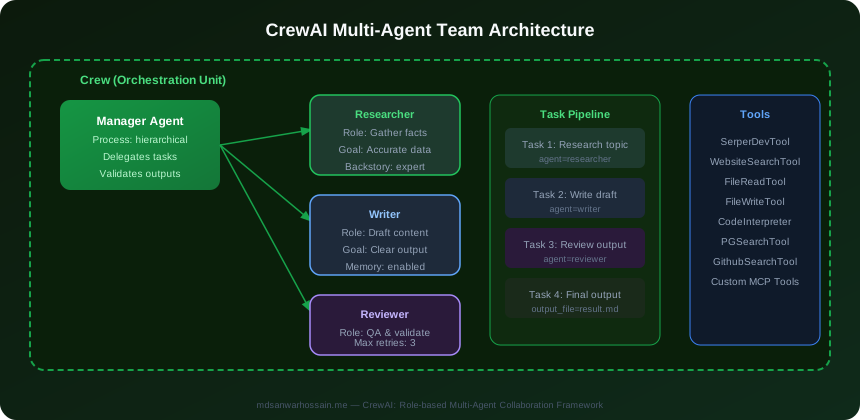
TL;DR — CrewAI in One Paragraph
"CrewAI is a role-based multi-agent framework where you define specialized agents (Researcher, Writer, Reviewer) with goals and backstories, assign them tasks in a pipeline, and let them collaborate to complete complex multi-step objectives. In 2026, CrewAI with Flows is the leading Python framework for production multi-agent systems that don't need complex graph wiring."
Table of Contents
- Why Role-Based Multi-Agent Systems?
- CrewAI Core Concepts: Agents, Tasks, Crews
- Process Modes: Sequential, Hierarchical & Parallel
- CrewAI Flows: Event-Driven Agent Orchestration
- Memory: Short-Term, Long-Term & Entity Memory
- Built-in & Custom Tools
- Production Patterns: Error Handling & Reliability
- CrewAI vs LangGraph vs AutoGen vs OpenAI Agents SDK
- Enterprise Deployment on Kubernetes
- Real-World Crew Designs
- Conclusion & Production Checklist
1. Why Role-Based Multi-Agent Systems?
Ask a single LLM to simultaneously research a topic, write an expert article, and critically review its own output — and you'll get mediocre results in all three areas. The model dilutes its "attention" across conflicting cognitive modes. Specialization is the fundamental reason multi-agent systems outperform single-agent approaches on complex tasks.
The Specialization Principle
When you give an LLM a detailed role, goal, and backstory — "You are a senior research analyst with 15 years of experience known for thorough fact-checking and citing primary sources" — the model activates the most relevant knowledge patterns from its pretraining. This is not merely prompt engineering; it's cognitive priming. Research shows specialized agents achieve 30–40% better task completion rates on complex multi-step objectives compared to generalist single-agent approaches.
The Human Team Analogy
You wouldn't hire one person to serve as CTO, lead developer, QA engineer, and security auditor simultaneously. Each role requires different instincts, heuristics, and priorities. A developer optimizes for shipping features; a QA engineer optimizes for breaking them. This creative tension between specialized roles produces higher-quality outcomes than a single generalist — and the same dynamic applies to LLM agents.
When to Use Multi-Agent Systems
- Tasks requiring parallel work streams: Market research + content writing + SEO analysis can proceed concurrently across specialized agents
- Tasks exceeding a single context window: A 100,000-word codebase analysis distributes across agents that each own a module
- Tasks requiring different expertise domains: A code review crew needs a security expert, a performance expert, and an API design expert with different evaluation criteria
- Tasks with sequential quality gates: Writer → Editor → Fact-Checker → Publisher ensures each phase has a dedicated expert before handoff
- Tasks needing adversarial review: Separate Proposal agent and Critique agent produce better outcomes than self-review by the same agent
CrewAI makes specialization a first-class primitive in the framework — every Agent object requires a role, goal, and backstory by design. This isn't optional scaffolding; it's the core architectural philosophy that differentiates CrewAI from lower-level agent frameworks.
2. CrewAI Core Concepts: Agents, Tasks, Crews
CrewAI's object model has three primary primitives: Agent, Task, and Crew. Understanding their properties and interactions is essential before writing any production code.
The Agent Object
An Agent encapsulates a persona with specific expertise. Key properties:
- role: The agent's job title — "Senior Research Analyst", "Content Strategist", "Security Auditor". This sets the cognitive frame for every task the agent receives.
- goal: The agent's objective in a single sentence — what "success" means for this agent. Guides the agent's decision-making within tasks.
- backstory: The most impactful property. A 2–5 sentence persona description that defines the agent's expertise depth, working style, and priorities. Longer, richer backstories produce measurably better task performance.
- tools: List of Tool objects the agent can invoke during task execution (web search, database queries, code execution).
- llm: The model to use — "gpt-4o", "claude-sonnet-4", "llama-3-70b". Different agents in the same crew can use different models, enabling cost optimization.
- max_iter: Maximum reasoning iterations before forced output. Prevents infinite loops. Default 5; increase for complex tasks.
- memory: Boolean. Whether this agent accumulates memory across tasks within the crew run.
- verbose: Boolean. Enables step-by-step output logging for debugging.
Backstory Effect: Don't say "You are a researcher." Say "You are a senior research analyst with 15 years of experience in technology markets, known for thorough fact-checking, citing primary sources, and synthesizing contradictory findings into clear conclusions." The added specificity activates deeper domain knowledge patterns from pretraining and constrains the agent's output style consistently across all tasks.
The Task Object
A Task defines a unit of work assigned to a specific agent. Key properties:
- description: What the agent must do. Support for template variables like
{topic}enables dynamic crew inputs viakickoff(inputs={"topic": "..."}). - expected_output: The format and content of the ideal result. Be explicit — "A JSON object with keys: findings (list of 5 strings), sources (list of URLs), confidence_score (0–1)" performs better than "A research summary."
- agent: The Agent object responsible for this task.
- context: List of upstream Task objects whose outputs this task can access. The writing task receives the researcher's output via context=[research_task].
- output_file: Optional path to save the task output — useful for long crew runs that persist intermediate results.
- human_input: Boolean. If True, the crew pauses after the task completes and requires human approval before the next task proceeds. Critical for high-stakes workflows.
- output_pydantic: A Pydantic model class. The task output is parsed into this structured format, enabling type-safe downstream processing.
The Crew Object
A Crew assembles agents and tasks into an executable pipeline. Key properties:
- agents: List of Agent objects participating in this crew.
- tasks: Ordered list of Task objects. Order matters in sequential mode.
- process: Process.sequential (default), Process.hierarchical, or parallel via async execution.
- verbose: Boolean. Logs detailed execution information for the entire crew run.
- memory: Boolean. Enables crew-level memory — agents share a persistent memory store across the entire run.
- manager_llm: Required for hierarchical process. The model used by the crew manager agent that delegates tasks and reviews outputs.
- max_rpm: Maximum requests per minute to the LLM API. Critical for staying within rate limits in production.
Complete Production Crew Example
from crewai import Agent, Task, Crew, Process
from crewai_tools import SerperDevTool, WebsiteSearchTool

search_tool = SerperDevTool()

researcher = Agent(
    role="Senior Research Analyst",
    goal="Gather comprehensive, accurate information on the given topic",
    backstory="""You are a senior research analyst with 10 years of experience
    in technology research. You are meticulous about accuracy, always verify
    facts from multiple sources, and excel at synthesizing complex information
    into clear insights.""",
    tools=[search_tool],
    llm="gpt-4o",
    max_iter=5,
    verbose=True,
)

writer = Agent(
    role="Content Strategist & Writer",
    goal="Write compelling, accurate, well-structured content based on research",
    backstory="""You are an expert technical writer who transforms complex research
    into clear, engaging content. You understand developer audiences and write
    with precision, concrete examples, and actionable insights.""",
    llm="gpt-4o-mini",  # cheaper model for writing
    verbose=True,
)

research_task = Task(
    description="Research the current state of {topic} in 2026, covering key trends, challenges, and opportunities.",
    expected_output="A detailed research report with 5+ key findings, each backed by specific sources.",
    agent=researcher,
)

writing_task = Task(
    description="Write a comprehensive technical blog post based on the research findings.",
    expected_output="A 2000-word blog post with clear sections, code examples, and actionable takeaways.",
    agent=writer,
    context=[research_task],  # writer sees researcher's output
)

crew = Crew(
    agents=[researcher, writer],
    tasks=[research_task, writing_task],
    process=Process.sequential,
    verbose=True,
)

result = crew.kickoff(inputs={"topic": "agentic AI in enterprise software"})
print(result.raw)
3. Process Modes: Sequential, Hierarchical & Parallel
The process mode determines how CrewAI orchestrates task execution across agents. Choosing the right process mode for your use case dramatically affects output quality, cost, and reliability.
Sequential Process
Process.sequential is the default. Tasks execute in the order they appear in the tasks list. Each task can access the outputs of all previous tasks via the context parameter. This creates a linear pipeline where information flows forward through the crew:
- Best for: Linear content pipelines (research → write → edit → publish), data processing ETL, sequential approval workflows
- Characteristics: Predictable execution order, easy to debug, straightforward data flow
- Limitations: No parallelism — total latency is the sum of all task latencies
Hierarchical Process
Process.hierarchical introduces a manager agent (powered by manager_llm) that orchestrates worker agents. The manager receives the overall objective, delegates tasks to appropriate agents, reviews outputs, and can reassign tasks if outputs are unsatisfactory. This mirrors how a human project manager operates:
- Best for: Complex research and planning tasks where the workflow is not fixed in advance, tasks requiring adaptive delegation based on intermediate results
- Characteristics: Manager can route tasks to different agents, can retry failed tasks with different instructions, more flexible than sequential
- Cost: Higher token usage due to manager oversight at each step — budget for 20–40% more tokens vs sequential
- Configuration:
manager_llm="gpt-4o"— use your most capable model as the manager, cheaper models for workers
hierarchical_crew = Crew(
    agents=[researcher, analyst, writer, reviewer],
    tasks=[complex_research_task, analysis_task, writing_task, review_task],
    process=Process.hierarchical,
    manager_llm="gpt-4o",  # manager model
    verbose=True,
)
Parallel Execution
Parallel execution runs multiple independent tasks simultaneously using Python's asyncio. Use crew.kickoff_async() for non-blocking execution, or combine multiple async crew executions in a Flow (see Section 4). This is critical for cutting latency when tasks don't depend on each other:
import asyncio

async def run_parallel_research():
    # Run three independent research crews simultaneously
    results = await asyncio.gather(
        market_research_crew.kickoff_async(inputs={"domain": "fintech"}),
        competitor_crew.kickoff_async(inputs={"domain": "fintech"}),
        trend_crew.kickoff_async(inputs={"domain": "fintech"}),
    )
    return results

results = asyncio.run(run_parallel_research())| Process Mode | Best For | Latency | Cost |
|---|---|---|---|
| Sequential | Linear pipelines, content creation | Sum of tasks | Lowest |
| Hierarchical | Adaptive research, complex planning | Variable | 20–40% higher |
| Parallel (async) | Independent data streams, multi-source research | Max single task | Medium (concurrent API calls) |
4. CrewAI Flows: Event-Driven Agent Orchestration
Introduced in CrewAI 0.63, Flows are Python class-based orchestrators that compose multiple Crews into complex, event-driven pipelines. Where a single Crew handles a focused task, a Flow handles an entire business process that may involve multiple Crews, conditional branching, and persistent state.
Flow Fundamentals
- @start() decorator: Marks the entry point method of the Flow. Called when
flow.kickoff()is invoked. - @listen() decorator: Marks event handler methods that execute after specified methods complete. Creates the event graph.
- @router() decorator: Enables conditional branching — routes execution to different methods based on state or output values.
- Flow state: Defined as a Pydantic BaseModel. Automatically persisted between method calls. Type-safe access to all accumulated data.
- flow.plot(): Generates an interactive HTML visualization of the flow graph — invaluable for understanding and debugging complex flows.
- State persistence: Flow state can be saved to a database between runs, enabling long-running multi-session workflows.
from crewai.flow.flow import Flow, listen, start, router
from pydantic import BaseModel
from typing import Literal

class ContentFlowState(BaseModel):
    topic: str = ""
    research_output: str = ""
    content_type: Literal["blog", "whitepaper", "social"] = "blog"
    final_content: str = ""

class ContentCreationFlow(Flow[ContentFlowState]):

    @start()
    def initialize(self):
        print(f"Starting content creation for: {self.state.topic}")

    @listen(initialize)
    async def run_research(self):
        result = await research_crew.kickoff_async(
            inputs={"topic": self.state.topic}
        )
        self.state.research_output = result.raw

    @router(run_research)
    def route_by_content_type(self) -> Literal["blog", "whitepaper", "social"]:
        return self.state.content_type

    @listen("blog")
    async def create_blog_post(self):
        result = await blog_writing_crew.kickoff_async(
            inputs={"research": self.state.research_output}
        )
        self.state.final_content = result.raw

    @listen("whitepaper")
    async def create_whitepaper(self):
        result = await whitepaper_crew.kickoff_async(
            inputs={"research": self.state.research_output}
        )
        self.state.final_content = result.raw

# Usage
flow = ContentCreationFlow()
flow.state.topic = "quantum computing in enterprise 2026"
flow.state.content_type = "blog"
result = flow.kickoff()

# Visualize the flow graph
flow.plot("content_flow_diagram.html")
Combining Multiple Crews in One Flow
The real power of Flows is orchestrating multiple specialized Crews. A production content marketing Flow might chain: Topic Research Crew → SEO Analysis Crew → Writing Crew → Editorial Review Crew → Publishing Crew. Each Crew handles its domain; the Flow manages state passing and coordination. This cleanly separates concerns while enabling arbitrarily complex multi-crew workflows.
5. Memory: Short-Term, Long-Term & Entity Memory
CrewAI's memory system enables agents to learn from experience, build context across tasks, and remember information across multiple crew runs — turning stateless LLM calls into a stateful knowledge-accumulating system.
Short-Term Memory
Short-term memory stores context within a single crew run. Implemented as a RAG system over recent agent messages using Chroma vector store by default. Agents can semantically search their own interaction history to retrieve relevant context, preventing "forgetting" important information shared earlier in a long multi-task run. This is particularly useful for hierarchical crews where the manager needs to remember decisions made during earlier delegations.
Long-Term Memory
Long-term memory persists across crew runs. When a crew successfully completes a task, the result is stored in a persistent memory store. Future crew runs can retrieve and build on prior results. Default backend: SQLite (zero-config for development). Production recommendation: replace with PostgreSQL + pgvector for scalability and concurrent access.
from crewai import Crew
from crewai.memory import LongTermMemory
from crewai.memory.storage.ltm_sqlite_storage import LTMSQLiteStorage

crew = Crew(
    agents=[researcher, writer],
    tasks=[research_task, writing_task],
    memory=True,
    long_term_memory=LongTermMemory(
        storage=LTMSQLiteStorage(db_path="./crew_memory.db")
    ),
)
Entity Memory
Entity memory tracks specific entities — people, organizations, products, locations — mentioned across all agent interactions. It builds a knowledge graph of entities and their relationships, enabling agents to recall "We discussed Acme Corp in the previous task — they have a $50M ARR and are expanding into Southeast Asia." Critical for multi-session customer support or ongoing research workflows.
User Memory
User memory stores per-user preferences, history, and context for personalization. Indexed by user ID, it enables a customer service crew to remember a user's product tier, past issues, and communication preferences across multiple support interactions — without the user repeating context on every contact.
Memory Best Practices
- Enable memory only when crews run repeatedly on related topics — it adds latency for single-use crews
- Set memory TTL (time-to-live) to prevent stale context from degrading outputs over time
- Use PostgreSQL for long-term memory in production — SQLite has concurrency limitations
- Monitor memory size: unconstrained long-term memory grows indefinitely and increases retrieval latency
6. Built-in & Custom Tools
Tools are the bridge between agents and the external world. CrewAI ships with a comprehensive crewai-tools package, and the @tool decorator makes creating custom tools trivial.
Built-in CrewAI Tools
| Tool | Use Case | Key Property |
|---|---|---|
| SerperDevTool | Real-time web search via Serper API | Fresh results, structured JSON |
| WebsiteSearchTool | Scrape + RAG search over a website | Semantic search within a domain |
| ScrapeWebsiteTool | Raw web page scraping | Full page text extraction |
| FileReadTool / FileWriteTool | Local file I/O | Read/write task outputs to disk |
| CodeInterpreterTool | Execute Python in a sandboxed environment | Data analysis, calculations, plots |
| GithubSearchTool | Search GitHub repositories and code | Code review, dependency research |
| PGSearchTool | Query PostgreSQL databases | Structured data retrieval |
| VisionTool | Analyze images with vision models | Multi-modal agent workflows |
Building Custom Tools with @tool
from crewai.tools import tool
import psycopg2

@tool("Database Query Tool")
def query_database(sql_query: str) -> str:
    """Execute a read-only SQL query on the production analytics DB.
    Use this tool to retrieve business metrics, user counts, and revenue data.
    Only SELECT queries are permitted."""
    try:
        # Validate it's a read-only query
        if not sql_query.strip().upper().startswith("SELECT"):
            return "Error: Only SELECT queries are permitted for safety."
        conn = psycopg2.connect(dsn=DB_CONNECTION_STRING)
        cursor = conn.cursor()
        cursor.execute(sql_query)
        rows = cursor.fetchmany(100)  # limit results
        return str(rows)
    except Exception as e:
        return f"Query failed: {str(e)}"  # return error string, don't raise

@tool("Slack Notification Tool")
def send_slack_alert(channel: str, message: str) -> str:
    """Send a notification message to a Slack channel.
    Use this tool when a task is complete and requires human awareness."""
    # ... implementation
    return f"Message sent to #{channel}"
MCP Integration
CrewAI supports the Model Context Protocol (MCP) through MCPServerAdapter. Any MCP server — filesystem, GitHub, Slack, databases — can be wrapped as a CrewAI tool set and assigned to agents. This gives CrewAI agents access to the growing ecosystem of MCP servers without custom tool development for each integration.
Tool error handling: Tools should return error strings rather than raising exceptions. When a tool returns an error message, the agent can recognize the failure, adjust its approach, and retry — exactly the behavior you want in production. Raising an exception terminates the agent's reasoning loop, losing all intermediate context. Always wrap tool implementations in try/except and return descriptive error strings.
7. Production Patterns: Error Handling & Reliability
Running CrewAI in production requires defensive engineering across every layer — from individual tool calls to full crew orchestration. Here are the critical patterns for production-grade reliability.
Structured Outputs with Pydantic
Use output_pydantic on Tasks to enforce typed, validated outputs. This eliminates parsing errors when downstream code consumes agent outputs:
from pydantic import BaseModel
from typing import List

class ResearchReport(BaseModel):
    title: str
    key_findings: List[str]
    sources: List[str]
    confidence_score: float
    recommended_actions: List[str]

research_task = Task(
    description="Research {topic} and produce a structured report.",
    expected_output="A structured research report with findings, sources, and recommendations.",
    agent=researcher,
    output_pydantic=ResearchReport,  # enforces type-safe output
)

result = crew.kickoff(inputs={"topic": "edge AI deployment"})
report: ResearchReport = result.pydantic  # fully typed Python object
Timeout & Fallback Patterns
import asyncio

async def run_crew_with_timeout(crew, inputs, timeout_seconds=300):
    """Run crew with timeout and fallback to simpler crew on failure."""
    try:
        result = await asyncio.wait_for(
            crew.kickoff_async(inputs=inputs),
            timeout=timeout_seconds
        )
        return result
    except asyncio.TimeoutError:
        print(f"Crew timed out after {timeout_seconds}s, running fallback...")
        return await fallback_crew.kickoff_async(inputs=inputs)
    except Exception as e:
        print(f"Crew failed: {e}, running fallback...")
        return await fallback_crew.kickoff_async(inputs=inputs)
Key Production Configuration Checklist
- max_iter on Agents: Set 3–7 depending on task complexity. Prevents infinite reasoning loops that waste tokens and time.
- max_rpm on Crew: Stay within your LLM provider's rate limits. For OpenAI Tier 2: 5,000 RPM for GPT-4o.
- human_input=True on critical tasks: Pause the crew before irreversible actions (sending emails, publishing content, making API mutations).
- kickoff_for_each(): Efficiently process lists (process 100 support tickets through the same crew without manual looping).
- Structured logging: Log crew_id, task_id, agent_role, start_time, end_time, token_count, and output for every task execution.
- Rate limiting on tools: Implement per-tool rate limiting separately from the crew's max_rpm to respect individual API quotas.
8. CrewAI vs LangGraph vs AutoGen vs OpenAI Agents SDK
The multi-agent framework landscape in 2026 is crowded with four dominant options. Choosing the right tool depends on your specific use case, team expertise, and infrastructure constraints.
| Framework | Paradigm | Best For | Abstraction Level | Learning Curve |
|---|---|---|---|---|
| CrewAI | Role-based teams | Content, research, analysis pipelines | High-level | Low (intuitive API) |
| LangGraph | Graph-based state machines | Complex stateful agents, decision loops | Low-level | High (graph thinking) |
| AutoGen (Microsoft) | Conversation-based teams | Code generation, debugging teams | Medium | Medium |
| OpenAI Agents SDK | Handoff-based agents | OpenAI-native apps, simple agent chains | Medium-high | Low (if already on OpenAI) |
When to Choose Each Framework
Choose CrewAI when:
Your task maps naturally to a team of specialists with distinct roles. You want to ship fast without learning graph theory. Your use cases are content creation, research automation, data analysis pipelines, or customer service triage. You want built-in memory, tools, and Flows without assembling from primitives. You're model-agnostic and want to mix GPT-4o, Claude, and Llama in the same crew.
Choose LangGraph when:
You need precise control over state transitions and conditional branching. Your agent workflow involves cycles — the agent must loop back to retry or re-evaluate. You have complex stateful decision-making with many possible paths. You need checkpointing, time-travel debugging, and sub-graphs. You think naturally in terms of nodes and edges rather than teams and roles.
Choose AutoGen when:
Your primary use case is code generation and debugging with multiple agent perspectives. You're in a Microsoft-heavy environment (Azure OpenAI, GitHub Copilot). You want agents that engage in extended natural-language conversations with each other as the primary coordination mechanism. VS Code extension and IDE-first workflows are important to your team.
Choose OpenAI Agents SDK when:
You're fully committed to the OpenAI ecosystem and want first-party support and built-in tracing. The handoff primitive (one agent passing control to another) maps naturally to your workflow. You want the simplest possible path to production for OpenAI-native apps. Anthropic or open-source model support is not a requirement.
9. Enterprise Deployment on Kubernetes
Production CrewAI deployments require a thoughtful infrastructure architecture. Crews are CPU-light (LLM calls are network I/O) but can accumulate significant memory for long-running crews with many tool results. Here's the reference architecture for Kubernetes-based production deployment.
Architecture Components
- FastAPI REST layer: Exposes a
/crew/kickoffendpoint that accepts job parameters and enqueues to Celery. Returns a job ID immediately for async polling. - Celery workers: Execute crew runs asynchronously. Each worker pod processes one crew run at a time to prevent resource contention. Scale workers horizontally.
- Redis: Celery broker + result backend. Also used for tool result caching and rate limit counters.
- PostgreSQL: Long-term crew memory persistence. Use pgvector extension for vector similarity search on memory retrieval.
- Kubernetes HPA: Scale worker Deployments based on Celery queue depth (number of pending jobs), not CPU usage — crews are I/O bound.
# crew-worker-deployment.yaml
apiVersion: apps/v1
kind: Deployment
metadata:
  name: crewai-worker
  namespace: ai-platform
spec:
  replicas: 3
  selector:
    matchLabels:
      app: crewai-worker
  template:
    spec:
      containers:
      - name: worker
        image: your-registry/crewai-worker:v2.1.0
        command: ["celery", "-A", "crew_tasks", "worker", "--loglevel=info", "--concurrency=1"]
        resources:
          requests:
            memory: "512Mi"
            cpu: "250m"
          limits:
            memory: "2Gi"
            cpu: "1000m"
        env:
        - name: OPENAI_API_KEY
          valueFrom:
            secretKeyRef:
              name: llm-api-keys
              key: openai-key
        livenessProbe:
          exec:
            command: ["celery", "-A", "crew_tasks", "inspect", "ping"]
          initialDelaySeconds: 30
          periodSeconds: 60
Monitoring & Observability
Instrument your CrewAI deployment with Prometheus metrics to track costs and performance:
crew_run_duration_seconds— histogram of end-to-end crew execution time, labeled by crew_namecrew_task_success_rate— gauge of task completion success percentage per crew typecrew_token_cost_total— counter of total tokens consumed, labeled by model and crew_name (multiply by per-token price for cost tracking)crew_queue_depth— gauge of pending crew jobs in the Celery queue (used by HPA)crew_tool_call_errors_total— counter of tool invocation failures per tool name
Secrets Management
Store LLM API keys, database credentials, and tool API keys in Kubernetes Secrets and sync from HashiCorp Vault or AWS Secrets Manager using external-secrets-operator. Never bake API keys into Docker images or environment files in version control. Rotate secrets regularly — LLM API key leaks are among the most expensive cloud security incidents in 2026.
10. Real-World Crew Designs
Here are five production-ready crew architectures for common enterprise use cases, including agent definitions, task pipelines, tooling, and expected performance characteristics.
1. Market Research Crew
Use case: Automated weekly competitor analysis reports for product and strategy teams.
Pipeline: Researcher (SerperDevTool + ScrapeWebsiteTool) → Analyst (CodeInterpreterTool for data synthesis) → Report Writer (FileWriteTool)
Tools: SerperDevTool for real-time news, ScrapeWebsiteTool for competitor pages, CodeInterpreterTool for trend analysis, FileWriteTool for PDF/markdown output
Typical performance: 4–8 minutes per report, $0.80–$1.50 per run (GPT-4o + GPT-4o-mini mix), 3,000–5,000 tokens
2. Code Review Crew
Use case: Automated PR review comments covering security, performance, and design concerns.
Pipeline: Code Reader (FileReadTool + GithubSearchTool) → Security Auditor → Performance Analyzer → API Design Reviewer → Review Summarizer
Tools: GithubSearchTool for dependency research, FileReadTool for the diff, custom SAST tool wrapper for security scans
Typical performance: 3–6 minutes per PR review, $0.40–$0.90 per run, excellent consistency across 500+ PR reviews per day
3. Customer Support Triage Crew
Use case: First-line support automation handling 70–80% of inbound tickets without human intervention.
Pipeline: Query Classifier → Knowledge Base Searcher (WebsiteSearchTool + PGSearchTool) → Response Drafter → Quality Checker (human_input=True for escalation path)
Memory: Entity memory enabled to remember customer history; long-term memory for successful resolution patterns
Typical performance: 45–90 seconds per ticket, $0.05–$0.15 per run, 76% resolution rate without human escalation
4. Content Marketing Crew
Use case: Automated blog content pipeline producing 3–5 SEO-optimized posts per week.
Pipeline: Topic Researcher → SEO Analyst (keyword density, competition analysis) → Technical Writer → Editor (style + accuracy) → Publisher (CMS API tool)
Process: Hierarchical with GPT-4o as manager — manager decides if draft meets quality bar or needs revision before proceeding to publish
Typical performance: 12–20 minutes per 2,000-word post, $1.50–$3.00 per run including manager overhead
5. Self-Service Analytics Crew
Use case: Natural-language query to SQL execution to plain-English insight — self-service analytics for non-technical stakeholders.
Pipeline: Schema Analyst (reads DB schema via PGSearchTool) → SQL Generator → SQL Validator (dry-run via custom tool) → Query Executor → Result Explainer
Safety: SQL Validator agent rejects any query that modifies data; human_input=True on the Query Executor for queries touching PII tables
Typical performance: 30–90 seconds per query, $0.10–$0.25 per run, 89% first-attempt query success rate
11. Conclusion & Production Checklist
CrewAI has matured significantly in 2026. With Flows enabling complex multi-crew orchestration, built-in memory systems, an extensive tool library, and first-class async support, it's the leading choice for Python teams building production multi-agent systems that don't require the complexity of a full graph engine.
The framework's core philosophy — specialization through roles, goals, and backstories — maps naturally to how domain experts think about complex tasks. This makes it uniquely accessible to product engineers who aren't AI researchers but need to build reliable AI workflows that actually ship.
The five crew architectures in Section 10 are starting points, not blueprints. Real production crews evolve through iteration: you'll discover that your Researcher agent needs a more specific backstory, your Writer produces better output with richer context from the upstream task, and your Quality Checker catches more issues with a stricter expected_output definition. Treat your crew definitions as code: version-control them, evaluate them, and iterate.
Production Deployment Checklist
- ☐ Agent design: role is specific (job title), goal is actionable (one sentence), backstory is detailed (3+ sentences with expertise & style)
- ☐ Task design: expected_output specifies exact format, length, and required fields — not just "a summary"
- ☐ Context chains: downstream tasks explicitly reference upstream tasks via context=[...] for data flow
- ☐ Process selection: sequential for linear pipelines, hierarchical for adaptive workflows, async for parallel execution
- ☐ Output validation: output_pydantic on all tasks consumed by application code — no raw string parsing
- ☐ Max iterations: max_iter set on all agents (3–7), max_rpm set on crew to stay within API rate limits
- ☐ Memory configuration: long-term memory on PostgreSQL for production, memory TTL set to prevent stale context
- ☐ Tool error handling: all custom tools return error strings on failure — no unhandled exceptions
- ☐ Human input gates: human_input=True before irreversible actions (publish, send, mutate data)
- ☐ Flows for orchestration: complex multi-crew workflows use Flows with typed BaseModel state, not ad-hoc scripting
- ☐ Async deployment: crews run via Celery workers, not synchronously in web request handlers
- ☐ Cost monitoring: token counters per model per crew type, alerting on cost anomalies (>2× baseline)
- ☐ Memory cleanup: scheduled job to prune long-term memory older than retention policy
- ☐ Secrets management: API keys in Kubernetes Secrets / external-secrets-operator, rotated quarterly
The teams seeing the most success with CrewAI in production share one trait: they invest heavily in the design of agents and tasks — the roles, backstories, and expected outputs — before touching deployment infrastructure. A well-designed crew on a simple server outperforms a poorly designed crew on an elaborate Kubernetes setup. Start with the agent design, prove it works end-to-end, then scale the infrastructure to match your production requirements.
