LangGraph in Production: Building Stateful Multi-Step AI Agent Workflows That Don't Collapse
Every production AI agent hits the same wall eventually: the LLM runs out of context, a tool call fails silently, or a multi-step pipeline collapses into a hallucination spiral with no way to recover. Simple LangChain chains are elegant for prototypes, but the moment your workflow needs branching, retries, human approval gates, or crash recovery, you need something fundamentally different. LangGraph is the graph-based, stateful workflow runtime that makes production-grade AI agents possible — not by hiding complexity, but by giving you the tools to manage it explicitly.
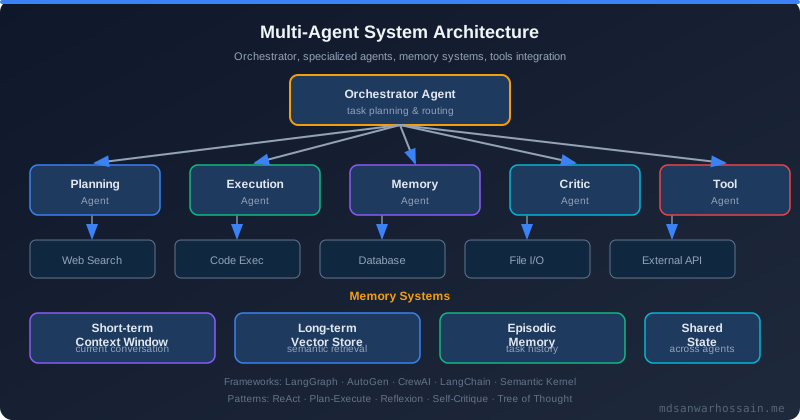
Table of Contents
- The Real Problem: Why Linear LLM Chains Fail in Production
- What is LangGraph?
- Architecture: Building a Production-Ready Agent Workflow
- State Management and Checkpointing
- Human-in-the-Loop and Interrupts
- Failure Scenarios and Debugging
- Trade-offs and When NOT to Use LangGraph
- Performance Optimization
- Key Takeaways
- Conclusion
1. The Real Problem: Why Linear LLM Chains Fail in Production
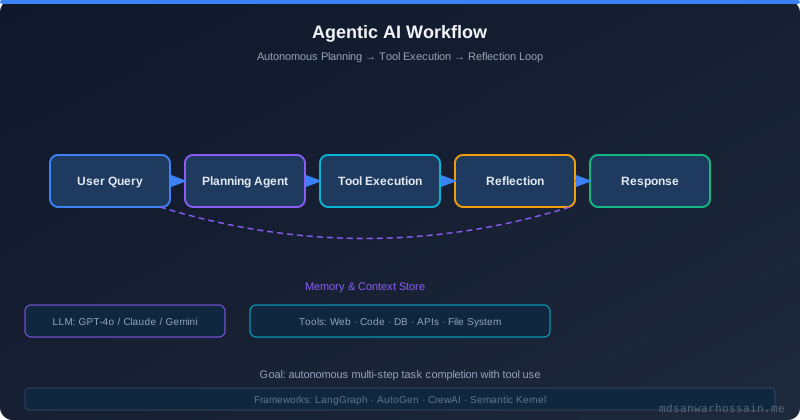
An e-commerce platform built a product recommendation engine using a straightforward LangChain pipeline: user query → retrieval → LLM → ranked product list. It worked beautifully in testing and handled the first month of production traffic without issue. Then the catalogue grew — from 12,000 SKUs to over 80,000 — and the retrieved context ballooned beyond the LLM's context window.
The post-mortem was unambiguous. Linear pipelines expose three categories of structural failure that no amount of prompt engineering can fix:
- Context overflow causes hallucinations: When input exceeds the model's context window, the LLM silently truncates or confabulates. A linear chain has no node dedicated to measuring, trimming, or routing around overflow before it reaches the model.
- No branching on failure: If a tool call returns an error, a standard chain has nowhere to go except forward or to a generic exception handler. There is no mechanism to retry with different parameters, escalate to a fallback model, or pause for human intervention.
- State is ephemeral: Each chain invocation starts fresh. If the process crashes mid-execution or a downstream service times out, the entire multi-step computation is lost with no way to resume from the last successful checkpoint.
These are not edge cases. They are the normal operating conditions of any production system under real load. The solution is not a better prompt — it is a different execution model.
2. What is LangGraph?
LangGraph is a graph-based workflow runtime for building stateful, multi-step AI agents. Rather than treating an agent as a sequential pipeline, LangGraph models it as a directed graph where each node is a discrete computation step (an LLM call, a tool invocation, a validation check) and edges define the control flow between steps — including conditional branches based on runtime state.
The four core primitives of LangGraph are:
- State: A typed dictionary (TypedDict) that persists across every node in the graph. Every node reads from state and writes back to it. State is the single source of truth for the entire workflow.
- Nodes: Python functions that receive the current state, perform some computation, and return a partial state update. Nodes are pure functions — they do not manage their own lifecycle.
- Edges: Directed connections between nodes that define execution order. Normal edges always route to the same destination. Conditional edges evaluate a routing function at runtime to choose the next node dynamically.
- Conditional Routing: A function that inspects the current state and returns a string key that maps to the next node. This is what enables retry loops, escalation paths, and human approval gates without any if-else logic scattered across the pipeline.
3. Architecture: Building a Production-Ready Agent Workflow
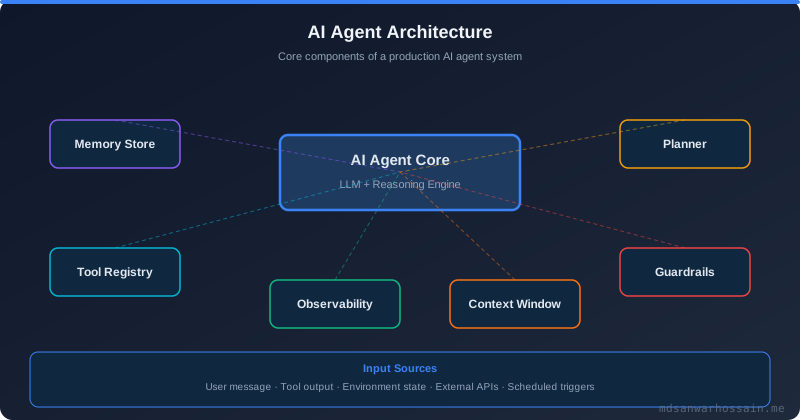
A production agent workflow typically involves at least three distinct node types: an LLM node that generates a response or decides which tool to call, a tool executor node that invokes external APIs or databases, and a validator node that checks the output quality before routing to success or retry. The architecture diagram below shows the control flow:
User Input → State Graph
               ├── [LLM Node]        — generates response / selects tool
               │       ↓
               ├── [Tool Node]       — executes tool calls, updates state
               │       ↓
               └── [Validator Node]  — checks output quality
                       ↓
               Conditional Edge
               ├── "retry"    → back to LLM Node (max_retries guard)
               ├── "success"  → END (return result to caller)
               └── "escalate" → [Human Review Node] → END
Translating this architecture into LangGraph code is straightforward once you understand the state-node-edge model:
from langgraph.graph import StateGraph, END
from typing import TypedDict, Annotated
import operator

class AgentState(TypedDict):
    messages: Annotated[list, operator.add]
    retry_count: int
    tool_results: dict

def create_agent_graph():
    graph = StateGraph(AgentState)
    graph.add_node("llm_call", llm_node)
    graph.add_node("tool_executor", tool_node)
    graph.add_node("validator", validator_node)
    graph.add_conditional_edges("validator", route_decision, {
        "retry": "llm_call",
        "success": END,
        "escalate": "human_review"
    })
    graph.set_entry_point("llm_call")
    return graph.compile()
The Annotated[list, operator.add] type hint on messages tells LangGraph to merge list updates by appending rather than replacing — this is how the message history accumulates across node invocations without any manual concatenation. The route_decision function reads state["retry_count"] and state["tool_results"] to decide which path to take. The retry loop is guarded by checking that retry_count is below a maximum threshold — without this guard, a persistently failing LLM call would loop indefinitely.
4. State Management and Checkpointing
One of LangGraph's most operationally important features is its checkpointing system. Every time a node completes and updates state, LangGraph can persist that state snapshot to a backing store. If the process crashes or is restarted by Kubernetes, the graph can resume from the last persisted checkpoint rather than restarting from scratch. This transforms AI agent workflows from fragile single-run scripts into durable, resumable computations.
LangGraph ships with two built-in checkpoint backends:
- MemorySaver: Stores checkpoints in memory. Zero infrastructure dependencies, ideal for development and testing. Checkpoints are lost when the process exits — not suitable for production workflows requiring crash recovery.
- PostgresSaver: Stores checkpoints in a PostgreSQL table. Survives process restarts, container rescheduling, and deployments. Supports concurrent workflows via thread-level state isolation — each workflow invocation uses a unique
thread_idso that concurrent users never share or corrupt each other's state.
from langgraph.checkpoint.postgres import PostgresSaver
import psycopg

# Production: durable checkpointing with PostgreSQL
DB_URI = "postgresql://agent_user:secret@postgres:5432/agentdb"

def create_durable_graph():
    with psycopg.connect(DB_URI) as conn:
        checkpointer = PostgresSaver(conn)
        checkpointer.setup()  # creates checkpoint tables if they don't exist

    graph = StateGraph(AgentState)
    # ... add nodes and edges ...
    return graph.compile(checkpointer=checkpointer)

# Invoke with a unique thread_id to isolate per-user state
config = {"configurable": {"thread_id": f"user-{user_id}-session-{session_id}"}}
result = app.invoke({"messages": [user_message]}, config=config)
Thread-level state isolation is critical for multi-tenant deployments. Without a unique thread_id per user session, concurrent workflow invocations would overwrite each other's state in the checkpoint store. The thread_id convention of combining a user identifier with a session identifier ensures clean isolation while still allowing a single user's multi-turn conversation to resume its previous state across HTTP requests.
5. Human-in-the-Loop and Interrupts
LangGraph's interrupt mechanism allows a graph to pause execution before or after any named node and wait indefinitely for an external signal before resuming. This is architecturally distinct from a simple conditional edge — the graph serializes its full state to the checkpoint store, exits cleanly, and resumes from exactly that point when the approval signal arrives, even if hours or days pass in between.
A compelling production use case is a medical AI assistant that drafts prescription recommendations. The workflow must pause for a licensed physician's approval before any prescription information is transmitted to a pharmacy system — a hard regulatory requirement. LangGraph's interrupt_before makes this a first-class workflow concept rather than a fragile workaround:
from langgraph.graph import StateGraph, END

def create_medical_agent():
    graph = StateGraph(MedicalAgentState)
    graph.add_node("assess_symptoms", symptom_assessment_node)
    graph.add_node("draft_prescription", prescription_drafting_node)
    graph.add_node("send_prescription", pharmacy_dispatch_node)
    graph.add_edge("assess_symptoms", "draft_prescription")
    graph.add_edge("draft_prescription", "send_prescription")
    graph.add_edge("send_prescription", END)
    graph.set_entry_point("assess_symptoms")

    # Graph pauses BEFORE send_prescription and awaits human approval
    return graph.compile(
        checkpointer=PostgresSaver(conn),
        interrupt_before=["send_prescription"]
    )

# Physician reviews the draft, then resumes the paused workflow
def approve_prescription(thread_id: str, physician_notes: str):
    config = {"configurable": {"thread_id": thread_id}}
    # Resume from checkpoint with physician approval added to state
    app.invoke(
        {"physician_approved": True, "notes": physician_notes},
        config=config
    )
The same pattern applies to financial transaction approvals, content moderation queues, legal document review workflows, and any scenario where an AI-generated action requires human sign-off before taking effect. interrupt_after is available for scenarios where the node should execute but the result needs review before the workflow proceeds to the next step.
6. Failure Scenarios and Debugging
Understanding how your LangGraph workflow fails is as important as building the happy path. Three failure modes are responsible for the majority of production incidents with stateful agent workflows:
Infinite loop detection. The most dangerous failure mode in a graph with conditional retry edges is an infinite loop — the validator repeatedly routes back to llm_call because the LLM keeps producing outputs that fail validation. Guard every retry edge with a max_retries check in the routing function. The pattern is simple: increment state["retry_count"] in the LLM node, check it in the router, and escalate to a human review node or return an error state if the count exceeds the threshold.
Dead-end state detection. A dead-end occurs when a node updates state in a way that no conditional edge can route forward from — for example, a tool returns None but the routing function only handles "success" and "error" string values. Add explicit default cases to every routing function and use LangGraph's built-in graph validation (graph.compile() raises errors for unreachable nodes and missing edge targets) to catch structural issues before deployment.
Tracing with LangSmith. LangGraph integrates natively with LangSmith for full execution tracing. Setting the environment variables LANGCHAIN_TRACING_V2=true and LANGCHAIN_API_KEY enables automatic trace capture for every graph invocation — each node execution, its input state, output state delta, latency, token usage, and error stack trace are recorded. In production, LangSmith traces are the primary debugging tool for diagnosing why an agent chose a particular path or why a specific tool call failed.
7. Trade-offs and When NOT to Use LangGraph
LangGraph is a powerful tool, but it introduces genuine complexity that is not always justified. Evaluate the following trade-offs honestly before adopting it in every AI workflow:
Overkill for single-step LLM calls. If your workflow is a single LLM invocation with no branching, no tool calls, and no state that needs to persist beyond the HTTP response, a plain LangChain chain or even a direct OpenAI SDK call is simpler, faster to deploy, and easier to debug. Adding a StateGraph, checkpoint store, and node routing infrastructure to a one-shot call is pure overhead.
Added latency from state persistence. Every node checkpoint write adds a database round-trip. For a graph with ten nodes using PostgresSaver, you are adding ten synchronous writes to a Postgres instance on the hot path. For latency-sensitive applications, profile the checkpoint overhead carefully and consider async checkpointing or batching writes at graph boundaries rather than after every node.
Learning curve. The state-node-edge mental model is different from the function-composition model that most engineers are familiar with from LangChain chains or standard web APIs. Debugging a graph that routes unexpectedly requires reading state diffs across node invocations, which demands familiarity with LangSmith traces. Budget two to three days of onboarding time for engineers new to the graph execution model.
8. Performance Optimization
Once your LangGraph workflow is functionally correct, three optimization strategies have the highest return on investment in production:
Parallel node execution with the Send API. LangGraph's Send API allows a single node to fan out to multiple downstream nodes that execute concurrently rather than sequentially. For an agent that needs to query three external APIs before synthesizing a response, issuing those requests in parallel reduces total latency from the sum of individual latencies to the maximum single latency. Use Send for any set of tool calls where the inputs are independent — i.e., the result of one tool call is not an input to another.
Lazy state loading. By default, every node receives the full state object. For workflows with large state payloads — long message histories, large tool result blobs — passing the full state to every node wastes serialization overhead. Structure your state so that bulky fields use lazy loading patterns: store large blobs in an object store (S3, GCS) and keep only a reference key in the LangGraph state. Nodes that need the blob fetch it on demand; nodes that do not, pay no loading cost.
Avoid deep state nesting. LangGraph serializes state to JSON for checkpoint storage. Deeply nested dictionaries and complex object hierarchies increase serialization time and checkpoint payload size. Keep your AgentState TypedDict flat — one level of keys with simple scalar or list values where possible. For complex sub-structures, flatten them into separate top-level keys or encode them as JSON strings. A flat state schema also makes debugging easier because the entire state is readable in a single glance at a LangSmith trace.
"An AI agent that cannot recover from failure is not an agent — it is a very expensive cron job. The value of LangGraph is not in the graph itself, but in what the graph makes explicit: state boundaries, routing decisions, and the precise moment where a human must intervene."
— Engineering principle from the LangGraph production team
Key Takeaways
- Linear LLM chains fail predictably under real load — context overflow, silent tool failures, and missing retry logic are structural problems that require a graph execution model to solve, not better prompts.
- LangGraph's state-node-edge model makes control flow explicit — every branching decision is a named routing function inspecting typed state, which is debuggable, testable, and auditable in production traces.
- PostgresSaver checkpointing turns fragile scripts into durable workflows — agent state survives process crashes, Kubernetes rescheduling, and rolling deployments without losing intermediate results.
- Human-in-the-loop via
interrupt_beforeis a first-class production pattern — regulatory and safety requirements for human approval are modelled directly in the graph topology, not bolted on as an afterthought. - Always guard retry edges with a
max_retriescheck — an unbounded retry loop is the single most common cause of runaway cost and hung agent workflows in production LangGraph deployments.
Conclusion
LangGraph does not make building production AI agents easy — nothing does. What it does is make the hard parts explicit. State transitions are typed and inspectable. Routing decisions are named functions rather than hidden conditional logic. Checkpoints turn ephemeral computations into durable workflows. Human approval gates are first-class graph nodes rather than ad-hoc HTTP callbacks bolted around the agent. These properties matter not because they reduce complexity, but because they make complexity manageable — observable, testable, and recoverable when things go wrong in production.
For teams building on top of LangGraph, the investment in learning the graph execution model pays off quickly once the first production incident happens and the full state trace in LangSmith reveals exactly which node produced the bad output and why the routing function chose the wrong path. For a deeper look at the concurrency primitives that underpin durable agent execution, our guide on Java Structured Concurrency covers the structured execution patterns that inspire LangGraph's node lifecycle model.
Read Full Blog Here
Explore the complete guide including full LangGraph workflow examples, PostgresSaver production setup, LangSmith tracing integration, and the Send API for parallel node execution.
Read the Full PostLeave a Comment
Related Posts

Software Engineer · Java · Spring Boot · Microservices