Distributed Caching Patterns: Invalidation, Cache Stampedes & CQRS Integration
Caching is the oldest trick in computer science: remember expensive computations so you do not repeat them. But distributed caching—where multiple servers compete for a shared cache—introduces subtle problems that do not exist in single-machine systems. Cache invalidation, the famous joke says, is one of the hardest problems in computer science. When you combine that with thousands of servers pounding a cache, cache stampedes appear: a single expired cache entry causes 1000 simultaneous database hits. This article dissects these patterns, their failure modes, and the strategies that production systems use to handle them.
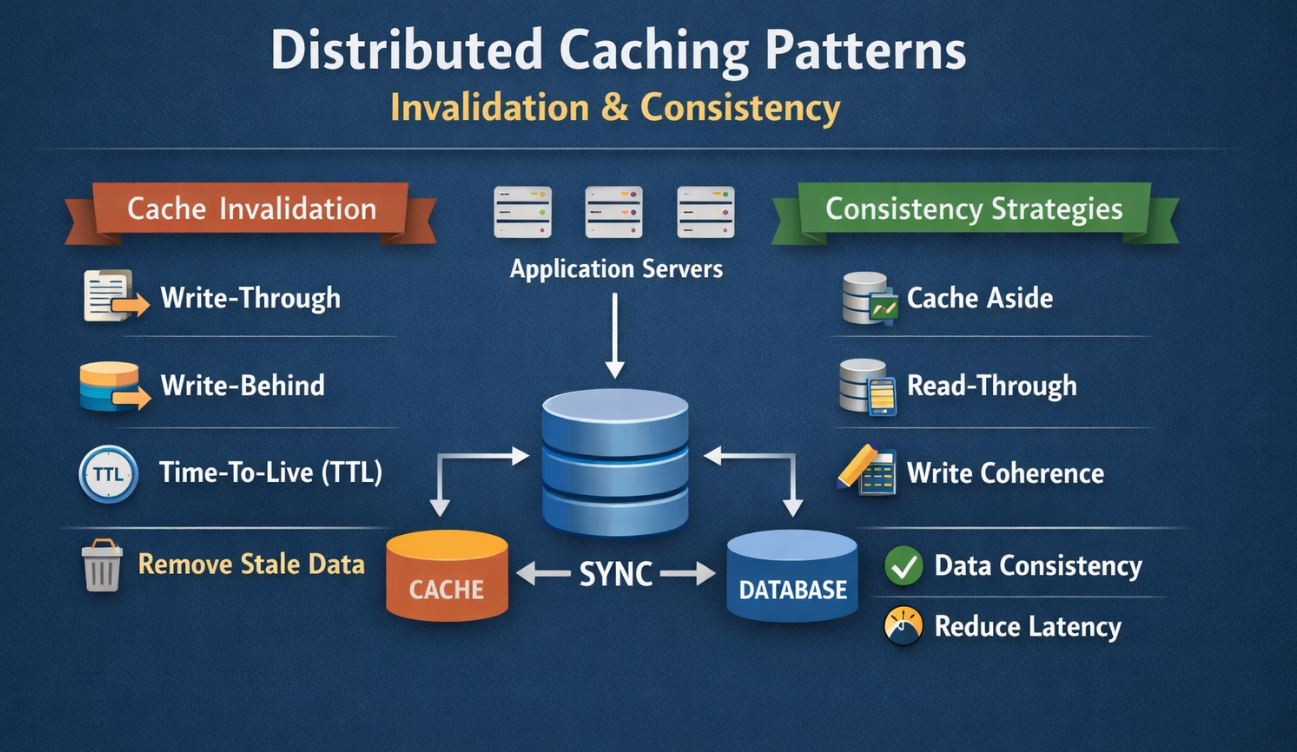
Table of Contents
- The Cache Stampede Incident
- Cache Patterns: Aside, Through, Behind
- Solving the Cache Stampede
- Cache Invalidation Strategies
- CQRS Integration: Separating Reads and Writes
- Consistency Models in Distributed Caches
- TTL Optimization: Balancing Freshness and Load
- Monitoring Cache Health
- Key Takeaways
- Read More
The Cache Stampede Incident
A video streaming platform cached popular movie metadata (title, duration, recommendations) with a 1-hour TTL. At 15:00 UTC, millions of instances had the same cache entry. At 16:00 UTC, the entry expired. In the next 100 milliseconds, 50,000 concurrent requests asked "what is the metadata for movie X?" All found the cache empty. All queried the database simultaneously. The database, expecting a few hundred metadata queries per second, received 50,000 in 100ms and crashed. For the next 30 minutes, the entire platform was down. The fix: request coalescing—when a cache miss occurs, the first request computes the value while subsequent requests wait for it.
Cache Patterns: Aside, Through, Behind
Cache-Aside Pattern (Lazy Loading)
Application code is responsible for populating the cache. On a cache miss, the application loads from the source (database) and writes to the cache. On a subsequent hit, the cache is served directly.
public Product getProduct(String id) {
    // Check cache first
    Product cached = cache.get("product:" + id);
    if (cached != null) return cached;

    // Cache miss: fetch from database
    Product product = database.getProduct(id);

    // Populate cache with 1-hour TTL
    cache.set("product:" + id, product, Duration.ofHours(1));
    return product;
}
Pros: Simple, works with any database, only caches accessed data.
Cons: Cache misses cause database hits, vulnerable to stampedes, requires cache invalidation logic in application code.
Write-Through Pattern
On writes, data is written to both the cache and the database simultaneously. Reads hit the cache (which is kept warm).
public void saveProduct(Product product) {
    // Write to cache and database together
    cache.set("product:" + product.id, product);
    database.saveProduct(product);
}
Pros: Cache stays consistent with the database, reads are always fast, no stampedes.
Cons: Writes are slower (dual write), cache is populated with data that may never be read (write amplification).
Write-Behind Pattern (Write-Back)
Writes go to the cache immediately (fast) and are asynchronously flushed to the database later (eventual consistency).
public void saveProduct(Product product) {
    // Write only to cache (instant)
    cache.set("product:" + product.id, product);

    // Async flush to database after 5 seconds or when batch reaches 100 items
    flushService.enqueue(product);
}
Pros: Writes are extremely fast, throughput is limited only by database batch capacity.
Cons: Data loss if cache crashes before flushing, eventual consistency can cause user-facing inconsistencies, complex failure handling.
Solving the Cache Stampede
Solution 1: Request Coalescing
When multiple threads detect a cache miss simultaneously, only one computes the value while others wait for it. This serializes the computation and prevents multiple database queries.
private final Map> inFlight = new ConcurrentHashMap<>();

public Product getProduct(String id) {
    String cacheKey = "product:" + id;

    // Check cache
    Product cached = cache.get(cacheKey);
    if (cached != null) return cached;

    // Coalesce: only one thread computes
    CompletableFuture future = inFlight.computeIfAbsent(cacheKey, key -> {
        return CompletableFuture.supplyAsync(() -> {
            Product product = database.getProduct(id);
            cache.set(cacheKey, product, Duration.ofHours(1));
            return product;
        });
    });

    try {
        return future.get(); // Wait for computation
    } finally {
        inFlight.remove(cacheKey);
    }
}
Solution 2: Probabilistic Early Expiration (Xfetch)
Instead of expiring at a fixed TTL, start refreshing before expiry with some probability. If a key is accessed within 5 minutes of expiry and random() < probability, refresh it from the database. This spreads the load and prevents thundering herds.
public Product getProduct(String id) {
    CachedValue cached = cache.get("product:" + id);

    if (cached == null) {
        return fetch(id); // Complete miss
    }

    long secondsUntilExpiry = cached.expiresAt - now();

    // Proactively refresh if close to expiry and probability check passes
    if (secondsUntilExpiry < 300 && Math.random() < 0.01) {
        CompletableFuture.runAsync(() -> fetch(id)); // Non-blocking refresh
    }

    return cached.value;
}
Solution 3: Stale-While-Revalidate
Serve stale data from the cache while recomputing in the background. Users see data instantly; eventual consistency is tolerated for non-critical data.
public Product getProduct(String id) {
    CachedValue cached = cache.get("product:" + id);

    if (cached != null && !cached.isExpired()) {
        return cached.value; // Fresh
    }

    if (cached != null && cached.isStale()) {
        // Return stale but trigger refresh
        CompletableFuture.runAsync(() -> refresh(id));
        return cached.value; // Return stale immediately
    }

    // Complete miss: must compute
    return fetch(id);
}
Cache Invalidation Strategies
Time-Based Expiry (TTL)
Entries expire after a fixed duration. Simple but can tolerate staleness up to the TTL window.
// Cache entries expire after 1 hour
cache.set("user:123", user, Duration.ofHours(1));
Event-Based Invalidation
When data changes (e.g., a user updates their profile), publish an event. Cache subscribers hear the event and invalidate the entry.
@Service
public class UserService {

    public void updateUser(User user) {
        database.saveUser(user);

        // Publish invalidation event
        eventBus.publish(new UserUpdatedEvent(user.id));
    }
}

@Component
public class CacheInvalidator {

    @EventListener
    public void onUserUpdated(UserUpdatedEvent event) {
        cache.delete("user:" + event.userId);
    }
}
Pattern: Active-Active Invalidation
In a distributed system, different cache nodes may have the same entry. A single write should invalidate the entry on all nodes. This requires:
- A message bus (Kafka, RabbitMQ) that broadcasts invalidation messages
- All cache clients subscribe to invalidation topics
- Cache consistency is eventually consistent (stale reads for a few milliseconds)
CQRS Integration: Separating Reads and Writes
Command Query Responsibility Segregation (CQRS) splits your data model into write and read models. The write model is optimized for transactions; the read model is optimized for caching and queries.
// Write model: normalized, transactional
@Entity
public class User {
    @Id Long id;
    String email;
    String name;
}

// Read model: denormalized, cached
@Data
public class UserReadModel {
    Long id;
    String email;
    String name;
    List recentOrders;       // Denormalized from Order table
    int orderCount;                   // Precomputed aggregate
    String membershipTier;            // Denormalized
}

// Reads hit the read model (which is in Redis)
@Service
public class UserQuery {
    public UserReadModel getUserProfile(Long id) {
        return redisCache.get("user:profile:" + id, UserReadModel.class);
    }
}

// Writes go to the write model; changes are published to update read models
@Service
public class UserCommand {

    public void updateUserEmail(Long id, String email) {
        // Write to the transactional write model
        user.setEmail(email);
        writeDatabase.save(user);

        // Publish a domain event
        eventBus.publish(new UserEmailChangedEvent(id, email));
    }
}

// Read model is kept in sync via event subscribers
@Component
public class UserReadModelUpdater {

    @EventListener
    public void onUserEmailChanged(UserEmailChangedEvent event) {
        UserReadModel model = readModel.get(event.userId);
        model.setEmail(event.newEmail);
        redisCache.set("user:profile:" + event.userId, model);
    }
}
Consistency Models in Distributed Caches
Strong Consistency
All readers see the same value immediately after a write. Achieved via synchronous replication or write-through patterns. Slow but correct.
Eventual Consistency
After a write, readers may see stale data for a brief period. Data converges to the correct value after the update propagates. Fast but temporarily inconsistent. Acceptable for most non-critical data (user preferences, recommendations, product metadata).
Causal Consistency
Operations that are causally related appear in order. If A writes X and then B reads X and writes Y, all readers see X before Y. Complex to implement but valuable for data with dependencies.
TTL Optimization: Balancing Freshness and Load
A short TTL (5 minutes) means stale data is bounded but cache misses are frequent. A long TTL (24 hours) reduces misses but increases staleness. In production, TTL should vary by data type:
- User profiles: 1 hour (infrequently changed, staleness tolerated)
- Product inventory: 5 minutes (frequent changes, near-real-time required)
- Recommendations: 24 hours (change infrequently, staleness acceptable)
- Real-time feeds: 30 seconds (highly dynamic, freshness critical)
Monitoring Cache Health
Observe:
- Hit rate: % of requests served from cache. Should be >80% for well-tuned caches.
- Eviction rate: How often entries are evicted due to memory pressure. High eviction means cache is too small.
- Staleness: Age of cached data relative to TTL. Should be skewed toward fresh (median age < 25% of TTL).
- Stampede incidents: Count of cache misses for the same key in rapid succession. Should be <5 per minute.
Caching is not optional in modern systems; it is essential for performance. But caching incorrectly is worse than no caching at all. Master these patterns, and your system will handle millions of concurrent requests.
Key Takeaways
- Cache-aside is simple but vulnerable to stampedes; write-through is safer but slower; write-behind is fast but risky.
- Request coalescing prevents thundering herds by serializing cache misses.
- Probabilistic early expiration and stale-while-revalidate spread load without sacrificing availability.
- Event-based invalidation is more accurate than TTL-based but requires discipline in application code.
- CQRS separates read and write models, allowing each to be optimized independently.
- Monitor hit rates, eviction rates, and staleness to detect cache inefficiencies early.
Tags:
Read More
Explore related deep-dives on system design and performance:
- Database Sharding at Scale — complement caching with horizontal scaling
- Database Replication and Consistency — understand replication lag with caching
- Transaction Isolation Levels — ensure consistency with cached data
Redis Cluster Architecture: Sharding, Replication and Failover
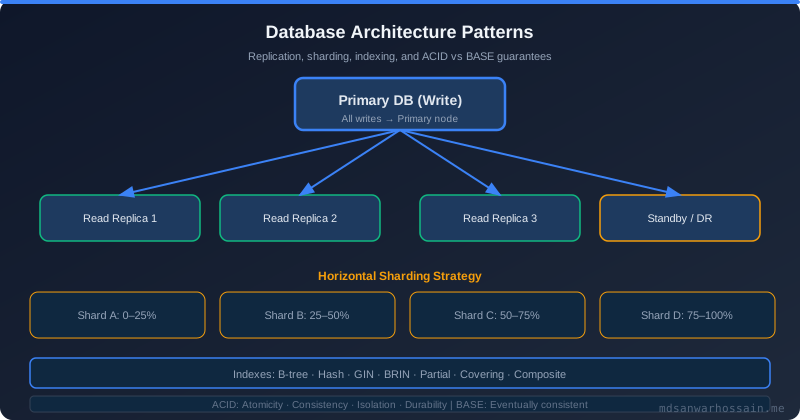
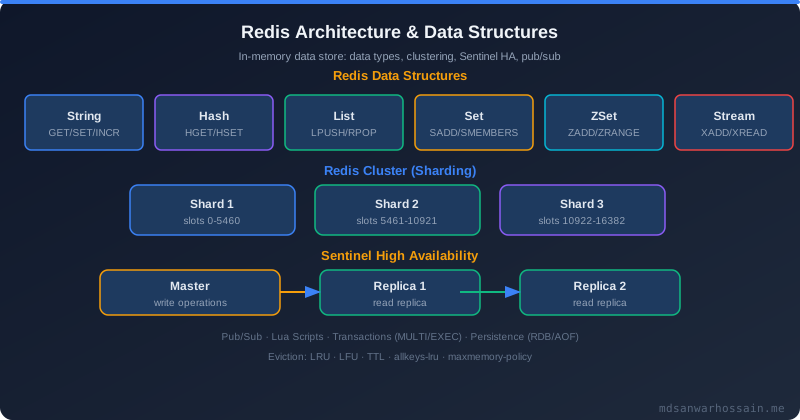
Redis Cluster is the built-in horizontal scaling solution for Redis, designed to distribute data across multiple master nodes while maintaining high availability through automatic failover. Unlike a single Redis instance that is limited by the memory and CPU of one server, Redis Cluster partitions the keyspace using a consistent technique called hash slots. There are exactly 16,384 hash slots in a Redis Cluster, and every key is mapped to exactly one slot using the formula slot = CRC16(key) % 16384. Each master node is responsible for a contiguous or non-contiguous range of these slots. In a typical three-node cluster, each master owns approximately 5,461 slots, and together they cover all 16,384 slots.
Data replication in Redis Cluster is handled by assigning one or more replica nodes to each master. Replicas receive a continuous stream of write commands from their master (asynchronous replication by default) and serve as hot standbys for failover. A common production configuration uses three masters each with one replica, giving six nodes total. This ensures that losing any single node (master or replica) does not cause data loss or downtime. For stricter durability, Redis Cluster supports the WAIT command to block until at least N replicas have acknowledged a write, converting asynchronous replication into semi-synchronous for critical operations.
Failover in Redis Cluster is fully automatic. When a master node becomes unreachable, its replicas initiate a cluster election. Replicas send FAILOVER_AUTH_REQUEST messages to other masters. The replica with the most up-to-date replication offset wins the election and is promoted to master. The default cluster-node-timeout is 15 seconds—a master is considered failed if it is unreachable for this duration. After promotion, the new master takes ownership of all the failed master's hash slots and the cluster resumes serving requests. The entire failover process typically completes in under 30 seconds in production, including election time plus client reconnection.
Sentinel mode is a simpler deployment where a single master serves all writes and one or more replicas handle optional read scaling. Redis Sentinel processes (separate daemons) monitor the master and automatically promote a replica when the master fails. Sentinel is appropriate for workloads that fit on a single Redis instance—up to roughly 100 GB of data—while Cluster is required when the dataset or throughput must span multiple shards. The critical operational difference is that Sentinel does not shard data: all keys live on one master, so throughput is bounded by a single node's CPU and memory.
// pom.xml dependency
// <dependency>
//   <groupId>org.springframework.boot</groupId>
//   <artifactId>spring-boot-starter-data-redis</artifactId>
// </dependency>

// application.yml — Redis Cluster configuration
// spring:
//   data:
//     redis:
//       cluster:
//         nodes:
//           - redis-node-1:6379
//           - redis-node-2:6379
//           - redis-node-3:6379
//         max-redirects: 3
//       timeout: 2000ms
//       lettuce:
//         cluster:
//           refresh:
//             adaptive: true
//             period: 30s

@Configuration
public class RedisClusterConfig {

    @Bean
    public LettuceConnectionFactory redisConnectionFactory(
            RedisClusterConfiguration clusterConfig) {

        LettuceClientConfiguration clientConfig = LettuceClientConfiguration.builder()
            .commandTimeout(Duration.ofMillis(2000))
            .readFrom(ReadFrom.REPLICA_PREFERRED) // fan reads to replicas
            .clientOptions(ClusterClientOptions.builder()
                .topologyRefreshOptions(
                    ClusterTopologyRefreshOptions.builder()
                        .enableAdaptiveRefreshTrigger(
                            RefreshTrigger.MOVED_REDIRECT,
                            RefreshTrigger.PERSISTENT_RECONNECTS)
                        .adaptiveRefreshTriggersTimeout(Duration.ofSeconds(30))
                        .build())
                .build())
            .build();

        return new LettuceConnectionFactory(clusterConfig, clientConfig);
    }

    @Bean
    public RedisTemplate<String, Object> redisTemplate(
            LettuceConnectionFactory connectionFactory) {
        RedisTemplate<String, Object> template = new RedisTemplate<>();
        template.setConnectionFactory(connectionFactory);
        template.setKeySerializer(new StringRedisSerializer());
        template.setValueSerializer(new GenericJackson2JsonRedisSerializer());
        return template;
    }
}Cache Serialization and Compression Strategies
Every value stored in Redis must be serialized from a JVM object into bytes and later deserialized back. The serialization format you choose directly impacts cache storage size, CPU cost, and debugging ease. Three formats dominate production Java systems: JSON (human-readable, no schema required), MessagePack (binary, schema-free, roughly 30% smaller than JSON), and Protocol Buffers (binary, schema-required, roughly 50% smaller than JSON with far faster serialization). JSON wins for its debuggability—you can inspect Redis keys with redis-cli get mykey and read the value—but pays a significant CPU and storage cost at scale. At 100K cache reads/second, the serialization overhead of Jackson ObjectMapper can consume several CPU cores on its own. MessagePack and Protobuf trade human-readability for throughput and smaller memory footprint.
Compression adds another dimension. The most common choices are LZ4 (extremely fast, ~50% size reduction, minimal CPU), Snappy (balanced speed and ratio, ~45–55% size reduction), and GZIP (maximum compression at 60–70% reduction, but 10–20x slower than LZ4). The cardinal rule is: only compress values larger than 1 KB. For small values (a simple boolean flag, an integer, or a short string), the compression overhead—both CPU and the bytes added by the compression header itself—exceeds any savings. Compress large JSON payloads such as product catalogs, recommendation lists, or HTML fragments where the value reliably exceeds 1 KB.
Cache warm-up is an often-overlooked startup concern. When a service restarts, its local caches are cold, and the first wave of traffic causes a thundering herd against the database. A well-designed warm-up strategy spawns a background thread during application startup that proactively loads the most-frequently-accessed keys—identified from analytics or access logs—into the cache before the service is marked healthy in the load balancer. This is particularly important for L1 in-process caches (like Caffeine) whose state is lost on every restart, unlike Redis which persists across restarts.
// Spring Boot Redis serialization configuration with optional LZ4 compression

@Configuration
public class RedisCacheConfig {

    // Option 1: Jackson JSON serializer (human-readable, larger size)
    @Bean
    public RedisSerializer<Object> jsonSerializer() {
        return new GenericJackson2JsonRedisSerializer();
    }

    // Option 2: Jackson with type info (safer for polymorphic types)
    @Bean
    public RedisSerializer<Object> typedJsonSerializer() {
        ObjectMapper mapper = new ObjectMapper();
        mapper.activateDefaultTyping(
            mapper.getPolymorphicTypeValidator(),
            ObjectMapper.DefaultTyping.NON_FINAL,
            JsonTypeInfo.As.PROPERTY);
        return new GenericJackson2JsonRedisSerializer(mapper);
    }

    @Bean
    public RedisCacheManager cacheManager(RedisConnectionFactory factory) {
        RedisCacheConfiguration config = RedisCacheConfiguration.defaultCacheConfig()
            .serializeValuesWith(
                RedisSerializationContext.SerializationPair.fromSerializer(
                    new CompressingRedisSerializer(new GenericJackson2JsonRedisSerializer())))
            .entryTtl(Duration.ofMinutes(30))
            .disableCachingNullValues();

        return RedisCacheManager.builder(factory)
            .cacheDefaults(config)
            .build();
    }
}

// LZ4 compression wrapper around any RedisSerializer
public class CompressingRedisSerializer implements RedisSerializer<Object> {
    private static final int COMPRESSION_THRESHOLD_BYTES = 1024; // 1 KB
    private final RedisSerializer<Object> delegate;
    private final LZ4Compressor compressor = LZ4Factory.fastestInstance().fastCompressor();
    private final LZ4FastDecompressor decompressor =
        LZ4Factory.fastestInstance().fastDecompressor();

    public CompressingRedisSerializer(RedisSerializer<Object> delegate) {
        this.delegate = delegate;
    }

    @Override
    public byte[] serialize(Object value) throws SerializationException {
        byte[] raw = delegate.serialize(value);
        if (raw == null || raw.length < COMPRESSION_THRESHOLD_BYTES) {
            return raw; // Not worth compressing
        }
        byte[] compressed = compressor.compress(raw);
        // Prepend original length (4 bytes) for decompression
        ByteBuffer buf = ByteBuffer.allocate(4 + compressed.length);
        buf.putInt(raw.length);
        buf.put(compressed);
        return buf.array();
    }

    @Override
    public Object deserialize(byte[] bytes) throws SerializationException {
        if (bytes == null || bytes.length < 4) return delegate.deserialize(bytes);
        ByteBuffer buf = ByteBuffer.wrap(bytes);
        int originalLength = buf.getInt();
        byte[] compressed = new byte[bytes.length - 4];
        buf.get(compressed);
        byte[] decompressed = new byte[originalLength];
        decompressor.decompress(compressed, decompressed);
        return delegate.deserialize(decompressed);
    }
}

// Cache warm-up on startup
@Component
public class CacheWarmUpService implements ApplicationListener<ApplicationReadyEvent> {

    private final ProductRepository productRepository;
    private final RedisTemplate<String, Object> redisTemplate;

    @Override
    public void onApplicationEvent(ApplicationReadyEvent event) {
        CompletableFuture.runAsync(() -> {
            // Load top-1000 most accessed products from DB
            List<Product> hotProducts = productRepository.findTop1000ByAccessCountDesc();
            hotProducts.forEach(p ->
                redisTemplate.opsForValue().set(
                    "product:" + p.getId(), p, Duration.ofHours(1)));
            log.info("Cache warm-up complete: {} products loaded", hotProducts.size());
        });
    }
}Multi-Layer Caching: L1 Local Cache + L2 Redis
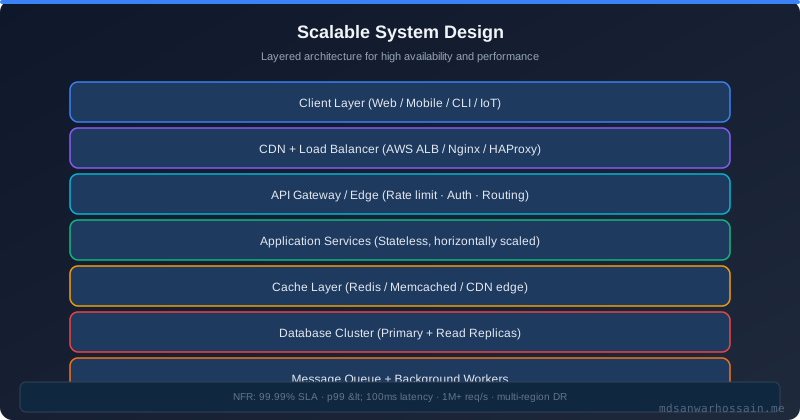
A single-layer Redis cache already provides dramatic latency improvements over a database, but round-trip latency to even a local Redis instance is typically 0.5–2ms due to network I/O and serialization overhead. For the hottest objects in a high-throughput system—such as the authenticated user's session, popular product listings, or configuration data—even 1ms adds up at 100,000 requests per second. A multi-layer caching strategy solves this by adding an L1 in-process cache (Caffeine in Java, bounded by the JVM heap) in front of the L2 distributed cache (Redis). L1 hits complete in under 100 microseconds with zero network I/O, while L2 handles larger datasets that exceed per-instance memory limits and provides a shared cache across all application instances.
The read path through a two-layer cache follows this sequence: first, check L1 (Caffeine); if found, return immediately (sub-millisecond). If L1 misses, check L2 (Redis); if found, populate L1 and return (~1ms). If both miss, query the database, populate both L2 and L1, and return (~10–100ms depending on query complexity). The L1 size is intentionally small—typically 1,000–10,000 entries—because it consumes JVM heap memory shared with the application. You want to cache only the hottest objects in L1 and rely on L2 for the long tail. L1 TTLs should also be shorter than L2 TTLs to limit staleness window; a typical configuration uses 30-second L1 TTL with a 10-minute L2 TTL.
The write path introduces the central consistency challenge of multi-layer caching. When a record is updated, you must invalidate or update both L1 and L2. For L2, this is straightforward: issue a Redis DEL or SET command. For L1, the problem is that each application instance has its own independent Caffeine cache, and a write to instance A's L1 does not automatically propagate to instances B and C. The standard solution is to use a Redis Pub/Sub channel as an invalidation bus: when any instance writes to the database, it publishes the cache key to a Redis channel. All application instances subscribe to this channel and immediately evict the key from their L1 caches. This keeps L1 caches consistent within the latency of Redis Pub/Sub message delivery, typically under 5ms.
The trade-off is explicit: higher cache hit rates and lower read latency versus increased consistency complexity and more code to maintain. Multi-layer caching is not appropriate for every cache. Use it only for the hottest objects—those with hit rates exceeding 90% and access frequencies exceeding 1,000 reads/second per instance. For the long tail of less-accessed objects, L2 Redis alone is sufficient and avoids the operational burden of cross-instance invalidation.
// pom.xml
// <dependency>
//   <groupId>com.github.ben-manes.caffeine</groupId>
//   <artifactId>caffeine</artifactId>
// </dependency>

@Configuration
@EnableCaching
public class MultiLayerCacheConfig {

    // L1: Caffeine in-process cache — small, fast, instance-local
    @Bean
    public CaffeineCache l1ProductCache() {
        return new CaffeineCache("products-l1",
            Caffeine.newBuilder()
                .maximumSize(5_000)           // max 5K entries per JVM instance
                .expireAfterWrite(30, TimeUnit.SECONDS)
                .recordStats()
                .build());
    }

    // L2: Redis distributed cache — large, shared across all instances
    @Bean
    public RedisCacheManager l2CacheManager(RedisConnectionFactory factory) {
        RedisCacheConfiguration config = RedisCacheConfiguration.defaultCacheConfig()
            .entryTtl(Duration.ofMinutes(10))
            .serializeValuesWith(
                RedisSerializationContext.SerializationPair.fromSerializer(
                    new GenericJackson2JsonRedisSerializer()));
        return RedisCacheManager.builder(factory).cacheDefaults(config).build();
    }
}

// Two-layer cache service with Redis pub/sub invalidation
@Service
public class MultiLayerProductService {

    private final Cache<String, Product> l1Cache;
    private final RedisTemplate<String, Object> redisTemplate;
    private final ProductRepository productRepository;
    private static final String INVALIDATION_CHANNEL = "cache:invalidation:products";

    public Product getProduct(String id) {
        String cacheKey = "product:" + id;

        // L1 check (sub-millisecond)
        Product l1Hit = l1Cache.getIfPresent(cacheKey);
        if (l1Hit != null) return l1Hit;

        // L2 check (~1ms)
        Product l2Hit = (Product) redisTemplate.opsForValue().get(cacheKey);
        if (l2Hit != null) {
            l1Cache.put(cacheKey, l2Hit); // Promote to L1
            return l2Hit;
        }

        // DB fallback (~10–50ms)
        Product product = productRepository.findById(id)
            .orElseThrow(() -> new ProductNotFoundException(id));

        redisTemplate.opsForValue().set(cacheKey, product, Duration.ofMinutes(10));
        l1Cache.put(cacheKey, product);
        return product;
    }

    @Transactional
    public void updateProduct(Product product) {
        productRepository.save(product);
        String cacheKey = "product:" + product.getId();

        // Invalidate L2
        redisTemplate.delete(cacheKey);

        // Broadcast L1 invalidation to ALL instances via Redis pub/sub
        redisTemplate.convertAndSend(INVALIDATION_CHANNEL, cacheKey);
    }
}

// Redis pub/sub listener — subscribes on every application instance
@Component
public class CacheInvalidationListener implements MessageListener {

    private final Cache<String, Product> l1Cache;

    @Override
    public void onMessage(Message message, byte[] pattern) {
        String cacheKey = new String(message.getBody(), StandardCharsets.UTF_8);
        l1Cache.invalidate(cacheKey); // Evict from this instance's L1
    }
}

@Bean
public RedisMessageListenerContainer invalidationContainer(
        RedisConnectionFactory factory, CacheInvalidationListener listener) {
    RedisMessageListenerContainer container = new RedisMessageListenerContainer();
    container.setConnectionFactory(factory);
    container.addMessageListener(listener,
        new ChannelTopic("cache:invalidation:products"));
    return container;
}
Cache Security: Protecting Sensitive Data
Caching dramatically improves performance but introduces a new attack surface that is frequently overlooked until a security audit or breach. The most fundamental rule is that not everything should be cached. Personally Identifiable Information (PII)—names, addresses, national ID numbers, health records—should be cached only when strictly necessary and always with a short TTL to limit exposure. Payment card data (PANs, CVVs) must never be cached in plaintext under PCI-DSS rules. Authentication tokens such as JWT access tokens can be cached briefly (matching the token's own expiry), but must be encrypted at the application level before storage, since Redis by default stores all data in plaintext in memory and on disk (if persistence is enabled). The cache is not a secure secrets store; treat it as a fast-access, semi-public data layer.
Redis provides two authentication mechanisms. The legacy requirepass directive sets a global password for all connections and all commands—simple but coarse. Redis 6 introduced Access Control Lists (ACLs), which allow fine-grained permissions per user: you can restrict a service account to only the specific commands it needs (GET, SET, DEL, EXPIRE) and only to keys matching a specific pattern (e.g., ~product:*). This follows the principle of least privilege: a compromised cache client can only access keys within its allowed pattern and cannot execute dangerous commands like FLUSHALL, DEBUG, or CONFIG. In production, every microservice should have its own Redis ACL user with narrowly scoped permissions. All Redis connections should use TLS (Redis 6+ supports native TLS, or you can use stunnel for older versions) to prevent credential and data interception in transit.
Cache poisoning is a subtle attack where an adversary injects malicious or corrupted data into the cache, causing subsequent reads to return the attacker's payload. This can happen through compromised application accounts, forged requests that bypass validation, or through exploitation of deserialization vulnerabilities (Java deserialization gadgets are a classic example). Defenses include: strict key naming conventions that prevent key collision between tenants or services, always validating and sanitizing data before caching it (do not cache the raw user input), using typed deserializers that reject unexpected types (e.g., Protobuf schema validation), and optionally signing cached values with an HMAC so that tampering is detectable on read. Never log cache values that may contain sensitive data, even in debug logs—log only cache keys and hit/miss statistics.
# Redis ACL configuration (redis.conf or ACL file)
# Create a service-specific user with minimal permissions

# Global password (legacy, apply to default user)
requirepass "use-a-strong-password-here"

# Product service user — can only GET/SET/DEL/EXPIRE on product:* keys
ACL SETUSER product-service on >product-svc-pass
  ~product:*
  +GET +SET +DEL +EXPIRE +TTL +EXISTS
  -@dangerous -@admin -FLUSHALL -CONFIG -DEBUG

# Read-only analytics user — only GET on any key
ACL SETUSER analytics-reader on >analytics-pass
  ~*
  +GET +SCAN +TTL
  -@write -@dangerous

# application.yml — TLS configuration for Spring Boot + Lettuce
# spring:
#   data:
#     redis:
#       host: redis.internal.example.com
#       port: 6380
#       password: ${REDIS_PASSWORD}
#       username: product-service
#       ssl:
#         enabled: true
#       lettuce:
#         ssl: true

@Configuration
public class SecureRedisConfig {

    @Bean
    public LettuceConnectionFactory secureRedisConnectionFactory(
            @Value("${spring.data.redis.host}") String host,
            @Value("${spring.data.redis.port}") int port,
            @Value("${spring.data.redis.password}") String password,
            @Value("${spring.data.redis.username}") String username) throws Exception {

        RedisStandaloneConfiguration serverConfig =
            new RedisStandaloneConfiguration(host, port);
        serverConfig.setUsername(username);
        serverConfig.setPassword(RedisPassword.of(password));

        // TLS: load trust store with Redis server certificate
        KeyStore trustStore = KeyStore.getInstance("JKS");
        try (InputStream ts = new ClassPathResource("redis-truststore.jks").getInputStream()) {
            trustStore.load(ts, "truststore-password".toCharArray());
        }
        TrustManagerFactory tmf = TrustManagerFactory.getInstance(
            TrustManagerFactory.getDefaultAlgorithm());
        tmf.init(trustStore);
        SSLContext sslContext = SSLContext.getInstance("TLS");
        sslContext.init(null, tmf.getTrustManagers(), new SecureRandom());

        LettuceClientConfiguration clientConfig = LettuceClientConfiguration.builder()
            .useSsl()
            .and()
            .commandTimeout(Duration.ofSeconds(2))
            .build();

        return new LettuceConnectionFactory(serverConfig, clientConfig);
    }

    // HMAC-signed cache value wrapper to detect tampering
    public static class SignedValue {
        public Object data;
        public String hmac; // HMAC-SHA256 of serialized data

        public static SignedValue sign(Object data, String secretKey) throws Exception {
            String serialized = new ObjectMapper().writeValueAsString(data);
            Mac mac = Mac.getInstance("HmacSHA256");
            mac.init(new SecretKeySpec(secretKey.getBytes(), "HmacSHA256"));
            SignedValue sv = new SignedValue();
            sv.data = data;
            sv.hmac = Base64.getEncoder().encodeToString(mac.doFinal(serialized.getBytes()));
            return sv;
        }

        public boolean verify(String secretKey) throws Exception {
            String serialized = new ObjectMapper().writeValueAsString(data);
            Mac mac = Mac.getInstance("HmacSHA256");
            mac.init(new SecretKeySpec(secretKey.getBytes(), "HmacSHA256"));
            String expected = Base64.getEncoder().encodeToString(
                mac.doFinal(serialized.getBytes()));
            return MessageDigest.isEqual(expected.getBytes(), this.hmac.getBytes());
        }
    }
}
Discussion / Comments
Last updated: March 2026 — Written by Md Sanwar Hossain

Software Engineer · Java · Spring Boot · Microservices