Transaction Isolation Levels: ACID, MVCC & Race Condition Prevention at Scale
A transaction is a sequence of operations that either all succeed (commit) or all fail (rollback). ACID properties—Atomicity, Consistency, Isolation, Durability—guarantee correctness. But implementing ACID completely comes at a cost: locking and reduced concurrency. Most systems relax the isolation guarantee: instead of serializing all transactions, they allow some transactions to see uncommitted changes from others (dirty reads), or see phantom rows that appeared between reads. Understanding isolation levels—and the race conditions each allows—is critical for building systems that are both correct and fast. This guide dissects the four SQL isolation levels, race conditions, and optimization strategies.
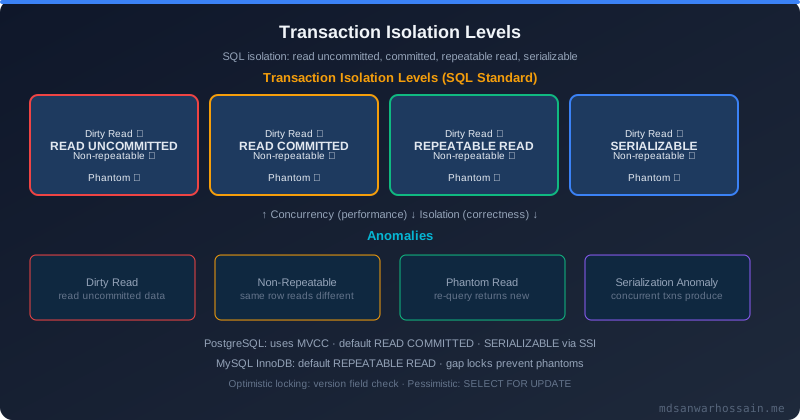
Table of Contents
ACID Properties: The Foundation
Atomicity
A transaction is atomic: it either completes entirely or rolls back completely. There is no middle ground. If a transfer debits account A and credits account B, both operations succeed or both fail.
Consistency
A transaction moves the database from one consistent state to another. All constraints (primary keys, foreign keys, CHECK constraints) are satisfied. The database never violates its invariants, even if a transaction fails halfway.
Isolation
Concurrent transactions do not interfere with each other. Transaction A's reads and writes are isolated from Transaction B's. Isolation is the property relaxed by most systems for concurrency.
Durability
Once a transaction commits, the data persists, even if the server crashes. Durability is provided by write-ahead logging: transactions are written to disk before responding to the client.
The Four Isolation Levels
READ UNCOMMITTED (Dirty Reads)
Transaction A can read uncommitted changes from Transaction B. If B rolls back, A has read a value that never existed. This is rarely used in production.
-- Transaction B
BEGIN;
UPDATE accounts SET balance = balance - 100 WHERE id = 1;
-- balance = 900

-- Transaction A (same time)
BEGIN;
SELECT balance FROM accounts WHERE id = 1;  -- Reads 900 (uncommitted!)
COMMIT;

-- Transaction B
ROLLBACK;  -- Oops, the -100 never happened. A read a phantom value.
READ COMMITTED (Default in Most Systems)
Transaction A can only read committed changes from Transaction B. But between two reads in A, B can insert new rows (phantom reads) or update rows (non-repeatable reads).
-- Transaction A
BEGIN;
SELECT COUNT(*) FROM orders WHERE user_id = 123;  -- Result: 5
COMMIT;

-- Transaction B (same time)
BEGIN;
INSERT INTO orders (user_id, ...) VALUES (123, ...);
COMMIT;

-- Transaction A (continued)
BEGIN;
SELECT COUNT(*) FROM orders WHERE user_id = 123;  -- Result: 6! (phantom read)
REPEATABLE READ
Within a transaction, the same query returns the same result. New rows cannot appear (phantom reads are prevented), and existing rows cannot change. But between transactions, updates are visible (lost update race condition possible).
SERIALIZABLE
Complete isolation. Transactions execute as if they were serial (one after another), even though they run concurrently. This is the highest isolation level but the slowest due to locking overhead.
MVCC: Multi-Version Concurrency Control
Modern databases use MVCC to achieve high concurrency without locking. Each transaction sees a snapshot of the database at a specific point in time. When a row is updated, the database creates a new version; the old version remains visible to transactions that started before the update.
-- Simplified MVCC model
rows = {
  (id=1, balance=1000, version=1),
  (id=1, balance=900, version=2),   // updated by T2
  (id=1, balance=800, version=3)    // updated by T3
}

// T1 (started at version 2) sees: balance=900
// T2 (started at version 3) sees: balance=800
// New transactions see: balance=800
Race Conditions and How to Prevent Them
Dirty Read
Reading uncommitted data. Prevented by: READ COMMITTED, REPEATABLE READ, SERIALIZABLE.
Non-Repeatable Read
The same query returns different results within a transaction. Transaction A reads a row, Transaction B updates it, A reads again and gets a different value. Prevented by: REPEATABLE READ, SERIALIZABLE.
-- T1 (REPEATABLE READ)
BEGIN;
SELECT salary FROM employees WHERE id = 123;  -- 50,000

-- T2
UPDATE employees SET salary = 60,000 WHERE id = 123;

-- T1
SELECT salary FROM employees WHERE id = 123;  -- Still 50,000 (repeatable)
Phantom Read
A query returns different rows in two executions within the same transaction. Between the two SELECT statements, Transaction B inserted rows matching the WHERE clause. Prevented by: SERIALIZABLE (and sometimes REPEATABLE READ, depending on the database).
Lost Update
Two transactions read the same value, both increment it, and the increments are lost. Prevented by: optimistic locking (version numbers) or pessimistic locking (SELECT FOR UPDATE).
-- Lost update scenario
-- T1: SELECT balance = 100; balance++; UPDATE balance = 101;
-- T2: SELECT balance = 100; balance++; UPDATE balance = 101;
-- Result: balance is 101, not 102. One increment was lost.

-- Solution: SELECT FOR UPDATE (pessimistic locking)
BEGIN;
SELECT balance FROM accounts WHERE id = 1 FOR UPDATE;  -- Lock the row
UPDATE accounts SET balance = balance + 100 WHERE id = 1;
COMMIT;
Optimistic vs Pessimistic Locking
Pessimistic Locking
Lock the resource before reading: SELECT FOR UPDATE. If another transaction holds the lock, you wait. Safe but can cause deadlocks and reduce concurrency.
-- PostgreSQL
BEGIN;
SELECT * FROM accounts WHERE id = 1 FOR UPDATE;
UPDATE accounts SET balance = balance + 100 WHERE id = 1;
COMMIT;
Optimistic Locking
Add a version field to each row. On update, check that the version hasn't changed. If it has, the transaction fails (conflict). Retry the transaction. Reduces locking overhead but requires retry logic.
@Entity
public class Account {
    @Version
    Long version;
    BigDecimal balance;
}

// JPA automatically handles optimistic locking
account.setBalance(account.getBalance() + 100);
accountRepository.save(account);  // Throws OptimisticLockingFailureException if version changed
Deadlocks and Prevention
A deadlock occurs when two transactions wait for each other. T1 holds lock A and waits for lock B; T2 holds lock B and waits for lock A. Both are stuck.
// Prevention strategies
// 1. Always acquire locks in the same order
// 2. Keep transactions short
// 3. Use consistent READ COMMITTED isolation level
// 4. Monitor deadlock frequency and investigate

SELECT * FROM pg_stat_database WHERE deadlocks > 0;
Choosing Isolation Levels in Practice
- Financial transactions (transfers, payments): SERIALIZABLE or pessimistic locking. Correctness is paramount.
- Inventory updates: REPEATABLE READ or optimistic locking. Non-repeatable reads are acceptable; lost updates are not.
- Analytics queries: READ COMMITTED. Analytical consistency is not critical.
- User profile updates: READ COMMITTED with optimistic locking. High concurrency is needed.
Performance Implications
Higher isolation levels reduce concurrency:
- READ COMMITTED: Highest throughput, lowest latency. 5000+ transactions/sec.
- REPEATABLE READ: 3000-4000 transactions/sec. Slightly more locking.
- SERIALIZABLE: 500-1000 transactions/sec. Extensive locking; deadlocks increase.
Understanding isolation is essential for building correct systems at scale. Master these patterns, and you avoid data corruption, race conditions, and cascading failures.
Spring @Transactional Deep Dive
Spring's @Transactional annotation is deceptively simple on the surface but has several sharp edges that trip up even experienced developers. Let's go deep on isolation mapping, common mistakes, propagation, and when REQUIRES_NEW saves you.
How @Transactional Maps to Database Isolation Levels
Spring's Isolation enum maps directly to JDBC isolation constants:
| Spring Isolation | JDBC Constant | Dirty Read | Non-Repeatable Read | Phantom Read |
|---|---|---|---|---|
Isolation.DEFAULT |
Database default | Varies | Varies | Varies |
Isolation.READ_UNCOMMITTED |
TRANSACTION_READ_UNCOMMITTED | ✅ Possible | ✅ Possible | ✅ Possible |
Isolation.READ_COMMITTED |
TRANSACTION_READ_COMMITTED | ❌ Prevented | ✅ Possible | ✅ Possible |
Isolation.REPEATABLE_READ |
TRANSACTION_REPEATABLE_READ | ❌ Prevented | ❌ Prevented | ✅ Possible |
Isolation.SERIALIZABLE |
TRANSACTION_SERIALIZABLE | ❌ Prevented | ❌ Prevented | ❌ Prevented |
The Most Common @Transactional Mistake: Private Methods
Spring's @Transactional works via AOP proxying. The proxy wraps your bean and intercepts method calls to apply transaction management. But the proxy only intercepts calls coming from outside the bean. Internal calls between methods within the same class bypass the proxy entirely, silently ignoring any @Transactional annotations.
@Service
public class PaymentService {

    // ❌ WRONG: @Transactional on a private method — Spring AOP cannot proxy this.
    // The annotation is completely ignored. No transaction is opened.
    @Transactional
    private void processRefund(Long paymentId) { ... }

    // ✅ CORRECT: @Transactional only works on public methods
    @Transactional
    public void processRefund(Long paymentId) { ... }
}

@Service
public class OrderService {

    @Transactional(propagation = Propagation.REQUIRES_NEW)
    public void createAuditLog(String action) { ... }

    public void placeOrder(Order order) {
        // ❌ WRONG: self-invocation bypasses the proxy.
        // REQUIRES_NEW has NO effect — audit runs inside placeOrder's transaction.
        createAuditLog("ORDER_PLACED");
        // ...
    }
}
The fix for self-invocation: inject the bean into a separate Spring-managed bean and call through that bean's reference. Spring resolves the proxy, and the transaction annotation takes effect correctly.
Propagation Attribute Reference
| Propagation | If Existing Transaction | If No Existing Transaction | Use Case |
|---|---|---|---|
REQUIRED (default) |
Join existing | Create new | Standard service methods |
REQUIRES_NEW |
Suspend outer, create new | Create new | Audit logging that must persist on outer rollback |
NESTED |
Create savepoint in existing | Create new | Partial rollback without aborting parent |
MANDATORY |
Join existing | Throw exception | Methods that must always be called within a transaction |
NEVER |
Throw exception | Execute non-transactionally | Operations that must not run in a transaction |
NOT_SUPPORTED |
Suspend outer, run non-transactionally | Run non-transactionally | Long-running reads that should not hold a connection |
SUPPORTS |
Join existing | Run non-transactionally | Optional transactional context |
REQUIRES_NEW for Audit Logging: The Canonical Example
@Service
@RequiredArgsConstructor
public class AuditService {

    private final AuditLogRepository auditLogRepository;

    // REQUIRES_NEW: commits independently of the calling transaction.
    // If the outer transaction rolls back, this audit entry still persists.
    // Critical — we want to audit failures, not just successes.
    @Transactional(propagation = Propagation.REQUIRES_NEW)
    public void logEvent(String entityType, Long entityId,
                         String action, String performedBy) {
        auditLogRepository.save(AuditLog.builder()
            .entityType(entityType)
            .entityId(entityId)
            .action(action)
            .performedBy(performedBy)
            .timestamp(Instant.now())
            .build());
    }
}

@Service
@RequiredArgsConstructor
public class LoanService {

    private final LoanRepository loanRepository;
    private final AuditService auditService;  // Separate bean — proxy works correctly

    @Transactional
    public void approveLoan(Long loanId, String approvedBy) {
        Loan loan = loanRepository.findById(loanId)
            .orElseThrow(() -> new LoanNotFoundException(loanId));

        // AuditService.logEvent() runs in its own REQUIRES_NEW transaction.
        // Even if we throw below, this audit record persists.
        auditService.logEvent("LOAN", loanId, "APPROVAL_ATTEMPTED", approvedBy);

        if (!loan.isEligibleForApproval()) {
            throw new LoanNotEligibleException(loanId);  // Outer tx rolls back; audit stays
        }

        loan.setStatus(LoanStatus.APPROVED);
        loan.setApprovedBy(approvedBy);
        loan.setApprovedAt(Instant.now());
        loanRepository.save(loan);

        auditService.logEvent("LOAN", loanId, "APPROVED", approvedBy);
    }
}
At BRAC IT: The Phantom Read That Cost Us Real Money
This is a true story from our loan disbursement system at BRAC IT. The bug was subtle, the root cause was a misunderstood isolation level, and the financial impact was real.
The Setup
We have a loan quota system. Each loan product has a maximum disbursable amount per month — the monthly_quota. Before disbursing any loan, the system checks: "Is there enough quota remaining this month?" If yes, it deducts the loan amount from the quota and proceeds with disbursement.
CREATE TABLE loans_quota (
    product_id    BIGINT PRIMARY KEY,
    total_quota   DECIMAL(15,2),   -- e.g., 10,000,000 BDT per month
    used_quota    DECIMAL(15,2),   -- Increments with each disbursement
    last_updated  TIMESTAMP
);
The Race Condition
Our disbursement service used the default isolation level: READ_COMMITTED. Two loan officers submitted disbursement requests for the same loan product simultaneously. Here is what happened at the database level:
-- Initial state: total_quota = 500,000 BDT, used_quota = 200,000 BDT
-- Available = 300,000 BDT

-- Officer A requests 250,000 BDT:
T1: BEGIN;
T1: SELECT used_quota FROM loans_quota WHERE product_id = 42;
    -- Returns: 200,000. Available = 300,000. OK to proceed.

    -- Officer B requests 200,000 BDT — runs CONCURRENTLY before T1 commits:
    T2: BEGIN;
    T2: SELECT used_quota FROM loans_quota WHERE product_id = 42;
        -- Returns: 200,000 (T1 hasn't committed yet, so T2 sees the original value)
        -- Available = 300,000. T2 also thinks it's OK to proceed.

-- T1 checks: 200,000 + 250,000 = 450,000 < 500,000. Quota OK.
T1: UPDATE loans_quota SET used_quota = 450,000 WHERE product_id = 42;
T1: -- Disburse 250,000 BDT loan.
T1: COMMIT;

    -- T2 checks: 200,000 + 200,000 = 400,000 < 500,000. T2 still sees 200k!
    T2: UPDATE loans_quota SET used_quota = 400,000 WHERE product_id = 42;
    -- WRONG: T2 overwrites T1's 450,000 with 400,000 — T1's deduction is LOST.
    T2: -- Disburse 200,000 BDT loan.
    T2: COMMIT;

-- Final state: used_quota = 400,000 (should be 450,000)
-- Real disbursed = 450,000 BDT but recorded as 400,000 BDT used.
This is a lost update combined with a phantom-style race condition. Both transactions read the same initial value because READ_COMMITTED only prevents dirty reads — each read gets a fresh snapshot, so T2's second read after T1 commits still saw the old row because T2's SELECT had already run. The quota accounting was now incorrect and three such incidents totalled around 150,000 BDT in under-recorded usage before we caught it in month-end reconciliation.
The Fix: SELECT FOR UPDATE
// ❌ BEFORE (broken):
@Transactional(isolation = Isolation.READ_COMMITTED)
public void disburseLoan(Long productId, BigDecimal amount, Long loanId) {
    LoanQuota quota = quotaRepository.findByProductId(productId);  // Plain SELECT
    BigDecimal available = quota.getTotalQuota().subtract(quota.getUsedQuota());
    if (amount.compareTo(available) > 0) {
        throw new InsufficientQuotaException(productId);
    }
    quota.setUsedQuota(quota.getUsedQuota().add(amount));
    quotaRepository.save(quota);
    disbursementRepository.save(new Disbursement(loanId, amount));
}

// ✅ AFTER (fixed):
@Transactional(isolation = Isolation.SERIALIZABLE)
public void disburseLoan(Long productId, BigDecimal amount, Long loanId) {
    // SELECT FOR UPDATE: acquires an exclusive row lock immediately.
    // Any concurrent transaction on this row blocks until we COMMIT or ROLLBACK.
    LoanQuota quota = quotaRepository.findByProductIdForUpdate(productId);

    BigDecimal available = quota.getTotalQuota().subtract(quota.getUsedQuota());
    if (amount.compareTo(available) > 0) {
        throw new InsufficientQuotaException(
            String.format("Insufficient quota for product %d: requested %.2f, available %.2f",
                          productId, amount, available));
    }
    quota.setUsedQuota(quota.getUsedQuota().add(amount));
    quotaRepository.save(quota);
    disbursementRepository.save(new Disbursement(loanId, amount));
}

// In the repository:
@Query(value = "SELECT * FROM loans_quota WHERE product_id = :productId FOR UPDATE",
       nativeQuery = true)
Optional<LoanQuota> findByProductIdForUpdate(@Param("productId") Long productId);
With SELECT FOR UPDATE, the first transaction to touch the quota row acquires an exclusive lock. All other concurrent disbursement transactions for the same product wait in a queue. Each one sees the fully committed, up-to-date value when its turn arrives. No more lost updates. No more phantom quota over-disbursement.
UPDATE loans_quota SET used_quota = used_quota + ? WHERE product_id = ? AND (used_quota + ?) <= total_quotaCheck
affectedRows: if 0, quota was insufficient. This pushes concurrency control into the database engine and avoids blocking — each UPDATE is atomic at the row level under READ_COMMITTED.
Distributed Transactions: When @Transactional Isn't Enough
Spring's @Transactional is powerful but has a hard boundary: it only works within a single datasource connection. The moment your business operation spans multiple microservices — each owning its own database — @Transactional cannot coordinate across them. You need a distributed transaction strategy.
Why 2PC (Two-Phase Commit) Does Not Scale for Microservices
The traditional solution is XA / 2PC: a global transaction coordinator asks all participant databases to "prepare" (write to redo log, hold locks), waits for all acknowledgements, then tells everyone to "commit." The problems are fundamental: the coordinator is a single point of failure; all participants are locked during Phase 1 until Phase 2 completes; and any coordinator crash mid-transaction leaves participants in an indefinitely blocked state. At microservice scale with dozens of services, 2PC is operationally unacceptable.
The Saga Pattern: Distributed Transactions Without 2PC
A Saga is a sequence of local transactions, each publishing an event or message that triggers the next step. If a step fails, compensating transactions execute in reverse order to undo the previous steps. No locks are held across service boundaries, and each step commits locally — maximising availability.
For a payment → inventory → order confirmation flow:
// Happy path:
// 1. OrderService: creates order in PENDING state → publishes OrderCreatedEvent
// 2. PaymentService: processes payment → publishes PaymentCompletedEvent
// 3. InventoryService: reserves stock → publishes InventoryReservedEvent
// 4. OrderService: marks order CONFIRMED

// Failure path (inventory reservation fails):
// 3. InventoryService: stock unavailable → publishes InventoryReservationFailedEvent
// 2. PaymentService: receives failure event → reverses payment (compensating transaction)
//    → publishes PaymentRefundedEvent
// 1. OrderService: receives failure → marks order FAILED
Spring Boot Saga Orchestrator
@Service
@RequiredArgsConstructor
@Slf4j
public class OrderSagaOrchestrator {

    private final PaymentClient      paymentClient;
    private final InventoryClient    inventoryClient;
    private final OrderRepository    orderRepository;
    private final SagaStateRepository sagaStateRepository;

    @Transactional
    public void executePlaceOrderSaga(PlaceOrderCommand command) {
        SagaState saga = sagaStateRepository.save(SagaState.builder()
            .orderId(command.getOrderId())
            .status(SagaStatus.STARTED)
            .build());

        try {
            // Step 1: Persist order locally
            Order order = orderRepository.save(Order.pending(command));
            saga.setStep("ORDER_CREATED");
            sagaStateRepository.save(saga);

            // Step 2: Process payment (remote call to PaymentService)
            PaymentResult payment = paymentClient.processPayment(
                command.getOrderId(), command.getAmount(), command.getCustomerId());
            if (!payment.isSuccess()) {
                throw new PaymentFailedException(payment.getErrorCode());
            }
            saga.setPaymentId(payment.getPaymentId());
            saga.setStep("PAYMENT_COMPLETED");
            sagaStateRepository.save(saga);

            // Step 3: Reserve inventory (remote call to InventoryService)
            InventoryResult inventory = inventoryClient.reserveItems(
                command.getOrderId(), command.getItems());
            if (!inventory.isSuccess()) {
                // Compensate: reverse the payment before failing
                paymentClient.reversePayment(payment.getPaymentId());
                throw new InventoryReservationFailedException(inventory.getErrorCode());
            }

            // Step 4: Confirm order
            order.setStatus(OrderStatus.CONFIRMED);
            orderRepository.save(order);
            saga.setStatus(SagaStatus.COMPLETED);
            sagaStateRepository.save(saga);

            log.info("Saga completed for orderId={}", command.getOrderId());

        } catch (PaymentFailedException e) {
            saga.setStatus(SagaStatus.FAILED);
            saga.setFailureReason("PAYMENT: " + e.getMessage());
            sagaStateRepository.save(saga);
            orderRepository.markFailed(command.getOrderId(), "Payment failed");
            throw e;
        } catch (InventoryReservationFailedException e) {
            saga.setStatus(SagaStatus.COMPENSATING);
            sagaStateRepository.save(saga);
            orderRepository.markFailed(command.getOrderId(), "Inventory unavailable");
            throw e;
        }
    }
}
The SagaState table is the durability anchor: it records every completed step. If the service crashes mid-saga, a scheduled recovery job can inspect incomplete saga records and either re-drive them from the last completed step or trigger the appropriate compensations. This is how you achieve exactly-once business semantics across microservice boundaries — without 2PC and without distributed locks.
Transaction Isolation in Practice: Quick Reference
Here is the reference table engineers bookmark and share with their teams. Map your specific use case to the right isolation level, understand the locking strategy, and know the risk you are accepting if you choose a lower isolation than needed.
| Use Case | Isolation Level | Lock Strategy | Performance | Risk If Too Low |
|---|---|---|---|---|
| Read-only analytics report | READ COMMITTED | No locks (MVCC snapshot) | ⚡ Highest | Slightly stale report data (acceptable) |
| Shopping cart checkout | REPEATABLE READ | Optimistic locking (@Version) | ⚡ High | Price changes mid-checkout |
| Financial transfer (debit/credit) | SERIALIZABLE | SELECT FOR UPDATE | 🐢 Low | Double-spend, incorrect balances |
| Inventory decrement | READ COMMITTED | Atomic SQL UPDATE with check | ⚡ High | Oversell (negative stock) |
| Audit log write | READ COMMITTED | REQUIRES_NEW propagation | ⚡ Highest | Lost audit entry on outer rollback |
| Cache warming (bulk read) | READ UNCOMMITTED | No locks | ⚡ Highest | Dirty data in cache (usually tolerable) |
| Loan quota check + deduction | SERIALIZABLE | SELECT FOR UPDATE | 🐢 Low | Quota overdraft (as at BRAC IT) |
| User profile update | READ COMMITTED | Optimistic locking (@Version) | ⚡ High | Lost update (last writer wins) |
The Atomic SQL Pattern for Inventory (No SERIALIZABLE Needed)
-- ❌ Race condition under READ_COMMITTED:
SELECT stock FROM products WHERE id = 42;   -- Returns 5
-- Another transaction decrements concurrently...
UPDATE products SET stock = stock - 1 WHERE id = 42;   -- Now stock = -1!

-- ✅ Atomic check-and-decrement in ONE statement:
UPDATE products
SET stock = stock - 1
WHERE id = 42
  AND stock >= 1;   -- Guard: only decrements if stock is available

-- Check affectedRows in your application:
-- 0 rows updated → stock was insufficient, reject the order
-- 1 row updated → success, proceed with order confirmation
This pattern requires no locking beyond the implicit row-level lock during the UPDATE statement itself. It works correctly under READ_COMMITTED and avoids the throughput penalty of SERIALIZABLE. We use it for product inventory management in our e-commerce integrations.
Monitoring Transactions and Lock Contention
Performance problems from locking and transaction misuse are often invisible until they trigger a full outage. Proactive monitoring lets you catch long-running transactions, blocked queries, and lock waits before they cascade.
MySQL: Finding Long-Running Transactions and Blocked Queries
-- All active transactions older than 5 seconds:
SELECT
    trx_id,
    trx_state,
    trx_started,
    TIMESTAMPDIFF(SECOND, trx_started, NOW()) AS running_seconds,
    trx_mysql_thread_id,
    trx_query,
    trx_rows_locked,
    trx_rows_modified
FROM information_schema.INNODB_TRX
WHERE TIMESTAMPDIFF(SECOND, trx_started, NOW()) > 5
ORDER BY trx_started ASC;

-- Blocked transactions — who is blocking whom:
SELECT
    r.trx_id          AS waiting_trx_id,
    r.trx_mysql_thread_id AS waiting_thread,
    r.trx_query       AS waiting_query,
    b.trx_id          AS blocking_trx_id,
    b.trx_mysql_thread_id AS blocking_thread,
    b.trx_query       AS blocking_query
FROM information_schema.INNODB_LOCK_WAITS w
JOIN information_schema.INNODB_TRX b ON b.trx_id = w.blocking_trx_id
JOIN information_schema.INNODB_TRX r ON r.trx_id = w.requesting_trx_id;

-- Current lock waits (MySQL 8.0+):
SELECT * FROM performance_schema.data_lock_waits LIMIT 20;
PostgreSQL: Finding Lock Waits and Blocked Queries
-- Blocked queries and who is blocking them:
SELECT
    blocked.pid            AS blocked_pid,
    blocked.query          AS blocked_query,
    blocking.pid           AS blocking_pid,
    blocking.query         AS blocking_query,
    blocked.wait_event_type,
    blocked.wait_event,
    now() - blocked.query_start AS blocked_duration
FROM pg_stat_activity blocked
JOIN pg_stat_activity blocking
    ON blocking.pid = ANY(pg_blocking_pids(blocked.pid))
WHERE blocked.wait_event_type = 'Lock'
ORDER BY blocked_duration DESC;

-- Long-running transactions (older than 5 seconds):
SELECT
    pid,
    usename,
    application_name,
    state,
    now() - xact_start AS transaction_duration,
    query
FROM pg_stat_activity
WHERE xact_start IS NOT NULL
  AND now() - xact_start > interval '5 seconds'
ORDER BY transaction_duration DESC;

-- Total deadlocks in current database:
SELECT deadlocks FROM pg_stat_database WHERE datname = current_database();
Spring Boot: Micrometer Metrics for Transaction Duration
@Aspect
@Component
@RequiredArgsConstructor
public class TransactionMonitoringAspect {

    private final MeterRegistry meterRegistry;

    @Around("@annotation(transactional)")
    public Object monitorTransaction(ProceedingJoinPoint pjp,
                                     Transactional transactional) throws Throwable {
        String className  = pjp.getTarget().getClass().getSimpleName();
        String methodName = pjp.getSignature().getName();
        String isolation  = transactional.isolation().name();
        boolean readOnly  = transactional.readOnly();

        Timer.Sample sample = Timer.start(meterRegistry);
        boolean success = false;
        try {
            Object result = pjp.proceed();
            success = true;
            return result;
        } finally {
            sample.stop(Timer.builder("db.transaction.duration")
                .tag("class",     className)
                .tag("method",    methodName)
                .tag("isolation", isolation)
                .tag("readOnly",  String.valueOf(readOnly))
                .tag("success",   String.valueOf(success))
                .description("Transaction execution duration")
                .register(meterRegistry));
        }
    }
}
Detecting HikariCP Connection Pool Starvation
# Prometheus query — non-zero pending connections means pool is exhausted:
hikaricp_connections_pending{pool="HikariPool-1"} > 0

# Grafana alert rule:
# Alert: Connection pool starvation
# Condition: hikaricp_connections_pending > 0 for 10 seconds
#
# Root causes:
#   - Long-running transactions holding connections too long
#   - Missing @Transactional boundaries (connection checked out but never returned)
#   - Pool sized too small for concurrent load
#   - Deadlocks causing transactions to hang indefinitely
With these queries and metrics in place, set up Grafana dashboards showing transaction P95/P99 durations per service method. Alert on any transaction exceeding 10 seconds — in a well-designed OLTP application, that almost always indicates a bug: a missing index causing a full table scan inside a transaction, a forgotten SELECT FOR UPDATE holding a lock, or a missing COMMIT in error handling. At BRAC IT, we run the long-running transaction queries on a daily automated schedule and review results in our weekly engineering sync. Catching a 30-second transaction query that ran once a day would have saved us at least two production incidents in the past year.
Key Takeaways
- ACID properties are foundational. Atomicity and durability are non-negotiable; consistency and isolation can be relaxed for performance.
- READ COMMITTED is the default in most databases and works for most OLTP workloads. Understand its limitations (phantom reads, non-repeatable reads).
- REPEATABLE READ prevents non-repeatable reads but allows phantom reads. Useful for strict consistency needs without full serialization.
- SERIALIZABLE provides complete isolation but at a high performance cost. Reserve it for critical transactions (financial transfers).
- MVCC enables high concurrency by allowing readers and writers to coexist without blocking. Understand version management and cleanup.
- Choose between optimistic locking (lower overhead, requires retries) and pessimistic locking (blocks other transactions, risk of deadlocks).
- Monitor deadlocks and lock contention. High deadlock rates indicate schema or query issues that should be fixed.
Tags:
Read More
Explore related articles on databases, consistency, and distributed systems:
- Database Replication: Leader-Follower, Consistency & Failover — understand consistency across replicas
- Database Sharding at Scale: Consistent Hashing and Resharding — combining isolation with sharding
- Distributed Caching Patterns: Invalidation & Consistency — caching and consistency interactions
Discussion / Comments
Last updated: March 2026 — Written by Md Sanwar Hossain

Software Engineer · Java · Spring Boot · Microservices