ELK Stack for Java Microservices: Structured Logging with Logstash & Kibana
When a payment failure silently sweeps across 50 microservices at 2 AM, grep-ing through flat text logs across pods is not a strategy — it is chaos. This guide builds a production-grade ELK Stack pipeline for Java microservices from scratch: structured JSON logging in Spring Boot, Logstash parsing and enrichment, Elasticsearch index design with ILM, Kibana dashboards for SREs, Filebeat on Kubernetes DaemonSets, and the security and retention policies that keep the whole thing running at scale.
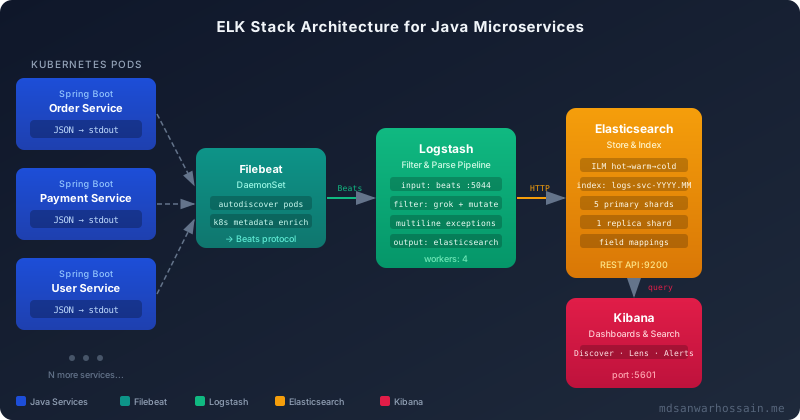
Table of Contents
- Why Structured Logging is Non-Negotiable in Microservices
- Configuring Structured JSON Logging in Spring Boot
- Logstash Pipeline Configuration for Java Apps
- Elasticsearch Index Design for Java Logs
- Building Kibana Dashboards for Java Microservices
- Filebeat Deployment for Kubernetes Java Pods
- Production Operations: Retention, Security & Performance
1. Why Structured Logging is Non-Negotiable in Microservices
Consider a traditional monolith: one process, one log file, one tail -f and you can see the world. Now scale that to 50 Spring Boot microservices, each running 3 replicas in Kubernetes — you have 150 log streams, each producing thousands of lines per minute in an unstructured format like:
2026-04-05 14:23:45.123 ERROR 1 --- [http-nio-8080-exec-3] c.example.payment.PaymentService  : Payment failed for orderId=ORD-4892
java.lang.RuntimeException: Downstream timeout after 3000ms
    at com.example.payment.PaymentService.process(PaymentService.java:87)
    at com.example.payment.PaymentController.checkout(PaymentController.java:42)
That log line contains exactly zero machine-parseable metadata. You cannot aggregate by orderId, correlate with the upstream traceId, filter by userId, or alert when the error rate for payment-service exceeds 1% in a 5-minute window — not without heroic regex engineering.
The ELK Stack at a Glance
The ELK Stack (now the Elastic Stack) is the industry-standard open-source solution for centralised log management. It comprises four primary components:
Distributed search and analytics engine. Stores and indexes log documents; exposes a REST API and DSL for full-text search, aggregations and KQL.
Server-side data processing pipeline. Ingests from multiple sources, transforms with grok/mutate/date filters, and outputs to Elasticsearch or other sinks.
Visualisation and exploration UI. Discover view, dashboards, Lens charts, Alerting rules, and APM integration for end-to-end observability.
Lightweight log shippers deployed as Kubernetes DaemonSets. Filebeat tails container stdout/stderr, enriches with k8s metadata and forwards to Logstash.
ELK vs Loki: Which Should You Choose?
Grafana Loki is a popular alternative optimised for label-based indexing (inspired by Prometheus). The key difference: Loki indexes only labels (pod, namespace, service), not the log content itself. Full-text search over log message bodies requires scanning raw chunks, which is slower. Elasticsearch indexes every field, enabling sub-second full-text search and complex aggregations over billions of documents — essential when your SRE needs to find "OutOfMemoryError" across all services in the last hour instantly. For Java microservices with rich structured logs (exception types, trace IDs, business fields), ELK wins on search power. Loki wins on operational simplicity and cost when you only need tail + label filtering.
2. Configuring Structured JSON Logging in Spring Boot
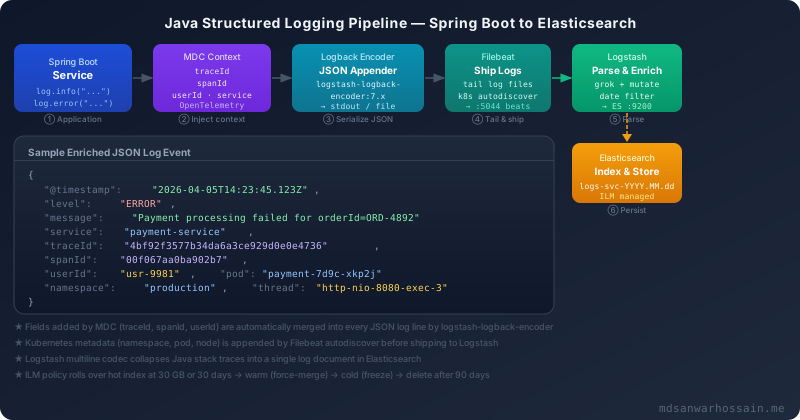
The foundation of the entire ELK pipeline is structured JSON logging at the source. Instead of formatting log events as human-readable text, we serialise them as JSON objects where every field (level, message, timestamp, trace ID, exception) is a discrete, indexable key-value pair.
Maven Dependency: logstash-logback-encoder
<!-- pom.xml -->
<dependency>
    <groupId>net.logstash.logback</groupId>
    <artifactId>logstash-logback-encoder</artifactId>
    <version>7.4</version>
</dependency>

<!-- Spring Boot already includes logback-classic, so no version needed -->
<dependency>
    <groupId>ch.qos.logback</groupId>
    <artifactId>logback-classic</artifactId>
</dependency>
logback-spring.xml — JSON Appender Configuration
<!-- src/main/resources/logback-spring.xml -->
<configuration>

    <springProperty scope="context" name="serviceName"
                    source="spring.application.name" defaultValue="unknown"/>

    <!-- JSON Console Appender (active in non-local profiles) -->
    <appender name="JSON_CONSOLE" class="ch.qos.logback.core.ConsoleAppender">
        <encoder class="net.logstash.logback.encoder.LogstashEncoder">
            <!-- Include MDC fields as top-level JSON keys -->
            <includeMdcKeyName>traceId</includeMdcKeyName>
            <includeMdcKeyName>spanId</includeMdcKeyName>
            <includeMdcKeyName>userId</includeMdcKeyName>
            <includeMdcKeyName>requestId</includeMdcKeyName>
            <!-- Add static service name field -->
            <customFields>{"service":"${serviceName}"}</customFields>
            <!-- Shorten logger name: com.example.payment.PaymentService → PaymentService -->
            <shortenedLoggerNameLength>36</shortenedLoggerNameLength>
            <!-- Include stack trace as a structured field, not a string blob -->
            <throwableConverter class="net.logstash.logback.stacktrace.ShortenedThrowableConverter">
                <maxDepthPerCause>20</maxDepthPerCause>
                <rootCauseFirst>true</rootCauseFirst>
            </throwableConverter>
        </encoder>
    </appender>

    <!-- Human-readable console for local development -->
    <appender name="CONSOLE" class="ch.qos.logback.core.ConsoleAppender">
        <encoder>
            <pattern>%d{HH:mm:ss.SSS} %highlight(%-5level) [%thread] %cyan(%logger{36}) - %msg%n</pattern>
        </encoder>
    </appender>

    <!-- Async wrapper to avoid blocking application threads on I/O -->
    <appender name="ASYNC_JSON" class="ch.qos.logback.classic.AsyncAppender">
        <queueSize>512</queueSize>
        <discardingThreshold>0</discardingThreshold>
        <appender-ref ref="JSON_CONSOLE"/>
    </appender>

    <!-- Profile-based appender selection -->
    <springProfile name="local">
        <root level="DEBUG">
            <appender-ref ref="CONSOLE"/>
        </root>
    </springProfile>

    <springProfile name="!local">
        <root level="INFO">
            <appender-ref ref="ASYNC_JSON"/>
        </root>
        <logger name="com.example" level="DEBUG" additivity="false">
            <appender-ref ref="ASYNC_JSON"/>
        </logger>
    </springProfile>

</configuration>
MDC Enrichment with OpenTelemetry Trace Context
MDC (Mapped Diagnostic Context) is the mechanism that attaches per-request metadata to every log line produced during that request — without passing the data manually to every logger. Spring Boot 3.x with Micrometer Tracing + OpenTelemetry automatically populates traceId and spanId in MDC. Add a WebFilter for custom fields:
// LoggingContextFilter.java
@Component
@Order(Ordered.HIGHEST_PRECEDENCE)
public class LoggingContextFilter implements Filter {

    @Override
    public void doFilter(ServletRequest req, ServletResponse res, FilterChain chain)
            throws IOException, ServletException {
        HttpServletRequest request = (HttpServletRequest) req;
        try {
            // Extract authenticated user from security context or header
            String userId = extractUserId(request);
            String requestId = Optional.ofNullable(request.getHeader("X-Request-ID"))
                    .orElse(UUID.randomUUID().toString());

            MDC.put("userId", userId);
            MDC.put("requestId", requestId);
            MDC.put("httpMethod", request.getMethod());
            MDC.put("requestUri", request.getRequestURI());

            chain.doFilter(req, res);
        } finally {
            // CRITICAL: always clear MDC to prevent thread pool contamination
            MDC.clear();
        }
    }

    private String extractUserId(HttpServletRequest request) {
        // Extract from JWT, session, or default to anonymous
        Authentication auth = SecurityContextHolder.getContext().getAuthentication();
        if (auth != null && auth.isAuthenticated() &&
                !(auth instanceof AnonymousAuthenticationToken)) {
            return auth.getName();
        }
        return "anonymous";
    }
}
application.yml — Logging Configuration
# application.yml
spring:
  application:
    name: payment-service

management:
  tracing:
    sampling:
      probability: 1.0   # 100% sampling in dev; use 0.1 in prod
  otlp:
    tracing:
      endpoint: http://otel-collector:4318/v1/traces

logging:
  level:
    root: INFO
    com.example: DEBUG
    org.springframework.web: WARN
    # Silence noisy Hibernate SQL unless debugging
    org.hibernate.SQL: WARN
With the above configuration, every log line emitted by your Spring Boot service — regardless of which thread or class generates it — will be a fully formed JSON document including @timestamp, level, message, service, traceId, spanId, userId, and the full stack trace as a structured array, not a multi-line string blob.
3. Logstash Pipeline Configuration for Java Apps
Logstash sits between Filebeat and Elasticsearch. Its job is to receive log events via the Beats protocol, validate and transform fields, collapse multi-line Java stack traces into single documents, and route output to the correct Elasticsearch index. A well-tuned Logstash pipeline can comfortably handle 50,000 events per second on a 4-core node.
logstash.conf — Complete Java Pipeline
# /etc/logstash/conf.d/java-microservices.conf

input {
  beats {
    port  => 5044
    ssl   => true
    ssl_certificate => "/etc/logstash/certs/logstash.crt"
    ssl_key         => "/etc/logstash/certs/logstash.key"
  }
}

filter {
  # ── JSON log lines from logstash-logback-encoder ──────────────────────
  if [message] =~ /^\{/ {
    json {
      source => "message"
      # Merge parsed JSON into the event root, dropping original message key
      target => "[parsed]"
    }
    # Promote all parsed fields to the top level
    ruby {
      code => '
        parsed = event.get("[parsed]")
        parsed.each { |k, v| event.set(k, v) } if parsed.is_a?(Hash)
        event.remove("[parsed]")
      '
    }
  }

  # ── Multi-line Java stack trace reassembly ─────────────────────────────
  # Filebeat multiline merges exception lines; Logstash cleans up
  if [stack_trace] {
    # stack_trace is already a structured array from logstash-logback-encoder
    # Nothing to do — just verify the field exists
    mutate {
      add_field => { "has_exception" => "true" }
    }
  }

  # ── Timestamp normalisation ────────────────────────────────────────────
  if [@timestamp] {
    # logstash-logback-encoder emits ISO8601; parse it properly
    date {
      match   => ["[timestamp]", "ISO8601"]
      target  => "@timestamp"
      remove_field => ["timestamp"]
    }
  }

  # ── Grok pattern for legacy services still using text logging ──────────
  if ![level] {
    grok {
      match => {
        "message" => "%{TIMESTAMP_ISO8601:log_timestamp} %{LOGLEVEL:level}%{SPACE}%{NUMBER:pid} --- \[%{DATA:thread}\] %{DATA:logger}%{SPACE}: %{GREEDYDATA:log_message}"
      }
      overwrite => ["message"]
      tag_on_failure => ["_grok_parse_failure"]
    }
    mutate {
      rename => { "log_message" => "message" }
    }
    date {
      match   => ["log_timestamp", "yyyy-MM-dd HH:mm:ss.SSS"]
      target  => "@timestamp"
      remove_field => ["log_timestamp"]
    }
  }

  # ── Field normalisation and enrichment ─────────────────────────────────
  mutate {
    # Normalise log level to uppercase
    uppercase => ["level"]
    # Add environment tag from Filebeat metadata
    add_field => {
      "environment" => "%{[kubernetes][namespace]}"
      "pod_name"    => "%{[kubernetes][pod][name]}"
      "node_name"   => "%{[kubernetes][node][name]}"
    }
    # Remove noisy Filebeat housekeeping fields
    remove_field => ["agent", "ecs", "input", "log", "host"]
  }

  # ── HTTP status code classification ───────────────────────────────────
  if [http_status] {
    if [http_status] >= 500 {
      mutate { add_field => { "log_category" => "server_error" } }
    } else if [http_status] >= 400 {
      mutate { add_field => { "log_category" => "client_error" } }
    } else {
      mutate { add_field => { "log_category" => "success" } }
    }
  }

  # ── Drop health-check noise ────────────────────────────────────────────
  if [requestUri] in ["/actuator/health", "/actuator/prometheus"] {
    drop { }
  }
}

output {
  elasticsearch {
    hosts    => ["https://elasticsearch:9200"]
    user     => "logstash_writer"
    password => "${LOGSTASH_ES_PASSWORD}"
    cacert   => "/etc/logstash/certs/ca.crt"
    # Dynamic index name: logs-<service>-YYYY.MM.dd
    index    => "logs-%{[service]}-%{+YYYY.MM.dd}"
    # Use data stream for ILM-managed rolling indices
    data_stream => true
    data_stream_type      => "logs"
    data_stream_dataset   => "%{[service]}"
    data_stream_namespace => "%{[environment]}"
  }

  # Dead-letter queue for events that fail to index
  if "_elasticsearch_index_failure" in [tags] {
    file {
      path => "/var/log/logstash/dlq-%{+YYYY-MM-dd}.log"
    }
  }
}
Logstash pipelines.yml — Worker Tuning
# /etc/logstash/pipelines.yml
- pipeline.id: java-microservices
  path.config: "/etc/logstash/conf.d/java-microservices.conf"
  pipeline.workers: 4           # Match number of CPU cores
  pipeline.batch.size: 500      # Documents per batch sent to Elasticsearch
  pipeline.batch.delay: 50      # Max ms to wait before flushing a batch
  queue.type: persisted         # Disk-backed queue for durability
queue.max_bytes: 1gbWhen using logstash-logback-encoder, Java stack traces are serialised as a structured JSON array in the stack_trace field — they are never split across multiple log lines. However, if you have legacy services using plain-text Logback patterns, you must configure Filebeat's multiline pattern to collapse the stack trace before shipping, otherwise each stack trace line becomes a separate Elasticsearch document.
4. Elasticsearch Index Design for Java Logs
Poor index design is the most common reason ELK clusters become slow and expensive at scale. For Java microservices logs, the goal is to balance query performance (fast search and aggregation), ingest throughput (high write rate), and storage efficiency (appropriate field types, compression).
Index Template for Java Logs
PUT _index_template/java-logs-template
{
  "index_patterns": ["logs-*-*"],
  "data_stream": {},
  "priority": 200,
  "template": {
    "settings": {
      "number_of_shards": 2,
      "number_of_replicas": 1,
      "index.lifecycle.name": "java-logs-ilm-policy",
      "index.lifecycle.rollover_alias": "java-logs",
      "index.codec": "best_compression",
      "index.refresh_interval": "5s",
      "index.translog.durability": "async",
      "index.translog.sync_interval": "30s"
    },
    "mappings": {
      "dynamic": "false",
      "properties": {
        "@timestamp":   { "type": "date" },
        "level":        { "type": "keyword" },
        "message":      { "type": "text", "analyzer": "standard",
                          "fields": { "keyword": { "type": "keyword", "ignore_above": 512 } } },
        "service":      { "type": "keyword" },
        "traceId":      { "type": "keyword", "index": true },
        "spanId":       { "type": "keyword", "index": true },
        "userId":       { "type": "keyword" },
        "requestId":    { "type": "keyword" },
        "thread":       { "type": "keyword" },
        "logger":       { "type": "keyword" },
        "environment":  { "type": "keyword" },
        "pod_name":     { "type": "keyword" },
        "node_name":    { "type": "keyword" },
        "has_exception":{ "type": "boolean" },
        "log_category": { "type": "keyword" },
        "http_status":  { "type": "short" },
        "duration_ms":  { "type": "long" },
        "stack_trace":  { "type": "text", "index": false },
        "requestUri":   { "type": "keyword" },
        "httpMethod":   { "type": "keyword" }
      }
    }
  }
}
Index Lifecycle Management (ILM) Policy
ILM automatically manages the lifecycle of indices through hot → warm → cold → delete phases, reducing storage costs by 60–80% compared to keeping all data on fast SSD nodes:
PUT _ilm/policy/java-logs-ilm-policy
{
  "policy": {
    "phases": {
      "hot": {
        "min_age": "0ms",
        "actions": {
          "rollover": {
            "max_primary_shard_size": "30gb",
            "max_age": "1d"
          },
          "set_priority": { "priority": 100 }
        }
      },
      "warm": {
        "min_age": "2d",
        "actions": {
          "shrink":       { "number_of_shards": 1 },
          "forcemerge":   { "max_num_segments": 1 },
          "set_priority": { "priority": 50 },
          "allocate": {
            "require": { "data": "warm" }
          }
        }
      },
      "cold": {
        "min_age": "15d",
        "actions": {
          "freeze":       {},
          "set_priority": { "priority": 0 },
          "allocate": {
            "require": { "data": "cold" }
          }
        }
      },
      "delete": {
        "min_age": "90d",
        "actions": {
          "delete": {}
        }
      }
    }
  }
}
Shard Sizing Guidelines
- Target shard size: 20–50 GB per shard. Smaller shards cause overhead; larger shards slow query performance.
- Shards per index: Start with 2 primary shards for medium-volume (≤ 50 GB/day) microservices deployments. Scale out only when you exceed 50 GB/day.
- Rule of thumb: Number of shards ≤ 20 × (number of Elasticsearch data nodes). Over-sharding is the most common cluster performance killer.
- Replicas: 1 replica in production for HA. The replica also serves read queries, so it doubles query throughput.
- dynamic: false in mappings is critical — it prevents Elasticsearch from auto-mapping unexpected fields (like stringified JSON from a badly configured service) and causing mapping explosions.
5. Building Kibana Dashboards for Java Microservices
A Kibana dashboard tailored for Java microservices gives SREs instant answers to the questions that matter most: Which service is erroring? At what rate? Which trace IDs are affected? Which user is impacted?
Creating the Index Pattern (Data View)
In Kibana → Stack Management → Data Views:
# Index pattern to cover all Java microservice logs
logs-*-*

# Set @timestamp as the time field
# This enables time-range filtering in Discover and all visualisations
Essential KQL Queries
# All errors in the last 15 minutes across all services
level: "ERROR"

# Find all logs for a distributed trace (end-to-end trace)
traceId: "4bf92f3577b34da6a3ce929d0e0e4736"

# Payment service errors with exception for a specific user
service: "payment-service" AND level: "ERROR" AND userId: "usr-9981"

# Slow requests over 1 second in production
duration_ms >= 1000 AND environment: "production"

# Find NullPointerExceptions across all services
stack_trace: "NullPointerException"

# All 5xx errors in the order service today
service: "order-service" AND http_status >= 500

# Exceptions in the last 1 hour, grouped — use with Date Histogram
has_exception: true AND @timestamp >= now-1h
Recommended Dashboard Panels
Lens: Date Histogram X-axis, Count Y-axis, Break-down by service.keyword, filtered to level: ERROR. Shows which service is spiking.
Data Table: Top 20 terms aggregation on stack_trace.keyword (first line). Reveals which exception class is most frequent in the last 24 hours.
Metric: 99th percentile aggregation on duration_ms, break by service. Links to Discover with duration_ms >= {p99_value} for drill-down.
Heatmap: X-axis = time (1h buckets), Y-axis = service, colour = log count. Instantly spots noisy services or dead services (zero logs = unhealthy).
Kibana Alerting: Error Rate Threshold
# Kibana Alerting Rule (Stack Management → Rules → Create rule)
# Type: Elasticsearch query
# Index: logs-*-*
# KQL condition:
level: "ERROR" AND service: "payment-service"

# Threshold: COUNT > 50 over last 5 minutes
# Action: PagerDuty / Slack webhook
# Message template:
# "⚠️ payment-service has {{context.value}} errors in 5 min.
#  Kibana: https://kibana:5601/app/discover#?...&query=(language:kuery,query:'traceId: {{context.traceId}}')"
6. Filebeat Deployment for Kubernetes Java Pods
Filebeat runs as a DaemonSet — one pod per Kubernetes node — and tails the container log files that the container runtime writes to the host filesystem. This approach requires no changes to your Java containers and scales automatically as you add nodes.
Filebeat DaemonSet Manifest
# filebeat-daemonset.yaml
apiVersion: apps/v1
kind: DaemonSet
metadata:
  name: filebeat
  namespace: kube-system
  labels:
    app: filebeat
spec:
  selector:
    matchLabels:
      app: filebeat
  template:
    metadata:
      labels:
        app: filebeat
    spec:
      serviceAccountName: filebeat
      terminationGracePeriodSeconds: 30
      containers:
      - name: filebeat
        image: docker.elastic.co/beats/filebeat:8.12.0
        args: ["-c", "/etc/filebeat.yml", "-e"]
        env:
        - name: LOGSTASH_HOST
          value: "logstash.logging.svc.cluster.local:5044"
        - name: NODE_NAME
          valueFrom:
            fieldRef:
              fieldPath: spec.nodeName
        securityContext:
          runAsUser: 0
          privileged: false
        resources:
          limits:
            memory: 200Mi
            cpu: "100m"
          requests:
            memory: 100Mi
            cpu: "50m"
        volumeMounts:
        - name: config
          mountPath: /etc/filebeat.yml
          readOnly: true
          subPath: filebeat.yml
        - name: varlog
          mountPath: /var/log
          readOnly: true
        - name: varlibdockercontainers
          mountPath: /var/lib/docker/containers
          readOnly: true
        - name: data
          mountPath: /usr/share/filebeat/data
      volumes:
      - name: config
        configMap:
          name: filebeat-config
      - name: varlog
        hostPath:
          path: /var/log
      - name: varlibdockercontainers
        hostPath:
          path: /var/lib/docker/containers
      - name: data
        hostPath:
          path: /var/lib/filebeat-data
          type: DirectoryOrCreate
      tolerations:
      - key: node-role.kubernetes.io/master
        effect: NoSchedule
Filebeat ConfigMap — Autodiscover & Multiline
# filebeat-configmap.yaml
apiVersion: v1
kind: ConfigMap
metadata:
  name: filebeat-config
  namespace: kube-system
data:
  filebeat.yml: |
    filebeat.autodiscover:
      providers:
      - type: kubernetes
        node: ${NODE_NAME}
        hints.enabled: true
        hints.default_config:
          type: container
          paths:
          - /var/log/containers/*${data.kubernetes.container.id}.log
        templates:
        # Special config for Java services (annotation-based)
        - condition:
            contains:
              kubernetes.labels.app.kubernetes.io/runtime: "java"
          config:
          - type: container
            paths:
            - /var/log/containers/*${data.kubernetes.container.id}.log
            # Collapse Java multiline stack traces for legacy text-format services
            multiline.type: pattern
            multiline.pattern: '^[[:space:]]+(at|\.\.\.)\s'
            multiline.negate: false
            multiline.match: after
            multiline.max_lines: 200
            # Annotate with k8s metadata
            processors:
            - add_kubernetes_metadata:
                host: ${NODE_NAME}
                matchers:
                - logs_path:
                    logs_path: "/var/log/containers/"
            - drop_fields:
                fields: ["agent.ephemeral_id", "agent.type", "agent.version"]
                ignore_missing: true

    # Drop health-check endpoints early to reduce Logstash load
    processors:
    - drop_event:
        when:
          regexp:
            message: '.*"requestUri":\s*"/actuator/health".*'

    output.logstash:
      hosts: ["${LOGSTASH_HOST}"]
      ssl.certificate_authorities: ["/etc/filebeat/certs/ca.crt"]
      bulk_max_size: 200
      worker: 2

    logging.level: warning
    logging.to_files: false
RBAC for Filebeat
# filebeat-rbac.yaml
apiVersion: v1
kind: ServiceAccount
metadata:
  name: filebeat
  namespace: kube-system
---
apiVersion: rbac.authorization.k8s.io/v1
kind: ClusterRole
metadata:
  name: filebeat
rules:
- apiGroups: [""]
  resources: ["namespaces", "pods", "nodes"]
  verbs: ["get", "watch", "list"]
- apiGroups: ["apps"]
  resources: ["replicasets"]
  verbs: ["get", "list", "watch"]
---
apiVersion: rbac.authorization.k8s.io/v1
kind: ClusterRoleBinding
metadata:
  name: filebeat
subjects:
- kind: ServiceAccount
  name: filebeat
  namespace: kube-system
roleRef:
  kind: ClusterRole
  name: filebeat
apiGroup: rbac.authorization.k8s.ioYou can override Filebeat behaviour per-pod using annotations. Add co.elastic.logs/multiline.pattern, co.elastic.logs/processors.drop_event, or co.elastic.logs/enabled: "false" to exclude noisy pods from log shipping entirely. This is invaluable for suppressing verbose sidecar logs (e.g., Envoy access logs) without modifying the Filebeat DaemonSet config.
7. Production Operations: Retention, Security & Performance
Running the ELK Stack in production requires attention to security hardening, JVM tuning, and operational runbooks. Here are the critical settings that separate a hobby cluster from a production deployment.
Elasticsearch Security: TLS & API Keys
# elasticsearch.yml — enable security features
xpack.security.enabled: true
xpack.security.http.ssl.enabled: true
xpack.security.http.ssl.keystore.path: /etc/elasticsearch/certs/http.p12
xpack.security.transport.ssl.enabled: true
xpack.security.transport.ssl.verification_mode: certificate
xpack.security.transport.ssl.keystore.path: /etc/elasticsearch/certs/transport.p12

# Audit logging for compliance
xpack.security.audit.enabled: true
xpack.security.audit.logfile.events.include:
  - ACCESS_DENIED
  - AUTHENTICATION_FAILED
  - INDEX_ACCESS_DENIED
# Create a dedicated Logstash writer role with minimal permissions
POST _security/role/logstash_writer
{
"cluster": ["monitor", "manage_ilm", "manage_index_templates"],
"indices": [
{
"names": ["logs-*"],
"privileges": ["auto_configure", "create_doc", "create_index",
"manage", "manage_ilm", "view_index_metadata"]
}
]
}
# Create API key for Logstash (prefer over password)
POST _security/api_key
{
"name": "logstash-writer-key",
"role_descriptors": {
"logstash_writer": {
"cluster": ["monitor", "manage_ilm"],
"index": [{ "names": ["logs-*"], "privileges": ["all"] }]
}
},
"expiration": "365d"
}JVM Heap Tuning for Elasticsearch
# /etc/elasticsearch/jvm.options.d/heap.options
# Rule: set heap to 50% of RAM, never exceed 30–31 GB (compressed OOPs limit)
-Xms16g
-Xmx16g

# Prefer G1GC for Elasticsearch 7.x and earlier
# ES 8.x defaults to ZGC which is better for large heaps
-XX:+UseG1GC
-XX:G1HeapRegionSize=32m
-XX:MaxGCPauseMillis=200

# Enable GC logging for diagnostics
-Xlog:gc*,gc+age=trace,safepoint:file=/var/log/elasticsearch/gc.log:utctime,pid,tags:filecount=32,filesize=64m
Logstash JVM & Worker Tuning
# /etc/logstash/jvm.options
-Xms2g
-Xmx2g
-XX:+UseG1GC

# logstash.yml
pipeline.workers: 4          # = CPU cores
pipeline.batch.size: 500
pipeline.batch.delay: 50
config.reload.automatic: true
config.reload.interval: 3s
# Monitoring via X-Pack
xpack.monitoring.enabled: true
xpack.monitoring.elasticsearch.hosts: ["https://elasticsearch:9200"]
xpack.monitoring.elasticsearch.username: logstash_system
xpack.monitoring.elasticsearch.password: "${LOGSTASH_MONITOR_PASSWORD}"
Operational Runbook: Common Issues
| Symptom | Root Cause | Resolution |
|---|---|---|
| Logstash backpressure / high queue depth | Elasticsearch indexing too slow | Increase ES bulk thread pool, add data nodes, reduce refresh_interval |
| Mapping explosion: too many fields | dynamic: true mapping auto-creating fields |
Set dynamic: false in index template, use Logstash mutate to prune fields |
| Kibana Discover returns 0 results | Time filter mismatch or wrong index pattern | Verify @timestamp field type is date, confirm index pattern matches actual index names |
| Filebeat lag: events delayed by minutes | Logstash output queue full, Filebeat backpressure | Increase Logstash workers and batch size, add a Kafka buffer between Filebeat and Logstash |
| Elasticsearch heap OOM | Too many shards, or shard size too large | Run /_cat/shards?v, delete old indices, reduce shard count via shrink API |
High-Volume Architecture: Add Kafka as Buffer
When your log volume exceeds 100,000 events/second, the direct Filebeat → Logstash connection becomes a bottleneck. Introduce Apache Kafka as a durable buffer:
# Filebeat output → Kafka (instead of Logstash)
output.kafka:
  hosts: ["kafka-broker-1:9092", "kafka-broker-2:9092", "kafka-broker-3:9092"]
  topic: "java-logs"
  partition.round_robin:
    reachable_only: false
  required_acks: 1
  compression: gzip
  max_message_bytes: 1000000

# Logstash input → Kafka (instead of Beats)
input {
  kafka {
    bootstrap_servers => "kafka-broker-1:9092,kafka-broker-2:9092"
    topics            => ["java-logs"]
    group_id          => "logstash-consumer-group"
    consumer_threads  => 4
    decorate_events   => true
    codec             => "json"
  }
}
Kafka provides durable buffering — if Logstash or Elasticsearch goes down temporarily, Kafka retains the logs (for your configured retention period) and Logstash consumes from its last committed offset on recovery. This prevents any log loss during planned maintenance or unexpected outages.
Key Takeaways
- Start with structured JSON logging in Spring Boot using
logstash-logback-encoder. Every log line must be a machine-parseable JSON document. - Inject trace context via MDC —
traceId,spanId,userIdon every request. OpenTelemetry + Micrometer Tracing does this automatically in Spring Boot 3. - Use Filebeat DaemonSets on Kubernetes with autodiscover hints. No sidecar containers needed — Filebeat reads container logs from the host filesystem.
- Logstash pipeline should handle grok for legacy services, date normalisation, and multi-line stack trace collapsing. Use
pipeline.workers = CPU cores. - ILM hot → warm → cold → delete is non-negotiable in production. Without it, your Elasticsearch cluster will run out of disk in days on a busy cluster.
- Set
dynamic: falsein index templates to prevent mapping explosions from misconfigured services logging arbitrary JSON blobs. - Add Kafka as a buffer between Filebeat and Logstash for high-volume (>100k events/sec) or for zero-loss during Elasticsearch maintenance windows.
Leave a Comment
Related Posts

Software Engineer · Java · Spring Boot · Microservices