Elasticsearch with Spring Boot: Full-Text Search, Aggregations & Production Guide (2026)
A complete guide to integrating Elasticsearch 8 with Spring Boot 3: from custom analyzers and Spring Data ES to faceted search, relevance tuning, bulk indexing, zero-downtime reindexing, and production cluster operations.
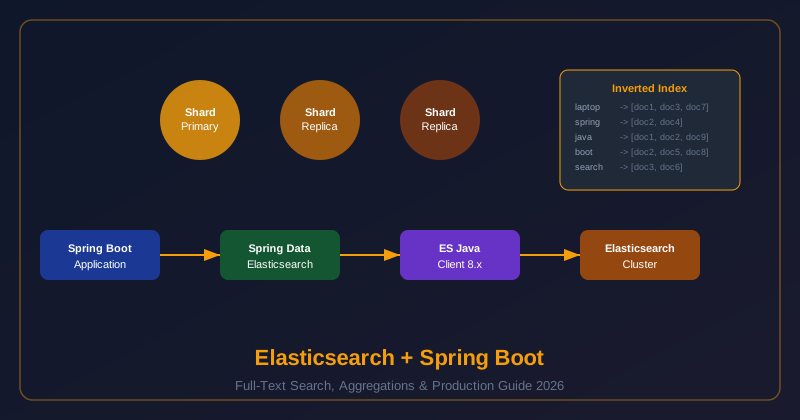
1. When to Use Elasticsearch
| Feature | PostgreSQL FTS | Elasticsearch | Solr |
|---|---|---|---|
| Full-text ranking | ✅ Basic BM25 | ✅ Advanced BM25, tunable | ✅ Good |
| Custom tokenizers | ❌ Limited | ✅ Extensive | ✅ Good |
| Faceted search | ❌ Manual | ✅ Native aggregations | ✅ Native facets |
| Horizontal scale | ❌ Complex sharding | ✅ Native clustering | ✅ SolrCloud |
| Spring integration | ✅ Spring Data JPA | ✅ Spring Data ES 5 | ⚠️ Limited |
Decision guide: Use Elasticsearch when you need (a) ranked relevance scoring with tunable weights, (b) faceted search for e-commerce-style filtering, (c) more than 50M searchable documents, or (d) real-time analytics on log/event data alongside search.
2. Core Concepts
- Index: A collection of documents (equivalent to a DB table). ES 8 defaults to 1 primary shard.
- Shard: Horizontal slice of an index; each shard is an independent Lucene instance. Scale reads by adding replicas; scale writes/capacity by adding primary shards.
- Mapping: Schema definition for field types. Always use explicit mapping in production — dynamic mapping can create unintended field types.
- Inverted index: Core data structure. Maps each token (word) to the list of documents containing it. Searching for "laptop" is O(1) — vs O(N) for SQL
LIKE '%laptop%'. - Analyzer pipeline: Character filters → Tokenizer → Token filters. Applied at index time and query time. Custom analyzers let you control how text is tokenized (e.g., edge-ngram for autocomplete).
3. Spring Boot 3 Setup
<dependency>
    <groupId>org.springframework.boot</groupId>
    <artifactId>spring-boot-starter-data-elasticsearch</artifactId>
</dependency>
<!-- IMPORTANT: RestHighLevelClient is REMOVED in ES 8 — use ElasticsearchClient -->

# application.yml
spring:
  elasticsearch:
    uris: https://localhost:9200
    username: elastic
    password: ${ES_PASSWORD}
    connection-timeout: 3s
    socket-timeout: 30s
RestHighLevelClient — deprecated since ES 7.15, removed in ES 8. Spring Data ES 5 uses the new ElasticsearchClient (Java API Client) automatically. Do not add the old high-level client dependency.
4. Index Mapping with @Document & @Field
@Document(indexName = "products", shards = 3, replicas = 1)
@Setting(settingPath = "es-settings.json")  // custom analyzers
public class ProductDocument {

    @Id
    private String id;

    @MultiField(mainField = @Field(type = FieldType.Text, analyzer = "custom_edge_ngram"),
                otherFields = {@InnerField(suffix = "keyword", type = FieldType.Keyword)})
    private String name;

    @Field(type = FieldType.Text, analyzer = "custom_synonym")
    private String description;

    @Field(type = FieldType.Keyword)     // exact match, used in facets
    private String category;

    @Field(type = FieldType.Double)
    private double price;

    @Field(type = FieldType.Date, format = DateFormat.epoch_millis)
    private Instant createdAt;

    @Field(type = FieldType.Integer)
    private int salesCount;              // for popularity boosting

    @CompletionField(maxInputLength = 100)
    private Completion suggest;          // autocomplete
}
5. Custom Analyzers: Edge-Ngram, Synonym, HTML Strip
{
  "analysis": {
    "filter": {
      "edge_ngram_filter": {
        "type": "edge_ngram",
        "min_gram": 2,
        "max_gram": 15
      },
      "synonym_filter": {
        "type": "synonym",
        "synonyms": ["mobile, phone, cell", "laptop, notebook, computer"]
      }
    },
    "analyzer": {
      "custom_edge_ngram": {
        "type": "custom",
        "tokenizer": "standard",
        "filter": ["lowercase", "edge_ngram_filter"]
      },
      "custom_synonym": {
        "type": "custom",
        "tokenizer": "standard",
        "char_filter": ["html_strip"],
        "filter": ["lowercase", "synonym_filter", "stop"]
      }
    }
  }
}
Edge-ngram analyzer enables autocomplete: indexing "laptop" produces "la", "lap", "lapt", "lapto", "laptop" — a prefix search for "lap" matches it. Use a separate search analyzer (standard) so the query text is not also ngrammed at search time.
6. Full-Text Queries: match, bool, highlight
@Service
public class ProductSearchService {
    @Autowired private ElasticsearchOperations operations;

    public SearchResult search(String query, String category, Pageable pageable) {
        // Build bool query: must = full-text, filter = category (cached, no scoring)
        Query esQuery = NativeQuery.builder()
            .withQuery(q -> q.bool(b -> {
                b.must(m -> m.multiMatch(mm -> mm
                    .query(query)
                    .fields("name^3", "description^1")  // name boosted 3x
                    .type(TextQueryType.BestFields)
                    .fuzziness("AUTO")));
                if (category != null) {
                    b.filter(f -> f.term(t -> t.field("category").value(category)));
                }
                return b;
            }))
            .withHighlightQuery(new HighlightQuery(
                new Highlight(List.of(new HighlightField("name"), new HighlightField("description"))),
                ProductDocument.class))
            .withPageable(pageable)
            .build();

        SearchHits<ProductDocument> hits = operations.search(esQuery, ProductDocument.class);
        return mapToResult(hits);
    }
}
7. Aggregations: Terms, Date Histogram, Facets
NativeQuery aggQuery = NativeQuery.builder()
    .withQuery(q -> q.matchAll(m -> m))
    .withAggregation("categories", Aggregation.of(a -> a
        .terms(t -> t.field("category").size(20))))
    .withAggregation("price_ranges", Aggregation.of(a -> a
        .range(r -> r.field("price")
            .ranges(
                AggregationRange.of(rng -> rng.to(50.0)),
                AggregationRange.of(rng -> rng.from(50.0).to(200.0)),
                AggregationRange.of(rng -> rng.from(200.0))
            ))))
    .withMaxResults(0)  // only aggregations, no hits
    .build();

SearchHits<ProductDocument> result = operations.search(aggQuery, ProductDocument.class);

// Parse category facets
ElasticsearchAggregation catAgg = result.getAggregations().get("categories");
catAgg.aggregation().getAggregate().sterms().buckets().array()
    .forEach(b -> System.out.println(b.key().stringValue() + ": " + b.docCount()));
8. Relevance Tuning: Boosting & Function Score
Raw BM25 scores rank by text similarity only. Production search needs business logic: boost recent products, popular items, or specific brands.
Query functionScoreQuery = NativeQuery.builder()
    .withQuery(q -> q.functionScore(fs -> fs
        .query(inner -> inner.multiMatch(mm -> mm
            .query(searchText).fields("name^3", "description")))
        .functions(
            // Boost by recency: score decays if older than 30 days
            FunctionScore.of(f -> f.gauss(g -> g
                .field("createdAt")
                .placement(p -> p.origin(new FieldValue.Builder().stringValue("now").build())
                    .scale(new JsonData.Builder().build())  // "30d"
                    .decay(0.5)))),
            // Boost by sales count (popularity)
            FunctionScore.of(f -> f.fieldValueFactor(fvf -> fvf
                .field("salesCount")
                .factor(0.1)
                .modifier(FieldValueFactorModifier.Log1p)
                .missing(1.0)))
        )
        .scoreMode(FunctionScoreMode.Sum)
        .boostMode(FunctionBoostMode.Multiply)))
    .build();
9. Bulk Indexing & Zero-Downtime Reindexing
// Step 1: Create new versioned index
ElasticsearchClient client;
String newIndex = "products-" + LocalDate.now();
client.indices().create(c -> c.index(newIndex));

// Step 2: Bulk index data to new index (batch of 500)
BulkIngester<ProductDocument> ingester = BulkIngester.of(b -> b
    .client(client)
    .maxOperations(500)
    .maxConcurrentRequests(3)
    .listener(new BulkListener<>() {
        @Override public void beforeBulk(long executionId, BulkRequest request, List items) {}
        @Override public void afterBulk(long executionId, BulkRequest request, List items, BulkResponse response) {
            if (response.errors()) log.error("Bulk had errors");
        }
        @Override public void afterBulk(long executionId, BulkRequest request, List items, Throwable failure) {
            log.error("Bulk failed", failure);
        }
    }));

productRepository.streamAll().forEach(p ->
    ingester.add(op -> op.index(i -> i.index(newIndex).id(p.getId()).document(p))));
ingester.close();  // flush remaining

// Step 3: Atomically swap alias "products" to point to new index
client.indices().updateAliases(u -> u.actions(
    Action.of(a -> a.remove(r -> r.index("products-*").alias("products"))),
    Action.of(a -> a.add(add -> add.index(newIndex).alias("products")))
));
10. Production Operations
| Area | Key Action | Tool / API |
|---|---|---|
| Cluster health | Monitor green/yellow/red status | GET /_cluster/health |
| Slow queries | Enable slow log (>100ms) | _settings slowlog thresholds |
| JVM heap | Set -Xms = -Xmx, max 26GB (compressed oops) | jvm.options |
| Index lifecycle | ILM for log rotation (hot/warm/cold/delete) | PUT /_ilm/policy |
| Snapshots | Daily snapshots to S3 (Elastic snapshot API) | PUT /_snapshot |
11. Interview Questions & Production Checklist
A: When your dataset is under 1M documents — PostgreSQL full-text search (tsvector/GIN index) is sufficient and avoids operational overhead. When you need strong ACID consistency for the search index. When the team has no Elasticsearch expertise — operational complexity (cluster management, mapping migrations, JVM tuning) is significant.
- Use explicit mapping (disable dynamic)
- ElasticsearchClient not RestHighLevelClient
- Index aliases for zero-downtime reindex
- Set JVM heap to 50% of RAM, max 26GB
- Use filter context (not query context) for non-scoring filters
- Enable slow query log in production
- Replicas = 1 minimum for HA
- Daily snapshots to S3
12. At BRAC IT: Full-Text Search Across Loan Documents
At BRAC IT we index approximately 2.1 million loan application documents into Elasticsearch — income verification letters, property valuations, bank statements, identity documents, and legal agreements. Loan officers need to search across all of these: "find all loans where the guarantor is named Rahman and the loan purpose mentions 'fish farm'" is a real query our platform must answer in under 200 milliseconds.
The most significant challenge was multilingual content. About 65% of documents are in Bengali, 25% are in English, and 10% are bilingual. Standard Elasticsearch analyzers work well for English but produce poor results for Bengali. We solved this with a custom multi-field mapping that applies different analyzers per language:
PUT /loan-documents
{
  "settings": {
    "analysis": {
      "analyzer": {
        "bengali_analyzer": {
          "type": "custom",
          "tokenizer": "icu_tokenizer",
          "filter": ["icu_normalizer", "icu_folding"]
        },
        "english_analyzer": {
          "type": "english"
        }
      }
    }
  },
  "mappings": {
    "properties": {
      "documentText": {
        "type": "text",
        "analyzer": "bengali_analyzer",
        "fields": {
          "english": {
            "type": "text",
            "analyzer": "english_analyzer"
          }
        }
      }
    }
  }
}
At query time, we use a multi_match query that searches both fields and combines scores. Search latency at P95 across 2.1 million documents is 140 milliseconds — well within our 200ms SLA. The ICU tokenizer correctly handles Bengali script word boundaries, which standard whitespace and standard analyzers completely fail on.
13. Elasticsearch vs PostgreSQL Full-Text Search
Engineers often debate whether to add Elasticsearch or use PostgreSQL's built-in full-text search. The answer depends on scale and requirements. PostgreSQL FTS is powerful and underrated — it handles millions of rows efficiently for simple keyword search with tsvector indexes. However, Elasticsearch provides capabilities that PostgreSQL cannot match at scale:
| Capability | PostgreSQL FTS | Elasticsearch |
|---|---|---|
| Scale | Up to ~10M rows efficiently | Billions of documents |
| Relevance ranking | Basic (ts_rank) | Advanced (BM25, function score, learning-to-rank) |
| Aggregations/facets | Limited | First-class feature |
| Custom analyzers | Limited (dictionaries) | Highly extensible (ICU, phonetic, synonyms) |
| Operational complexity | Low — already in your stack | High — separate cluster, eventual consistency |
| Data freshness | Immediately consistent | Eventually consistent (1s default refresh) |
Our guideline: use PostgreSQL FTS for datasets under 5 million records with simple keyword search requirements. Use Elasticsearch when you need relevance ranking, faceted navigation, multilingual support, or analytics aggregations on the same dataset.
14. Production JVM Tuning for Elasticsearch Nodes
Elasticsearch is a Java application, and JVM tuning has an outsized impact on cluster stability. The most important settings:
Heap size: Set JVM heap to exactly 50% of available RAM, with a maximum of 26 GB. Above 26 GB, the JVM switches from compressed ordinary object pointers (compressed OOPs) to uncompressed OOPs, which increases memory overhead significantly. On a 64 GB server: set heap to 26 GB, not 32 GB.
Disable swapping: Elasticsearch nodes must never swap to disk. Memory access latency jumps from nanoseconds to milliseconds when swapping occurs. Add bootstrap.memory_lock: true to elasticsearch.yml and MAX_LOCKED_MEMORY=unlimited to the system limits.
GC selection: Use G1GC (the default since Java 11) for heaps below 26 GB. G1GC gives predictable pause times. The Elasticsearch team specifically advises against ZGC for production because it can cause unpredictable latency spikes under high indexing load.
# jvm.options
-Xms26g
-Xmx26g
-XX:+UseG1GC
-XX:G1HeapRegionSize=32m
-XX:+UnlockExperimentalVMOptions
-XX:+UseG1GC

# elasticsearch.yml
bootstrap.memory_lock: true
indices.memory.index_buffer_size: 20%
thread_pool.write.queue_size: 1000
15. Elasticsearch Production Readiness Checklist
Before going to production with an Elasticsearch cluster, validate each of these items:
- Minimum 3-node cluster — a single node has no high availability; 3 nodes allows one node to fail without data loss
- Replica shards configured — at minimum,
number_of_replicas: 1; zero replicas means any node failure loses data - Heap at 50% of RAM, max 26 GB — above 26 GB, JVM compressed OOP overhead reduces performance
- Swapping disabled —
bootstrap.memory_lock: true+MAX_LOCKED_MEMORY=unlimitedin system limits - Daily snapshots to S3 or GCS — Elasticsearch clusters can corrupt; without snapshots you lose all data
- Slow query log enabled —
index.search.slowlog.threshold.query.warn: 5ssurfaces inefficient queries before they cause SLA violations - Index lifecycle management (ILM) configured — time-series indexes (logs, audit events) must roll over to prevent unbounded shard growth
- Mapping explosion prevented — use
dynamic: "strict"on indexes with user-provided data; dynamic mapping creates unbounded numbers of fields from untrusted input - Security enabled — Elasticsearch 8.x enables security by default; do not disable it; use TLS for all inter-node and client communication
- Query cache sized appropriately — for analytics workloads, increase node query cache to 20% of heap; for search workloads, keep defaults
A useful health-check command to run weekly in production: GET /_cluster/health?pretty. Green means all primary and replica shards are allocated. Yellow means unallocated replicas (typically because you have fewer nodes than replicas). Red means unallocated primary shards — this is data loss territory and requires immediate attention.