DevOps Observability: Mastering Logs, Metrics, and Traces in Production 2026
You can't fix what you can't see. Observability is what turns production incidents from panicked guesswork into systematic diagnosis. In 2026, the tooling is mature and the patterns are established — what separates functional observability from performative dashboarding is intentional design.
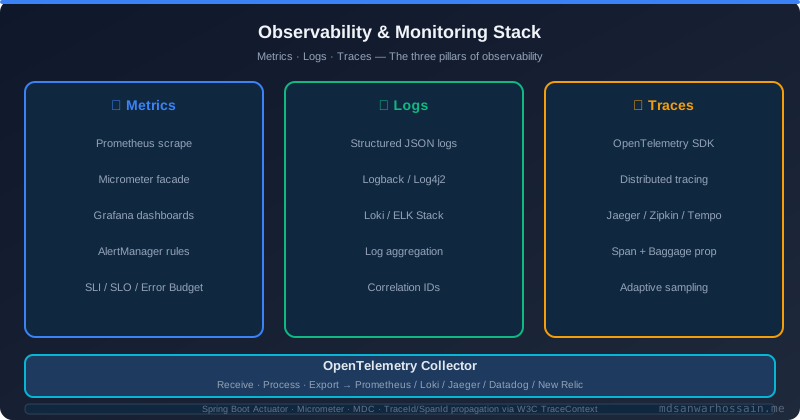
There's a version of "observability" that most engineering teams have: a Grafana dashboard full of metrics that nobody looks at unless something is on fire, log lines that contain timestamps and HTTP status codes but nothing else useful, and a distributed tracing system that was set up once and never connected to the actual debugging workflow. This version of observability looks like observability but doesn't function like it. Real observability — the kind that reduces mean time to resolution, enables proactive incident prevention, and builds genuine confidence in deployments — requires a different level of intentionality. This guide covers how to build it.
Table of Contents
- The Three Pillars: Logs, Metrics, Traces
- Why Monitoring Is Not the Same as Observability
- Setting Up OpenTelemetry in Java Spring Boot
- Prometheus + Grafana for Metrics
- Loki for Log Aggregation
- Jaeger and Grafana Tempo for Distributed Tracing
- RED Method and USE Method for Alerts
- Creating Actionable Dashboards
- Alert Fatigue — Designing Runbook-Driven Alerts
- SLOs, SLIs, and Error Budgets
- Conclusion
The Three Pillars: Logs, Metrics, Traces
Observability is conventionally described in terms of three signals, each answering different questions about your system:
- Logs answer "what happened?" They are discrete events with context: a request was received, a database query executed, an exception was thrown. Logs are high-cardinality and verbose — they tell you the story of individual operations.
- Metrics answer "how is the system behaving?" They are aggregated numerical measurements over time: request rate, error rate, latency percentiles, memory usage. Metrics are efficient to store and query, enabling trend analysis and alerting.
- Traces answer "where did this request go, and how long did each step take?" A distributed trace follows a request across service boundaries, timing each operation and showing the causal chain of calls. Traces are indispensable for diagnosing performance problems in distributed systems.
These three signals are most powerful when correlated: a latency spike in a metric links to a trace showing which service is slow, which links to logs showing why. In 2026, OpenTelemetry is the standard for connecting all three signals.
Why Monitoring Is Not the Same as Observability
Monitoring tells you when something is wrong. Observability tells you why. Monitoring is checking known failure modes against known thresholds — CPU over 90%, error rate above 1%, service down. These checks are valuable but fundamentally reactive: they only fire for failures you anticipated and instrumented.
Observability enables you to ask arbitrary questions about your system's behaviour — questions you didn't know you'd need to ask when you instrumented it. This requires rich, queryable telemetry data: structured logs you can filter and aggregate, high-cardinality metrics with meaningful labels, and distributed traces that reflect actual request paths. The distinction matters most during novel incidents: monitoring tells you the house is on fire; observability helps you find the electrical fault.
"Good observability means being able to answer questions about your system that you hadn't thought to ask when you built it." — Charity Majors, Honeycomb
Setting Up OpenTelemetry in Java Spring Boot
OpenTelemetry is the CNCF standard for telemetry instrumentation, providing a vendor-neutral API for traces, metrics, and logs. Spring Boot 3.x has first-class OpenTelemetry support via Micrometer:
<!-- Maven dependencies -->
<dependency>
    <groupId>io.micrometer</groupId>
    <artifactId>micrometer-tracing-bridge-otel</artifactId>
</dependency>
<dependency>
    <groupId>io.opentelemetry</groupId>
    <artifactId>opentelemetry-exporter-otlp</artifactId>
</dependency>
<dependency>
    <groupId>io.micrometer</groupId>
    <artifactId>micrometer-registry-otlp</artifactId>
</dependency>
# application.yml
management:
otlp:
metrics:
export:
url: http://otel-collector:4318/v1/metrics
step: 30s
tracing:
sampling:
probability: 0.1 # 10% in production; 1.0 for staging
opentelemetry:
resource-attributes:
service.name: "order-service"
service.version: "${APP_VERSION:unknown}"
deployment.environment: "${SPRING_PROFILES_ACTIVE:production}"
logging:
pattern:
console: "%d{yyyy-MM-dd HH:mm:ss} [%X{traceId}/%X{spanId}] %-5level %logger{36} - %msg%n"With this configuration, every HTTP request automatically generates a trace, every log line contains the trace and span IDs for correlation, and metrics export to your OTLP-compatible backend. The service.name and deployment.environment resource attributes are critical — they allow you to filter telemetry in Grafana by service and environment.
Adding Custom Spans
@Service
@RequiredArgsConstructor
public class PaymentService {
    private final Tracer tracer;

    public PaymentResult processPayment(PaymentRequest request) {
        Span span = tracer.nextSpan().name("processPayment").start();
        try (Tracer.SpanInScope ws = tracer.withSpan(span)) {
            span.tag("payment.method", request.method().name());
            span.tag("payment.amount", request.amount().toString());

            PaymentResult result = chargeCard(request);
            span.tag("payment.result", result.status().name());
            return result;
        } catch (Exception ex) {
            span.error(ex);
            throw ex;
        } finally {
            span.end();
        }
    }
}
Prometheus + Grafana for Metrics
Prometheus scrapes metrics from your Spring Boot Actuator endpoint (/actuator/prometheus) at configurable intervals. Spring Boot auto-configures Micrometer to export JVM, HTTP, and Spring-specific metrics in Prometheus format:
# prometheus.yml scrape config
scrape_configs:
  - job_name: 'spring-boot-services'
    metrics_path: '/actuator/prometheus'
    scrape_interval: 15s
    kubernetes_sd_configs:
      - role: pod
    relabel_configs:
      - source_labels: [__meta_kubernetes_pod_annotation_prometheus_io_scrape]
        action: keep
        regex: 'true'
Key metrics to track for every Spring Boot service:
http_server_requests_seconds— request rate, error rate, and latency by path and status codejvm_memory_used_bytes— heap and non-heap memory by area (eden, survivor, old gen)jvm_gc_pause_seconds— GC pause duration and frequencyhikaricp_connections_*— connection pool utilization, pending acquisitions, timeoutskafka_consumer_lag_sum— consumer group lag per topic partition
Useful PromQL Queries
# P99 latency by service
histogram_quantile(0.99,
  sum(rate(http_server_requests_seconds_bucket{job="order-service"}[5m]))
  by (le, uri))

# Error rate as percentage
sum(rate(http_server_requests_seconds_count{status=~"5.."}[5m]))
  / sum(rate(http_server_requests_seconds_count[5m])) * 100

# HikariCP pool saturation
hikaricp_connections_pending / hikaricp_connections_max * 100
Loki for Log Aggregation
Grafana Loki stores logs indexed only by labels (service name, environment, pod name), making it far more cost-efficient than Elasticsearch for log storage while integrating natively with Grafana. Use Promtail or the OpenTelemetry Collector to ship logs from your pods to Loki:
# LogQL query examples

# Find all errors in order-service in the last hour
{service="order-service", level="ERROR"} | json

# Find slow requests (> 2 seconds) with trace correlation
{service="order-service"} | json
  | duration > 2s
  | line_format "{{.traceId}} {{.uri}} {{.duration}}"

# Count error rate per minute
sum(count_over_time({service="order-service", level="ERROR"}[1m]))
  by (service)
Ensure all your application logs are structured JSON. Loki's | json parser can then extract any field for filtering and alerting. A well-structured log event looks like:
{
  "timestamp": "2026-03-15T14:23:11.432Z",
  "level": "ERROR",
  "service": "order-service",
  "traceId": "4bf92f3577b34da6a3ce929d0e0e4736",
  "spanId": "00f067aa0ba902b7",
  "userId": "user-12345",
  "orderId": "ord-67890",
  "message": "Payment processing failed",
  "error": "InsufficientFundsException",
  "duration_ms": 342
}
Jaeger and Grafana Tempo for Distributed Tracing
Grafana Tempo is the preferred distributed tracing backend in 2026 when you're already using the Grafana stack. It's object-storage-backed (cheap to run), integrates with Grafana's exemplar feature for metric-to-trace correlation, and accepts OTLP directly.
Jaeger remains excellent for teams that want a self-hosted, purpose-built tracing UI. Both accept spans via OTLP and provide flame graph views of trace spans. Configure your OTel Collector to export traces to your chosen backend:
# otel-collector config
exporters:
  otlp/tempo:
    endpoint: http://tempo:4317
    tls:
      insecure: true

service:
  pipelines:
    traces:
      receivers: [otlp]
      processors: [batch, memory_limiter]
      exporters: [otlp/tempo]
RED Method and USE Method for Alerts
Not all metrics need alerts. Two frameworks help identify the metrics that matter most:
RED Method (for services): Alert on Rate (requests per second), Errors (failed requests per second), and Duration (latency percentiles). These three signals cover the user-facing health of any HTTP service.
USE Method (for resources): Alert on Utilization (percentage of resource in use), Saturation (queue depth or wait time), and Errors (error rate for that resource). Apply this to CPU, memory, disk, network, and thread pools.
# Example Grafana alert: P99 latency SLO breach
# Alert when 99th percentile latency exceeds 500ms for 5 minutes
- alert: HighP99Latency
  expr: |
    histogram_quantile(0.99,
      sum(rate(http_server_requests_seconds_bucket{job="order-service"}[5m]))
      by (le)
    ) > 0.5
  for: 5m
  labels:
    severity: warning
    service: order-service
  annotations:
    summary: "P99 latency above 500ms for order-service"
    runbook: "https://runbooks.internal/order-service/high-latency"
Creating Actionable Dashboards
Most Grafana dashboards are built to look impressive during demos and ignored during incidents. Actionable dashboards are different — they are designed for a specific audience (on-call engineer) with a specific purpose (incident diagnosis).
- Start with the service RED metrics at the top: Rate, error rate, and P99 latency on a single row. This tells you immediately if something is wrong.
- Add dependency health below: Database connection pool, Kafka consumer lag, external API error rates. This identifies whether the problem is internal or external.
- Use variable selectors for service and environment: One dashboard per service type, parameterized by instance, not one dashboard per service instance.
- Link to runbooks from every alert panel: Every panel that can trigger an alert should include a direct link to the corresponding runbook.
- Avoid decoration: Every panel on the dashboard should answer a specific question. Remove anything that doesn't drive a decision.
Alert Fatigue — Designing Runbook-Driven Alerts
Alert fatigue is the condition where on-call engineers receive so many alerts — most of them low-signal — that they begin ignoring them. The consequences are serious: real incidents are missed, engineer burnout increases, and trust in the alerting system collapses. Prevention requires strict alert discipline:
- Every alert must be actionable: If an on-call engineer can't take a specific action in response to an alert, it should be a notification or a dashboard warning, not a paging alert.
- Every alert must have a runbook: The runbook should include: what the alert means, what to check first, what actions to take, and what escalation looks like.
- Alert on symptoms, not causes: Alert on "user-visible error rate above 1%", not "CPU above 80%." CPU spikes may not affect users; user errors always do.
- Tune thresholds post-incident: After every incident, ask: which alerts fired that shouldn't have? Which didn't fire that should have? Update thresholds accordingly.
- Dead-man's switch alerts: Add alerts for the absence of expected signals — "no successful health check in 5 minutes" catches blackout failures that other alerts miss.
SLOs, SLIs, and Error Budgets
Service Level Objectives (SLOs) are the contractual foundation of reliability engineering. They define the reliability standard your service commits to, and the error budget that determines how much unreliability you can afford before reliability work takes priority over feature work.
# Example SLO definition for order service
SLO: Order API availability
SLI: Percentage of successful requests (non-5xx responses) to /api/v1/orders/**
Target: 99.9% availability over a rolling 30-day window
Error budget: 43.2 minutes of downtime per 30 days

# PromQL to calculate SLI
sum(rate(http_server_requests_seconds_count{
  job="order-service",
  uri=~"/api/v1/orders.*",
  status!~"5.."
}[30d]))
/
sum(rate(http_server_requests_seconds_count{
  job="order-service",
  uri=~"/api/v1/orders.*"
}[30d]))
Error budgets create a shared language between engineering and product: when the error budget is healthy, teams can ship features aggressively. When the budget is nearly exhausted, reliability investment takes priority. This removes the subjective "are we reliable enough to ship?" debate and replaces it with a data-driven process.
Key Takeaways
- Observability answers "why is this broken?" — monitoring only answers "is this broken?" Build for the former.
- OpenTelemetry is the standard for vendor-neutral instrumentation; adopt it now to avoid lock-in.
- Structured JSON logging with trace and span ID correlation is the foundation of correlated observability.
- Use the RED method for services and USE method for resources to identify which metrics actually need alerts.
- Every alert must be actionable with a runbook; untriaged or informational alerts should be warnings, not pages.
- SLOs and error budgets provide a data-driven framework for balancing reliability and feature velocity.
- Grafana Tempo + Loki + Prometheus is the most cost-effective self-hosted observability stack in 2026 for teams already using Kubernetes.
Conclusion
Observability is not a tooling problem — it's a discipline problem. The Prometheus, Grafana, Loki, and Tempo stack is excellent, but excellent tools used without intentional design produce noise, not insight. The teams that get observability right are those who treat it as a first-class engineering concern: structuring logs for queryability, defining SLOs before incidents rather than after, designing dashboards for on-call use, and treating alert fatigue as a critical reliability signal. Invest in observability the way you invest in tests — incrementally, deliberately, and continuously. Your future self at 3 AM will thank you.
Leave a Comment
Related Posts

Software Engineer · Java · Spring Boot · Microservices