Microservices Observability: OpenTelemetry Patterns for Faster Incident Response
In microservices, failures rarely happen in one place. Observability connects the dots across services so engineers can find causes quickly instead of guessing under pressure.
TL;DR
"Microservices observability guide with OpenTelemetry, RED metrics, alerting strategy, and incident response patterns for distributed systems."
As teams move from monoliths to microservices, one thing becomes obvious very quickly: incident debugging gets harder. A request may pass through an API gateway, identity service, order service, payment provider, and event consumer before a user sees success or failure. If observability is weak, debugging turns into log hunting across disconnected systems. Recovery slows, customer trust drops, and engineering teams burn out. The solution is to design observability as a core product capability, not a monitoring afterthought.
1) Define observability goals in business terms
Start with outcomes, not tools. Ask: what incidents hurt users most, and how fast must we detect and recover? Turn those answers into measurable targets such as mean time to detect (MTTD), mean time to resolve (MTTR), and error budget adherence. If you optimize only for dashboard count, you may collect enormous telemetry without improving incident response.
For each user-critical journey, define key signals and owners. A checkout flow might require near-real-time anomaly detection, while a nightly batch sync can tolerate longer alert windows.
2) Adopt OpenTelemetry as a common instrumentation standard
OpenTelemetry reduces fragmentation by standardizing traces, metrics, and logs across languages and frameworks. Standardize service naming, span names, status codes, and high-value attributes such as tenant, region, and operation type. Without naming standards, your telemetry becomes noisy and hard to query. With standards, incident responders can quickly pivot from a failing endpoint to dependency traces and related metrics.
Keep attribute cardinality under control. High-cardinality labels can create storage spikes and slow queries. Capture business context thoughtfully, not indiscriminately.
3) Use the RED method as baseline metrics
For every service, track RED metrics: request rate, error rate, and duration. These three signals provide a strong first layer for detecting user-impacting incidents. Then add service-specific indicators where needed: queue lag for async processors, cache hit ratio for read-heavy APIs, and retry rates for dependency resilience health.
Visualize metrics by endpoint and dependency, not only at service aggregate level. Aggregated charts can hide isolated but critical failures.
4) Build trace sampling strategy around incident value
Full-fidelity tracing in high-traffic systems can be expensive. Use adaptive sampling: keep all error traces, retain slow traces above threshold, and sample healthy traffic at lower rates. This gives responders high-value traces when they matter most while controlling telemetry cost. Always verify that sampling policies do not remove critical paths needed during incidents.
When sampling aggressively, add high-quality span events for important state transitions to preserve context in retained traces.
5) Correlate logs, traces, and metrics with consistent IDs
The fastest incident investigations happen when one signal leads directly to others. Include trace ID and request ID in logs, attach operation and dependency labels to metrics, and expose links from dashboards to trace views. If an alert fires on elevated error rate, the on-call engineer should jump directly into representative failing traces and related logs in seconds.
Correlation is often where teams fail. They have telemetry in three systems, but no connective tissue. Build this integration early.
6) Turn alerts into action, not noise
Alert fatigue is one of the biggest hidden costs in DevOps. Define alert severity based on user impact and urgency. Page only when immediate action is required; route informational signals to asynchronous channels. Every paging alert should have an owner, runbook link, and clear threshold rationale. If alerts are noisy, responders will ignore them—exactly when you need trust most.
Run monthly alert reviews. Remove stale alerts, adjust thresholds, and validate escalation policies against recent incidents.
7) Design runbooks for first 15 minutes of incident response
Most teams have dashboards, but few have high-quality runbooks. A runbook should answer: what happened, where to look first, how to mitigate quickly, when to escalate, and how to validate recovery. Keep it short, practical, and linked directly from alert payloads. During incidents, nobody wants a 30-page wiki article.
Runbooks should include rollback criteria, feature flag toggles, and dependency health checks. These steps reduce decision fatigue under pressure.
8) Monitor dependencies as first-class reliability risks
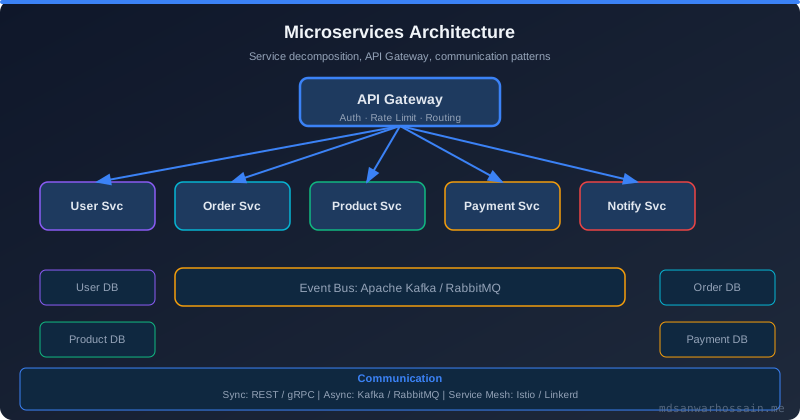
External APIs, databases, caches, and message brokers are common incident sources. Instrument outbound calls with dependency-specific latency and failure labels. Track timeout rates separately from application errors. If a payment provider degrades, your observability stack should show that immediately and help you isolate blast radius.
Use separate SLOs for critical dependencies and include them in capacity and resilience reviews.
9) Include deployment metadata in telemetry
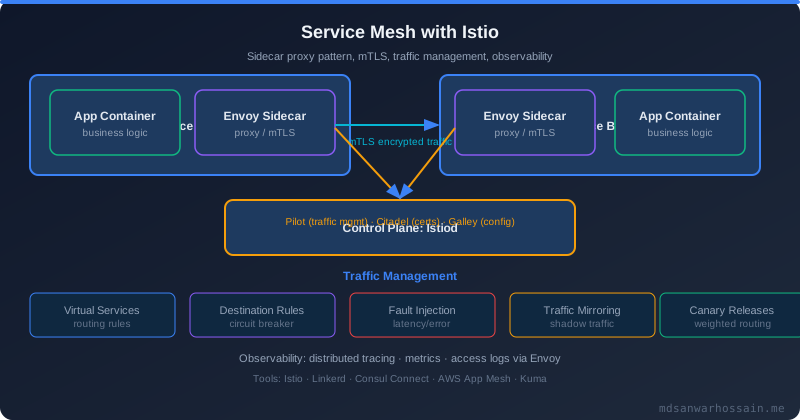
A significant portion of incidents are change-related. Tag telemetry with version, commit SHA, deployment environment, and feature flag state. This allows rapid correlation between errors and recent rollouts. During canary deployments, compare key metrics across baseline and canary cohorts to detect regressions early.
Without deployment metadata, teams waste time debating “what changed” instead of proving it with data.
10) Practice incident response with game days
You cannot validate observability only in calm conditions. Run regular game days that simulate common failure modes: downstream timeouts, queue backlog, regional network issues, and cache outages. Measure detection speed, triage accuracy, and mitigation execution. Use findings to improve instrumentation, alert thresholds, and runbook clarity.
Game days turn theoretical readiness into operational muscle memory.
11) Keep costs visible and optimize telemetry value
Observability cost can grow rapidly as traffic and teams scale. Set telemetry budgets and monitor ingestion trends per service. Drop low-value logs, reduce redundant metrics, and tune trace sampling where safe. Cost optimization should never remove the signals needed for high-severity incidents. Focus on value density: maximize signal quality per unit cost.
12) Build a culture where observability is shared responsibility
Observability is not only an SRE concern. Application teams must own service-level telemetry quality, meaningful alerts, and runbook updates. Platform teams should provide consistent tooling and guardrails. Product leadership should support incident learning cycles rather than blame-driven reactions. The healthiest organizations treat incidents as data for system improvement.
13) Bring agentic AI into incident response with guardrails
Agentic AI copilots can summarize alerts, surface probable root causes from trace outliers, and draft customer-facing status updates. Use them to reduce cognitive load during high-pressure moments, but limit automation to read-only observability queries unless a human explicitly approves a mitigation. Provide the agent with structured runbooks and SLO targets so its recommendations align with business priorities. Archive AI-generated insights with the incident timeline to accelerate post-incident reviews.
For advanced teams, integrate AI-driven anomaly detection that looks across traces, logs, and metrics simultaneously. Keep precision high by focusing on user-facing KPIs and validating signals against historical incidents. When the AI suggests rollback or feature-flag toggles, require confirmation from the on-call engineer to prevent overcorrecting on false positives.
When observability is designed intentionally, microservices stop feeling opaque and chaotic. Teams can detect issues faster, diagnose causes with confidence, and recover before users lose trust. The patterns above are practical and cumulative: adopt standards, correlate signals, reduce noise, and practice response. Over time, you will see a measurable drop in MTTR and a major increase in engineering confidence during high-pressure incidents.
Table of Contents
Observability Stack Reference
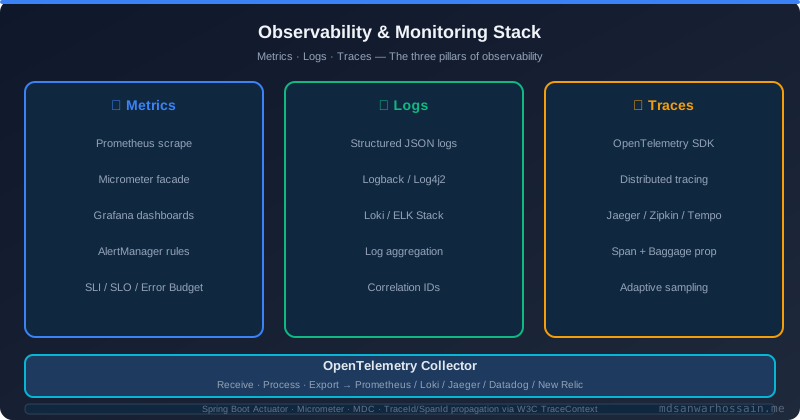
A production-ready microservices observability stack integrates three signal types into a unified platform:
Code: OpenTelemetry Auto-Instrumentation with Spring Boot 3
With the OpenTelemetry Java agent and Spring Boot 3, you get traces, metrics, and log correlation with near-zero code changes:
# Dockerfile: attach OTel Java agent at startup
FROM eclipse-temurin:21-jre
COPY otel-javaagent.jar /app/otel-javaagent.jar
COPY app.jar /app/app.jar
ENV JAVA_TOOL_OPTIONS="-javaagent:/app/otel-javaagent.jar"
ENV OTEL_SERVICE_NAME="order-service"
ENV OTEL_EXPORTER_OTLP_ENDPOINT="http://otel-collector:4318"
ENV OTEL_LOGS_EXPORTER="otlp"
ENTRYPOINT ["java", "-jar", "/app/app.jar"]

# Add correlation IDs to every log line via logback-spring.xml
# MDC fields trace_id and span_id are auto-populated by the OTel agent
<pattern>%d{ISO8601} %-5level [%X{trace_id},%X{span_id}] %logger{36} - %msg%n</pattern>OTEL_TRACES_SAMPLER=parentbased_traceidratio with a value of 0.1 (10%) for high-throughput services. Always sample 100% of error spans by using a custom AlwaysOnSampler for non-2xx responses.
Conclusion
Observability is not a dashboard problem — it is a design problem. Teams that instrument services from day one with OpenTelemetry, propagate correlation IDs across every call, and reduce alert noise to actionable signals resolve incidents in minutes rather than hours. The 13 patterns in this post represent a progressive maturity model: start with the RED method and structured logs, layer in distributed tracing, build runbooks, and gradually introduce AI-assisted incident analysis with strict guardrails.
The investment in observability compounds over time. Every incident you resolve quickly, every regression you catch before it reaches users, and every on-call rotation that stays manageable is a direct result of the observability quality you built into the system from the start.
Distributed Tracing Deep Dive: Trace Context Propagation
Distributed tracing is only as useful as the consistency of its context propagation. A trace that breaks at an async boundary, a message queue hand-off, or a third-party HTTP call is a trace that cannot answer the most important incident question: why did this request take 8 seconds? Understanding the propagation standards and their implementation details is the difference between traces that illuminate and traces that mislead.
W3C TraceContext (RFC 7230 compliant) is the modern standard, defining two HTTP headers: traceparent carries the trace ID, parent span ID, and sampling flags; tracestate carries vendor-specific data in a key-value list. The B3 propagation format (originated at Twitter/Zipkin) remains common in older microservice estates, using X-B3-TraceId, X-B3-SpanId, and X-B3-Sampled headers. OpenTelemetry supports both formats simultaneously via a composite propagator — critical when migrating a fleet where some services use B3 and new services use W3C.
Spring Boot auto-instrumentation with the OpenTelemetry Java agent handles W3C TraceContext, B3, and baggage propagation transparently for all HTTP and gRPC calls. For message queues and asynchronous boundaries, you need explicit instrumentation:
// Propagating trace context through Kafka messages (Spring Kafka + OTel)
@Service
public class OrderEventPublisher {
    private final KafkaTemplate<String, OrderEvent> kafkaTemplate;
    private final OpenTelemetry openTelemetry;

    public void publish(OrderEvent event) {
        ProducerRecord<String, OrderEvent> record =
            new ProducerRecord<>("orders.created", event.getOrderId(), event);

        // Inject current span context into Kafka message headers
        openTelemetry.getPropagators()
            .getTextMapPropagator()
            .inject(Context.current(), record.headers(),
                (headers, key, value) ->
                    headers.add(key, value.getBytes(StandardCharsets.UTF_8)));

        kafkaTemplate.send(record);
    }
}

// Extracting trace context on the consumer side
@KafkaListener(topics = "orders.created")
public void consume(ConsumerRecord<String, OrderEvent> record) {
    // Extract parent context from Kafka headers to continue the trace
    Context extractedContext = openTelemetry.getPropagators()
        .getTextMapPropagator()
        .extract(Context.current(), record.headers(),
            (headers, key) -> {
                Header header = headers.lastHeader(key);
                return header != null
                    ? new String(header.value(), StandardCharsets.UTF_8)
                    : null;
            });

    Span span = openTelemetry.getTracer("order-consumer")
        .spanBuilder("process-order-event")
        .setParent(extractedContext)   // links to the producer's span
        .setSpanKind(SpanKind.CONSUMER)
        .startSpan();

    try (Scope scope = span.makeCurrent()) {
        processOrder(record.value());
    } finally {
        span.end();
    }
}

// Baggage — carry business context across service boundaries
// Useful for propagating tenant ID, experiment ID, or feature flags
Baggage baggage = Baggage.builder()
    .put("tenant.id", tenantId)
    .put("experiment.variant", "B")
    .build();
Context withBaggage = baggage.storeInContext(Context.current());
// All downstream spans and logs will automatically include baggage entries
Key auto-instrumentation configuration for Spring Boot 3 with the OTel Java agent — covers HTTP, JDBC, Redis, Kafka, and gRPC without any manual span creation:
# application.yml — OTel configuration for Spring Boot 3
management:
  tracing:
    sampling:
      probability: 0.1    # sample 10% of traces; override in env-vars per service

# Dockerfile — attach OTel Java agent
FROM eclipse-temurin:21-jre
COPY otel-javaagent.jar /app/otel-javaagent.jar
COPY app.jar /app/app.jar
ENV JAVA_TOOL_OPTIONS="-javaagent:/app/otel-javaagent.jar"
ENV OTEL_SERVICE_NAME="order-service"
ENV OTEL_SERVICE_VERSION="2.1.0"
ENV OTEL_EXPORTER_OTLP_ENDPOINT="http://otel-collector:4317"
ENV OTEL_EXPORTER_OTLP_PROTOCOL="grpc"
ENV OTEL_LOGS_EXPORTER="otlp"
ENV OTEL_METRICS_EXPORTER="otlp"
# Use composite propagator: W3C TraceContext + B3 (for legacy services) + baggage
ENV OTEL_PROPAGATORS="tracecontext,baggage,b3multi"
# Always sample 100% of error traces regardless of base sampling rate
ENV OTEL_TRACES_SAMPLER="parentbased_traceidratio"
ENV OTEL_TRACES_SAMPLER_ARG="0.1"
ENTRYPOINT ["java", "-jar", "/app/app.jar"]
Building a Unified Observability Platform: The Three Pillars
The observability community converged on the Prometheus + Loki + Tempo stack as the open-source standard for unified observability: Prometheus for metrics, Loki for logs, and Tempo for traces — all queryable through a single Grafana interface with native correlation between signal types. This stack runs entirely on Kubernetes with low operational overhead and no per-seat licensing costs.
The key to making this stack feel unified rather than three separate tools is exemplar linking: each Prometheus metric data point carries an embedded trace ID (TraceId exemplar field). In Grafana, clicking on a spike in an error-rate graph instantly opens the specific distributed trace from that time window — jumping from metric anomaly to root cause in two clicks instead of a manual log grep.
# OTel Collector configuration — fan out all three signal types
receivers:
  otlp:
    protocols:
      grpc:
        endpoint: 0.0.0.0:4317
      http:
        endpoint: 0.0.0.0:4318

processors:
  batch:
    send_batch_size: 1000
    timeout: 5s
  resource:
    attributes:
      - action: upsert
        key: cluster.name
        value: "prod-us-east-1"

exporters:
  prometheusremotewrite:
    endpoint: http://prometheus:9090/api/v1/write
    add_metric_suffixes: false
  loki:
    endpoint: http://loki:3100/loki/api/v1/push
  otlp/tempo:
    endpoint: http://tempo:4317
    tls:
      insecure: true

service:
  pipelines:
    metrics:
      receivers: [otlp]
      processors: [batch, resource]
      exporters: [prometheusremotewrite]
    logs:
      receivers: [otlp]
      processors: [batch, resource]
      exporters: [loki]
    traces:
      receivers: [otlp]
      processors: [batch, resource]
      exporters: [otlp/tempo]
Custom Metrics with Micrometer: Application-Level KPIs
Infrastructure metrics (CPU, memory, HTTP error rate) tell you whether the system is running. Application-level KPIs tell you whether the system is delivering value. A payment service with 0% error rate may still be failing its business SLA if 30% of payment attempts are declined due to an upstream fraud score misconfiguration. You need custom Micrometer metrics to surface these business signals.
@Component
public class OrderServiceMetrics {
    // Counter: total events; queryable as rate() in Prometheus
    private final Counter ordersCreated;
    private final Counter ordersRejected;

    // Gauge: current point-in-time value (use carefully — avoid cardinality explosion)
    private final AtomicInteger activeCheckoutSessions = new AtomicInteger(0);

    // Timer: captures latency distribution with configurable percentiles
    private final Timer checkoutDuration;

    // DistributionSummary: for non-time values like cart item count or order value
    private final DistributionSummary orderValueDistribution;

    public OrderServiceMetrics(MeterRegistry registry) {
        ordersCreated = Counter.builder("orders.created.total")
            .tag("channel", "web")
            .description("Total orders successfully created")
            .register(registry);

        ordersRejected = Counter.builder("orders.rejected.total")
            .tag("reason", "unknown")  // override per rejection reason
            .description("Orders rejected before creation")
            .register(registry);

        // Gauge backed by an existing AtomicInteger — zero-overhead measurement
        Gauge.builder("checkout.sessions.active", activeCheckoutSessions,
                      AtomicInteger::get)
             .description("Number of checkout sessions currently in progress")
             .register(registry);

        checkoutDuration = Timer.builder("checkout.duration")
            .publishPercentiles(0.5, 0.90, 0.95, 0.99)
            .publishPercentileHistogram()   // enables Grafana heatmaps
            .sla(Duration.ofMillis(500),    // SLO boundary markers
                 Duration.ofMillis(1000),
                 Duration.ofMillis(3000))
            .description("End-to-end checkout workflow duration")
            .register(registry);

        orderValueDistribution = DistributionSummary
            .builder("order.value.usd")
            .baseUnit("USD")
            .publishPercentiles(0.5, 0.90, 0.99)
            .description("Distribution of order values in USD")
            .register(registry);
    }

    public void recordOrderCreated(Order order) {
        ordersCreated.increment();
        orderValueDistribution.record(order.getTotalValueUsd());
    }

    public void recordOrderRejected(String reason) {
        registry.counter("orders.rejected.total", "reason", reason).increment();
    }

    public void recordCheckoutCompleted(Duration duration) {
        checkoutDuration.record(duration);
    }
}
With these metrics in Prometheus, you can build Grafana panels that answer real business questions: "What percentage of checkouts complete within our 500ms SLO?" (sum(checkout_duration_seconds_bucket{le="0.5"}) / sum(checkout_duration_seconds_count)), "What is the p99 order value over the last hour?" and "How many orders are we rejecting per minute and why?" — questions that pure infrastructure metrics can never answer.
Alerting Strategy: From Noisy Alerts to Actionable Signals
Alert fatigue is the silent killer of observability programs. When on-call engineers receive more than a handful of alerts per shift that require investigation, they begin to ignore them. Every false positive trains the team that alerts are not trustworthy. The goal is not to alert on every deviation from normal — it is to alert only when a human must act within minutes to prevent or limit user impact.
The transition from noisy threshold-based alerts to actionable SLO-based alerts requires adopting the multi-window, multi-burn-rate approach defined in the Google SRE Workbook. This approach alerts on the rate at which you are consuming your error budget — catching both fast burns (sudden outages) and slow burns (sustained degradations that would exhaust the budget before the month ends):
Implementing the fast-burn page alert in Prometheus AlertManager:
# SLO: 99.9% availability (0.1% error budget)
# Burn rate 14.4x = exhausts monthly budget in 2 hours
groups:
  - name: slo.order-service
    rules:
      - alert: OrderServiceFastBurn
        expr: |
          (
            rate(http_requests_total{service="order-service",status=~"5.."}[5m])
            / rate(http_requests_total{service="order-service"}[5m])
          ) > (14.4 * 0.001)  # 14.4x burn rate on 99.9% SLO
          AND
          (
            rate(http_requests_total{service="order-service",status=~"5.."}[1h])
            / rate(http_requests_total{service="order-service"}[1h])
          ) > (14.4 * 0.001)
        for: 2m
        labels:
          severity: critical
          team: platform
        annotations:
          summary: "Order service burning error budget at 14.4x rate"
          description: "At current error rate, monthly error budget exhausted in ~2h"
          runbook_url: "https://wiki.internal/runbooks/order-service-slo"

# Alertmanager routing — page only for critical; ticket for warnings
route:
  receiver: "pagerduty-high"
  routes:
    - match:
        severity: critical
      receiver: pagerduty-high
    - match:
        severity: warning
      receiver: slack-oncall-channel
The discipline behind effective alerting is to treat every false-positive alert as a bug. Hold a brief review after every on-call rotation to identify alerts that fired without requiring action, then either raise the threshold, add a longer for: duration, or delete the alert entirely. A team that regularly prunes its alert set maintains the trust that makes on-call sustainable.
Leave a Comment

Software Engineer · Java · Spring Boot · Microservices