Java Garbage Collection Deep Dive: G1GC, ZGC, and Shenandoah for Low-Latency Production Systems
Garbage collection is the silent killer in Java production systems. CPU spikes, latency tail spikes, and timeout cascades often trace back to stop-the-world GC pauses that most engineers only investigate after something breaks in production. This guide gives you the knowledge to get ahead of GC issues before they become incidents.
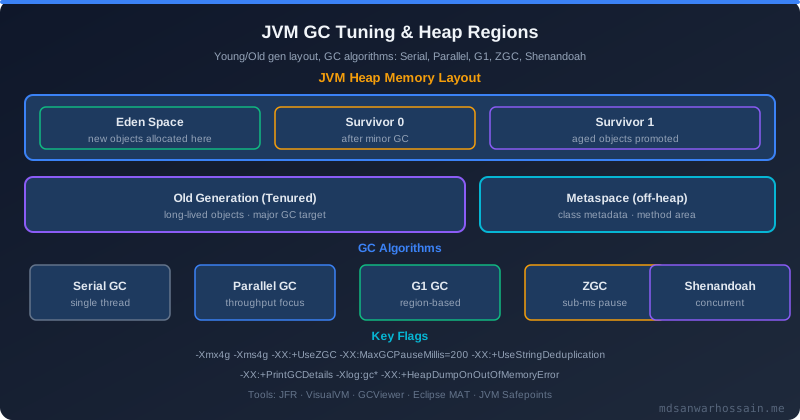
Table of Contents
The Real-World Problem
A fintech payment processing service running on Java 17 with G1GC exhibited a curious latency pattern. During normal operation, P99 latency was a healthy 180ms — well within the 2-second payment SLA. But every 45 minutes, almost clockwise, P99 spiked to 4–8 seconds, causing a wave of timeout errors and payment SLA breaches. The spikes lasted 6–8 seconds and then vanished completely, as if nothing had happened. No service restarts, no deployment events, no external dependency issues.
The diagnosis began with enabling GC logging on the production JVM — something that should have been enabled from day one but was not. The flags added to the JVM startup were:
-Xlog:gc*:file=/var/log/app/gc.log:time,uptime,level,tags:filecount=5,filesize=20m
Within 45 minutes, the first spike occurred and the cause was immediately apparent in the GC log:
[2026-03-18T10:24:30.456+0000][gc] GC(43) Pause Full (G1 Compaction Pause) 22528M->8192M(24576M) 6423.891ms
A single GC event had paused the entire JVM for 6.4 seconds. During this pause, every thread in the application — including all HTTP request handler threads — was frozen. No requests could be processed. Pending requests timed out. The payment SLA was violated for every transaction in-flight at the moment of the pause.
The root cause was classic: G1GC's concurrent marking cycle was not completing fast enough to reclaim old generation space before heap exhaustion forced a stop-the-world Full GC. The 16GB heap was sized too small for the application's live data set (~9GB), leaving insufficient headroom for G1GC's concurrent collection to operate without triggering the Full GC fallback.
The fix was two-pronged: switch from G1GC to ZGC (which does not have a stop-the-world Full GC fallback), and increase heap from 16GB to 24GB. The result after the change: P99 latency was 220ms consistently — slightly higher than the old P50 due to ZGC's load barrier overhead — with zero GC pause events exceeding 2ms over the following 30 days of monitoring. No more Full GC events. No more SLA breaches from GC.
GC Fundamentals: Generational Hypothesis and Memory Regions
Understanding why different GC algorithms make different trade-offs requires understanding the memory model they operate on. Java heap memory is divided into regions based on the generational hypothesis: the observation, validated empirically across decades of Java application profiling, that most objects die young. A user request creates hundreds of small objects (DTOs, request context objects, intermediate string buffers) that become unreachable within milliseconds once the request completes. A much smaller number of objects (caches, connection pools, session stores) survive long-term.
The heap is therefore divided into generations to exploit this asymmetry. The Young Generation consists of Eden (where new objects are allocated) and two Survivor spaces (S0 and S1, used for objects that survive one collection). A Minor GC (also called Young GC) collects only the young generation. Since most young generation objects are already dead by collection time, Minor GC is fast — typically 5–50ms — and runs frequently. Objects that survive a configurable number of Minor GC cycles (default 15 for G1GC) are promoted to the Old Generation (also called Tenured generation). A Major GC or Full GC must collect the old generation, which is larger, has more live objects, and requires more work.
The critical distinction is between concurrent and stop-the-world GC phases. Stop-the-world (STW) phases pause all application threads — completely. No Java code runs during an STW pause. Concurrent phases run GC work in the background, interleaved with application threads, at the cost of some throughput overhead. Modern low-latency collectors (G1GC, ZGC, Shenandoah) minimize STW pause duration by doing as much work as possible concurrently. The fundamental challenge is that heap compaction — physically moving objects to eliminate fragmentation — is difficult to do concurrently because objects are being used while they are being moved.
GC logging is not optional in production systems. The flags above produce rolling log files (5 files × 20MB) with detailed timing information for every GC event. The overhead is negligible (<1% CPU, no application thread impact), and the diagnostic value during an incident is immeasurable. Make it a non-negotiable part of your JVM startup configuration.
G1GC (Garbage First) — The Default Collector
G1GC has been the default Java collector since Java 9. It divides the heap into a configurable number of equal-sized regions (between 1MB and 32MB, auto-sized based on heap). Rather than having fixed young and old generation boundaries, G1GC dynamically assigns regions to young or old generation based on collection needs. This allows it to adaptively resize generation boundaries without requiring heap resizing.
G1GC's defining characteristic is its mixed GC cycle. After a concurrent marking phase identifies old generation regions with the most garbage (hence "Garbage First"), G1GC includes those high-garbage old regions in normal young generation collections. This allows it to collect old generation incrementally without requiring a full heap scan. The goal is to keep GC pause times below a configurable target (default 200ms) by selecting only as many regions as can be collected within that time budget.
Humongous objects — objects larger than 50% of a G1GC region size — skip the young generation entirely and are allocated directly in old generation humongous regions. This means large byte arrays, large strings, or large collections that are created frequently and die quickly bypass the young generation optimization and add pressure to old generation collection. Detecting humongous allocation problems requires the gc+humongous log tag:
-Xlog:gc+humongous:file=/var/log/app/gc-humongous.log:time,uptime
Recommended G1GC JVM flags for a production Spring Boot service:
# G1GC configuration for 16GB heap, targeting <200ms pauses
-XX:+UseG1GC
-Xms16g -Xmx16g
-XX:MaxGCPauseMillis=200
-XX:G1HeapRegionSize=16m
-XX:G1NewSizePercent=20
-XX:G1MaxNewSizePercent=40
-XX:G1MixedGCCountTarget=8
-XX:InitiatingHeapOccupancyPercent=45
-XX:G1HeapWastePercent=5
-XX:ConcGCThreads=4
-Xlog:gc*:file=/var/log/app/gc.log:time,uptime,level,tags:filecount=5,filesize=20m
Parameter explanations: MaxGCPauseMillis=200 is a soft target — G1GC uses it to determine how many regions to include in each mixed GC, but it cannot guarantee this target under all conditions. G1HeapRegionSize=16m sets region size to 16MB; objects >8MB become humongous. G1NewSizePercent=20 and G1MaxNewSizePercent=40 bound the young generation between 20% and 40% of heap. InitiatingHeapOccupancyPercent=45 starts concurrent marking when old generation occupancy exceeds 45% of heap — decreasing this value starts concurrent marking earlier, giving G1GC more time to complete before heap exhaustion forces a Full GC.
G1GC's Achilles heel is its Full GC fallback. When G1GC cannot keep up with allocation rate — either because concurrent marking cannot complete before old generation fills, or because mixed GC cannot reclaim space fast enough — it falls back to a single-threaded stop-the-world Full GC. This is the scenario described in the opening section: a 6.4-second pause on a 24GB heap. G1GC is an excellent collector for heaps up to 32GB with balanced latency/throughput requirements, but it is the wrong choice for latency-critical services with large heaps or high allocation rates.
ZGC — Sub-Millisecond Pauses at Any Heap Size
ZGC was designed with a single primary goal: keep GC pause times below 1 millisecond regardless of heap size, even on terabyte-scale heaps. This is not just a marketing claim — ZGC has been measured maintaining <1ms pauses on 2TB heaps in production workloads. Achieving this requires a fundamentally different architecture from G1GC.
ZGC's key innovation is concurrent relocation using colored pointers. In traditional collectors, compacting the heap (moving objects to eliminate fragmentation) requires stopping all application threads because moving an object invalidates any pointer to it. ZGC solves this by encoding metadata directly into object references (using spare bits in the 64-bit pointer), and intercepting every pointer dereference via load barriers — compiler-injected code that runs whenever an object reference is read. When a load barrier detects a reference pointing to a relocated object, it atomically updates the reference to the new location and continues. This means compaction can happen concurrently with application execution — threads transparently see the relocated objects through the load barrier remapping.
Java 21 introduced Generational ZGC, which separates young and old generations within ZGC's concurrent framework. This significantly improves throughput (10–40% in benchmarks) by focusing more frequent collections on the young generation where most garbage resides, reducing the amount of write barrier overhead needed for old generation tracking.
# Java 21 with Generational ZGC — recommended for latency-critical services
-XX:+UseZGC
-XX:+ZGenerational
-Xms8g -Xmx24g
-XX:ConcGCThreads=4
-XX:SoftMaxHeapSize=20g
-Xlog:gc*:file=/var/log/app/zgc.log:time,uptime,level,tags:filecount=5,filesize=20m
Note the asymmetric min/max heap sizing (-Xms8g -Xmx24g). Unlike G1GC where matching min and max heap sizes prevents heap resizing overhead, ZGC benefits from allowing the JVM to right-size the heap dynamically. SoftMaxHeapSize=20g is ZGC-specific: it hints to the collector to try to keep live heap below 20GB, triggering more aggressive GC before reaching the hard maximum of 24GB.
ZGC excels for latency-sensitive services: trading platforms with microsecond SLAs, payment processors with strict sub-second timeouts, real-time analytics with P99 latency SLAs, or any service where GC-induced latency spikes are more costly than slightly lower throughput. The throughput trade-off is real — load barrier overhead costs 5–15% throughput compared to G1GC on identical workloads — but for many production services, the elimination of multi-second GC pauses is well worth the cost.
ZGC does not have a stop-the-world fallback. If it cannot keep up with allocation, it slows allocation to give GC time to complete — a controlled degradation rather than a catastrophic pause. This makes ZGC's failure mode far more predictable and graceful than G1GC's.
Shenandoah GC — Red Hat's Concurrent Compaction
Shenandoah, developed by Red Hat and available in OpenJDK 12+, takes a different architectural approach to concurrent compaction than ZGC. Where ZGC uses colored pointers in object references, Shenandoah uses a Brooks pointer — an extra forwarding pointer prepended to every object header. When an object is relocated, its Brooks pointer is updated to the new location, and all subsequent accesses through the old reference transparently follow the forwarding pointer. Read and write barriers in Shenandoah check the Brooks pointer on every heap access.
This approach has different trade-offs. The extra word per object increases memory overhead by roughly 1–3% depending on object size distribution. The per-access barrier cost is slightly different from ZGC's load-barrier-only model. In practice, Shenandoah tends to produce pause times in the 1–5ms range — better than G1GC, but slightly less aggressive than ZGC's sub-millisecond target.
# Shenandoah GC configuration
-XX:+UseShenandoahGC
-XX:ShenandoahGCMode=adaptive
-Xms4g -Xmx16g
-XX:ShenandoahUncommitDelay=1000
-XX:ShenandoahGuaranteedGCInterval=10000
-Xlog:gc*:file=/var/log/app/shenandoah.log:time,uptime,level,tags:filecount=5,filesize=20m
ShenandoahGCMode=adaptive (the default) dynamically adjusts GC pacing based on allocation rate. Alternative modes include compact (aggressive compaction, lower throughput) and passive (full STW, for debugging only). ShenandoahUncommitDelay=1000 returns unused heap pages to the OS after 1000ms of inactivity — useful for Kubernetes environments where memory pressure from the cgroup affects other containers on the node.
Shenandoah is particularly well-suited for workloads that G1GC struggles with but that do not need ZGC's extreme latency guarantees. Apache Cassandra nodes, large in-memory caches (Redis alternatives, Hazelcast grids), and batch processing services with intermittent large object allocation patterns often perform better with Shenandoah than either G1GC or ZGC.
The following comparison summarizes the key trade-offs across all modern collectors:
Collector    | Max Pause    | Throughput  | Heap Sweet Spot | Min Java Version
-------------|--------------|-------------|-----------------|------------------
G1GC         | 10ms–500ms   | High        | 4GB–32GB        | Java 9 (default)
ZGC          | <1ms         | Medium-High | 8GB–4TB         | Java 11 (prod: 15, gen: 21)
Shenandoah   | <5ms         | Medium      | 4GB–64GB        | Java 12
Serial GC    | High (STW)   | Highest     | <1GB            | All versions
Parallel GC  | Medium (STW) | Very High   | <4GB            | All versions
Serial and Parallel GC are throughput-optimized collectors that perform fully stop-the-world collections. They are appropriate for batch processing jobs where total execution time matters more than latency, or for very small heap sizes (<4GB) in resource-constrained environments like CLI tools or small microservices.
GC Tuning Checklist
Right-size the heap using the 3× live data rule. Measure your application's live data size after a Full GC (the heap size reported in the GC log after a full collection reflects approximately the live data size). Set maximum heap to 3× live data. Too small a heap means G1GC runs out of headroom and triggers Full GC; too large a heap means GC cycles must scan more memory, and ZGC/Shenandoah's concurrent threads must cover more ground, increasing their overhead.
Enable GC logging always in production. There is no acceptable reason not to. The performance overhead is negligible and the diagnostic value is enormous. Use rolling files to bound disk space consumption.
Use GCEasy.io to analyze GC logs visually. Upload your GC log to GCEasy.io (free tier available) for automatic analysis: pause time distribution, allocation rate trends, promotion rate, heap occupancy at collection triggers, and recommendations. This is far faster than reading thousands of log lines manually.
Check for premature promotion. Objects being promoted to old generation too quickly increase old generation pressure and trigger more frequent Major GC cycles. Premature promotion appears as a rapidly growing old generation even though your application's cache sizes have not changed. Fix by increasing -XX:MaxTenuringThreshold or increasing young generation size (G1NewSizePercent).
Check for humongous allocations with G1GC. Add -Xlog:gc+humongous to your GC logging and inspect the output. Frequent humongous allocations of objects that die quickly (e.g., large response body byte arrays) indicate that G1HeapRegionSize should be increased, or that the code should be refactored to avoid single large allocations (e.g., streaming instead of buffering entire response bodies).
Reading a GC log effectively requires knowing what to look for. Here is an example showing both a normal young collection and a catastrophic Full GC:
[2026-03-18T10:23:45.123+0000][gc] GC(42) Pause Young (Normal) (G1 Evacuation Pause) 8192M->6144M(24576M) 187.234ms
[2026-03-18T10:24:30.456+0000][gc] GC(43) Pause Full (G1 Compaction Pause) 22528M->8192M(24576M) 6423.891ms
Line 1: Normal young GC. Heap reduced from 8GB to 6GB (reclaimed 2GB), total heap capacity is 24GB, pause was 187ms — within the 200ms target. Line 2: Full GC. Heap was at 22.5GB out of 24GB (near exhaustion), reduced to 8GB, pause was 6.4 seconds. The 45-minute interval between Full GC events corresponds exactly to how long it takes to fill 14GB of heap at the application's allocation rate. The fix is to either size the heap larger (so the 3× headroom rule is satisfied) or switch to a collector that does not have a stop-the-world Full GC fallback.
Production Debugging Tools
async-profiler is the essential tool for understanding what your application is allocating. GC logs tell you that allocation is high; async-profiler tells you which code paths are responsible, so you can fix the root cause rather than just tuning the symptom.
# Allocation profiling with async-profiler for 30 seconds
./asprof -d 30 -e alloc -f alloc-flamegraph.html $(jps | grep YourApp | awk '{print $1}')

# CPU profiling to find hotspots contributing to allocation pressure
./asprof -d 30 -e cpu -f cpu-flamegraph.html $(jps | grep YourApp | awk '{print $1}')
The resulting flamegraph SVG shows allocation volume (width of each frame is proportional to bytes allocated) and the call stack responsible. Common findings include JSON serialization libraries allocating large intermediate byte arrays, ORM frameworks building large in-memory result sets, and logging frameworks creating unnecessary string objects even when the log level would suppress the output.
jcmd provides live JVM diagnostics without attaching a full profiler. It is safe to use on production JVMs and adds minimal overhead:
# View current heap statistics
jcmd <pid> GC.heap_info

# View native memory usage breakdown (requires -XX:NativeMemoryTracking=summary)
jcmd <pid> VM.native_memory summary

# Force a GC cycle (use sparingly in production — impacts latency)
jcmd <pid> GC.run

# View class histogram — identify which object types consume most heap
jcmd <pid> GC.class_histogram | head -50
Spring Boot Actuator exposes GC metrics via Micrometer at the /actuator/metrics/jvm.gc.pause endpoint. The metric is tagged by cause (the GC trigger: allocation failure, concurrent mark, etc.) and action (end of major GC, end of minor GC), enabling you to separate young generation collection overhead from old generation collection overhead in your Grafana dashboards. Alert on jvm.gc.pause{action="end of major GC"} exceeding 1 second — major GC pauses of that duration in a production service are a reliability risk regardless of whether they have caused an incident yet.
VisualVM with the GC plugin provides heap dump analysis and live heap monitoring. For offline analysis of heap dumps captured during a production incident, Eclipse MAT (Memory Analyzer Tool) is more powerful — it can identify the largest retained heap trees and find memory leaks that are slowly filling old generation over days or weeks.
When Not to Over-Tune
GC tuning is an area where premature optimization is particularly risky. A thoughtless change to GC flags can introduce severe throughput regression, unexpected pause patterns under load, or out-of-memory errors at traffic spikes that never occurred with the default configuration.
If your application has a heap under 2GB and P99 latency is comfortably within SLA, the default G1GC configuration with default flags is almost certainly fine. The JVM's ergonomic defaults have improved dramatically over the last decade and are well-tuned for common server workloads. Do not add GC flags without a measured problem to solve.
Profile before tuning. Understanding your actual allocation rate, live data size, and object size distribution takes 30 minutes with async-profiler and GCEasy. This profile determines which knobs to turn. Tuning without profiling is guessing, and GC systems are complex enough that guesses frequently make things worse.
When switching GC collectors in production, do not make the switch during high traffic. Test the new collector under realistic load in a staging environment for at least a week, comparing P50/P95/P99 latency, throughput (requests/second), CPU utilization, and GC log patterns. ZGC's lower throughput may satisfy your latency SLA while failing your throughput SLA — you will only discover this under realistic load, not in a 5-minute benchmark. ZGC also behaves very differently from G1GC when the heap is nearly full — understanding its behavior at heap pressure boundaries requires load testing at 80%+ heap occupancy.
Key Takeaways
- Always enable GC logging in production:
-Xlog:gc*:file=gc.log:time,uptime,level,tags:filecount=5,filesize=20mhas negligible overhead and is essential for diagnosing latency incidents that trace back to GC pauses. - Right-size the heap with the 3× live data rule: Live data size is readable from GC logs after a full collection. Heap too small triggers catastrophic Full GC; heap too large extends concurrent GC cycle duration without adding proportional benefit.
- Use ZGC for latency-critical services: Payment processors, trading platforms, and APIs with sub-second P99 SLAs should use ZGC (Java 21 with
-XX:+ZGenerational). It eliminates stop-the-world pauses at the cost of 5–15% throughput reduction. - Use G1GC for balanced workloads: Services with moderate heap sizes (4–32GB) and P99 latency targets >200ms are well-served by G1GC with
InitiatingHeapOccupancyPercenttuned to prevent Full GC triggers. - Profile allocations before tuning: Use async-profiler to identify which code paths drive allocation rate. Fixing a high-allocation hot path often improves GC behavior more than tuning GC flags ever could.
- Test GC changes under realistic load: Never switch GC collectors in production without thorough load testing in staging at realistic traffic patterns and heap occupancy levels. Behavior at heap pressure boundaries is impossible to predict without empirical measurement.
Leave a Comment
Related Posts

Software Engineer · Java · Spring Boot · Microservices