Java JMH Micro-Benchmarking: Measuring Throughput, Latency & Performance Regression Detection in CI/CD 2026
Measuring Java performance correctly is harder than it looks. The JVM's JIT compiler, dead code elimination, and warmup effects can silently invalidate naive benchmarks. This guide takes you from why System.currentTimeMillis() lies to production-grade JMH setups with CI/CD regression detection — the exact toolkit senior Java engineers use in 2026.
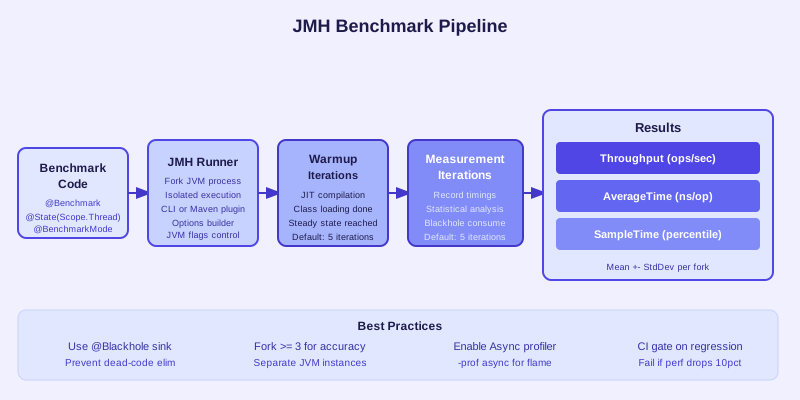
TL;DR — JMH Benchmarking Essentials
"Use JMH (Java Microbenchmark Harness) — never System.currentTimeMillis() for performance measurement. Always warmup (≥5 iterations). Use @Blackhole to prevent dead code elimination. Report in ops/sec (Throughput) or ns/op (AverageTime). Run benchmarks in CI to catch regressions before production."
Table of Contents
- Why Naive Benchmarking Lies: JIT, Warmup & Dead Code
- JMH Setup: Dependencies, Maven & Gradle
- Benchmark Modes: Throughput, AverageTime, SampleTime, SingleShotTime
- @State, @Setup & @TearDown: Managing Benchmark State
- Avoiding Dead Code Elimination with @Blackhole
- Warmup Tuning & Fork Count Best Practices
- Real Benchmarks: HashMap vs ConcurrentHashMap, String vs StringBuilder
- Profilers & Async-Profiler Integration with JMH
- Continuous Benchmarking in CI/CD: Regression Detection
- JMH Pitfalls, Anti-Patterns & Conclusion
1. Why Naive Benchmarking Lies: JIT, Warmup & Dead Code
Java engineers often reach for System.currentTimeMillis() or System.nanoTime() wrapped around a loop to "measure" performance. This approach produces wildly inaccurate results because it ignores three fundamental JVM behaviors that dominate micro-scale execution time.
The JIT Warmup Problem
HotSpot JVM uses tiered compilation with three meaningful tiers:
- Tier 0 — Interpreter: All code starts here. Execution is ~10–50× slower than compiled code but starts immediately.
- Tier 1–3 (C1 compiler): After ~2,000 invocations a method gets a quick compile with limited optimizations. Moderate performance gains.
- Tier 4 (C2 / server compiler): After ~10,000–15,000 invocations the profiler-guided optimizer kicks in, applying aggressive inlining, loop unrolling, escape analysis, and SIMD vectorization. This is where peak performance is reached.
A naive benchmark that runs a method 1,000 times will measure mostly interpreter and C1 performance — not the steady-state throughput you care about in production. The warmup curve is steep: throughput can increase by 5–20× between the first invocation and after full JIT compilation.
On-Stack Replacement (OSR)
OSR is the JVM's mechanism for switching from interpreted to compiled code while a loop is still executing. OSR-compiled code has different performance characteristics than normally compiled code because the JVM must preserve interpreter state at the OSR entry point, preventing some optimizations. Benchmarks that put their entire logic inside one large loop (common in hand-rolled timing code) measure OSR-compiled performance — another source of error.
Dead Code Elimination (DCE)
The C2 compiler performs aggressive dead code elimination. If it proves that a computation's result is never used, it removes the computation entirely. Consider this common mistake:
// WRONG: JIT will eliminate the entire computation
long start = System.nanoTime();
for (int i = 0; i < 1_000_000; i++) {
    int result = compute(i);  // result never used → DCE removes compute()
}
long elapsed = System.nanoTime() - start;
System.out.println("Took: " + elapsed + "ns");
The JIT will prove result has no side effects and eliminate the loop body. Your benchmark reports near-zero nanoseconds — not because your code is fast, but because it was never executed.
Constant Folding
Related to DCE is constant folding: if inputs to a computation are compile-time constants (or JIT-inferred constants), the JVM precomputes the result at compile time. A benchmark computing Math.sqrt(4.0) in a loop may be measuring nothing more than a constant load — the sqrt was hoisted out and replaced with 2.0 at JIT time. JMH's @State and @Blackhole exist specifically to defeat these optimizations safely.
2. JMH Setup: Dependencies, Maven & Gradle
JMH (Java Microbenchmark Harness) is the official OpenJDK benchmarking framework maintained by the JVM engineers themselves. It handles warmup, iteration control, forking, and result statistics so you can focus on writing meaningful benchmarks.
Maven Setup
Add JMH dependencies and the shade plugin to build an executable fat JAR:
<dependencies>
    <dependency>
        <groupId>org.openjdk.jmh</groupId>
        <artifactId>jmh-core</artifactId>
        <version>1.37</version>
    </dependency>
    <dependency>
        <groupId>org.openjdk.jmh</groupId>
        <artifactId>jmh-generator-annprocess</artifactId>
        <version>1.37</version>
        <scope>provided</scope>
    </dependency>
</dependencies>

<build>
    <plugins>
        <plugin>
            <groupId>org.apache.maven.plugins</groupId>
            <artifactId>maven-shade-plugin</artifactId>
            <version>3.5.2</version>
            <executions>
                <execution>
                    <phase>package</phase>
                    <goals><goal>shade</goal></goals>
                    <configuration>
                        <finalName>benchmarks</finalName>
                        <transformers>
                            <transformer implementation=
                              "org.apache.maven.plugins.shade.resource.ManifestResourceTransformer">
                                <mainClass>org.openjdk.jmh.Main</mainClass>
                            </transformer>
                            <transformer implementation=
                              "org.apache.maven.plugins.shade.resource.ServicesResourceTransformer"/>
                        </transformers>
                    </configuration>
                </execution>
            </executions>
        </plugin>
    </plugins>
</build>
Gradle Setup
Use the me.champeau.jmh Gradle plugin (version 0.7.2) for seamless integration:
// build.gradle.kts
plugins {
    id("me.champeau.jmh") version "0.7.2"
    java
}

jmh {
    jmhVersion.set("1.37")
    warmupIterations.set(5)
    iterations.set(10)
    fork.set(2)
    resultsFile.set(project.file("build/reports/jmh/results.json"))
    resultFormat.set("JSON")
}

dependencies {
    jmh("org.openjdk.jmh:jmh-core:1.37")
    jmhAnnotationProcessor("org.openjdk.jmh:jmh-generator-annprocess:1.37")
}
Running Benchmarks
# Maven: package then run
mvn clean package -DskipTests
java -jar target/benchmarks.jar

# Gradle
./gradlew jmh

# Run specific benchmarks matching regex
java -jar target/benchmarks.jar "HashMapBenchmark"

# List all available benchmarks
java -jar target/benchmarks.jar -l
First Benchmark Class Skeleton
package com.example.benchmarks;

import org.openjdk.jmh.annotations.*;
import org.openjdk.jmh.infra.Blackhole;
import java.util.concurrent.TimeUnit;

@BenchmarkMode(Mode.AverageTime)
@OutputTimeUnit(TimeUnit.NANOSECONDS)
@State(Scope.Thread)
@Warmup(iterations = 5, time = 1, timeUnit = TimeUnit.SECONDS)
@Measurement(iterations = 10, time = 1, timeUnit = TimeUnit.SECONDS)
@Fork(value = 2)
public class MyFirstBenchmark {

    private int value;

    @Setup(Level.Trial)
    public void setUp() {
        value = 42;
    }

    @Benchmark
    public int addNumbers() {
        return value + value;
    }

    @Benchmark
    public void addNumbersBlackhole(Blackhole bh) {
        bh.consume(value + value);
    }
}3. Benchmark Modes: Throughput, AverageTime, SampleTime, SingleShotTime
JMH provides four benchmark modes via the @BenchmarkMode annotation. Choosing the wrong mode gives you the right number for the wrong question. Pair @BenchmarkMode with @OutputTimeUnit to control the unit of reported results.
Mode.Throughput — Operations Per Second
@BenchmarkMode(Mode.Throughput)
@OutputTimeUnit(TimeUnit.SECONDS)
@Benchmark
public int measureThroughput() {
    return computeHash(input);
}
Reports ops/s — how many times the benchmark method executes per second. Higher is better. Ideal for: comparing alternative implementations of the same algorithm, measuring the impact of cache optimizations, or validating that a refactoring preserved throughput.
Mode.AverageTime — Average Invocation Time
@BenchmarkMode(Mode.AverageTime)
@OutputTimeUnit(TimeUnit.NANOSECONDS)   // or MICROSECONDS for slower ops
@Benchmark
public String measureAverageLatency() {
    return buildString(input);
}
Reports ns/op or µs/op — the arithmetic mean time per benchmark invocation. Lower is better. Use for understanding individual request latency. Note: AverageTime hides tail latency; a p99 spike won't show up in the mean.
Mode.SampleTime — Percentile Distribution
@BenchmarkMode(Mode.SampleTime)
@OutputTimeUnit(TimeUnit.MICROSECONDS)
@Benchmark
public void measureSampleTime(Blackhole bh) {
    bh.consume(processRequest(request));
}
Samples individual invocation times and reports percentiles (p50, p90, p95, p99, p99.9). Critical for latency-sensitive systems where tail latency (p99) matters more than the mean. Use for: API endpoint response time, lock acquisition latency, GC pause simulation.
Mode.SingleShotTime — Cold Start / First Invocation
@BenchmarkMode(Mode.SingleShotTime)
@OutputTimeUnit(TimeUnit.MILLISECONDS)
@Warmup(iterations = 0)   // NO warmup for cold start measurement
@Fork(value = 10)          // Many forks to get statistical significance
@Benchmark
public void measureColdStart() {
    initializeHeavyComponent();
}
Executes the benchmark exactly once per fork with no warmup. Measures cold start cost: class loading, static initialization, first-time JIT. Use for: Spring context startup time, AWS Lambda cold starts, first-query plan compilation.
Mode Selection Reference
| Mode | Unit | Use When | Example |
|---|---|---|---|
| Throughput | ops/s | Comparing fast algorithms | HashMap vs TreeMap get() |
| AverageTime | ns/op or µs/op | Single-operation latency | String.format() overhead |
| SampleTime | p50/p99 µs | Tail latency matters | DB query, HTTP call simulation |
| SingleShotTime | ms/op | Cold start / init cost | Spring context, Lambda init |
4. @State, @Setup & @TearDown: Managing Benchmark State
Benchmark correctness depends critically on state management. @State tells JMH how to scope and share objects between benchmark invocations and threads. Getting scope wrong produces either misleading results (Scope too broad → lock contention) or incorrect results (Scope too narrow → missing shared-state bugs).
@State Scope Options
- Scope.Thread (default): Each worker thread gets its own State instance. No sharing. Use for thread-local benchmarks like single-threaded algorithms, parser performance, or data structure operations where you don't want contention.
- Scope.Benchmark: One State instance shared across all worker threads running the benchmark. Use to benchmark concurrent access patterns — e.g., ConcurrentHashMap shared across threads. Requires your State fields to be thread-safe or read-only.
- Scope.Group: Shared within a @Group of methods. Useful for producer/consumer benchmarks where one method writes and another reads the same data structure simultaneously.
@Setup and @TearDown Levels
- Level.Trial: Run once per @Fork (JVM instance). Use for expensive one-time setup: loading files, building large data structures, establishing DB connections.
- Level.Iteration: Run before and after each measurement iteration (typically 1 second long). Use for resetting mutable state that accumulates across invocations.
- Level.Invocation: Run before and after every single benchmark method call. Avoid unless necessary — the setup overhead is included in the measurement unless you're very careful, and it usually makes benchmarks unreliable for sub-microsecond operations.
@State(Scope.Thread)
public static class BenchmarkState {

    // Loaded once per JVM fork — expensive resources
    private Map<String, String> largeMap;
    private String[] testKeys;

    @Setup(Level.Trial)
    public void trialSetup() {
        largeMap = new HashMap<>(100_000);
        testKeys = new String[10_000];
        for (int i = 0; i < 100_000; i++) {
            largeMap.put("key-" + i, "value-" + i);
        }
        for (int i = 0; i < 10_000; i++) {
            testKeys[i] = "key-" + ThreadLocalRandom.current().nextInt(100_000);
        }
        System.gc(); // Request GC before measurement starts
    }

    // Resets mutable counters between measurement iterations
    private int iterationCounter;

    @Setup(Level.Iteration)
    public void iterationSetup() {
        iterationCounter = 0;
    }

    @TearDown(Level.Trial)
    public void trialTearDown() {
        largeMap = null; // Allow GC
    }
}

@Benchmark
public String benchmarkMapGet(BenchmarkState state, Blackhole bh) {
    String key = state.testKeys[state.iterationCounter++ % state.testKeys.length];
    return state.largeMap.get(key);
}
Thread Safety with Scope.Benchmark
When using Scope.Benchmark, all JMH worker threads share the same State instance. Fields accessed by benchmark methods must be thread-safe. Using a HashMap as a shared state with Scope.Benchmark and multiple threads will corrupt the map and crash — use ConcurrentHashMap or make fields read-only with Collections.unmodifiableMap().
5. Avoiding Dead Code Elimination with @Blackhole
Dead Code Elimination (DCE) is the most dangerous JMH pitfall. It's silent — your benchmark runs, reports results, and the numbers look plausible. They're just completely wrong because the JIT removed the code you thought you were measuring.
How the JIT Eliminates Dead Code
C2 compiler performs escape analysis and reachability analysis. If the result of a method call never escapes the method (never stored, never returned, never passed to another method), the call is proven to have no observable side effects and is eliminated. Similarly, constant folding replaces expressions with statically knowable inputs with their precomputed values at compile time.
Wrong vs Correct Benchmark Pattern
// ❌ WRONG — JIT will eliminate computeHash() if result is unused
@Benchmark
public void wrongBenchmark() {
    // result computed but never used → DCE eliminates this
    int hash = computeHash(data);
}

// ❌ ALSO WRONG — JIT may constant-fold if data is a static final
@Benchmark
public int alsoWrong() {
    return computeHash(CONSTANT_DATA); // CONSTANT_DATA = "hello" → folded
}

// ✅ CORRECT — return value forces JVM to perform computation
@Benchmark
public int correctWithReturn() {
    return computeHash(data); // returned value → not eliminated
}

// ✅ CORRECT — Blackhole sink consumes result preventing DCE
@Benchmark
public void correctWithBlackhole(Blackhole bh) {
    bh.consume(computeHash(data));
}

// ✅ CORRECT — Multiple results consumed
@Benchmark
public void multipleResults(Blackhole bh) {
    bh.consume(computeHash(data));
    bh.consume(formatString(data));
    bh.consume(parseJson(jsonData));
}
Blackhole.consumeCPU() for Timing Holes
Blackhole.consumeCPU(tokens) burns a predictable amount of CPU time without measurable memory allocation. It's used to simulate a "think time" between operations in producer/consumer benchmarks or to add realistic computational load to otherwise trivial benchmark methods:
@Benchmark
public void simulateWorkWithThinkTime(Blackhole bh) {
    bh.consume(acquireLock());
    Blackhole.consumeCPU(200); // ~200 "token" CPU cycles of simulated work
    releaseLock();
}
Return vs Blackhole: Which to Choose?
Both approaches prevent DCE. Use return when benchmarking a single computation that naturally returns a value — it's simpler and incurs minimal overhead. Use Blackhole when benchmarking multiple computations in one method, or when the method naturally returns void (e.g., writing to a buffer). Blackhole itself has negligible overhead but is designed to prevent both DCE and constant folding of its inputs.
6. Warmup Tuning & Fork Count Best Practices
Warmup iterations let the JIT compiler reach steady-state before measurement begins. Too few warmup iterations → measuring C1-compiled code, not peak C2 performance. Too many → wasted time without improved accuracy. Fork count controls JVM process isolation between benchmarks.
Warmup and Measurement Annotations
@Warmup(
    iterations = 5,          // number of warmup iterations
    time = 1,                // time per warmup iteration
    timeUnit = TimeUnit.SECONDS
)
@Measurement(
    iterations = 10,         // number of measurement iterations
    time = 1,                // time per measurement iteration
    timeUnit = TimeUnit.SECONDS
)
@Fork(
    value = 3,               // number of separate JVM processes (forks)
    jvmArgs = {"-Xms512m", "-Xmx512m", "-XX:+UseG1GC"}
)
@BenchmarkMode(Mode.AverageTime)
@OutputTimeUnit(TimeUnit.NANOSECONDS)
@State(Scope.Thread)
public class WarmupExampleBenchmark {
    @Benchmark
    public long fibonacci() {
        return fib(30);
    }
}
Why Forking Matters
Each @Fork starts a fresh JVM process. This is critical for two reasons:
- JIT pollution isolation: If benchmarks A and B run in the same JVM, benchmark A's JIT profile can influence how B is compiled. Forked runs start with a clean JIT profile slate, giving independent measurements.
- Statistical independence: Multiple forks provide independent samples of JVM startup + warmup + measurement, giving you variance across JVM instances in addition to within-run variance.
Single fork (@Fork(1)) is acceptable for quick development-time checks but should never be used for CI baseline numbers. Use at least 3 forks for production benchmarks.
Recommended Configurations
| Context | Warmup | Measurement | Forks | Total Time |
|---|---|---|---|---|
| Development / Quick | 3 × 1s | 5 × 1s | 1 | ~8s / benchmark |
| CI / Regression | 5 × 1s | 10 × 1s | 2–3 | ~45–75s / benchmark |
| Production Baseline | 10 × 2s | 20 × 2s | 5 | ~5min / benchmark |
7. Real Benchmarks: HashMap vs ConcurrentHashMap, String vs StringBuilder
Let's write and interpret real JMH benchmarks that answer common Java performance questions. Both examples demonstrate complete, correct JMH usage you can run immediately.
HashMap vs ConcurrentHashMap: Read Performance
@BenchmarkMode(Mode.Throughput)
@OutputTimeUnit(TimeUnit.SECONDS)
@State(Scope.Benchmark)
@Warmup(iterations = 5, time = 1, timeUnit = TimeUnit.SECONDS)
@Measurement(iterations = 10, time = 1, timeUnit = TimeUnit.SECONDS)
@Fork(value = 3)
@Threads({1, 4, 8, 16})   // Run at different concurrency levels
public class MapBenchmark {

    private Map<String, Integer> hashMap;
    private ConcurrentHashMap<String, Integer> concurrentMap;
    private String[] keys;

    @Setup(Level.Trial)
    public void setup() {
        hashMap = new HashMap<>(10_000);
        concurrentMap = new ConcurrentHashMap<>(10_000);
        keys = new String[10_000];

        for (int i = 0; i < 10_000; i++) {
            String key = "key-" + i;
            hashMap.put(key, i);
            concurrentMap.put(key, i);
            keys[i] = key;
        }
    }

    @Benchmark
    public Integer hashMapGet(Blackhole bh) {
        // NOT thread-safe for concurrent reads — single-threaded only
        return hashMap.get(keys[ThreadLocalRandom.current().nextInt(keys.length)]);
    }

    @Benchmark
    public Integer concurrentHashMapGet(Blackhole bh) {
        // Thread-safe, non-blocking reads
        return concurrentMap.get(keys[ThreadLocalRandom.current().nextInt(keys.length)]);
    }
}
Benchmark Results (Approximate, JDK 21, M2 Pro)
| Benchmark | Threads | ops/s (approx) | Notes |
|---|---|---|---|
| hashMapGet | 1 | ~420M ops/s | Fastest single-thread |
| concurrentHashMapGet | 1 | ~380M ops/s | ~10% overhead vs HashMap |
| concurrentHashMapGet | 8 | ~2.8B ops/s | Near-linear scaling |
| concurrentHashMapGet | 16 | ~4.9B ops/s | Still scaling at 16 threads |
Takeaway: HashMap is ~10% faster for single-threaded reads, but ConcurrentHashMap's read scalability makes it the clear winner in any multi-threaded scenario. The read performance is non-blocking due to volatile reads on node values.
String Concatenation vs StringBuilder vs StringJoiner
@BenchmarkMode(Mode.AverageTime)
@OutputTimeUnit(TimeUnit.NANOSECONDS)
@State(Scope.Thread)
@Warmup(iterations = 5, time = 1)
@Measurement(iterations = 10, time = 1)
@Fork(2)
public class StringBenchmark {

    @Param({"5", "20", "100"})  // Benchmark with different iteration counts
    private int iterations;

    @Benchmark
    public String stringPlusConcat(Blackhole bh) {
        String result = "";
        for (int i = 0; i < iterations; i++) {
            result += "part-" + i;  // Creates new String each iteration
        }
        return result;
    }

    @Benchmark
    public String stringBuilder(Blackhole bh) {
        StringBuilder sb = new StringBuilder();
        for (int i = 0; i < iterations; i++) {
            sb.append("part-").append(i);
        }
        return sb.toString();
    }

    @Benchmark
    public String stringJoiner(Blackhole bh) {
        StringJoiner sj = new StringJoiner(", ");
        for (int i = 0; i < iterations; i++) {
            sj.add("part-" + i);
        }
        return sj.toString();
    }

    @Benchmark
    public String streamJoin(Blackhole bh) {
        return IntStream.range(0, iterations)
            .mapToObj(i -> "part-" + i)
            .collect(Collectors.joining(", "));
    }
}
At 100 iterations, String + concatenation is ~40–60× slower than StringBuilder due to quadratic string copy behavior. At 5 iterations, the JIT's invokedynamic optimization for string concatenation (since Java 9) nearly closes the gap. Use StringBuilder for loops, Collectors.joining() for streams, and don't obsess over String + for 2–3 concatenations.
8. Profilers & Async-Profiler Integration with JMH
JMH integrates with several profilers via the -prof flag. Profiler output answers why a benchmark performs as it does, not just how fast it is.
-prof gc: GC and Allocation Profiling
# Run benchmark with GC profiler
java -jar benchmarks.jar StringBenchmark -prof gc

# Sample output (allocation rate per operation):
# StringBenchmark.stringPlusConcat:·gc.alloc.rate       237.4 MB/sec
# StringBenchmark.stringPlusConcat:·gc.alloc.rate.norm  24576.0 B/op  ← LARGE
# StringBenchmark.stringBuilder:·gc.alloc.rate.norm      1056.0 B/op   ← SMALL
# StringBenchmark.streamJoin:·gc.alloc.rate.norm         3200.0 B/op
The gc.alloc.rate.norm metric (bytes allocated per operation) is one of the most valuable for identifying GC pressure. High allocation rates trigger frequent young-gen collections, adding jitter to latency measurements.
-prof async: Async-Profiler Flame Graphs
# Download async-profiler 3.x first, then:
java -jar benchmarks.jar HashMapBenchmark \
  -prof "async:libPath=/path/to/libasyncProfiler.so;output=flamegraph;dir=profiles"

# Or with event-based profiling
java -jar benchmarks.jar \
  -prof "async:event=alloc;output=flamegraph;dir=profiles"
Async-profiler uses Linux perf_events (CPU), Java TLAB events (allocation), or lock events to generate flame graphs. Open the generated .html flame graph in a browser. Wide frames indicate hot code paths. Look for unexpected frames from serialization, reflection, or logging inside benchmark loops.
-prof jfr: Java Flight Recorder
# Capture JFR recording during benchmark
java -jar benchmarks.jar MyBenchmark -prof jfr

# JFR file saved to working directory, open in JMC (Java Mission Control)
# or convert to flame graph with JFR to async-profiler converter
-prof stack: Stack Sampling
# Built-in stack sampler — no native library needed
java -jar benchmarks.jar MyBenchmark -prof stack

# Output: sorted stack frame frequencies
# 47.3%  com.example.MyClass.hotMethod()
# 23.1%  java.util.HashMap.get()
# 12.8%  java.lang.String.hashCode()
The built-in -prof stack profiler requires no native libraries and works on all platforms. It's less accurate than async-profiler (uses JVMTI safepoint-based sampling which misses certain frames) but is perfect for initial investigation. Use async-profiler for production-grade flame graphs.
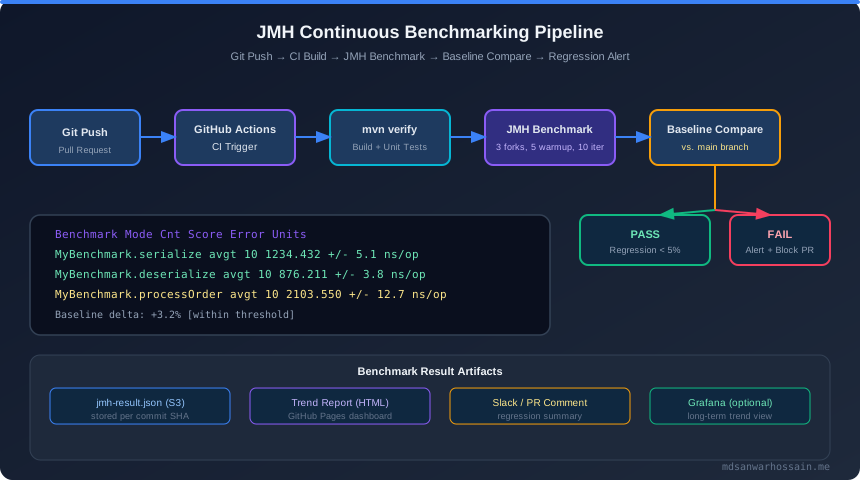
9. Continuous Benchmarking in CI/CD: Regression Detection
Running benchmarks in CI turns performance from a reactive investigation into a proactive quality gate. The pipeline: run JMH → emit JSON results → compare against stored baseline → fail build on >10% regression.
JMH JSON Output
# Output results in JSON format for programmatic processing
java -jar benchmarks.jar \
  -rf json \
  -rff build/reports/jmh/results.json \
  -wi 5 -w 1 -i 10 -r 1 -f 2

# Gradle equivalent in build.gradle.kts
jmh {
    resultsFile.set(project.file("build/reports/jmh/results.json"))
    resultFormat.set("JSON")
    warmupIterations.set(5)
    iterations.set(10)
    fork.set(2)
}
Regression Detection Script
#!/usr/bin/env python3
# check_regression.py — fails with exit code 1 if any benchmark regressed >10%
import json, sys, os

THRESHOLD = 0.10  # 10% regression threshold

def load_results(path):
    with open(path) as f:
        data = json.load(f)
    return {b["benchmark"]: b["primaryMetric"]["score"] for b in data}

baseline_path = os.environ.get("BASELINE_RESULTS", "baseline/results.json")
current_path  = sys.argv[1] if len(sys.argv) > 1 else "build/reports/jmh/results.json"

if not os.path.exists(baseline_path):
    print("No baseline found — saving current results as baseline")
    os.makedirs("baseline", exist_ok=True)
    import shutil; shutil.copy(current_path, baseline_path)
    sys.exit(0)

baseline = load_results(baseline_path)
current  = load_results(current_path)

regressions = []
for name, curr_score in current.items():
    if name not in baseline:
        continue
    base_score = baseline[name]
    # For Throughput: higher is better; for AverageTime: lower is better
    # Detect regression as significant drop in throughput or increase in time
    change = (base_score - curr_score) / base_score
    if change > THRESHOLD:
        regressions.append((name, base_score, curr_score, change * 100))

if regressions:
    print("❌ PERFORMANCE REGRESSIONS DETECTED:")
    for name, base, curr, pct in regressions:
        print(f"  {name}: {base:.0f} → {curr:.0f} ops/s  ({pct:.1f}% regression)")
    sys.exit(1)
else:
    print(f"✅ No regressions detected (threshold: {THRESHOLD*100:.0f}%)")
    sys.exit(0)
GitHub Actions Workflow
# .github/workflows/benchmarks.yml
name: JMH Benchmark Regression Check

on:
  pull_request:
    branches: [ main ]
  schedule:
    - cron: '0 2 * * 1'  # Weekly Monday 2AM for baseline refresh

jobs:
  benchmark:
    runs-on: ubuntu-latest
    steps:
      - uses: actions/checkout@v4
        with:
          fetch-depth: 0

      - name: Set up JDK 21
        uses: actions/setup-java@v4
        with:
          java-version: '21'
          distribution: 'temurin'

      - name: Cache Gradle packages
        uses: actions/cache@v4
        with:
          path: ~/.gradle/caches
          key: gradle-${{ hashFiles('**/*.gradle.kts') }}

      - name: Download baseline results
        uses: actions/download-artifact@v4
        with:
          name: jmh-baseline
          path: baseline/
        continue-on-error: true  # Don't fail if no baseline yet

      - name: Run JMH benchmarks
        run: ./gradlew jmh

      - name: Check for regressions
        run: |
          pip install -q json5
          python3 scripts/check_regression.py build/reports/jmh/results.json

      - name: Upload benchmark results as artifact
        uses: actions/upload-artifact@v4
        with:
          name: jmh-results-${{ github.sha }}
          path: build/reports/jmh/results.json

      - name: Update baseline on main branch push
        if: github.ref == 'refs/heads/main'
        uses: actions/upload-artifact@v4
        with:
          name: jmh-baseline
          path: build/reports/jmh/results.json
CI Infrastructure Considerations
- Use dedicated benchmark runners: Shared CI runners have variable CPU frequency and background noise. Use
runs-on: self-hostedwith a dedicated machine or at minimum ac5.2xlargeEC2 for consistency. - Pin CPU frequency: On Linux runners, use
cpupower frequency-set -g performanceto disable turbo boost variance. - Use relative comparison only: Compare current run against previous run on the same hardware. Absolute numbers vary between machines.
- 10% regression threshold: CI noise on shared runners is typically 5–15%. Use 15–20% threshold on shared runners, 5–8% on dedicated hardware.
10. JMH Pitfalls, Anti-Patterns & Conclusion
Even experienced engineers make these JMH mistakes. This reference table summarizes the most common anti-patterns, their effects on benchmark validity, and the correct approach.
| Mistake | Effect | Correction |
|---|---|---|
| No @Blackhole / no return | DCE eliminates benchmark body, reports 0ns | Always consume result via return or Blackhole |
| Scope.Benchmark + mutable state + multi-thread | Data corruption, NPE, or measures lock contention not the algorithm | Use Scope.Thread for mutable state; use Scope.Benchmark only for read-only or thread-safe structures |
| @Fork(1) for final results | JIT pollution from previous benchmarks skews results | Use @Fork(3) minimum for CI; @Fork(5) for baselines |
| Measuring I/O or network in JMH | Results dominated by OS/network jitter, not code under test | Mock I/O; JMH is for CPU/memory micro-benchmarks only |
| Missing @State (fields in benchmark class) | JMH may null-out fields or constant-fold them; NPE or DCE | Always put benchmark inputs in a @State class |
| Synchronization in benchmark method | Benchmark measures lock contention overhead, not the algorithm | Use Scope.Thread to isolate threads; add contention explicitly with @Group if needed |
| Too-short measurement time (100ms/iter) | High coefficient of variation (CV >5%) — results not reproducible | Use at least 1s per iteration; check CV in JMH output |
| Level.Invocation @Setup for sub-µs benchmarks | Setup overhead dwarfs measurement; results include setup cost | Use Level.Trial or Level.Iteration; reserve Invocation for multi-ms operations |
Reading JMH Output Correctly
# Typical JMH output:
Benchmark                    Mode  Cnt     Score     Error  Units
HashMapBenchmark.get        thrpt   60  419432.3 ± 12341.2  ops/ms
ConcurrentHashMapBenchmark  thrpt   60  381023.7 ±  8923.4  ops/ms

# ± Error = 99.9% confidence interval half-width (not standard deviation)
# Cnt = warmup_iters × forks (60 = 10 iterations × 3 forks × 2 = wait,
#       actually Cnt = measurement_iters × forks = 20 × 3 = 60)
# If Error/Score > 5%, results are noisy — increase iterations or fork count
Conclusion: JMH Is Non-Negotiable for Java Performance Work
JMH is not optional for Java performance measurement — it's the only correct tool for micro-benchmarking on the JVM. Any alternative (System.nanoTime loops, JUnit-based timing, hand-written benchmarks) will produce unreliable results due to JIT warmup, dead code elimination, OSR effects, and measurement timing errors that JMH specifically addresses.
The professional workflow in 2026: write JMH benchmarks alongside unit tests, run them in CI with JSON output, compare against stored baselines, and gate PRs on regression thresholds. This transforms performance from "we think it's still fast" to a measured, version-controlled, automatically enforced quality attribute — the same way correctness is enforced by unit tests.
- ✅ Use
@BenchmarkMode(Mode.Throughput)for throughput comparisons,Mode.AverageTimefor latency,Mode.SampleTimefor tail-latency analysis - ✅ Always use
@Blackholeor return results to prevent DCE - ✅ Always warmup (≥5 iterations at 1s each) and fork (≥2, ideally 3–5)
- ✅ Store benchmark state in
@Stateobjects, not in the benchmark class itself - ✅ Add
-prof gcto identify allocation-heavy benchmarks and guide GC tuning - ✅ Run in CI with JSON output and a regression check script gating every PR
Leave a Comment