Java Flight Recorder (JFR) in Production: Zero-Overhead Profiling, Custom Events & Incident Investigation
Production Java services carry mysteries that local profilers cannot solve. The latency spike that only surfaces at 2,000 requests per second, the memory surge that arrives on a cron schedule, the GC pause that ruins your SLA for exactly 30 seconds every hour — these are problems you cannot reproduce in a laptop environment. Java Flight Recorder (JFR) is the JVM's built-in, always-on diagnostic engine that captures these events with sub-2% overhead, stores them in a ring buffer, and lets you replay the exact moment things broke. This guide covers everything from enabling JFR in production Spring Boot services to writing custom events that expose your own application-layer telemetry.
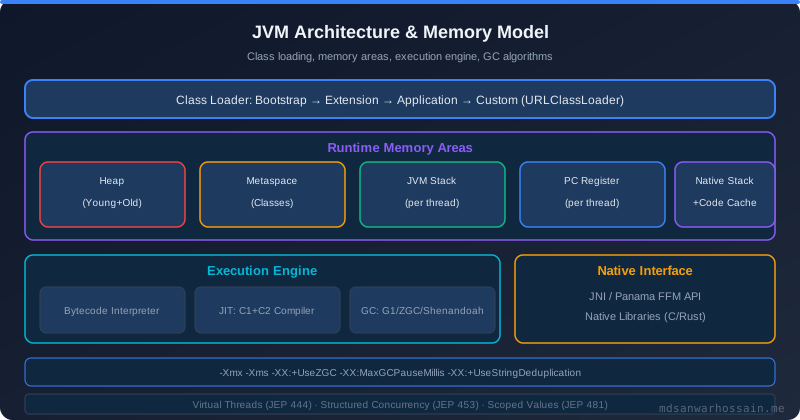
Table of Contents
1. The Problem: Profiling in Production is Hard
Imagine a Spring Boot order-management service running at 2,000 requests per second. For 23 hours and 30 minutes of every day it performs flawlessly — P99 latency sits at a comfortable 50 milliseconds. But every hour, exactly 30 seconds after the clock ticks over, P99 rockets to 800 milliseconds. Alert pages fire. SREs scramble. Then, just as suddenly, the service recovers. The entire degradation window is 30 seconds long.
You open your APM dashboard. It confirms the symptom perfectly: latency spiked, throughput dipped, error rate climbed. But why? The APM traces show slow requests — they show the effect, not the cause. Your Kubernetes metrics show CPU and memory behaving normally. The application logs show no errors. You try to reproduce it locally by hammering the service with k6, but the spike never appears at lower concurrency on a developer machine with a different heap size and GC configuration.
This is precisely the problem Java Flight Recorder was designed to solve. JFR is embedded in the HotSpot JVM itself — not an agent bolted on the outside — and it captures hundreds of low-level JVM events (GC phases, class loading, thread park/unpark, socket I/O, memory allocation) with overhead so low that Oracle runs it permanently on their own production systems. The recording is stored in a circular buffer; when the incident occurs you dump the last N minutes and analyze them offline.
2. What is Java Flight Recorder?
Java Flight Recorder originated in BEA's JRockit JVM, was acquired by Oracle, and shipped as a commercial feature in Oracle JDK 7 and 8. With JDK 11 (JEP 328), JFR was open-sourced as part of OpenJDK and made available at no cost to all JDK 11+ users. If you are running any modern JDK — AdoptOpenJDK, Amazon Corretto, Eclipse Temurin, or Oracle's own builds — JFR is already compiled in and ready to use.
The architecture has three core components. First, the event subsystem — a set of JVM-internal probes that emit typed, structured events at defined points: GC phase starts, safepoints, thread sleeps, file reads, socket connects, TLAB allocation failures, and hundreds more. Each event carries a timestamp (nanosecond precision), thread ID, stacktrace (configurable depth), and typed payload fields. Second, the ring buffer — a fixed-size off-heap memory region where events are written with a lock-free algorithm. When the buffer fills, the oldest events are overwritten. In continuous recording mode this means you always have the last N minutes available. Third, the chunk writer — a background thread that flushes buffer contents to disk periodically or on demand, producing a binary .jfr file.
JFR supports two primary recording modes. Timed recording captures events for a fixed duration and then stops — ideal for targeted performance investigations. Continuous recording runs indefinitely, dumping the buffer to disk on demand or automatically when a threshold is crossed (e.g., GC pause > 500ms). The overhead difference between the two modes is negligible in practice; what changes overhead is the event configuration — specifically, the method sampling rate and allocation profiling threshold.
Compared to async-profiler, JFR has a complementary rather than competing role. Async-profiler uses AsyncGetCallTrace for wall-clock profiling and is excellent for pinpointing CPU hot paths in a running service over minutes. JFR captures a broader event universe — GC details, lock contention, I/O latency, network activity — and is better for diagnosing why a system behaves differently under load rather than pure CPU profiling. In practice, experienced engineers use both: JFR for always-on production diagnostics, async-profiler for targeted CPU attribution.
3. Enabling JFR in Production
The simplest way to start a timed recording at JVM launch is via the -XX:StartFlightRecording flag. For production continuous recording, the recommended pattern is:
# Continuous recording: keeps last 60 minutes in a 256MB ring buffer
# Automatically dumps to /tmp/app.jfr on JVM exit or OOM
java \
  -XX:StartFlightRecording=name=continuous,\
maxsize=256m,\
maxage=60m,\
filename=/tmp/app.jfr,\
dumponexit=true,\
settings=profile \
  -jar app.jar
# On-demand timed dump (while JVM is running):
jcmd <PID> JFR.dump name=continuous filename=/tmp/incident_$(date +%s).jfr
The settings=profile parameter selects the high-fidelity configuration that enables method sampling at 20ms intervals and allocation profiling with a 512KB threshold. For ultra-conservative overhead, use settings=default which disables method sampling. Spring Boot Actuator (3.x) exposes JFR management endpoints out of the box when the spring-boot-actuator dependency is on the classpath:
# application.properties — expose JFR via Actuator
management.endpoints.web.exposure.include=health,info,jfr
management.endpoint.jfr.enabled=true
# Trigger a dump via HTTP:
# POST /actuator/jfr/dump  (produces binary .jfr download)
For programmatic control — for example, starting a recording when a circuit breaker opens — the jdk.jfr.FlightRecorder API is clean and straightforward:
import jdk.jfr.Configuration;
import jdk.jfr.Recording;
public class JfrDiagnostics {
    public static Path captureIncidentRecording(Duration duration) throws Exception {
        Configuration config = Configuration.getConfiguration("profile");
        try (Recording recording = new Recording(config)) {
            recording.setMaxSize(128 * 1024 * 1024); // 128 MB cap
            recording.start();
            Thread.sleep(duration.toMillis());
            Path output = Files.createTempFile("incident-", ".jfr");
            recording.dump(output);
            return output;
        }
    }
}preStop lifecycle hook that runs jcmd 1 JFR.dump filename=/shared/jfr/$(hostname)-exit.jfr before the pod terminates. Mount a shared volume at /shared/jfr and have a sidecar collect the files. This ensures you never lose the recording for a pod that is replaced by a rolling deployment during an incident.
4. Custom JFR Events
Built-in JFR events cover the JVM layer thoroughly, but they say nothing about your application's domain — database query durations, circuit breaker state transitions, cache miss rates, or which specific business operation is allocating the most memory. Custom JFR events fill this gap and are one of JFR's most underused capabilities. They beat log scraping on every axis: structured fields instead of regex-parsed strings, nanosecond timestamps instead of millisecond log entries, and zero allocation on the fast path when the event is disabled.
Creating a custom event requires extending jdk.jfr.Event and annotating it with metadata:
import jdk.jfr.*;
@Name("com.myapp.DatabaseQueryEvent")
@Label("Database Query")
@Category({"MyApp", "Database"})
@Description("Tracks individual database query execution time and outcome")
@StackTrace(false) // disable stacktrace capture to keep overhead minimal
public class DatabaseQueryEvent extends Event {
    @Label("SQL Query")
    @Description("The parameterized SQL statement executed")
    public String sql;
    @Label("Row Count")
    public int rowCount;
    @Label("Database Name")
    public String databaseName;
    @Label("Success")
    public boolean success;
    @Label("Error Message")
    public String errorMessage;
}
// Usage in a JDBC wrapper or Spring AOP aspect:
public <T> T executeQuery(String sql, String db, Supplier<T> query, int expectedRows) {
    var event = new DatabaseQueryEvent();
    event.begin();
    try {
        T result = query.get();
        event.sql = sql;
        event.databaseName = db;
        event.rowCount = expectedRows;
        event.success = true;
        return result;
    } catch (Exception ex) {
        event.success = false;
        event.errorMessage = ex.getMessage();
        throw ex;
    } finally {
        event.end();
        event.commit(); // only writes to buffer if event is enabled AND duration > threshold
    }
}
Notice the begin() / end() / commit() pattern. Calling commit() without begin()/end() produces an instant event with no duration. The threshold mechanism is powerful: you can configure an event to only be committed if its duration exceeds a value (e.g., only record queries slower than 100ms). This threshold is configurable at runtime without redeployment via a JFR configuration file.
Here is a circuit breaker trip event — a more nuanced application-domain event that pairs perfectly with tools like Resilience4j:
@Name("com.myapp.CircuitBreakerEvent")
@Label("Circuit Breaker State Change")
@Category({"MyApp", "Resilience"})
public class CircuitBreakerEvent extends Event {
    @Label("Service Name")
    public String serviceName;
    @Label("Previous State")
    public String previousState; // CLOSED, OPEN, HALF_OPEN
    @Label("New State")
    public String newState;
    @Label("Failure Rate Percent")
    public float failureRate;
    @Label("Buffered Calls")
    public int bufferedCalls;
}
// Register with Resilience4j CircuitBreakerRegistry:
circuitBreakerRegistry.getEventPublisher()
    .onStateTransition(event -> {
        var jfrEvent = new CircuitBreakerEvent();
        jfrEvent.serviceName     = event.getCircuitBreakerName();
        jfrEvent.previousState   = event.getStateTransition().getFromState().name();
        jfrEvent.newState        = event.getStateTransition().getToState().name();
        jfrEvent.failureRate     = event.getCircuitBreaker().getMetrics().getFailureRate();
        jfrEvent.bufferedCalls   = event.getCircuitBreaker().getMetrics().getNumberOfBufferedCalls();
        jfrEvent.commit();
    });
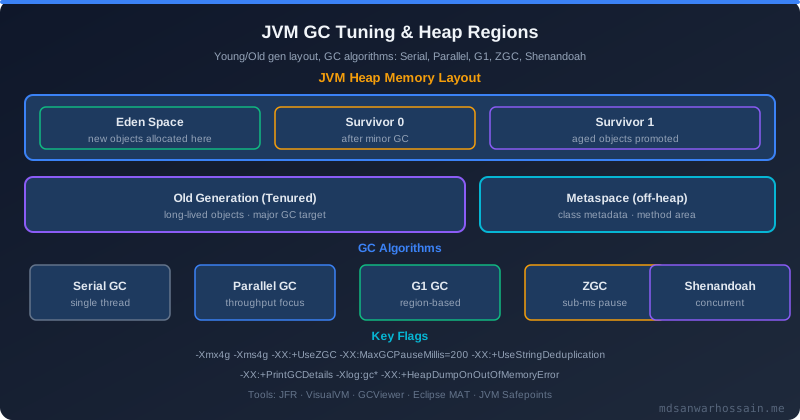
In JMC, these custom events appear under their declared category tree alongside built-in JVM events. You can correlate a circuit breaker OPEN transition with the simultaneous GC pause that caused downstream timeouts — something completely invisible to APM tools that treat application metrics and JVM metrics as separate concerns.
5. JDK Mission Control (JMC) Deep Dive
JDK Mission Control is the official GUI for analyzing JFR recordings. It ships separately from the JDK since JDK 11 and is available from jdk.java.net/jmc. When you open a .jfr file in JMC, five views are immediately actionable for incident investigation:
Method Profiling: The flame graph tab shows where CPU time was spent. JFR's default method sampling fires every 20ms, which is sufficient to identify hot paths in services running at hundreds of RPS. Unlike async-profiler's wall-clock mode, JFR method sampling is safe-point-biased — this is a known limitation for CPU-bound work, but for I/O-heavy microservices the safepoint skew is usually negligible.
Memory & Allocations: The TLAB allocation view shows which object types are being allocated fastest, broken down by allocating thread. When the allocation rate for a specific class spikes — say, byte[] arrays from a connection pool creating new PreparedStatement objects — JMC highlights both the allocation site and the allocation rate over time.
GC Phases: The Garbage Collection tab breaks every GC pause into phases (initial mark, concurrent mark, remark, cleanup for G1GC). You can see exactly how long stop-the-world phases lasted, which generation triggered them, and the heap occupancy before and after.
Back to our mystery: Loading the incident recording from the hourly latency spike into JMC immediately reveals the culprit. The GC tab shows a G1 Full GC pause of 28 seconds starting at precisely the latency spike onset. The allocation profiling view shows that in the 60 seconds before the spike, the allocation rate for HikariProxyConnection objects triples. Cross-referencing with the application's DatabaseQueryEvent custom events reveals the spikes cluster around a @Scheduled job that runs hourly, executes 50,000 fine-grained queries in a tight loop, and each iteration creates a new connection wrapper rather than reusing the pool's idle connections — because the pool was misconfigured with connectionTimeout=30000 and maximumPoolSize=2, forcing new connection creation under the query burst. The short-lived proxy objects overwhelm G1's young generation, triggering a full heap collection that stops the world for 28 seconds. Root cause: two lines of HikariCP configuration. Total investigation time with JFR: 12 minutes.
6. Failure Scenarios & Debugging Strategies
Thread starvation detection: The Thread view in JMC plots all threads on a timeline, colour-coding their state: running (green), blocked (red), waiting (yellow), sleeping (blue). If you see a large fraction of your request-handling threads blocked in red simultaneously, sorted by longest blocked duration, you have lock contention. Click into a blocked thread to see its stack trace at the moment of blocking and the identity of the lock it was waiting for. This is far more actionable than a thread dump snapshot, because JFR gives you the history — you can see when the blocking started and how long it lasted.
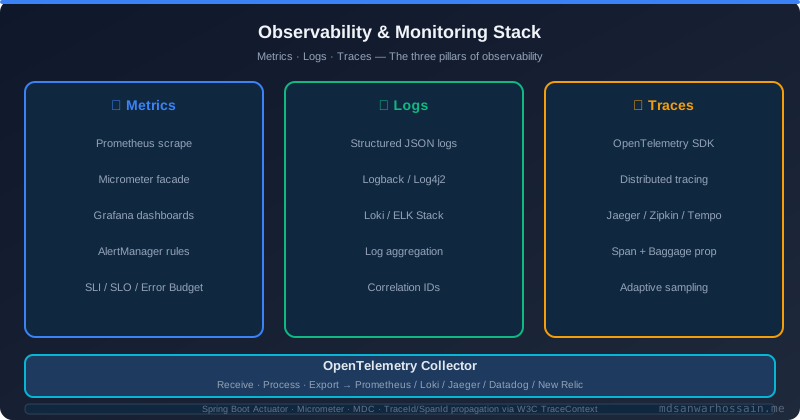
GC pause analysis: For G1GC, the JFR GCPhasePause events give you sub-millisecond breakdowns of each pause phase. The most common issue in production services is mixed collection pauses growing over time — a signal that the old generation is filling faster than mixed GC can reclaim it, often caused by long-lived caches without proper eviction policies. Compare the heap occupancy before GC trend over a recording to verify whether old-gen growth is steady (memory leak suspect) or burst-then-recover (allocation burst suspect).
Native memory tracking with jcmd: JFR records Java heap events, but native memory leaks (off-heap buffers, JNI allocations, metaspace) require combining JFR with NMT. Use the following command sequence to correlate JFR native memory events with NMT summaries:
# Enable NMT at JVM startup:
-XX:NativeMemoryTracking=summary
# Check native memory breakdown while recording is active:
jcmd <PID> VM.native_memory summary
# Dump JFR recording on-demand without stopping it:
jcmd <PID> JFR.dump name=continuous filename=/tmp/native-debug.jfr
# Check JFR recording status:
jcmd <PID> JFR.check
# Start a new 2-minute targeted recording focused on I/O events:
jcmd <PID> JFR.start duration=120s filename=/tmp/io-profiling.jfr \
  settings=profile name=io-debug
CPU hot paths: When a service's CPU usage climbs without a corresponding throughput increase — a common pattern during GC pressure or excessive serialization — load the recording in JMC's method profiling view and sort the flame graph by self time. Pay particular attention to java.util.regex, ObjectMapper.writeValueAsString, and String.format in inner loops. These are consistently among the top CPU hot paths in real Spring Boot services that have never been profiled in production.
7. Trade-offs and When NOT to Use JFR
JFR's advertised overhead of <2% reflects the default settings profile at moderate load. Under the profile settings — which enables method sampling and allocation profiling — overhead typically sits between 1% and 5% depending on allocation rate and method call depth. For CPU-bound batch jobs or services with extremely tight latency budgets (<1ms P99 targets), even 2% additional latency can be unacceptable. Profile the overhead on a production-representative load test before committing to always-on JFR.
JFR is not a replacement for APM: Distributed tracing tools (Jaeger, Zipkin, Datadog APM) show you request flow across service boundaries, correlating a single user request through API gateway, order service, inventory service, and database. JFR is JVM-local — it cannot show you that your latency spike was caused by a misbehaving downstream service three hops away unless you have custom JFR events that record outbound HTTP call durations. Use JFR to understand what the JVM is doing, use APM to understand what the distributed system is doing.
Disk space considerations: A continuous recording with maxsize=256m and maxage=60m is bounded by whichever limit is hit first. In practice, a busy service at 2,000 RPS with custom events generates roughly 50–100 MB per hour. In Kubernetes, ensure your /tmp volume has sufficient capacity for dump files, especially if your alerting triggers automated dumps on threshold crossings. A runaway dump loop (many threshold crossings per minute) can fill ephemeral storage and kill the pod.
When async-profiler is better: If your goal is purely to identify which methods consume the most CPU wall-clock time — for instance, when optimising a computationally intensive batch processor — async-profiler's AsyncGetCallTrace-based sampling is more accurate than JFR's safe-point-biased sampling. Use async-profiler for targeted CPU micro-optimisation investigations; use JFR for everything else.
8. Optimization Techniques
Tuning event thresholds: JFR's built-in events have configurable thresholds in a JFC (JFR Configuration) XML file. Copy the default profile and lower the jdk.SocketRead threshold from 10ms to 2ms to catch slow DNS lookups. Similarly, raise the allocation profiling threshold from 512KB to 2MB if your service intentionally allocates large buffers and you want to filter out noise:
<!-- custom-profile.jfc -->
<configuration version="2.0" label="Custom Production Profile">
  <event name="jdk.SocketRead">
    <setting name="enabled">true</setting>
    <setting name="threshold">2 ms</setting>  <!-- was 10 ms -->
  </event>
  <event name="jdk.ObjectAllocationInNewTLAB">
    <setting name="enabled">true</setting>
    <setting name="stackTrace">true</setting>
  </event>
  <event name="com.myapp.DatabaseQueryEvent">
    <setting name="enabled">true</setting>
    <setting name="threshold">100 ms</setting>  <!-- only slow queries -->
  </event>
</configuration>
JFR Streaming API (Java 14+): JEP 349 introduced the RecordingStream API, which lets you consume JFR events in real time without writing to disk. This opens the door to alerting on JFR events directly from the application — for example, triggering a heap dump if the GC overhead event fires more than three times within 60 seconds:
import jdk.jfr.consumer.RecordingStream;
import java.util.concurrent.atomic.AtomicInteger;
public class JfrAlertingAgent {
    public static void startGcOverheadAlert() {
        var gcPauseCount = new AtomicInteger(0);
        try (var rs = new RecordingStream()) {
            rs.enable("jdk.GCPhasePause").withThreshold(Duration.ofMillis(500));
            rs.enable("com.myapp.CircuitBreakerEvent");
            // Alert on repeated long GC pauses
            rs.onEvent("jdk.GCPhasePause", event -> {
                int count = gcPauseCount.incrementAndGet();
                if (count >= 3) {
                    alertingService.fire("GC pause >500ms occurred " + count + " times");
                    gcPauseCount.set(0);
                }
            });
            // Log circuit breaker transitions to observability platform
            rs.onEvent("com.myapp.CircuitBreakerEvent", event -> {
                metricsRegistry.counter("circuit.breaker.trips",
                    "service", event.getString("serviceName"),
                    "state",   event.getString("newState")).increment();
            });
            rs.startAsync(); // non-blocking
        }
    }
}
OpenTelemetry integration: The OpenTelemetry JFR extension (available in the opentelemetry-javaagent-extension contrib module) automatically converts selected JFR events into OTLP metrics and spans. This means your Grafana dashboards can display JVM-layer metrics — GC pause duration, allocation rate, thread starvation events — alongside application-level RED metrics, all within the same observability platform without separate JMC sessions. Configure which events to bridge in your otel.jfr.enabled properties file.
Key Takeaways
- JFR is production-safe by design — built into HotSpot with <2% overhead at default settings; free in JDK 11+ for all OpenJDK distributions.
- Continuous recording catches intermittent incidents — set
maxage=60manddumponexit=trueso every production incident leaves a retrievable evidence trail. - Custom JFR events beat log scraping — structured, typed, timestamped to nanosecond precision, zero allocation when disabled, and visible in JMC alongside JVM events.
- JMC automated analysis accelerates root-cause identification — the rule engine surfaces GC overhead, lock contention, and thread starvation findings in seconds on an unfamiliar recording.
- JFR Streaming (Java 14+) enables real-time alerting — use
RecordingStreamto react to JVM events without disk I/O and integrate custom JFR metrics directly into your OpenTelemetry pipeline.
Read Full Blog Here
Bookmark this post and share it with your team. The full guide — including all code examples, JMC screenshots walkthrough, and JFC configuration files — is permanently available at:
Java Flight Recorder (JFR) in Production →Conclusion
The hourly latency spike that stumped your team for a week can be solved in 12 minutes with JFR. The key insight is not that JFR is technically impressive — though it is — but that it shifts the investigation mindset from reproducing production problems to recording them. You stop asking "can I make this happen again?" and start asking "what was the JVM doing when it happened?" That shift alone is worth enabling JFR on every production service immediately.
Start with the three-step onboarding path: enable continuous recording with -XX:StartFlightRecording=maxage=60m,dumponexit=true, add two or three custom JFR events for your highest-value business operations (database queries, external API calls, cache interactions), and wire up RecordingStream to push GC pause metrics into your existing observability stack. The incremental investment is measured in hours; the diagnostic capability gain is permanent.
For complementary thread-level diagnostics, our guide on Java Structured Concurrency shows how proper task scoping eliminates a whole class of thread-related performance issues — thread leaks and dangling subtasks that show up as thread starvation in your JFR recordings become structurally impossible with StructuredTaskScope. And for a broader view of JVM-level performance levers — heap sizing, GC algorithm selection, JIT compilation flags — the companion post on JVM Performance Tuning provides the holistic framework that JFR diagnostics feed into. Used together, these three tools — structured concurrency for correctness, JVM tuning for capacity, and JFR for continuous observability — give Java services a production engineering foundation that most competing platforms cannot match.
Leave a Comment
Related Posts

Software Engineer · Java · Spring Boot · Microservices