Kubernetes Interview Questions 2026: CKA-Level Scenarios & Production Answers
Kubernetes interview questions draw 40K+ searches per month — and senior Kubernetes interviews in 2026 go well beyond YAML writing. Interviewers expect you to explain control plane internals, debug pod scheduling failures, design autoscaling policies, secure workloads with RBAC and NetworkPolicy, and walk through production incident scenarios. Whether you're targeting a CKA certification or a senior platform engineer role, this guide covers 35+ real questions with deep, production-tested answers.
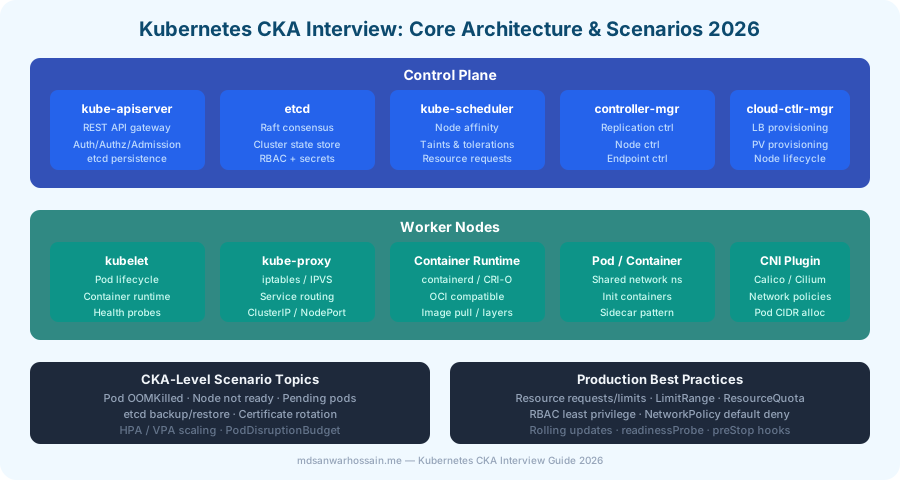
Table of Contents
1. Control Plane Architecture
Q1: Walk me through what happens when you run kubectl apply -f deployment.yaml.
Answer: This is a classic CKA question that tests your understanding of the full Kubernetes control plane flow:
- kubectl reads
~/.kube/config, authenticates tokube-apiservervia client certificate or token, and sends aPOST /apis/apps/v1/namespaces/{ns}/deploymentsrequest with the YAML body. - kube-apiserver runs Authentication → Authorization (RBAC check) → Admission Control (ValidatingWebhook, MutatingWebhook like Kyverno/OPA Gatekeeper). It then persists the Deployment resource to etcd.
- Deployment controller (inside kube-controller-manager) watches the apiserver for new Deployments via list-watch. It creates a ReplicaSet to match the desired state.
- ReplicaSet controller creates the required Pod objects (initially unscheduled —
nodeNamefield empty). - kube-scheduler watches for unscheduled pods, runs its scheduling algorithm (filtering: node selectors, taints, resource fit; scoring: spread, affinity, utilization), and writes the selected
nodeNameback to the Pod object in etcd via the apiserver. - kubelet on the chosen node watches for pods assigned to it, calls the container runtime (containerd) to pull the image and start the container.
- kube-proxy on each node updates iptables/IPVS rules when new Service endpoints appear.
Q2: What is etcd, and what happens to the cluster if etcd goes down?
Answer: etcd is a distributed key-value store using the Raft consensus algorithm. It stores all Kubernetes cluster state: pod specs, node info, ConfigMaps, Secrets, RBAC rules, ServiceAccount tokens. etcd requires a quorum of (n/2)+1 nodes to accept writes — a 3-node cluster tolerates 1 failure; a 5-node cluster tolerates 2.
If etcd goes down: The apiserver cannot persist or retrieve cluster state. Running workloads continue (kubelet manages local pod lifecycle independently), but you cannot create, update, or delete any Kubernetes resource. kubectl commands fail. New pods cannot be scheduled. This makes etcd backup critical — run etcdctl snapshot save daily with ETCD_ENDPOINTS, cert, and key flags, and store snapshots in S3.
# Backup etcd snapshot
ETCDCTL_API=3 etcdctl snapshot save /backup/etcd-$(date +%Y%m%d).db \
  --endpoints=https://127.0.0.1:2379 \
  --cacert=/etc/kubernetes/pki/etcd/ca.crt \
  --cert=/etc/kubernetes/pki/etcd/server.crt \
  --key=/etc/kubernetes/pki/etcd/server.key

# Restore from snapshot
ETCDCTL_API=3 etcdctl snapshot restore /backup/etcd-20260401.db \
  --data-dir=/var/lib/etcd-restored
2. Pod Scheduling & Resource Management
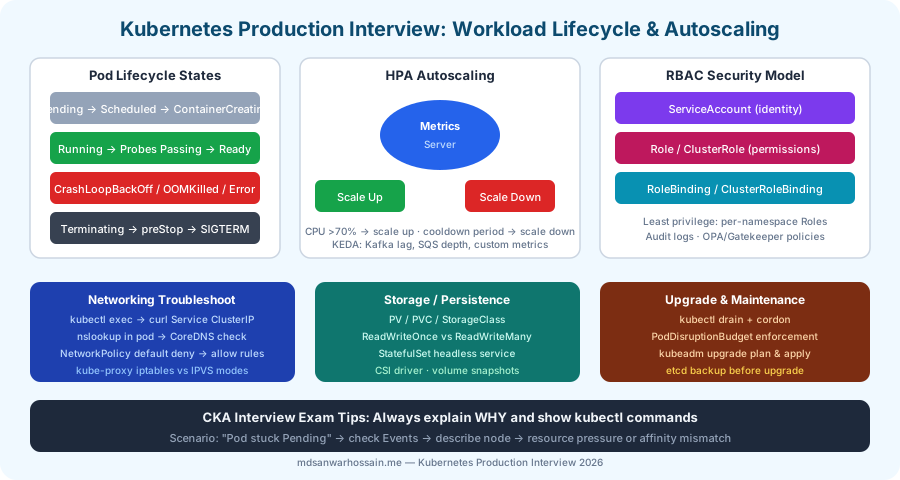
Q3: A pod is stuck in Pending state. Walk me through your diagnostic process.
Answer: A pod in Pending state means the scheduler could not find a suitable node, or the pod is waiting for a PVC. Diagnostic steps:
kubectl describe pod <name> -n <ns>— scroll to the Events section at the bottom. The scheduler events say exactly why it failed: "Insufficient cpu", "node(s) had taint that pod didn't tolerate", "0/3 nodes are available: 3 node(s) had untolerated taint".- If Insufficient resources: check
kubectl describe nodesfor allocatable vs requested. Consider adding nodes, adjusting pod resource requests, or enabling VPA. - If Taint issue: check node taints with
kubectl get nodes -o custom-columns=NAME:.metadata.name,TAINTS:.spec.taints. Add matchingtolerationsto the pod spec. - If NodeSelector/Affinity mismatch: check node labels with
kubectl get nodes --show-labels. The pod'snodeSelectorornodeAffinityrequires a label that no node has. - If PVC not bound: check
kubectl describe pvc <name>— StorageClass may not exist, or no PV matches the access mode and storage request.
Q4: Explain the difference between resource Requests and Limits, and what happens when a container exceeds its memory limit.
Answer:
- Requests: the amount of CPU/memory the scheduler uses to find a fit. Kubernetes guarantees the container will get at least this much. Determines scheduling placement.
- Limits: the maximum the container can use. If a container exceeds its CPU limit, it is throttled (CFS bandwidth control). If it exceeds its memory limit, it is OOMKilled immediately — the container is killed and restarted (restart policy applies).
resources:
  requests:
    cpu: "250m"       # 0.25 cores guaranteed for scheduling
    memory: "256Mi"   # 256MB guaranteed
  limits:
    cpu: "500m"       # throttled at 0.5 cores
    memory: "512Mi"   # OOMKilled if exceeded
Production rule: Always set both requests and limits. Without limits, a noisy-neighbor pod can starve all other pods on the same node. Use LimitRange to set namespace defaults and ResourceQuota to cap namespace totals.
3. Kubernetes Networking
Q5: Explain how Kubernetes Service types work: ClusterIP, NodePort, LoadBalancer, and ExternalName.
Answer:
- ClusterIP (default): assigns a virtual IP internal to the cluster. Only accessible from within the cluster. kube-proxy maintains iptables/IPVS rules to load balance across pod endpoints. Use for service-to-service communication.
- NodePort: exposes the service on a static port (30000-32767) on every node's IP. External clients reach
node-ip:node-port. The node forwards to the ClusterIP. Useful for development, not production (relies on knowing node IPs). - LoadBalancer: provisions a cloud load balancer (AWS ALB/NLB, GCP LB) via cloud-controller-manager. External clients reach the load balancer, which forwards to NodePort, which forwards to ClusterIP → pods. The standard production ingress pattern for cloud deployments.
- ExternalName: maps a service to an external DNS name (e.g.,
my-db.example.com). DNS CNAME — no proxying. Used to abstract external services behind a Kubernetes service name for seamless migration.
Q6: What is a NetworkPolicy and how do you implement a "default deny all" with selective allow rules?
Answer: NetworkPolicy is a namespaced resource that defines ingress/egress rules for pods using label selectors. By default, all pod-to-pod communication is allowed. A "default deny all" policy selects all pods in the namespace and defines empty ingress/egress rules (no allowed traffic):
# Default deny all ingress and egress
apiVersion: networking.k8s.io/v1
kind: NetworkPolicy
metadata:
  name: default-deny-all
  namespace: payments
spec:
  podSelector: {}          # selects all pods in namespace
  policyTypes:
  - Ingress
  - Egress

---
# Allow: payment-service can receive from order-service on port 8080
apiVersion: networking.k8s.io/v1
kind: NetworkPolicy
metadata:
  name: allow-order-to-payment
  namespace: payments
spec:
  podSelector:
    matchLabels:
      app: payment-service
  policyTypes:
  - Ingress
  ingress:
  - from:
    - namespaceSelector:
        matchLabels:
          name: orders
      podSelector:
        matchLabels:
          app: order-service
    ports:
    - port: 8080
      protocol: TCP
Important: NetworkPolicy is enforced by the CNI plugin (Calico, Cilium, Weave). Default CNI plugins like flannel do not enforce NetworkPolicy — you must use Calico or Cilium in production for network segmentation.
4. Storage: PV, PVC, StorageClass
Q7: Explain PersistentVolume, PersistentVolumeClaim, and StorageClass. What is dynamic provisioning?
Answer:
- PersistentVolume (PV): cluster-scoped resource representing actual storage (AWS EBS volume, NFS share, local disk). Can be statically provisioned by an admin or dynamically provisioned by a StorageClass.
- PersistentVolumeClaim (PVC): namespace-scoped resource — a pod's request for storage with specific access mode and capacity. Kubernetes finds a matching PV (or provisions one) and binds them.
- StorageClass: defines the provisioner (e.g.,
ebs.csi.aws.com) and parameters (disk type: gp3, iops). With dynamic provisioning, creating a PVC with a StorageClass automatically provisions the underlying storage resource in the cloud provider, eliminating manual PV management.
apiVersion: storage.k8s.io/v1
kind: StorageClass
metadata:
  name: fast-ssd
provisioner: ebs.csi.aws.com
parameters:
  type: gp3
  iops: "3000"
  throughput: "125"
reclaimPolicy: Retain   # Keep volume after PVC deleted
volumeBindingMode: WaitForFirstConsumer  # Only provision when pod is scheduled

---
apiVersion: v1
kind: PersistentVolumeClaim
metadata:
  name: postgres-data
spec:
  storageClassName: fast-ssd
  accessModes: [ReadWriteOnce]
  resources:
    requests:
      storage: 100Gi
5. Autoscaling: HPA, VPA, KEDA
Q8: Explain HPA (Horizontal Pod Autoscaler), how it works, and what the scale-down stabilization window prevents.
Answer: HPA continuously queries the Metrics Server (or custom metrics via Prometheus Adapter) every 15 seconds. It calculates the desired replica count as: desiredReplicas = ceil(currentReplicas * currentMetricValue / desiredMetricValue). If CPU utilization is 80% with a target of 50%, it scales from 3 replicas to ceil(3 * 80/50) = ceil(4.8) = 5 replicas.
Scale-down stabilization window (default 5 minutes): prevents flapping. Even if CPU drops to 20%, HPA waits 5 minutes before scaling down, capturing the peak replica count needed in that window. This avoids repeatedly scaling down and then scaling back up due to bursty traffic.
apiVersion: autoscaling/v2
kind: HorizontalPodAutoscaler
metadata:
  name: order-service-hpa
spec:
  scaleTargetRef:
    apiVersion: apps/v1
    kind: Deployment
    name: order-service
  minReplicas: 2
  maxReplicas: 20
  metrics:
  - type: Resource
    resource:
      name: cpu
      target:
        type: Utilization
        averageUtilization: 60
  - type: Resource
    resource:
      name: memory
      target:
        type: Utilization
        averageUtilization: 70
  behavior:
    scaleDown:
      stabilizationWindowSeconds: 300   # 5 min before scaling down
      policies:
      - type: Percent
        value: 20                       # max 20% pods removed per minute
        periodSeconds: 60
Q9: What is KEDA, and how does it enable event-driven autoscaling that HPA cannot?
Answer: KEDA (Kubernetes Event-Driven Autoscaling) extends HPA with external trigger support. Standard HPA can only scale on CPU and memory (or Prometheus metrics via adapter). KEDA adds 60+ built-in scalers: Kafka consumer lag, RabbitMQ queue depth, Azure Service Bus, AWS SQS message count, Cron schedule, and more. Critically, KEDA supports scale-to-zero: when there are no messages in a Kafka topic, KEDA scales the consumer deployment down to 0 pods (saving costs). When messages arrive, KEDA detects the lag and scales up from 0. Standard HPA cannot scale to zero because it always requires a minimum of 1 replica to gather metrics.
apiVersion: keda.sh/v1alpha1
kind: ScaledObject
metadata:
  name: kafka-consumer-scaler
spec:
  scaleTargetRef:
    name: notification-consumer
  minReplicaCount: 0        # scale to zero when no messages
  maxReplicaCount: 30
  triggers:
  - type: kafka
    metadata:
      bootstrapServers: kafka:9092
      consumerGroup: notification-group
      topic: user-notifications
      lagThreshold: "5"       # 1 replica per 5 messages of lag
6. Security: RBAC, NetworkPolicy, Secrets
Q10: Design an RBAC setup for a multi-team namespace with least-privilege access.
Answer: Key principle: use namespaced Roles (not ClusterRoles) for team-scoped permissions. Use ClusterRoles only for cluster-wide resources (nodes, PVs). Each team's deployment pipeline gets a ServiceAccount with only the permissions needed:
# ServiceAccount for CI/CD pipeline
apiVersion: v1
kind: ServiceAccount
metadata:
  name: payments-deployer
  namespace: payments

---
# Role: can only manage Deployments and Services in payments namespace
apiVersion: rbac.authorization.k8s.io/v1
kind: Role
metadata:
  name: deployment-manager
  namespace: payments
rules:
- apiGroups: ["apps"]
  resources: ["deployments"]
  verbs: ["get", "list", "create", "update", "patch"]
- apiGroups: [""]
  resources: ["services", "configmaps"]
  verbs: ["get", "list", "create", "update"]
# Explicitly NO access to Secrets (use External Secrets Operator instead)

---
# Bind Role to ServiceAccount
apiVersion: rbac.authorization.k8s.io/v1
kind: RoleBinding
metadata:
  name: payments-deployer-binding
  namespace: payments
subjects:
- kind: ServiceAccount
  name: payments-deployer
  namespace: payments
roleRef:
  kind: Role
  name: deployment-manager
  apiGroup: rbac.authorization.k8s.io
Q11: How do you manage Kubernetes Secrets securely? Why are base64-encoded Secrets not truly secure?
Answer: Kubernetes Secrets are only base64-encoded by default — not encrypted. Anyone with kubectl get secret access can decode them instantly. Production security layers: (1) etcd encryption at rest: configure an encryption provider (AES-GCM or KMS) in --encryption-provider-config so Secrets are encrypted in etcd storage, not just base64; (2) RBAC restriction: limit who can get/list Secret resources (most pods don't need direct Secret API access); (3) External Secrets Operator: sync secrets from AWS SSM Parameter Store, HashiCorp Vault, or Azure Key Vault into Kubernetes Secrets automatically — secrets never live in Git; (4) CSI Secret Store Driver: mount secrets directly from Vault/SSM into pod file system, bypassing Kubernetes Secret objects entirely.
7. Production Troubleshooting Scenarios
Q12: Your Spring Boot deployment is showing CrashLoopBackOff. Walk through your investigation.
Answer:
kubectl describe pod <name>— check Events section for OOMKilled, failed probe, image pull errors, or missing ConfigMap/Secret mounts.kubectl logs <name> --previous— get logs from the previous crashed container to see the startup exception.- If OOMKilled: JVM heap + metaspace + off-heap memory exceed memory limit. Set JVM flags:
-XX:MaxRAMPercentage=75.0 -XX:+UseContainerSupportso the JVM respects container limits instead of reading the node's total memory. - If liveness probe failure: the app starts but the probe considers it unhealthy — check probe endpoint (
/actuator/health), timeout, andinitialDelaySeconds. A slow-starting Spring Boot app (especially GraalVM native or heavy initialization) may needstartupProbeinstead oflivenessProbeduring startup. - If missing secret or configmap: the pod cannot start because a referenced volume or env var doesn't exist. Fix the missing resource, not the deployment.
# Startup probe for slow-starting Spring Boot apps
startupProbe:
  httpGet:
    path: /actuator/health/readiness
    port: 8080
  failureThreshold: 30     # 30 × 10s = 5 min for startup
  periodSeconds: 10

livenessProbe:
  httpGet:
    path: /actuator/health/liveness
    port: 8080
  periodSeconds: 15
  failureThreshold: 3
Q13: How do you perform a zero-downtime rolling deployment in Kubernetes, and what is a PodDisruptionBudget?
Answer: Kubernetes rolling updates replace pods one at a time (default: 25% max unavailable, 25% max surge). For true zero-downtime, you need: (1) readiness probe configured so new pods only receive traffic once healthy; (2) preStop hook with a sleep to allow in-flight requests to drain before the pod terminates; (3) connection draining via graceful shutdown (terminationGracePeriodSeconds: 60).
PodDisruptionBudget (PDB) ensures a minimum number of pods remain available during voluntary disruptions (node drain, cluster upgrade, manual deletion). A PDB with minAvailable: 2 on a 3-replica deployment prevents kubectl drain from evicting pods if it would leave fewer than 2 running.
apiVersion: policy/v1
kind: PodDisruptionBudget
metadata:
  name: order-service-pdb
spec:
  minAvailable: 2        # at least 2 pods always available
  selector:
    matchLabels:
      app: order-service

# Graceful shutdown in pod spec:
lifecycle:
  preStop:
    exec:
      command: ["/bin/sh", "-c", "sleep 10"]  # drain in-flight requests
terminationGracePeriodSeconds: 60
8. Cluster Operations: Upgrades & etcd
Q14: Walk through the process of upgrading a kubeadm cluster from 1.29 to 1.30 safely.
Answer:
- Backup etcd: always snapshot etcd before any upgrade.
- Check upgrade plan:
kubeadm upgrade plan— shows available versions and component compatibility. - Upgrade control plane: on the control plane node, update the
kubeadmpackage to 1.30, runkubeadm upgrade apply v1.30.0. This upgrades the apiserver, controller-manager, scheduler, and kube-proxy. - Upgrade kubelet on control plane:
apt install kubelet=1.30.0-00, thensystemctl restart kubelet. - Upgrade worker nodes one at a time:
kubectl drain <node> --ignore-daemonsets --delete-emptydir-data→ upgrade kubeadm/kubelet on the node →kubeadm upgrade node→kubectl uncordon <node>. - Verify:
kubectl get nodesto confirm all nodes show 1.30.
kubectl command, (2) why the component works this way (not just what it does), (3) a production failure scenario you've seen or would expect, and (4) how monitoring helps you catch the issue proactively.
Key Takeaways
- Know the full request lifecycle from
kubectl applyto container running — it tests your understanding of every control plane component. - etcd backup is the most critical operational task — always know the
etcdctl snapshotcommands. - NetworkPolicy requires a compatible CNI (Calico/Cilium) — default flannel does not enforce it.
- HPA + PDB + readinessProbe + preStop hook is the production zero-downtime deployment stack.
- KEDA enables scale-to-zero for Kafka/SQS consumers — standard HPA cannot do this.
- RBAC least privilege: namespace-scoped Roles, not ClusterRoles, for team access control.
Leave a Comment
Related Posts

Software Engineer · Java · Spring Boot · Microservices