Spring Boot Interview Questions 2026: Senior Engineer Level with Real Answers
"Spring Boot interview questions" is one of the most searched terms among Java engineers — and for good reason. Senior roles at top companies require you to go far beyond knowing what @SpringBootApplication does. Interviewers expect depth on JVM internals, @Transactional pitfalls, reactive programming, Kafka integration, security hardening, and production-grade microservices design. This guide covers 35+ senior-level Spring Boot interview questions with real, detailed answers you can deliver confidently in 2026.
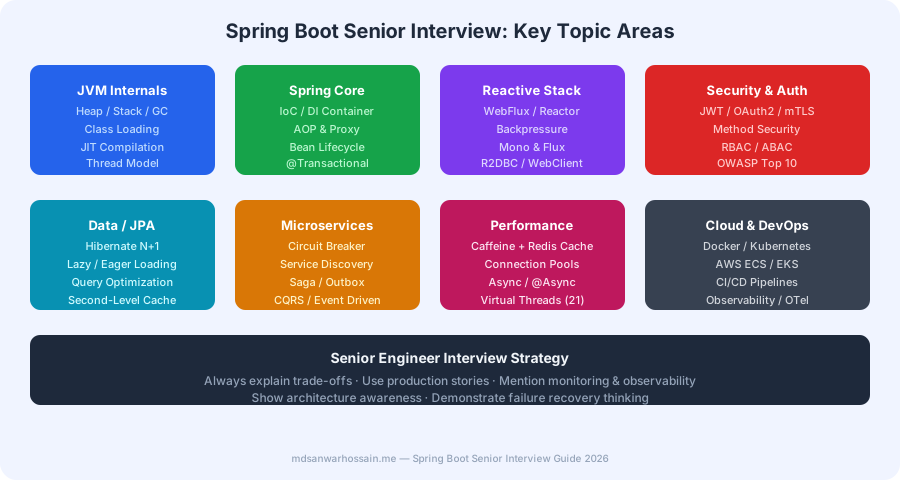
Table of Contents
- Core Spring & IoC Container Questions
- @Transactional & Data Persistence Deep Dive
- Reactive Stack: WebFlux, Mono, Flux
- Spring Security & OAuth2 Questions
- Performance & Caching Questions
- Spring Boot Microservices Architecture
- Testing & Test Slices
- Production & Observability Questions
- Scenario-Based & Design Questions
1. Core Spring & IoC Container Questions
Q1: How does Spring's IoC container work internally? What is the difference between BeanFactory and ApplicationContext?
Answer: Spring's IoC container manages the full lifecycle of beans: instantiation, dependency injection, initialization callbacks, and destruction. The BeanFactory is the base interface — it provides lazy initialization (beans created on first getBean() call) and is memory-efficient for resource-constrained environments. ApplicationContext extends BeanFactory and adds eager singleton initialization at startup, event publishing (ApplicationEvent), internationalization, AOP auto-proxy creation, and bean post-processor registration. In practice, you always use ApplicationContext.
Spring Boot uses AnnotationConfigServletWebServerApplicationContext for web apps. At startup it: (1) scans for @Component/@Configuration classes, (2) processes @Bean factory methods, (3) resolves @Autowired dependencies through AutowiredAnnotationBeanPostProcessor, (4) calls @PostConstruct methods, and (5) registers beans with the DisposableBean shutdown hook.
Q2: Explain Spring AOP — how does it create proxies, and what is the self-invocation problem?
Answer: Spring AOP uses either JDK dynamic proxies (for interface-based beans) or CGLIB subclass proxies (for class-based beans). When a bean is injected into another bean, what you actually receive is a proxy wrapper. When you call this.method() inside the same class, you bypass the proxy and call the real object directly — this is the self-invocation problem. Any advice (e.g., @Transactional, @Cacheable, @Async) annotated on that inner method is silently skipped.
The fix is to inject the bean into itself via @Autowired @Lazy, extract the method into a separate Spring bean, or use AopContext.currentProxy() (requires exposeProxy=true).
// ❌ Self-invocation bypasses @Transactional
@Service
public class OrderService {
    public void process(Order order) {
        this.saveOrder(order); // proxy skipped — no transaction!
    }

    @Transactional
    public void saveOrder(Order order) {
        orderRepo.save(order);
    }
}

// ✅ Fix: inject self or extract to separate bean
@Service
public class OrderService {
    @Autowired @Lazy private OrderService self;

    public void process(Order order) {
        self.saveOrder(order); // goes through proxy
    }

    @Transactional
    public void saveOrder(Order order) {
        orderRepo.save(order);
    }
}
Q3: What is the difference between @Component, @Service, @Repository, and @Controller?
Answer: All four are stereotypes built on @Component and trigger component scanning. The semantic differences matter for tooling and exception handling: @Repository enables Spring's persistence exception translation — raw SQLException or JPA exceptions are automatically wrapped into Spring's DataAccessException hierarchy by the PersistenceExceptionTranslationPostProcessor. @Service marks business logic layer beans. @Controller marks MVC controllers and works with @RequestMapping. @RestController is @Controller + @ResponseBody. In interviews, emphasize that @Repository has a concrete functional difference (exception translation), not just documentation value.
2. @Transactional & Data Persistence Deep Dive
Q4: What are the Spring transaction propagation levels and when do you use REQUIRES_NEW vs NESTED?
Answer: Spring defines 7 propagation behaviors. The three most important at the senior level:
REQUIRED(default): joins existing transaction or creates one. Both callee and caller share the same DB connection and commit/rollback together.REQUIRES_NEW: always suspends the current transaction and opens a fresh connection. The inner transaction commits independently. Use for audit logging — you want the audit entry to persist even if the main operation fails.NESTED: uses a savepoint within the same connection. An inner rollback returns to the savepoint without rolling back the outer transaction. Requires savepoint support from the JDBC driver (MySQL InnoDB supports it; not all do).
REQUIRES_NEW opens a second physical connection from the pool. Under high concurrency, this can exhaust HikariCP connections. Always size your pool to account for nested REQUIRES_NEW calls.
Q5: Explain Hibernate N+1 problem, how to detect it, and three ways to fix it.
Answer: The N+1 problem occurs when loading a collection of N entities triggers N additional queries to load their associations. Example: loading 100 orders, then lazily fetching the customer for each order — 101 queries instead of 1.
Detection: Enable Hibernate statistics with spring.jpa.properties.hibernate.generate_statistics=true and monitor the query count via logs or Micrometer. In production, use slow query logging at the DB level or APM traces (Jaeger/Zipkin) showing multiple identical queries.
Three fixes:
- JOIN FETCH in JPQL:
SELECT o FROM Order o JOIN FETCH o.customer WHERE o.status = :status— one query with a JOIN. - @EntityGraph:
@EntityGraph(attributePaths = {"customer", "items"})on the repository method — no JPQL needed. - Batch fetching:
@BatchSize(size=20)on the collection — Hibernate usesIN (?,?,...)queries in batches instead of one query per entity.
3. Reactive Stack: WebFlux, Mono, Flux
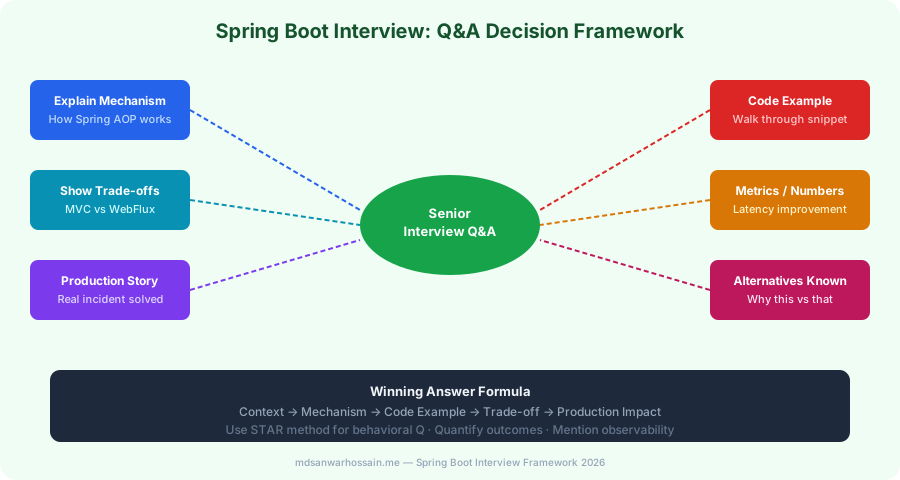
Q6: When would you choose Spring WebFlux over Spring MVC, and what are the trade-offs?
Answer: Choose WebFlux when your service has many concurrent connections with high I/O wait (e.g., streaming APIs, real-time event feeds, API gateway aggregation over slow upstream services). WebFlux runs on Netty with a small number of event-loop threads — typically 2× CPU cores — and handles thousands of concurrent connections without thread-per-request overhead.
Trade-offs against Spring MVC:
- Debugging reactive pipelines is harder — stack traces are non-linear; use
checkpoint()operators for context. - JDBC/JPA do not support reactive I/O. You must use R2DBC for reactive database access, which has a less mature ecosystem.
- Blocking code inside a reactive pipeline (e.g., synchronous HTTP call) starves the event loop — must be isolated with
subscribeOn(Schedulers.boundedElastic()). - With Java 21 Virtual Threads, Spring MVC achieves near-equivalent concurrency for most workloads without the complexity of reactive programming.
Q7: Explain backpressure in Project Reactor and how to handle a slow consumer.
Answer: Backpressure is the mechanism by which a subscriber signals to the publisher how many items it can process at a time. In Project Reactor, this is implemented via the Reactive Streams Subscription.request(n) protocol. If a publisher produces data faster than the subscriber consumes it, without backpressure handling, the intermediate buffer overflows and items are dropped or an OutOfMemoryError occurs.
Strategies for slow consumers:
// Drop excess elements when buffer is full
Flux.range(1, 1_000_000)
    .onBackpressureDrop(dropped -> log.warn("Dropped: {}", dropped))
    .subscribe(item -> slowProcess(item));

// Buffer with bounded capacity — throws BufferOverflowException when full
Flux.range(1, 1_000_000)
    .onBackpressureBuffer(256, dropped -> log.warn("Buffer overflow"))
    .subscribe(item -> slowProcess(item));

// Latest-only: always emit latest value, discard intermediates
Flux.interval(Duration.ofMillis(1))
    .onBackpressureLatest()
    .subscribe(tick -> slowProcess(tick));
4. Spring Security & OAuth2 Questions
Q8: Walk through the Spring Security filter chain and how JWT authentication is integrated.
Answer: Spring Security is implemented as a chain of servlet filters registered in DelegatingFilterProxy. Key filters in order: SecurityContextPersistenceFilter → UsernamePasswordAuthenticationFilter → ExceptionTranslationFilter → FilterSecurityInterceptor. For JWT-based stateless authentication, you add a custom OncePerRequestFilter before the standard authentication filter.
@Component
public class JwtAuthFilter extends OncePerRequestFilter {

    @Override
    protected void doFilterInternal(HttpServletRequest req,
            HttpServletResponse res, FilterChain chain)
            throws ServletException, IOException {
        String header = req.getHeader("Authorization");
        if (header != null && header.startsWith("Bearer ")) {
            String token = header.substring(7);
            if (jwtUtil.validateToken(token)) {
                var auth = new UsernamePasswordAuthenticationToken(
                    jwtUtil.extractUsername(token), null,
                    jwtUtil.extractAuthorities(token));
                SecurityContextHolder.getContext().setAuthentication(auth);
            }
        }
        chain.doFilter(req, res);
    }
}

// Register in SecurityFilterChain:
http.addFilterBefore(jwtAuthFilter, UsernamePasswordAuthenticationFilter.class);
Q9: What is the difference between OAuth2 Authorization Code flow and Client Credentials flow in Spring Security?
Answer: Authorization Code flow is for user-facing applications: the user is redirected to the identity provider (Keycloak, Auth0), authenticates, and the browser receives an authorization code that the backend exchanges for access + refresh tokens. Spring Boot enables this with spring-boot-starter-oauth2-client and spring.security.oauth2.client.* configuration. Client Credentials flow is for machine-to-machine (M2M) communication — your service authenticates directly with the authorization server using its client ID and secret, with no user involved. Use this for inter-service calls in microservices. Configure it with WebClient and ServletOAuth2AuthorizedClientManager to automatically inject access tokens into outgoing requests.
5. Performance & Caching Questions
Q10: How do you implement a two-level cache (L1 Caffeine + L2 Redis) in Spring Boot, and what are the invalidation challenges?
Answer: L1 (Caffeine) sits in-process for sub-millisecond reads; L2 (Redis) provides a shared cache across all instances. The challenge: when one instance updates a value, its L1 is correct but other instances still have stale L1 entries. Solutions include: short L1 TTLs (e.g., 30 seconds), Redis keyspace notifications to trigger local evictions, or using a cache-aside pattern where L1 is only populated on cache hits from Redis.
@Configuration
public class CacheConfig {

    @Bean
    public CaffeineCacheManager caffeineCacheManager() {
        CaffeineCacheManager mgr = new CaffeineCacheManager("products");
        mgr.setCaffeine(Caffeine.newBuilder()
            .maximumSize(10_000)
            .expireAfterWrite(30, TimeUnit.SECONDS));
        return mgr;
    }

    // L1 lookup first; on miss, populate from Redis (L2)
    @Cacheable(value = "products", key = "#id", cacheManager = "caffeineCacheManager")
    public Product getProduct(Long id) {
        return redisTemplate.opsForValue().get("product:" + id);
    }
}
Q11: How do Virtual Threads (Java 21) impact Spring Boot MVC applications, and when should you enable them?
Answer: Virtual threads are lightweight user-space threads managed by the JVM, not the OS. They allow Spring MVC (Tomcat) to handle I/O blocking operations without pinning OS threads. With traditional platform threads, a slow database call blocks one OS thread for its duration; with virtual threads, the JVM parks the virtual thread and re-uses the OS carrier thread for other work. Enable them in Spring Boot 3.2+:
# application.properties
spring.threads.virtual.enabled=true

# or programmatically
@Bean
public TomcatProtocolHandlerCustomizer<?> protocolHandlerVirtualThreadExecutorCustomizer() {
    return protocolHandler ->
        protocolHandler.setExecutor(Executors.newVirtualThreadPerTaskExecutor());
}
When to use: Services with high I/O concurrency and blocking calls (database, HTTP, file I/O). Avoid for CPU-bound work — virtual threads don't improve throughput for compute-intensive tasks and can cause thread pinning with synchronized blocks.
6. Spring Boot Microservices Architecture
Q12: How do you implement the Circuit Breaker pattern in Spring Boot using Resilience4j?
Answer: Resilience4j's circuit breaker has three states: CLOSED (requests pass through, failures counted), OPEN (requests fail fast with fallback), and HALF-OPEN (probe requests allowed to test recovery). Configure via application.yml and annotate with @CircuitBreaker:
# application.yml
resilience4j:
  circuitbreaker:
    instances:
      paymentService:
        slidingWindowSize: 10
        failureRateThreshold: 50          # open when 50% of 10 calls fail
        waitDurationInOpenState: 30s
        permittedNumberOfCallsInHalfOpenState: 3
        slowCallDurationThreshold: 2s
        slowCallRateThreshold: 80

# Service
@Service
public class PaymentClient {

    @CircuitBreaker(name = "paymentService", fallbackMethod = "paymentFallback")
    @TimeLimiter(name = "paymentService")
    public CompletableFuture<PaymentResponse> charge(ChargeRequest req) {
        return CompletableFuture.supplyAsync(() -> paymentApi.charge(req));
    }

    public CompletableFuture<PaymentResponse> paymentFallback(ChargeRequest req, Exception e) {
        log.error("Payment circuit open, using fallback", e);
        return CompletableFuture.completedFuture(PaymentResponse.pending());
    }
}
Q13: Explain the Outbox Pattern and how it solves the dual-write problem with Kafka.
Answer: The dual-write problem occurs when you need to write to the database AND publish an event to Kafka in the same business operation. If the DB write succeeds but the Kafka publish fails, your data is inconsistent — the event is lost. The Transactional Outbox Pattern solves this by writing the event to an outbox table in the same database transaction as the business entity. A CDC tool (Debezium) reads the outbox table's write-ahead log and reliably publishes to Kafka. Since both writes are in the same DB transaction, they atomically succeed or fail together. Debezium provides at-least-once delivery, so consumers must be idempotent (use unique event IDs to deduplicate).
7. Testing & Test Slices
Q14: What are Spring Boot test slices, and when do you use @WebMvcTest vs @DataJpaTest vs @SpringBootTest?
Answer: Test slices load only a slice of the Spring application context relevant to the layer under test, making tests faster than full @SpringBootTest.
@WebMvcTest(OrderController.class): loads only the web layer (controllers, filters, Jackson converters). Use@MockBeanto mock the service layer. Ideal for testing request mapping, validation, and HTTP response codes.@DataJpaTest: loads JPA entities, repositories, and an embedded H2 database. Tests repository query methods and Hibernate mappings in isolation. Transactions are rolled back after each test.@SpringBootTest(webEnvironment = RANDOM_PORT): loads the full application context with a real HTTP server. Use for integration tests that cross multiple layers. Combine with Testcontainers for a real database.
8. Production & Observability Questions
Q15: How do you expose custom business metrics in Spring Boot with Micrometer and Prometheus?
Answer: Micrometer is Spring Boot's metrics facade. It abstracts over Prometheus, Datadog, CloudWatch, and others. Add micrometer-registry-prometheus and expose metrics at /actuator/prometheus. Register custom metrics in your service:
@Service
public class OrderService {

    private final Counter orderCounter;
    private final Timer orderProcessingTimer;

    public OrderService(MeterRegistry registry) {
        this.orderCounter = Counter.builder("orders.created")
            .tag("region", "eu-west")
            .description("Number of orders created")
            .register(registry);

        this.orderProcessingTimer = Timer.builder("orders.processing.time")
            .publishPercentiles(0.5, 0.95, 0.99)
            .register(registry);
    }

    public Order placeOrder(OrderRequest req) {
        return orderProcessingTimer.record(() -> {
            Order order = orderRepo.save(new Order(req));
            orderCounter.increment();
            return order;
        });
    }
}
Q16: What is distributed tracing, and how do you implement it in Spring Boot with OpenTelemetry?
Answer: Distributed tracing correlates requests across service boundaries using a shared traceId. Each service operation creates a span with start time, duration, and tags. Spring Boot 3.x uses Micrometer Tracing (which wraps OpenTelemetry or Brave) to auto-instrument HTTP calls, Kafka producers/consumers, JPA queries, and scheduled jobs. Add micrometer-tracing-bridge-otel and opentelemetry-exporter-otlp dependencies; configure the OTLP endpoint (management.otlp.tracing.endpoint) to send traces to Jaeger or Grafana Tempo. MDC automatically propagates traceId and spanId into log lines for correlated log + trace analysis.
9. Scenario-Based & System Design Questions
Q17: Your Spring Boot service suddenly starts throwing HikariCP "Connection is not available" errors under load. Walk me through your debugging process.
Answer: This means all connections in HikariCP's pool are checked out and the wait timeout expired. My debugging process:
- Check current pool state via
/actuator/metrics/hikaricp.connections.activeandhikaricp.connections.pending. If active == maximum-pool-size, the pool is exhausted. - Find connection leaks: enable
spring.datasource.hikari.leak-detection-threshold=2000. HikariCP logs a stack trace for any connection held longer than 2 seconds — this identifies leaks from unclosed connections or long-running transactions. - Check for blocking in transactions: long
@Transactionalmethods holding connections while doing synchronous HTTP calls or file I/O. Move non-DB work outside the transaction boundary. - Check for N+1 queries: slow queries holding connections longer than expected.
- Increase pool size as last resort:
spring.datasource.hikari.maximum-pool-size=20. But the correct fix is reducing connection hold time.
Q18: Design a rate limiter in Spring Boot that handles 1000 requests/minute per user with distributed state.
Answer: Use Redis with a sliding window counter. For each incoming request: (1) compute the current 1-minute window key, (2) INCR the counter for that key, (3) set EXPIRE if the key is new, (4) if the counter exceeds 1000, return HTTP 429. For atomicity, use a Lua script to INCR + EXPIRE in a single Redis command:
@Component
public class RateLimiter {
    private final StringRedisTemplate redis;
    private static final String LUA_SCRIPT =
        "local current = redis.call('INCR', KEYS[1])\n" +
        "if current == 1 then redis.call('EXPIRE', KEYS[1], 60) end\n" +
        "return current";

    public boolean isAllowed(String userId) {
        String key = "rate:" + userId + ":" + (System.currentTimeMillis() / 60_000);
        Long count = redis.execute(RedisScript.of(LUA_SCRIPT, Long.class),
            List.of(key));
        return count != null && count <= 1000;
    }
}
For higher precision, use Resilience4j RateLimiter for in-process limiting combined with Redis for distributed coordination. Spring Cloud Gateway has built-in Redis rate limiting via RequestRateLimiter filter.
Key Takeaways
- Always explain the why behind decisions — trade-offs matter more than memorized API names.
- Self-invocation bypasses Spring AOP — know the three fix strategies.
- Production debugging stories (HikariCP exhaustion, N+1 detection) differentiate senior candidates.
- Virtual Threads + Spring Boot 3.2 replace most WebFlux use cases for blocking I/O services.
- Outbox pattern, Circuit Breaker, and distributed tracing are expected knowledge for senior roles in 2026.
- Always tie your answers to monitoring — every pattern should have an associated metric or alert.
Leave a Comment
Related Posts

Software Engineer · Java · Spring Boot · Microservices