Kubernetes RBAC Security Hardening: Zero-Trust Access Control for Production Clusters
The security alert arrived at 2:11 AM: an anomalous kubectl command originating from inside the cluster had listed all secrets across every namespace. Within the hour, the team confirmed the worst — a pod running a compromised third-party container image had used its service account's cluster-admin binding to enumerate and exfiltrate database credentials from every namespace in the SaaS platform. The blast radius spanned twelve tenants. The root cause was a single misconfigured ClusterRoleBinding created six months earlier during a rushed debugging session and never cleaned up.
Table of Contents
- Kubernetes RBAC Core Concepts: Subjects, Verbs, Resources & Bindings
- The Over-Privileged Service Account Problem
- Principle of Least Privilege: Designing Minimal Roles per Workload
- Preventing Privilege Escalation: Escalate Verb, Bind Verb & Wildcard Anti-Patterns
- Namespace Isolation: NetworkPolicies + RBAC Combined
- IRSA on EKS: Pod Identity Without Node-Level IAM Roles
- Workload Identity on GKE and AKS Equivalents
- Kubernetes Audit Logging: Capturing and Analysing RBAC Decisions
- RBAC Hardening Tools: kubectl, rbac-police, kube-bench, OPA Gatekeeper
- Common RBAC Misconfigurations and Their CVEs
- Key Takeaways
Kubernetes RBAC Core Concepts: Subjects, Verbs, Resources & Bindings
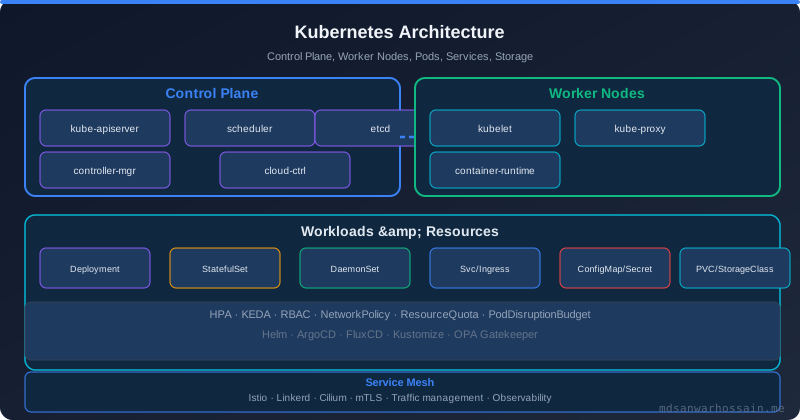
Kubernetes Role-Based Access Control (RBAC) was introduced in Kubernetes 1.6 and became stable in 1.8. It controls which subjects can perform which verbs on which resources within specified API groups. Before hardening anything, you must understand the four-dimensional access model precisely.
Subjects are the actors requesting access. There are three kinds:
- User: A human user authenticated by the cluster's identity provider (certificates, OIDC tokens, or static token files). Kubernetes itself does not manage user accounts — they are external identities.
- Group: A set of users. Cluster administrators commonly use groups like
system:masters(full cluster-admin),system:authenticated, andsystem:unauthenticated. Never grant broad permissions tosystem:authenticated. - ServiceAccount: A namespaced Kubernetes object representing an in-cluster identity for workloads (pods). Every pod runs as exactly one service account. This is the primary attack surface for in-cluster privilege escalation.
Verbs mirror HTTP methods and CRUD semantics: get, list, watch, create, update, patch, delete, deletecollection. Two additional meta-verbs are especially dangerous: bind (create bindings to roles) and escalate (modify roles to grant permissions you do not already have).
Roles vs ClusterRoles: A Role is namespaced — it grants permissions within a single namespace. A ClusterRole is cluster-scoped — it can grant permissions across all namespaces or for cluster-scoped resources like nodes, namespaces, clusterroles, and persistentvolumes. A RoleBinding binds a Role or ClusterRole to subjects within a namespace. A ClusterRoleBinding binds a ClusterRole to subjects cluster-wide. The most dangerous configuration is a ClusterRoleBinding granting a ClusterRole with * verbs on * resources — effectively cluster-admin for the bound subject.
The Over-Privileged Service Account Problem
Every namespace gets a default service account automatically. Unless you explicitly configure otherwise, pods not specifying a serviceAccountName run as default. Worse: prior to Kubernetes 1.24, the default service account had a long-lived secret token automatically created and mounted into every pod at /var/run/secrets/kubernetes.io/serviceaccount/token.
This is the attack vector the incident in the introduction exploited. The compromised container read the mounted token, authenticated to the Kubernetes API server, and discovered it had cluster-admin permissions. In Kubernetes 1.24+, service account tokens are no longer automatically created as Secrets (they are projected volumes with a shorter TTL), but the fundamental problem remains: any pod can call the API server using its mounted token unless explicitly blocked.
# How an attacker in a compromised pod enumerates access
# (from inside the container)
TOKEN=$(cat /var/run/secrets/kubernetes.io/serviceaccount/token)
APISERVER=https://kubernetes.default.svc
NAMESPACE=$(cat /var/run/secrets/kubernetes.io/serviceaccount/namespace)

# List all secrets in all namespaces (if cluster-admin or secrets/* binding exists)
curl -k -H "Authorization: Bearer $TOKEN" \
  "$APISERVER/api/v1/secrets"

# Enumerate what permissions this service account has
kubectl auth can-i --list --token=$TOKEN

# Fix: Disable token automounting at the namespace default service account level
# AND at the individual pod level
# Patch the default service account to disable auto-mounting in all new pods
# Apply to every namespace
kubectl patch serviceaccount default -n <namespace> \
-p '{"automountServiceAccountToken": false}'
# For existing pods, set automountServiceAccountToken: false in pod spec
apiVersion: v1
kind: Pod
spec:
automountServiceAccountToken: false # Explicitly deny token mounting
containers:
- name: app
image: myapp:latestPrinciple of Least Privilege: Designing Minimal Roles per Workload
Every microservice workload should have a dedicated service account with the minimum permissions it actually needs. Start by identifying what Kubernetes API resources each service genuinely calls at runtime — not what you think it might need, what it provably calls. Use audit logs or API server access logs to verify.
A typical Spring Boot microservice that reads its own ConfigMaps and occasionally creates Events for observability needs exactly this:
# 1. Dedicated service account — one per microservice, not shared
apiVersion: v1
kind: ServiceAccount
metadata:
  name: order-service-sa
  namespace: orders
  annotations:
    description: "Service account for order-service — read ConfigMaps, create Events only"
automountServiceAccountToken: false  # We will project the token explicitly when needed
---
# 2. Minimal Role — only what is provably needed
apiVersion: rbac.authorization.k8s.io/v1
kind: Role
metadata:
  name: order-service-role
  namespace: orders
rules:
  # Read own ConfigMaps for runtime configuration
  - apiGroups: [""]
    resources: ["configmaps"]
    verbs: ["get", "watch", "list"]
    resourceNames: ["order-service-config"]  # Scope to specific resource names!

  # Create Events for observability
  - apiGroups: [""]
    resources: ["events"]
    verbs: ["create", "patch"]

  # Read own pod info (for health checks via Downward API is preferred, but if API needed)
  - apiGroups: [""]
    resources: ["pods"]
    verbs: ["get"]
    resourceNames: []  # If specific pod names needed, list them; otherwise omit this rule
---
# 3. RoleBinding — binds Role to ServiceAccount in the SAME namespace
apiVersion: rbac.authorization.k8s.io/v1
kind: RoleBinding
metadata:
  name: order-service-rolebinding
  namespace: orders
subjects:
  - kind: ServiceAccount
    name: order-service-sa
    namespace: orders
roleRef:
  kind: Role
  name: order-service-role
  apiGroup: rbac.authorization.k8s.io
The resourceNames field is underused and highly effective — it scopes access to specific named objects rather than all resources of a type. A service that only needs to read its own ConfigMap should never be able to read other services' ConfigMaps in the same namespace.
Preventing Privilege Escalation: Escalate Verb, Bind Verb & Wildcard Anti-Patterns
Kubernetes RBAC has two privilege escalation prevention mechanisms built in, but both can be bypassed by misconfigured roles:
The escalate verb: Normally, a user cannot grant permissions they do not already have. If you try to create a Role or ClusterRole with permissions exceeding your own, the API server rejects it with a 403. However, a subject with the escalate verb on roles or clusterroles can bypass this check and create roles with any permissions. Never grant escalate to non-administrative subjects.
The bind verb: A subject with bind on rolebindings or clusterrolebindings can bind any role — including cluster-admin — to any subject. This is equivalent to granting cluster-admin to whoever has the bind permission. Treat bind on binding objects as equivalent to cluster-admin.
# DANGEROUS anti-patterns — never use in production service accounts

# Anti-pattern 1: Wildcard on resources
rules:
  - apiGroups: ["*"]
    resources: ["*"]       # Grants access to ALL resources
    verbs: ["*"]            # With ALL verbs — this is cluster-admin

# Anti-pattern 2: Wildcard on secrets
rules:
  - apiGroups: [""]
    resources: ["secrets"]
    verbs: ["*"]            # Can list ALL secrets, including TLS certs, API tokens

# Anti-pattern 3: Bind on ClusterRoleBindings (privilege escalation path)
rules:
  - apiGroups: ["rbac.authorization.k8s.io"]
    resources: ["clusterrolebindings"]
    verbs: ["create", "update", "bind"]  # Can grant cluster-admin to any subject

# Safe pattern: Explicitly list every verb and resource name
rules:
  - apiGroups: [""]
    resources: ["configmaps"]
    verbs: ["get"]
    resourceNames: ["my-service-config"]
Namespace Isolation: NetworkPolicies + RBAC Combined
RBAC controls the Kubernetes API plane — who can call the API server to create, read, or modify Kubernetes objects. NetworkPolicies control the data plane — which pods can communicate with which other pods over the network. Both must be configured together for genuine namespace isolation.
RBAC alone does not prevent a pod in namespace A from making HTTP calls to a pod in namespace B — it only prevents pod A's service account from calling the Kubernetes API to read namespace B's secrets. An attacker who has already compromised a pod with valid credentials can exfiltrate data over the network without touching the Kubernetes API at all.
# Combined RBAC + NetworkPolicy for strict namespace isolation

# Step 1: Default deny all ingress and egress in the namespace
apiVersion: networking.k8s.io/v1
kind: NetworkPolicy
metadata:
  name: default-deny-all
  namespace: payments
spec:
  podSelector: {}        # Applies to all pods in namespace
  policyTypes:
    - Ingress
    - Egress

---
# Step 2: Allow only specific cross-namespace communication
apiVersion: networking.k8s.io/v1
kind: NetworkPolicy
metadata:
  name: allow-orders-to-payments
  namespace: payments
spec:
  podSelector:
    matchLabels:
      app: payment-service
  policyTypes:
    - Ingress
  ingress:
    - from:
        - namespaceSelector:
            matchLabels:
              kubernetes.io/metadata.name: orders  # Only from orders namespace
          podSelector:
            matchLabels:
              app: order-service  # Only from order-service pods
      ports:
        - protocol: TCP
          port: 8080

---
# Step 3: RBAC — prevent order-service-sa from reading payments secrets
# (This is the default if you follow least-privilege; explicitly verify with can-i)
# kubectl auth can-i get secrets -n payments --as=system:serviceaccount:orders:order-service-sa
# Expected: no
IRSA on EKS: Pod Identity Without Node-Level IAM Roles
On Amazon EKS, workloads often need to access AWS services (S3, DynamoDB, SQS, Secrets Manager). The naive approach is to attach IAM policies to the EC2 node's instance profile — every pod on that node then inherits the permissions. This violates least privilege at the infrastructure level: a compromised pod on a node with broad S3 access can read the entire company's data.
IRSA (IAM Roles for Service Accounts) solves this with OIDC federation. The EKS cluster acts as an OIDC identity provider. A Kubernetes service account is annotated with an IAM role ARN. When a pod using that service account makes an AWS API call, the AWS SDK (via the Pod Identity Agent or projected token) exchanges the service account token for temporary IAM credentials scoped to that specific role.
# Step 1: Create the IAM OIDC provider for the EKS cluster
eksctl utils associate-iam-oidc-provider \
  --cluster my-cluster \
  --region us-east-1 \
  --approve

# Step 2: Create an IAM role with a trust policy scoped to the service account
# Trust policy (substitute your account ID, region, cluster OIDC ID, namespace, SA name)
cat > trust-policy.json <<'EOF'
{
  "Version": "2012-10-17",
  "Statement": [{
    "Effect": "Allow",
    "Principal": {
      "Federated": "arn:aws:iam::123456789012:oidc-provider/oidc.eks.us-east-1.amazonaws.com/id/EXAMPLED539D4633E53DE1B71EXAMPLE"
    },
    "Action": "sts:AssumeRoleWithWebIdentity",
    "Condition": {
      "StringEquals": {
        "oidc.eks.us-east-1.amazonaws.com/id/EXAMPLED539D4633E53DE1B71EXAMPLE:sub":
          "system:serviceaccount:orders:order-service-sa",
        "oidc.eks.us-east-1.amazonaws.com/id/EXAMPLED539D4633E53DE1B71EXAMPLE:aud":
          "sts.amazonaws.com"
      }
    }
  }]
}
EOF

aws iam create-role \
  --role-name order-service-role \
  --assume-role-policy-document file://trust-policy.json

# Step 3: Attach only the minimal IAM policy the service needs
aws iam attach-role-policy \
  --role-name order-service-role \
  --policy-arn arn:aws:iam::123456789012:policy/OrderServiceS3ReadPolicy

# Step 4: Annotate the Kubernetes service account with the IAM role ARN
kubectl annotate serviceaccount order-service-sa \
  -n orders \
  eks.amazonaws.com/role-arn=arn:aws:iam::123456789012:role/order-service-role

# Step 5: Pod deployment — credentials are injected automatically via projected token
# No changes to pod spec needed if Pod Identity Agent is installed
# Legacy IRSA: ensure AWS_ROLE_ARN and AWS_WEB_IDENTITY_TOKEN_FILE env vars are present
The critical security property of IRSA: even if a pod is compromised, the attacker obtains temporary credentials scoped to that specific IAM role with a 1-hour TTL. They cannot access resources outside the role's permission boundary. Rotating or deleting the IAM role immediately revokes access.
Workload Identity on GKE and AKS Equivalents
GKE Workload Identity operates on the same OIDC federation principle as IRSA. A Kubernetes service account is linked to a Google Cloud service account (GSA) using an IAM binding. The KSA's OIDC token is exchanged for a Google-signed credential scoped to the GSA.
# GKE Workload Identity setup
# 1. Enable Workload Identity on the cluster
gcloud container clusters update my-cluster \
  --workload-pool=my-project.svc.id.goog

# 2. Create a GCP service account with minimal permissions
gcloud iam service-accounts create order-service-gsa \
  --project=my-project

gcloud projects add-iam-policy-binding my-project \
  --member="serviceAccount:order-service-gsa@my-project.iam.gserviceaccount.com" \
  --role="roles/storage.objectViewer"   # Only what is needed

# 3. Bind the Kubernetes service account to the GSA
gcloud iam service-accounts add-iam-policy-binding \
  order-service-gsa@my-project.iam.gserviceaccount.com \
  --role roles/iam.workloadIdentityUser \
  --member "serviceAccount:my-project.svc.id.goog[orders/order-service-sa]"

# 4. Annotate the Kubernetes service account
kubectl annotate serviceaccount order-service-sa \
  -n orders \
  iam.gke.io/gcp-service-account=order-service-gsa@my-project.iam.gserviceaccount.com
AKS Workload Identity (GA since 2023) uses Azure Active Directory (Entra ID) and federated credentials. The pattern is identical: a Kubernetes service account is federated to an Azure Managed Identity, and pods receive OIDC tokens that the Azure Identity SDK exchanges for Azure credentials. Configure with --enable-workload-identity on the AKS cluster and annotate the service account with azure.workload.identity/client-id.
Kubernetes Audit Logging: Capturing and Analysing RBAC Decisions
Kubernetes audit logging records every request to the API server — including the identity of the requester, the verb, resource, namespace, and whether the request was allowed or denied. Audit logs are the primary forensic tool for detecting RBAC breaches and misconfigured bindings.
# Audit policy — log RBAC-relevant events at RequestResponse level
# Deploy as /etc/kubernetes/audit-policy.yaml on kube-apiserver nodes
apiVersion: audit.k8s.io/v1
kind: Policy
omitStages:
  - "RequestReceived"
rules:
  # Log all access to secrets at RequestResponse (capture the actual data)
  - level: Metadata
    resources:
      - group: ""
        resources: ["secrets"]

  # Log all RBAC operations — catch privilege escalation attempts
  - level: RequestResponse
    resources:
      - group: "rbac.authorization.k8s.io"
        resources: ["roles", "clusterroles", "rolebindings", "clusterrolebindings"]

  # Log service account token requests — detect stolen credential use
  - level: Request
    resources:
      - group: "authentication.k8s.io"
        resources: ["tokenreviews"]

  # Log exec and port-forward — common lateral movement techniques
  - level: RequestResponse
    verbs: ["create"]
    resources:
      - group: ""
        resources: ["pods/exec", "pods/portforward", "pods/attach"]

  # Minimal logging for read-only operations on common resources
  - level: Metadata
    verbs: ["get", "list", "watch"]
    resources:
      - group: ""
        resources: ["pods", "services", "endpoints"]

  # Log everything else at Metadata level
  - level: Metadata
# kube-apiserver flags to enable audit logging
--audit-log-path=/var/log/kubernetes/audit/audit.log
--audit-policy-file=/etc/kubernetes/audit-policy.yaml
--audit-log-maxage=30
--audit-log-maxbackup=10
--audit-log-maxsize=100
# Detect suspicious RBAC activity with jq — unauthorised secret enumeration
cat /var/log/kubernetes/audit/audit.log | \
jq -r 'select(.objectRef.resource=="secrets" and .verb=="list") |
[.requestReceivedTimestamp, .user.username, .user.groups[], .objectRef.namespace // "ALL"] |
@csv'
# Alert: Any non-system service account listing secrets across namespaces
cat /var/log/kubernetes/audit/audit.log | \
jq -r 'select(.objectRef.resource=="secrets" and .verb=="list" and
(.user.username | startswith("system:serviceaccount")) and
(.objectRef.namespace == null)) |
.user.username + " listed ALL secrets at " + .requestReceivedTimestamp'RBAC Hardening Tools: kubectl, rbac-police, kube-bench, OPA Gatekeeper
Manual RBAC review does not scale. Use these tools as part of your security pipeline:
kubectl auth can-i is the first tool to reach for. Test what a specific identity can do before and after policy changes:
# Test if order-service-sa can list secrets in payments namespace
kubectl auth can-i list secrets -n payments \
  --as=system:serviceaccount:orders:order-service-sa
# Expected: no

# Test all permissions for a service account
kubectl auth can-i --list -n orders \
  --as=system:serviceaccount:orders:order-service-sa

# Test from a specific pod's perspective
kubectl exec -it <pod> -n orders -- \
  kubectl auth can-i list secrets --token=$(cat /var/run/secrets/kubernetes.io/serviceaccount/token)
rbac-police (Lightspin): A static analyser that evaluates your cluster's RBAC configuration against a rule set of known dangerous permission combinations. It flags patterns like: service accounts with secrets/list cluster-wide, subjects with escalate or bind, and any subject bound to cluster-admin.
kube-bench (Aqua Security): Runs CIS Kubernetes Benchmark checks. Section 5 covers RBAC-specific checks including verifying that the system:anonymous user has no bindings, that system:unauthenticated group is not granted unnecessary access, and that no service accounts have cluster-admin bindings.
OPA Gatekeeper: Policy enforcement using Open Policy Agent. Define ConstraintTemplates that prevent misconfigured RBAC resources from ever being created:
# OPA Gatekeeper ConstraintTemplate — block ClusterRoleBindings to cluster-admin
# except for explicitly whitelisted subjects
apiVersion: templates.gatekeeper.sh/v1
kind: ConstraintTemplate
metadata:
  name: noclusteradminbinding
spec:
  crd:
    spec:
      names:
        kind: NoClusterAdminBinding
  targets:
    - target: admission.k8s.gatekeeper.sh
      rego: |
        package noclusteradminbinding
        violation[{"msg": msg}] {
          input.review.kind.kind == "ClusterRoleBinding"
          input.review.object.roleRef.name == "cluster-admin"
          subject := input.review.object.subjects[_]
          not is_allowed_subject(subject)
          msg := sprintf("ClusterRoleBinding to cluster-admin is not allowed for subject: %v", [subject.name])
        }
        is_allowed_subject(subject) {
          allowed_subjects := {"cluster-admin-group", "kube-system-admin"}
          allowed_subjects[subject.name]
        }
---
# Instantiate the constraint
apiVersion: constraints.gatekeeper.sh/v1beta1
kind: NoClusterAdminBinding
metadata:
  name: no-cluster-admin-binding
spec:
  enforcementAction: deny
Common RBAC Misconfigurations and Their CVEs
Understanding real CVEs grounds the hardening work in tangible risk:
- CVE-2018-1002105 (CVSS 9.8 — Critical): An unauthenticated user could send a specially crafted request to upgrade a connection and then send arbitrary requests to backend APIs through the aggregated API server. Mitigation: RBAC alone is insufficient — keep kube-apiserver patched; this required a Kubernetes version update.
- CVE-2020-8558: A misconfigured
hostNetwork: truepod combined with overly permissive RBAC allowed lateral movement to the node's local API server port, bypassing network policies. Mitigation: prohibithostNetworkvia OPA or PodSecurity admission, combined with strict RBAC. - Wildcard ClusterRoleBindings: Not a single CVE but the root cause of the incident described in this post's introduction. Any
ClusterRoleBindinggrantingresources: ["*"]andverbs: ["*"]to a non-system subject is effectively a backdoor. Audit with:kubectl get clusterrolebindings -o json | jq '.items[] | select(.roleRef.name == "cluster-admin") | .subjects' - Helm default service account bindings: Older Helm versions (Helm 2's Tiller) required cluster-admin to operate. Many organisations still have legacy Tiller service accounts with cluster-admin bindings. Audit for them:
kubectl get clusterrolebindings | grep tiller
"A Kubernetes cluster's RBAC configuration is only as strong as its weakest ClusterRoleBinding. Every permissive binding you create during a debugging session is a future breach waiting to happen. Treat RBAC changes with the same rigour as production code changes — peer review, audit trail, time-boxed credentials."
The Misconfigured ClusterRoleBinding Failure Scenario: A developer debugging a pod in production runs kubectl create clusterrolebinding debug-admin --clusterrole=cluster-admin --serviceaccount=production:debug-sa to speed up troubleshooting. The pod gets fixed, the developer forgets the binding. Six months later, a supply chain attack compromises the container image used in that namespace. The attacker's code reads the mounted token, calls the API server, and has cluster-admin. Within minutes, all secrets across all namespaces are exfiltrated. Defence: OPA Gatekeeper blocks the ClusterRoleBinding creation; CI/CD pipelines scan manifests for wildcard permissions before apply; periodic audit jobs run kubectl get clusterrolebindings and alert on unexpected entries.
Key Takeaways
- One service account per microservice, never share. Sharing service accounts means a breach of one service compromises all services sharing that identity. Create dedicated, narrowly scoped service accounts for every workload.
- Disable
automountServiceAccountTokenby default. Patch everydefaultservice account in every namespace toautomountServiceAccountToken: false. Set it explicitly at the pod spec level for any pod that actually needs API access. - Use
resourceNamesto scope access to specific objects. A service that reads one ConfigMap should never be able to read all ConfigMaps in the namespace. This single change eliminates a huge class of lateral movement opportunities. - Never grant
escalate,bind, or wildcards to workload service accounts. These are cluster-admin equivalents. Treat any role containing these verbs as a critical security finding. - RBAC and NetworkPolicies are complementary, not alternatives. RBAC secures the API plane; NetworkPolicies secure the data plane. Deploy default-deny NetworkPolicies in every namespace and add explicit allow rules.
- Use IRSA (EKS), Workload Identity (GKE/AKS) instead of node-level IAM. Never attach broad cloud IAM permissions to the node. Scope cloud credentials to individual service accounts with short-lived tokens.
- Enable audit logging with an RBAC-focused policy and forward logs to your SIEM. Alert on: service accounts listing secrets cluster-wide, new ClusterRoleBindings, and
pods/execin production namespaces. - Automate RBAC governance with OPA Gatekeeper. Prevention at admission time is infinitely more effective than detection after the fact. Block wildcard bindings, enforce naming conventions, and require peer approval for ClusterRole changes.
Leave a Comment
Related Posts

Software Engineer · Java · Spring Boot · Microservices