Advanced Kubernetes: Resource Management and Scheduling for Production Clusters
Default Kubernetes resource settings work in a dev cluster. In production — running 200+ microservices across multi-AZ node pools — misconfigured requests, missing QoS guarantees, and naive scheduling decisions cause noisy-neighbor interference, unpredictable evictions, and cascading failures under load. This guide covers the advanced scheduling and resource management techniques that distinguish a production-grade cluster from a demo environment.
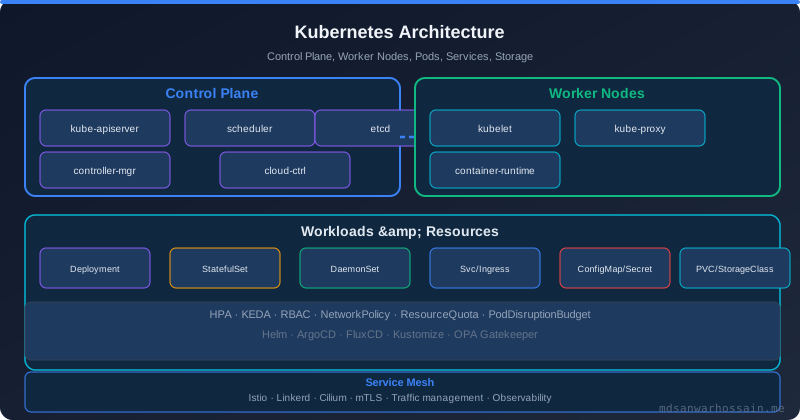
Table of Contents
- Real-World Problem: Noisy Neighbours and Eviction Storms
- QoS Classes: Guaranteed, Burstable, BestEffort
- Resource Rightsizing with VPA and Metrics
- Priority Classes and Preemption
- Topology-Aware Scheduling and Pod Spread
- Node Affinity, Taints, Tolerations, and Pod Affinity
- Failure Scenarios and Debugging
- Optimization Techniques
- Trade-offs and When NOT to Over-Engineer Scheduling
- Key Takeaways
1. Real-World Problem: Noisy Neighbours and Eviction Storms
A fintech platform running 180 microservices on a 40-node EKS cluster began experiencing intermittent payment processing latency spikes every Tuesday at 09:00 UTC. Root cause analysis revealed that a batch analytics job — deployed without resource limits — was consuming 90% of CPU on 12 nodes, starving payment-critical pods. The analytics job had no PriorityClass, same namespace as payment services, and nodes lacked taints.
Kubernetes did not evict the analytics pods because they were declared BestEffort — meaning no requests set — so the kubelet's eviction manager saw them as already using zero requested resources. The payment pods, despite having requests set, were starved at the Linux cgroups level because actual CPU usage was uncapped for the analytics pods.
2. QoS Classes: Guaranteed, Burstable, BestEffort
Kubernetes assigns one of three Quality of Service classes to every pod, determining eviction priority under node memory pressure:
- Guaranteed: Every container in the pod has equal requests and limits set for both CPU and memory. These pods are the last evicted. Use for latency-critical services: payment processors, order management, session stores.
- Burstable: At least one container has requests set, but requests ≠ limits. These pods can burst when capacity is available, but risk eviction under pressure. Use for most stateless microservices that have variable traffic patterns.
- BestEffort: No requests or limits set on any container. Evicted first. Only acceptable for fault-tolerant batch jobs that are idempotent and can restart without consequence.
# Guaranteed QoS — payment-service
resources:
  requests:
    cpu: "500m"
    memory: "512Mi"
  limits:
    cpu: "500m"      # Must equal requests for Guaranteed
    memory: "512Mi"  # Must equal requests for Guaranteed

# Burstable QoS — notification-service (variable load)
resources:
  requests:
    cpu: "100m"
    memory: "256Mi"
  limits:
    cpu: "2000m"     # Can burst 20x on CPU
    memory: "512Mi"  # Memory limit = 2x request
Critical nuance — memory limits kill pods immediately: Unlike CPU throttling (which slows the pod), exceeding the memory limit triggers an OOMKill. Set memory limits conservatively — at least 2× the p99 observed usage. Insufficient memory limits cause unpredictable OOMKill storms during traffic peaks, which look like "random" pod crashes in logs.
3. Resource Rightsizing with VPA and Metrics
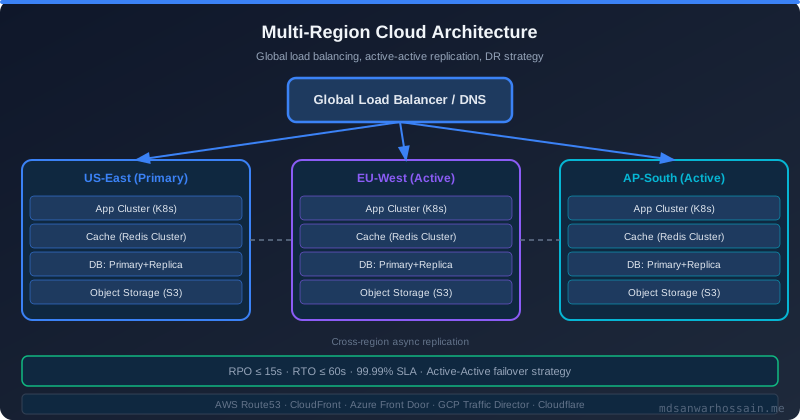
Static resource requests set at deployment time become stale as services evolve. A service that handled 1000 RPS at launch may handle 10× that 18 months later with the same YAML. The Vertical Pod Autoscaler (VPA) continuously monitors actual CPU and memory usage and recommends (or automatically applies) updated requests.
apiVersion: autoscaling.k8s.io/v1
kind: VerticalPodAutoscaler
metadata:
  name: payment-service-vpa
  namespace: production
spec:
  targetRef:
    apiVersion: apps/v1
    kind: Deployment
    name: payment-service
  updatePolicy:
    updateMode: "Off"   # Recommendation-only; use "Auto" only after thorough testing
  resourcePolicy:
    containerPolicies:
      - containerName: payment-service
        minAllowed:
          cpu: 100m
          memory: 128Mi
        maxAllowed:
          cpu: 4000m
          memory: 4Gi
        controlledResources: ["cpu", "memory"]
VPA in production: Use updateMode: "Off" (recommendations only) initially and review kubectl describe vpa payment-service-vpa recommendations weekly. Apply changes during maintenance windows. VPA Auto mode restarts pods to apply new requests — dangerous for stateful or low-replica deployments. VPA and HPA are incompatible on the same metric (CPU) — use HPA for horizontal scaling and VPA for rightsizing only.
4. Priority Classes and Preemption
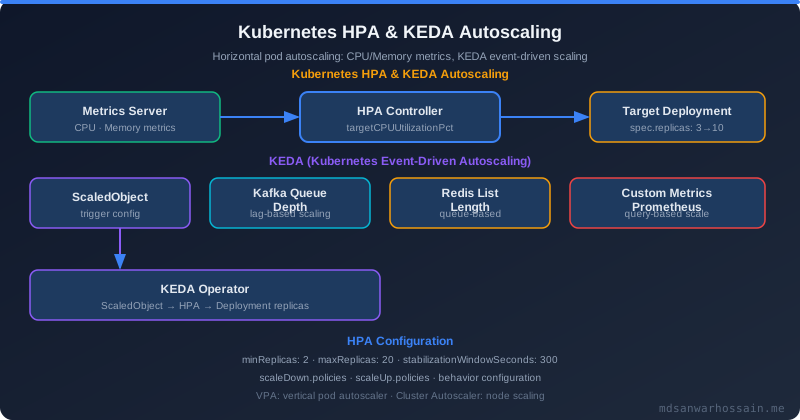
Priority classes determine scheduling order and preemption behaviour. When a high-priority pod can't be scheduled due to insufficient cluster capacity, the Kubernetes scheduler will evict lower-priority pods to make room — this is preemption. Without priority classes, a batch job submitted at the wrong moment can prevent a critical payment service from scaling up during a traffic spike.
# Three-tier priority model for production
---
apiVersion: scheduling.k8s.io/v1
kind: PriorityClass
metadata:
  name: critical-production
value: 1000000
globalDefault: false
preemptionPolicy: PreemptLowerPriority
description: "Payment, Auth, Order services — never preempted"
---
apiVersion: scheduling.k8s.io/v1
kind: PriorityClass
metadata:
  name: standard-production
value: 100000
globalDefault: true
preemptionPolicy: PreemptLowerPriority
description: "Standard microservices"
---
apiVersion: scheduling.k8s.io/v1
kind: PriorityClass
metadata:
  name: batch-low
value: 1000
globalDefault: false
preemptionPolicy: Never   # Batch jobs never preempt others
description: "Analytics, reporting, non-urgent batch jobs"
Preemption anti-pattern: Setting preemptionPolicy: PreemptLowerPriority on batch jobs causes production outages when cluster capacity is tight. A batch job preempting a live notification service causes real user-facing failures. Always use preemptionPolicy: Never for batch and analytics workloads.
critical-production (1,000,000) → Payment, Auth, Gateway
standard-production (100,000) → All other live services
batch-low (1,000) → Analytics, ETL, reports
Eviction order under pressure (lowest priority first):
BestEffort pods → batch-low pods → standard-production Burstable
critical-production Guaranteed → never evicted
5. Topology-Aware Scheduling and Pod Spread Constraints
In a multi-AZ cluster, naive scheduling can place all replicas of a critical service in a single availability zone. An AZ outage then takes the entire service down, even though you have 6 replicas. topologySpreadConstraints enforce even distribution across zones, racks, or nodes.
spec:
  topologySpreadConstraints:
    # Spread across AZs — at most 1 replica skew between zones
    - maxSkew: 1
      topologyKey: topology.kubernetes.io/zone
      whenUnsatisfiable: DoNotSchedule   # Hard constraint
      labelSelector:
        matchLabels:
          app: payment-service
    # Spread across nodes — no two replicas on same node
    - maxSkew: 1
      topologyKey: kubernetes.io/hostname
      whenUnsatisfiable: ScheduleAnyway  # Soft constraint
      labelSelector:
        matchLabels:
          app: payment-service
  # Combine with minReadySeconds to prevent thundering herd
  minReadySeconds: 10
whenUnsatisfiable: DoNotSchedule vs. ScheduleAnyway: Use DoNotSchedule (hard) for AZ spread on critical services — prefer pending over unbalanced placement. Use ScheduleAnyway (soft) for node-level spread to avoid pending pods when a node pool is transiently undersized during cluster scale-out.
6. Node Affinity, Taints, Tolerations, and Pod Affinity
Node Affinity for Workload Isolation
Production clusters typically have heterogeneous node pools: general-purpose nodes, compute-optimized nodes (for ML inference), memory-optimized nodes (for in-memory caches), and spot/preemptible nodes (for batch). Node affinity routes workloads to the correct pool.
affinity:
  nodeAffinity:
    # Hard requirement: must run on memory-optimized nodes
    requiredDuringSchedulingIgnoredDuringExecution:
      nodeSelectorTerms:
        - matchExpressions:
            - key: node.kubernetes.io/instance-type
              operator: In
              values: ["r5.4xlarge", "r5.8xlarge"]
    # Soft preference: prefer nodes in us-east-1a
    preferredDuringSchedulingIgnoredDuringExecution:
      - weight: 80
        preference:
          matchExpressions:
            - key: topology.kubernetes.io/zone
              operator: In
              values: ["us-east-1a"]
Taints and Tolerations for Dedicated Node Pools
Taints prevent pods from being scheduled on nodes unless they explicitly tolerate the taint. This creates a "dedicated" pool pattern — GPU nodes tainted with nvidia.com/gpu=present:NoSchedule ensure only ML inference pods land there, preventing general workloads from consuming expensive GPU instances.
# Node: taint applied by cluster admin
kubectl taint nodes gpu-node-01 nvidia.com/gpu=present:NoSchedule

# Pod: must declare toleration
tolerations:
  - key: "nvidia.com/gpu"
    operator: "Equal"
    value: "present"
    effect: "NoSchedule"

# Spot node pool taint — batch jobs tolerate spot eviction
kubectl taint nodes spot-node-01 cloud.google.com/gke-spot=true:NoSchedule

tolerations:
  - key: "cloud.google.com/gke-spot"
    operator: "Equal"
    value: "true"
    effect: "NoSchedule"
Inter-Pod Affinity for latency-sensitive co-location: A caching tier (Redis) and the services that query it benefit from co-location on the same node to eliminate network hops. Use podAffinity with preferredDuringScheduling to co-locate cache sidecars with their consumers without hard-blocking scheduling.
7. Failure Scenarios and Debugging
Failure: Pending Pods with "Insufficient CPU"
Pods stuck in Pending with event 0/40 nodes are available: 40 Insufficient cpu indicates the cluster has no node with enough allocatable CPU headroom for the requested amount. Allocatable CPU = node capacity minus system-reserved minus kubelet-reserved minus already-scheduled requests. A node with 8 vCPUs may only have 6.5 allocatable after OS and system daemon reservations.
# Diagnose scheduling failures
kubectl describe pod <pending-pod> | grep -A20 Events
kubectl get nodes -o custom-columns=\
  "NAME:.metadata.name,\
   CPU_ALLOCATABLE:.status.allocatable.cpu,\
   MEM_ALLOCATABLE:.status.allocatable.memory"

# Check actual resource pressure per node
kubectl top nodes
kubectl describe node <node-name> | grep -A10 "Allocated resources"
Failure: OOMKilled Pods After Traffic Surge
JVM-based services often have high GC memory overhead during full GC cycles — actual RSS can spike 3× request memory for several hundred milliseconds. Memory limits that are 1.5× requests are too tight for JVM workloads. Use limits of 2.5–3× requests for Java services, and configure JVM heap to be approximately 60–70% of the memory request (-Xmx at 60% of request, not 60% of limit).
Failure: Topology Spread Deadlock
A 6-replica deployment with maxSkew:1 and whenUnsatisfiable:DoNotSchedule across 3 AZs (2 replicas per zone) becomes stuck when one AZ loses all nodes. The scheduler cannot place the 2 evicted replicas into the remaining 2 AZs (doing so would create a skew of 2, violating the constraint). Mitigation: use whenUnsatisfiable:ScheduleAnyway as the fallback, or use a 2-AZ topology key combined with a node-level hard constraint.
8. Optimization Techniques
- Bin-packing vs. spreading: The default scheduler spreads pods across nodes (least-requested). For cost optimization (maximizing spot node utilization before scaling out), enable the
MostAllocatedscoring plugin or use Karpenter's bin-packing consolidation to reduce node count. - ResourceQuota per namespace: Prevent runaway namespaces from consuming disproportionate cluster resources. Set CPU and memory quotas per team namespace, with LimitRange defaults so unset requests default to safe values.
- Descheduler: The Kubernetes Descheduler runs as a CronJob and evicts pods that violate current policy (pods on over-utilized nodes, pods violating spread constraints after node additions). This rebalances the cluster without manual intervention.
- Cluster Autoscaler vs. Karpenter: Cluster Autoscaler is reactive (waits for Pending pods, then adds nodes). Karpenter is proactive and provisions exactly-sized nodes for the pending workload. For mixed instance type strategies and spot optimization, Karpenter is significantly more efficient.
- Startup and readiness probes with correct thresholds: Incorrect
initialDelaySecondscauses premature readiness failures and pod restarts, keeping replicas in an unavailable state during scaling events — amplifying the traffic impact of a latency spike.
9. Trade-offs and When NOT to Over-Engineer Scheduling
- Don't hard-constrain every service: Aggressive
requiredDuringSchedulingaffinity rules on non-critical services causes scheduling failures when node pools are temporarily undersized. Reserve hard constraints for genuinely critical, compliance-mandated, or cost-sensitive workloads. - Priority class sprawl: More than 4–5 priority classes create complexity without proportional benefit. Start with three (critical, standard, batch) and add only when clearly justified.
- VPA Auto mode risks: VPA Auto restarts pods to update requests. For stateful services with long startup times (JVM warm-up), this creates outages. Never use VPA Auto on single-replica deployments or pods without proper readiness probes.
- Topology spread + cluster autoscaler conflicts: Hard spread constraints across 3 AZs require the autoscaler to add nodes in the correct AZ. If the target AZ's node pool is at quota, pods stay pending indefinitely. Always set cloud provider node group targets per-AZ, not cluster-wide.
10. Key Takeaways
- CPU requests govern scheduling; CPU limits govern cgroups throttling. A pod without a limit can exhaust a node regardless of low requests.
- QoS class (Guaranteed → Burstable → BestEffort) determines eviction priority under memory pressure — set requests and limits deliberately.
- Priority classes with
preemptionPolicy:Neveron batch workloads prevent preemption-induced production outages. topologySpreadConstraintsenforce AZ/node distribution more reliably thanpodAntiAffinityfor large deployments.- Use VPA in recommendation mode to right-size requests; never use VPA Auto on low-replica or stateful services.
- Karpenter outperforms Cluster Autoscaler for heterogeneous instance type strategies and spot/on-demand mixed pools.
- The Kubernetes Descheduler corrects scheduling drift without requiring pod restarts by cluster operators.
Conclusion
Advanced Kubernetes scheduling is not about applying every feature — it is about understanding the mechanisms deeply enough to apply each one where it genuinely reduces risk or cost. Start by establishing QoS class discipline (every container must have requests set), add a three-tier priority class model, and implement AZ spread constraints on critical services. Then use VPA recommendations to right-size requests over time.
The operational investment in these patterns pays dividends during the incidents that matter most: AZ failures, traffic surges, and cost-driven cluster consolidations. A cluster that is well-configured for resource management self-heals far more gracefully than one running on default settings.
Leave a Comment
Related Posts

Software Engineer · Java · Spring Boot · Microservices