Load Testing Spring Boot with k6 & Gatling: Benchmarking APIs Under Real Traffic
Your Spring Boot API passes all unit and integration tests — but how does it behave when 1,000 users hit it simultaneously? Load testing bridges the gap between a green CI pipeline and production confidence. With k6 and Gatling, you can benchmark your APIs under realistic traffic, catch bottlenecks before they become incidents, and validate SLOs with hard data.
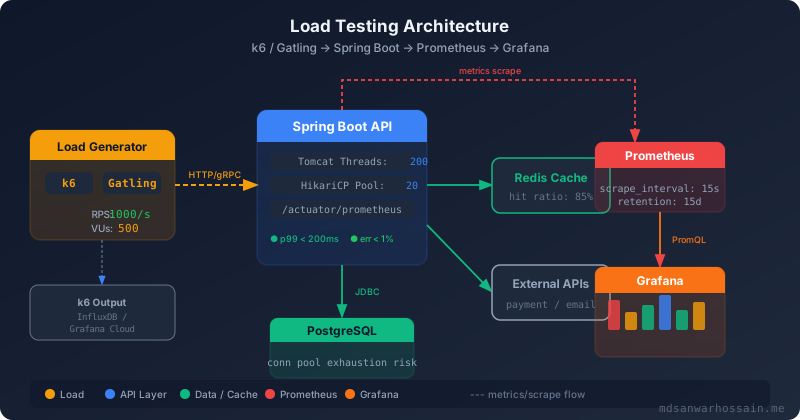
Table of Contents
- Why Load Testing is Critical Before Production Deployment
- Getting Started with k6 for Spring Boot APIs
- Advanced k6: Scenarios, Checks & Thresholds
- Gatling for Java Engineers: Simulation DSL
- Interpreting Results: Bottleneck Identification
- Integrating Load Tests in CI/CD Pipelines
- Spring Boot Optimization Based on Load Test Results
1. Why Load Testing is Critical Before Production Deployment
In 2023, a major e-commerce platform's Black Friday deployment failed within 11 minutes of go-live. The culprit? A perfectly functioning checkout API that had never been tested beyond 50 concurrent users. Under 800 concurrent shoppers it exhausted its HikariCP connection pool in 40 seconds, triggering a cascade that brought down order, inventory, and notification services simultaneously.
The distinction between test types matters at 2 AM during an incident:
| Test Type | Goal | Pattern | When to Run |
|---|---|---|---|
| Load Test | Validate SLOs at expected peak | Ramp to target, hold 30 min | Before every release |
| Stress Test | Find breaking point | Increase load until failure | Capacity planning |
| Spike Test | Detect sudden traffic surge handling | Instant 10× load for 60 s | Marketing campaigns |
| Soak Test | Uncover memory leaks, slow degradation | Moderate load for 8–24 h | Monthly regression |
Define your SLOs as load test thresholds before writing a single script. A concrete target: p99 latency < 200 ms at 1,000 RPS with an error rate below 0.5%. Everything else flows from that definition.
| Tool | Language | Runtime | Reporting | Best For |
|---|---|---|---|---|
| k6 | JavaScript/TS | Go | Grafana / InfluxDB | Cloud-native, DevOps teams |
| Gatling | Scala / Java | JVM / Akka | HTML (built-in) | Java teams, Maven/Gradle CI |
| JMeter | XML / GUI | JVM | Dashboard plugin | Legacy enterprise, GUI users |
2. Getting Started with k6 for Spring Boot APIs
Install k6 in seconds on any platform. On macOS/Linux:
# macOS
brew install k6

# Linux (Debian/Ubuntu)
sudo gpg -k
sudo gpg --no-default-keyring \
  --keyring /usr/share/keyrings/k6-archive-keyring.gpg \
  --keyserver hkp://keyserver.ubuntu.com:80 \
  --recv-keys C5AD17C747E3415A3642D57D77C6C491D6AC1D69
echo "deb [signed-by=/usr/share/keyrings/k6-archive-keyring.gpg] \
  https://dl.k6.io/deb stable main" | sudo tee /etc/apt/sources.list.d/k6.list
sudo apt-get update && sudo apt-get install k6

# Docker (no install required)
docker run --rm -i grafana/k6 run - <script.js
Here is a complete first k6 script targeting a Spring Boot REST API. It ramps up to 100 virtual users, holds for 1 minute, and enforces p95 and error-rate thresholds:
// k6-springboot-baseline.js
import http from 'k6/http';
import { check, sleep } from 'k6';
import { Rate } from 'k6/metrics';

const BASE_URL = __ENV.BASE_URL || 'http://localhost:8080';
const errorRate = new Rate('errors');

export const options = {
  stages: [
    { duration: '30s', target: 20  },  // warm-up
    { duration: '1m',  target: 100 },  // ramp to 100 VUs
    { duration: '2m',  target: 100 },  // hold at 100 VUs
    { duration: '30s', target: 0   },  // ramp down
  ],
  thresholds: {
    'http_req_duration': ['p(95)<500', 'p(99)<1000'],
    'http_req_failed':   ['rate<0.01'],  // <1% error rate
    'errors':            ['rate<0.01'],
  },
};

export default function () {
  const res = http.get(`${BASE_URL}/api/v1/products`, {
    headers: { 'Accept': 'application/json' },
  });

  const ok = check(res, {
    'status is 200': (r) => r.status === 200,
    'response time < 500ms': (r) => r.timings.duration < 500,
    'has products array': (r) => JSON.parse(r.body).length > 0,
  });

  errorRate.add(!ok);
  sleep(1);
}
Run it and generate an HTML report:
# Run against local Spring Boot
k6 run --out json=results.json k6-springboot-baseline.js

# Generate HTML report (k6 v0.49+)
k6 run --out web-dashboard k6-springboot-baseline.js

# Run against staging with env variable
BASE_URL=https://staging.myapp.com k6 run k6-springboot-baseline.js

# Export to InfluxDB for Grafana
k6 run --out influxdb=http://localhost:8086/k6 k6-springboot-baseline.js
3. Advanced k6: Scenarios, Checks & Thresholds
Real APIs require multiple concurrent user journeys. k6 scenarios let you model this precisely, each with independent executors, VU pools, and thresholds. The following script simulates anonymous browsing, authenticated checkout, and a background admin polling job simultaneously:
// k6-advanced-scenarios.js
import http from 'k6/http';
import { check, sleep, group } from 'k6';
import { Counter, Trend } from 'k6/metrics';

const BASE_URL = __ENV.BASE_URL || 'http://localhost:8080';
const loginErrors  = new Counter('login_errors');
const checkoutTime = new Trend('checkout_duration', true);

export const options = {
  scenarios: {
    browse: {
      executor: 'ramping-vus',
      startVUs: 0,
      stages: [
        { duration: '30s', target: 50  },
        { duration: '2m',  target: 200 },
        { duration: '30s', target: 0   },
      ],
      exec: 'browseScenario',
    },
    checkout: {
      executor: 'constant-vus',
      vus: 20,
      duration: '3m',
      exec: 'checkoutScenario',
      startTime: '30s',
    },
    adminPoll: {
      executor: 'constant-arrival-rate',
      rate: 5,
      timeUnit: '1s',
      duration: '3m',
      preAllocatedVUs: 5,
      exec: 'adminScenario',
    },
  },
  thresholds: {
    'http_req_duration{scenario:browse}':    ['p(95)<300'],
    'http_req_duration{scenario:checkout}':  ['p(95)<800'],
    'checkout_duration':                      ['p(99)<2000'],
    'login_errors':                           ['count<5'],
    'http_req_failed':                        ['rate<0.005'],
  },
};

function getAuthToken() {
  const res = http.post(`${BASE_URL}/api/auth/login`,
    JSON.stringify({ username: 'testuser', password: 'Test@1234' }),
    { headers: { 'Content-Type': 'application/json' } }
  );
  if (res.status !== 200) { loginErrors.add(1); return null; }
  return JSON.parse(res.body).accessToken;
}

export function browseScenario() {
  group('browse products', () => {
    const r = http.get(`${BASE_URL}/api/v1/products?page=0&size=20`);
    check(r, { 'products 200': (res) => res.status === 200 });
    sleep(2);

    const products = JSON.parse(r.body).content || [];
    if (products.length > 0) {
      const detail = http.get(`${BASE_URL}/api/v1/products/${products[0].id}`);
      check(detail, { 'detail 200': (res) => res.status === 200 });
    }
  });
  sleep(1);
}

export function checkoutScenario() {
  const token = getAuthToken();
  if (!token) { sleep(2); return; }

  const headers = {
    'Authorization': `Bearer ${token}`,
    'Content-Type': 'application/json',
  };

  const start = Date.now();
  const order = http.post(
    `${BASE_URL}/api/v1/orders`,
    JSON.stringify({ productId: 42, quantity: 1 }),
    { headers }
  );
  checkoutTime.add(Date.now() - start);
  check(order, { 'order created': (r) => r.status === 201 });
  sleep(3);
}

export function adminScenario() {
  const r = http.get(`${BASE_URL}/actuator/health`);
  check(r, { 'health UP': (res) => res.status === 200 });
}
4. Gatling for Java Engineers: Simulation DSL
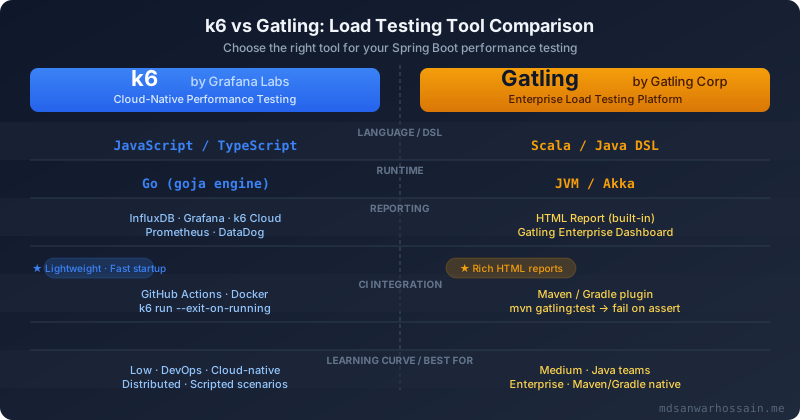
For Java teams, Gatling integrates directly into Maven/Gradle workflows. Add the dependency and plugin to your pom.xml:
<!-- pom.xml -->
<dependency>
  <groupId>io.gatling.highcharts</groupId>
  <artifactId>gatling-charts-highcharts</artifactId>
  <version>3.11.5</version>
  <scope>test</scope>
</dependency>

<plugin>
  <groupId>io.gatling</groupId>
  <artifactId>gatling-maven-plugin</artifactId>
  <version>4.9.6</version>
  <configuration>
    <simulationClass>simulations.ProductApiSimulation</simulationClass>
    <failOnError>true</failOnError>
  </configuration>
</plugin>
A complete Gatling Simulation in Java using the Java DSL (Gatling 3.9+):
// src/test/java/simulations/ProductApiSimulation.java
package simulations;

import io.gatling.javaapi.core.*;
import io.gatling.javaapi.http.*;
import static io.gatling.javaapi.core.CoreDsl.*;
import static io.gatling.javaapi.http.HttpDsl.*;

public class ProductApiSimulation extends Simulation {

    private static final String BASE_URL =
        System.getProperty("baseUrl", "http://localhost:8080");

    // CSV feeder: id,name columns
    FeederBuilder<String> productFeeder =
        csv("products.csv").circular();

    HttpProtocolBuilder httpProtocol = http
        .baseUrl(BASE_URL)
        .acceptHeader("application/json")
        .contentTypeHeader("application/json")
        .userAgentHeader("Gatling/3.11 LoadTest")
        .shareConnections();

    // Auth chain — obtain JWT, store in session
    ChainBuilder authenticate = exec(
        http("Login")
            .post("/api/auth/login")
            .body(StringBody("""
                {"username":"testuser","password":"Test@1234"}
                """))
            .check(status().is(200))
            .check(jsonPath("$.accessToken").saveAs("token"))
    );

    // Browse products scenario
    ScenarioBuilder browseProducts = scenario("Browse Products")
        .feed(productFeeder)
        .exec(
            http("List Products")
                .get("/api/v1/products?page=0&size=20")
                .check(status().is(200))
                .check(jsonPath("$.totalElements").gt("0"))
        )
        .pause(2)
        .exec(
            http("Get Product Detail")
                .get("/api/v1/products/#{id}")
                .check(status().is(200))
                .check(responseTimeInMillis().lte(300))
        )
        .pause(1);

    // Authenticated checkout scenario
    ScenarioBuilder checkout = scenario("Checkout Flow")
        .exec(authenticate)
        .pause(1)
        .exec(
            http("Create Order")
                .post("/api/v1/orders")
                .header("Authorization", "Bearer #{token}")
                .body(StringBody("""
                    {"productId":42,"quantity":1}
                    """))
                .check(status().is(201))
                .check(jsonPath("$.orderId").exists())
        )
        .pause(3);

    {
        setUp(
            browseProducts.injectOpen(
                nothingFor(5),
                rampUsersPerSec(1).to(50).during(60),
                constantUsersPerSec(50).during(120)
            ),
            checkout.injectOpen(
                nothingFor(15),
                rampUsers(20).during(30),
                constantUsersPerSec(5).during(120)
            )
        )
        .protocols(httpProtocol)
        .assertions(
            global().responseTime().percentile(95).lte(500),
            global().responseTime().percentile(99).lte(1000),
            global().failedRequests().percent().lte(1.0),
            forAll().responseTime().mean().lte(300),
            details("Create Order").responseTime().percentile(95).lte(800)
        );
    }
}
Run the simulation and fail the build on assertion failure:
# Run with Maven
mvn gatling:test -DbaseUrl=https://staging.myapp.com

# Gradle
./gradlew gatlingRun -DbaseUrl=https://staging.myapp.com

# Reports generated at:
# target/gatling/productsapisimulation-<timestamp>/index.html
5. Interpreting Results: Bottleneck Identification
Raw numbers are meaningless without context. Here is how to interpret the key percentiles:
| Metric | Meaning | Green | Red Flag |
|---|---|---|---|
| p50 (median) | Typical user experience | < 100ms | > 500ms |
| p95 | 95% of users see this or better | < 500ms | > 1s |
| p99 | The "tail latency" SLO target | < 1s | > 3s |
| Error Rate | % of non-2xx responses | < 0.1% | > 1% |
Common Bottleneck Patterns
1. JVM GC pause spikes. You see periodic p99 latency spikes every 30–120 seconds. In Prometheus, jvm_gc_pause_seconds_max correlates exactly. The fix is switching to ZGC (-XX:+UseZGC) or tuning heap sizing. Reproduce with:
# Prometheus query — GC pause over 100ms
rate(jvm_gc_pause_seconds_sum[1m]) / rate(jvm_gc_pause_seconds_count[1m]) > 0.1

# k6 check — detect GC pauses via latency histogram
jvm_gc_pause_seconds_max{action="end of minor GC"} > 0.1
2. Thread pool saturation. p50 stays healthy but p95 degrades as load increases — classic thread starvation. Diagnose with a thread dump:
# Take thread dump from running Spring Boot pod
kubectl exec -it <pod> -- jcmd 1 Thread.print | grep -A3 "WAITING\|BLOCKED" | head -60

# Or via Spring Boot Actuator
curl http://localhost:8080/actuator/threaddump | jq '.threads[] | select(.threadState=="BLOCKED")'
3. Database connection pool exhaustion. The error rate spikes with HikariPool-1 - Connection is not available, request timed out in logs. In Prometheus, monitor:
# HikariCP pool exhaustion signal
hikaricp_connections_pending{pool="HikariPool-1"} > 0

# Connection acquisition time increasing
hikaricp_connections_acquire_seconds_max{pool="HikariPool-1"} > 0.5
6. Integrating Load Tests in CI/CD Pipelines
The goal is a performance gate that blocks deployments when SLOs regress. Separate your test sizes: smoke (1 VU, 30s for fast CI feedback) from full load tests (500 VUs, 5 min, triggered on release branches only).
GitHub Actions with k6
# .github/workflows/load-test.yml
name: Load Test — Spring Boot API

on:
  push:
    branches: [main, release/**]
  workflow_dispatch:
    inputs:
      environment:
        description: 'Target environment'
        required: true
        default: 'staging'

jobs:
  smoke-test:
    name: Smoke Test (1 VU)
    runs-on: ubuntu-latest
    steps:
      - uses: actions/checkout@v4
      - uses: grafana/setup-k6-action@v1
        with:
          k6-version: '0.54.0'
      - name: Run smoke test
        run: |
          k6 run \
            --vus 1 --duration 30s \
            --out json=smoke-results.json \
            tests/k6-springboot-baseline.js
        env:
          BASE_URL: ${{ secrets.STAGING_URL }}
      - uses: actions/upload-artifact@v4
        if: always()
        with:
          name: smoke-results
          path: smoke-results.json

  load-test:
    name: Full Load Test (500 VUs)
    needs: smoke-test
    runs-on: ubuntu-latest
    if: github.ref == 'refs/heads/main' || startsWith(github.ref, 'refs/heads/release/')
    steps:
      - uses: actions/checkout@v4
      - uses: grafana/setup-k6-action@v1
        with:
          k6-version: '0.54.0'
      - name: Run full load test
        run: |
          k6 run \
            --out json=load-results.json \
            tests/k6-advanced-scenarios.js
        env:
          BASE_URL: ${{ secrets.STAGING_URL }}
          K6_CLOUD_TOKEN: ${{ secrets.K6_CLOUD_TOKEN }}
      - name: Check threshold breaches
        if: failure()
        run: |
          echo "::error::Load test thresholds breached — deployment blocked"
          cat load-results.json | jq '.metrics | to_entries[] | select(.value.thresholds != null)'
          exit 1
      - uses: actions/upload-artifact@v4
        if: always()
        with:
          name: load-test-results
          path: load-results.json
          retention-days: 30
Gatling CI Mode
# .github/workflows/gatling.yml
name: Gatling Load Test

on:
  push:
    branches: [main]

jobs:
  gatling:
    runs-on: ubuntu-latest
    steps:
      - uses: actions/checkout@v4
      - uses: actions/setup-java@v4
        with:
          java-version: '21'
          distribution: 'temurin'
      - name: Cache Maven
        uses: actions/cache@v4
        with:
          path: ~/.m2/repository
          key: maven-${{ hashFiles('**/pom.xml') }}
      - name: Run Gatling simulation
        run: |
          mvn gatling:test \
            -DbaseUrl=${{ secrets.STAGING_URL }} \
            -Dgatling.simulationClass=simulations.ProductApiSimulation
        # failOnError=true in pom.xml breaks build on assertion failure
      - uses: actions/upload-artifact@v4
        if: always()
        with:
          name: gatling-report
          path: target/gatling/
For reliability, separate environment noise from application regressions: run lightweight smoke tests on every PR against ephemeral environments, then execute full saturation tests on stable staging infrastructure with fixed resource limits. Archive raw k6/Gatling outputs as artifacts and publish summarized percentile dashboards so engineers can inspect regressions without parsing raw JSON. When thresholds fail, include top slow endpoints, DB wait metrics, and JVM GC stats in the failure summary to make triage immediate. Over time, maintain endpoint-specific SLO catalogs rather than one global latency threshold, because a search endpoint and a checkout endpoint should not share identical latency budgets.
7. Spring Boot Optimization Based on Load Test Results
Once load tests reveal bottlenecks, here are the highest-impact tunings to apply:
HikariCP Connection Pool Tuning
# application.yml — tuned for 1000 RPS, 4-core pod
spring:
  datasource:
    hikari:
      maximum-pool-size: 20          # CPU cores × 2 + effective_spindle_count
      minimum-idle: 5
      connection-timeout: 3000       # fail fast: 3s not 30s default
      idle-timeout: 600000           # 10 min
      max-lifetime: 1800000          # 30 min — less than DB wait_timeout
      leak-detection-threshold: 5000 # detect connection leaks after 5s
      pool-name: HikariPool-orders
      data-source-properties:
        cachePrepStmts: true
        prepStmtCacheSize: 250
        prepStmtCacheSqlLimit: 2048
Tomcat Thread Pool & HTTP/2
# application.yml
server:
  port: 8080
  http2:
    enabled: true                    # multiplexing reduces connection overhead
  tomcat:
    threads:
      max: 200                       # default 200 — tune based on thread dump analysis
      min-spare: 20
    accept-count: 100                # queue depth before rejecting connections
    connection-timeout: 5000
    keep-alive-timeout: 20000
    max-keep-alive-requests: 100
JVM Flags for Container Deployments
# Dockerfile / Kubernetes pod spec JVM flags
JAVA_OPTS="\
  -XX:+UseContainerSupport \
  -XX:MaxRAMPercentage=75.0 \
  -XX:InitialRAMPercentage=50.0 \
  -XX:+UseZGC \
  -XX:+ZGenerational \
  -XX:+AlwaysPreTouch \
  -XX:+DisableExplicitGC \
  -Djava.security.egd=file:/dev/./urandom \
  -Dspring.jmx.enabled=false"
@Async for Non-Blocking Operations
@Configuration
@EnableAsync
public class AsyncConfig {

    @Bean
    public Executor taskExecutor() {
        ThreadPoolTaskExecutor executor = new ThreadPoolTaskExecutor();
        executor.setCorePoolSize(4);
        executor.setMaxPoolSize(20);
        executor.setQueueCapacity(500);
        executor.setThreadNamePrefix("async-");
        executor.setRejectedExecutionHandler(new ThreadPoolExecutor.CallerRunsPolicy());
        executor.initialize();
        return executor;
    }
}

@Service
public class NotificationService {

    @Async
    public CompletableFuture<Void> sendOrderConfirmationEmail(Order order) {
        // heavy I/O — runs in async thread pool, not Tomcat threads
        emailClient.send(order.getEmail(), buildTemplate(order));
        return CompletableFuture.completedFuture(null);
    }
}
After applying all optimizations, re-run your k6/Gatling suite and compare the before/after p99 in Grafana. A well-tuned Spring Boot service running on 4 vCPUs should comfortably sustain 1,000 RPS with p99 under 200 ms — validate that claim with data, not assumptions.
Key Takeaways
- Define SLOs as thresholds before writing load test scripts — measure purpose, not vanity numbers.
- k6 excels for DevOps teams and cloud-native CI/CD; Gatling fits Java teams with Maven/Gradle workflows.
- Separate smoke tests (1 VU, 30s) from full load tests (500+ VU) to keep CI pipelines fast.
- HikariCP pool exhaustion is the #1 Spring Boot load failure — instrument it with Prometheus from day one.
- Use
-XX:+UseZGC -XX:+ZGenerationalon Java 21 to eliminate GC-induced latency spikes at scale.
Leave a Comment
Related Posts

Software Engineer · Java · Spring Boot · Microservices